Making IA Real Planning an Information  Architecture Strategy Chiara Fox Internet Librarian 2001 November 6, 2001
What We’ll Cover What Is Information Architecture? Know What You Have Get a Second Opinion User Test, User Test, User Test Bring It All Together
What is Information Architecture? Information architecture is the art and science of structuring and organizing information systems to help people achieve their goals.
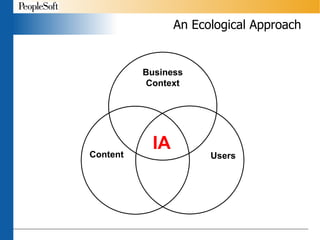
An Ecological Approach
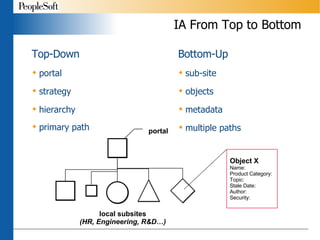
IA From Top to Bottom Top-Down portal strategy hierarchy primary path Bottom-Up sub-site objects metadata multiple paths Object X Name: Product Category: Topic: Stale Date: Author: Security: portal local subsites (HR, Engineering, R&D…)
Components of IA Organization Navigation (including search)  Labeling
Organization The grouping of like content together Provides a way to browse the structure of the site Exact Schemes Chronological Geographical Alphabetical Ambiguous Schemes Subject Audience Task
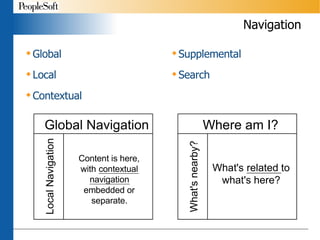
Navigation Global Local  Contextual Supplemental Search
Labeling The interface to the organization scheme - the names of the different categories Appears in the words in the navigation systems One of the most important aspects and one of the most difficult to do. Needs to reflect the content and the user - must be written in the users’ language
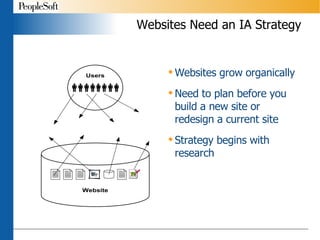
Websites Need an IA Strategy Websites grow organically Need to plan before you build a new site or redesign a current site Strategy begins with research
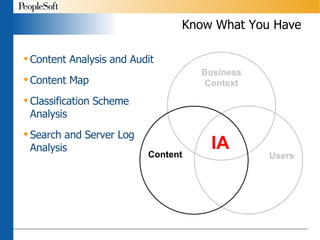
Know What You Have Content Analysis and Audit Content Map Classification Scheme  Analysis Search and Server Log  Analysis
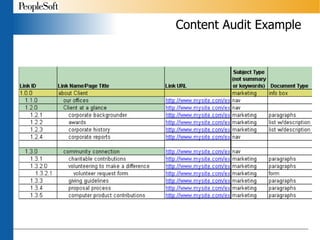
Content Analysis & Audit Take a representative sample of the content on your site Look for patterns and relationships among the content What is similar What is different Possible attributes Identify ROT You will need to do a complete content audit before implementation to document the site for migration
Content Audit Example
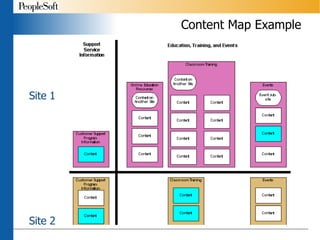
Content Map Example Site 1 Site 2
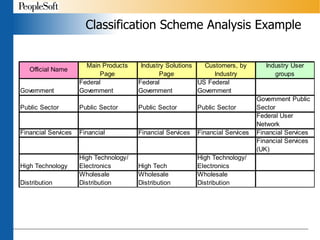
Classification Scheme Analysis Compile listing of all classifications used on the site Product names Industries Look for similarities and differences Can schemes be collapsed?  Do you need a new scheme?
Classification Scheme Analysis Example
Search & Server Log Analysis Take a sampling of the logs – a few hours or days depending upon site traffic Search Logs Determine top 100 terms users are searching for What terms are yielding no results? How do these terms relate to your content? Server Logs Determine most accessed pages Click-stream analysis - what path are users taking through the site
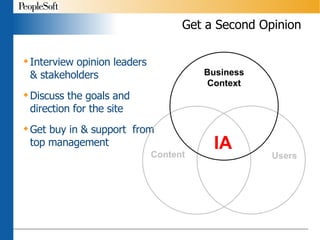
Get a Second Opinion Interview opinion leaders & stakeholders Discuss the goals and direction for the site Get buy in & support  from top management
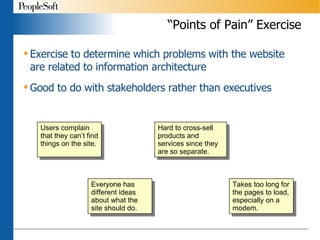
“Points of Pain” Exercise Exercise to determine which problems with the website are related to information architecture Good to do with stakeholders rather than executives Users complain that they can’t find things on the site. Everyone has different ideas about what the site should do. Hard to cross-sell products and services since they are so separate. Takes too long for the pages to load, especially on a modem.
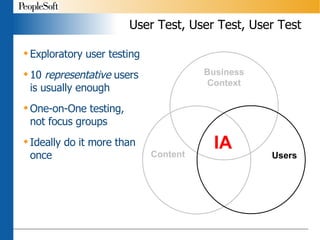
User Test, User Test, User Test Exploratory user testing 10  representative  users is usually enough One-on-One testing,  not   focus groups Ideally do it more than once
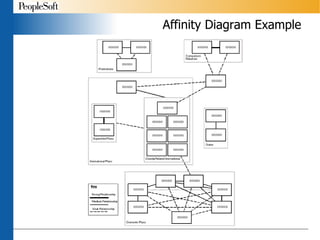
Card Sorting & Affinity Diagrams Card Sorting Great for understanding how users would like to see the content organized Open sort vs. closed sort Affinity Diagramming Way to analyze what the users told you in the card sorting
Affinity Diagram Example
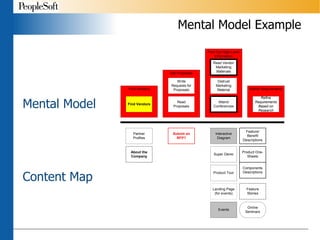
Task Analysis & Mental Model Task Analysis More traditional usability study Have the user try to do something on the site Can use prototypes to test design Paper prototypes are great so users don’t get hung up on design Users’ Mental Model Determine what discrete tasks the user is trying to accomplish by coming to your site Match the content of your site to the mental model
Mental Model Example Mental Model Content Map
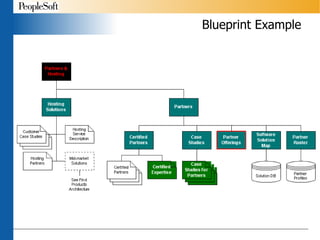
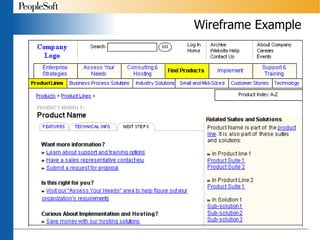
Bring It All Together Use the information you have gathered to create a structure that: Enables users to complete their tasks Supports the goals of the organization Can grow and adapt as needs change Remember you are:  Determining content areas Designing navigational systems Applying clear and descriptive labels Improving search
Blueprint Example
Wireframe Example
Metadata Schemes Definition Metadata is structured data which describes the characteristics of a resource. It shares many similar characteristics to the cataloguing that takes place in libraries, museums and archives.  Chris Taylor, University of Queensland Purposes Document surrogate (abstract, title) Maintenance attributes (date, author) Facilitates retrieval (subject, audience)
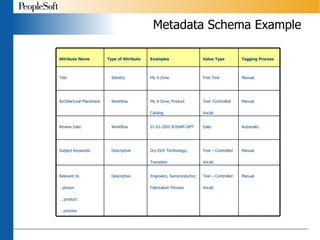
Metadata Schema Example Relevant to …person  …product  …process Subject Keywords Review Date Architectural Placement Title Attribute Name Manual Text – Controlled Vocab Engineers, Semiconductor, Fabrication Process Descriptive Manual Text – Controlled Vocab Dry Etch Technology; Transistor Descriptive Automatic Date 01-01-2002 8:00AM GMT Workflow Manual Text -Controlled Vocab My X-Zone, Product Catalog Workflow Manual Free Text My X-Zone Identity Tagging Process Value Type Examples Type of Attribute
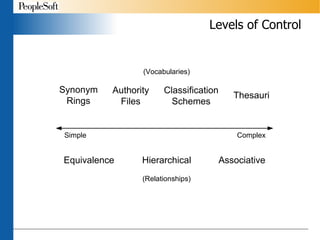
Levels of Control
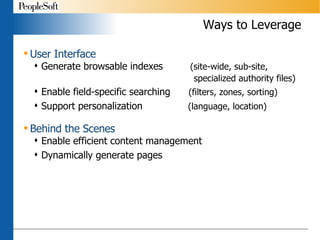
Ways to Leverage User Interface Generate browsable indexes  (site-wide, sub-site,    specialized authority files) Enable field-specific searching  (filters, zones, sorting)   Support personalization  (language, location) Behind the Scenes Enable efficient content management  Dynamically generate pages
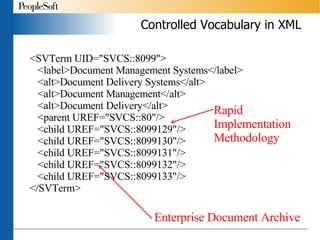
Controlled Vocabulary in XML <SVTerm UID=&quot;SVCS::8099&quot;> <label>Document Management Systems</label> <alt>Document Delivery Systems</alt> <alt>Document Management</alt> <alt>Document Delivery</alt> <parent UREF=&quot;SVCS::80&quot;/> <child UREF=&quot;SVCS::8099129&quot;/> <child UREF=&quot;SVCS::8099130&quot;/> <child UREF=&quot;SVCS::8099131&quot;/> <child UREF=&quot;SVCS::8099132&quot;/> <child UREF=&quot;SVCS::8099133&quot;/> </SVTerm> Rapid Implementation Methodology Enterprise Document Archive
Next Step: Implementation Make it happen Work closely with other teams Graphic Design IT Department Content Contributors Not easy but well worth the effort
How To Learn More Argus Center for Information Architecture Website  http://argus-acia.com IA Guide http://argus-acia.com/ia_guide/ ASIS&T SIG-IA Website http://www.asis.org/SIG/SIGIA/ Email discussion list Books Information Architecture for the World Wide Web  by Lou Rosenfeld and Peter Morville Practical Information Architecture  by Eric Reiss Web Navigation  by Jennifer Fleming
Thank You Chiara Fox Information Architect [email_address] Presentation available at http://www.geocities.com/chiarafox PeopleSoft  http://www.peoplesoft.com

Making IA Real: Planning an Information Architecture Strategy

  • 1.
    Making IA RealPlanning an Information Architecture Strategy Chiara Fox Internet Librarian 2001 November 6, 2001
  • 2.
    What We’ll CoverWhat Is Information Architecture? Know What You Have Get a Second Opinion User Test, User Test, User Test Bring It All Together
  • 3.
    What is InformationArchitecture? Information architecture is the art and science of structuring and organizing information systems to help people achieve their goals.
  • 4.
  • 5.
    IA From Topto Bottom Top-Down portal strategy hierarchy primary path Bottom-Up sub-site objects metadata multiple paths Object X Name: Product Category: Topic: Stale Date: Author: Security: portal local subsites (HR, Engineering, R&D…)
  • 6.
    Components of IAOrganization Navigation (including search) Labeling
  • 7.
    Organization The groupingof like content together Provides a way to browse the structure of the site Exact Schemes Chronological Geographical Alphabetical Ambiguous Schemes Subject Audience Task
  • 8.
    Navigation Global Local Contextual Supplemental Search
  • 9.
    Labeling The interfaceto the organization scheme - the names of the different categories Appears in the words in the navigation systems One of the most important aspects and one of the most difficult to do. Needs to reflect the content and the user - must be written in the users’ language
  • 10.
    Websites Need anIA Strategy Websites grow organically Need to plan before you build a new site or redesign a current site Strategy begins with research
  • 11.
    Know What YouHave Content Analysis and Audit Content Map Classification Scheme Analysis Search and Server Log Analysis
  • 12.
    Content Analysis &Audit Take a representative sample of the content on your site Look for patterns and relationships among the content What is similar What is different Possible attributes Identify ROT You will need to do a complete content audit before implementation to document the site for migration
  • 13.
  • 14.
    Content Map ExampleSite 1 Site 2
  • 15.
    Classification Scheme AnalysisCompile listing of all classifications used on the site Product names Industries Look for similarities and differences Can schemes be collapsed? Do you need a new scheme?
  • 16.
  • 17.
    Search & ServerLog Analysis Take a sampling of the logs – a few hours or days depending upon site traffic Search Logs Determine top 100 terms users are searching for What terms are yielding no results? How do these terms relate to your content? Server Logs Determine most accessed pages Click-stream analysis - what path are users taking through the site
  • 18.
    Get a SecondOpinion Interview opinion leaders & stakeholders Discuss the goals and direction for the site Get buy in & support from top management
  • 19.
    “Points of Pain”Exercise Exercise to determine which problems with the website are related to information architecture Good to do with stakeholders rather than executives Users complain that they can’t find things on the site. Everyone has different ideas about what the site should do. Hard to cross-sell products and services since they are so separate. Takes too long for the pages to load, especially on a modem.
  • 20.
    User Test, UserTest, User Test Exploratory user testing 10 representative users is usually enough One-on-One testing, not focus groups Ideally do it more than once
  • 21.
    Card Sorting &Affinity Diagrams Card Sorting Great for understanding how users would like to see the content organized Open sort vs. closed sort Affinity Diagramming Way to analyze what the users told you in the card sorting
  • 22.
  • 23.
    Task Analysis &Mental Model Task Analysis More traditional usability study Have the user try to do something on the site Can use prototypes to test design Paper prototypes are great so users don’t get hung up on design Users’ Mental Model Determine what discrete tasks the user is trying to accomplish by coming to your site Match the content of your site to the mental model
  • 24.
    Mental Model ExampleMental Model Content Map
  • 25.
    Bring It AllTogether Use the information you have gathered to create a structure that: Enables users to complete their tasks Supports the goals of the organization Can grow and adapt as needs change Remember you are: Determining content areas Designing navigational systems Applying clear and descriptive labels Improving search
  • 26.
  • 27.
  • 28.
    Metadata Schemes DefinitionMetadata is structured data which describes the characteristics of a resource. It shares many similar characteristics to the cataloguing that takes place in libraries, museums and archives. Chris Taylor, University of Queensland Purposes Document surrogate (abstract, title) Maintenance attributes (date, author) Facilitates retrieval (subject, audience)
  • 29.
    Metadata Schema ExampleRelevant to …person …product …process Subject Keywords Review Date Architectural Placement Title Attribute Name Manual Text – Controlled Vocab Engineers, Semiconductor, Fabrication Process Descriptive Manual Text – Controlled Vocab Dry Etch Technology; Transistor Descriptive Automatic Date 01-01-2002 8:00AM GMT Workflow Manual Text -Controlled Vocab My X-Zone, Product Catalog Workflow Manual Free Text My X-Zone Identity Tagging Process Value Type Examples Type of Attribute
  • 30.
  • 31.
    Ways to LeverageUser Interface Generate browsable indexes (site-wide, sub-site, specialized authority files) Enable field-specific searching (filters, zones, sorting) Support personalization (language, location) Behind the Scenes Enable efficient content management Dynamically generate pages
  • 32.
    Controlled Vocabulary inXML <SVTerm UID=&quot;SVCS::8099&quot;> <label>Document Management Systems</label> <alt>Document Delivery Systems</alt> <alt>Document Management</alt> <alt>Document Delivery</alt> <parent UREF=&quot;SVCS::80&quot;/> <child UREF=&quot;SVCS::8099129&quot;/> <child UREF=&quot;SVCS::8099130&quot;/> <child UREF=&quot;SVCS::8099131&quot;/> <child UREF=&quot;SVCS::8099132&quot;/> <child UREF=&quot;SVCS::8099133&quot;/> </SVTerm> Rapid Implementation Methodology Enterprise Document Archive
  • 33.
    Next Step: ImplementationMake it happen Work closely with other teams Graphic Design IT Department Content Contributors Not easy but well worth the effort
  • 34.
    How To LearnMore Argus Center for Information Architecture Website http://argus-acia.com IA Guide http://argus-acia.com/ia_guide/ ASIS&T SIG-IA Website http://www.asis.org/SIG/SIGIA/ Email discussion list Books Information Architecture for the World Wide Web by Lou Rosenfeld and Peter Morville Practical Information Architecture by Eric Reiss Web Navigation by Jennifer Fleming
  • 35.
    Thank You ChiaraFox Information Architect [email_address] Presentation available at http://www.geocities.com/chiarafox PeopleSoft http://www.peoplesoft.com