User Research 101: DIY Quick CourseCarol Smith@carologicCodeMash 2.0.1.1January 14, 2011
Small,Iterative Steps
Handout for Attendees
Behaviors, Desires, Needs & Abilities4
Observations
Interviews
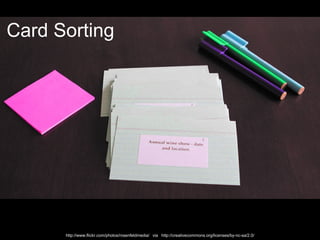
7Card Sortinghttp://www.flickr.com/photos/rosenfeldmedia/   via   http://creativecommons.org/licenses/by-nc-sa/2.0/
Design for Everyone is Impossible8
Who will use it?What they need to do?9
Same Job Title, May Differ in…10
Which Student?RickConnie11http://www.flickr.com/photos/mrjkbh/ via http://creativecommons.org/licenses/by-nc-nd/2.0/deed.en http://www.flickr.com/photos/caharley72/  (Christopher Alison Photography) via http://creativecommons.org/licenses/by-nc-nd/2.0/
Where do I start?12
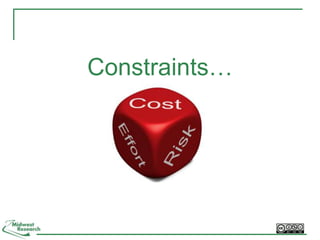
Constraints…
Scope for SuccessPlan and ScheduleResearch and DiscoverDocumentAnalyzeUnderstand
15Interview ExpertsWho are the users?How many are there?Common complaints?Show stoppers?Understand:Assumptions and stereotypes Differences between users
16Focus On…Tasks frequency, importance, complexityEnvironment of Use location, abilities and limitationsExperience Level and Knowledge Technology mobile use, connection speed
17Define Primary & Secondary UsersSeparate by:NeedsGoals (Why will they use the product?)Environment (Where will they use it?)Context (When will they use it?)How else do they differ?
Now You Have User Groups [perhaps very loosely defined]18
Observations19
20Go to the user
Why Observe?Understand user’s environmentAbilities and limitationsSituational (lighting, noise)DisabilitiesLearn about:Real processInterruptions (frequency and type)Find out more about users21
http://www.flickr.com/photos/heygabe/ via  http://creativecommons.org/licenses/by-nc-sa/2.0/Actual Photo:  http://www.flickr.com/photos/heygabe/47206241/
Sit Back and WatchArrive when they will be doing related tasksObserve for as long as needed:1/2 hour each - quick repetitive tasks>1 hour for longer processesStay out of their “space” and don’t interrupt
Take photos and videos23
Take Detailed NotesWrite down questions and contextLook for patterns and differences:Style of tasksOrder of operationsEnvironment24
25Artifacts! Collect, Copy, Photograph http://www.flickr.com/photos/camknows/      via      http://creativecommons.org/licenses/by-nc-sa/2.0/
Clarify ObservationsAfter observation ask about:Why doing?Goal?How typical was this?Clarify confusing observations26
Interviews27
Interview to Discover/Confirm…Build on what you’ve learned:TasksAttitudes and OpinionsProblemsGoalsExperience level and knowledge Technology 28
StylesStructuredQuestion 1Question 2Question 3Open-endedCombination29
Use ScriptsMemory tool for facilitatorDon’t have to followPromote consistencyQuestionsOrder of questions30
QuestionsQuality of questions correlates to quality of answers:Open-endedUnbiasedDon’t lead or make assumptionsUse participant’s words31
Stretch & Exercise32
Question 1Do you regularly book your travel online to save money?33
Alternates – Question 1How often do you travel? <listen>  What proportion of that do you book online? <listen>   Why do you book travel online? <listen>  34
Rationale - Question 1Do you regularly book your travel online to save money?Address one issue at a time and avoid double-barreled questions.35
Question 2What are your thoughts about a new feature that allows you to instant message a travel agent with any questions as you book your travel?36
Alternates – Question 2Would you like to correspond with a travel agent while you are booking travel?  <listen>  What are some ways that you would like to correspond with a travel agent while you are booking travel? <listen>  37
Rationale – Question 2What are your thoughts about a new feature that allows you to instant message a travel agent with any questions as you book your travel?This question asked the participant to predict the future.38
FacilitationRemain passive (body, face) Don’t confirm or reject answersListen for vocalizations Watch non-verbal gesturesEncourage participant to elaborateAsk your question and let them talk39
Silence is GoldenUser’s Time to Think!40
Card Sorting41
Card SortingMaximize probability of users finding contentExplore how people are likely to group itemsIdentify content likely to be:Difficult to categorize Difficult to findMisunderstood42Gaffney, Gerry. (2000) What is Card Sorting? Usability Techniques Series, Information & Design. http://www.infodesign.com.au/usabilityresources/design/cardsorting.asphttp://www.flickr.com/photos/richtpt  via   http://creativecommons.org/licenses/by-nc-sa/2.0/
43Benefits of Card SortingEasy and inexpensiveUse to determine:Order of informationRelationships between infoLabels for navigationVerify correct audienceGaffney, Gerry. (2000) What is Card Sorting? Usability Techniques Series, Information & Design. http://www.infodesign.com.au/usabilityresources/design/cardsorting.asp
Open or Closed (Reverse) Sort?44???Group 1Group 2Group 3
One title/subject on each cardShort for quick readingDetailed enough to understandSupplement - short description on backUse printed stickers (handwriting)Practice session firstCard Basics4536Preventive Care Guidelines
46ParticipantsRepresentative of usersMinimum of 6 More participants = more data to analyzeAllow one hour for 50 items30 – 100 cards
Facilitation/DirectionShuffle cardsAsk to: Group items in own wayTalk out loudThink about:What expect to be togetherWhen expect to see47
IssuesCard doesn’t fit: make separate groupNot relevant: tell meMore than one place: tell me and put in best fitItems not understoodCorrect audience?Items without consensus Re-name item?Include in more than one category?48
Grouping CardsAsk toDescribe groups and name themDescribe overall rationale for grouping cardsShow best example from groupsWhat was difficult? What was easy?Happy with final outcome?49
50AnalysisCodes on cards = faster data analysisStandardize group names Look for patternsExcel Spreadsheet (Donna Spencer)Online tools - limited analysis
Online ToolsModeratedUn-moderated51Optimal Sort, Optimal Workshop - http://www.optimalworkshop.com/Demo: https://livedemo.optimalworkshop.com/optimalsort/supermarketdemo
Patterns52
53Looking for PatternsIdentify repetitionGroupings or clusters of usersOverlapping characteristicsRelevant to design problemAfter pattern is found, continuation of study: Adds cost Delays reportingLow probability of many new findings
54Focus your effortsuntil…Get to 80%
80% Sure We Know…Primary user’stasksgoalsPrioritize with:vision (why we are doing this?)business needsetc.Awareness of what not known (yet).55
Are we there yet?
57At Least 80%
Share What You Learn [Radiate Knowledge*]58*Thoughtworks via @jonrstahl
59Goals of SharingHelp the team:understand user’s point of view prioritize content and solutionsdesign for user’s needs and behaviorsidentify new opportunitiescreate new solutions
Information Radiators ShouldRepresents all research Facilitate:communication decision-making Guide decisions about:NavigationFeaturesDesign60
61Persona
62Task AnalysisExample of a Task Analysis by Todd Zaki Warfel from his Agile2010 presentation "Opening the Kimono a look behind the design process."
Mental ModelMental Space  (goal or intent)Behaviors, thoughts, goals or intents of usersOpportunityContent and/or solutions provided
Actionable Gap AnalysisChange Situation
Other MethodsBrainstorming Competitive ReviewsFocus GroupsExpert (Heuristic) EvaluationsPaper Prototypes and WireframesParticipatory DesignSurveysUsability Testing65
Do UX Early & OftenCreate a User Wall Information radiatorsArtifactsResearch findingsCompetitors66
Update Radiators Regularly67
Recommended Readings68
ContactCarol J. Smith        @carologiccarol@mw-research.comMidwest Research, LLChttp://www.mw-research.com 69

User Research 101: DIY Quick Course - CodeMash 2.0.1.1.