Personas for 
Accessible UX 
Including everyone in design & research 
Whitney Quesenbery 
Center for Civic Design 
http://www.slideshare.net/whitneyq/personas-for-accessible-ux 
Twitter: @whitneyq | #aux
Hi 
Whitney 
Users' stories, plain language, 
accessibility, civic design 
A Web for Everyone 
a book with Sarah Horton
Usability and accessibility 
are like twins separated at birth 

Disability 
the outcome of the interaction 
between a person ... and the 
environment and attitudinal 
barriers they may face 
International Classification of Functioning (ICF), 
World Health Organization
Accessibility 
The usability of a product, 
service, environment or facility 
by people with the widest range 
of capabilities. 
- ISO 9241-20
How do we include 
people with disabilities in our 
design considerations?
Why are people with disabilities 
not considered (more) in UX design work? 
Invisible 
Hidden 
Misunderstood
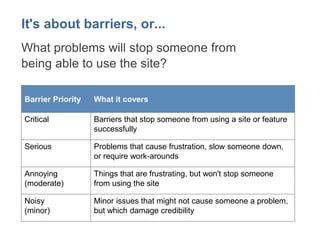
It's about barriers, or... 
What problems will stop someone from 
being able to use the site? 
Barrier Priority What it covers 
Critical Barriers that stop someone from using a site or feature 
successfully 
Serious Problems that cause frustration, slow someone down, 
or require work-arounds 
Annoying 
(moderate) 
Things that are frustrating, but won't stop someone 
from using the site 
Noisy 
(minor) 
Minor issues that might not cause someone a problem, 
but which damage credibility
It's not (just) about checklists....or 
What is the experience we 
are trying to support and 
improve?
Personas 
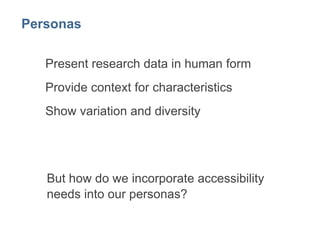
Present research data in human form 
Provide context for characteristics 
Show variation and diversity
But how do we incorporate 
accessibility needs into our 
personas?
Focus on domain 
User journey 
Aptitude 
Attitude 
Ability
Focus on domain
Focus on ability? 
Vision 
Hearing 
Mobility 
Dexterity 
Cognitive
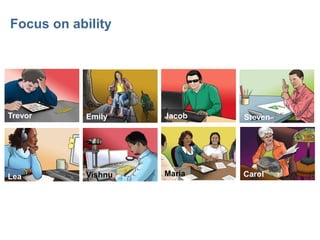
Focus on ability 
Carol 
Jacob 
Lea 
Emily Steven 
Maria 
Trevor 
Vishnu
Focus on assistive technologies? 
Eye trackers 
Screen magnifiers 
Keyboard 
Captions 
Speech 
and...
Responsive to different devices
Responsive to different interaction styles 
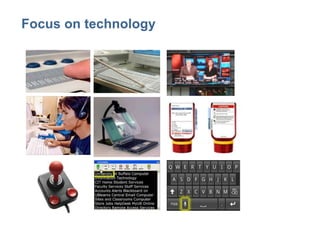
Images: Braille, foot pedal, magnifier, Talking Dial, Voiceover, joystick, audio, high 
contrast keyboard Glenda Watson Hyatt and her iPad, captions on screens, plain 
language labels, speech input
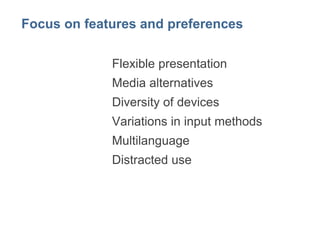
Focus on features and preferences 
Flexible presentation 
Media alternatives 
Diversity of devices 
Variations in input methods 
Multilanguage 
Distracted use
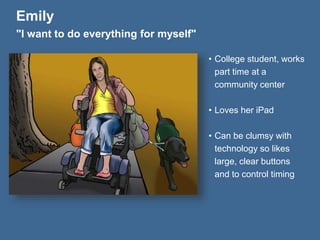
Emily 
"I want to do everything for myself" 
• College student, works 
part time at a 
community center 
• Loves her iPad 
• Can be clumsy with 
technology so likes 
large, clear buttons 
and to control timing
Emily 
"I want to do everything for myself" 
• College student, works 
part time at a 
community center 
• Loves her iPad 
• Can be clumsy with 
technology so likes 
large, clear buttons 
and to control timing
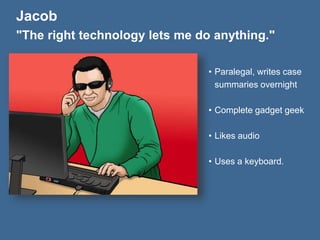
Jacob 
"The right technology lets me do anything." 
• Paralegal, writes case 
summaries overnight 
• Complete gadget geek 
• Likes audio 
• Uses a keyboard.
Jacob 
"The right technology lets me do anything." 
• Paralegal, writes case 
summaries overnight 
• Complete gadget geek 
• Likes audio 
• Uses a keyboard.
Because everyone has 
preferences!
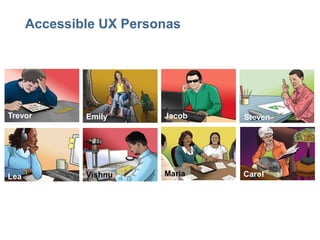
Accessible UX Personas 
Carol 
Jacob 
Lea 
Emily Steven 
Maria 
Trevor 
Vishnu
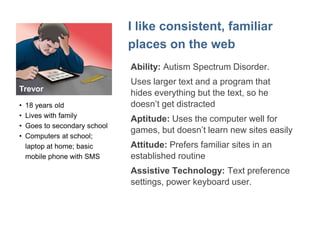
I like consistent, familiar 
places on the web 
Ability: Autism Spectrum Disorder. 
Uses larger text and a program that 
hides everything but the text, so he 
doesn’t get distracted 
Aptitude: Uses the computer well for 
games, but doesn’t learn new sites easily 
Attitude: Prefers familiar sites in an 
established routine 
Assistive Technology: Text preference 
settings, power keyboard user. 
Trevor 
• 18 years old 
• Lives with family 
• Goes to secondary school 
• Computers at school; 
laptop at home; basic 
mobile phone with SMS
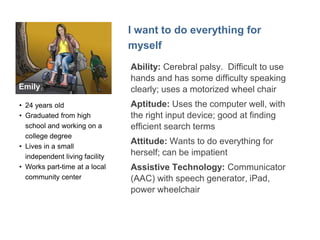
Emily 
I want to do everything for 
myself 
Ability: Cerebral palsy. Difficult to use 
hands and has some difficulty speaking 
clearly; uses a motorized wheel chair 
Aptitude: Uses the computer well, with 
the right input device; good at finding 
efficient search terms 
Attitude: Wants to do everything for 
herself; can be impatient 
Assistive Technology: Communicator 
(AAC) with speech generator, iPad, 
power wheelchair 
• 24 years old 
• Graduated from high 
school and working on a 
college degree 
• Lives in a small 
independent living facility 
• Works part-time at a local 
community center
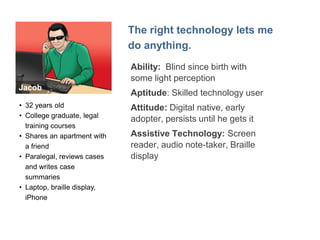
Jacob 
The right technology lets me 
do anything. 
Ability: Blind since birth with 
some light perception 
Aptitude: Skilled technology user 
Attitude: Digital native, early 
adopter, persists until he gets it 
Assistive Technology: Screen 
reader, audio note-taker, Braille 
display 
• 32 years old 
• College graduate, legal 
training courses 
• Shares an apartment with 
a friend 
• Paralegal, reviews cases 
and writes case 
summaries 
• Laptop, braille display, 
iPhone
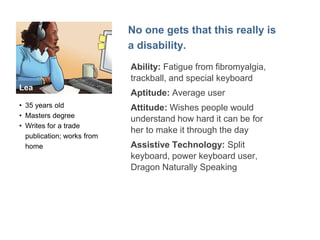
Lea 
No one gets that this really is 
a disability. 
Ability: Fatigue from fibromyalgia, 
trackball, and special keyboard 
Aptitude: Average user 
Attitude: Wishes people would 
understand how hard it can be for 
her to make it through the day 
Assistive Technology: Split 
keyboard, power keyboard user, 
Dragon Naturally Speaking 
• 35 years old 
• Masters degree 
• Writes for a trade 
publication; works from 
home
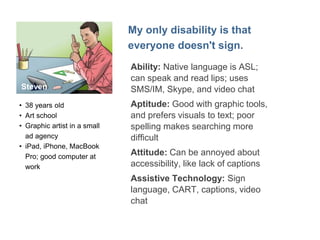
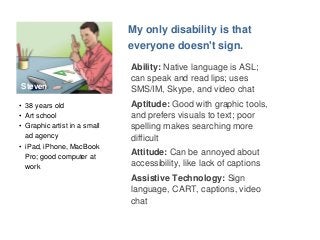
Steven 
My only disability is that 
everyone doesn't sign. 
Ability: Native language is ASL; 
can speak and read lips; uses 
SMS/IM, Skype, and video chat 
Aptitude: Good with graphic tools, 
and prefers visuals to text; poor 
spelling makes searching more 
difficult 
Attitude: Can be annoyed about 
accessibility, like lack of captions 
Assistive Technology: Sign 
language, CART, captions, video 
chat 
• 38 years old 
• Art school 
• Graphic artist in a small 
ad agency 
• iPad, iPhone, MacBook 
Pro; good computer at 
work
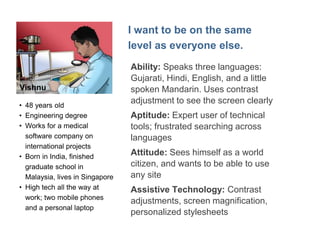
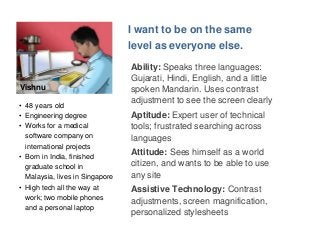
Vishnu 
I want to be on the same 
level as everyone else. 
Ability: Speaks three languages: 
Gujarati, Hindi, English, and a little 
spoken Mandarin. Uses contrast 
adjustment to see the screen clearly 
Aptitude: Expert user of technical 
tools; frustrated searching across 
languages 
Attitude: Sees himself as a world 
citizen, and wants to be able to use 
any site 
Assistive Technology: Contrast 
adjustments, screen magnification, 
personalized stylesheets 
• 48 years old 
• Engineering degree 
• Works for a medical 
software company on 
international projects 
• Born in India, finished 
graduate school in 
Malaysia, lives in Singapore 
• High tech all the way at 
work; two mobile phones 
and a personal laptop
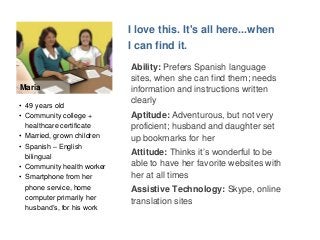
Maria 
I love this. It's all here...when 
I can find it. 
Ability: Prefers Spanish language 
sites, when she can find them; needs 
information and instructions written 
clearly 
Aptitude: Adventurous, but not very 
proficient; husband and daughter set 
up bookmarks for her 
Attitude: Thinks it’s wonderful to be 
able to have her favorite websites with 
her at all times 
Assistive Technology: Skype, online 
translation sites 
• 49 years old 
• Community college + 
healthcare certificate 
• Married, grown children 
• Spanish – English 
bilingual 
• Community health worker 
• Smartphone from her 
phone service, home 
computer primarily her 
husband’s, for his work
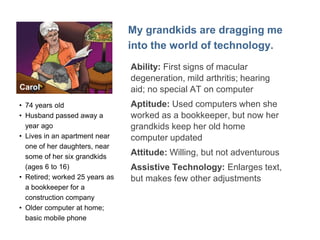
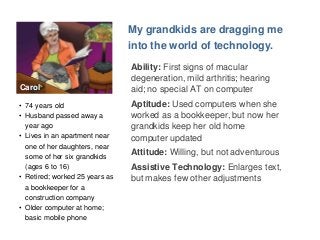
Carol 
My grandkids are dragging me 
into the world of technology. 
Ability: First signs of macular 
degeneration, mild arthritis; hearing 
aid; no special AT on computer 
Aptitude: Used computers when she 
worked as a bookkeeper, but now her 
grandkids keep her old home 
computer updated 
Attitude: Willing, but not adventurous 
Assistive Technology: Enlarges text, 
but makes few other adjustments 
• 74 years old 
• Husband passed away a 
year ago 
• Lives in an apartment near 
one of her daughters, near 
some of her six grandkids 
(ages 6 to 16) 
• Retired; worked 25 years as 
a bookkeeper for a 
construction company 
• Older computer at home; 
basic mobile phone
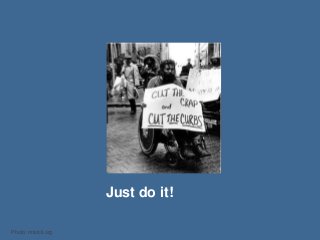
Just do it! 
Photo: mtstcil.org
Whitney Quesenbery 
whitneyq@civicdesign.org 
@whitneyq 
Center for Civic Design 
civicdesign.org 
@civicdesign 
A Web for Everyone 
Sarah Horton and Whitney Quesenbery 
Rosenfeld Media 
@AWebforEveryone
Thank you

Personas for Accessible UX

  • 1.
    Personas for AccessibleUX Including everyone in design & research Whitney Quesenbery Center for Civic Design http://www.slideshare.net/whitneyq/personas-for-accessible-ux Twitter: @whitneyq | #aux
  • 2.
    Hi Whitney Users'stories, plain language, accessibility, civic design A Web for Everyone a book with Sarah Horton
  • 3.
    Usability and accessibility are like twins separated at birth 
  • 4.
    Disability the outcomeof the interaction between a person ... and the environment and attitudinal barriers they may face International Classification of Functioning (ICF), World Health Organization
  • 5.
    Accessibility The usabilityof a product, service, environment or facility by people with the widest range of capabilities. - ISO 9241-20
  • 6.
    How do weinclude people with disabilities in our design considerations?
  • 7.
    Why are peoplewith disabilities not considered (more) in UX design work? Invisible Hidden Misunderstood
  • 8.
    It's about barriers,or... What problems will stop someone from being able to use the site? Barrier Priority What it covers Critical Barriers that stop someone from using a site or feature successfully Serious Problems that cause frustration, slow someone down, or require work-arounds Annoying (moderate) Things that are frustrating, but won't stop someone from using the site Noisy (minor) Minor issues that might not cause someone a problem, but which damage credibility
  • 9.
    It's not (just)about checklists....or What is the experience we are trying to support and improve?
  • 10.
    Personas Present researchdata in human form Provide context for characteristics Show variation and diversity
  • 11.
    But how dowe incorporate accessibility needs into our personas?
  • 12.
    Focus on domain User journey Aptitude Attitude Ability
  • 13.
  • 14.
    Focus on ability? Vision Hearing Mobility Dexterity Cognitive
  • 15.
    Focus on ability Carol Jacob Lea Emily Steven Maria Trevor Vishnu
  • 16.
    Focus on assistivetechnologies? Eye trackers Screen magnifiers Keyboard Captions Speech and...
  • 17.
  • 18.
    Responsive to differentinteraction styles Images: Braille, foot pedal, magnifier, Talking Dial, Voiceover, joystick, audio, high contrast keyboard Glenda Watson Hyatt and her iPad, captions on screens, plain language labels, speech input
  • 19.
    Focus on featuresand preferences Flexible presentation Media alternatives Diversity of devices Variations in input methods Multilanguage Distracted use
  • 20.
    Emily "I wantto do everything for myself" • College student, works part time at a community center • Loves her iPad • Can be clumsy with technology so likes large, clear buttons and to control timing
  • 21.
    Emily "I wantto do everything for myself" • College student, works part time at a community center • Loves her iPad • Can be clumsy with technology so likes large, clear buttons and to control timing
  • 22.
    Jacob "The righttechnology lets me do anything." • Paralegal, writes case summaries overnight • Complete gadget geek • Likes audio • Uses a keyboard.
  • 23.
    Jacob "The righttechnology lets me do anything." • Paralegal, writes case summaries overnight • Complete gadget geek • Likes audio • Uses a keyboard.
  • 24.
    Because everyone has preferences!
  • 25.
    Accessible UX Personas Carol Jacob Lea Emily Steven Maria Trevor Vishnu
  • 26.
    I like consistent,familiar places on the web Ability: Autism Spectrum Disorder. Uses larger text and a program that hides everything but the text, so he doesn’t get distracted Aptitude: Uses the computer well for games, but doesn’t learn new sites easily Attitude: Prefers familiar sites in an established routine Assistive Technology: Text preference settings, power keyboard user. Trevor • 18 years old • Lives with family • Goes to secondary school • Computers at school; laptop at home; basic mobile phone with SMS
  • 27.
    Emily I wantto do everything for myself Ability: Cerebral palsy. Difficult to use hands and has some difficulty speaking clearly; uses a motorized wheel chair Aptitude: Uses the computer well, with the right input device; good at finding efficient search terms Attitude: Wants to do everything for herself; can be impatient Assistive Technology: Communicator (AAC) with speech generator, iPad, power wheelchair • 24 years old • Graduated from high school and working on a college degree • Lives in a small independent living facility • Works part-time at a local community center
  • 28.
    Jacob The righttechnology lets me do anything. Ability: Blind since birth with some light perception Aptitude: Skilled technology user Attitude: Digital native, early adopter, persists until he gets it Assistive Technology: Screen reader, audio note-taker, Braille display • 32 years old • College graduate, legal training courses • Shares an apartment with a friend • Paralegal, reviews cases and writes case summaries • Laptop, braille display, iPhone
  • 29.
    Lea No onegets that this really is a disability. Ability: Fatigue from fibromyalgia, trackball, and special keyboard Aptitude: Average user Attitude: Wishes people would understand how hard it can be for her to make it through the day Assistive Technology: Split keyboard, power keyboard user, Dragon Naturally Speaking • 35 years old • Masters degree • Writes for a trade publication; works from home
  • 30.
    Steven My onlydisability is that everyone doesn't sign. Ability: Native language is ASL; can speak and read lips; uses SMS/IM, Skype, and video chat Aptitude: Good with graphic tools, and prefers visuals to text; poor spelling makes searching more difficult Attitude: Can be annoyed about accessibility, like lack of captions Assistive Technology: Sign language, CART, captions, video chat • 38 years old • Art school • Graphic artist in a small ad agency • iPad, iPhone, MacBook Pro; good computer at work
  • 31.
    Vishnu I wantto be on the same level as everyone else. Ability: Speaks three languages: Gujarati, Hindi, English, and a little spoken Mandarin. Uses contrast adjustment to see the screen clearly Aptitude: Expert user of technical tools; frustrated searching across languages Attitude: Sees himself as a world citizen, and wants to be able to use any site Assistive Technology: Contrast adjustments, screen magnification, personalized stylesheets • 48 years old • Engineering degree • Works for a medical software company on international projects • Born in India, finished graduate school in Malaysia, lives in Singapore • High tech all the way at work; two mobile phones and a personal laptop
  • 32.
    Maria I lovethis. It's all here...when I can find it. Ability: Prefers Spanish language sites, when she can find them; needs information and instructions written clearly Aptitude: Adventurous, but not very proficient; husband and daughter set up bookmarks for her Attitude: Thinks it’s wonderful to be able to have her favorite websites with her at all times Assistive Technology: Skype, online translation sites • 49 years old • Community college + healthcare certificate • Married, grown children • Spanish – English bilingual • Community health worker • Smartphone from her phone service, home computer primarily her husband’s, for his work
  • 33.
    Carol My grandkidsare dragging me into the world of technology. Ability: First signs of macular degeneration, mild arthritis; hearing aid; no special AT on computer Aptitude: Used computers when she worked as a bookkeeper, but now her grandkids keep her old home computer updated Attitude: Willing, but not adventurous Assistive Technology: Enlarges text, but makes few other adjustments • 74 years old • Husband passed away a year ago • Lives in an apartment near one of her daughters, near some of her six grandkids (ages 6 to 16) • Retired; worked 25 years as a bookkeeper for a construction company • Older computer at home; basic mobile phone
  • 34.
    Just do it! Photo: mtstcil.org
  • 35.
    Whitney Quesenbery whitneyq@civicdesign.org @whitneyq Center for Civic Design civicdesign.org @civicdesign A Web for Everyone Sarah Horton and Whitney Quesenbery Rosenfeld Media @AWebforEveryone
  • 36.

Editor's Notes

  • #5 Social model of disability. It's the interaction. That's what we create. So it make sense that accessibility is part of UX
  • #6 ISO says so.
  • #7 Discussion
  • #8 Invisible: people think they don't know any pwd They don't get included in user research Hidden: relatively low numbers of any specific disability and assistive technology is not revealed in analytics. (pros and cons of this) Misunderstood: still. Really.
  • #9 Accessibility and usability both have the same approach to what makes a problem, error or barrier critical See David Travis: www.userfocus.co.uk/articles/prioritise.html Glenda Sims: 2103 Accessibility Summit: http://environmentsforhumans.com
  • #14 Avoids focus on disabiity and shifts it to the interaction of technologu\y