Jan 27, 2016
XPath
2
What is XPath?
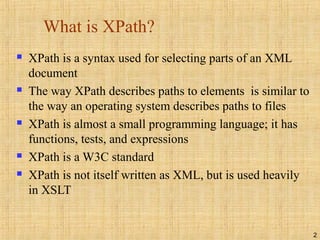
 XPath is a syntax used for selecting parts of an XML
document
 The way XPath describes paths to elements is similar to
the way an operating system describes paths to files
 XPath is almost a small programming language; it has
functions, tests, and expressions
 XPath is a W3C standard
 XPath is not itself written as XML, but is used heavily
in XSLT
3
Terminology
<library>
<book>
<chapter>
</chapter>
<chapter>
<section>
<paragraph/>
<paragraph/>
</section>
</chapter>
</book>
</library>
 library is the parent of book; book is
the parent of the two chapters
 The two chapters are the children of
book, and the section is the child of
the second chapter
 The two chapters of the book are
siblings (they have the same parent)
 library, book, and the second chapter
are the ancestors of the section
 The two chapters, the section, and the
two paragraphs are the descendents of
the book
4
Paths
Operating system: XPath:
/ = the root directory /library = the root element (if named
library )
/users/dave/foo = the
(one) file named foo in
dave in users
/library/book/chapter/section =
every section element in a chapter in
every book in the library
. = the current directory . = the current element
.. = the parent directory .. = parent of the current element
/users/dave/* = all the files
in /users/dave
/library/book/chapter/* = all the
elements in /library/book/chapter
foo = the (one) file named foo
in the current directory
section = every section element
that is a child of the current element
5
Slashes
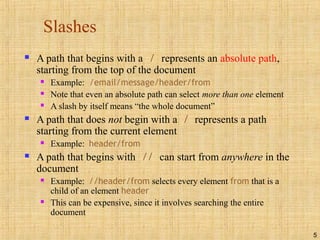
 A path that begins with a / represents an absolute path,
starting from the top of the document
 Example: /email/message/header/from
 Note that even an absolute path can select more than one element
 A slash by itself means “the whole document”
 A path that does not begin with a / represents a path
starting from the current element
 Example: header/from
 A path that begins with // can start from anywhere in the
document
 Example: //header/from selects every element from that is a
child of an element header
 This can be expensive, since it involves searching the entire
document
6
Brackets and last()
 A number in brackets selects a particular matching child
(counting starts from 1, except in Internet Explorer)
 Example: /library/book[1] selects the first book of the library
 Example: //chapter/section[2] selects the second section of every
chapter in the XML document
 Example: //book/chapter[1]/section[2]
 Only matching elements are counted; for example, if a book has both
sections and exercises, the latter are ignored when counting sections
 The function last() in brackets selects the last matching child
 Example: /library/book/chapter[last()]
 You can even do simple arithmetic
 Example: /library/book/chapter[last()-1]
7
Stars
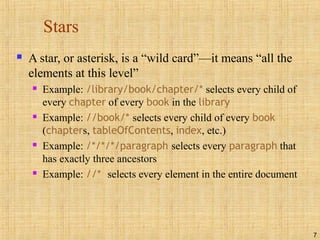
 A star, or asterisk, is a “wild card”—it means “all the
elements at this level”
 Example: /library/book/chapter/* selects every child of
every chapter of every book in the library
 Example: //book/* selects every child of every book
(chapters, tableOfContents, index, etc.)
 Example: /*/*/*/paragraph selects every paragraph that
has exactly three ancestors
 Example: //* selects every element in the entire document
8
Attributes I
 You can select attributes by themselves, or elements that have
certain attributes
 Remember: an attribute consists of a name-value pair, for example in
<chapter num="5">, the attribute is named num
 To choose the attribute itself, prefix the name with @
 Example: @num will choose every attribute named num
 Example: //@* will choose every attribute, everywhere in the
document
 To choose elements that have a given attribute, put the
attribute name in square brackets
 Example: //chapter[@num] will select every chapter element
(anywhere in the document) that has an attribute named num
9
Attributes II
 //chapter[@num] selects every chapter element with an
attribute num
 //chapter[not(@num)] selects every chapter element that
does not have a num attribute
 //chapter[@*] selects every chapter element that has any
attribute
 //chapter[not(@*)] selects every chapter element with no
attributes
10
Values of attributes
 //chapter[@num='3'] selects every chapter element with an
attribute num with value 3
 //chapter[not(@num)] selects every chapter element that
does not have a num attribute
 //chapter[@*] selects every chapter element that has any
attribute
 //chapter[not(@*)] selects every chapter element with no
attributes
 The normalize-space() function can be used to remove leading
and trailing spaces from a value before comparison
 Example: //chapter[normalize-space(@num)="3"]
11
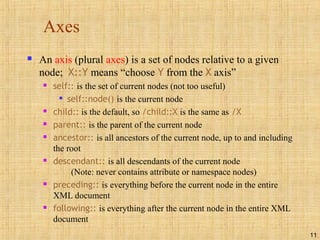
Axes
 An axis (plural axes) is a set of nodes relative to a given
node; X::Y means “choose Y from the X axis”
 self:: is the set of current nodes (not too useful)

self::node() is the current node
 child:: is the default, so /child::X is the same as /X
 parent:: is the parent of the current node
 ancestor:: is all ancestors of the current node, up to and including
the root
 descendant:: is all descendants of the current node
(Note: never contains attribute or namespace nodes)
 preceding:: is everything before the current node in the entire
XML document
 following:: is everything after the current node in the entire XML
document
12
Axes (outline view)
<library>
<book>
<chapter/>
<chapter>
<section>
<paragraph/>
<paragraph/>
</section>
</chapter>
<chapter/>
</book>
<book/>
</library>
//chapter[2]/self::*
//chapter[2]/preceding::*
//chapter[2]/following::*
//chapter[2]/ancestor::*
//chapter[2]/descendant::*
Starting from a given node, the self, preceding, following,
ancestor, and descendant axes form a partition of all the nodes
(if we ignore attribute and namespace nodes)
13
Axes (tree view)
 Starting from a given node, the self, ancestor, descendant ,
preceding, and following axes form a partition of all the nodes (if we
ignore attribute and namespace nodes)
paragraph[1] paragraph[2]
section[1]
chapter[2]chapter[1] chapter[3]
book[1] book[2]
library
self
ancestor
descendant
preceding
following
14
Axis examples
 //book/descendant::* is all descendants of every book
 //book/descendant::section is all section descendants of
every book
 //parent::* is every element that is a parent, i.e., is not a leaf
 //section/parent::* is every parent of a section element
 //parent::chapter is every chapter that is a parent, i.e., has
children
 /library/book[3]/following::* is everything after the third
book in the library
15
More axes
 ancestor-or-self:: ancestors plus the current node
 descendant-or-self:: descendants plus the current node
 attribute:: is all attributes of the current node
 namespace:: is all namespace nodes of the current node
 preceding:: is everything before the current node in the
entire XML document
 following-sibling:: is all siblings after the current node
 Note: preceding-sibling:: and following-sibling:: do not
apply to attribute nodes or namespace nodes
16
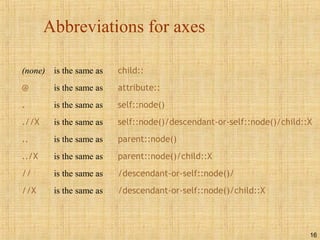
Abbreviations for axes
(none) is the same as child::
@ is the same as attribute::
. is the same as self::node()
.//X is the same as self::node()/descendant-or-self::node()/child::X
.. is the same as parent::node()
../X is the same as parent::node()/child::X
// is the same as /descendant-or-self::node()/
//X is the same as /descendant-or-self::node()/child::X
17
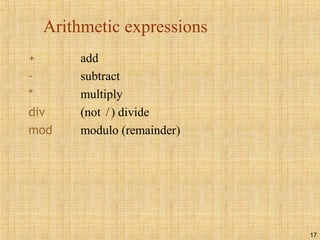
Arithmetic expressions
+ add
- subtract
* multiply
div (not /) divide
mod modulo (remainder)
18
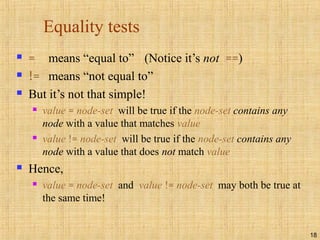
Equality tests
 = means “equal to” (Notice it’s not ==)
 != means “not equal to”
 But it’s not that simple!
 value = node-set will be true if the node-set contains any
node with a value that matches value
 value != node-set will be true if the node-set contains any
node with a value that does not match value
 Hence,
 value = node-set and value != node-set may both be true at
the same time!
19
Other boolean operators
 and (infix operator)
 or (infix operator)
 Example: count = 0 or count = 1
 not() (function)
 The following are used for numerical comparisons only:
 < “less than” Some places may require &lt;
 <= “less than Some places may require &lt;=
or equal to”
 > “greater than” Some places may require &gt;
 >= “greater than Some places may require &gt;=
or equal to”
20
Some XPath functions
 XPath contains a number of functions on node sets,
numbers, and strings; here are a few of them:
 count(elem) counts the number of selected elements

Example: //chapter[count(section)=1] selects chapters with
exactly two section children
 name() returns the name of the element

Example: //*[name()='section'] is the same as //section
 starts-with(arg1, arg2) tests if arg1 starts with arg2

Example: //*[starts-with(name(), 'sec']
 contains(arg1, arg2) tests if arg1 contains arg2

Example: //*[contains(name(), 'ect']
21
The End

Xpath

  • 1.
  • 2.
    2 What is XPath? XPath is a syntax used for selecting parts of an XML document  The way XPath describes paths to elements is similar to the way an operating system describes paths to files  XPath is almost a small programming language; it has functions, tests, and expressions  XPath is a W3C standard  XPath is not itself written as XML, but is used heavily in XSLT
  • 3.
    3 Terminology <library> <book> <chapter> </chapter> <chapter> <section> <paragraph/> <paragraph/> </section> </chapter> </book> </library>  library isthe parent of book; book is the parent of the two chapters  The two chapters are the children of book, and the section is the child of the second chapter  The two chapters of the book are siblings (they have the same parent)  library, book, and the second chapter are the ancestors of the section  The two chapters, the section, and the two paragraphs are the descendents of the book
  • 4.
    4 Paths Operating system: XPath: /= the root directory /library = the root element (if named library ) /users/dave/foo = the (one) file named foo in dave in users /library/book/chapter/section = every section element in a chapter in every book in the library . = the current directory . = the current element .. = the parent directory .. = parent of the current element /users/dave/* = all the files in /users/dave /library/book/chapter/* = all the elements in /library/book/chapter foo = the (one) file named foo in the current directory section = every section element that is a child of the current element
  • 5.
    5 Slashes  A paththat begins with a / represents an absolute path, starting from the top of the document  Example: /email/message/header/from  Note that even an absolute path can select more than one element  A slash by itself means “the whole document”  A path that does not begin with a / represents a path starting from the current element  Example: header/from  A path that begins with // can start from anywhere in the document  Example: //header/from selects every element from that is a child of an element header  This can be expensive, since it involves searching the entire document
  • 6.
    6 Brackets and last() A number in brackets selects a particular matching child (counting starts from 1, except in Internet Explorer)  Example: /library/book[1] selects the first book of the library  Example: //chapter/section[2] selects the second section of every chapter in the XML document  Example: //book/chapter[1]/section[2]  Only matching elements are counted; for example, if a book has both sections and exercises, the latter are ignored when counting sections  The function last() in brackets selects the last matching child  Example: /library/book/chapter[last()]  You can even do simple arithmetic  Example: /library/book/chapter[last()-1]
  • 7.
    7 Stars  A star,or asterisk, is a “wild card”—it means “all the elements at this level”  Example: /library/book/chapter/* selects every child of every chapter of every book in the library  Example: //book/* selects every child of every book (chapters, tableOfContents, index, etc.)  Example: /*/*/*/paragraph selects every paragraph that has exactly three ancestors  Example: //* selects every element in the entire document
  • 8.
    8 Attributes I  Youcan select attributes by themselves, or elements that have certain attributes  Remember: an attribute consists of a name-value pair, for example in <chapter num="5">, the attribute is named num  To choose the attribute itself, prefix the name with @  Example: @num will choose every attribute named num  Example: //@* will choose every attribute, everywhere in the document  To choose elements that have a given attribute, put the attribute name in square brackets  Example: //chapter[@num] will select every chapter element (anywhere in the document) that has an attribute named num
  • 9.
    9 Attributes II  //chapter[@num]selects every chapter element with an attribute num  //chapter[not(@num)] selects every chapter element that does not have a num attribute  //chapter[@*] selects every chapter element that has any attribute  //chapter[not(@*)] selects every chapter element with no attributes
  • 10.
    10 Values of attributes //chapter[@num='3'] selects every chapter element with an attribute num with value 3  //chapter[not(@num)] selects every chapter element that does not have a num attribute  //chapter[@*] selects every chapter element that has any attribute  //chapter[not(@*)] selects every chapter element with no attributes  The normalize-space() function can be used to remove leading and trailing spaces from a value before comparison  Example: //chapter[normalize-space(@num)="3"]
  • 11.
    11 Axes  An axis(plural axes) is a set of nodes relative to a given node; X::Y means “choose Y from the X axis”  self:: is the set of current nodes (not too useful)  self::node() is the current node  child:: is the default, so /child::X is the same as /X  parent:: is the parent of the current node  ancestor:: is all ancestors of the current node, up to and including the root  descendant:: is all descendants of the current node (Note: never contains attribute or namespace nodes)  preceding:: is everything before the current node in the entire XML document  following:: is everything after the current node in the entire XML document
  • 12.
  • 13.
    13 Axes (tree view) Starting from a given node, the self, ancestor, descendant , preceding, and following axes form a partition of all the nodes (if we ignore attribute and namespace nodes) paragraph[1] paragraph[2] section[1] chapter[2]chapter[1] chapter[3] book[1] book[2] library self ancestor descendant preceding following
  • 14.
    14 Axis examples  //book/descendant::*is all descendants of every book  //book/descendant::section is all section descendants of every book  //parent::* is every element that is a parent, i.e., is not a leaf  //section/parent::* is every parent of a section element  //parent::chapter is every chapter that is a parent, i.e., has children  /library/book[3]/following::* is everything after the third book in the library
  • 15.
    15 More axes  ancestor-or-self::ancestors plus the current node  descendant-or-self:: descendants plus the current node  attribute:: is all attributes of the current node  namespace:: is all namespace nodes of the current node  preceding:: is everything before the current node in the entire XML document  following-sibling:: is all siblings after the current node  Note: preceding-sibling:: and following-sibling:: do not apply to attribute nodes or namespace nodes
  • 16.
    16 Abbreviations for axes (none)is the same as child:: @ is the same as attribute:: . is the same as self::node() .//X is the same as self::node()/descendant-or-self::node()/child::X .. is the same as parent::node() ../X is the same as parent::node()/child::X // is the same as /descendant-or-self::node()/ //X is the same as /descendant-or-self::node()/child::X
  • 17.
    17 Arithmetic expressions + add -subtract * multiply div (not /) divide mod modulo (remainder)
  • 18.
    18 Equality tests  =means “equal to” (Notice it’s not ==)  != means “not equal to”  But it’s not that simple!  value = node-set will be true if the node-set contains any node with a value that matches value  value != node-set will be true if the node-set contains any node with a value that does not match value  Hence,  value = node-set and value != node-set may both be true at the same time!
  • 19.
    19 Other boolean operators and (infix operator)  or (infix operator)  Example: count = 0 or count = 1  not() (function)  The following are used for numerical comparisons only:  < “less than” Some places may require &lt;  <= “less than Some places may require &lt;= or equal to”  > “greater than” Some places may require &gt;  >= “greater than Some places may require &gt;= or equal to”
  • 20.
    20 Some XPath functions XPath contains a number of functions on node sets, numbers, and strings; here are a few of them:  count(elem) counts the number of selected elements  Example: //chapter[count(section)=1] selects chapters with exactly two section children  name() returns the name of the element  Example: //*[name()='section'] is the same as //section  starts-with(arg1, arg2) tests if arg1 starts with arg2  Example: //*[starts-with(name(), 'sec']  contains(arg1, arg2) tests if arg1 contains arg2  Example: //*[contains(name(), 'ect']
  • 21.