XPath
Raji GHAWI
20/1/2009
20/1/2009 2
What is XPath ?
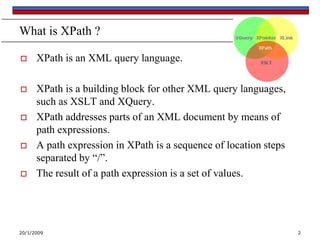
 XPath is an XML query language.
 XPath is a building block for other XML query languages,
such as XSLT and XQuery.
 XPath addresses parts of an XML document by means of
path expressions.
 A path expression in XPath is a sequence of location steps
separated by “/”.
 The result of a path expression is a set of values.
20/1/2009 3
XPath Terminology
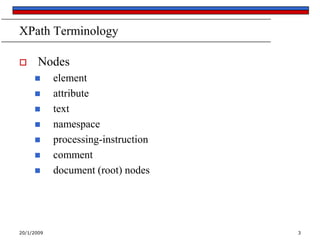
 Nodes
 element
 attribute
 text
 namespace
 processing-instruction
 comment
 document (root) nodes
20/1/2009 4
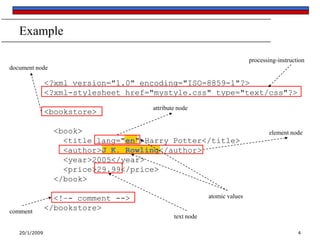
Example
<?xml version="1.0" encoding="ISO-8859-1"?>
<?xml-stylesheet href="mystyle.css" type="text/css"?>
<bookstore>
<book>
<title lang="en">Harry Potter</title>
<author>J K. Rowling</author>
<year>2005</year>
<price>29.99</price>
</book>
<!–- comment -->
</bookstore>
document node
element node
attribute node
atomic values
text node
processing-instruction
comment
20/1/2009 5
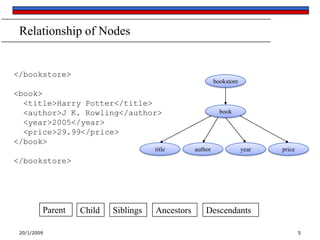
Relationship of Nodes
</bookstore>
<book>
<title>Harry Potter</title>
<author>J K. Rowling</author>
<year>2005</year>
<price>29.99</price>
</book>
</bookstore>
bookstore
book
authortitle priceyear
Parent Child Siblings Ancestors Descendants
20/1/2009 6
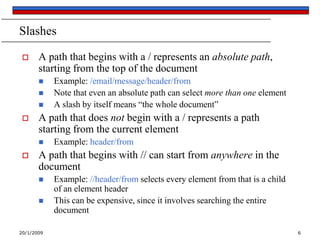
Slashes
 A path that begins with a / represents an absolute path,
starting from the top of the document
 Example: /email/message/header/from
 Note that even an absolute path can select more than one element
 A slash by itself means “the whole document”
 A path that does not begin with a / represents a path
starting from the current element
 Example: header/from
 A path that begins with // can start from anywhere in the
document
 Example: //header/from selects every element from that is a child
of an element header
 This can be expensive, since it involves searching the entire
document
20/1/2009 7
Brackets and last()
 A number in brackets selects a particular matching child
 Example: /library/book[1] selects the first book of the library
 Example: //chapter/section[2] selects the second section of every
chapter in the XML document
 Example: //book/chapter[1]/section[2]
 Only matching elements are counted; for example, if a book has
both sections and exercises, the latter are ignored when counting
sections
 The function last() in brackets selects the last matching
child
 Example: /library/book/chapter[last()]
 You can even do simple arithmetic
 Example: /library/book/chapter[last()-1]
20/1/2009 8
Stars
 A star, or asterisk, is a "wild card“ -- it means "all the
elements at this level"
 Example: /library/book/chapter/* selects every child of every
chapter of every book in the library
 Example: //book/* selects every child of every book (chapters,
tableOfContents, index, etc.)
 Example: /*/*/*/paragraph selects every paragraph that has
exactly three ancestors
 Example: //* selects every element in the entire document
<AAA>
<BBB/>
<CCC/>
<BBB/>
<BBB/>
<DDD>
<BBB/>
</DDD>
<CCC/>
</AAA>
/AAA
<AAA>
<BBB/>
<CCC/>
<BBB/>
<BBB/>
<DDD>
<BBB/>
</DDD>
<CCC/>
</AAA>
/AAA/CCC
Select all elements CCC which
are children of the root element
AAA
Select the root element AAA
<AAA>
<BBB/>
<CCC/>
<BBB/>
<BBB/>
<DDD>
<BBB/>
</DDD>
<CCC/>
</AAA>
/AAA/DDD/BBB
Select all elements BBB which
are children of DDD which are
children of the root element AAA
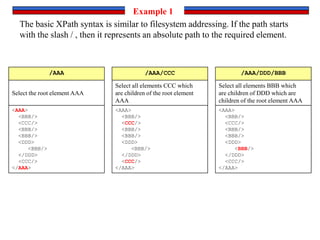
The basic XPath syntax is similar to filesystem addressing. If the path starts
with the slash / , then it represents an absolute path to the required element.
Example 1
<AAA>
<BBB/>
<CCC/>
<BBB/>
<DDD>
<BBB/>
</DDD>
<CCC>
<DDD>
<BBB/>
<BBB/>
</DDD>
</CCC>
</AAA>
//BBB //DDD/BBB
Select all elements BBB
which are children of DDD
Select all elements BBB
<AAA>
<BBB/>
<CCC/>
<BBB/>
<DDD>
<BBB/>
</DDD>
<CCC>
<DDD>
<BBB/>
<BBB/>
</DDD>
</CCC>
</AAA>
If the path starts with // then all elements in the document which fulfill
following criteria are selected.
Example 2
<AAA>
<XXX>
<DDD>
<BBB/>
<BBB/>
<EEE/>
<FFF/>
</DDD>
</XXX>
<CCC>
<DDD>
<BBB/>
<BBB/>
<EEE/>
<FFF/>
</DDD>
</CCC>
<CCC>
<BBB>
<BBB>
<BBB/>
</BBB>
</BBB>
</CCC>
</AAA>
/AAA/CCC/DDD/* /*/*/*/BBB
Select all elements BBB which
have 3 ancestors
Select all elements enclosed by
elements /AAA/CCC/DDD
<AAA>
<XXX>
<DDD>
<BBB/>
<BBB/>
<EEE/>
<FFF/>
</DDD>
</XXX>
<CCC>
<DDD>
<BBB/>
<BBB/>
<EEE/>
<FFF/>
</DDD>
</CCC>
<CCC>
<BBB>
<BBB>
<BBB/>
</BBB>
</BBB>
</CCC>
</AAA>
//*
Select all elements
<AAA>
<XXX>
<DDD>
<BBB/>
<BBB/>
<EEE/>
<FFF/>
</DDD>
</XXX>
<CCC>
<DDD>
<BBB/>
<BBB/>
<EEE/>
<FFF/>
</DDD>
</CCC>
<CCC>
<BBB>
<BBB>
<BBB/>
</BBB>
</BBB>
</CCC>
</AAA>
The star * selects all elements located by preceeding path
Example 3
<AAA>
<BBB/>
<BBB/>
<BBB/>
<BBB/>
</AAA>
/AAA/BBB[1] /AAA/BBB[last()]
Select the last BBB child of
element AAA
Select the first BBB child of
element AAA
<AAA>
<BBB/>
<BBB/>
<BBB/>
<BBB/>
</AAA>
Expresion in square brackets can further specify an element. A number in the
brackets gives the position of the element in the selected set. The function
last() selects the last element in the selection.
Example 4
<AAA>
<BBB id = "b1"/>
<BBB id = "b2"/>
<BBB name = "bbb"/>
<BBB/>
</AAA>
//@id //BBB[@id]
Select BBB elements which have
attribute id
Select all attributes @id
<AAA>
<BBB id = "b1"/>
<BBB id = "b2"/>
<BBB name = "bbb"/>
<BBB/>
</AAA>
<AAA>
<BBB id = "b1"/>
<BBB id = "b2"/>
<BBB name = "bbb"/>
<BBB/>
</AAA>
//BBB[@name] //BBB[@*]
Select BBB elements which have
any attribute
Select BBB elements which have
attribute name
<AAA>
<BBB id = "b1"/>
<BBB id = "b2"/>
<BBB name = "bbb"/>
<BBB/>
</AAA>
//BBB[not(@*)]
Select BBB elements without an
attribute
<AAA>
<BBB id = "b1"/>
<BBB id = "b2"/>
<BBB name = "bbb"/>
<BBB/>
</AAA>
Attributes are specified by @ prefix.
Example 5
<AAA>
<BBB id = "b1"/>
<BBB name = " bbb "/>
<BBB name = "bbb"/>
</AAA>
//BBB[@id='b1']
<AAA>
<BBB id = "b1"/>
<BBB name = " bbb "/>
<BBB name = "bbb"/>
</AAA>
//BBB[@name='bbb']
Select BBB elements which have
attribute name with value 'bbb'
Select BBB elements which have
attribute id with value b1
<AAA>
<BBB id = "b1"/>
<BBB name = " bbb "/>
<BBB name = "bbb"/>
</AAA>
//BBB[normalize-space(@name)='bbb']
Select BBB elements which have attribute name with value bbb, leading
and trailing spaces are removed before comparison
Values of attributes can be used as selection criteria. Function normalize-space
removes leading and trailing spaces and replaces sequences of whitespace
characters by a single space.
Example 6
<AAA>
<CCC>
<BBB/>
<BBB/>
<BBB/>
</CCC>
<DDD>
<BBB/>
<BBB/>
</DDD>
<EEE>
<CCC/>
<DDD/>
</EEE>
</AAA>
//*[count(BBB)=2] //*[count(*)=2]
Select elements which have
2 children
Select elements which have two
children BBB
//*[count(*)=3]
Select elements which have
3 children
<AAA>
<CCC>
<BBB/>
<BBB/>
<BBB/>
</CCC>
<DDD>
<BBB/>
<BBB/>
</DDD>
<EEE>
<CCC/>
<DDD/>
</EEE>
</AAA>
<AAA>
<CCC>
<BBB/>
<BBB/>
<BBB/>
</CCC>
<DDD>
<BBB/>
<BBB/>
</DDD>
<EEE>
<CCC/>
<DDD/>
</EEE>
</AAA>
Function count() counts the number of selected elements
Example 7
<AAA>
<BCC>
<BBB/>
<BBB/>
<BBB/>
</BCC>
<DDB>
<BBB/>
<BBB/>
</DDB>
<BEC>
<CCC/>
<DBD/>
</BEC>
</AAA>
//*[name()='BBB'] //*[starts-with(name(),'B')]
Select all elements name of
which starts with letter B
Select all elements with name
BBB, equivalent with //BBB
//*[contains(name(),'C')]
Select all elements name of
which contain letter C
<AAA>
<BCC>
<BBB/>
<BBB/>
<BBB/>
</BCC>
<DDB>
<BBB/>
<BBB/>
</DDB>
<BEC>
<CCC/>
<DBD/>
</BEC>
</AAA>
<AAA>
<BCC>
<BBB/>
<BBB/>
<BBB/>
</BCC>
<DDB>
<BBB/>
<BBB/>
</DDB>
<BEC>
<CCC/>
<DBD/>
</BEC>
</AAA>
Function name() returns name of the element, the starts-with function returns
true if the first argument string starts with the second argument string, and the
contains function returns true if the first argument string contains the second
argument string.
Example 8
<AAA>
<Q/>
<SSSS/>
<BB/>
<CCC/>
<DDDDDDDD/>
<EEEE/>
</AAA>
//*[string-length(name()) = 3] //*[string-length(name()) < 3]
Select elements name of which has one or two
charactersSelect elements with three-letter name
<AAA>
<Q/>
<SSSS/>
<BB/>
<CCC/>
<DDDDDDDD/>
<EEEE/>
</AAA>
//*[string-length(name()) > 3]
Select elements with name longer than three
characters
<AAA>
<Q/>
<SSSS/>
<BB/>
<CCC/>
<DDDDDDDD/>
<EEEE/>
</AAA>
The string-length function returns the number of characters in the string. You
must use &lt; as a substitute for < and &gt; as a substitute for > .
Example 9
<AAA>
<BBB/>
<CCC/>
<DDD>
<CCC/>
</DDD>
<EEE/>
</AAA>
//CCC | //BBB /AAA/EEE | //BBB
Select all elements BBB and elements EEE
which are children of root element AAASelect all elements CCC and BBB
<AAA>
<BBB/>
<CCC/>
<DDD>
<CCC/>
</DDD>
<EEE/>
</AAA>
/AAA/EEE | //DDD/CCC | /AAA | //BBB
Number of combinations is not restricted
<AAA>
<BBB/>
<CCC/>
<DDD>
<CCC/>
</DDD>
<EEE/>
</AAA>
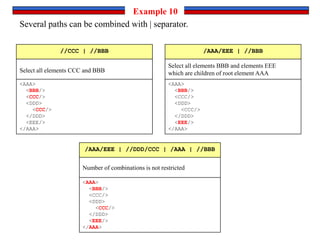
Several paths can be combined with | separator.
Example 10
<AAA>
<BBB/>
<CCC/>
</AAA>
/AAA /child::AAA
Equivalent of /AAAEquivalent of /child::AAA
<AAA>
<BBB/>
<CCC/>
</AAA>
<AAA>
<BBB/>
<CCC/>
</AAA>
/AAA/BBB /child::AAA/child::BBB
Equivalent of
/AAA/BBB
Equivalent of
/child::AAA/child::BBB
<AAA>
<BBB/>
<CCC/>
</AAA>
/child::AAA/BBB
Both possibilities can be
combined
<AAA>
<BBB/>
<CCC/>
</AAA>
The child axis contains the children of the context node. The child axis is the
default axis and it can be omitted.
Example 11
<AAA>
<BBB>
<DDD>
<CCC>
<DDD/>
<EEE/>
</CCC>
</DDD>
</BBB>
<CCC>
<DDD>
<EEE>
<DDD>
<FFF/>
</DDD>
</EEE>
</DDD>
</CCC>
</AAA>
/descendant::* /AAA/BBB/descendant::* //CCC/descendant::*
<AAA>
<BBB>
<DDD>
<CCC>
<DDD/>
<EEE/>
</CCC>
</DDD>
</BBB>
<CCC>
<DDD>
<EEE>
<DDD>
<FFF/>
</DDD>
</EEE>
</DDD>
</CCC>
</AAA>
<AAA>
<BBB>
<DDD>
<CCC>
<DDD/>
<EEE/>
</CCC>
</DDD>
</BBB>
<CCC>
<DDD>
<EEE>
<DDD>
<FFF/>
</DDD>
</EEE>
</DDD>
</CCC>
</AAA>
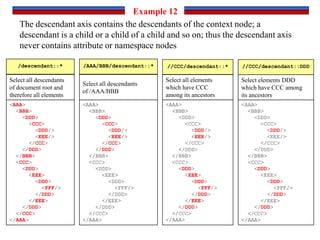
The descendant axis contains the descendants of the context node; a
descendant is a child or a child of a child and so on; thus the descendant axis
never contains attribute or namespace nodes
Example 12
<AAA>
<BBB>
<DDD>
<CCC>
<DDD/>
<EEE/>
</CCC>
</DDD>
</BBB>
<CCC>
<DDD>
<EEE>
<DDD>
<FFF/>
</DDD>
</EEE>
</DDD>
</CCC>
</AAA>
//CCC/descendant::DDD
Select elements DDD
which have CCC among
its ancestors
Select all descendants
of /AAA/BBB
Select all descendants
of document root and
therefore all elements
Select all elements
which have CCC
among its ancestors
<AAA>
<BBB>
<DDD>
<CCC>
<DDD/>
<EEE/>
</CCC>
</DDD>
</BBB>
<CCC>
<DDD>
<EEE>
<DDD>
<FFF/>
</DDD>
</EEE>
</DDD>
</CCC>
</AAA>
//DDD/parent::*
Select all parents of DDD element
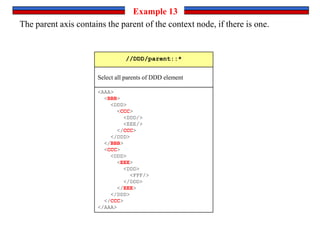
The parent axis contains the parent of the context node, if there is one.
Example 13
<AAA>
<BBB>
<DDD>
<CCC>
<DDD/>
<EEE/>
</CCC>
</DDD>
</BBB>
<CCC>
<DDD>
<EEE>
<DDD>
<FFF/>
</DDD>
</EEE>
</DDD>
</CCC>
</AAA>
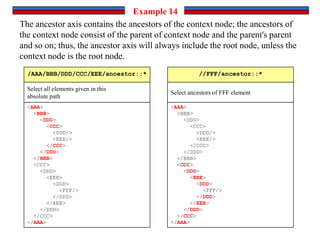
/AAA/BBB/DDD/CCC/EEE/ancestor::*
Select all elements given in this
absolute path
The ancestor axis contains the ancestors of the context node; the ancestors of
the context node consist of the parent of context node and the parent's parent
and so on; thus, the ancestor axis will always include the root node, unless the
context node is the root node.
Example 14
<AAA>
<BBB>
<DDD>
<CCC>
<DDD/>
<EEE/>
</CCC>
</DDD>
</BBB>
<CCC>
<DDD>
<EEE>
<DDD>
<FFF/>
</DDD>
</EEE>
</DDD>
</CCC>
</AAA>
//FFF/ancestor::*
Select ancestors of FFF element
<AAA>
<BBB>
<CCC/>
<DDD/>
</BBB>
<XXX>
<DDD>
<EEE/>
<DDD/>
<CCC/>
<FFF/>
<FFF>
<GGG/>
</FFF>
</DDD>
</XXX>
<CCC>
<DDD/>
</CCC>
</AAA>
/AAA/BBB/following-sibling::*
The following-sibling axis contains all the following siblings of the context
node.
Example 15
<AAA>
<BBB>
<CCC/>
<DDD/>
</BBB>
<XXX>
<DDD>
<EEE/>
<DDD/>
<CCC/>
<FFF/>
<FFF>
<GGG/>
</FFF>
</DDD>
</XXX>
<CCC>
<DDD/>
</CCC>
</AAA>
//CCC/following-sibling::*
<AAA>
<BBB>
<CCC/>
<DDD/>
</BBB>
<XXX>
<DDD>
<EEE/>
<DDD/>
<CCC/>
<FFF/>
<FFF>
<GGG/>
</FFF>
</DDD>
</XXX>
<CCC>
<DDD/>
</CCC>
</AAA>
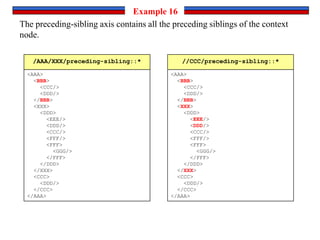
/AAA/XXX/preceding-sibling::*
The preceding-sibling axis contains all the preceding siblings of the context
node.
Example 16
<AAA>
<BBB>
<CCC/>
<DDD/>
</BBB>
<XXX>
<DDD>
<EEE/>
<DDD/>
<CCC/>
<FFF/>
<FFF>
<GGG/>
</FFF>
</DDD>
</XXX>
<CCC>
<DDD/>
</CCC>
</AAA>
//CCC/preceding-sibling::*
<AAA>
<BBB>
<CCC/>
<ZZZ>
<DDD/>
<DDD>
<EEE/>
</DDD>
</ZZZ>
<FFF>
<GGG/>
</FFF>
</BBB>
<XXX>
<DDD>
<EEE/>
<DDD/>
<CCC/>
<FFF/>
<FFF>
<GGG/>
</FFF>
</DDD>
</XXX>
<CCC>
<DDD/>
</CCC>
</AAA>
/AAA/XXX/following::*
The following axis contains all nodes in the same document as the context node that are after the context node in
document order, excluding any descendants and excluding attribute nodes and namespace nodes.
Example 17
//ZZZ/following::*
<AAA>
<BBB>
<CCC/>
<ZZZ>
<DDD/>
<DDD>
<EEE/>
</DDD>
</ZZZ>
<FFF>
<GGG/>
</FFF>
</BBB>
<XXX>
<DDD>
<EEE/>
<DDD/>
<CCC/>
<FFF/>
<FFF>
<GGG/>
</FFF>
</DDD>
</XXX>
<CCC>
<DDD/>
</CCC>
</AAA>
<AAA>
<BBB>
<CCC/>
<ZZZ>
<DDD/>
</ZZZ>
</BBB>
<XXX>
<DDD>
<EEE/>
<DDD/>
<CCC/>
<FFF/>
<FFF>
<GGG/>
</FFF>
</DDD>
</XXX>
<CCC>
<DDD/>
</CCC>
</AAA>
/AAA/XXX/preceding::*
The preceding axis contains all nodes in the same document as the context node
that are before the context node in document order, excluding any ancestors and
excluding attribute nodes and namespace nodes
Example 18
//GGG/preceding::*
<AAA>
<BBB>
<CCC/>
<ZZZ>
<DDD/>
</ZZZ>
</BBB>
<XXX>
<DDD>
<EEE/>
<DDD/>
<CCC/>
<FFF/>
<FFF>
<GGG/>
</FFF>
</DDD>
</XXX>
<CCC>
<DDD/>
</CCC>
</AAA>
20/1/2009 27
References
 http://www.zvon.org/xxl/XPathTutorial/General/examples.html
 http://www.w3schools.com/xpath/

XPath