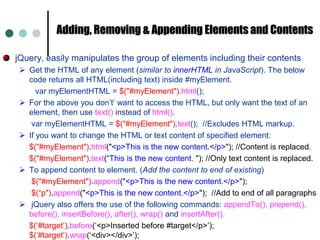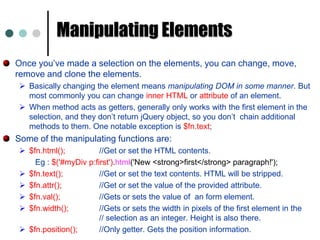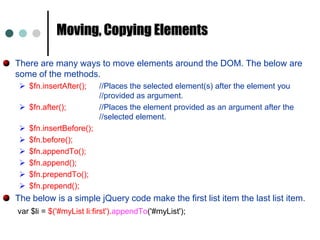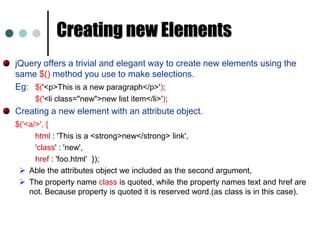

jQueryWrites less, Do MoreCh. Vishwa MohanFreelance Software Consultant &Corporate Trainer
Table of ContentsjQuery IntroductionjQuery BasicsjQuery CoreEventsAnimationAJAXPlugins
jQuery Introduction
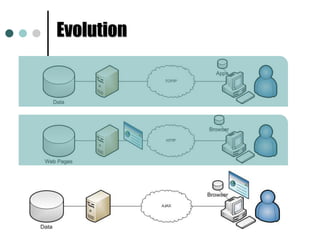
Evolution
With AJAX .  .  .JavaScript has become essential to current web page development, but.. JavaScript is not a good language design.JavaScript has become bloatedDOM Navigation
Browser differencesWriting JavaScript code is tedious, time-consuming and error prone.
Why you might want to use jQueryjQuery makes writing Javascript much easier. DOM Navigation (CSS-like syntax)
Apply methods to sets of DOM elements.
Builder model (chain method calls)
Extensible and there are tons of libraries
Handles most of browser differences so you don’t have to Server provides datajQuery on client provides presentation. Advantages of jQuery over JavaScript are: Much easier to use.
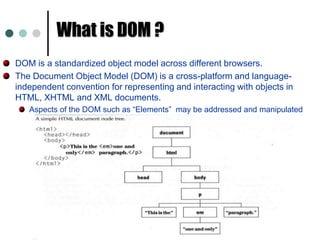
Eliminates cross browser problems What is DOM ?DOM is a standardized object model across different browsers. The Document Object Model (DOM) is a cross-platform and language-independent convention for representing and interacting with objects in HTML, XHTML and XML documents. Aspects of the DOM such as “Elements”  may be addressed and manipulated within the syntax of the programming language in use.
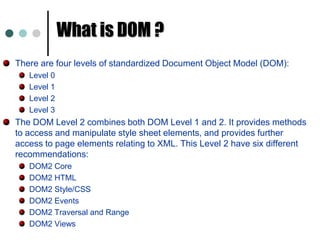
What is DOM ?There are four levels of standardized Document Object Model (DOM):Level 0Level 1Level 2Level 3 The DOM Level 2 combines both DOM Level 1 and 2. It provides methods to access and manipulate style sheet elements, and provides further access to page elements relating to XML. This Level 2 have six different recommendations: DOM2 CoreDOM2 HTMLDOM2 Style/CSSDOM2 EventsDOM2 Traversal and RangeDOM2 Views
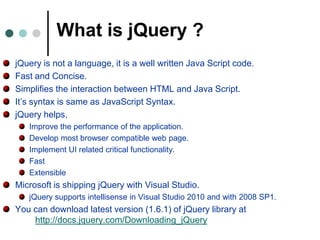
What is jQuery ?jQuery is not a language, it is a well written Java Script code. Fast and Concise. Simplifies the interaction between HTML and Java Script. It’s syntax is same as JavaScript Syntax. jQuery helps, Improve the performance of the application. Develop most browser compatible web page. Implement UI related critical functionality. FastExtensibleMicrosoft is shipping jQuery with Visual Studio. jQuery supports intellisense in Visual Studio 2010 and with 2008 SP1. You can download latest version (1.6.1) of jQuery library at			http://docs.jquery.com/Downloading_jQuery
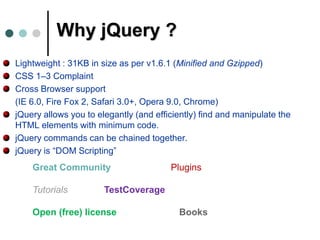
Why jQuery ?Lightweight : 31KB in size as per v1.6.1 (Minified and Gzipped)CSS 1–3 Complaint Cross Browser support	(IE 6.0, Fire Fox 2, Safari 3.0+, Opera 9.0, Chrome)jQuery allows you to elegantly (and efficiently) find and manipulate the HTML elements with minimum code. jQuery commands can be chained together. jQuery is “DOM Scripting”Great CommunityPluginsTutorialsTestCoverageOpen (free) licenseBooks
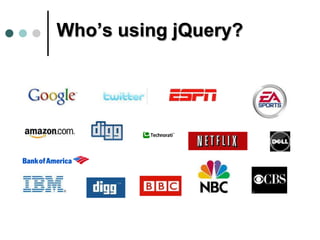
Who’s using jQuery?
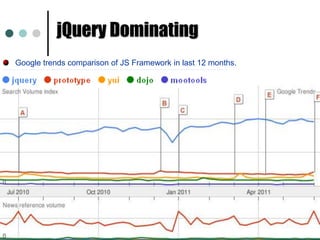
jQuery Dominating Google trends comparison of JS Framework in last 12 months.
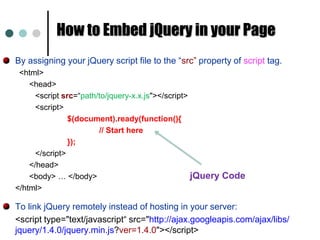
How to Embed jQuery in your PageBy assigning your jQuery script file to the “src” property of script tag. <html> 	<head> 		<script src=“path/to/jquery-x.x.js"></script> 		<script> 			$(document).ready(function(){				// Start here			}); 		</script> 	</head> 	<body> … </body> 	</html> To link jQuery remotely instead of hosting in your server:	<script type="text/javascript“ src="http://ajax.googleapis.com/ajax/libs/   jquery/1.4.0/jquery.min.js?ver=1.4.0"></script>jQuery Code
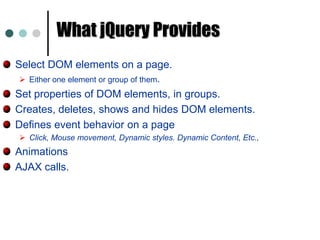
What jQuery ProvidesSelect DOM elements on a page. Either one element or group of them.Set properties of DOM elements, in groups. Creates, deletes, shows and hides DOM elements.Defines event behavior on a page Click, Mouse movement, Dynamic styles. Dynamic Content, Etc.,AnimationsAJAX calls.
jQuery Basics
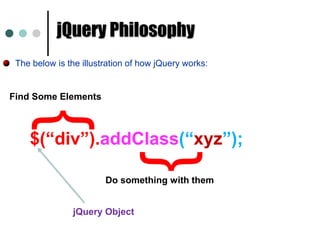
jQuery PhilosophyThe below is the illustration of how jQuery works:{Find Some Elements$(“div”).addClass(“xyz”);}Do something with themjQuery Object
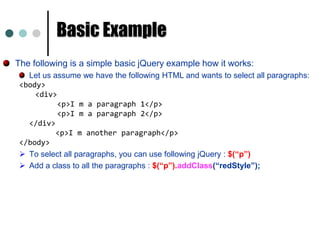
Basic ExampleThe following is a simple basic jQuery example how it works: Let us assume we have the following HTML and wants to select all paragraphs:<body> 		<div>		     <p>I m a paragraph 1</p> 		     <p>I m a paragraph 2</p> 	</div>	      <p>I m another paragraph</p> </body> To select all paragraphs, you can use following jQuery : $(“p”)
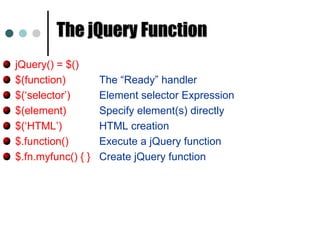
Add a class to all the paragraphs : $(“p”).addClass(“redStyle”);The jQuery FunctionjQuery() = $()$(function)     	The “Ready” handler$(‘selector’)	Element selector Expression$(element)		Specify element(s) directly$(‘HTML’)		HTML creation$.function()	Execute a jQuery function$.fn.myfunc() { } 	Create jQuery function
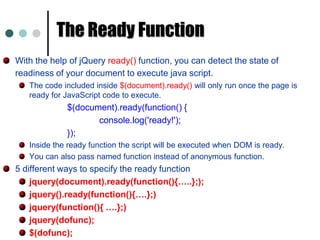
The Ready FunctionWith the help of jQuery ready() function, you can detect the state of readiness of your document to execute java script.The code included inside $(document).ready() will only run once the page is ready for JavaScript code to execute. $(document).ready(function() {	    		console.log('ready!');			});Inside the ready function the script will be executed when DOM is ready.You can also pass named function instead of anonymous function. 5 different ways to specify the ready functionjquery(document).ready(function(){…..};);jquery().ready(function(){….};)jquery(function(){ ….};)jquery(dofunc);$(dofunc);
jQuery Core
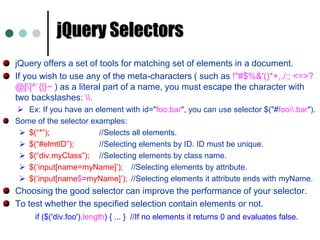
jQuery SelectorsjQuery offers a set of tools for matching set of elements in a document.If you wish to use any of the meta-characters ( such as !"#$%&'()*+,./:; <=>? @[\]^`{|}~ ) as a literal part of a name, you must escape the character with two backslashes: \\.Ex: If you have an element with id="foo.bar", you can use selector $("#foo\\.bar").Some of the selector examples:  $(“*”); 	        	//Selects all elements.
$(“#elmtID”); 	//Selecting elements by ID. ID must be unique.
$(“div.myClass”); 	//Selecting elements by class name.
$(‘input[name=myName]’); 	//Selecting elements by attribute.
$(‘input[name$=myName]’); 	//Selecting elements it attribute ends with myName. Choosing the good selector can improve the performance of your selector. To test whether the specified selection contain elements or not. if ($('div.foo').length) { ... }  //If no elements it returns 0 and evaluates false.
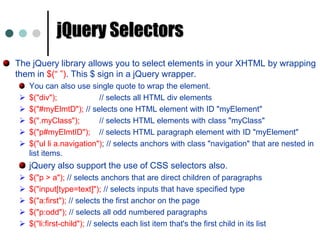
jQuery SelectorsThe jQuery library allows you to select elements in your XHTML by wrapping them in $(“ ”). This $ sign in a jQuery wrapper. You can also use single quote to wrap the element.$("div"); 		// selects all HTML div elements
$("#myElmtD"); // selects one HTML element with ID "myElement"
$(".myClass"); 	// selects HTML elements with class "myClass"
$("p#myElmtID"); 	// selects HTML paragraph element with ID "myElement"
$("ullia.navigation"); // selects anchors with class "navigation" that are nested in list items. jQuery also support the use of CSS selectors also. 	$("p > a"); // selects anchors that are direct children of paragraphs
$("input[type=text]"); // selects inputs that have specified type
$("a:first"); // selects the first anchor on the page
$("p:odd"); // selects all odd numbered paragraphs
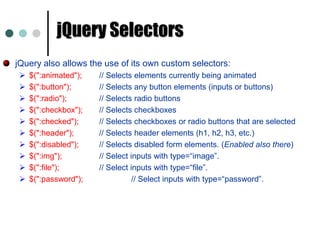
$("li:first-child"); // selects each list item that's the first child in its listjQuery SelectorsjQuery also allows the use of its own custom selectors: $(":animated"); 	// Selects elements currently being animated
$(":button"); 	// Selects any button elements (inputs or buttons)
$(":radio"); 	// Selects radio buttons
$(":checkbox"); 	// Selects checkboxes
$(":checked"); 	// Selects checkboxes or radio buttons that are selected
$(":header"); 	// Selects header elements (h1, h2, h3, etc.)
$(":disabled"); 	// Selects disabled form elements. (Enabled also there)
$(":img"); 		// Select inputs with type=“image”.
$(":file"); 		// Select inputs with type=“file”.
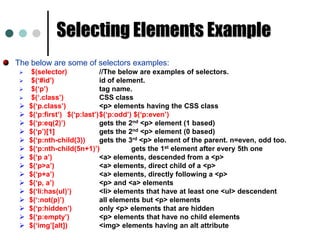
$(":password");		// Select inputs with type=“password”.Selecting Elements ExampleThe below are some of selectors examples:$(selector)   	//The below are examples of selectors.
$(‘#id’)		id of element.
$(‘p’)		tag name.
$(‘.class’)		CSS class
$(‘p.class’)		<p> elements having the CSS class
$(‘p:first’)	$(‘p:last’)	$(‘p:odd’) $(‘p:even’)
$(‘p:eq(2)’)		gets the 2nd <p> element (1 based)
$(‘p’)[1]		gets the 2nd <p> element (0 based)
$(‘p:nth-child(3))	gets the 3rd <p> element of the parent. n=even, odd too.
$(‘p:nth-child(5n+1)’)	gets the 1st element after every 5th one
$(‘p a’)		<a> elements, descended from a <p>
$(‘p>a’)		<a> elements, direct child of a <p>
$(‘p+a’)		<a> elements, directly following a <p>
$(‘p, a’)		<p> and <a> elements
$(‘li:has(ul)’)	<li> elements that have at least one <ul> descendent
$(‘:not(p)’)		all elements but <p> elements
$(‘p:hidden’)	only <p> elements that are hidden
$(‘p:empty’)	<p> elements that have no child elements
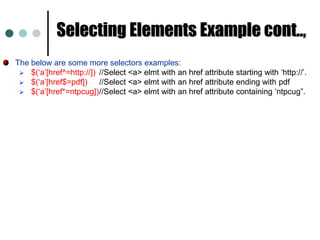
$(‘img’[alt])	<img> elements having an alt attributeSelecting Elements Example cont..,The below are some more selectors examples:$(‘a’[href^=http://]) 	//Select <a> elmt with an href attribute starting with ‘http://’.
$(‘a’[href$=pdf])	//Select <a> elmt with an href attribute ending with pdf
$(‘a’[href*=ntpcug])	//Select <a> elmt with an href attribute containing ‘ntpcug”. Working with Attributes The $fn.attr method acts as both a getter and setter. The $.fn.attr as a setter can accept either a key and a value, or an object containing one or more key/value pairs.$('a').attr('href', 'allMyHrefsAreTheSameNow.html');  //single attribute.$('a').attr({ 				// Multiple attribues. 'title' : 'all titles are the same too!', 'href' : 'somethingNew.html' });The below example demonstrates the getting attribute href of the first <a> element in the document. $('a').attr('href');
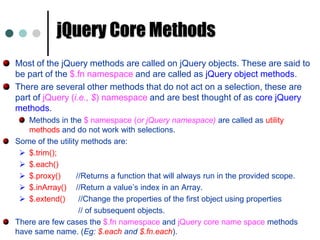
jQuery Core MethodsMost of the jQuery methods are called on jQuery objects. These are said to be part of the $.fn namespace and are called as jQuery object methods. There are several other methods that do not act on a selection, these are part of jQuery (i.e., $) namespace and are best thought of as core jQuery methods.  Methods in the $ namespace (or jQuery namespace) are called as utility methods and do not work with selections. Some of the utility methods are:$.trim();
$.each()
$.proxy()	    //Returns a function that will always run in the provided scope.
$.inArray()	    //Return a value’s index in an Array.
$.extend()	     //Change the properties of the first object using properties 			     // of subsequent objects. There are few cases the $.fn namespace and jQuery core name space methods have same name. (Eg: $.each and $.fn.each).
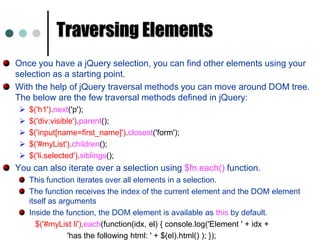
Traversing Elements Once you have a jQuery selection, you can find other elements using your selection as a starting point.With the help of jQuery traversal methods you can move around DOM tree. The below are the few traversal methods defined in jQuery: $('h1').next('p');
$('div:visible').parent();

jQuery

  • 1.
    jQueryWrites less, DoMoreCh. Vishwa MohanFreelance Software Consultant &Corporate Trainer
  • 2.
    Table of ContentsjQueryIntroductionjQuery BasicsjQuery CoreEventsAnimationAJAXPlugins
  • 3.
  • 4.
  • 5.
    With AJAX . . .JavaScript has become essential to current web page development, but.. JavaScript is not a good language design.JavaScript has become bloatedDOM Navigation
  • 6.
    Browser differencesWriting JavaScriptcode is tedious, time-consuming and error prone.
  • 7.
    Why you mightwant to use jQueryjQuery makes writing Javascript much easier. DOM Navigation (CSS-like syntax)
  • 8.
    Apply methods tosets of DOM elements.
  • 9.
  • 10.
    Extensible and thereare tons of libraries
  • 11.
    Handles most ofbrowser differences so you don’t have to Server provides datajQuery on client provides presentation. Advantages of jQuery over JavaScript are: Much easier to use.
  • 12.
    Eliminates cross browserproblems What is DOM ?DOM is a standardized object model across different browsers. The Document Object Model (DOM) is a cross-platform and language-independent convention for representing and interacting with objects in HTML, XHTML and XML documents. Aspects of the DOM such as “Elements” may be addressed and manipulated within the syntax of the programming language in use.
  • 13.
    What is DOM?There are four levels of standardized Document Object Model (DOM):Level 0Level 1Level 2Level 3 The DOM Level 2 combines both DOM Level 1 and 2. It provides methods to access and manipulate style sheet elements, and provides further access to page elements relating to XML. This Level 2 have six different recommendations: DOM2 CoreDOM2 HTMLDOM2 Style/CSSDOM2 EventsDOM2 Traversal and RangeDOM2 Views
  • 14.
    What is jQuery?jQuery is not a language, it is a well written Java Script code. Fast and Concise. Simplifies the interaction between HTML and Java Script. It’s syntax is same as JavaScript Syntax. jQuery helps, Improve the performance of the application. Develop most browser compatible web page. Implement UI related critical functionality. FastExtensibleMicrosoft is shipping jQuery with Visual Studio. jQuery supports intellisense in Visual Studio 2010 and with 2008 SP1. You can download latest version (1.6.1) of jQuery library at http://docs.jquery.com/Downloading_jQuery
  • 15.
    Why jQuery ?Lightweight: 31KB in size as per v1.6.1 (Minified and Gzipped)CSS 1–3 Complaint Cross Browser support (IE 6.0, Fire Fox 2, Safari 3.0+, Opera 9.0, Chrome)jQuery allows you to elegantly (and efficiently) find and manipulate the HTML elements with minimum code. jQuery commands can be chained together. jQuery is “DOM Scripting”Great CommunityPluginsTutorialsTestCoverageOpen (free) licenseBooks
  • 16.
  • 17.
    jQuery Dominating Googletrends comparison of JS Framework in last 12 months.
  • 18.
    How to EmbedjQuery in your PageBy assigning your jQuery script file to the “src” property of script tag. <html> <head> <script src=“path/to/jquery-x.x.js"></script> <script> $(document).ready(function(){ // Start here }); </script> </head> <body> … </body> </html> To link jQuery remotely instead of hosting in your server: <script type="text/javascript“ src="http://ajax.googleapis.com/ajax/libs/ jquery/1.4.0/jquery.min.js?ver=1.4.0"></script>jQuery Code
  • 19.
    What jQuery ProvidesSelectDOM elements on a page. Either one element or group of them.Set properties of DOM elements, in groups. Creates, deletes, shows and hides DOM elements.Defines event behavior on a page Click, Mouse movement, Dynamic styles. Dynamic Content, Etc.,AnimationsAJAX calls.
  • 20.
  • 21.
    jQuery PhilosophyThe belowis the illustration of how jQuery works:{Find Some Elements$(“div”).addClass(“xyz”);}Do something with themjQuery Object
  • 22.
    Basic ExampleThe followingis a simple basic jQuery example how it works: Let us assume we have the following HTML and wants to select all paragraphs:<body> <div> <p>I m a paragraph 1</p> <p>I m a paragraph 2</p> </div> <p>I m another paragraph</p> </body> To select all paragraphs, you can use following jQuery : $(“p”)
  • 23.
    Add a classto all the paragraphs : $(“p”).addClass(“redStyle”);The jQuery FunctionjQuery() = $()$(function) The “Ready” handler$(‘selector’) Element selector Expression$(element) Specify element(s) directly$(‘HTML’) HTML creation$.function() Execute a jQuery function$.fn.myfunc() { } Create jQuery function
  • 24.
    The Ready FunctionWiththe help of jQuery ready() function, you can detect the state of readiness of your document to execute java script.The code included inside $(document).ready() will only run once the page is ready for JavaScript code to execute. $(document).ready(function() { console.log('ready!'); });Inside the ready function the script will be executed when DOM is ready.You can also pass named function instead of anonymous function. 5 different ways to specify the ready functionjquery(document).ready(function(){…..};);jquery().ready(function(){….};)jquery(function(){ ….};)jquery(dofunc);$(dofunc);
  • 25.
  • 26.
    jQuery SelectorsjQuery offersa set of tools for matching set of elements in a document.If you wish to use any of the meta-characters ( such as !"#$%&'()*+,./:; <=>? @[\]^`{|}~ ) as a literal part of a name, you must escape the character with two backslashes: \\.Ex: If you have an element with id="foo.bar", you can use selector $("#foo\\.bar").Some of the selector examples: $(“*”); //Selects all elements.
  • 27.
    $(“#elmtID”); //Selecting elementsby ID. ID must be unique.
  • 28.
  • 29.
  • 30.
    $(‘input[name$=myName]’); //Selecting elementsit attribute ends with myName. Choosing the good selector can improve the performance of your selector. To test whether the specified selection contain elements or not. if ($('div.foo').length) { ... } //If no elements it returns 0 and evaluates false.
  • 31.
    jQuery SelectorsThe jQuerylibrary allows you to select elements in your XHTML by wrapping them in $(“ ”). This $ sign in a jQuery wrapper. You can also use single quote to wrap the element.$("div"); // selects all HTML div elements
  • 32.
    $("#myElmtD"); // selectsone HTML element with ID "myElement"
  • 33.
    $(".myClass"); // selectsHTML elements with class "myClass"
  • 34.
    $("p#myElmtID"); // selectsHTML paragraph element with ID "myElement"
  • 35.
    $("ullia.navigation"); // selectsanchors with class "navigation" that are nested in list items. jQuery also support the use of CSS selectors also. $("p > a"); // selects anchors that are direct children of paragraphs
  • 36.
    $("input[type=text]"); // selectsinputs that have specified type
  • 37.
    $("a:first"); // selectsthe first anchor on the page
  • 38.
    $("p:odd"); // selectsall odd numbered paragraphs
  • 39.
    $("li:first-child"); // selectseach list item that's the first child in its listjQuery SelectorsjQuery also allows the use of its own custom selectors: $(":animated"); // Selects elements currently being animated
  • 40.
    $(":button"); // Selectsany button elements (inputs or buttons)
  • 41.
  • 42.
  • 43.
    $(":checked"); // Selectscheckboxes or radio buttons that are selected
  • 44.
    $(":header"); // Selectsheader elements (h1, h2, h3, etc.)
  • 45.
    $(":disabled"); // Selectsdisabled form elements. (Enabled also there)
  • 46.
    $(":img"); // Selectinputs with type=“image”.
  • 47.
    $(":file"); // Selectinputs with type=“file”.
  • 48.
    $(":password"); // Select inputswith type=“password”.Selecting Elements ExampleThe below are some of selectors examples:$(selector) //The below are examples of selectors.
  • 49.
  • 50.
  • 51.
  • 52.
  • 53.
  • 54.
    $(‘p:eq(2)’) gets the 2nd<p> element (1 based)
  • 55.
    $(‘p’)[1] gets the 2nd<p> element (0 based)
  • 56.
    $(‘p:nth-child(3)) gets the 3rd<p> element of the parent. n=even, odd too.
  • 57.
    $(‘p:nth-child(5n+1)’) gets the 1stelement after every 5th one
  • 58.
    $(‘p a’) <a> elements,descended from a <p>
  • 59.
  • 60.
  • 61.
  • 62.
    $(‘li:has(ul)’) <li> elements thathave at least one <ul> descendent
  • 63.
  • 64.
  • 65.
  • 66.
    $(‘img’[alt]) <img> elements havingan alt attributeSelecting Elements Example cont..,The below are some more selectors examples:$(‘a’[href^=http://]) //Select <a> elmt with an href attribute starting with ‘http://’.
  • 67.
    $(‘a’[href$=pdf]) //Select <a> elmtwith an href attribute ending with pdf
  • 68.
    $(‘a’[href*=ntpcug]) //Select <a> elmtwith an href attribute containing ‘ntpcug”. Working with Attributes The $fn.attr method acts as both a getter and setter. The $.fn.attr as a setter can accept either a key and a value, or an object containing one or more key/value pairs.$('a').attr('href', 'allMyHrefsAreTheSameNow.html'); //single attribute.$('a').attr({ // Multiple attribues. 'title' : 'all titles are the same too!', 'href' : 'somethingNew.html' });The below example demonstrates the getting attribute href of the first <a> element in the document. $('a').attr('href');
  • 69.
    jQuery Core MethodsMostof the jQuery methods are called on jQuery objects. These are said to be part of the $.fn namespace and are called as jQuery object methods. There are several other methods that do not act on a selection, these are part of jQuery (i.e., $) namespace and are best thought of as core jQuery methods. Methods in the $ namespace (or jQuery namespace) are called as utility methods and do not work with selections. Some of the utility methods are:$.trim();
  • 70.
  • 71.
    $.proxy() //Returns a function that will always run in the provided scope.
  • 72.
    $.inArray() //Return a value’s index in an Array.
  • 73.
    $.extend() //Change the properties of the first object using properties // of subsequent objects. There are few cases the $.fn namespace and jQuery core name space methods have same name. (Eg: $.each and $.fn.each).
  • 74.
    Traversing Elements Onceyou have a jQuery selection, you can find other elements using your selection as a starting point.With the help of jQuery traversal methods you can move around DOM tree. The below are the few traversal methods defined in jQuery: $('h1').next('p');
  • 75.