Querying XML with XPATH
Basics and understanding
Malintha Adikari
Software Engineer
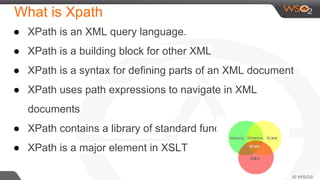
What is Xpath
● XPath is an XML query language.
● XPath is a building block for other XML
● XPath is a syntax for defining parts of an XML document
● XPath uses path expressions to navigate in XML
documents
● XPath contains a library of standard functions
● XPath is a major element in XSLT
Xpath is All About
● Nodes
● element
● attribute
● text
● namespace
● processing-instruction
● comment
● document (root) nodes
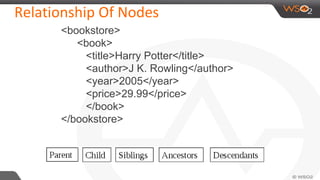
Relationship Of Nodes
<bookstore>
<book>
<title>Harry Potter</title>
<author>J K. Rowling</author>
<year>2005</year>
<price>29.99</price>
</book>
</bookstore>
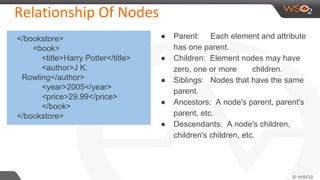
Relationship Of Nodes
● Parent: Each element and attribute
has one parent.
● Children: Element nodes may have
zero, one or more children.
● Siblings: Nodes that have the same
parent.
● Ancestors: A node's parent, parent's
parent, etc.
● Descendants: A node's children,
children's children, etc.
</bookstore>
<book>
<title>Harry Potter</title>
<author>J K.
Rowling</author>
<year>2005</year>
<price>29.99</price>
</book>
</bookstore>
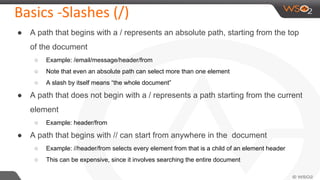
Basics -Slashes (/)
● A path that begins with a / represents an absolute path, starting from the top
of the document
○ Example: /email/message/header/from
○ Note that even an absolute path can select more than one element
○ A slash by itself means “the whole document”
● A path that does not begin with a / represents a path starting from the current
element
○ Example: header/from
● A path that begins with // can start from anywhere in the document
○ Example: //header/from selects every element from that is a child of an element header
○ This can be expensive, since it involves searching the entire document
Basics -Brackets and last()
● A number in brackets selects a particular matching child
○ Example: /library/book[1] selects the first book of the library
○ Example: //chapter/section[2] selects the second section of every chapter in the XML document
○ Example: //book/chapter[1]/section[2]
○ Only matching elements are counted; for example, if a book has both sections and exercises,
the latter are ignored when counting sections
● The function last() in brackets selects the last matching child
○ Example: /library/book/chapter[last()]
● You can even do simple arithmetic
○ Example: /library/book/chapter[last()-1]
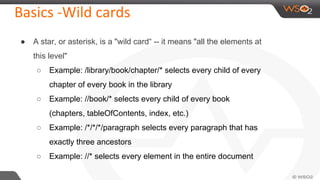
Basics -Wild cards
● A star, or asterisk, is a "wild card“ -- it means "all the elements at
this level"
○ Example: /library/book/chapter/* selects every child of every
chapter of every book in the library
○ Example: //book/* selects every child of every book
(chapters, tableOfContents, index, etc.)
○ Example: /*/*/*/paragraph selects every paragraph that has
exactly three ancestors
○ Example: //* selects every element in the entire document
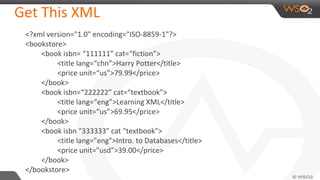
Get This XML
<?xml version="1.0" encoding="ISO-8859-1"?>
<bookstore>
<book isbn= “111111” cat=“fiction”>
<title lang=“chn”>Harry Potter</title>
<price unit=“us”>79.99</price>
</book>
<book isbn=“222222” cat=“textbook”>
<title lang=“eng”>Learning XML</title>
<price unit=“us”>69.95</price>
</book>
<book isbn "333333" cat "textbook">
<title lang="eng">Intro. to Databases</title>
<price unit="usd">39.00</price>
</book>
</bookstore>
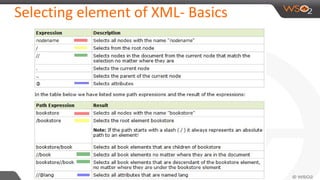
Selecting element of XML- Basics
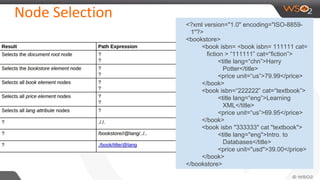
Node Selection
<?xml version="1.0" encoding="ISO-8859-
1"?>
<bookstore>
<book isbn= <book isbn= 111111 cat=
fiction > “111111” cat=“fiction”>
<title lang=“chn”>Harry
Potter</title>
<price unit=“us”>79.99</price>
</book>
<book isbn=“222222” cat=“textbook”>
<title lang=“eng”>Learning
XML</title>
<price unit=“us”>69.95</price>
</book>
<book isbn "333333" cat "textbook">
<title lang="eng">Intro. to
Databases</title>
<price unit="usd">39.00</price>
</book>
</bookstore>
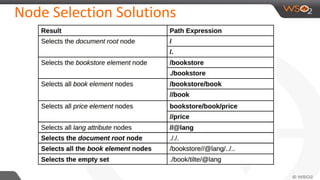
Node Selection Solutions
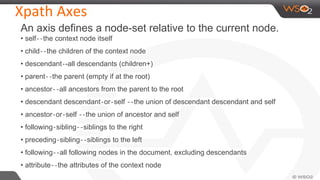
Xpath Axes
An axis defines a node-set relative to the current node.
• self‐‐the context node itself
• child‐‐the children of the context node
• descendant‐-all descendants (children+)
• parent‐‐the parent (empty if at the root)
• ancestor‐‐all ancestors from the parent to the root
• descendant descendant‐or‐self ‐‐the union of descendant descendant and self
• ancestor‐or‐self ‐‐the union of ancestor and self
• following‐sibling‐‐siblings to the right
• preceding‐sibling‐‐siblings to the left
• following‐‐all following nodes in the document, excluding descendants
• attribute‐‐the attributes of the context node
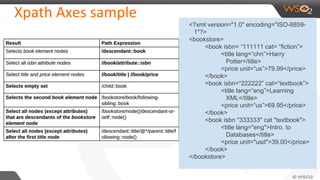
Xpath Axes sample
<?xml version="1.0" encoding="ISO-8859-
1"?>
<bookstore>
<book isbn= “111111 cat= “fiction”>
<title lang=“chn”>Harry
Potter</title>
<price unit=“us”>79.99</price>
</book>
<book isbn=“222222” cat=“textbook”>
<title lang=“eng”>Learning
XML</title>
<price unit=“us”>69.95</price>
</book>
<book isbn "333333" cat "textbook">
<title lang="eng">Intro. to
Databases</title>
<price unit="usd">39.00</price>
</book>
</bookstore>
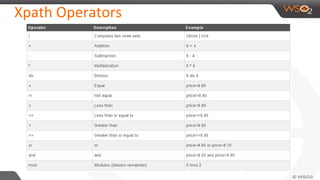
Xpath Operators
Predicates
[position() op #],[last()]
–op: =, !=, <, >, <=, >=
–test position among siblings
•[attribute::name [attribute::name op “value ]"
–op: =, !=, <, >, <=, >=
–test equality equality of an attribute attribute
•[axis:nodeSelector]
–test pattern
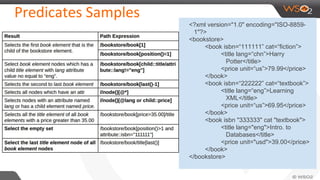
Predicates Samples
<?xml version="1.0" encoding="ISO-8859-
1"?>
<bookstore>
<book isbn=“111111” cat=“fiction”>
<title lang=“chn”>Harry
Potter</title>
<price unit=“us”>79.99</price>
</book>
<book isbn=“222222” cat=“textbook”>
<title lang=“eng”>Learning
XML</title>
<price unit=“us”>69.95</price>
</book>
<book isbn "333333" cat "textbook">
<title lang="eng">Intro. to
Databases</title>
<price unit="usd">39.00</price>
</book>
</bookstore>
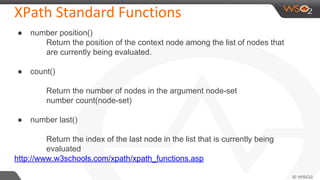
XPath Standard Functions
● number position()
Return the position of the context node among the list of nodes that
are currently being evaluated.
● count()
Return the number of nodes in the argument node-set
number count(node-set)
● number last()
Return the index of the last node in the list that is currently being
evaluated
http://www.w3schools.com/xpath/xpath_functions.asp
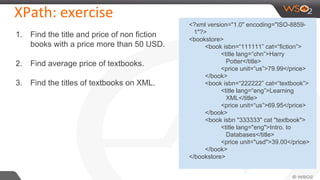
XPath: exercise
1. Find the title and price of non fiction
books with a price more than 50 USD.
2. Find average price of textbooks.
3. Find the titles of textbooks on XML.
<?xml version="1.0" encoding="ISO-8859-
1"?>
<bookstore>
<book isbn=“111111” cat=“fiction”>
<title lang=“chn”>Harry
Potter</title>
<price unit=“us”>79.99</price>
</book>
<book isbn=“222222” cat=“textbook”>
<title lang=“eng”>Learning
XML</title>
<price unit=“us”>69.95</price>
</book>
<book isbn "333333" cat "textbook">
<title lang="eng">Intro. to
Databases</title>
<price unit="usd">39.00</price>
</book>
</bookstore>
Answers
1. Find the title and price of non “COOKING” books with a price more than 25
USD.
/bookstore/book[attribute::category!="COOKING" and price > 25]/title/text() | /bookstore/book
[attribute::category!="COOKING" and price > 25]/price/text())
2. Find average price of “WEB” books.
sum(//book[attribute::category="WEB"]/price/text()) div count(//book[attribute::category="WEB"])
3. Find the titles of textbooks on XML.
//book[@category="textbook" and contains(title,"XML")]/title/text()
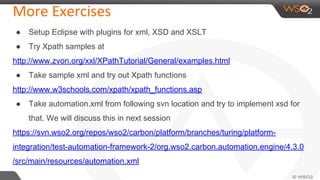
More Exercises
● Setup Eclipse with plugins for xml, XSD and XSLT
● Try Xpath samples at
http://www.zvon.org/xxl/XPathTutorial/General/examples.html
● Take sample xml and try out Xpath functions
http://www.w3schools.com/xpath/xpath_functions.asp
● Take automation.xml from following svn location and try to implement xsd for
that. We will discuss this in next session
https://svn.wso2.org/repos/wso2/carbon/platform/branches/turing/platform-
integration/test-automation-framework-2/org.wso2.carbon.automation.engine/4.3.0
/src/main/resources/automation.xml
Questions?
Contact us !

Querring xml with xpath

  • 1.
    Querying XML withXPATH Basics and understanding Malintha Adikari Software Engineer
  • 2.
    What is Xpath ●XPath is an XML query language. ● XPath is a building block for other XML ● XPath is a syntax for defining parts of an XML document ● XPath uses path expressions to navigate in XML documents ● XPath contains a library of standard functions ● XPath is a major element in XSLT
  • 3.
    Xpath is AllAbout ● Nodes ● element ● attribute ● text ● namespace ● processing-instruction ● comment ● document (root) nodes
  • 4.
    Relationship Of Nodes <bookstore> <book> <title>HarryPotter</title> <author>J K. Rowling</author> <year>2005</year> <price>29.99</price> </book> </bookstore>
  • 5.
    Relationship Of Nodes ●Parent: Each element and attribute has one parent. ● Children: Element nodes may have zero, one or more children. ● Siblings: Nodes that have the same parent. ● Ancestors: A node's parent, parent's parent, etc. ● Descendants: A node's children, children's children, etc. </bookstore> <book> <title>Harry Potter</title> <author>J K. Rowling</author> <year>2005</year> <price>29.99</price> </book> </bookstore>
  • 6.
    Basics -Slashes (/) ●A path that begins with a / represents an absolute path, starting from the top of the document ○ Example: /email/message/header/from ○ Note that even an absolute path can select more than one element ○ A slash by itself means “the whole document” ● A path that does not begin with a / represents a path starting from the current element ○ Example: header/from ● A path that begins with // can start from anywhere in the document ○ Example: //header/from selects every element from that is a child of an element header ○ This can be expensive, since it involves searching the entire document
  • 7.
    Basics -Brackets andlast() ● A number in brackets selects a particular matching child ○ Example: /library/book[1] selects the first book of the library ○ Example: //chapter/section[2] selects the second section of every chapter in the XML document ○ Example: //book/chapter[1]/section[2] ○ Only matching elements are counted; for example, if a book has both sections and exercises, the latter are ignored when counting sections ● The function last() in brackets selects the last matching child ○ Example: /library/book/chapter[last()] ● You can even do simple arithmetic ○ Example: /library/book/chapter[last()-1]
  • 8.
    Basics -Wild cards ●A star, or asterisk, is a "wild card“ -- it means "all the elements at this level" ○ Example: /library/book/chapter/* selects every child of every chapter of every book in the library ○ Example: //book/* selects every child of every book (chapters, tableOfContents, index, etc.) ○ Example: /*/*/*/paragraph selects every paragraph that has exactly three ancestors ○ Example: //* selects every element in the entire document
  • 9.
    Get This XML <?xmlversion="1.0" encoding="ISO-8859-1"?> <bookstore> <book isbn= “111111” cat=“fiction”> <title lang=“chn”>Harry Potter</title> <price unit=“us”>79.99</price> </book> <book isbn=“222222” cat=“textbook”> <title lang=“eng”>Learning XML</title> <price unit=“us”>69.95</price> </book> <book isbn "333333" cat "textbook"> <title lang="eng">Intro. to Databases</title> <price unit="usd">39.00</price> </book> </bookstore>
  • 10.
  • 11.
    Node Selection <?xml version="1.0"encoding="ISO-8859- 1"?> <bookstore> <book isbn= <book isbn= 111111 cat= fiction > “111111” cat=“fiction”> <title lang=“chn”>Harry Potter</title> <price unit=“us”>79.99</price> </book> <book isbn=“222222” cat=“textbook”> <title lang=“eng”>Learning XML</title> <price unit=“us”>69.95</price> </book> <book isbn "333333" cat "textbook"> <title lang="eng">Intro. to Databases</title> <price unit="usd">39.00</price> </book> </bookstore>
  • 12.
  • 13.
    Xpath Axes An axisdefines a node-set relative to the current node. • self‐‐the context node itself • child‐‐the children of the context node • descendant‐-all descendants (children+) • parent‐‐the parent (empty if at the root) • ancestor‐‐all ancestors from the parent to the root • descendant descendant‐or‐self ‐‐the union of descendant descendant and self • ancestor‐or‐self ‐‐the union of ancestor and self • following‐sibling‐‐siblings to the right • preceding‐sibling‐‐siblings to the left • following‐‐all following nodes in the document, excluding descendants • attribute‐‐the attributes of the context node
  • 14.
    Xpath Axes sample <?xmlversion="1.0" encoding="ISO-8859- 1"?> <bookstore> <book isbn= “111111 cat= “fiction”> <title lang=“chn”>Harry Potter</title> <price unit=“us”>79.99</price> </book> <book isbn=“222222” cat=“textbook”> <title lang=“eng”>Learning XML</title> <price unit=“us”>69.95</price> </book> <book isbn "333333" cat "textbook"> <title lang="eng">Intro. to Databases</title> <price unit="usd">39.00</price> </book> </bookstore>
  • 15.
  • 16.
    Predicates [position() op #],[last()] –op:=, !=, <, >, <=, >= –test position among siblings •[attribute::name [attribute::name op “value ]" –op: =, !=, <, >, <=, >= –test equality equality of an attribute attribute •[axis:nodeSelector] –test pattern
  • 17.
    Predicates Samples <?xml version="1.0"encoding="ISO-8859- 1"?> <bookstore> <book isbn=“111111” cat=“fiction”> <title lang=“chn”>Harry Potter</title> <price unit=“us”>79.99</price> </book> <book isbn=“222222” cat=“textbook”> <title lang=“eng”>Learning XML</title> <price unit=“us”>69.95</price> </book> <book isbn "333333" cat "textbook"> <title lang="eng">Intro. to Databases</title> <price unit="usd">39.00</price> </book> </bookstore>
  • 18.
    XPath Standard Functions ●number position() Return the position of the context node among the list of nodes that are currently being evaluated. ● count() Return the number of nodes in the argument node-set number count(node-set) ● number last() Return the index of the last node in the list that is currently being evaluated http://www.w3schools.com/xpath/xpath_functions.asp
  • 19.
    XPath: exercise 1. Findthe title and price of non fiction books with a price more than 50 USD. 2. Find average price of textbooks. 3. Find the titles of textbooks on XML. <?xml version="1.0" encoding="ISO-8859- 1"?> <bookstore> <book isbn=“111111” cat=“fiction”> <title lang=“chn”>Harry Potter</title> <price unit=“us”>79.99</price> </book> <book isbn=“222222” cat=“textbook”> <title lang=“eng”>Learning XML</title> <price unit=“us”>69.95</price> </book> <book isbn "333333" cat "textbook"> <title lang="eng">Intro. to Databases</title> <price unit="usd">39.00</price> </book> </bookstore>
  • 20.
    Answers 1. Find thetitle and price of non “COOKING” books with a price more than 25 USD. /bookstore/book[attribute::category!="COOKING" and price > 25]/title/text() | /bookstore/book [attribute::category!="COOKING" and price > 25]/price/text()) 2. Find average price of “WEB” books. sum(//book[attribute::category="WEB"]/price/text()) div count(//book[attribute::category="WEB"]) 3. Find the titles of textbooks on XML. //book[@category="textbook" and contains(title,"XML")]/title/text()
  • 21.
    More Exercises ● SetupEclipse with plugins for xml, XSD and XSLT ● Try Xpath samples at http://www.zvon.org/xxl/XPathTutorial/General/examples.html ● Take sample xml and try out Xpath functions http://www.w3schools.com/xpath/xpath_functions.asp ● Take automation.xml from following svn location and try to implement xsd for that. We will discuss this in next session https://svn.wso2.org/repos/wso2/carbon/platform/branches/turing/platform- integration/test-automation-framework-2/org.wso2.carbon.automation.engine/4.3.0 /src/main/resources/automation.xml
  • 22.
  • 23.