CONTENTS
1.WHAT IS DOCUMENT OBJECT MODEL ?
2.WHERE THE DOM CAME FROM ?
3.HOW THE WEBPAGE IS LOADED AND DISPLAYED?
3.1. THE REQUEST
3.2. THE RESPONSE
3.3. THE PARSING
3.4 THE BUILT
4.WHAT IS NODE ?
5.ADDING SOME TEXT TO A PAGE
6.BEST WAY TO THE GET ELEMENT
7.CONCLUSION
8.REFERENCES
2
What is Document Object Model ?
 Document Object Model (DOM), a programming interface specification
being developed by the World Wide Web Consortium (W3C).
 DOM is the browser’s internal programmatic representation of the
Webpage.
 Can be manipulated by language like JavaScript.
 Set of hierarchical collection of objects/elements.
3
WheretheDocumentObjectModelcamefrom?
"browser wars" of the late 1990s between Netscape Navigator
and Microsoft Internet Explorer.
1996 within Netscape Navigator 2.0
“DOM Level 0" or "Legacy DOM”
W3C in late 1998 - > 2000 introduce.. DOM Level 1 and 2.
2005, large parts of W3C DOM were well-supported
by common ECMAScript-enabled browsers
4
HOWTHEWEBPAGEISLOADEDANDDISPLAYED?
Technically there are four steps of a webpage being displayed
 Request
 Response
 Built
 Render
Each of these steps are often performed several times during a page load.
5
The Request
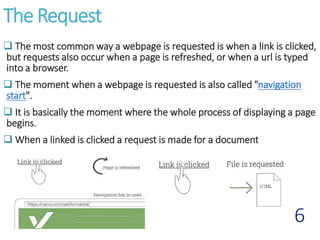
 The most common way a webpage is requested is when a link is clicked,
but requests also occur when a page is refreshed, or when a url is typed
into a browser.
 The moment when a webpage is requested is also called "navigation
start".
 It is basically the moment where the whole process of displaying a page
begins.
 When a linked is clicked a request is made for a document
6
The Response
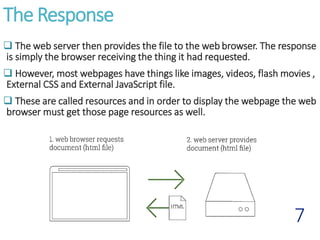
 The web server then provides the file to the web browser. The response
is simply the browser receiving the thing it had requested.
 However, most webpages have things like images, videos, flash movies ,
External CSS and External JavaScript file.
 These are called resources and in order to display the webpage the web
browser must get those page resources as well.
7
Parsing
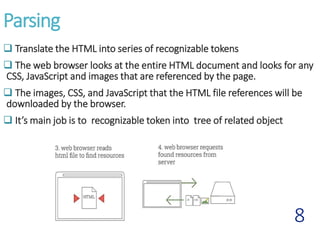
 Translate the HTML into series of recognizable tokens
 The web browser looks at the entire HTML document and looks for any
CSS, JavaScript and images that are referenced by the page.
 The images, CSS, and JavaScript that the HTML file references will be
downloaded by the browser.
 It’s main job is to recognizable token into tree of related object
8
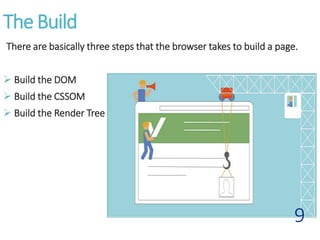
The Build
There are basically three steps that the browser takes to build a page.
 Build the DOM
 Build the CSSOM
 Build the Render Tree
9
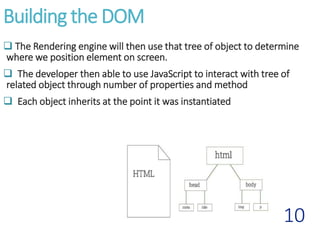
Building the DOM
 The Rendering engine will then use that tree of object to determine
where we position element on screen.
 The developer then able to use JavaScript to interact with tree of
related object through number of properties and method
 Each object inherits at the point it was instantiated
10
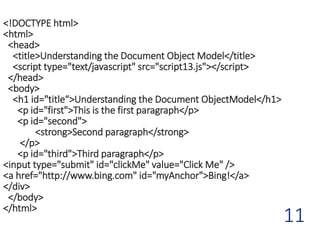
<!DOCTYPE html>
<html>
<head>
<title>Understanding the Document Object Model</title>
<script type="text/javascript" src="script13.js"></script>
</head>
<body>
<h1 id="title“>Understanding the Document ObjectModel</h1>
<p id="first">This is the first paragraph</p>
<p id="second">
<strong>Second paragraph</strong>
</p>
<p id="third">Third paragraph</p>
<input type="submit" id="clickMe" value="Click Me" />
<a href="http://www.bing.com" id="myAnchor">Bing!</a>
</div>
</body>
</html>
11
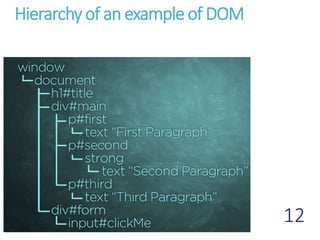
Hierarchyof an exampleof DOM
12
13
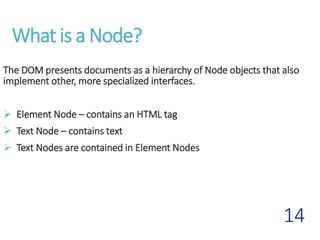
What is a Node?
The DOM presents documents as a hierarchy of Node objects that also
implement other, more specialized interfaces.
 Element Node – contains an HTML tag
 Text Node – contains text
 Text Nodes are contained in Element Nodes
14
Adding Some Text To A Page
 Create a new Element
[document.createElement(“p”)]
 Create a Text Node
[document.createTextNode(“Some text.”) ]
 Attach the New Text Node to the New Element
[newNode.appendChild(newText)]
 Find an Existing Element
[document.getElementById(“thisLocation”)]
15
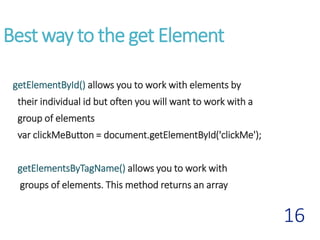
Best way to the get Element
getElementById() allows you to work with elements by
their individual id but often you will want to work with a
group of elements
var clickMeButton = document.getElementById('clickMe');
getElementsByTagName() allows you to work with
groups of elements. This method returns an array
16
Early Lifecycle of Web page
17
CONCLUSION
There's much more to the Document Object Model than what's been
covered here. Styles add a whole new dimension to content
presentation and events provide a means to make pages interactive with
the user. But these topics deserve their own discussion. The methods
provided to navigate it and manipulate different types of nodes. This will
give you a solid foundation for dealing with other features of the DOM
18
REFERENCES
1. https://en.wikipedia.org/wiki/Document_Object_Model
2. https://www.youtube.com/watch?v=SmE4OwHztCc
3. https://www.w3c.org/DOM/
4. https://varvy.com/pagespeed/display.html
19
20

Document Object Model

  • 2.
    CONTENTS 1.WHAT IS DOCUMENTOBJECT MODEL ? 2.WHERE THE DOM CAME FROM ? 3.HOW THE WEBPAGE IS LOADED AND DISPLAYED? 3.1. THE REQUEST 3.2. THE RESPONSE 3.3. THE PARSING 3.4 THE BUILT 4.WHAT IS NODE ? 5.ADDING SOME TEXT TO A PAGE 6.BEST WAY TO THE GET ELEMENT 7.CONCLUSION 8.REFERENCES 2
  • 3.
    What is DocumentObject Model ?  Document Object Model (DOM), a programming interface specification being developed by the World Wide Web Consortium (W3C).  DOM is the browser’s internal programmatic representation of the Webpage.  Can be manipulated by language like JavaScript.  Set of hierarchical collection of objects/elements. 3
  • 4.
    WheretheDocumentObjectModelcamefrom? "browser wars" ofthe late 1990s between Netscape Navigator and Microsoft Internet Explorer. 1996 within Netscape Navigator 2.0 “DOM Level 0" or "Legacy DOM” W3C in late 1998 - > 2000 introduce.. DOM Level 1 and 2. 2005, large parts of W3C DOM were well-supported by common ECMAScript-enabled browsers 4
  • 5.
    HOWTHEWEBPAGEISLOADEDANDDISPLAYED? Technically there arefour steps of a webpage being displayed  Request  Response  Built  Render Each of these steps are often performed several times during a page load. 5
  • 6.
    The Request  Themost common way a webpage is requested is when a link is clicked, but requests also occur when a page is refreshed, or when a url is typed into a browser.  The moment when a webpage is requested is also called "navigation start".  It is basically the moment where the whole process of displaying a page begins.  When a linked is clicked a request is made for a document 6
  • 7.
    The Response  Theweb server then provides the file to the web browser. The response is simply the browser receiving the thing it had requested.  However, most webpages have things like images, videos, flash movies , External CSS and External JavaScript file.  These are called resources and in order to display the webpage the web browser must get those page resources as well. 7
  • 8.
    Parsing  Translate theHTML into series of recognizable tokens  The web browser looks at the entire HTML document and looks for any CSS, JavaScript and images that are referenced by the page.  The images, CSS, and JavaScript that the HTML file references will be downloaded by the browser.  It’s main job is to recognizable token into tree of related object 8
  • 9.
    The Build There arebasically three steps that the browser takes to build a page.  Build the DOM  Build the CSSOM  Build the Render Tree 9
  • 10.
    Building the DOM The Rendering engine will then use that tree of object to determine where we position element on screen.  The developer then able to use JavaScript to interact with tree of related object through number of properties and method  Each object inherits at the point it was instantiated 10
  • 11.
    <!DOCTYPE html> <html> <head> <title>Understanding theDocument Object Model</title> <script type="text/javascript" src="script13.js"></script> </head> <body> <h1 id="title“>Understanding the Document ObjectModel</h1> <p id="first">This is the first paragraph</p> <p id="second"> <strong>Second paragraph</strong> </p> <p id="third">Third paragraph</p> <input type="submit" id="clickMe" value="Click Me" /> <a href="http://www.bing.com" id="myAnchor">Bing!</a> </div> </body> </html> 11
  • 12.
  • 13.
  • 14.
    What is aNode? The DOM presents documents as a hierarchy of Node objects that also implement other, more specialized interfaces.  Element Node – contains an HTML tag  Text Node – contains text  Text Nodes are contained in Element Nodes 14
  • 15.
    Adding Some TextTo A Page  Create a new Element [document.createElement(“p”)]  Create a Text Node [document.createTextNode(“Some text.”) ]  Attach the New Text Node to the New Element [newNode.appendChild(newText)]  Find an Existing Element [document.getElementById(“thisLocation”)] 15
  • 16.
    Best way tothe get Element getElementById() allows you to work with elements by their individual id but often you will want to work with a group of elements var clickMeButton = document.getElementById('clickMe'); getElementsByTagName() allows you to work with groups of elements. This method returns an array 16
  • 17.
    Early Lifecycle ofWeb page 17
  • 18.
    CONCLUSION There's much moreto the Document Object Model than what's been covered here. Styles add a whole new dimension to content presentation and events provide a means to make pages interactive with the user. But these topics deserve their own discussion. The methods provided to navigate it and manipulate different types of nodes. This will give you a solid foundation for dealing with other features of the DOM 18
  • 19.
  • 20.