XML

      Farag Zakaria
       ITI-JAVA 30
       FCI-CU 2007
Farag_cs2005@yahoo.com
Agenda
 Introduction
 XML vs. HTML
 XML basic rules
 XML overall structure & building blocks
 XML document validation
 XML related technologies.
 XML parsing (JAXP)
 JAXB
Introduction
 XML stands for eXtensible Markup Language.
 XML document describes the structure of data.
 XML has no mechanism to specify the format for
  presenting data to the user.(you specify your
  own tags and structure).
 XML document resides in its own file with an
  “.xml” extension.
 XML derived from SGML(Standard Generalized
  Markup Language).
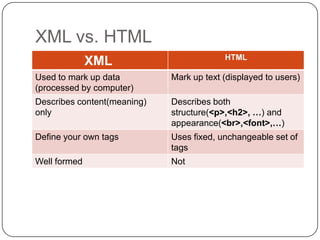
XML vs. HTML
                                          HTML
              XML
Used to mark up data         Mark up text (displayed to users)
(processed by computer)
Describes content(meaning)   Describes both
only                         structure(<p>,<h2>, …) and
                             appearance(<br>,<font>,…)
Define your own tags         Uses fixed, unchangeable set of
                             tags
Well formed                  Not
XML basic rules
 XML is case sensitive
 All start tags must have end tags.
 Elements must be properly nested.
 XML declaration is the first statement.
 Every document must contain a root element.
 Attribute values must have quotation marks.
   <?xml version=“1.0”?>
 Certain characters are reserved for parsing ( as
  <,>,&,’,”)
 Documents that follow these basic rules are well-
  formed xml documents
XML overall structure & building
blocks
 Document may start with one or more processing
  instructions(PI) or directives
  - <?xml version=“1.0”?>
  - PI provides application-specific document
  information
 After PI there must be one root element containing all
  rest xml.
 XML building blocks
  1.   Element <book name="Core JAVA"></book>
  2.   Tags <book name="Core JAVA"> </book>
  3.   Attributes <book name="Core JAVA"></book>
  4.   Entities (special characters)
             <today>Sunny &amp; hot</today>
  5.   Character data
             <today>Sunny &amp; hot</today>
  6.   Empty element has no body <book name=“Core JAVA”
       />
XML document
<?xml version="1.0" encoding="UTF-8"?> PI
<library> Root Element
   <book name="Core JAVA"> Element
        <author>Cornel</author> Sub Element
        <chapters>12</chapters>
        <price>40$</price>
   </book>
   <book name="Core JSF"> Element
        <author>Cornel</author>
        <chapters>8</chapters>
        <price>35$</price>
   </book>
</library>
XML document tree
XML document validation
 DTD (Document Type Definition)
  - Defines the structure constraints for XML
  documents.
  - Documents that conform to DTD are Valid
  documents.
 XML Schema
  - Same as DTD, more powerful because it
  includes facilities
     to specify the data type of elements and it is
  based on
     XML.
  - Documents that conform to Schema are
  Schema valid
XML document validation(DTD)
 Can be categorized as
 1. Internal subsets
    Elements declarations inside the document.
    <!DOCTYPE --DTD-Instructions--        >
 2. External subsets
    Elements declarations are outside the
 document in file
     with .dtd extension
     <!DOCTYPE allbooks SYSTEM "book.dtd" >
 3. External subsets in Internet
 <!DOCTYPE allbooks public “URL/book.dtd" >
XML document validation(DTD)
(cont.)
 DTD file
  <!ELEMENT book ( name , author ) >
  <!ELEMENT name ( #PCDATA )>
  <!ELEMENT author ( #PCDATA )>
  <!ATTLIST book sellto CDATA #REQUIRED>
 XML file
  <!DOCTYPE allbooks SYSTEM "book.dtd" >
  <allbooks>
        <book sellto=“Egypt”>
              <name>Core JAVA</name>
              <author>Cornell</author>
        </book>
  </allbooks>
DTD limitations
 Not written in XML syntax, DTD has its own
    syntax. So it is hard to learn.
   Certain number of element repetitions can’t be
    achieved.
   XML document can reference only 1 DTD.
   Do not support namespaces.
   No constraints on character data.
    - PCDATA, CDATA allows any permutations of
    characters.
    - But if we need to limit element value to int 
    Not in DTD
      <chapters>8</chapters>  required
XML doc. validation(XML
Schema)
 Provide more powerful and flexible schema
  language than DTD.
 It has 44 enhanced data types.
 You can create your own data types (Complex
  Data types).
 Written in xml.
XML Schema Data types
 Simple type
  1. Don’t have sub-element.
  2. Don’t have attribute
  Ex. <element name="price" type="integer" />
 Complex type(your own data type)
  either have one of the following or all of them.
  1. sub-element.
  2. attributes.
Example (Schema)
<complexType name="book">
   <sequence>
          <element name="name" type="string" />
          <element name="chapters" type="integer" />
          <element name="price" type="integer" />
   </sequence>
   <attribute name="shipto" type="string" use="required"/>
</complexType>
<complexType name="library">
   <sequence>
          <element name="book" type="tns:book" minOccurs="1"
   maxOccurs="2"/>
   </sequence>
</complexType>
<element name="library" type="tns:library"></element>
Example(XML Document)
<tns:library
  xmlns:tns="http://www.example.org/bookschema"

  xmlns:xsi="http://www.w3.org/2001/XMLSchema-
  instance"
     xsi:schemaLocation="bookschema.xsd ">
 <tns:book shipto="Egypt">
   <tns:name>Core Java</tns:name>
   <tns:chapters>12</tns:chapters>
   <tns:price>35</tns:price>
 </tns:book>
</tns:library>
XML related technologies
 XPath
 XSLT (eXtensible Stylesheet Language
 Transformations)
 Used to translate from one form of XML to
 another.
 XPointer
  identify the particular point in or part of an XML
  document that an XLink links to.
 XQuery
XML related technologies(XPath)
 XPath is a W3C Standard.
 Expression language for locating particular parts of
  XML documents.
 XPath is a major element in XSLT
 XQuery and XPointer are both built on XPath
  expressions.
 XML documents are viewed as a tree of nodes.
  1. The root element node.
  2. Element nodes.
  3. Text nodes.
  4. Attribute nodes.
  5. Comment nodes.
  6. Processing Instruction nodes.
  7. Namespace nodes.
XPath (cont.)
 XPath expression evaluates to one of four types
  1. Node set
    collection of nodes returned from location path
  expressions
  2. Boolean
  3. Number
  4. String
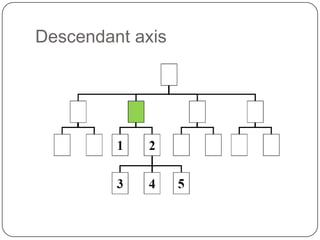
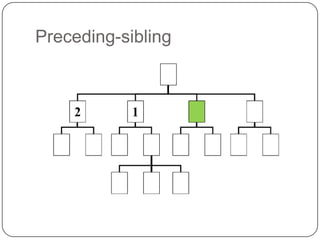
 Location path expressions
  - Form is Axis:: nodetest [predicate]
  - Each location step composed of
    1. Axis        defines a Node-Set relative to the
  current node
    2. Node test  Consists of the Node name OR
  Node type
    3. Predicate  optional and used to filter the node-
  set.
Ancester-or-self axis
Parent axis
Child axis
Ancestor axis
Descendant axis
Following
Following-sibling
Preceding
Preceding-sibling
XPath (cont.) Node test
 Consists of the Node name OR Node type
  Ex. Ex: “Element, attribute --- etc”
 Node test by type
  1. node()       selects all nodes regardless of
  their type.
  2. text()      selects all text nodes.
  3. comment()  selects all comment nodes.
  4. processing-instruction()  Selects all
  processing-
                                   instruction nodes
XPath (cont.) Node test
<tns:book shipto="Egypt">
   <tns:name>Core Java</tns:name>
   <tns:chapters>12</tns:chapters>
   <tns:price>35</tns:price>
 </tns:book>
 If you are at the root element book
  Child::*  selects 3 elements name, chapters,
  price
 If you are at chapters element
  child::text()  selects 3 elements
    1. text node containing text before 12
    2. text node with the value 12
    3. text node containing text after 12
XPath (cont.) predicates
 Used to filter the node-set.
 Used to find a specific node or a node that
  contains a specific value.
 They are always embedded in square brackets.
 Predicate types.
  1. Numeric predicates.
  2. Boolean predicates.
  3. String predicates.
  4. Node-set predicates.
XPath (cont.) predicates
 Numeric predicates
  (+,-,*, div, mod) and the following functions
  ceiling(), floor(), round(), sum()
  /book/name[1]  selects the name of the first book.
 Boolean predicates
  all of us know Boolean operators
  /book[price < 40]  selects all books whose price is less
                             than 40
 String predicates  Strings in XPath is made up of
  Unicode characters.
  Work with = and != operators
  starts-with(str1, str2), contains(str1,str2), string-length(str),
  substring(str, offset, length), concat(str1, str2,…..)
 The previous predicates cannot be used in match pattern
  of xsl:template
XPath (cont.) predicates
 Node-set predicates.
 last()  the last position of the current node in
 the node-set
 position()  position of the current node in the
 node-set.
 count()  number of nodes in node-set
XPath Abbreviated location path
Abbreviation    Expanded Form
@Name           Attribute::Name
//              /descendant-or-self::Node()/
.               self::node()
..              parent::node()
*               Matches any element
@*              Matches any attribute element
Node()          Matches any node of any kind
XML related technologies(XSLT)
 W3C standard for XML transformation
 Made of two parts.
  1. XSL Transformation (XSLT).
  2. XSL Formatting Objects (XSL-FO).
 Transforms XML document into
  1. Another XML Document (XHTML or WML).
  2. HTML document.
  3. Text
XML related technologies(XSLT)
 template
 value-of
 apply-templates
 for-each
 if
 when, choose, otherwise
 sort
 filtering
XML related technologies(XSLT)
 template
  It is a container for a set of rules to apply actions
  against the source tree to produce a result tree
 General form
  <xsl:template match = “node name”
                      [name = “template name”] >
     <!– action -->
  </xsl:template>
 match uses XPath expression to match elements
XML related technologies(XSLT)
 value-of
  Used inside template element to extract value
  from the source tree and insert it in the result
  tree.
 General form
  <xsl:value-of select=“node-Name”/>
XML related technologies(XSLT)
 apply-templates
  Executes templates based on the current context
  and passes control over to the other template.
 The apply-template has a select attribute, which
  tells the XSLT processor which nodes to apply
  templates to.
 If there is no select attribute  the XSLT
  processor collects all the children of the current
  node and applies template to them.
XML related technologies(XSLT)
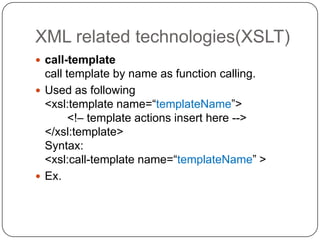
 call-template
  call template by name as function calling.
 Used as following
  <xsl:template name=“templateName”>
        <!– template actions insert here -->
  </xsl:template>
  Syntax:
  <xsl:call-template name=“templateName” >
 Ex.
XML related technologies(XSLT)
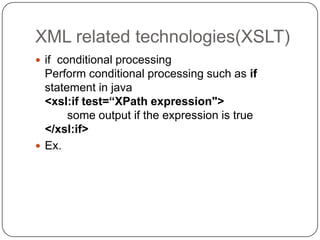
 if conditional processing
  Perform conditional processing such as if
  statement in java
  <xsl:if test=“XPath expression">
       some output if the expression is true
  </xsl:if>
 Ex.
XML related technologies(XSLT)
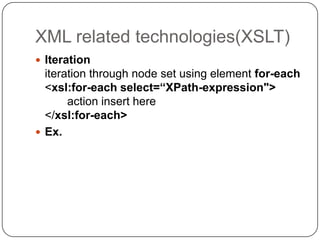
 Iteration
  iteration through node set using element for-each
  <xsl:for-each select=“XPath-expression">
       action insert here
  </xsl:for-each>
 Ex.
XML related technologies(XSLT)
 Sorting
  <xsl:for-each select=“XPath-expression">
      <xsl:sort select=“Node or attribute“
                    order=“”/>
  </xsl:for-each>
  value of attribute order can be
  ascending A-Z “default”
  descending Z-A
 Ex.
XML related technologies(XSLT)
 Choose
 - perform conditional processing
 - has child elements when and otherwise
 Ex.
 <xsl:choose>
       <xsl:when test="expression">
           ... some output ...
       </xsl:when>
       <xsl:when test="expression">
                 ... some output ...
       </xsl:when>
       -----------------------
       <xsl:otherwise>
                 ... some output ....
       </xsl:otherwise>
 </xsl:choose>
XML related technologies(XSLT)
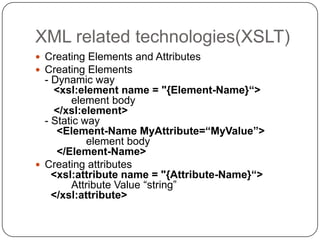
 Creating Elements and Attributes
 Creating Elements
  - Dynamic way
    <xsl:element name = "{Element-Name}“>
        element body
    </xsl:element>
  - Static way
     <Element-Name MyAttribute=“MyValue”>
            element body
     </Element-Name>
 Creating attributes
    <xsl:attribute name = "{Attribute-Name}“>
        Attribute Value “string”
    </xsl:attribute>
JAXP

Xml session

  • 1.
    XML Farag Zakaria ITI-JAVA 30 FCI-CU 2007 Farag_cs2005@yahoo.com
  • 2.
    Agenda  Introduction  XMLvs. HTML  XML basic rules  XML overall structure & building blocks  XML document validation  XML related technologies.  XML parsing (JAXP)  JAXB
  • 3.
    Introduction  XML standsfor eXtensible Markup Language.  XML document describes the structure of data.  XML has no mechanism to specify the format for presenting data to the user.(you specify your own tags and structure).  XML document resides in its own file with an “.xml” extension.  XML derived from SGML(Standard Generalized Markup Language).
  • 4.
    XML vs. HTML HTML XML Used to mark up data Mark up text (displayed to users) (processed by computer) Describes content(meaning) Describes both only structure(<p>,<h2>, …) and appearance(<br>,<font>,…) Define your own tags Uses fixed, unchangeable set of tags Well formed Not
  • 5.
    XML basic rules XML is case sensitive  All start tags must have end tags.  Elements must be properly nested.  XML declaration is the first statement.  Every document must contain a root element.  Attribute values must have quotation marks. <?xml version=“1.0”?>  Certain characters are reserved for parsing ( as <,>,&,’,”)  Documents that follow these basic rules are well- formed xml documents
  • 6.
    XML overall structure& building blocks  Document may start with one or more processing instructions(PI) or directives - <?xml version=“1.0”?> - PI provides application-specific document information  After PI there must be one root element containing all rest xml.  XML building blocks 1. Element <book name="Core JAVA"></book> 2. Tags <book name="Core JAVA"> </book> 3. Attributes <book name="Core JAVA"></book> 4. Entities (special characters) <today>Sunny &amp; hot</today> 5. Character data <today>Sunny &amp; hot</today> 6. Empty element has no body <book name=“Core JAVA” />
  • 7.
    XML document <?xml version="1.0"encoding="UTF-8"?> PI <library> Root Element <book name="Core JAVA"> Element <author>Cornel</author> Sub Element <chapters>12</chapters> <price>40$</price> </book> <book name="Core JSF"> Element <author>Cornel</author> <chapters>8</chapters> <price>35$</price> </book> </library>
  • 8.
  • 9.
    XML document validation DTD (Document Type Definition) - Defines the structure constraints for XML documents. - Documents that conform to DTD are Valid documents.  XML Schema - Same as DTD, more powerful because it includes facilities to specify the data type of elements and it is based on XML. - Documents that conform to Schema are Schema valid
  • 10.
    XML document validation(DTD) Can be categorized as 1. Internal subsets Elements declarations inside the document. <!DOCTYPE --DTD-Instructions-- > 2. External subsets Elements declarations are outside the document in file with .dtd extension <!DOCTYPE allbooks SYSTEM "book.dtd" > 3. External subsets in Internet <!DOCTYPE allbooks public “URL/book.dtd" >
  • 11.
    XML document validation(DTD) (cont.) DTD file <!ELEMENT book ( name , author ) > <!ELEMENT name ( #PCDATA )> <!ELEMENT author ( #PCDATA )> <!ATTLIST book sellto CDATA #REQUIRED>  XML file <!DOCTYPE allbooks SYSTEM "book.dtd" > <allbooks> <book sellto=“Egypt”> <name>Core JAVA</name> <author>Cornell</author> </book> </allbooks>
  • 12.
    DTD limitations  Notwritten in XML syntax, DTD has its own syntax. So it is hard to learn.  Certain number of element repetitions can’t be achieved.  XML document can reference only 1 DTD.  Do not support namespaces.  No constraints on character data. - PCDATA, CDATA allows any permutations of characters. - But if we need to limit element value to int  Not in DTD <chapters>8</chapters>  required
  • 13.
    XML doc. validation(XML Schema) Provide more powerful and flexible schema language than DTD.  It has 44 enhanced data types.  You can create your own data types (Complex Data types).  Written in xml.
  • 14.
    XML Schema Datatypes  Simple type 1. Don’t have sub-element. 2. Don’t have attribute Ex. <element name="price" type="integer" />  Complex type(your own data type) either have one of the following or all of them. 1. sub-element. 2. attributes.
  • 15.
    Example (Schema) <complexType name="book"> <sequence> <element name="name" type="string" /> <element name="chapters" type="integer" /> <element name="price" type="integer" /> </sequence> <attribute name="shipto" type="string" use="required"/> </complexType> <complexType name="library"> <sequence> <element name="book" type="tns:book" minOccurs="1" maxOccurs="2"/> </sequence> </complexType> <element name="library" type="tns:library"></element>
  • 16.
    Example(XML Document) <tns:library xmlns:tns="http://www.example.org/bookschema" xmlns:xsi="http://www.w3.org/2001/XMLSchema- instance" xsi:schemaLocation="bookschema.xsd "> <tns:book shipto="Egypt"> <tns:name>Core Java</tns:name> <tns:chapters>12</tns:chapters> <tns:price>35</tns:price> </tns:book> </tns:library>
  • 17.
    XML related technologies XPath  XSLT (eXtensible Stylesheet Language Transformations) Used to translate from one form of XML to another.  XPointer identify the particular point in or part of an XML document that an XLink links to.  XQuery
  • 18.
    XML related technologies(XPath) XPath is a W3C Standard.  Expression language for locating particular parts of XML documents.  XPath is a major element in XSLT  XQuery and XPointer are both built on XPath expressions.  XML documents are viewed as a tree of nodes. 1. The root element node. 2. Element nodes. 3. Text nodes. 4. Attribute nodes. 5. Comment nodes. 6. Processing Instruction nodes. 7. Namespace nodes.
  • 19.
    XPath (cont.)  XPathexpression evaluates to one of four types 1. Node set collection of nodes returned from location path expressions 2. Boolean 3. Number 4. String  Location path expressions - Form is Axis:: nodetest [predicate] - Each location step composed of 1. Axis  defines a Node-Set relative to the current node 2. Node test  Consists of the Node name OR Node type 3. Predicate  optional and used to filter the node- set.
  • 20.
  • 21.
  • 22.
  • 23.
  • 24.
  • 25.
  • 26.
  • 27.
  • 28.
  • 29.
    XPath (cont.) Nodetest  Consists of the Node name OR Node type Ex. Ex: “Element, attribute --- etc”  Node test by type 1. node()  selects all nodes regardless of their type. 2. text()  selects all text nodes. 3. comment()  selects all comment nodes. 4. processing-instruction()  Selects all processing- instruction nodes
  • 30.
    XPath (cont.) Nodetest <tns:book shipto="Egypt"> <tns:name>Core Java</tns:name> <tns:chapters>12</tns:chapters> <tns:price>35</tns:price> </tns:book>  If you are at the root element book Child::*  selects 3 elements name, chapters, price  If you are at chapters element child::text()  selects 3 elements 1. text node containing text before 12 2. text node with the value 12 3. text node containing text after 12
  • 31.
    XPath (cont.) predicates Used to filter the node-set.  Used to find a specific node or a node that contains a specific value.  They are always embedded in square brackets.  Predicate types. 1. Numeric predicates. 2. Boolean predicates. 3. String predicates. 4. Node-set predicates.
  • 32.
    XPath (cont.) predicates Numeric predicates (+,-,*, div, mod) and the following functions ceiling(), floor(), round(), sum() /book/name[1]  selects the name of the first book.  Boolean predicates all of us know Boolean operators /book[price < 40]  selects all books whose price is less than 40  String predicates  Strings in XPath is made up of Unicode characters. Work with = and != operators starts-with(str1, str2), contains(str1,str2), string-length(str), substring(str, offset, length), concat(str1, str2,…..)  The previous predicates cannot be used in match pattern of xsl:template
  • 33.
    XPath (cont.) predicates Node-set predicates. last()  the last position of the current node in the node-set position()  position of the current node in the node-set. count()  number of nodes in node-set
  • 34.
    XPath Abbreviated locationpath Abbreviation Expanded Form @Name Attribute::Name // /descendant-or-self::Node()/ . self::node() .. parent::node() * Matches any element @* Matches any attribute element Node() Matches any node of any kind
  • 35.
    XML related technologies(XSLT) W3C standard for XML transformation  Made of two parts. 1. XSL Transformation (XSLT). 2. XSL Formatting Objects (XSL-FO).  Transforms XML document into 1. Another XML Document (XHTML or WML). 2. HTML document. 3. Text
  • 36.
  • 37.
    XML related technologies(XSLT) template  value-of  apply-templates  for-each  if  when, choose, otherwise  sort  filtering
  • 38.
    XML related technologies(XSLT) template It is a container for a set of rules to apply actions against the source tree to produce a result tree  General form <xsl:template match = “node name” [name = “template name”] > <!– action --> </xsl:template>  match uses XPath expression to match elements
  • 39.
    XML related technologies(XSLT) value-of Used inside template element to extract value from the source tree and insert it in the result tree.  General form <xsl:value-of select=“node-Name”/>
  • 40.
    XML related technologies(XSLT) apply-templates Executes templates based on the current context and passes control over to the other template.  The apply-template has a select attribute, which tells the XSLT processor which nodes to apply templates to.  If there is no select attribute  the XSLT processor collects all the children of the current node and applies template to them.
  • 41.
    XML related technologies(XSLT) call-template call template by name as function calling.  Used as following <xsl:template name=“templateName”> <!– template actions insert here --> </xsl:template> Syntax: <xsl:call-template name=“templateName” >  Ex.
  • 42.
    XML related technologies(XSLT) if conditional processing Perform conditional processing such as if statement in java <xsl:if test=“XPath expression"> some output if the expression is true </xsl:if>  Ex.
  • 43.
    XML related technologies(XSLT) Iteration iteration through node set using element for-each <xsl:for-each select=“XPath-expression"> action insert here </xsl:for-each>  Ex.
  • 44.
    XML related technologies(XSLT) Sorting <xsl:for-each select=“XPath-expression"> <xsl:sort select=“Node or attribute“ order=“”/> </xsl:for-each> value of attribute order can be ascending A-Z “default” descending Z-A  Ex.
  • 45.
    XML related technologies(XSLT) Choose - perform conditional processing - has child elements when and otherwise Ex. <xsl:choose> <xsl:when test="expression"> ... some output ... </xsl:when> <xsl:when test="expression"> ... some output ... </xsl:when> ----------------------- <xsl:otherwise> ... some output .... </xsl:otherwise> </xsl:choose>
  • 46.
    XML related technologies(XSLT) Creating Elements and Attributes  Creating Elements - Dynamic way <xsl:element name = "{Element-Name}“> element body </xsl:element> - Static way <Element-Name MyAttribute=“MyValue”> element body </Element-Name>  Creating attributes <xsl:attribute name = "{Attribute-Name}“> Attribute Value “string” </xsl:attribute>
  • 47.