
XPath Anitha Reddy
XPath XPath is an expression language used to: Find nodes and attributes ( location paths ) in the XML file Test Boolean conditions Manipulate strings Perform numerical calculations
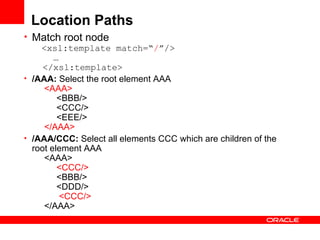
Location Paths Match root node   <xsl:template match=“ / ”/>   …   </xsl:template> /AAA:  Select the root element AAA        <AAA>             <BBB/>            <CCC/>            <EEE/>        </AAA>   /AAA/CCC:  Select all elements CCC which are children of the root element AAA       <AAA>             <CCC/>             <BBB/>            <DDD/>              <CCC/>        </AAA>
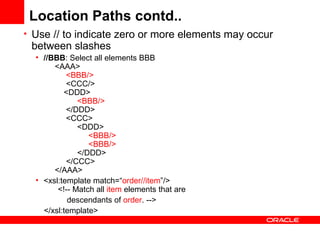
Location Paths contd.. Use // to indicate zero or more elements may occur between slashes //BBB : Select all elements BBB       <AAA>             <BBB/>             <CCC/>           <DDD>                  <BBB/>            </DDD>            <CCC>                 <DDD>                       <BBB/>                      <BBB/>                  </DDD>            </CCC>       </AAA>  <xsl:template match=“ order//item ”/>  <!-- Match all  item  elements that are   descendants of  order . --> </xsl:template>
Location Paths contd.. Match a specific element Use […] as a predicate filter to select a particular element /AAA/BBB[1] : Select the first BBB child of element AAA        <AAA>             <BBB/>             <BBB/>            <BBB/>            <BBB/>       </AAA>   / AAA/BBB[last()] :   Select the last BBB child of element AAA    <AAA>              <BBB/>            <BBB/>             <BBB/> </AAA>
Location Paths contd.. Match a specific attribute:  Use @ attribute  to select a particular attribute //BBB[@name] : Select BBB elements which have attribute name       <AAA>            <BBB id = &quot;b1&quot;/>            <BBB id = &quot;b2&quot;/>            < BBB  name = &quot;bbb&quot;/>            <BBB/>       </AAA>   //BBB[not(@*)] : Select BBB elements without an attribute       <AAA>            <BBB id = &quot;b1&quot;/>            <BBB name = &quot;bbb&quot;/>             <BBB/>        </AAA>  //BBB[@id='b1'] : Select BBB elements which have attribute name with value 'b1'       <AAA>            < BBB  id = &quot;b1&quot;/>            <BBB name = &quot; bbb &quot;/>       </AAA>
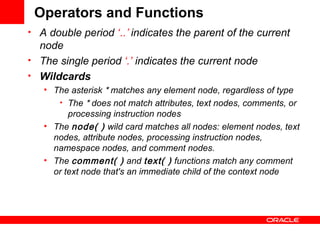
Operators and Functions A double period  ‘ ..’  indicates the parent of the current node  The single period  ‘.’  indicates the current node  Wildcards The asterisk  *  matches any element node, regardless of type The  *  does not match attributes, text nodes, comments, or processing instruction nodes  The  node( )  wild card matches all nodes: element nodes, text nodes, attribute nodes, processing instruction nodes, namespace nodes, and comment nodes.  The  comment( )  and  text( )  functions match any comment or text node that's an immediate child of the context node
Functions A union operator,  &quot;|&quot; , which forms the union of two node-sets.  <xsl:template match=“person[projectName=‘CGBU’] | person[ManagerName=‘Arpit’] ”/> Boolean operators &quot;and&quot; and &quot;or&quot; can be used in any boolean checks (and  intersection ) <xsl:value-of select=“employee[organization=‘Oracle’ and University=‘BITS’]/name ”> not(boolean exprsn)  negates any boolean expression. Node Set Functions position( )   function   returns the current node's position in the context node list as a number   last( )   function returns the number of nodes in the context node set, which is the same as the position of the last node in the set  The  count( )  function returns the number of nodes in its node set argument (rather than in the context node list)
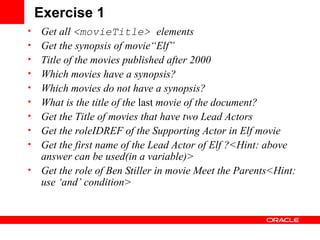
Exercise 1 Get all  <movieTitle>  elements Get the synopsis of movie“ Elf ” Title of the movies published after 2000 Which movies have a synopsis? Which movies do not have a synopsis? What is the title of the  last  movie of the document? Get the Title of movies that have two Lead Actors Get the roleIDREF of the Supporting Actor in Elf movie Get the first name of the Lead Actor of Elf ?<Hint: above answer can be used(in a variable)> Get the role of  Ben   Stiller  in movie  Meet the Parents<Hint: use ‘and’ condition>
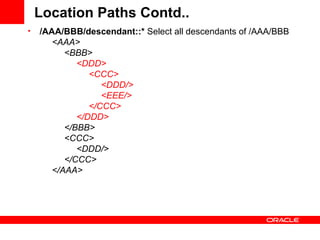
Location Paths Contd.. /AAA/BBB/descendant::*  Select all descendants of /AAA/BBB        <AAA>            <BBB>                  <DDD>                      <CCC>                           <DDD/>                           <EEE/>                      </CCC>                 </DDD>            </BBB>            <CCC>                 <DDD/>            </CCC>       </AAA>
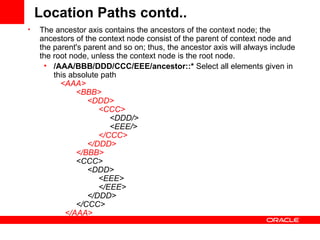
Location Paths contd.. The ancestor axis contains the ancestors of the context node; the ancestors of the context node consist of the parent of context node and the parent's parent and so on; thus, the ancestor axis will always include the root node, unless the context node is the root node.  /AAA/BBB/DDD/CCC/EEE/ancestor::*  Select all elements given in this absolute path      <AAA>            <BBB>                 <DDD>                      <CCC>                           <DDD/>                           <EEE/>                       </CCC>                 </DDD>            </BBB>            <CCC>                 <DDD>                      <EEE>                      </EEE>                 </DDD>            </CCC>        </AAA>
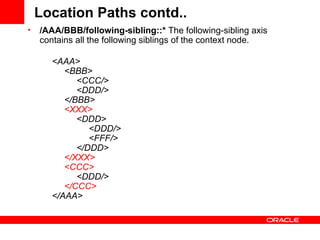
Location Paths contd.. /AAA/BBB/following-sibling::*  The following-sibling axis contains all the following siblings of the context node.        <AAA>            <BBB>                 <CCC/>                 <DDD/>            </BBB>             <XXX>                  <DDD>                      <DDD/>                      <FFF/>                </DDD>             </XXX>              <CCC>                  <DDD/>             </CCC>        </AAA>
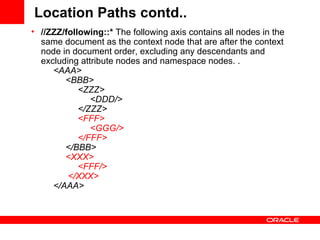
Location Paths contd.. //ZZZ/following::*  The following axis contains all nodes in the same document as the context node that are after the context node in document order, excluding any descendants and excluding attribute nodes and namespace nodes. .        <AAA>            <BBB>                 <ZZZ>                      <DDD/>                                    </ZZZ>                  <FFF>                      <GGG/>                 </FFF>             </BBB>             <XXX>                 <FFF/>             </XXX>                </AAA>
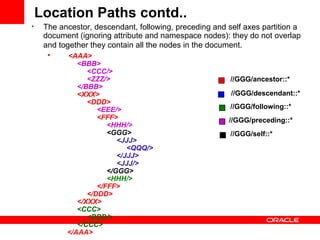
The ancestor, descendant, following, preceding and self axes partition a document (ignoring attribute and namespace nodes): they do not overlap and together they contain all the nodes in the document.          <AAA>              <BBB>                 <CCC/>                 <ZZZ/>            </BBB>              <XXX>                 <DDD>                       <EEE/>                        <FFF>                             <HHH/>                            <GGG>                                  <JJJ>                                     <QQQ/>                                </JJJ>                                <JJJ/>                            </GGG>                            <HHH/>                        </FFF>                 </DDD>            </XXX>              <CCC>                 <DDD/>            </CCC>        </AAA>   Location Paths contd.. //GGG/ancestor::*   //GGG/descendant::*  //GGG/following::*  //GGG/preceding::*  //GGG/self::*
Xpath Functions name()  returns name of the element  //*[name()='BBB']:  Select all elements with name BBB, equivalent with //BBB  starts-with(arg1,arg2)  function returns true if the first argument string starts with the second argument string //*[starts-with(name(),'B')]:  Select all elements name of which starts with letter B  Contains(arg1,arg2)  function returns true if the first argument string contains the second argument string //*[contains(name(),'C')]:  Select all elements name of which contain letter C  String-length(arg1) function returns the number of characters in the string //*[string-length(name()) = 3] Select elements with three-letter name        <AAA>            <Q/>            <SSSS/>            <BB/>             <CCC/>             <DDDDDDDD/>            <EEEE/>        </AAA>
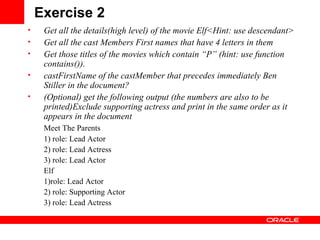
Exercise 2 Get all the details(high level) of the movie Elf<Hint: use descendant> Get all the cast Members First names that have 4 letters in them Get those titles of the movies which contain “P” (hint: use function contains()). castFirstName of the castMember that   precedes immediately Ben Stiller in the document? (Optional) get the following output (the numbers are also to be printed)Exclude supporting actress and print in the same order as it appears in the document Meet The Parents 1) role: Lead Actor 2) role: Lead Actress 3) role: Lead Actor Elf 1)role: Lead Actor 2) role: Supporting Actor 3) role: Lead Actress
References Xpath-  http://www.zvon.org/xxl/XPathTutorial/Output/example1.html XMLSpy Tutorial http://www. altova .com/manual2008/ XMLSpy / spyenterprise /index.html? xmlspytutorial . htm Exercises http://pierre.senellart.com/wdmd/chap-xpath.pdf Good:  http://saxon.sourceforge.net/saxon6.5.3/expressions.html XML: http://en.wikibooks.org/wiki/XPath_%28XML%29
A Q &

X Path

  • 1.
  • 2.
    XPath XPath isan expression language used to: Find nodes and attributes ( location paths ) in the XML file Test Boolean conditions Manipulate strings Perform numerical calculations
  • 3.
    Location Paths Matchroot node <xsl:template match=“ / ”/> … </xsl:template> /AAA: Select the root element AAA       <AAA>           <BBB/>           <CCC/>           <EEE/>       </AAA> /AAA/CCC: Select all elements CCC which are children of the root element AAA      <AAA>            <CCC/>           <BBB/>           <DDD/>             <CCC/>      </AAA>
  • 4.
    Location Paths contd..Use // to indicate zero or more elements may occur between slashes //BBB : Select all elements BBB      <AAA>            <BBB/>           <CCC/>          <DDD>                 <BBB/>           </DDD>           <CCC>                <DDD>                      <BBB/>                     <BBB/>                </DDD>           </CCC>      </AAA> <xsl:template match=“ order//item ”/> <!-- Match all item elements that are descendants of order . --> </xsl:template>
  • 5.
    Location Paths contd..Match a specific element Use […] as a predicate filter to select a particular element /AAA/BBB[1] : Select the first BBB child of element AAA       <AAA>            <BBB/>           <BBB/>           <BBB/>           <BBB/>      </AAA> / AAA/BBB[last()] : Select the last BBB child of element AAA <AAA>             <BBB/>           <BBB/>            <BBB/> </AAA>
  • 6.
    Location Paths contd..Match a specific attribute: Use @ attribute to select a particular attribute //BBB[@name] : Select BBB elements which have attribute name      <AAA>           <BBB id = &quot;b1&quot;/>           <BBB id = &quot;b2&quot;/>           < BBB name = &quot;bbb&quot;/>           <BBB/>      </AAA> //BBB[not(@*)] : Select BBB elements without an attribute      <AAA>           <BBB id = &quot;b1&quot;/>           <BBB name = &quot;bbb&quot;/>            <BBB/>      </AAA> //BBB[@id='b1'] : Select BBB elements which have attribute name with value 'b1'      <AAA>           < BBB id = &quot;b1&quot;/>           <BBB name = &quot; bbb &quot;/>      </AAA>
  • 7.
    Operators and FunctionsA double period ‘ ..’ indicates the parent of the current node The single period ‘.’ indicates the current node Wildcards The asterisk * matches any element node, regardless of type The * does not match attributes, text nodes, comments, or processing instruction nodes The node( ) wild card matches all nodes: element nodes, text nodes, attribute nodes, processing instruction nodes, namespace nodes, and comment nodes. The comment( ) and text( ) functions match any comment or text node that's an immediate child of the context node
  • 8.
    Functions A unionoperator, &quot;|&quot; , which forms the union of two node-sets. <xsl:template match=“person[projectName=‘CGBU’] | person[ManagerName=‘Arpit’] ”/> Boolean operators &quot;and&quot; and &quot;or&quot; can be used in any boolean checks (and  intersection ) <xsl:value-of select=“employee[organization=‘Oracle’ and University=‘BITS’]/name ”> not(boolean exprsn)  negates any boolean expression. Node Set Functions position( ) function returns the current node's position in the context node list as a number last( ) function returns the number of nodes in the context node set, which is the same as the position of the last node in the set The count( ) function returns the number of nodes in its node set argument (rather than in the context node list)
  • 9.
    Exercise 1 Getall <movieTitle> elements Get the synopsis of movie“ Elf ” Title of the movies published after 2000 Which movies have a synopsis? Which movies do not have a synopsis? What is the title of the last movie of the document? Get the Title of movies that have two Lead Actors Get the roleIDREF of the Supporting Actor in Elf movie Get the first name of the Lead Actor of Elf ?<Hint: above answer can be used(in a variable)> Get the role of Ben Stiller in movie Meet the Parents<Hint: use ‘and’ condition>
  • 10.
    Location Paths Contd../AAA/BBB/descendant::* Select all descendants of /AAA/BBB       <AAA>           <BBB>                 <DDD>                     <CCC>                          <DDD/>                          <EEE/>                     </CCC>                </DDD>           </BBB>           <CCC>                <DDD/>           </CCC>      </AAA>
  • 11.
    Location Paths contd..The ancestor axis contains the ancestors of the context node; the ancestors of the context node consist of the parent of context node and the parent's parent and so on; thus, the ancestor axis will always include the root node, unless the context node is the root node. /AAA/BBB/DDD/CCC/EEE/ancestor::* Select all elements given in this absolute path     <AAA>           <BBB>                <DDD>                     <CCC>                          <DDD/>                          <EEE/>                      </CCC>                </DDD>           </BBB>           <CCC>                <DDD>                     <EEE>                     </EEE>                </DDD>           </CCC>       </AAA>
  • 12.
    Location Paths contd../AAA/BBB/following-sibling::* The following-sibling axis contains all the following siblings of the context node.       <AAA>           <BBB>                <CCC/>                <DDD/>           </BBB>            <XXX>                <DDD>                     <DDD/>                     <FFF/>                </DDD>            </XXX>            <CCC>                <DDD/>            </CCC>      </AAA>
  • 13.
    Location Paths contd..//ZZZ/following::* The following axis contains all nodes in the same document as the context node that are after the context node in document order, excluding any descendants and excluding attribute nodes and namespace nodes. .       <AAA>           <BBB>                <ZZZ>                     <DDD/>                                    </ZZZ>                 <FFF>                     <GGG/>                </FFF>           </BBB>            <XXX>                <FFF/>            </XXX>                </AAA>
  • 14.
    The ancestor, descendant,following, preceding and self axes partition a document (ignoring attribute and namespace nodes): they do not overlap and together they contain all the nodes in the document.        <AAA>            <BBB>                <CCC/>                <ZZZ/>           </BBB>            <XXX>                <DDD>                      <EEE/>                      <FFF>                           <HHH/>                          <GGG>                                 <JJJ>                                    <QQQ/>                               </JJJ>                               <JJJ/>                          </GGG>                           <HHH/>                      </FFF>                </DDD>           </XXX>            <CCC>                <DDD/>           </CCC>       </AAA> Location Paths contd.. //GGG/ancestor::* //GGG/descendant::* //GGG/following::* //GGG/preceding::* //GGG/self::*
  • 15.
    Xpath Functions name() returns name of the element //*[name()='BBB']: Select all elements with name BBB, equivalent with //BBB starts-with(arg1,arg2) function returns true if the first argument string starts with the second argument string //*[starts-with(name(),'B')]: Select all elements name of which starts with letter B Contains(arg1,arg2) function returns true if the first argument string contains the second argument string //*[contains(name(),'C')]: Select all elements name of which contain letter C String-length(arg1) function returns the number of characters in the string //*[string-length(name()) = 3] Select elements with three-letter name       <AAA>           <Q/>           <SSSS/>           <BB/>            <CCC/>           <DDDDDDDD/>           <EEEE/>       </AAA>
  • 16.
    Exercise 2 Getall the details(high level) of the movie Elf<Hint: use descendant> Get all the cast Members First names that have 4 letters in them Get those titles of the movies which contain “P” (hint: use function contains()). castFirstName of the castMember that precedes immediately Ben Stiller in the document? (Optional) get the following output (the numbers are also to be printed)Exclude supporting actress and print in the same order as it appears in the document Meet The Parents 1) role: Lead Actor 2) role: Lead Actress 3) role: Lead Actor Elf 1)role: Lead Actor 2) role: Supporting Actor 3) role: Lead Actress
  • 17.
    References Xpath- http://www.zvon.org/xxl/XPathTutorial/Output/example1.html XMLSpy Tutorial http://www. altova .com/manual2008/ XMLSpy / spyenterprise /index.html? xmlspytutorial . htm Exercises http://pierre.senellart.com/wdmd/chap-xpath.pdf Good: http://saxon.sourceforge.net/saxon6.5.3/expressions.html XML: http://en.wikibooks.org/wiki/XPath_%28XML%29
  • 18.