WEB BROWSER &
SEARCH ENGINE
BY TR. MJ FERNANDEZ
A Web browser or browser is a software
application used in retrieving, presenting
and traversing information resources in
the world of the Internet, known as
the World Wide Web (WWW).
WEB BROWSER
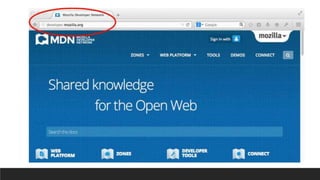
EXAMPLE OF WEB BROWSER
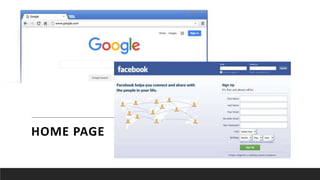
Each Web site contains a home
page (this is the original starting
page) and may also contain
additional pages.
HOME PAGE
HOME PAGE
A Web Page is like a page in a book.
Websites often have several pages that
you can access by clicking on links. A Web
site can be a collection of related Web
pages.
WEB PAGE
COMMON PARTS OF WEB BROWSER
WINDOWS
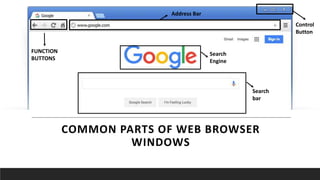
FUNCTION
BUTTONS
Address Bar
Control
Button
Search
Engine
Search
bar
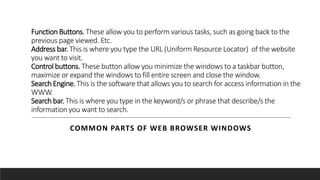
Function Buttons. These allow you to perform various tasks, such as going back to the
previous page viewed. Etc.
Address bar. This is where you type the URL (Uniform Resource Locator) of the website
you want to visit.
Control buttons. These button allow you minimize the windows to a taskbar button,
maximize or expand the windows to fill entire screen and close the window.
Search Engine. This is the software that allows you to search for access information in the
WWW.
Search bar. This is where you type in the keyword/s or phrase that describe/s the
information you want to search.
COMMON PARTS OF WEB BROWSER WINDOWS
감사합니다!

Web browser & search engine

  • 1.
    WEB BROWSER & SEARCHENGINE BY TR. MJ FERNANDEZ
  • 2.
    A Web browseror browser is a software application used in retrieving, presenting and traversing information resources in the world of the Internet, known as the World Wide Web (WWW). WEB BROWSER
  • 3.
  • 4.
    Each Web sitecontains a home page (this is the original starting page) and may also contain additional pages. HOME PAGE
  • 5.
  • 6.
    A Web Pageis like a page in a book. Websites often have several pages that you can access by clicking on links. A Web site can be a collection of related Web pages. WEB PAGE
  • 8.
    COMMON PARTS OFWEB BROWSER WINDOWS FUNCTION BUTTONS Address Bar Control Button Search Engine Search bar
  • 9.
    Function Buttons. Theseallow you to perform various tasks, such as going back to the previous page viewed. Etc. Address bar. This is where you type the URL (Uniform Resource Locator) of the website you want to visit. Control buttons. These button allow you minimize the windows to a taskbar button, maximize or expand the windows to fill entire screen and close the window. Search Engine. This is the software that allows you to search for access information in the WWW. Search bar. This is where you type in the keyword/s or phrase that describe/s the information you want to search. COMMON PARTS OF WEB BROWSER WINDOWS
  • 10.