WEB BROWSER
AND
SEARCH ENGINE
BY : sehrsh ASLAM
WEB BROWSER
 This is software that is use to view web pages .
 It acts like a interface between user and the
internet.
 It can understand HTML.
 It can display text and graphics .
 It is also known as web client and or universal
client.
Mozilla Firefox
It was developed in 2004.
Is was made for computer running
windows , Mac OS , Linux .
It can bee downloaded an installed
from internet.
It provides privacy security , a spell
checker , password manager .
Internet explorer
 It is free web browser form Microsoft.
 It was first released in 1995.
 It provides the capability to rearrange the
tabs , protection .
safari
Safari was first introduced 2003 by
apple.
It is available in pcs , iPad ,
iPhone.
It provides sharing , social
networks
Google chrome
It was developed in 2008 .
It is free web browser and availed
in windows and Mac OS.
It includes a large number of
security feature .
opera
It is a fast small and free web
browser used on both computer
and phones .
It can be downloaded and installed
It provides servable features.
Examples :
 Mozilla fire fox
 Internet explorer
 Safari
 Google chrome
Functions of web browser
 Web browsing
 Tabbed browsing
 Search box
 Favorites
 Browsing history
 Mailing
 Printing
 Autocomplete
Web browsing
 It is most important function in web
 The user can see the different contents and websites
using web browser.
 It provides the button.
 Examples :
 Back
 Forward
 Stop
 refresh
Tabbed browsing
Tabbed browser allows the user to
open pages.
Each page is loaded in separate
tab.
The user can move between
different pages easily.
Search box
The web provides the built in
search.
The user can designate the
preferred default search engine
for search.
favorites
A web can store favorites websites in
list.
By clicking on it user can add the page
in favorites list.
The user can easily open that website
after adding it into the list.
Browsing history
A web browser maintains the
browsing history.
Its stored the visited link.
Then user can visit theses website
easily.
Mailing
A web browser also provide the
facility to read n send an email .
The user can also open up news
groups.
Auto complete
 A web stores the address of all the websites
has been visited by user
 Auto complete features display the address
of the visited website.
 The user dose not need to type the whole
ddress.
 It saves a lot of time.
SEARCH ENGINE
It is a website that provides the
facility to find the required websites
for particular task.
The user the can search any topic on
internet using search engine.
Search engine contains a large number
of websites that are easily avaible.
What is search engine ?
 The father of a search engine is a Jonathon
fletcher.
 The web search engine is a type of
software that is developed to search the
information on World Wide Web . [WWW]
 The place in the net , where one goes to
find the websites for a specific information.
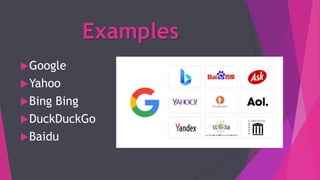
Examples
Google
Yahoo
Bing Bing
DuckDuckGo
Baidu
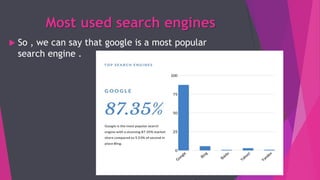
Most used search engines
 So , we can say that google is a most popular
search engine .
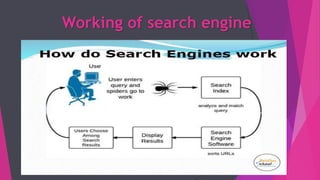
Working of search engine
Searching the web
 Keywords the used to search the required
information from search engine .
 Keywords is a word or set of words related to a
topic being searched .
 The keyword is typed in doubles quotation if
consists of 2 or more words
“ universities of Sialkot ’’
Boolean searches
Boolean searches uses the “BOOLEAN
OPERATORS”.
AND , OR , NOT
Theses are used to combine the word
and make searche on specific and
limited topic .
Boolean operators
AND operator :
 It is used to search on biases of the words search
string .
e.g. : software AND hardware
 The symbol AND is equal to plus signs.
 It means we need only that website which
contains only these two words .
OR operator :
 It is used to search on biases of the words
search in string.
e.g. : software OR hardware
 OR operator is equal to the – symbol.
 It means we want only those websites
which contains any one word in both of
theses .
NOT operator
It is used to search on the biases of
any word other than the search string .
e.g. : new York not city
This will search the website that
contains only new York not city.
THANK YOU ……..

Web browser and serach engine

  • 1.
  • 2.
    WEB BROWSER  Thisis software that is use to view web pages .  It acts like a interface between user and the internet.  It can understand HTML.  It can display text and graphics .  It is also known as web client and or universal client.
  • 3.
    Mozilla Firefox It wasdeveloped in 2004. Is was made for computer running windows , Mac OS , Linux . It can bee downloaded an installed from internet. It provides privacy security , a spell checker , password manager .
  • 4.
    Internet explorer  Itis free web browser form Microsoft.  It was first released in 1995.  It provides the capability to rearrange the tabs , protection .
  • 5.
    safari Safari was firstintroduced 2003 by apple. It is available in pcs , iPad , iPhone. It provides sharing , social networks
  • 6.
    Google chrome It wasdeveloped in 2008 . It is free web browser and availed in windows and Mac OS. It includes a large number of security feature .
  • 7.
    opera It is afast small and free web browser used on both computer and phones . It can be downloaded and installed It provides servable features.
  • 8.
    Examples :  Mozillafire fox  Internet explorer  Safari  Google chrome
  • 9.
    Functions of webbrowser  Web browsing  Tabbed browsing  Search box  Favorites  Browsing history  Mailing  Printing  Autocomplete
  • 10.
    Web browsing  Itis most important function in web  The user can see the different contents and websites using web browser.  It provides the button.  Examples :  Back  Forward  Stop  refresh
  • 11.
    Tabbed browsing Tabbed browserallows the user to open pages. Each page is loaded in separate tab. The user can move between different pages easily.
  • 12.
    Search box The webprovides the built in search. The user can designate the preferred default search engine for search.
  • 13.
    favorites A web canstore favorites websites in list. By clicking on it user can add the page in favorites list. The user can easily open that website after adding it into the list.
  • 14.
    Browsing history A webbrowser maintains the browsing history. Its stored the visited link. Then user can visit theses website easily.
  • 15.
    Mailing A web browseralso provide the facility to read n send an email . The user can also open up news groups.
  • 16.
    Auto complete  Aweb stores the address of all the websites has been visited by user  Auto complete features display the address of the visited website.  The user dose not need to type the whole ddress.  It saves a lot of time.
  • 17.
    SEARCH ENGINE It isa website that provides the facility to find the required websites for particular task. The user the can search any topic on internet using search engine. Search engine contains a large number of websites that are easily avaible.
  • 18.
    What is searchengine ?  The father of a search engine is a Jonathon fletcher.  The web search engine is a type of software that is developed to search the information on World Wide Web . [WWW]  The place in the net , where one goes to find the websites for a specific information.
  • 19.
  • 20.
    Most used searchengines  So , we can say that google is a most popular search engine .
  • 21.
  • 22.
    Searching the web Keywords the used to search the required information from search engine .  Keywords is a word or set of words related to a topic being searched .  The keyword is typed in doubles quotation if consists of 2 or more words “ universities of Sialkot ’’
  • 23.
    Boolean searches Boolean searchesuses the “BOOLEAN OPERATORS”. AND , OR , NOT Theses are used to combine the word and make searche on specific and limited topic .
  • 24.
    Boolean operators AND operator:  It is used to search on biases of the words search string . e.g. : software AND hardware  The symbol AND is equal to plus signs.  It means we need only that website which contains only these two words .
  • 25.
    OR operator : It is used to search on biases of the words search in string. e.g. : software OR hardware  OR operator is equal to the – symbol.  It means we want only those websites which contains any one word in both of theses .
  • 26.
    NOT operator It isused to search on the biases of any word other than the search string . e.g. : new York not city This will search the website that contains only new York not city.
  • 27.