Topic 3


        INTERNET TECHNOLOGY
3.2 The Internet
  3.2.2 World Wide Web
     3.2.2.1 Web Browser

                                1
Learning Outcome


At the end of this topic, students should be able to:

  • Explain the purpose of Web browser.
  • List examples of Web browser.


                                                   2
World Wide Web (WWW)
ď‚§ What is the World Wide Web (WWW)?
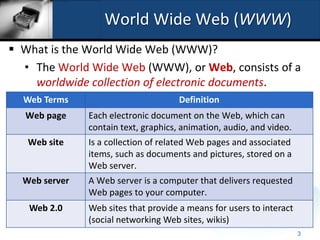
  • The World Wide Web (WWW), or Web, consists of a
    worldwide collection of electronic documents.
  Web Terms                           Definition
  Web page     Each electronic document on the Web, which can
               contain text, graphics, animation, audio, and video.
   Web site    Is a collection of related Web pages and associated
               items, such as documents and pictures, stored on a
               Web server.
  Web server   A Web server is a computer that delivers requested
               Web pages to your computer.
   Web 2.0     Web sites that provide a means for users to interact
               (social networking Web sites, wikis)
                                                                      3
World Wide Web (WWW)
ď‚§ How do we browse the Web?
   • A Web browser, or browser, is application software
     that allows users to access Web pages and Web 2.0
     programs.

   • The primary purpose of a Web browser is to display
     information resources to the users through retrieving,
     presenting, and navigating information.


                                                         4
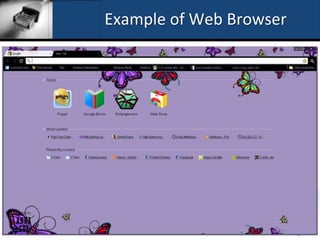
Example of Web Browser


                         5
World Wide Web (WWW)
• A Web browser will retrieve and display a starting
  Web page called the home page.

• A home page, refers to the first page that a Web site
  displays that provides information about the Web
  site’s purpose and content.

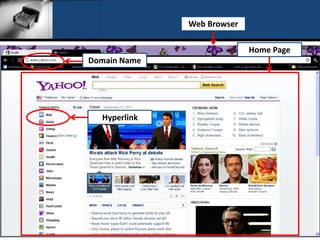
• A home page usually contains links to other
  documents, Web pages, or Web sites. A link, short for
  hyperlink, is a built-in connection to another related
  Web page or part of a Web page.
                                                       6
Web Browser

                            Home Page
Domain Name


  Hyperlink


                                        7
World Wide Web (WWW)

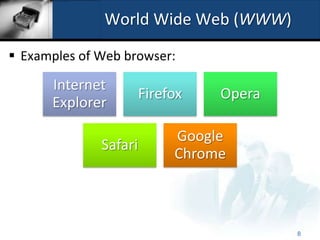
ď‚§ Examples of Web browser:

      Internet
                       Firefox   Opera
      Explorer

                            Google
              Safari
                            Chrome


                                         8
World Wide Web (WWW)
• Internet-enabled mobile devices such as smart
  phones use a special type of browser, called a
  microbrowser, which is designed for their small
  screens and limited computing power.
• Downloading is the process of
  receiving information.


                                                    9

2.2.2.1 Web Browser

  • 1.
    Topic 3 INTERNET TECHNOLOGY 3.2 The Internet 3.2.2 World Wide Web 3.2.2.1 Web Browser 1
  • 2.
    Learning Outcome At theend of this topic, students should be able to: • Explain the purpose of Web browser. • List examples of Web browser. 2
  • 3.
    World Wide Web(WWW)  What is the World Wide Web (WWW)? • The World Wide Web (WWW), or Web, consists of a worldwide collection of electronic documents. Web Terms Definition Web page Each electronic document on the Web, which can contain text, graphics, animation, audio, and video. Web site Is a collection of related Web pages and associated items, such as documents and pictures, stored on a Web server. Web server A Web server is a computer that delivers requested Web pages to your computer. Web 2.0 Web sites that provide a means for users to interact (social networking Web sites, wikis) 3
  • 4.
    World Wide Web(WWW)  How do we browse the Web? • A Web browser, or browser, is application software that allows users to access Web pages and Web 2.0 programs. • The primary purpose of a Web browser is to display information resources to the users through retrieving, presenting, and navigating information. 4
  • 5.
    Example of WebBrowser 5
  • 6.
    World Wide Web(WWW) • A Web browser will retrieve and display a starting Web page called the home page. • A home page, refers to the first page that a Web site displays that provides information about the Web site’s purpose and content. • A home page usually contains links to other documents, Web pages, or Web sites. A link, short for hyperlink, is a built-in connection to another related Web page or part of a Web page. 6
  • 7.
    Web Browser Home Page Domain Name Hyperlink 7
  • 8.
    World Wide Web(WWW) ď‚§ Examples of Web browser: Internet Firefox Opera Explorer Google Safari Chrome 8
  • 9.
    World Wide Web(WWW) • Internet-enabled mobile devices such as smart phones use a special type of browser, called a microbrowser, which is designed for their small screens and limited computing power. • Downloading is the process of receiving information. 9