HTML TABLES
By Tr. MJ Fernandez
Joy in Learning School Inc.
Defining an HTML Table
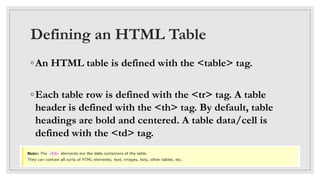
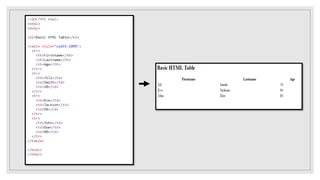
◦An HTML table is defined with the <table> tag.
◦Each table row is defined with the <tr> tag. A table
header is defined with the <th> tag. By default, table
headings are bold and centered. A table data/cell is
defined with the <td> tag.
HTML Table - Adding a Border
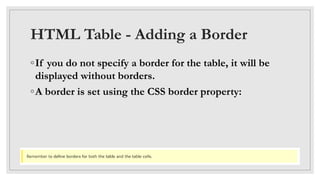
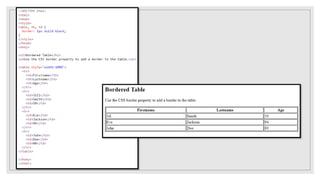
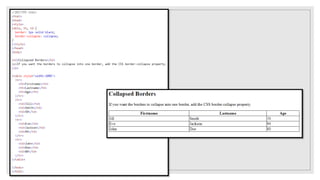
◦If you do not specify a border for the table, it will be
displayed without borders.
◦A border is set using the CSS border property:
HTML Table - Adding a Border
◦If you do not specify a border for the table, it will be
displayed without borders.
◦A border is set using the CSS border property:
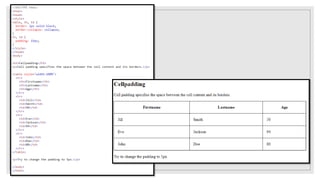
HTML Table - Adding Cell Padding
◦Cell padding specifies the space between the cell
content and its borders.
◦If you do not specify a padding, the table cells will be
displayed without padding.
◦To set the padding, use the CSS padding property:
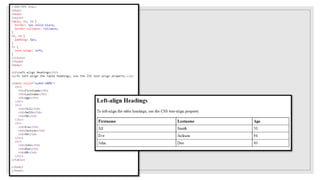
HTML Table - Left-align Headings
◦By default, table headings are bold and centered.
◦To left-align the table headings, use the CSS text-align
property:
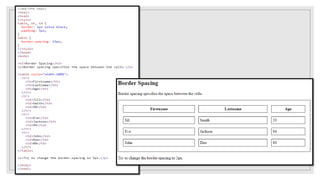
HTML Table - Adding Border Spacing
◦Border spacing specifies the space between the cells.
◦To set the border spacing for a table, use the CSS
border-spacing property:
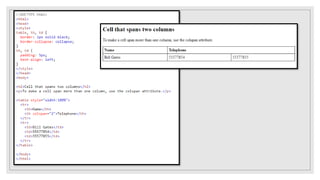
HTML Table - Cells that Span Many
Columns
◦To make a cell span more than one column, use the
colspan attribute:
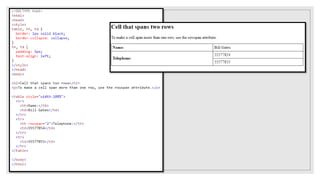
HTML Table - Cells that Span Many
Rows
◦To make a cell span more than one row, use the rowspan
attribute:
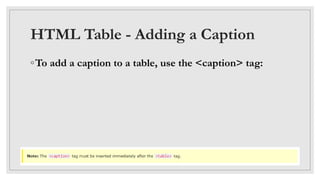
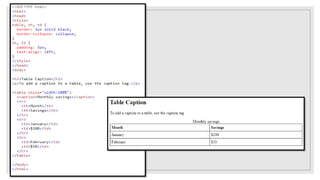
HTML Table - Adding a Caption
◦To add a caption to a table, use the <caption> tag:
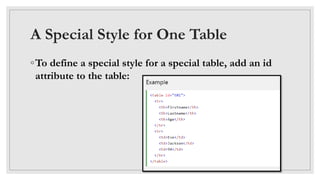
A Special Style for One Table
◦To define a special style for a special table, add an id
attribute to the table:
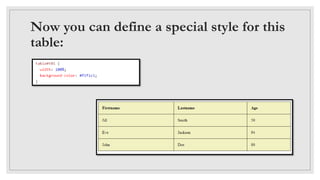
Now you can define a special style for this
table:
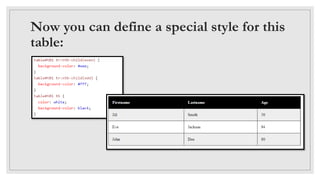
Now you can define a special style for this
table:
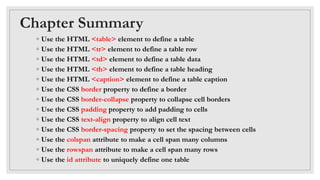
Chapter Summary
◦ Use the HTML <table> element to define a table
◦ Use the HTML <tr> element to define a table row
◦ Use the HTML <td> element to define a table data
◦ Use the HTML <th> element to define a table heading
◦ Use the HTML <caption> element to define a table caption
◦ Use the CSS border property to define a border
◦ Use the CSS border-collapse property to collapse cell borders
◦ Use the CSS padding property to add padding to cells
◦ Use the CSS text-align property to align cell text
◦ Use the CSS border-spacing property to set the spacing between cells
◦ Use the colspan attribute to make a cell span many columns
◦ Use the rowspan attribute to make a cell span many rows
◦ Use the id attribute to uniquely define one table
REFERENCE:
HTML TABLE
https://www.w3schools.com/html/html_tables.asp

Html table

  • 1.
    HTML TABLES By Tr.MJ Fernandez Joy in Learning School Inc.
  • 2.
    Defining an HTMLTable ◦An HTML table is defined with the <table> tag. ◦Each table row is defined with the <tr> tag. A table header is defined with the <th> tag. By default, table headings are bold and centered. A table data/cell is defined with the <td> tag.
  • 4.
    HTML Table -Adding a Border ◦If you do not specify a border for the table, it will be displayed without borders. ◦A border is set using the CSS border property:
  • 6.
    HTML Table -Adding a Border ◦If you do not specify a border for the table, it will be displayed without borders. ◦A border is set using the CSS border property:
  • 8.
    HTML Table -Adding Cell Padding ◦Cell padding specifies the space between the cell content and its borders. ◦If you do not specify a padding, the table cells will be displayed without padding. ◦To set the padding, use the CSS padding property:
  • 10.
    HTML Table -Left-align Headings ◦By default, table headings are bold and centered. ◦To left-align the table headings, use the CSS text-align property:
  • 12.
    HTML Table -Adding Border Spacing ◦Border spacing specifies the space between the cells. ◦To set the border spacing for a table, use the CSS border-spacing property:
  • 14.
    HTML Table -Cells that Span Many Columns ◦To make a cell span more than one column, use the colspan attribute:
  • 16.
    HTML Table -Cells that Span Many Rows ◦To make a cell span more than one row, use the rowspan attribute:
  • 18.
    HTML Table -Adding a Caption ◦To add a caption to a table, use the <caption> tag:
  • 20.
    A Special Stylefor One Table ◦To define a special style for a special table, add an id attribute to the table:
  • 21.
    Now you candefine a special style for this table:
  • 22.
    Now you candefine a special style for this table:
  • 23.
    Chapter Summary ◦ Usethe HTML <table> element to define a table ◦ Use the HTML <tr> element to define a table row ◦ Use the HTML <td> element to define a table data ◦ Use the HTML <th> element to define a table heading ◦ Use the HTML <caption> element to define a table caption ◦ Use the CSS border property to define a border ◦ Use the CSS border-collapse property to collapse cell borders ◦ Use the CSS padding property to add padding to cells ◦ Use the CSS text-align property to align cell text ◦ Use the CSS border-spacing property to set the spacing between cells ◦ Use the colspan attribute to make a cell span many columns ◦ Use the rowspan attribute to make a cell span many rows ◦ Use the id attribute to uniquely define one table
  • 24.