STYLING HTML WITH CSS
BYL TR. MJ FERNANDEZ
CSS STANDS FOR CASCADING STYLE SHEETS.
CSS describes how HTML elements are to be displayed on screen, paper, or in other media.
CSS saves a lot of work. It can control the layout of multiple web pages all at once.
CSS can be added to HTML elements in 3 ways:
 Inline - by using the style attribute in HTML elements
 Internal - by using a <style> element in the <head> section
 External - by using an external CSS file
The most common way to add CSS, is to keep the styles in separate CSS files. However, here
we will use inline and internal styling, because this is easier to demonstrate, and easier for you
to try it yourself.
INLINE CSS
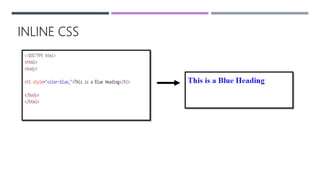
 An inline CSS is used to apply a unique style to a single
HTML element.
 An inline CSS uses the style attribute of an HTML
element.
 This example sets the text color of the <h1> element to
blue:
INLINE CSS
INTERNAL CSS
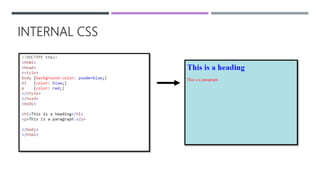
 An internal CSS is used to define a style for a single
HTML page.
 An internal CSS is defined in the <head> section of an
HTML page, within a <style> element:
INTERNAL CSS
EXTERNAL CSS
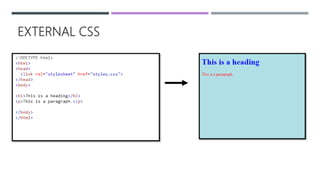
 An external style sheet is used to define the style for
many HTML pages.
 With an external style sheet, you can change the look of
an entire web site, by changing one file!
 To use an external style sheet, add a link to it in the
<head> section of the HTML page:
EXTERNAL CSS
CSS BORDER
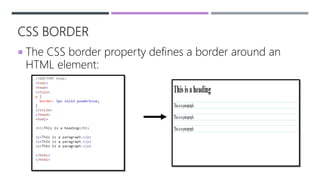
 The CSS border property defines a border around an
HTML element:
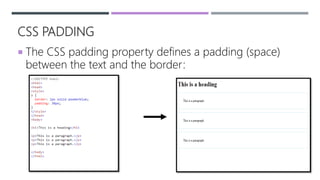
CSS PADDING
 The CSS padding property defines a padding (space)
between the text and the border:
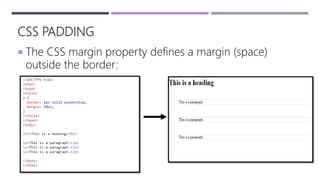
CSS PADDING
 The CSS margin property defines a margin (space)
outside the border:
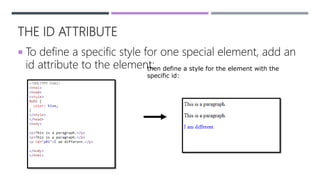
THE ID ATTRIBUTE
 To define a specific style for one special element, add an
id attribute to the element:then define a style for the element with the
specific id:
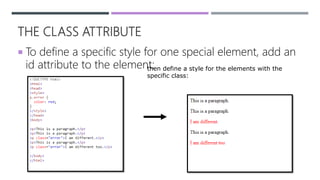
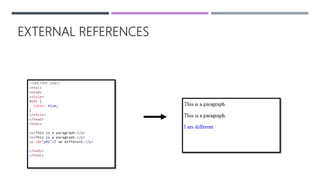
THE CLASS ATTRIBUTE
 To define a specific style for one special element, add an
id attribute to the element:then define a style for the elements with the
specific class:
EXTERNAL REFERENCES
REFERENCE:
HTML CSS
HTTPS://WWW.W3SCHOOLS.COM/HTML/HTML_CSS.ASP

Styling of css

  • 1.
    STYLING HTML WITHCSS BYL TR. MJ FERNANDEZ
  • 2.
    CSS STANDS FORCASCADING STYLE SHEETS. CSS describes how HTML elements are to be displayed on screen, paper, or in other media. CSS saves a lot of work. It can control the layout of multiple web pages all at once. CSS can be added to HTML elements in 3 ways:  Inline - by using the style attribute in HTML elements  Internal - by using a <style> element in the <head> section  External - by using an external CSS file The most common way to add CSS, is to keep the styles in separate CSS files. However, here we will use inline and internal styling, because this is easier to demonstrate, and easier for you to try it yourself.
  • 3.
    INLINE CSS  Aninline CSS is used to apply a unique style to a single HTML element.  An inline CSS uses the style attribute of an HTML element.  This example sets the text color of the <h1> element to blue:
  • 4.
  • 5.
    INTERNAL CSS  Aninternal CSS is used to define a style for a single HTML page.  An internal CSS is defined in the <head> section of an HTML page, within a <style> element:
  • 6.
  • 7.
    EXTERNAL CSS  Anexternal style sheet is used to define the style for many HTML pages.  With an external style sheet, you can change the look of an entire web site, by changing one file!  To use an external style sheet, add a link to it in the <head> section of the HTML page:
  • 8.
  • 9.
    CSS BORDER  TheCSS border property defines a border around an HTML element:
  • 10.
    CSS PADDING  TheCSS padding property defines a padding (space) between the text and the border:
  • 11.
    CSS PADDING  TheCSS margin property defines a margin (space) outside the border:
  • 12.
    THE ID ATTRIBUTE To define a specific style for one special element, add an id attribute to the element:then define a style for the element with the specific id:
  • 13.
    THE CLASS ATTRIBUTE To define a specific style for one special element, add an id attribute to the element:then define a style for the elements with the specific class:
  • 14.
  • 15.