



Accessibility: MISSION IMPOSSIBLE!
Removing barriers for a better user experience for all
To access audio for today’s webinar, please dial toll-free:
(866) 740-1260
Access Code: 1961557
Introducing Today’s Presenters:
2
Adam Kaye
Web Development Manager
akaye@charitydynamics.com
Brenda Miele
UX & Creative Director
bmiele@charitydynamics.com
What You
Need to Know
“Accessibility is the word used to describe whether a
product can be used by people of all abilities and
disabilities.”
- BBC, My Web My Way
What is Web Accessibility?
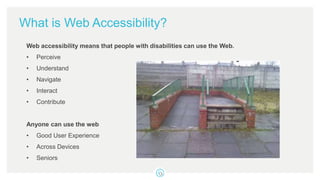
Web accessibility means that people with disabilities can use the Web.
• Perceive
• Understand
• Navigate
• Interact
• Contribute
Anyone can use the web
• Good User Experience
• Across Devices
• Seniors
Perspective
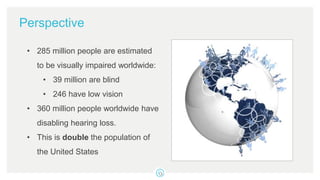
• 285 million people are estimated
to be visually impaired worldwide:
• 39 million are blind
• 246 have low vision
• 360 million people worldwide have
disabling hearing loss.
• This is double the population of
the United States
Real World Solutions Meet Digital Solutions
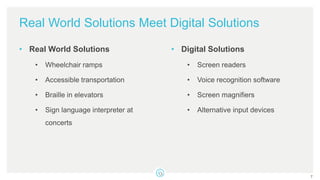
• Real World Solutions
• Wheelchair ramps
• Accessible transportation
• Braille in elevators
• Sign language interpreter at
concerts
• Digital Solutions
• Screen readers
• Voice recognition software
• Screen magnifiers
• Alternative input devices
7
Web Content Accessibility Guidelines
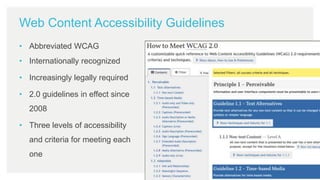
• Abbreviated WCAG
• Internationally recognized
• Increasingly legally required
• 2.0 guidelines in effect since
2008
• Three levels of accessibility
and criteria for meeting each
one
Section 508 Standards
• Part of the federal government’s Rehabilitation Act of 1973
• Provides standards for web accessibility
• Requires that all technology and electronic information produced by Federal
agencies be accessible to people with disabilities
• Have recently been updated to align with the WCAG standards
Unique Responsibility for Nonprofits
• Mission to serve a diverse audience
• Social responsibility tangential to organization’s mission such as a
commitment to human rights
• Educational mission, providing access to materials for a broad audience
• Supporting older people with age-related impairments (many of whom may
be donors)
Unique Risk for Nonprofits
• Unclear Legal Responsibility
• Section 504 – Requires needs of students with disabilities be met as adequately
as the needs of the non-disabled
• Section 508 – Applies to federal agency websites and services and to
contractors; not to recipients of Federal funds
• Americans with Disabilities Act – Public spaces; Title 3 implies web accessibility
requirements
• DOJ hasn’t made their position totally clear, but they did recently intervene in
another web accessibility lawsuit
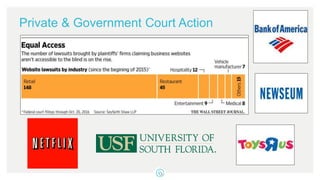
Private & Government Court Action
Act Now
• ACS & AHA have released statements committing to WCAG 2.0 AA level
• Be an industry leader
• Public relations benefits of demonstrating corporate social responsibility
• Reduce risk of legal action, high legal expenses, and negative image
• Better serve your constituents
• Improved usability, including higher conversion rates
• Search engine optimization (SEO) benefits
13
Accessibility
Principles
and Guidance
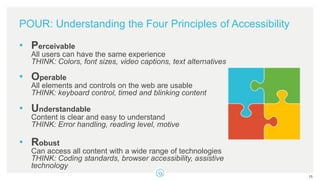
POUR: Understanding the Four Principles of Accessibility
• Perceivable
All users can have the same experience
THINK: Colors, font sizes, video captions, text alternatives
• Operable
All elements and controls on the web are usable
THINK: keyboard control, timed and blinking content
• Understandable
Content is clear and easy to understand
THINK: Error handling, reading level, motive
• Robust
Can access all content with a wide range of technologies
THINK: Coding standards, browser accessibility, assistive
technology
15
POUR: Understanding the Four Principles of Accessibility
If any of these 4 Principles are not true, users with
disabilities will not be able to use the Web.
16
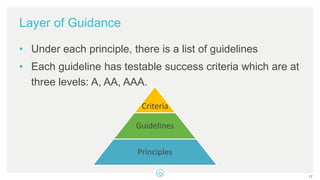
Layer of Guidance
• Under each principle, there is a list of guidelines
• Each guideline has testable success criteria which are at
three levels: A, AA, AAA.
17
Guidelines
Principles
Criteria
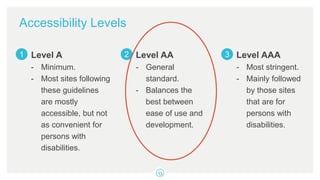
Accessibility Levels
Level A
- Minimum.
- Most sites following
these guidelines
are mostly
accessible, but not
as convenient for
persons with
disabilities.
Level AA
- General
standard.
- Balances the
best between
ease of use and
development.
Level AAA
- Most stringent.
- Mainly followed
by those sites
that are for
persons with
disabilities.
1 2 3
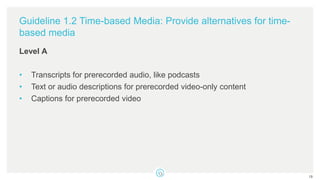
Guideline 1.2 Time-based Media: Provide alternatives for time-
based media
Level A
• Transcripts for prerecorded audio, like podcasts
• Text or audio descriptions for prerecorded video-only content
• Captions for prerecorded video
19
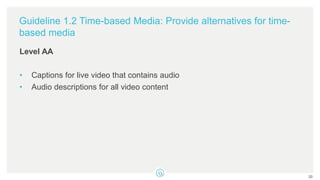
Guideline 1.2 Time-based Media: Provide alternatives for time-
based media
Level AA
• Captions for live video that contains audio
• Audio descriptions for all video content
20
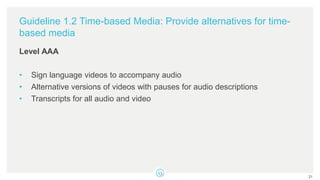
Guideline 1.2 Time-based Media: Provide alternatives for time-
based media
Level AAA
• Sign language videos to accompany audio
• Alternative versions of videos with pauses for audio descriptions
• Transcripts for all audio and video
21
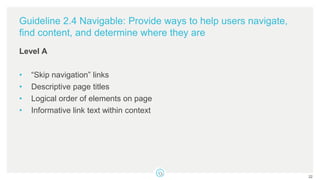
Guideline 2.4 Navigable: Provide ways to help users navigate,
find content, and determine where they are
Level A
• “Skip navigation” links
• Descriptive page titles
• Logical order of elements on page
• Informative link text within context
22
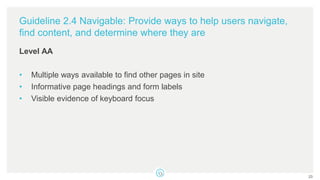
Guideline 2.4 Navigable: Provide ways to help users navigate,
find content, and determine where they are
Level AA
• Multiple ways available to find other pages in site
• Informative page headings and form labels
• Visible evidence of keyboard focus
23
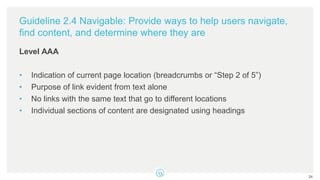
Guideline 2.4 Navigable: Provide ways to help users navigate,
find content, and determine where they are
Level AAA
• Indication of current page location (breadcrumbs or “Step 2 of 5”)
• Purpose of link evident from text alone
• No links with the same text that go to different locations
• Individual sections of content are designated using headings
24
25
Getting Started
Websites That Can Help
• WAVE: http://wave.webaim.org
– Used to evaluate the accessibility of millions of web pages.
• Color Contrast Checker: http://webaim.org/resources/contrastchecker/
– Enter foreground and background color to check compliance.
• Web Accessibility Evaluation Tools List: https://www.w3.org/WAI/ER/tools/
– A list of evaluation tools that help you determine if your content meets web
accessibility guidelines.
But What Can I Do Right Now?
28
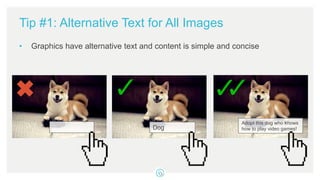
Tip #1: Alternative Text for All Images
• Graphics have alternative text and content is simple and concise
Dog
Adopt this dog who knows
how to play video games!
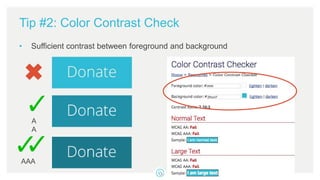
Tip #2: Color Contrast Check
• Sufficient contrast between foreground and background
A
A
AAA
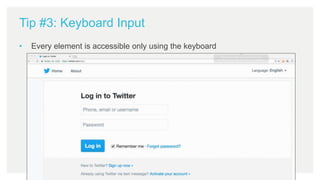
Tip #3: Keyboard Input
• Every element is accessible only using the keyboard
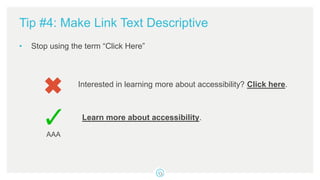
Tip #4: Make Link Text Descriptive
• Stop using the term “Click Here”
Interested in learning more about accessibility? Click here.
Learn more about accessibility.
AAA
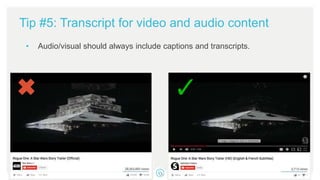
Tip #5: Transcript for video and audio content
• Audio/visual should always include captions and transcripts.
34
Mission POSSIBLE: You Got
Any Questions?
Thank You!
© 2017 Charity Dynamics

Web Accessibility: MISSION POSSIBLE!

  • 1.
    Accessibility: MISSION IMPOSSIBLE! Removingbarriers for a better user experience for all To access audio for today’s webinar, please dial toll-free: (866) 740-1260 Access Code: 1961557
  • 2.
    Introducing Today’s Presenters: 2 AdamKaye Web Development Manager akaye@charitydynamics.com Brenda Miele UX & Creative Director bmiele@charitydynamics.com
  • 3.
  • 4.
    “Accessibility is theword used to describe whether a product can be used by people of all abilities and disabilities.” - BBC, My Web My Way
  • 5.
    What is WebAccessibility? Web accessibility means that people with disabilities can use the Web. • Perceive • Understand • Navigate • Interact • Contribute Anyone can use the web • Good User Experience • Across Devices • Seniors
  • 6.
    Perspective • 285 millionpeople are estimated to be visually impaired worldwide: • 39 million are blind • 246 have low vision • 360 million people worldwide have disabling hearing loss. • This is double the population of the United States
  • 7.
    Real World SolutionsMeet Digital Solutions • Real World Solutions • Wheelchair ramps • Accessible transportation • Braille in elevators • Sign language interpreter at concerts • Digital Solutions • Screen readers • Voice recognition software • Screen magnifiers • Alternative input devices 7
  • 8.
    Web Content AccessibilityGuidelines • Abbreviated WCAG • Internationally recognized • Increasingly legally required • 2.0 guidelines in effect since 2008 • Three levels of accessibility and criteria for meeting each one
  • 9.
    Section 508 Standards •Part of the federal government’s Rehabilitation Act of 1973 • Provides standards for web accessibility • Requires that all technology and electronic information produced by Federal agencies be accessible to people with disabilities • Have recently been updated to align with the WCAG standards
  • 10.
    Unique Responsibility forNonprofits • Mission to serve a diverse audience • Social responsibility tangential to organization’s mission such as a commitment to human rights • Educational mission, providing access to materials for a broad audience • Supporting older people with age-related impairments (many of whom may be donors)
  • 11.
    Unique Risk forNonprofits • Unclear Legal Responsibility • Section 504 – Requires needs of students with disabilities be met as adequately as the needs of the non-disabled • Section 508 – Applies to federal agency websites and services and to contractors; not to recipients of Federal funds • Americans with Disabilities Act – Public spaces; Title 3 implies web accessibility requirements • DOJ hasn’t made their position totally clear, but they did recently intervene in another web accessibility lawsuit
  • 12.
  • 13.
    Act Now • ACS& AHA have released statements committing to WCAG 2.0 AA level • Be an industry leader • Public relations benefits of demonstrating corporate social responsibility • Reduce risk of legal action, high legal expenses, and negative image • Better serve your constituents • Improved usability, including higher conversion rates • Search engine optimization (SEO) benefits 13
  • 14.
  • 15.
    POUR: Understanding theFour Principles of Accessibility • Perceivable All users can have the same experience THINK: Colors, font sizes, video captions, text alternatives • Operable All elements and controls on the web are usable THINK: keyboard control, timed and blinking content • Understandable Content is clear and easy to understand THINK: Error handling, reading level, motive • Robust Can access all content with a wide range of technologies THINK: Coding standards, browser accessibility, assistive technology 15
  • 16.
    POUR: Understanding theFour Principles of Accessibility If any of these 4 Principles are not true, users with disabilities will not be able to use the Web. 16
  • 17.
    Layer of Guidance •Under each principle, there is a list of guidelines • Each guideline has testable success criteria which are at three levels: A, AA, AAA. 17 Guidelines Principles Criteria
  • 18.
    Accessibility Levels Level A -Minimum. - Most sites following these guidelines are mostly accessible, but not as convenient for persons with disabilities. Level AA - General standard. - Balances the best between ease of use and development. Level AAA - Most stringent. - Mainly followed by those sites that are for persons with disabilities. 1 2 3
  • 19.
    Guideline 1.2 Time-basedMedia: Provide alternatives for time- based media Level A • Transcripts for prerecorded audio, like podcasts • Text or audio descriptions for prerecorded video-only content • Captions for prerecorded video 19
  • 20.
    Guideline 1.2 Time-basedMedia: Provide alternatives for time- based media Level AA • Captions for live video that contains audio • Audio descriptions for all video content 20
  • 21.
    Guideline 1.2 Time-basedMedia: Provide alternatives for time- based media Level AAA • Sign language videos to accompany audio • Alternative versions of videos with pauses for audio descriptions • Transcripts for all audio and video 21
  • 22.
    Guideline 2.4 Navigable:Provide ways to help users navigate, find content, and determine where they are Level A • “Skip navigation” links • Descriptive page titles • Logical order of elements on page • Informative link text within context 22
  • 23.
    Guideline 2.4 Navigable:Provide ways to help users navigate, find content, and determine where they are Level AA • Multiple ways available to find other pages in site • Informative page headings and form labels • Visible evidence of keyboard focus 23
  • 24.
    Guideline 2.4 Navigable:Provide ways to help users navigate, find content, and determine where they are Level AAA • Indication of current page location (breadcrumbs or “Step 2 of 5”) • Purpose of link evident from text alone • No links with the same text that go to different locations • Individual sections of content are designated using headings 24
  • 25.
  • 26.
  • 27.
    Websites That CanHelp • WAVE: http://wave.webaim.org – Used to evaluate the accessibility of millions of web pages. • Color Contrast Checker: http://webaim.org/resources/contrastchecker/ – Enter foreground and background color to check compliance. • Web Accessibility Evaluation Tools List: https://www.w3.org/WAI/ER/tools/ – A list of evaluation tools that help you determine if your content meets web accessibility guidelines.
  • 28.
    But What CanI Do Right Now? 28
  • 29.
    Tip #1: AlternativeText for All Images • Graphics have alternative text and content is simple and concise Dog Adopt this dog who knows how to play video games!
  • 30.
    Tip #2: ColorContrast Check • Sufficient contrast between foreground and background A A AAA
  • 31.
    Tip #3: KeyboardInput • Every element is accessible only using the keyboard
  • 32.
    Tip #4: MakeLink Text Descriptive • Stop using the term “Click Here” Interested in learning more about accessibility? Click here. Learn more about accessibility. AAA
  • 33.
    Tip #5: Transcriptfor video and audio content • Audio/visual should always include captions and transcripts.
  • 34.
  • 35.
  • 36.
    Thank You! © 2017Charity Dynamics

Editor's Notes

  • #7 Based on reports from World Health Organization Blindness stats: Feb 2014; Hearing stats: March 2015
  • #12 http://www.adatitleiii.com/2015/06/doj-shifts-position-on-web-access-stating-in-court-filings-that-public-accommodations-have-a-pre-existing-obligation-to-make-websites-accessible/
  • #13 http://www.karlgroves.com/2011/11/15/list-of-web-accessibility-related-litigation-and-settlements/
  • #16 https://www.w3.org/TR/2007/WD-UNDERSTANDING-WCAG20-20071211/intro.html
  • #19 WCAG 2.0 is divided into three conformance levels (A-AA-AAA) because the success criteria are organized based on the impact they have on design or visual presentation of the pages. The higher the level, the more restraining it becomes on design.