From concept to implementation
Presented by
Denise R. Jacobs
Planning for Accessibility
Overview of Accessibility
For the purposes of this presentation,
"accessibility" refers to making web sites
accessible to people with disabilities, and at
the same time to people using different
operating systems, web browsers and
devices.
Who Cares?
“If anybody asks me what the Internet means to
me, I will tell him without hesitation: To me (a
quadriplegic), the Internet occupies the most
important part in my life. It is my feet that can
take me to any part of the world; it is my hands
which help me to accomplish my work; it is my
best friend — it gives my life meaning.”
— Dr. ZhangXU
Accessibility matters to…
The User
The Client
User Interface Designer(s)
The Search Engine
The Host
7 Real-Life Situations where Web Accessibility is a Must
1) Users cannot see.
2) Users cannot hear.
3) User cannot move.
4) Users cannot understand complex text.
5) Users have slow Internet connections and the
images either take too long to download or do
not download at all.
6) Users are not native speakers and have
difficulties understanding the foreign language.
7) The situation prevents for the user from using
their hands, eyes or ears to access a web page.
Knowledge is power
Know yourself, know your audience
It's important to make sure that you know what outcome
you want with the end-product of your website and how
your site will best serve your audience.
~ 10% of the population has disabilities
What are your audience's needs?
What are your internal needs?
If the users have…
sight disabilities
 correct page
semantics for
screen readers
 audio equivalents
to audio pieces
 color schemes
optimized for
contrast and
people with color
blindness
Know what to provide in each situation
Know what to provide in each situation, 2
If the users have…
 hearing disabilities
 text equivalents to any
audio pieces
 motor disabilities
 easily navigatable pages
(by multiple methods:
click, tab, keyboard)
 content chunked well
 cognitive disabilities
 content chunked well
 clear, simple
presentation of content
 content written in clear,
simple language
Know what to provide in each situation, 3
If the users have…
 different browsers and
operating systems
 thorough cross-browser
testing
 alternative media
 alternative stylesheets
 updated easily in the future:
progressive enhancement
 correct page semantics
(proper HTML coding)
 properly styled
implementation that can
be altered
Trends in accessibility
Adhering to Web Standards:
Following the specifications created by the W3C for
the version of markup or scripting language that you
are using.
Trends in accessibility
Web Standards make for good business
 Accessibility
 Usability
 Compatibility
 Substantially increased performance
 Higher search engine rankings
 Powerful designs
Trends in accessibility
Standards Harmonization
"Standards Harmonization" refers to the adoption
of a consistent set of international technical
standards for accessibility of:
 Web content
 browsers and media players
 authoring tools
Accessibility and Your Website
Project
Integrate accessibility standards into design process
Examples of design requirements for people with different
kinds of disabilities include:
 Visual:
 described graphics or video; well marked-up tables;
keyboard support, screen reader compatibility
 Hearing:
 captioning for audio, supplemental illustration
Accessibility and Your Website
Project
(continued)
 Physical, Speech:
 keyboard or single-switch support; alternatives for
speech input on voice portals
 Cognitive, Neurological:
 consistent navigation, appropriate language level;
illustration; no flickering or strobing designs
Site wireframing and designing
Incorporating accessibility
into wireframes and design
– what to look for
• The wireframes/design should
have logical and consistent
navigation.
• Elements should be grouped
and relationships between
elements should be evident.
• The design should not rely on
color alone to convey
information.
• As a client, do NOT require
browser pop-up windows for
your site (pop-up divs are
different, however).
Site wireframing and designing
Some (potentially) tough design choices:
 Submit buttons – standard buttons have full functionality,
whereas Javascript buttons may pose accessibility issues.
 Use (and/or abuse) of Ajax – Ajax is a combination of
technologies that is not reliable from an accessibility
standpoint. Be sure that any Ajax desired on the site is
proven to be accessible.
 Color - luckily, most of the unusable color combinations are
also visually unappealing. However, it is still important to
test the colors for contrast and color blindness.
Site wireframing and designing
The Goal: Graceful Transformation
 “Graceful Degrading” – backwards degrading: the site
works well in its simplest form.
 “Progressive Enhancement" – while users are still able to
see everything with a basic browser, JavaScript can
overwrite and add functional richness if necessary.
Also, if the site is redesigned, conceivably, only styles would
need to be changed, but the page semantics and hierarchy
are still solid.
Site wireframing and designing
Accessible is Beautiful
Once you get past all of
the hard thinking to make
sure you have all of your
accessibility bases
covered, then the fun can
begin! Don’t think that
just because a site is
accessible, it can’t be
beautiful too!
Content creation
Some Accessibility Guidelines for Web
Content :
 Provide context and orientation information.
 Link text should be meaningful enough to make
sense when read out of context - no more "click
here"!
 Place distinguishing information at the beginning
of headings, paragraphs, lists, etc.
 Use the clearest and simplest language appropriate
for a site's content.
Accessibility and
Implementation
You have the power…But with power comes
responsibility!
The WC3 has created the WCAG Guidelines, the
standards by which web developers can create
sites that are accessible to all audiences.
Accessibility and
Implementation
Here are some of the guidelines we will cover:
 Guideline 1. Provide equivalent alternatives to auditory and visual
content.
 Guideline 3. Use markup and style sheets and do so properly.
 Guideline 5. Create tables that transform gracefully.
 Guideline 6. Ensure that pages featuring new technologies transform
gracefully.
 Guideline 9. Design for device-independence.
 Guideline 12. Provide context and orientation information.
 Guideline 13. Provide clear navigation mechanisms.
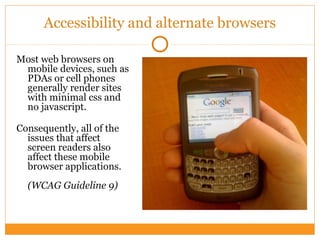
Accessibility and alternate browsers
Most web browsers on
mobile devices, such as
PDAs or cell phones
generally render sites
with minimal css and
no javascript.
Consequently, all of the
issues that affect
screen readers also
affect these mobile
browser applications.
(WCAG Guideline 9)
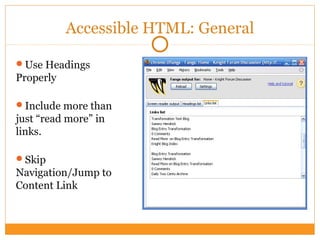
Accessible HTML: General
Use Headings
Properly
Include more than
just “read more” in
links.
Skip
Navigation/Jump to
Content Link
Distinguish between
Presentational Images
Content-Based Images
Accessible HTML: Images
Tables Are Not For
Layout
Tabular Data
How the Blind “see” on the web
Semantic Forms
Use Required flag to
promote important
content
Accessible HTML: Tables and Forms
Similar to the table tag being used for layout, iframes
are another tag that can make navigation with a
screen reader difficult. Keeping track of content
with more than one page, and the difficulties of
tracking which link opens in which frame, can be a
headache. It is best avoided.
(WCAG Guideline 12)
Accessible HTML: Iframes
Flash: Provide an alternative
Most Flash is not developed with accessibility in mind.
Because of the difficulty of Flash working properly
with screen readers, most screenreader users don’t
even have flash installed.
If a user doesn’t have Flash installed, you should show
the user alternate text. Flash files that use dynamic
content can be reproduced in HTML as an alternate
text version.
(WCAG Guidelines 1, 6)
Accessible HTML: Flash
Lists for
Navigation
Definition Lists
Accessible HTML: Lists
The main way increase
blog accessibility is to
maximize the ways to
get to content.
categorized content
is essential
tagged content
popular/rated
content
Accessible Blogs
Conclusion
"Accessibility is a Process, Not a Product."
- Bob Regan, Macromedia
Questions? Comments?

Plan For Accessibility - TODCon 2008

  • 1.
    From concept toimplementation Presented by Denise R. Jacobs Planning for Accessibility
  • 2.
    Overview of Accessibility Forthe purposes of this presentation, "accessibility" refers to making web sites accessible to people with disabilities, and at the same time to people using different operating systems, web browsers and devices.
  • 3.
    Who Cares? “If anybodyasks me what the Internet means to me, I will tell him without hesitation: To me (a quadriplegic), the Internet occupies the most important part in my life. It is my feet that can take me to any part of the world; it is my hands which help me to accomplish my work; it is my best friend — it gives my life meaning.” — Dr. ZhangXU
  • 4.
    Accessibility matters to… TheUser The Client User Interface Designer(s) The Search Engine The Host
  • 5.
    7 Real-Life Situationswhere Web Accessibility is a Must 1) Users cannot see. 2) Users cannot hear. 3) User cannot move. 4) Users cannot understand complex text. 5) Users have slow Internet connections and the images either take too long to download or do not download at all. 6) Users are not native speakers and have difficulties understanding the foreign language. 7) The situation prevents for the user from using their hands, eyes or ears to access a web page.
  • 6.
    Knowledge is power Knowyourself, know your audience It's important to make sure that you know what outcome you want with the end-product of your website and how your site will best serve your audience. ~ 10% of the population has disabilities What are your audience's needs? What are your internal needs?
  • 7.
    If the usershave… sight disabilities  correct page semantics for screen readers  audio equivalents to audio pieces  color schemes optimized for contrast and people with color blindness Know what to provide in each situation
  • 8.
    Know what toprovide in each situation, 2 If the users have…  hearing disabilities  text equivalents to any audio pieces  motor disabilities  easily navigatable pages (by multiple methods: click, tab, keyboard)  content chunked well  cognitive disabilities  content chunked well  clear, simple presentation of content  content written in clear, simple language
  • 9.
    Know what toprovide in each situation, 3 If the users have…  different browsers and operating systems  thorough cross-browser testing  alternative media  alternative stylesheets  updated easily in the future: progressive enhancement  correct page semantics (proper HTML coding)  properly styled implementation that can be altered
  • 10.
    Trends in accessibility Adheringto Web Standards: Following the specifications created by the W3C for the version of markup or scripting language that you are using.
  • 11.
    Trends in accessibility WebStandards make for good business  Accessibility  Usability  Compatibility  Substantially increased performance  Higher search engine rankings  Powerful designs
  • 12.
    Trends in accessibility StandardsHarmonization "Standards Harmonization" refers to the adoption of a consistent set of international technical standards for accessibility of:  Web content  browsers and media players  authoring tools
  • 13.
    Accessibility and YourWebsite Project Integrate accessibility standards into design process Examples of design requirements for people with different kinds of disabilities include:  Visual:  described graphics or video; well marked-up tables; keyboard support, screen reader compatibility  Hearing:  captioning for audio, supplemental illustration
  • 14.
    Accessibility and YourWebsite Project (continued)  Physical, Speech:  keyboard or single-switch support; alternatives for speech input on voice portals  Cognitive, Neurological:  consistent navigation, appropriate language level; illustration; no flickering or strobing designs
  • 15.
    Site wireframing anddesigning Incorporating accessibility into wireframes and design – what to look for • The wireframes/design should have logical and consistent navigation. • Elements should be grouped and relationships between elements should be evident. • The design should not rely on color alone to convey information. • As a client, do NOT require browser pop-up windows for your site (pop-up divs are different, however).
  • 16.
    Site wireframing anddesigning Some (potentially) tough design choices:  Submit buttons – standard buttons have full functionality, whereas Javascript buttons may pose accessibility issues.  Use (and/or abuse) of Ajax – Ajax is a combination of technologies that is not reliable from an accessibility standpoint. Be sure that any Ajax desired on the site is proven to be accessible.  Color - luckily, most of the unusable color combinations are also visually unappealing. However, it is still important to test the colors for contrast and color blindness.
  • 17.
    Site wireframing anddesigning The Goal: Graceful Transformation  “Graceful Degrading” – backwards degrading: the site works well in its simplest form.  “Progressive Enhancement" – while users are still able to see everything with a basic browser, JavaScript can overwrite and add functional richness if necessary. Also, if the site is redesigned, conceivably, only styles would need to be changed, but the page semantics and hierarchy are still solid.
  • 18.
    Site wireframing anddesigning Accessible is Beautiful Once you get past all of the hard thinking to make sure you have all of your accessibility bases covered, then the fun can begin! Don’t think that just because a site is accessible, it can’t be beautiful too!
  • 19.
    Content creation Some AccessibilityGuidelines for Web Content :  Provide context and orientation information.  Link text should be meaningful enough to make sense when read out of context - no more "click here"!  Place distinguishing information at the beginning of headings, paragraphs, lists, etc.  Use the clearest and simplest language appropriate for a site's content.
  • 20.
    Accessibility and Implementation You havethe power…But with power comes responsibility! The WC3 has created the WCAG Guidelines, the standards by which web developers can create sites that are accessible to all audiences.
  • 21.
    Accessibility and Implementation Here aresome of the guidelines we will cover:  Guideline 1. Provide equivalent alternatives to auditory and visual content.  Guideline 3. Use markup and style sheets and do so properly.  Guideline 5. Create tables that transform gracefully.  Guideline 6. Ensure that pages featuring new technologies transform gracefully.  Guideline 9. Design for device-independence.  Guideline 12. Provide context and orientation information.  Guideline 13. Provide clear navigation mechanisms.
  • 22.
    Accessibility and alternatebrowsers Most web browsers on mobile devices, such as PDAs or cell phones generally render sites with minimal css and no javascript. Consequently, all of the issues that affect screen readers also affect these mobile browser applications. (WCAG Guideline 9)
  • 23.
    Accessible HTML: General UseHeadings Properly Include more than just “read more” in links. Skip Navigation/Jump to Content Link
  • 24.
  • 25.
    Tables Are NotFor Layout Tabular Data How the Blind “see” on the web Semantic Forms Use Required flag to promote important content Accessible HTML: Tables and Forms
  • 26.
    Similar to thetable tag being used for layout, iframes are another tag that can make navigation with a screen reader difficult. Keeping track of content with more than one page, and the difficulties of tracking which link opens in which frame, can be a headache. It is best avoided. (WCAG Guideline 12) Accessible HTML: Iframes
  • 27.
    Flash: Provide analternative Most Flash is not developed with accessibility in mind. Because of the difficulty of Flash working properly with screen readers, most screenreader users don’t even have flash installed. If a user doesn’t have Flash installed, you should show the user alternate text. Flash files that use dynamic content can be reproduced in HTML as an alternate text version. (WCAG Guidelines 1, 6) Accessible HTML: Flash
  • 28.
  • 29.
    The main wayincrease blog accessibility is to maximize the ways to get to content. categorized content is essential tagged content popular/rated content Accessible Blogs
  • 30.
    Conclusion "Accessibility is aProcess, Not a Product." - Bob Regan, Macromedia Questions? Comments?

Editor's Notes

  • #3 Led by DM The nature of the internet today is powered by community (Me vs. We). The collective effort & intelligence needs to be harnessed. Scalable: The structure must provide for flexibility and growth that will come in stages. A modest base (issue/topic) will yield a framework for additional exploration of the Foundation’s priorities Sustainable: Must be able to be created, re-created and managed by CF and by the community alike.
  • #4 Agenda presented by CF: Introductions Project Overview Agenda presented by DM: Development & Execution Goals Conceptualizing the Experience Q&A: Both Parties
  • #5 Agenda presented by CF: Introductions Project Overview Agenda presented by DM: Development & Execution Goals Conceptualizing the Experience Q&A: Both Parties
  • #6 Agenda presented by CF: Introductions Project Overview Agenda presented by DM: Development & Execution Goals Conceptualizing the Experience Q&A: Both Parties
  • #7 Led by DM: Erring on the side of being conservative….we humbling espouse these execution goals: Earn = earning the respect, trust and investment of all stakeholders (related to sustainability) Learn = the continuous process of improvement through best practices through the leadership & guidance of the community Adapt = the role of the Foundation to evaluate engagement and make necessary changes (editorial, functional and tactical) to encourage, maintain and grow participation Connect = the active interaction (virtual & real) that is facilitated by the site = the fulfillment of the website’s mission = to seek, find, share information and action around the topics and issues (speak to CF’s neutrality) Repeat = repeating the process to expand the reach (the “connection”) of the site by issue and by audience.
  • #9 Agenda presented by CF: Introductions Project Overview Agenda presented by DM: Development & Execution Goals Conceptualizing the Experience Q&A: Both Parties
  • #10 Agenda presented by CF: Introductions Project Overview Agenda presented by DM: Development & Execution Goals Conceptualizing the Experience Q&A: Both Parties
  • #11 Led by CF & DM: 1>May to October = Site building & testing 2>June to August = Partnership building (grants) & community outreach (communicative/promotional) 3>September to October = “Soft” launch with trusted partners for content population/migration & communication 4>November to December = Public/community launch
  • #12 Agenda presented by CF: Introductions Project Overview Agenda presented by DM: Development & Execution Goals Conceptualizing the Experience Q&A: Both Parties
  • #13 Agenda presented by CF: Introductions Project Overview Agenda presented by DM: Development & Execution Goals Conceptualizing the Experience Q&A: Both Parties
  • #14 Led by CF & DM: 1>May to October = Site building & testing 2>June to August = Partnership building (grants) & community outreach (communicative/promotional) 3>September to October = “Soft” launch with trusted partners for content population/migration & communication 4>November to December = Public/community launch
  • #15 Led by CF & DM: 1>May to October = Site building & testing 2>June to August = Partnership building (grants) & community outreach (communicative/promotional) 3>September to October = “Soft” launch with trusted partners for content population/migration & communication 4>November to December = Public/community launch
  • #16 Led by CF Describe the genesis of the project and the benchmarks/milestones that we’ve met. What is the DPS? Community + Information + Communication Technology + Action Topics/focus, framework and cycles What DPS is not: Not your grandfather’s website Moviephone example
  • #18 Agenda presented by CF: Introductions Project Overview Agenda presented by DM: Development & Execution Goals Conceptualizing the Experience Q&A: Both Parties