TODAY:
Enhancing the User
Experience for People with
Disabilities
Simon Dermer and Spiro
Papathanasakis
User Experience Professionals
Association International
UXPA International Conference -
Puerto Rico
June 26 - June 28, 2018
Registration now open:
http://uxpa2018.org/ Check out our next webinars at
uxpa.org/event/webinars
Suggest speakers and topics at
education@uxpa.org
THE DISABILITY MARKET
1.3 BILLION PEOPLE WITH
DISABILITIES GLOBALLY
OVER 60 MILLION PEOPLE
WITH DISABILIITES MAKE IT
THE LARGEST MINORITY
GROUP IN NORTH AMERICA
19.3% OF AMERICANS
SELF-IDENTIFY
AS HAVING A DISABILITY
FRIENDS AND FAMILY
REPRESENT ANOTHER
105 MILLION CONSUMERS
WHO HAVE AN EMOTIONAL
CONNECTION TO DISABILITY
PEOPLE WITH
DISABILITIES CONTROL
$2 TRILLION IN INCOME
GLOBALLY
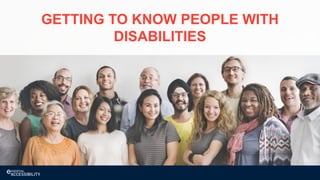
GETTING TO KNOW PEOPLE WITH
DISABILITIES
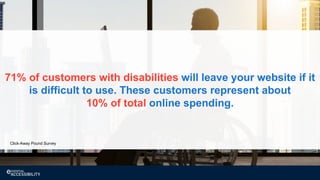
71% of customers with disabilities will leave your website if it
is difficult to use. These customers represent about
10% of total online spending.
Click-Away Pound Survey
CUSTOMERS WITH DISABILITIES
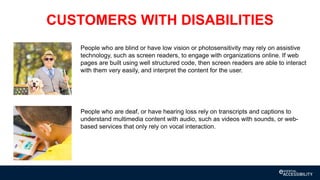
People who are blind or have low vision or photosensitivity may rely on assistive
technology, such as screen readers, to engage with organizations online. If web
pages are built using well structured code, then screen readers are able to interact
with them very easily, and interpret the content for the user.
People who are deaf, or have hearing loss rely on transcripts and captions to
understand multimedia content with audio, such as videos with sounds, or web-
based services that only rely on vocal interaction.
CUSTOMERS WITH DISABILITIES
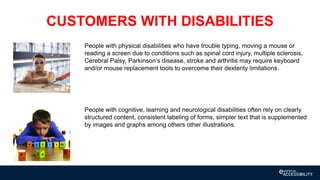
People with physical disabilities who have trouble typing, moving a mouse or
reading a screen due to conditions such as spinal cord injury, multiple sclerosis,
Cerebral Palsy, Parkinson’s disease, stroke and arthritis may require keyboard
and/or mouse replacement tools to overcome their dexterity limitations.
People with cognitive, learning and neurological disabilities often rely on clearly
structured content, consistent labeling of forms, simpler text that is supplemented
by images and graphs among others other illustrations.
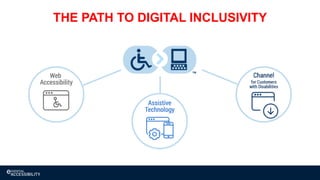
THE PATH TO DIGITAL INCLUSIVITY
ASSISTIVE TECHNOLOGY
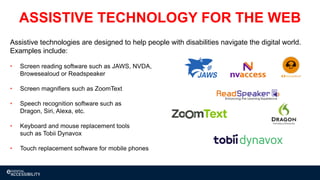
Assistive technologies are designed to help people with disabilities navigate the digital world.
Examples include:
• Screen reading software such as JAWS, NVDA,
Browesealoud or Readspeaker
• Screen magnifiers such as ZoomText
• Speech recognition software such as
Dragon, Siri, Alexa, etc.
• Keyboard and mouse replacement tools
such as Tobii Dynavox
• Touch replacement software for mobile phones
ASSISTIVE TECHNOLOGY FOR THE WEB
DIGITAL ACCESSIBILITY
14
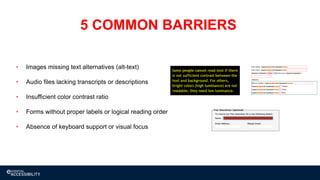
• Images missing text alternatives (alt-text)
• Audio files lacking transcripts or descriptions
• Insufficient color contrast ratio
• Forms without proper labels or logical reading order
• Absence of keyboard support or visual focus
5 COMMON BARRIERS
15
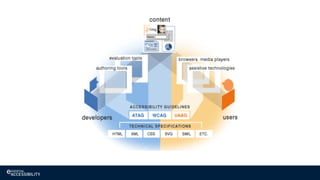
WEB CONTENT ACCESSIBILITY GUIDELINES
• The World Wide Web Consortium (W3C) is an international community where member
organizations, a full-time staff, and the public work together to develop web standards.
• WCAG 2.0 was published in 2008, and remains the most up-to-date and most universally accepted
set of web accessibility guidelines available today. There are 12 guidelines that are organized under
4 principles. For each guideline, there are testable success criteria, which are at three levels: A, AA
and AAA.
• International standards harmonizing to WCAG 2.0 such as AODA and EN 301549
• A new update, four years in the making, is expected to be published later this year. WCAG 2.1 does
not replace version 2.0. It’s an extension (add-on), tackling some additional accessibility barriers that
aren’t addressed by 2.0 alone, and is backwards compatible.
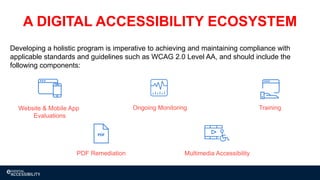
Multimedia AccessibilityPDF Remediation
TrainingOngoing MonitoringWebsite & Mobile App
Evaluations
Developing a holistic program is imperative to achieving and maintaining compliance with
applicable standards and guidelines such as WCAG 2.0 Level AA, and should include the
following components:
A DIGITAL ACCESSIBILITY ECOSYSTEM
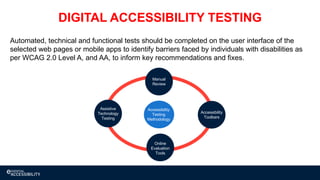
Automated, technical and functional tests should be completed on the user interface of the
selected web pages or mobile apps to identify barriers faced by individuals with disabilities as
per WCAG 2.0 Level A, and AA, to inform key recommendations and fixes.
DIGITAL ACCESSIBILITY TESTING
Accessibility
Testing
Methodology
Online
Evaluation
Tools
Accessibility
Toolbars
Assistive
Technology
Testing
Manual
Review
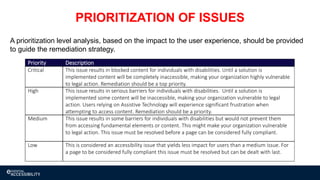
PRIORITIZATION OF ISSUES
Priority Description
Critical This issue results in blocked content for individuals with disabilities. Until a solution is
implemented content will be completely inaccessible, making your organization highly vulnerable
to legal action. Remediation should be a top priority.
High This issue results in serious barriers for individuals with disabilities. Until a solution is
implemented some content will be inaccessible, making your organization vulnerable to legal
action. Users relying on Assistive Technology will experience significant frustration when
attempting to access content. Remediation should be a priority.
Medium This issue results in some barriers for individuals with disabilities but would not prevent them
from accessing fundamental elements or content. This might make your organization vulnerable
to legal action. This issue must be resolved before a page can be considered fully compliant.
Low This is considered an accessibility issue that yields less impact for users than a medium issue. For
a page to be considered fully compliant this issue must be resolved but can be dealt with last.
A prioritization level analysis, based on the impact to the user experience, should be provided
to guide the remediation strategy.
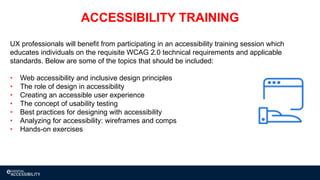
UX professionals will benefit from participating in an accessibility training session which
educates individuals on the requisite WCAG 2.0 technical requirements and applicable
standards. Below are some of the topics that should be included:
• Web accessibility and inclusive design principles
• The role of design in accessibility
• Creating an accessible user experience
• The concept of usability testing
• Best practices for designing with accessibility
• Analyzing for accessibility: wireframes and comps
• Hands-on exercises
ACCESSIBILITY TRAINING
21
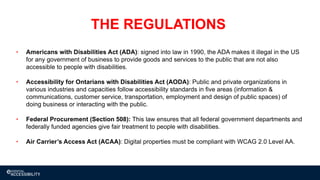
THE REGULATIONS
• Americans with Disabilities Act (ADA): signed into law in 1990, the ADA makes it illegal in the US
for any government of business to provide goods and services to the public that are not also
accessible to people with disabilities.
• Accessibility for Ontarians with Disabilities Act (AODA): Public and private organizations in
various industries and capacities follow accessibility standards in five areas (information &
communications, customer service, transportation, employment and design of public spaces) of
doing business or interacting with the public.
• Federal Procurement (Section 508): This law ensures that all federal government departments and
federally funded agencies give fair treatment to people with disabilities.
• Air Carrier’s Access Act (ACAA): Digital properties must be compliant with WCAG 2.0 Level AA.
ACCESSIBILITY STATEMENT
WHAT IS AN ACCESSIBILITY STATEMENT?
Purpose:
• Set expectations for site visitors
Includes:
• Technology Standards
• Known Issues
• Accessible Alternatives
• Contact Information
The statement should be reviewed by a third-party vendor or the legal department
An accessibility statement should not be confused with a conformance statement.
CASE STUDY
Builds trust with consumers, their family
and friends
Makes it easier for people with
disabilities to understand what you’re
doing around accessibility
Signals an inclusive and disability-
friendly brand
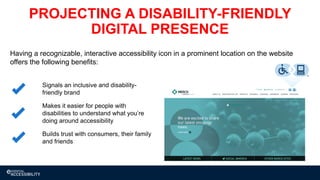
Having a recognizable, interactive accessibility icon in a prominent location on the website
offers the following benefits:
PROJECTING A DISABILITY-FRIENDLY
DIGITAL PRESENCE
Communicates messages around
diversity and inclusion
Highlights career opportunities,
inclusive hiring practices and policies
Features assistive technology for
people who have trouble typing,
moving a mouse or reading a screen
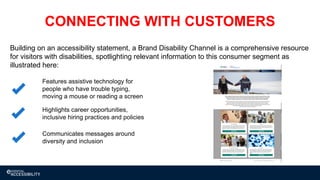
Building on an accessibility statement, a Brand Disability Channel is a comprehensive resource
for visitors with disabilities, spotlighting relevant information to this consumer segment as
illustrated here:
CONNECTING WITH CUSTOMERS
27
KEY TAKEAWAYS
• It’s important to determine your current level of accessibility
• Craft an accessibility statement to be posted on your website
• Assemble an accessibility testing team that includes people with disabilities to conduct manual and
functional testing (this could be done in-house or with a third-party testing team)
• Achieving and maintaining compliance requires an ongoing commitment; new content should be
tested for accessibility, and its important to stay current with regulations
• Go beyond the minimum requirements. Organizations who invest in their customers with disabilities
reap significant rewards: they enjoy brand loyalty, high customer satisfaction and repeat business
from the largest minority in the world
QUESTIONS?

Enhancing the User Experience for People with Disabilities

  • 1.
    TODAY: Enhancing the User Experiencefor People with Disabilities Simon Dermer and Spiro Papathanasakis User Experience Professionals Association International UXPA International Conference - Puerto Rico June 26 - June 28, 2018 Registration now open: http://uxpa2018.org/ Check out our next webinars at uxpa.org/event/webinars Suggest speakers and topics at education@uxpa.org
  • 2.
    THE DISABILITY MARKET 1.3BILLION PEOPLE WITH DISABILITIES GLOBALLY
  • 3.
    OVER 60 MILLIONPEOPLE WITH DISABILIITES MAKE IT THE LARGEST MINORITY GROUP IN NORTH AMERICA 19.3% OF AMERICANS SELF-IDENTIFY AS HAVING A DISABILITY
  • 4.
    FRIENDS AND FAMILY REPRESENTANOTHER 105 MILLION CONSUMERS WHO HAVE AN EMOTIONAL CONNECTION TO DISABILITY
  • 5.
    PEOPLE WITH DISABILITIES CONTROL $2TRILLION IN INCOME GLOBALLY
  • 6.
    GETTING TO KNOWPEOPLE WITH DISABILITIES
  • 7.
    71% of customerswith disabilities will leave your website if it is difficult to use. These customers represent about 10% of total online spending. Click-Away Pound Survey
  • 8.
    CUSTOMERS WITH DISABILITIES Peoplewho are blind or have low vision or photosensitivity may rely on assistive technology, such as screen readers, to engage with organizations online. If web pages are built using well structured code, then screen readers are able to interact with them very easily, and interpret the content for the user. People who are deaf, or have hearing loss rely on transcripts and captions to understand multimedia content with audio, such as videos with sounds, or web- based services that only rely on vocal interaction.
  • 9.
    CUSTOMERS WITH DISABILITIES Peoplewith physical disabilities who have trouble typing, moving a mouse or reading a screen due to conditions such as spinal cord injury, multiple sclerosis, Cerebral Palsy, Parkinson’s disease, stroke and arthritis may require keyboard and/or mouse replacement tools to overcome their dexterity limitations. People with cognitive, learning and neurological disabilities often rely on clearly structured content, consistent labeling of forms, simpler text that is supplemented by images and graphs among others other illustrations.
  • 10.
    THE PATH TODIGITAL INCLUSIVITY
  • 11.
  • 12.
    Assistive technologies aredesigned to help people with disabilities navigate the digital world. Examples include: • Screen reading software such as JAWS, NVDA, Browesealoud or Readspeaker • Screen magnifiers such as ZoomText • Speech recognition software such as Dragon, Siri, Alexa, etc. • Keyboard and mouse replacement tools such as Tobii Dynavox • Touch replacement software for mobile phones ASSISTIVE TECHNOLOGY FOR THE WEB
  • 13.
  • 14.
    14 • Images missingtext alternatives (alt-text) • Audio files lacking transcripts or descriptions • Insufficient color contrast ratio • Forms without proper labels or logical reading order • Absence of keyboard support or visual focus 5 COMMON BARRIERS
  • 15.
    15 WEB CONTENT ACCESSIBILITYGUIDELINES • The World Wide Web Consortium (W3C) is an international community where member organizations, a full-time staff, and the public work together to develop web standards. • WCAG 2.0 was published in 2008, and remains the most up-to-date and most universally accepted set of web accessibility guidelines available today. There are 12 guidelines that are organized under 4 principles. For each guideline, there are testable success criteria, which are at three levels: A, AA and AAA. • International standards harmonizing to WCAG 2.0 such as AODA and EN 301549 • A new update, four years in the making, is expected to be published later this year. WCAG 2.1 does not replace version 2.0. It’s an extension (add-on), tackling some additional accessibility barriers that aren’t addressed by 2.0 alone, and is backwards compatible.
  • 17.
    Multimedia AccessibilityPDF Remediation TrainingOngoingMonitoringWebsite & Mobile App Evaluations Developing a holistic program is imperative to achieving and maintaining compliance with applicable standards and guidelines such as WCAG 2.0 Level AA, and should include the following components: A DIGITAL ACCESSIBILITY ECOSYSTEM
  • 18.
    Automated, technical andfunctional tests should be completed on the user interface of the selected web pages or mobile apps to identify barriers faced by individuals with disabilities as per WCAG 2.0 Level A, and AA, to inform key recommendations and fixes. DIGITAL ACCESSIBILITY TESTING Accessibility Testing Methodology Online Evaluation Tools Accessibility Toolbars Assistive Technology Testing Manual Review
  • 19.
    PRIORITIZATION OF ISSUES PriorityDescription Critical This issue results in blocked content for individuals with disabilities. Until a solution is implemented content will be completely inaccessible, making your organization highly vulnerable to legal action. Remediation should be a top priority. High This issue results in serious barriers for individuals with disabilities. Until a solution is implemented some content will be inaccessible, making your organization vulnerable to legal action. Users relying on Assistive Technology will experience significant frustration when attempting to access content. Remediation should be a priority. Medium This issue results in some barriers for individuals with disabilities but would not prevent them from accessing fundamental elements or content. This might make your organization vulnerable to legal action. This issue must be resolved before a page can be considered fully compliant. Low This is considered an accessibility issue that yields less impact for users than a medium issue. For a page to be considered fully compliant this issue must be resolved but can be dealt with last. A prioritization level analysis, based on the impact to the user experience, should be provided to guide the remediation strategy.
  • 20.
    UX professionals willbenefit from participating in an accessibility training session which educates individuals on the requisite WCAG 2.0 technical requirements and applicable standards. Below are some of the topics that should be included: • Web accessibility and inclusive design principles • The role of design in accessibility • Creating an accessible user experience • The concept of usability testing • Best practices for designing with accessibility • Analyzing for accessibility: wireframes and comps • Hands-on exercises ACCESSIBILITY TRAINING
  • 21.
    21 THE REGULATIONS • Americanswith Disabilities Act (ADA): signed into law in 1990, the ADA makes it illegal in the US for any government of business to provide goods and services to the public that are not also accessible to people with disabilities. • Accessibility for Ontarians with Disabilities Act (AODA): Public and private organizations in various industries and capacities follow accessibility standards in five areas (information & communications, customer service, transportation, employment and design of public spaces) of doing business or interacting with the public. • Federal Procurement (Section 508): This law ensures that all federal government departments and federally funded agencies give fair treatment to people with disabilities. • Air Carrier’s Access Act (ACAA): Digital properties must be compliant with WCAG 2.0 Level AA.
  • 22.
  • 23.
    WHAT IS ANACCESSIBILITY STATEMENT? Purpose: • Set expectations for site visitors Includes: • Technology Standards • Known Issues • Accessible Alternatives • Contact Information The statement should be reviewed by a third-party vendor or the legal department An accessibility statement should not be confused with a conformance statement.
  • 24.
  • 25.
    Builds trust withconsumers, their family and friends Makes it easier for people with disabilities to understand what you’re doing around accessibility Signals an inclusive and disability- friendly brand Having a recognizable, interactive accessibility icon in a prominent location on the website offers the following benefits: PROJECTING A DISABILITY-FRIENDLY DIGITAL PRESENCE
  • 26.
    Communicates messages around diversityand inclusion Highlights career opportunities, inclusive hiring practices and policies Features assistive technology for people who have trouble typing, moving a mouse or reading a screen Building on an accessibility statement, a Brand Disability Channel is a comprehensive resource for visitors with disabilities, spotlighting relevant information to this consumer segment as illustrated here: CONNECTING WITH CUSTOMERS
  • 27.
    27 KEY TAKEAWAYS • It’simportant to determine your current level of accessibility • Craft an accessibility statement to be posted on your website • Assemble an accessibility testing team that includes people with disabilities to conduct manual and functional testing (this could be done in-house or with a third-party testing team) • Achieving and maintaining compliance requires an ongoing commitment; new content should be tested for accessibility, and its important to stay current with regulations • Go beyond the minimum requirements. Organizations who invest in their customers with disabilities reap significant rewards: they enjoy brand loyalty, high customer satisfaction and repeat business from the largest minority in the world
  • 28.