Web Accessibility
Analysis: MyQL Origination
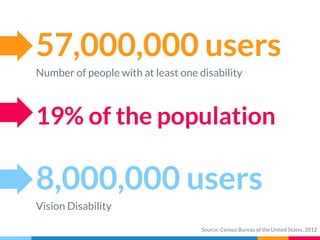
57,000,000 users
Number of people with at least one disability
8,000,000 users
Vision Disability
19% of the population
Source: Census Bureau of the United States, 2012
What’s this?
This is a basic analysis of the
MyQL Origination website with
a focus on how to start making
websites compliant.
ADA Compliance
As of today there are no laws
which strictly define if a
commercial website should be
accessible.
About this
How can I use this?
The initial requirements for accessibility are defined
in this document.
The report is built to ensure implementation of the
suggestions in the short term without requiring
herculean engineering effort.
Hello!
I am Nishan Bose
Software Engineer Intern, Game of Loans
Mentor: Rob Anderson, Leader: Joe Seto
Graduate Student at University of Michigan - Ann Arbor
Master of Science in Information
Built ADA Compliant Websites for Information &
Technology Services at U of M
Underwent Training in the Accessibility Lab at U of M
1.
Rules of the Game
What is Accessibility?
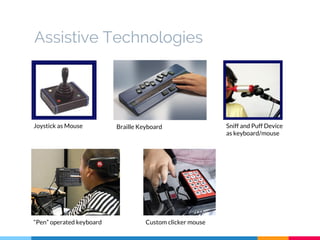
Assistive Technologies
Joystick as Mouse Braille Keyboard Sniff and Puff Device
as keyboard/mouse
“Pen” operated keyboard Custom clicker mouse
“Accessibility refers to the design of products, devices,
services, or environments for people with disabilities.
The concept of accessible design ensures both “direct
access” (i.e. unassisted) and “indirect access” meaning
compatibility with a person's assistive technology (for
example, computer screen readers).
Source: Wikipedia
“Making Web Accessible for the widest possible audience
Currently, online infrastructure is hostile to those with disabilities
Inseparable from SEO, Mobile and Usability
Improve one and you improve others
How to? Adhere to Standards.
Gump
Web Accessibility Essentials
▷ Disabilities and the web
▷ Standards
▷ Accessibility Tools
▷ Design, Content and Engineering
▷ Legal
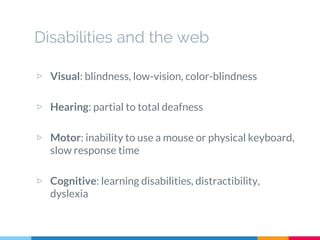
Disabilities and the web
▷ Visual: blindness, low-vision, color-blindness
▷ Hearing: partial to total deafness
▷ Motor: inability to use a mouse or physical keyboard,
slow response time
▷ Cognitive: learning disabilities, distractibility,
dyslexia
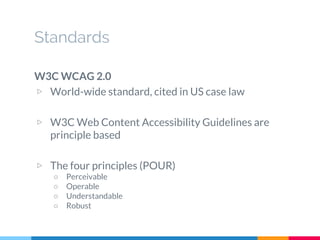
Standards
W3C WCAG 2.0
▷ World-wide standard, cited in US case law
▷ W3C Web Content Accessibility Guidelines are
principle based
▷ The four principles (POUR)
○ Perceivable
○ Operable
○ Understandable
○ Robust
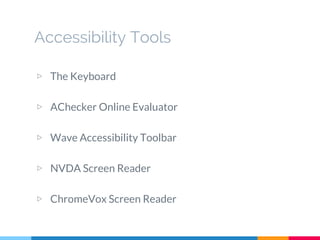
Accessibility Tools
▷ The Keyboard
▷ AChecker Online Evaluator
▷ Wave Accessibility Toolbar
▷ NVDA Screen Reader
▷ ChromeVox Screen Reader
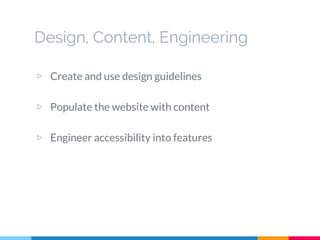
Design, Content, Engineering
▷ Create and use design guidelines
▷ Populate the website with content
▷ Engineer accessibility into features
Legal
▷ DOJ revising ADA to include online resources
▷ Based on W3C WCAG 2.0, Level AA
▷ Case Law: MIT, Harvard, Target, Southwest Airlines,
Priceline.com, Ramada, Kindle, LSAC and many more
Best Practices
Form Labels, Keyboard Access, Headings, Image
Text Alternatives and Page Titles
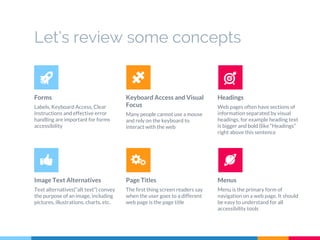
Let’s review some concepts
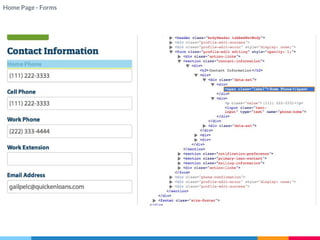
Forms
Labels, Keyboard Access, Clear
Instructions and effective error
handling are important for forms
accessibility
Keyboard Access and Visual
Focus
Many people cannot use a mouse
and rely on the keyboard to
interact with the web
Headings
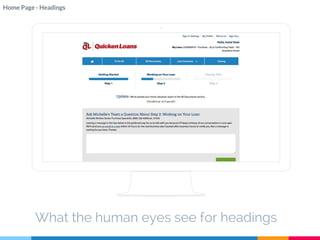
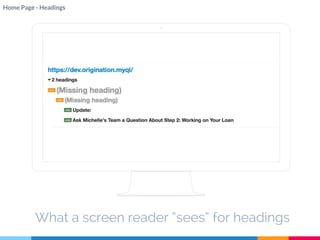
Web pages often have sections of
information separated by visual
headings, for example heading text
is bigger and bold (like “Headings”
right above this sentence
Image Text Alternatives
Text alternatives(“alt text”) convey
the purpose of an image, including
pictures, illustrations, charts, etc.
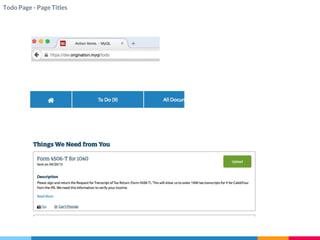
Page Titles
The first thing screen readers say
when the user goes to a different
web page is the page title
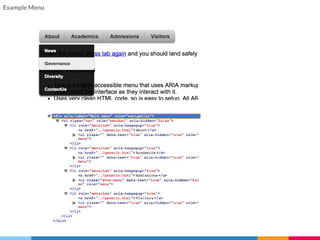
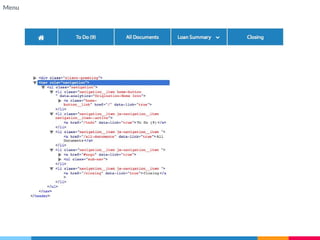
Menus
Menu is the primary form of
navigation on a web page. It should
be easy to understand for all
accessibility tools
2.
Analysis
Individual Pages
Its not about WHO is right, it’s about WHAT is right.
What the human eyes see for headings
Home Page - Headings
What a screen reader “sees” for headings
Home Page - Headings
Todo Page - Page Titles
Example Menu
Menu
Home Page - Forms
Accessibility must become mainstream.
Only then will Quicken Loans reach its true
potential for connecting and enabling everyone
in the world.
Every Client. Every Time. No Exceptions. No Excuses.
How to?
▷ Design Guidelines
▷ Accessibility Training
▷ TFS Task for each story
▷ Accessibility Labs
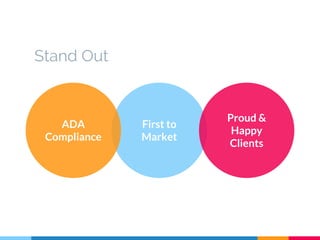
Stand Out
First to
Market
ADA
Compliance
Proud &
Happy
Clients
QL becomes the leader in yet another
game-changing initiative
Obsessed with finding a better way.
Thanks!
Any questions?
Team Game of Loans
You can find me at:
nishan@umich.edu

Website Accessibility

  • 1.
  • 2.
    57,000,000 users Number ofpeople with at least one disability 8,000,000 users Vision Disability 19% of the population Source: Census Bureau of the United States, 2012
  • 3.
    What’s this? This isa basic analysis of the MyQL Origination website with a focus on how to start making websites compliant. ADA Compliance As of today there are no laws which strictly define if a commercial website should be accessible. About this How can I use this? The initial requirements for accessibility are defined in this document. The report is built to ensure implementation of the suggestions in the short term without requiring herculean engineering effort.
  • 4.
    Hello! I am NishanBose Software Engineer Intern, Game of Loans Mentor: Rob Anderson, Leader: Joe Seto Graduate Student at University of Michigan - Ann Arbor Master of Science in Information Built ADA Compliant Websites for Information & Technology Services at U of M Underwent Training in the Accessibility Lab at U of M
  • 5.
    1. Rules of theGame What is Accessibility?
  • 8.
    Assistive Technologies Joystick asMouse Braille Keyboard Sniff and Puff Device as keyboard/mouse “Pen” operated keyboard Custom clicker mouse
  • 9.
    “Accessibility refers tothe design of products, devices, services, or environments for people with disabilities. The concept of accessible design ensures both “direct access” (i.e. unassisted) and “indirect access” meaning compatibility with a person's assistive technology (for example, computer screen readers). Source: Wikipedia
  • 10.
    “Making Web Accessiblefor the widest possible audience Currently, online infrastructure is hostile to those with disabilities Inseparable from SEO, Mobile and Usability Improve one and you improve others How to? Adhere to Standards. Gump
  • 11.
    Web Accessibility Essentials ▷Disabilities and the web ▷ Standards ▷ Accessibility Tools ▷ Design, Content and Engineering ▷ Legal
  • 12.
    Disabilities and theweb ▷ Visual: blindness, low-vision, color-blindness ▷ Hearing: partial to total deafness ▷ Motor: inability to use a mouse or physical keyboard, slow response time ▷ Cognitive: learning disabilities, distractibility, dyslexia
  • 13.
    Standards W3C WCAG 2.0 ▷World-wide standard, cited in US case law ▷ W3C Web Content Accessibility Guidelines are principle based ▷ The four principles (POUR) ○ Perceivable ○ Operable ○ Understandable ○ Robust
  • 14.
    Accessibility Tools ▷ TheKeyboard ▷ AChecker Online Evaluator ▷ Wave Accessibility Toolbar ▷ NVDA Screen Reader ▷ ChromeVox Screen Reader
  • 15.
    Design, Content, Engineering ▷Create and use design guidelines ▷ Populate the website with content ▷ Engineer accessibility into features
  • 16.
    Legal ▷ DOJ revisingADA to include online resources ▷ Based on W3C WCAG 2.0, Level AA ▷ Case Law: MIT, Harvard, Target, Southwest Airlines, Priceline.com, Ramada, Kindle, LSAC and many more
  • 17.
    Best Practices Form Labels,Keyboard Access, Headings, Image Text Alternatives and Page Titles
  • 18.
    Let’s review someconcepts Forms Labels, Keyboard Access, Clear Instructions and effective error handling are important for forms accessibility Keyboard Access and Visual Focus Many people cannot use a mouse and rely on the keyboard to interact with the web Headings Web pages often have sections of information separated by visual headings, for example heading text is bigger and bold (like “Headings” right above this sentence Image Text Alternatives Text alternatives(“alt text”) convey the purpose of an image, including pictures, illustrations, charts, etc. Page Titles The first thing screen readers say when the user goes to a different web page is the page title Menus Menu is the primary form of navigation on a web page. It should be easy to understand for all accessibility tools
  • 19.
    2. Analysis Individual Pages Its notabout WHO is right, it’s about WHAT is right.
  • 20.
    What the humaneyes see for headings Home Page - Headings
  • 21.
    What a screenreader “sees” for headings Home Page - Headings
  • 22.
    Todo Page -Page Titles
  • 23.
  • 24.
  • 25.
  • 26.
    Accessibility must becomemainstream. Only then will Quicken Loans reach its true potential for connecting and enabling everyone in the world. Every Client. Every Time. No Exceptions. No Excuses.
  • 27.
    How to? ▷ DesignGuidelines ▷ Accessibility Training ▷ TFS Task for each story ▷ Accessibility Labs
  • 28.
  • 29.
    QL becomes theleader in yet another game-changing initiative Obsessed with finding a better way.
  • 30.
    Thanks! Any questions? Team Gameof Loans You can find me at: nishan@umich.edu