Accessibility 101 15th August 2008
Agenda Define Guidelines The Audit PDF Accessibility
Defining Accessibility 1
Hit or myth? Accessible sites look boring “ Read more…” is a suitable alternative to “Click here” links “ Text-only” pages are a good way to provide accessibility Accessibility adds cost to a web project
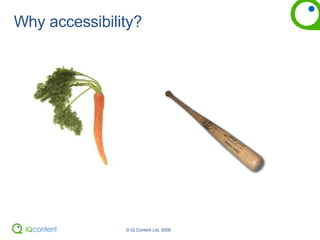
Why accessibility?
Incentives…
Disabilities Vision Hearing Mobility Cognitive Temporary injury Getting old
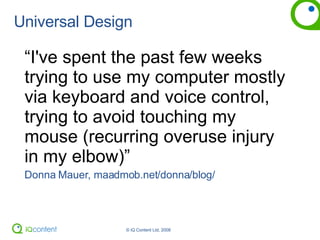
Universal Design “ I've spent the past few weeks trying to use my computer mostly via keyboard and voice control, trying to avoid touching my mouse (recurring overuse injury in my elbow)”  Donna Mauer, maadmob.net/donna/blog/
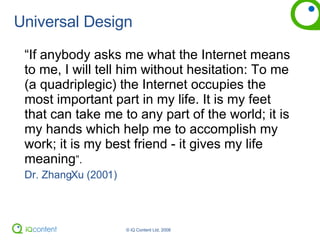
Universal Design “ If anybody asks me what the Internet means to me, I will tell him without hesitation: To me (a quadriplegic) the Internet occupies the most important part in my life. It is my feet that can take me to any part of the world; it is my hands which help me to accomplish my work; it is my best friend - it gives my life meaning ”. Dr. ZhangXu (2001)
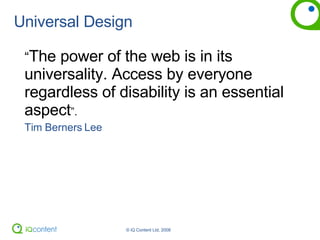
Universal Design “ The power of the web is in its universality. Access by everyone regardless of disability is an essential aspect ”. Tim Berners Lee
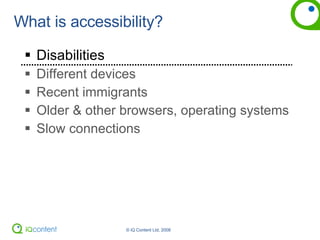
What is accessibility? Disabilities Different devices Recent immigrants Older & other browsers, operating systems Slow connections
Accessibility < Universal Design
Universal Design “ Accessibility: now everyone’s invited” . iQ Content
Irish legislation The  Disability Act (2005) , Section 28 “ Where a public body communicates in electronic form with one or more persons, the head of the body shall ensure, that as far as practicable, that the contents of the communication are accessible to persons with a visual impairment to whom adaptive technology is available”
Private sector legislation? Equal Status Act (2000) categorises discrimination under 9 grounds, one of which is disability Employment Equality Act (1998) provision of accessible technologies to employees
Employment Equality Act Intranets & internal web apps “ Unless I can use this new system, I can’t get a promotion”  – employee of a recent client of ours
Laws elsewhere Barcelona Declaration  www.bcn.es/ciutat-disminucio/angles/a_dec02.html UK Disability Discrimination Act   www.opsi.gov.uk/acts/acts1995/1995050.htm  U.S. Section 508   www.usdoj.gov/crt/508/ Other policies www.w3.org/WAI/Policy/
Open discussion When  in a project do you think “accessibility”? Who checks for accessibility? Have you cross-browser checked it? Have you tested it with JAWs? Checked against guidelines?


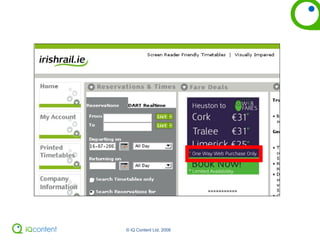
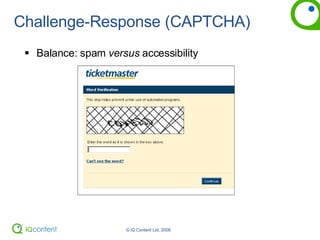
Challenge-Response (CAPTCHA) Balance: spam  versus  accessibility
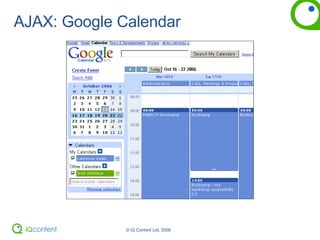
AJAX: Google Calendar
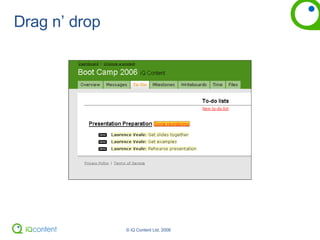
Drag n’ drop
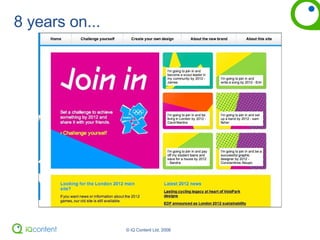
Olympics.com
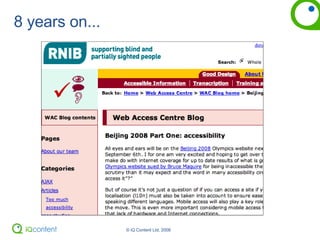
8 years on...
8 years on...
 
Dangers of accessibility compliance This often leads to rubber stamping   A box ticking exercise Quick fix and badge-wearing Bare minimum level of accessibility What about usable accessibility?
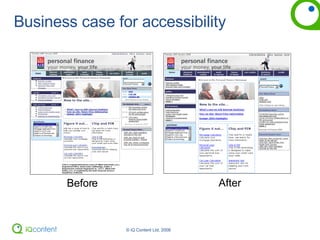
Business case for accessibility Before After
Case study: AIB A reduction in file size of  69% Reduction  in bandwidth of 192 GB  per page, per year. A  reduction in development costs. Faster downloads  - happier users of AIB sites Better  search engine placement? Question:  is this the best way to promote accessibility?
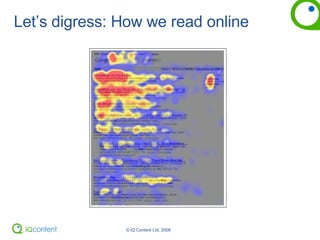
Let’s digress: How we read online
How do we read online? People almost always  scan  your pages Users  won't read your text thoroughly  in a word-by-word manner Most readers have 2 key questions: Am I on the right page? If not, where do I go next? Headings links
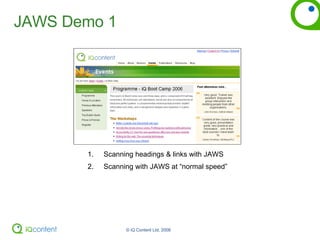
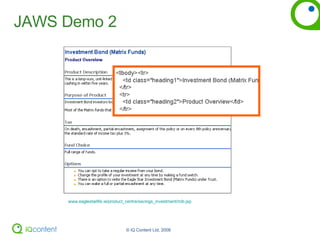
JAWS Demo 1 Scanning headings & links with JAWS Scanning with JAWS at “normal speed”
JAWS Demo 2 www.eaglestarlife.ie/product_centre/savings_investment/mib.jsp
“ Good Design Enables,  Bad Design Disables” The Institute for Design and Disability
Introduction to guidelines 2
W3C WAI WCAG 1.0 Published 1999 3 Priorities 1,2,3 – A, AA, AAA Checkpoints Provide a basis of an audit NDA have their own version…   accessit.nda.ie
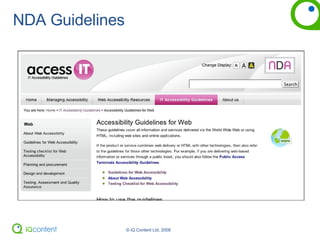
NDA Guidelines
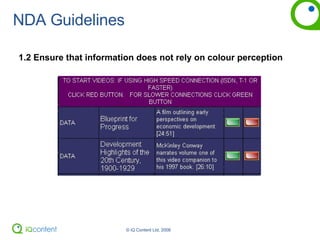
NDA Guidelines: Priority 1 1.1  Provide a text equivalent for every non-text element 1.2  Ensure that information does not rely on colour perception 1.6  Use the clearest and simplest language appropriate 1.9  For data tables, identify row and column headers 1.15  Ensure that scripts and applets that provide the only  source of important functionality are directly  accessible  or  compatible with assistive technologies 1.16  Ensure that pages are usable without support for scripts,  applets, or other programmatic objects 1.17  If you cannot make a page accessible, provide an equivalent accessible page
NDA Guidelines 1.2 Ensure that information does not rely on colour perception
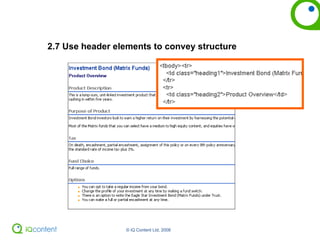
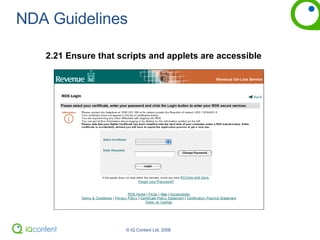
NDA Guidelines: Priority 2 2.5  Use style sheets to control layout and presentation WAI 2.6  Use relative rather than absolute units 2.7   Use header elements to convey structure 2.8  Break up large blocks of information where appropriate 2.12  Clearly identify the target of each link 2.16  Associate labels explicitly with their controls 2.17  Properly position the labels of form controls 2.18  Ensure that user interfaces are device-independent 2.21 Ensure that scripts and applets are accessible 2.30  Do not generate pop-ups or other windows and do not change the current window without informing the user
2.7 Use header elements to convey structure
NDA Guidelines 2.21 Ensure that scripts and applets are accessible
NDA Guidelines: Priority 3 3.5  Place distinguishing information at the beginning of headings, paragraphs, lists 3.7  Provide summaries for tables 3.9  Identify groups of related links and provide a way to bypass them 3.14  Provide navigation bars 3.18  Create a style of presentation that is consistent across pages
The “audit” 3
PAS 78 (UK) 4.3.1  Website commissioners should  not rely solely on automated conformance testing  tools to assess conformance with the relevant W3C guidelines and specifications 4.3.2  Automated tools  may  be used as part of the validation process, but additional  manual checks and user testing with disabled people are essential  to be confident that the website is accessible to disabled people.
The audit Automated  &  manual  Manual: code-checking Internal  or independent?
Process for the audit Checklists & audit procedure Automated tests Toolbars for manual testing  (AIS for IE, Web Developer on Firefox) User testing
Let’s do an accessibility audit… Pick a website…
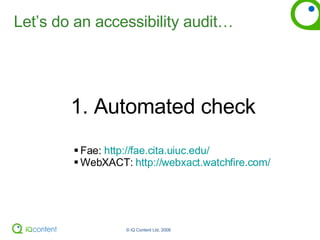
Let’s do an accessibility audit… 1. Automated check  Fae:  http://fae.cita.uiuc.edu/ WebXACT:  http://webxact.watchfire.com/
Let’s do an accessibility audit… 2. Manual check
Let’s do an accessibility audit… 3. User testing
Key message Guidelines are not there to be ticked off – try to understand the potential problems they highlight and ensure you don’t create those problems for your users
What we’ve covered so far Defining disability NDA guidelines Measuring accessibility
PDF Accessbilty 4
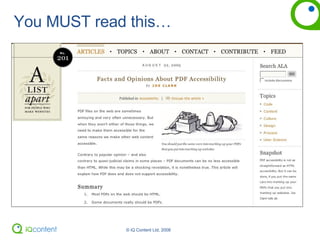
You MUST read this…
Thoughts on PDF accessibility Most of what we publish should  NOT  be PDF Appropriately prepared PDFs can be accessible To be accessible, PDFs need to be “tagged” Tagging requires “specialist” skills Screenreaders need to understand tags
Thoughts on PDF accessibility Not just blind users Simple, clear language Break large chunks of content up Good contrast Well designed
The alternatives HTML (as well as or instead of) RTF Retro-tag your PDFs (Yikes!) Change your content publishing process and think of your  content strategically Technology solution?
4. The new guidelines
New structure Principles Guidelines Success Criteria
The Four POUR Principles WCAG 2.0 principles: P erceivable  O perable  U nderstandable  R obust
Guidelines Each guideline has a number of  Success Criteria Success Criteria are measured over  3 levels Similar to current guidelines “ A” = all Level 1  “ AA” = all Level 1 & Level 2 “ AAA” = Levels 1 & 2 & 50% Level 3
Guideline 2.4 Provide ways to help users with disabilities navigate, find content and determine where they are 2.4.1 Bypass Blocks: A mechanism is available to bypass blocks of content that are repeated 2.4.2 Page Titled: Web pages have descriptive titles.  2.4.3 Focus Order: If a Web page  can be navigated sequentially, focusable components receive focus in an order that follows information and relationships conveyed through presentation 2.4.4 Link Purpose (Context): The purpose of each link can be determined from the link text View the rest of the success criteria… w3.org/WAI/WCAG20/quickref/#navigation-mechanisms
WCAG 2.0 Documents WCAG 2.0 Quick Reference www.w3.org/WAI/WCAG20/quickref/ Understanding WCAG 2.0 www.w3.org/TR/UNDERSTANDING-WCAG20/ Comparison of WCAG 1.0 checkpoints to WCAG 2.0  www.w3.org/TR/WCAG20/appendixD.html
Wrap-up
What you can do right now Right-click your images- especially those that contain text Plug-out your mouse Use some automated testing tools  (TAW, Fae, WebXACT) Validate your HTML Disable CSS & JavaScript Install  Firefox  &  Web Developer toolbar Download  AIS toolbar  and test your site with it Advanced: Download  JAWS  free (40 minute mode) Do some “live” testing
Key principles Think  usable accessibility , not just checkpoints Do your own quick audit for WCAG 1.0 If you are Double A now, you will have very little to do when the new guidelines become recommendations Accessible design is good design Build accessibility in, don’t bolt it on!
fin

Accessibility Workshop

  • 1.
  • 2.
    Agenda Define GuidelinesThe Audit PDF Accessibility
  • 3.
  • 4.
    Hit or myth?Accessible sites look boring “ Read more…” is a suitable alternative to “Click here” links “ Text-only” pages are a good way to provide accessibility Accessibility adds cost to a web project
  • 5.
  • 6.
  • 7.
    Disabilities Vision HearingMobility Cognitive Temporary injury Getting old
  • 8.
    Universal Design “I've spent the past few weeks trying to use my computer mostly via keyboard and voice control, trying to avoid touching my mouse (recurring overuse injury in my elbow)” Donna Mauer, maadmob.net/donna/blog/
  • 9.
    Universal Design “If anybody asks me what the Internet means to me, I will tell him without hesitation: To me (a quadriplegic) the Internet occupies the most important part in my life. It is my feet that can take me to any part of the world; it is my hands which help me to accomplish my work; it is my best friend - it gives my life meaning ”. Dr. ZhangXu (2001)
  • 10.
    Universal Design “The power of the web is in its universality. Access by everyone regardless of disability is an essential aspect ”. Tim Berners Lee
  • 11.
    What is accessibility?Disabilities Different devices Recent immigrants Older & other browsers, operating systems Slow connections
  • 12.
  • 13.
    Universal Design “Accessibility: now everyone’s invited” . iQ Content
  • 14.
    Irish legislation The Disability Act (2005) , Section 28 “ Where a public body communicates in electronic form with one or more persons, the head of the body shall ensure, that as far as practicable, that the contents of the communication are accessible to persons with a visual impairment to whom adaptive technology is available”
  • 15.
    Private sector legislation?Equal Status Act (2000) categorises discrimination under 9 grounds, one of which is disability Employment Equality Act (1998) provision of accessible technologies to employees
  • 16.
    Employment Equality ActIntranets & internal web apps “ Unless I can use this new system, I can’t get a promotion” – employee of a recent client of ours
  • 17.
    Laws elsewhere BarcelonaDeclaration www.bcn.es/ciutat-disminucio/angles/a_dec02.html UK Disability Discrimination Act www.opsi.gov.uk/acts/acts1995/1995050.htm U.S. Section 508 www.usdoj.gov/crt/508/ Other policies www.w3.org/WAI/Policy/
  • 18.
    Open discussion When in a project do you think “accessibility”? Who checks for accessibility? Have you cross-browser checked it? Have you tested it with JAWs? Checked against guidelines?
  • 19.
  • 20.
  • 21.
  • 22.
  • 23.
    Challenge-Response (CAPTCHA) Balance:spam versus accessibility
  • 24.
  • 25.
  • 26.
  • 27.
  • 28.
  • 29.
  • 30.
    Dangers of accessibilitycompliance This often leads to rubber stamping A box ticking exercise Quick fix and badge-wearing Bare minimum level of accessibility What about usable accessibility?
  • 31.
    Business case foraccessibility Before After
  • 32.
    Case study: AIBA reduction in file size of 69% Reduction in bandwidth of 192 GB per page, per year. A reduction in development costs. Faster downloads - happier users of AIB sites Better search engine placement? Question: is this the best way to promote accessibility?
  • 33.
    Let’s digress: Howwe read online
  • 34.
    How do weread online? People almost always scan your pages Users won't read your text thoroughly in a word-by-word manner Most readers have 2 key questions: Am I on the right page? If not, where do I go next? Headings links
  • 35.
    JAWS Demo 1Scanning headings & links with JAWS Scanning with JAWS at “normal speed”
  • 36.
    JAWS Demo 2www.eaglestarlife.ie/product_centre/savings_investment/mib.jsp
  • 37.
    “ Good DesignEnables, Bad Design Disables” The Institute for Design and Disability
  • 38.
  • 39.
    W3C WAI WCAG1.0 Published 1999 3 Priorities 1,2,3 – A, AA, AAA Checkpoints Provide a basis of an audit NDA have their own version… accessit.nda.ie
  • 40.
  • 41.
    NDA Guidelines: Priority1 1.1 Provide a text equivalent for every non-text element 1.2 Ensure that information does not rely on colour perception 1.6 Use the clearest and simplest language appropriate 1.9 For data tables, identify row and column headers 1.15 Ensure that scripts and applets that provide the only source of important functionality are directly accessible or compatible with assistive technologies 1.16 Ensure that pages are usable without support for scripts, applets, or other programmatic objects 1.17 If you cannot make a page accessible, provide an equivalent accessible page
  • 42.
    NDA Guidelines 1.2Ensure that information does not rely on colour perception
  • 43.
    NDA Guidelines: Priority2 2.5 Use style sheets to control layout and presentation WAI 2.6 Use relative rather than absolute units 2.7 Use header elements to convey structure 2.8 Break up large blocks of information where appropriate 2.12 Clearly identify the target of each link 2.16 Associate labels explicitly with their controls 2.17 Properly position the labels of form controls 2.18 Ensure that user interfaces are device-independent 2.21 Ensure that scripts and applets are accessible 2.30 Do not generate pop-ups or other windows and do not change the current window without informing the user
  • 44.
    2.7 Use headerelements to convey structure
  • 45.
    NDA Guidelines 2.21Ensure that scripts and applets are accessible
  • 46.
    NDA Guidelines: Priority3 3.5 Place distinguishing information at the beginning of headings, paragraphs, lists 3.7 Provide summaries for tables 3.9 Identify groups of related links and provide a way to bypass them 3.14 Provide navigation bars 3.18 Create a style of presentation that is consistent across pages
  • 47.
  • 48.
    PAS 78 (UK)4.3.1 Website commissioners should not rely solely on automated conformance testing tools to assess conformance with the relevant W3C guidelines and specifications 4.3.2 Automated tools may be used as part of the validation process, but additional manual checks and user testing with disabled people are essential to be confident that the website is accessible to disabled people.
  • 49.
    The audit Automated & manual Manual: code-checking Internal or independent?
  • 50.
    Process for theaudit Checklists & audit procedure Automated tests Toolbars for manual testing (AIS for IE, Web Developer on Firefox) User testing
  • 51.
    Let’s do anaccessibility audit… Pick a website…
  • 52.
    Let’s do anaccessibility audit… 1. Automated check Fae: http://fae.cita.uiuc.edu/ WebXACT: http://webxact.watchfire.com/
  • 53.
    Let’s do anaccessibility audit… 2. Manual check
  • 54.
    Let’s do anaccessibility audit… 3. User testing
  • 55.
    Key message Guidelinesare not there to be ticked off – try to understand the potential problems they highlight and ensure you don’t create those problems for your users
  • 56.
    What we’ve coveredso far Defining disability NDA guidelines Measuring accessibility
  • 57.
  • 58.
  • 59.
    Thoughts on PDFaccessibility Most of what we publish should NOT be PDF Appropriately prepared PDFs can be accessible To be accessible, PDFs need to be “tagged” Tagging requires “specialist” skills Screenreaders need to understand tags
  • 60.
    Thoughts on PDFaccessibility Not just blind users Simple, clear language Break large chunks of content up Good contrast Well designed
  • 61.
    The alternatives HTML(as well as or instead of) RTF Retro-tag your PDFs (Yikes!) Change your content publishing process and think of your content strategically Technology solution?
  • 62.
    4. The newguidelines
  • 63.
    New structure PrinciplesGuidelines Success Criteria
  • 64.
    The Four POURPrinciples WCAG 2.0 principles: P erceivable O perable U nderstandable R obust
  • 65.
    Guidelines Each guidelinehas a number of Success Criteria Success Criteria are measured over 3 levels Similar to current guidelines “ A” = all Level 1 “ AA” = all Level 1 & Level 2 “ AAA” = Levels 1 & 2 & 50% Level 3
  • 66.
    Guideline 2.4 Provideways to help users with disabilities navigate, find content and determine where they are 2.4.1 Bypass Blocks: A mechanism is available to bypass blocks of content that are repeated 2.4.2 Page Titled: Web pages have descriptive titles. 2.4.3 Focus Order: If a Web page can be navigated sequentially, focusable components receive focus in an order that follows information and relationships conveyed through presentation 2.4.4 Link Purpose (Context): The purpose of each link can be determined from the link text View the rest of the success criteria… w3.org/WAI/WCAG20/quickref/#navigation-mechanisms
  • 67.
    WCAG 2.0 DocumentsWCAG 2.0 Quick Reference www.w3.org/WAI/WCAG20/quickref/ Understanding WCAG 2.0 www.w3.org/TR/UNDERSTANDING-WCAG20/ Comparison of WCAG 1.0 checkpoints to WCAG 2.0 www.w3.org/TR/WCAG20/appendixD.html
  • 68.
  • 69.
    What you cando right now Right-click your images- especially those that contain text Plug-out your mouse Use some automated testing tools (TAW, Fae, WebXACT) Validate your HTML Disable CSS & JavaScript Install Firefox & Web Developer toolbar Download AIS toolbar and test your site with it Advanced: Download JAWS free (40 minute mode) Do some “live” testing
  • 70.
    Key principles Think usable accessibility , not just checkpoints Do your own quick audit for WCAG 1.0 If you are Double A now, you will have very little to do when the new guidelines become recommendations Accessible design is good design Build accessibility in, don’t bolt it on!
  • 71.