Application Layer
By,
C.Janani AP / IT,
SSMCE
Topics
• WAP Model
• Mobile Location Based Services
• WAP Gateway
• WAP Protocol
• WAP User Agent Profile
• Caching Model
• Wireless bearers of WAP
• WML
• WML scripts
• WTA
• iMode
• SyncML
1. WAP Model
• An international standard establishing how
mobile devices can access information on the
Internet.
• Providing Internet communications and
advanced telephony services on digital mobile
phones, pagers, personal digital assistants, and
other wireless terminals - WAP Forum
Definition
• Wireless: Lacking or not requiring a wire or wires pertaining to
radio transmission.
• Application: A computer program or piece of computer software
that is designed to do a specific task.
• Protocol: A set of technical rules about how information should be
transmitted and received using computers.
 June 26, 1997, Ericsson, Motorola, Nokia, and Unwired Planet took
the initiative to start a rapid creation of a standard for making
advanced services within the wireless domain a reality.
 In December 1997, WAP Forum was formally created and after the
release of the WAP 1.0 specifications in April 1998, WAP Forum
membership was opened to all.
Need for WAP
• Open and secure and well suited for many
different applications including, but not limited
to stock market information, weather forecasts,
enterprise data, and games.
Benefits
• Device Independent
• N/W Independent
• WML
• Optimizing the content and air link protocols
• No reduction of the end users
Architecture
• Internet Model
WAP Model
Working of WAP Model
• The user selects an option on their mobile device that has a URL with Wireless
Markup language (WML) content assigned to it.
• The phone sends the URL request via the phone network to a WAP gateway using
the binary encoded WAP protocol.
• The gateway translates this WAP request into a conventional HTTP request for
the specified URL and sends it on to the Internet.
• The appropriate Web server picks up the HTTP request.
• The server processes the request just as it would any other request. If the URL
refers to a static WML file, the server delivers it. If a CGI script is requested, it is
processed and the content returned as usual.
• The Web server adds the HTTP header to the WML content and returns it to the
gateway.
• The WAP gateway compiles the WML into binary form.
• The gateway then sends the WML response back to the phone.
• The phone receives the WML via the WAP protocol.
• The micro-browser processes the WML and displays the content on the screen.
WAP protocol
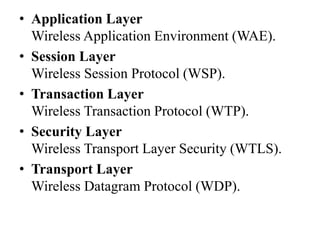
• Application Layer
Wireless Application Environment (WAE).
• Session Layer
Wireless Session Protocol (WSP).
• Transaction Layer
Wireless Transaction Protocol (WTP).
• Security Layer
Wireless Transport Layer Security (WTLS).
• Transport Layer
Wireless Datagram Protocol (WDP).
WAE
• WML- XML compliant mark-up language
• WMLScript - ECMAScript based scripting language
• WAP Push mechanism
• User Agent profiles
• WTA - WAP telephony services
WSP
• Provides shared state between client and server used
to optimize content transfer
• Provides semantics and mechanisms based on HTTP
1.1
• Supports compact encoding of headers
• Supports push functionality
• Supports capability negotiation
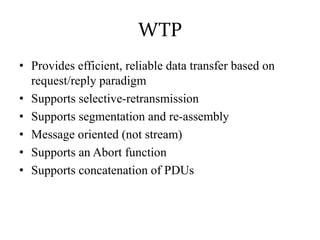
WTP
• Provides efficient, reliable data transfer based on
request/reply paradigm
• Supports selective-retransmission
• Supports segmentation and re-assembly
• Message oriented (not stream)
• Supports an Abort function
• Supports concatenation of PDUs
WAP Security
• Transport level security is WTLS, based on TLS.
Provides privacy, integrity, authentication
• End-to-end security mechanism defined at the
transport layer
• Application layer security provided via WMLScript
crypto library
WDP
• Provides a network and bearer independent interface
to higher layers
• Provides port level addressing
• Provides segmentation and reassembly
• For link layers that support IP, UDP is used as the
Wireless Datagram Protocol layer
WAP and Smart Cards
• WAP supports use of Smart Cards to enhance security
• Wireless Identity Module specification supports
performing security functions & storage of sensitive
data
• Smart Card Provisioning specification defines a file
structure for secure storage of provisioning data
WAP’s current status
• WAP Forum has 200+ members including
– 90% of world’s handset manufacturers
– Carriers with over 100 million subscribers
– Leading infrastructure providers, software developers &
content providers
• WAP v1.2 specification suite approved Dec 99
• Commercial services now widely deployed
Changing marketplace
• High speed 2.5G technologies - GPRS, EDGE
• 3G technologies being developed with data rates of
up to 2Mbps
• Multimedia capable devices being developed
• Demand for richer content - high quality graphics,
audio, video
WAP next generation
• WAP Architecture Convergence group working to
ensure WAP’s architecture converges with the IETF
and other protocols
• WPG reviewing the output from the IETF PILC
group with a goal of incorporating TCP into the WAP
stack
• WAP continually evolving to ensure compatibility
with emerging technologies
Mobile Location Based Services
Location Based Information Systems
• Systems that integrate advances in mobile phones, software
development platforms, databases, positioning technology,
Geographic Information Systems (GIS), and communications
• All combined make possible the creation of Location-Based
Information Systems (LBIS) and Location-Based Services (LBS)
– Promise to change the way we live
• 3.25 billion mobile phone users in 2007
– Half the world’s population
• LBS subscribers using GPS-enabled cell phones expected to grow
from 12 M in 2006 to 315 M in 2011
– 20 M from 500 K in North America
LBIS Challenges
• Many players and technologies involved, and many issues unsolved
– Databases, GIS systems, positioning, applications
• Erroneous and variable information
– Accuracy of GPS fixes depend on positioning system, user location,
weather conditions, interferences, etc.
• Cellular communication networks
– Wireless transmission problems, such as fading, interferences,
disconnections, low bandwidth, etc.
• Cell phones
– Very resource-constrained device in terms of processing power, storage,
and energy capabilities
• Operating systems and interoperability
Location-Based Services (LBS)
• An application that provides users with information based on
the geographical position of the mobile device
• Main difference from other applications/systems
– Availability of the user’s position in real-time
– This single difference makes a BIG difference
• Initial LBS systems were subscription-based
– Traffic congestion notifications based on roads selected
from a Web site
– Received congestion updates about I-75 when on travel in
NYC!
Types of LBS Applications
• LBS can be either Reactive (“pull”) or Proactive
(“push”)
• A Reactive LBS application is triggered by the user
who, based on his current location, queries the system
in search of information
• Many examples
– Finding restaurants or places of interest
– Obtaining directions
– Locating people
– Obtaining weather information
– Sending emergency notifications to police, insurance
companies, roadside assistance companies, etc.
• In Proactive LBS applications, on the other hand, queries or
actions are automatically generated by the LBIS once a
predefined set of conditions are met
• System needs to continuously know where you are and
evaluate the predefined conditions
• Many examples as well
– Geofencing, e.g., children outside predefined boundary
– Fleet management
– Real-time traffic congestion notifications
– Location-based advertisement
– Real-time friend finding
– Proximity-based actuation
– Travel assistant device for riding public transportation,
tourism, museum guided visits, etc
Location
• In LBIS and LBS applications everything is about
LOCATION
• Important to know about different players and
techniques used in the provision of location information
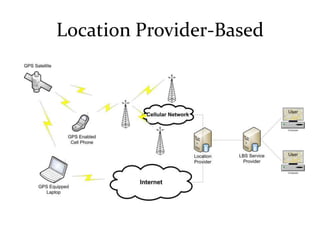
• A location provider may or may not be the same entity
providing the location-based service to the user
• According to who provides the location information,
the system can be categorized as network-based,
mobile-based, and location provider-based
Network-Based Location Provider
Mobile-Based Location Provider
Location Provider-Based
A Complete LBIS Tracking Example
• General real-time tracking application with visualization
– Tracking devices, people, etc.
• Uses the mobile-based location provider architecture
• Proactive LBS application consisting of the following
components:
– Positioning system
– Client device
– Transport network
– Main control station
– Servers
• Standard and free software and standard protocols as much
as possible
Hardware
• Positioning system
– GPS and Assisted GPS (A-GPS)
• Client device
– GPS-enabled cell phone or any device with GPS or embedded
positioning system
• Transport network
– Cellular network with data plan (GPRS or similar) or network
connectivity using Wi-Fi or any other IP-based networking technology
• Main control station
– PC connected to the system to control service and visualize data, e.g.,
set up geofence and Google maps
• Servers
– Database, GIS for geocoding and reverse geocoding, application server
for processing
Software
• Java platform
– Java SE for clients and Java ME for resource-constrained
devices
• Sun’s Glassfish as the application server
• Google ‘s Web Toolkit for visualization
– Google Maps and Google Earth
• Postgres, and object-oriented relational database
• PostGIS, Postgres’s add on to support geographic
objects
• Standard communication protocols
– HTTP, TCP, UDP
WAP User Agent Profile
• Fundamental user agent of the WAE
• WAE allows the integration of domain-specific user
agents with varying architectures and environments
• Existing Markup language contents designed for PC’s
with large displays ans large memory capacities
• WAP handset may not able to store and display the
received contents
• To resolve this UA profile also known as capability and
preference information (CPI) allows content generation
UA End to End Systems
Components
• Client device capable of requesting and rendering WAP
Content
• Wireless network employing WAP 1.1 or later protocols
• A WAP capable GW capable of translating WAP
requests into corresponding requests over the internet
and translating responses from the internet into
corresponding responses over the WAPs
• The internet and intranet using TCP / IP based protocols
and possibly having one or more protocol GWs and
HTPP / Web Proxies.
• A web server can generate request content.
Caching model
• A number of extensions and clarifications have
been specified to facilitate the operation of
HTTP/1.1 caching on limited function devices
• A time sensitive cached resource is set to
“must revalidate”
• Sesitive to Time Synchronization (Time of day
Clock)
• Security enhancements (Prefetching)
Wireless Beares of WAP
• Short Message Service (SMS)
• Circuit Switched Data (USSD)
• Unstructured Supplementary Services Data (USSD –
used over GSM)
• General Packet Radio Service (GPRS – used over
GSM and TDMA)
WML
• WML scripting language is used to design
applications that are sent over wireless devices such
as mobile phones
• WML is an application of XML, which is defined in a
document-type definition.
• WML pages are called decks
• They are constructed as a set of cards, related to each
other with links
Syntax
<?xml version="1.0"?>
<!DOCTYPE wml PUBLIC "-
//WAPFORUM//DTD WML 1.2//EN"
"http://www.wapforum.org/DTD/wml12.dtd">
<wml>
<card>
...
</card> ...
more cards...
</wml>
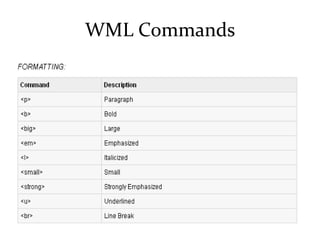
WML Commands
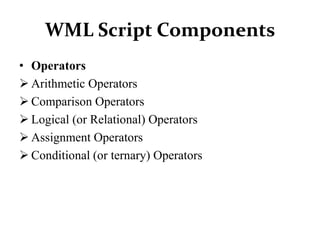
WML Script Components
• Operators
 Arithmetic Operators
 Comparison Operators
 Logical (or Relational) Operators
 Assignment Operators
 Conditional (or ternary) Operators
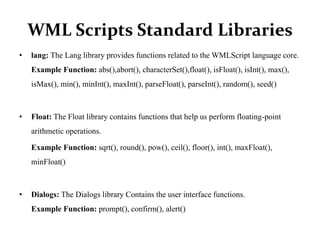
WML Scripts Standard Libraries
• lang: The Lang library provides functions related to the WMLScript language core.
Example Function: abs(),abort(), characterSet(),float(), isFloat(), isInt(), max(),
isMax(), min(), minInt(), maxInt(), parseFloat(), parseInt(), random(), seed()
• Float: The Float library contains functions that help us perform floating-point
arithmetic operations.
Example Function: sqrt(), round(), pow(), ceil(), floor(), int(), maxFloat(),
minFloat()
• Dialogs: The Dialogs library Contains the user interface functions.
Example Function: prompt(), confirm(), alert()
• String: The String library provides a number of functions that help us manipulate
strings.
Example Function: length(), charAt(), find(), replace(), trim(), compare(),
format(), isEmpty(), squeeze(), toString(), elementAt(), elements(), insertAt(),
removeAt(), replaceAt()
• URL: The URL library contains functions that help us manipulate URLs.
Example Function: getPath(), getReferer(), getHost(), getBase(), escapeString(),
isValid(), loadString(), resolve(), unescapeString(), getFragment()
• WMLBrowser: The WMLBrowser library provides a group of functions to control
the WML browser or to get information from it.
Example Function: go(), prev(), next(), getCurrentCard(), refresh(), getVar(),
setVar()
WML Scripts Comments
• Single-line comment: To add a single-line comment,
begin a line of text with the
// characters.
• Multi-line comment: To add a multi-line comment,
enclose the text within
/* and */.
Sample Program

Wap & WML

  • 1.
  • 2.
    Topics • WAP Model •Mobile Location Based Services • WAP Gateway • WAP Protocol • WAP User Agent Profile • Caching Model • Wireless bearers of WAP • WML • WML scripts • WTA • iMode • SyncML
  • 3.
    1. WAP Model •An international standard establishing how mobile devices can access information on the Internet. • Providing Internet communications and advanced telephony services on digital mobile phones, pagers, personal digital assistants, and other wireless terminals - WAP Forum
  • 4.
    Definition • Wireless: Lackingor not requiring a wire or wires pertaining to radio transmission. • Application: A computer program or piece of computer software that is designed to do a specific task. • Protocol: A set of technical rules about how information should be transmitted and received using computers.  June 26, 1997, Ericsson, Motorola, Nokia, and Unwired Planet took the initiative to start a rapid creation of a standard for making advanced services within the wireless domain a reality.  In December 1997, WAP Forum was formally created and after the release of the WAP 1.0 specifications in April 1998, WAP Forum membership was opened to all.
  • 5.
    Need for WAP •Open and secure and well suited for many different applications including, but not limited to stock market information, weather forecasts, enterprise data, and games.
  • 6.
    Benefits • Device Independent •N/W Independent • WML • Optimizing the content and air link protocols • No reduction of the end users
  • 7.
  • 8.
  • 9.
    Working of WAPModel • The user selects an option on their mobile device that has a URL with Wireless Markup language (WML) content assigned to it. • The phone sends the URL request via the phone network to a WAP gateway using the binary encoded WAP protocol. • The gateway translates this WAP request into a conventional HTTP request for the specified URL and sends it on to the Internet. • The appropriate Web server picks up the HTTP request. • The server processes the request just as it would any other request. If the URL refers to a static WML file, the server delivers it. If a CGI script is requested, it is processed and the content returned as usual. • The Web server adds the HTTP header to the WML content and returns it to the gateway. • The WAP gateway compiles the WML into binary form. • The gateway then sends the WML response back to the phone. • The phone receives the WML via the WAP protocol. • The micro-browser processes the WML and displays the content on the screen.
  • 10.
  • 11.
    • Application Layer WirelessApplication Environment (WAE). • Session Layer Wireless Session Protocol (WSP). • Transaction Layer Wireless Transaction Protocol (WTP). • Security Layer Wireless Transport Layer Security (WTLS). • Transport Layer Wireless Datagram Protocol (WDP).
  • 12.
    WAE • WML- XMLcompliant mark-up language • WMLScript - ECMAScript based scripting language • WAP Push mechanism • User Agent profiles • WTA - WAP telephony services
  • 13.
    WSP • Provides sharedstate between client and server used to optimize content transfer • Provides semantics and mechanisms based on HTTP 1.1 • Supports compact encoding of headers • Supports push functionality • Supports capability negotiation
  • 14.
    WTP • Provides efficient,reliable data transfer based on request/reply paradigm • Supports selective-retransmission • Supports segmentation and re-assembly • Message oriented (not stream) • Supports an Abort function • Supports concatenation of PDUs
  • 15.
    WAP Security • Transportlevel security is WTLS, based on TLS. Provides privacy, integrity, authentication • End-to-end security mechanism defined at the transport layer • Application layer security provided via WMLScript crypto library
  • 16.
    WDP • Provides anetwork and bearer independent interface to higher layers • Provides port level addressing • Provides segmentation and reassembly • For link layers that support IP, UDP is used as the Wireless Datagram Protocol layer
  • 17.
    WAP and SmartCards • WAP supports use of Smart Cards to enhance security • Wireless Identity Module specification supports performing security functions & storage of sensitive data • Smart Card Provisioning specification defines a file structure for secure storage of provisioning data
  • 18.
    WAP’s current status •WAP Forum has 200+ members including – 90% of world’s handset manufacturers – Carriers with over 100 million subscribers – Leading infrastructure providers, software developers & content providers • WAP v1.2 specification suite approved Dec 99 • Commercial services now widely deployed
  • 19.
    Changing marketplace • Highspeed 2.5G technologies - GPRS, EDGE • 3G technologies being developed with data rates of up to 2Mbps • Multimedia capable devices being developed • Demand for richer content - high quality graphics, audio, video
  • 20.
    WAP next generation •WAP Architecture Convergence group working to ensure WAP’s architecture converges with the IETF and other protocols • WPG reviewing the output from the IETF PILC group with a goal of incorporating TCP into the WAP stack • WAP continually evolving to ensure compatibility with emerging technologies
  • 21.
    Mobile Location BasedServices Location Based Information Systems • Systems that integrate advances in mobile phones, software development platforms, databases, positioning technology, Geographic Information Systems (GIS), and communications • All combined make possible the creation of Location-Based Information Systems (LBIS) and Location-Based Services (LBS) – Promise to change the way we live • 3.25 billion mobile phone users in 2007 – Half the world’s population • LBS subscribers using GPS-enabled cell phones expected to grow from 12 M in 2006 to 315 M in 2011 – 20 M from 500 K in North America
  • 22.
    LBIS Challenges • Manyplayers and technologies involved, and many issues unsolved – Databases, GIS systems, positioning, applications • Erroneous and variable information – Accuracy of GPS fixes depend on positioning system, user location, weather conditions, interferences, etc. • Cellular communication networks – Wireless transmission problems, such as fading, interferences, disconnections, low bandwidth, etc. • Cell phones – Very resource-constrained device in terms of processing power, storage, and energy capabilities • Operating systems and interoperability
  • 23.
    Location-Based Services (LBS) •An application that provides users with information based on the geographical position of the mobile device • Main difference from other applications/systems – Availability of the user’s position in real-time – This single difference makes a BIG difference • Initial LBS systems were subscription-based – Traffic congestion notifications based on roads selected from a Web site – Received congestion updates about I-75 when on travel in NYC!
  • 24.
    Types of LBSApplications • LBS can be either Reactive (“pull”) or Proactive (“push”) • A Reactive LBS application is triggered by the user who, based on his current location, queries the system in search of information • Many examples – Finding restaurants or places of interest – Obtaining directions – Locating people – Obtaining weather information – Sending emergency notifications to police, insurance companies, roadside assistance companies, etc.
  • 25.
    • In ProactiveLBS applications, on the other hand, queries or actions are automatically generated by the LBIS once a predefined set of conditions are met • System needs to continuously know where you are and evaluate the predefined conditions • Many examples as well – Geofencing, e.g., children outside predefined boundary – Fleet management – Real-time traffic congestion notifications – Location-based advertisement – Real-time friend finding – Proximity-based actuation – Travel assistant device for riding public transportation, tourism, museum guided visits, etc
  • 26.
    Location • In LBISand LBS applications everything is about LOCATION • Important to know about different players and techniques used in the provision of location information • A location provider may or may not be the same entity providing the location-based service to the user • According to who provides the location information, the system can be categorized as network-based, mobile-based, and location provider-based
  • 27.
  • 28.
  • 29.
  • 30.
    A Complete LBISTracking Example • General real-time tracking application with visualization – Tracking devices, people, etc. • Uses the mobile-based location provider architecture • Proactive LBS application consisting of the following components: – Positioning system – Client device – Transport network – Main control station – Servers • Standard and free software and standard protocols as much as possible
  • 31.
    Hardware • Positioning system –GPS and Assisted GPS (A-GPS) • Client device – GPS-enabled cell phone or any device with GPS or embedded positioning system • Transport network – Cellular network with data plan (GPRS or similar) or network connectivity using Wi-Fi or any other IP-based networking technology • Main control station – PC connected to the system to control service and visualize data, e.g., set up geofence and Google maps • Servers – Database, GIS for geocoding and reverse geocoding, application server for processing
  • 32.
    Software • Java platform –Java SE for clients and Java ME for resource-constrained devices • Sun’s Glassfish as the application server • Google ‘s Web Toolkit for visualization – Google Maps and Google Earth • Postgres, and object-oriented relational database • PostGIS, Postgres’s add on to support geographic objects • Standard communication protocols – HTTP, TCP, UDP
  • 33.
    WAP User AgentProfile • Fundamental user agent of the WAE • WAE allows the integration of domain-specific user agents with varying architectures and environments • Existing Markup language contents designed for PC’s with large displays ans large memory capacities • WAP handset may not able to store and display the received contents • To resolve this UA profile also known as capability and preference information (CPI) allows content generation
  • 34.
    UA End toEnd Systems
  • 35.
    Components • Client devicecapable of requesting and rendering WAP Content • Wireless network employing WAP 1.1 or later protocols • A WAP capable GW capable of translating WAP requests into corresponding requests over the internet and translating responses from the internet into corresponding responses over the WAPs • The internet and intranet using TCP / IP based protocols and possibly having one or more protocol GWs and HTPP / Web Proxies. • A web server can generate request content.
  • 36.
    Caching model • Anumber of extensions and clarifications have been specified to facilitate the operation of HTTP/1.1 caching on limited function devices • A time sensitive cached resource is set to “must revalidate” • Sesitive to Time Synchronization (Time of day Clock) • Security enhancements (Prefetching)
  • 37.
    Wireless Beares ofWAP • Short Message Service (SMS) • Circuit Switched Data (USSD) • Unstructured Supplementary Services Data (USSD – used over GSM) • General Packet Radio Service (GPRS – used over GSM and TDMA)
  • 38.
    WML • WML scriptinglanguage is used to design applications that are sent over wireless devices such as mobile phones • WML is an application of XML, which is defined in a document-type definition. • WML pages are called decks • They are constructed as a set of cards, related to each other with links
  • 39.
    Syntax <?xml version="1.0"?> <!DOCTYPE wmlPUBLIC "- //WAPFORUM//DTD WML 1.2//EN" "http://www.wapforum.org/DTD/wml12.dtd"> <wml> <card> ... </card> ... more cards... </wml>
  • 40.
  • 44.
    WML Script Components •Operators  Arithmetic Operators  Comparison Operators  Logical (or Relational) Operators  Assignment Operators  Conditional (or ternary) Operators
  • 46.
    WML Scripts StandardLibraries • lang: The Lang library provides functions related to the WMLScript language core. Example Function: abs(),abort(), characterSet(),float(), isFloat(), isInt(), max(), isMax(), min(), minInt(), maxInt(), parseFloat(), parseInt(), random(), seed() • Float: The Float library contains functions that help us perform floating-point arithmetic operations. Example Function: sqrt(), round(), pow(), ceil(), floor(), int(), maxFloat(), minFloat() • Dialogs: The Dialogs library Contains the user interface functions. Example Function: prompt(), confirm(), alert()
  • 47.
    • String: TheString library provides a number of functions that help us manipulate strings. Example Function: length(), charAt(), find(), replace(), trim(), compare(), format(), isEmpty(), squeeze(), toString(), elementAt(), elements(), insertAt(), removeAt(), replaceAt() • URL: The URL library contains functions that help us manipulate URLs. Example Function: getPath(), getReferer(), getHost(), getBase(), escapeString(), isValid(), loadString(), resolve(), unescapeString(), getFragment() • WMLBrowser: The WMLBrowser library provides a group of functions to control the WML browser or to get information from it. Example Function: go(), prev(), next(), getCurrentCard(), refresh(), getVar(), setVar()
  • 48.
    WML Scripts Comments •Single-line comment: To add a single-line comment, begin a line of text with the // characters. • Multi-line comment: To add a multi-line comment, enclose the text within /* and */.
  • 49.