Mr.M.Deivam
Assistant Professor in ICT in Education
Dept. of Education
Gandhigram Rural Institute – Deemed to be University
Gandhigram, Dindigul district
Tamilnadu- India
Email: deivammuniyandi@gmail.com
Virtual Learning: A New Trend for
Digital Age Learners
Introduction
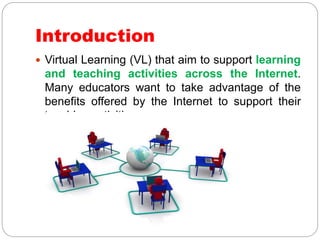
 Virtual Learning (VL) that aim to support learning
and teaching activities across the Internet.
Many educators want to take advantage of the
benefits offered by the Internet to support their
teaching activities.
Real Time VLE
 One way is through synchronous learning which is
done in real time. In this type, teachers conduct live
classes, the teacher may communicate with the
students in real-time using video or web
conferencing. This type of communication is typically
used for giving lectures and for question and answer
sessions. Students can communicate through a
microphone, chat, or by writing on the board. Real
time VLE is totally focused around the virtual
classroom.
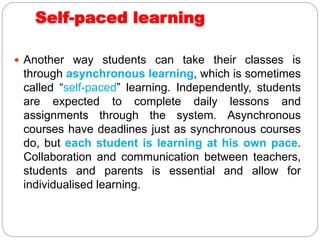
Self-paced learning
 Another way students can take their classes is
through asynchronous learning, which is sometimes
called “self-paced” learning. Independently, students
are expected to complete daily lessons and
assignments through the system. Asynchronous
courses have deadlines just as synchronous courses
do, but each student is learning at his own pace.
Collaboration and communication between teachers,
students and parents is essential and allow for
individualised learning.
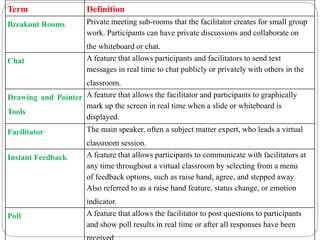
Term Definition
Breakout Rooms Private meeting sub-rooms that the facilitator creates for small group
work. Participants can have private discussions and collaborate on
the whiteboard or chat.
Chat A feature that allows participants and facilitators to send text
messages in real time to chat publicly or privately with others in the
classroom.
Drawing and Pointer
Tools
A feature that allows the facilitator and participants to graphically
mark up the screen in real time when a slide or whiteboard is
displayed.
Facilitator The main speaker, often a subject matter expert, who leads a virtual
classroom session.
Instant Feedback A feature that allows participants to communicate with facilitators at
any time throughout a virtual classroom by selecting from a menu
of feedback options, such as raise hand, agree, and stepped away.
Also referred to as a raise hand feature, status change, or emotion
indicator.
Poll A feature that allows the facilitator to post questions to participants
and show poll results in real time or after all responses have been
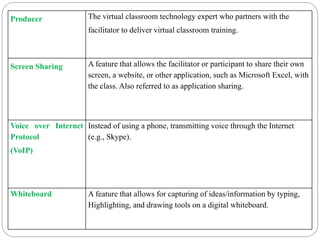
Producer The virtual classroom technology expert who partners with the
facilitator to deliver virtual classroom training.
Screen Sharing A feature that allows the facilitator or participant to share their own
screen, a website, or other application, such as Microsoft Excel, with
the class. Also referred to as application sharing.
Voice over Internet
Protocol
(VoIP)
Instead of using a phone, transmitting voice through the Internet
(e.g., Skype).
Whiteboard A feature that allows for capturing of ideas/information by typing,
Highlighting, and drawing tools on a digital whiteboard.
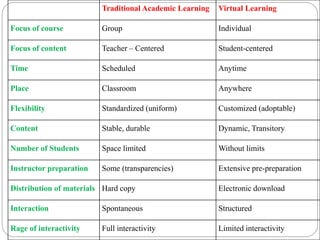
Traditional Academic Learning Virtual Learning
Focus of course Group Individual
Focus of content Teacher – Centered Student-centered
Time Scheduled Anytime
Place Classroom Anywhere
Flexibility Standardized (uniform) Customized (adoptable)
Content Stable, durable Dynamic, Transitory
Number of Students Space limited Without limits
Instructor preparation Some (transparencies) Extensive pre-preparation
Distribution of materials Hard copy Electronic download
Interaction Spontaneous Structured
Rage of interactivity Full interactivity Limited interactivity
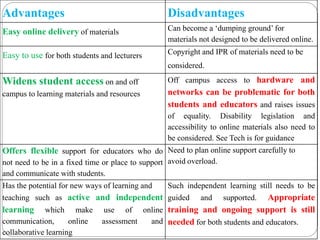
Advantages Disadvantages
Easy online delivery of materials Can become a ‘dumping ground’ for
materials not designed to be delivered online.
Easy to use for both students and lecturers Copyright and IPR of materials need to be
considered.
Widens student access on and off
campus to learning materials and resources
Off campus access to hardware and
networks can be problematic for both
students and educators and raises issues
of equality. Disability legislation and
accessibility to online materials also need to
be considered. See Tech is for guidance
Offers flexible support for educators who do
not need to be in a fixed time or place to support
and communicate with students.
Need to plan online support carefully to
avoid overload.
Has the potential for new ways of learning and
teaching such as active and independent
learning which make use of online
communication, online assessment and
collaborative learning
Such independent learning still needs to be
guided and supported. Appropriate
training and ongoing support is still
needed for both students and educators.
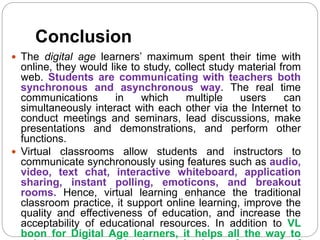
Conclusion
 The digital age learners’ maximum spent their time with
online, they would like to study, collect study material from
web. Students are communicating with teachers both
synchronous and asynchronous way. The real time
communications in which multiple users can
simultaneously interact with each other via the Internet to
conduct meetings and seminars, lead discussions, make
presentations and demonstrations, and perform other
functions.
 Virtual classrooms allow students and instructors to
communicate synchronously using features such as audio,
video, text chat, interactive whiteboard, application
sharing, instant polling, emoticons, and breakout
rooms. Hence, virtual learning enhance the traditional
classroom practice, it support online learning, improve the
quality and effectiveness of education, and increase the
acceptability of educational resources. In addition to VL
boon for Digital Age learners, it helps all the way to
Paper – II
Mr.M.Deivam, Ph.D Scholar,
Dept. of Education, Gandhigram Rural Institute – Deemed
University,
Gandhigram, Dindigul district – 624 302
Virtual Learning Environments: An
Innovative Pedagogy for Google
Generations
Virtual Learning Platforms
Scribblar
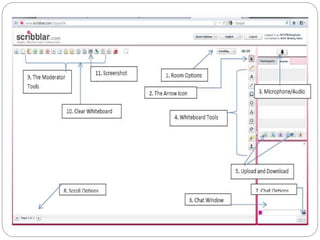
 Scribblar is web 2.0 online tool and real time
multi-user whiteboard which can be used for
revising artwork and images. The tool can also be
used for creative brainstorming and planning of
projects regardless of distance. Scribblar offer the
possibilities to upload and download image, text,
chat, and live audio collaboration. The tool is also
used by teachers and learning facilities. With
Scribblar allowed to add you own logo and branding.
Guests are allowed to join rooms and sessions
without subscribing.
Key Features
 Real time Multi user whiteboard
 Image upload and download
 Text chat
 User List
 Live audio
 Lock and unlock
 Assets : Users are allowed to upload and add assets
from local or online sites;
 Embedding: Users are allowed to embed the whiteboard
in their own site;
 Invite users
 Multiple rooms
Wimba Virtual Classroom
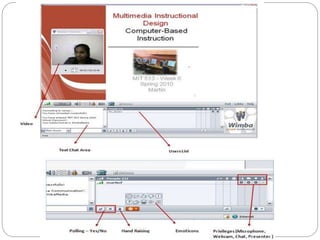
 The Wimba Virtual Classroom is a live, virtual
environment with audio, video, application sharing,
and content display. MP4 capabilities provide the
option for students to download the Wimba archives in
either an MP3 or MP4 audio file format. This makes it
possible for the archive to play on devices that can
support these audio file formats.
Key Features
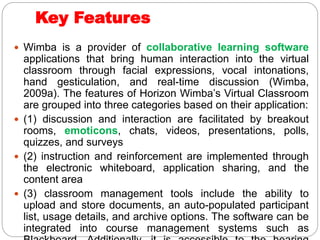
 Wimba is a provider of collaborative learning software
applications that bring human interaction into the virtual
classroom through facial expressions, vocal intonations,
hand gesticulation, and real-time discussion (Wimba,
2009a). The features of Horizon Wimba’s Virtual Classroom
are grouped into three categories based on their application:
 (1) discussion and interaction are facilitated by breakout
rooms, emoticons, chats, videos, presentations, polls,
quizzes, and surveys
 (2) instruction and reinforcement are implemented through
the electronic whiteboard, application sharing, and the
content area
 (3) classroom management tools include the ability to
upload and store documents, an auto-populated participant
list, usage details, and archive options. The software can be
integrated into course management systems such as
WizIQ Virtual Classroom
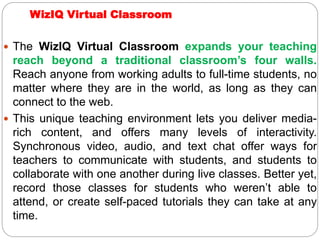
 The WizIQ Virtual Classroom expands your teaching
reach beyond a traditional classroom’s four walls.
Reach anyone from working adults to full-time students, no
matter where they are in the world, as long as they can
connect to the web.
 This unique teaching environment lets you deliver media-
rich content, and offers many levels of interactivity.
Synchronous video, audio, and text chat offer ways for
teachers to communicate with students, and students to
collaborate with one another during live classes. Better yet,
record those classes for students who weren’t able to
attend, or create self-paced tutorials they can take at any
time.
Key Features
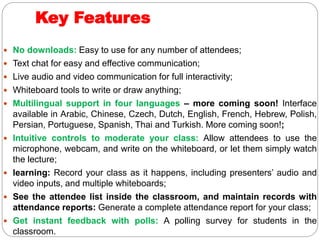
 No downloads: Easy to use for any number of attendees;
 Text chat for easy and effective communication;
 Live audio and video communication for full interactivity;
 Whiteboard tools to write or draw anything;
 Multilingual support in four languages – more coming soon! Interface
available in Arabic, Chinese, Czech, Dutch, English, French, Hebrew, Polish,
Persian, Portuguese, Spanish, Thai and Turkish. More coming soon!;
 Intuitive controls to moderate your class: Allow attendees to use the
microphone, webcam, and write on the whiteboard, or let them simply watch
the lecture;
 learning: Record your class as it happens, including presenters’ audio and
video inputs, and multiple whiteboards;
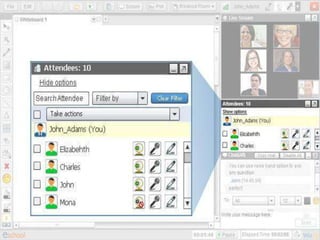
 See the attendee list inside the classroom, and maintain records with
attendance reports: Generate a complete attendance report for your class;
 Get instant feedback with polls: A polling survey for students in the
classroom.
Cont.,
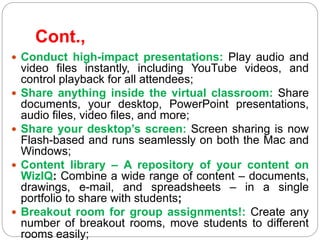
 Conduct high-impact presentations: Play audio and
video files instantly, including YouTube videos, and
control playback for all attendees;
 Share anything inside the virtual classroom: Share
documents, your desktop, PowerPoint presentations,
audio files, video files, and more;
 Share your desktop’s screen: Screen sharing is now
Flash-based and runs seamlessly on both the Mac and
Windows;
 Content library – A repository of your content on
WizIQ: Combine a wide range of content – documents,
drawings, e-mail, and spreadsheets – in a single
portfolio to share with students;
 Breakout room for group assignments!: Create any
number of breakout rooms, move students to different
rooms easily;
Conclusion
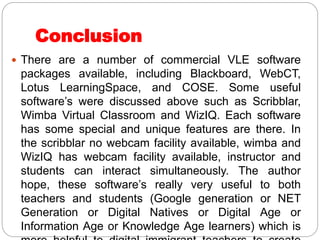
 There are a number of commercial VLE software
packages available, including Blackboard, WebCT,
Lotus LearningSpace, and COSE. Some useful
software’s were discussed above such as Scribblar,
Wimba Virtual Classroom and WizIQ. Each software
has some special and unique features are there. In
the scribblar no webcam facility available, wimba and
WizIQ has webcam facility available, instructor and
students can interact simultaneously. The author
hope, these software’s really very useful to both
teachers and students (Google generation or NET
Generation or Digital Natives or Digital Age or
Information Age or Knowledge Age learners) which is
Virtual learning   au

Virtual learning au

  • 1.
    Mr.M.Deivam Assistant Professor inICT in Education Dept. of Education Gandhigram Rural Institute – Deemed to be University Gandhigram, Dindigul district Tamilnadu- India Email: deivammuniyandi@gmail.com Virtual Learning: A New Trend for Digital Age Learners
  • 2.
    Introduction  Virtual Learning(VL) that aim to support learning and teaching activities across the Internet. Many educators want to take advantage of the benefits offered by the Internet to support their teaching activities.
  • 3.
    Real Time VLE One way is through synchronous learning which is done in real time. In this type, teachers conduct live classes, the teacher may communicate with the students in real-time using video or web conferencing. This type of communication is typically used for giving lectures and for question and answer sessions. Students can communicate through a microphone, chat, or by writing on the board. Real time VLE is totally focused around the virtual classroom.
  • 4.
    Self-paced learning  Anotherway students can take their classes is through asynchronous learning, which is sometimes called “self-paced” learning. Independently, students are expected to complete daily lessons and assignments through the system. Asynchronous courses have deadlines just as synchronous courses do, but each student is learning at his own pace. Collaboration and communication between teachers, students and parents is essential and allow for individualised learning.
  • 5.
    Term Definition Breakout RoomsPrivate meeting sub-rooms that the facilitator creates for small group work. Participants can have private discussions and collaborate on the whiteboard or chat. Chat A feature that allows participants and facilitators to send text messages in real time to chat publicly or privately with others in the classroom. Drawing and Pointer Tools A feature that allows the facilitator and participants to graphically mark up the screen in real time when a slide or whiteboard is displayed. Facilitator The main speaker, often a subject matter expert, who leads a virtual classroom session. Instant Feedback A feature that allows participants to communicate with facilitators at any time throughout a virtual classroom by selecting from a menu of feedback options, such as raise hand, agree, and stepped away. Also referred to as a raise hand feature, status change, or emotion indicator. Poll A feature that allows the facilitator to post questions to participants and show poll results in real time or after all responses have been
  • 6.
    Producer The virtualclassroom technology expert who partners with the facilitator to deliver virtual classroom training. Screen Sharing A feature that allows the facilitator or participant to share their own screen, a website, or other application, such as Microsoft Excel, with the class. Also referred to as application sharing. Voice over Internet Protocol (VoIP) Instead of using a phone, transmitting voice through the Internet (e.g., Skype). Whiteboard A feature that allows for capturing of ideas/information by typing, Highlighting, and drawing tools on a digital whiteboard.
  • 7.
    Traditional Academic LearningVirtual Learning Focus of course Group Individual Focus of content Teacher – Centered Student-centered Time Scheduled Anytime Place Classroom Anywhere Flexibility Standardized (uniform) Customized (adoptable) Content Stable, durable Dynamic, Transitory Number of Students Space limited Without limits Instructor preparation Some (transparencies) Extensive pre-preparation Distribution of materials Hard copy Electronic download Interaction Spontaneous Structured Rage of interactivity Full interactivity Limited interactivity
  • 8.
    Advantages Disadvantages Easy onlinedelivery of materials Can become a ‘dumping ground’ for materials not designed to be delivered online. Easy to use for both students and lecturers Copyright and IPR of materials need to be considered. Widens student access on and off campus to learning materials and resources Off campus access to hardware and networks can be problematic for both students and educators and raises issues of equality. Disability legislation and accessibility to online materials also need to be considered. See Tech is for guidance Offers flexible support for educators who do not need to be in a fixed time or place to support and communicate with students. Need to plan online support carefully to avoid overload. Has the potential for new ways of learning and teaching such as active and independent learning which make use of online communication, online assessment and collaborative learning Such independent learning still needs to be guided and supported. Appropriate training and ongoing support is still needed for both students and educators.
  • 9.
    Conclusion  The digitalage learners’ maximum spent their time with online, they would like to study, collect study material from web. Students are communicating with teachers both synchronous and asynchronous way. The real time communications in which multiple users can simultaneously interact with each other via the Internet to conduct meetings and seminars, lead discussions, make presentations and demonstrations, and perform other functions.  Virtual classrooms allow students and instructors to communicate synchronously using features such as audio, video, text chat, interactive whiteboard, application sharing, instant polling, emoticons, and breakout rooms. Hence, virtual learning enhance the traditional classroom practice, it support online learning, improve the quality and effectiveness of education, and increase the acceptability of educational resources. In addition to VL boon for Digital Age learners, it helps all the way to
  • 10.
    Paper – II Mr.M.Deivam,Ph.D Scholar, Dept. of Education, Gandhigram Rural Institute – Deemed University, Gandhigram, Dindigul district – 624 302 Virtual Learning Environments: An Innovative Pedagogy for Google Generations
  • 11.
  • 12.
    Scribblar  Scribblar isweb 2.0 online tool and real time multi-user whiteboard which can be used for revising artwork and images. The tool can also be used for creative brainstorming and planning of projects regardless of distance. Scribblar offer the possibilities to upload and download image, text, chat, and live audio collaboration. The tool is also used by teachers and learning facilities. With Scribblar allowed to add you own logo and branding. Guests are allowed to join rooms and sessions without subscribing.
  • 14.
    Key Features  Realtime Multi user whiteboard  Image upload and download  Text chat  User List  Live audio  Lock and unlock  Assets : Users are allowed to upload and add assets from local or online sites;  Embedding: Users are allowed to embed the whiteboard in their own site;  Invite users  Multiple rooms
  • 15.
    Wimba Virtual Classroom The Wimba Virtual Classroom is a live, virtual environment with audio, video, application sharing, and content display. MP4 capabilities provide the option for students to download the Wimba archives in either an MP3 or MP4 audio file format. This makes it possible for the archive to play on devices that can support these audio file formats.
  • 17.
    Key Features  Wimbais a provider of collaborative learning software applications that bring human interaction into the virtual classroom through facial expressions, vocal intonations, hand gesticulation, and real-time discussion (Wimba, 2009a). The features of Horizon Wimba’s Virtual Classroom are grouped into three categories based on their application:  (1) discussion and interaction are facilitated by breakout rooms, emoticons, chats, videos, presentations, polls, quizzes, and surveys  (2) instruction and reinforcement are implemented through the electronic whiteboard, application sharing, and the content area  (3) classroom management tools include the ability to upload and store documents, an auto-populated participant list, usage details, and archive options. The software can be integrated into course management systems such as
  • 18.
    WizIQ Virtual Classroom The WizIQ Virtual Classroom expands your teaching reach beyond a traditional classroom’s four walls. Reach anyone from working adults to full-time students, no matter where they are in the world, as long as they can connect to the web.  This unique teaching environment lets you deliver media- rich content, and offers many levels of interactivity. Synchronous video, audio, and text chat offer ways for teachers to communicate with students, and students to collaborate with one another during live classes. Better yet, record those classes for students who weren’t able to attend, or create self-paced tutorials they can take at any time.
  • 20.
    Key Features  Nodownloads: Easy to use for any number of attendees;  Text chat for easy and effective communication;  Live audio and video communication for full interactivity;  Whiteboard tools to write or draw anything;  Multilingual support in four languages – more coming soon! Interface available in Arabic, Chinese, Czech, Dutch, English, French, Hebrew, Polish, Persian, Portuguese, Spanish, Thai and Turkish. More coming soon!;  Intuitive controls to moderate your class: Allow attendees to use the microphone, webcam, and write on the whiteboard, or let them simply watch the lecture;  learning: Record your class as it happens, including presenters’ audio and video inputs, and multiple whiteboards;  See the attendee list inside the classroom, and maintain records with attendance reports: Generate a complete attendance report for your class;  Get instant feedback with polls: A polling survey for students in the classroom.
  • 21.
    Cont.,  Conduct high-impactpresentations: Play audio and video files instantly, including YouTube videos, and control playback for all attendees;  Share anything inside the virtual classroom: Share documents, your desktop, PowerPoint presentations, audio files, video files, and more;  Share your desktop’s screen: Screen sharing is now Flash-based and runs seamlessly on both the Mac and Windows;  Content library – A repository of your content on WizIQ: Combine a wide range of content – documents, drawings, e-mail, and spreadsheets – in a single portfolio to share with students;  Breakout room for group assignments!: Create any number of breakout rooms, move students to different rooms easily;
  • 22.
    Conclusion  There area number of commercial VLE software packages available, including Blackboard, WebCT, Lotus LearningSpace, and COSE. Some useful software’s were discussed above such as Scribblar, Wimba Virtual Classroom and WizIQ. Each software has some special and unique features are there. In the scribblar no webcam facility available, wimba and WizIQ has webcam facility available, instructor and students can interact simultaneously. The author hope, these software’s really very useful to both teachers and students (Google generation or NET Generation or Digital Natives or Digital Age or Information Age or Knowledge Age learners) which is