DISTANCE TECHNOLOGIES
FOR STUDENTS WITH SPECIAL
EDUCATIONAL NEEDS
Dr. Jagannath K. Dange
Associate Professor
Department of Education
Kuvempu University
Shankaraghatta
Dist: Shimoga,
Karnataka
jkdange@gmail.com
http://jkdange.blogspot.com
For many years instructors have taught students across great
distances via correspondence courses based on written and
printed materials.
DE first stage was marked in late nineteenth century. Then
known as correspondence courses generally provided students
with study guides, textbooks, and sometimes supplemental
reading lists.
The early days of television witnessed the introduction of
televised courses. Today, in a specially equipped facility, an
instructor can teach several classrooms full of students
brought together by interactive television.
Early online courses via electronic mail were rapidly
followed by web-based instruction.
At present, the range and magnitude of DE courses available on the
Internet have expanded tremendously.
DE has gained credibility as a valid, educationally sound and viable
alternative approach to teaching and learning, equal in standard to the
traditional face-to-face interaction of a regular school.
New information and communication technologies have the
potential to offer immense opportunities to all societies and
individuals of alternative and often cheaper ways of access to and
dissemination of information.
In this connection, DE has been a particularly successful model in the
developing countries where affordability and geography are real
barriers to access.
The progress in the DE field is exclusively relevant to education of
students with SEN, as the technology-based DE provides them with
the access to learning activities in any place throughout the world.
The design of many distance learning courses rigid barriers to
comprehensive participation of students and instructors with certain
types of impairments.
To assure that individuals with SEN can wholly participate in the
process of ICT-based DE, we must carefully analyze the demands of
the specific group of SEN students and make recommendations on how
to select the most appropriate technology, which will be adequate to
their needs.
For this purpose, sufficient knowledge of assistive technologies is
required
Distance Education: New Opportunities for Students with SEN
In recent years the importance of providing delivering information
mechanisms for the potential users of the emerging Digital Society
has increased significantly
Technological developments of the past three decades have led to
fundamental changes in the production, storage, and dissemination
of materials and information.
DE has the capacity to reach many more people more cost-effectively
than a traditional classroom instruction.
Such programmes meet the demands of social justice and equal
opportunity, especially, for groups who have difficulty in attending
scheduled on-campus courses.
DE is able to take advantage of Information Age and overcome the
obstacles created by societal changes.
Art
Evolution of distance education
The medium for the first generation was written and printed material.
The invention of radio in the 1920s allowed the beginning of radio-led courses
consisting of a series of talks. From the 1950s TV-led courses have been
extensively used, often with print and local groups, occasionally student
assessment.
The beginning of the second generation was marked by the Open University of
the UK set up in 1969. This was the first time when a deliberately integrated
multiple media approach was used for distance education, the print integrated
with broadcasts (audio cassettes were added later).
The third generation of distance education uses information and
communication technologies as its basis, offering two-way communication in
various forms (text, graphics, sound, moving pictures), either synchronous (‘at the
same time’, such as videoconferencing and audio-graphics; both popular in North
American institutions) or asynchronous (‘not at the same time’, such as electronic
mail, the Internet and computer conferencing).
Benefits of Distance Education for Students with SEN
ICT-based DE has the potential to reduce isolation, link an
individual with others, and increase access to learning for
students with SEN.
It is also likely to ensure that each student can access the
appropriate learning course and assistance according to their
needs.
ICT-based technologies can effectively support the DE of
students with SEN in three main areas:
• Interactive communication between educators and learners.
• Delivery of resources.
• Access to learning resources.
Benefits of ICT−based distance education for students with SEN
• Removes barriers of place –students can join classes from a place of their
choice. This may be seen as irrefutable advantage, particularly, for
‘homebound’ students with a disability;
• Removes barriers of time –students pursue learning with a more flexible
schedule; asynchronous discussion via a chat room enables them to join ‘the
class’ at personally convenient times;
• Obviates(Avoids) dependence on a prescribed information source (mostly
textbook) - resources may be derived from multiple locations, in varying
formats;
• Decreases the assistance, for example, of library staff and others;
• Increases opportunity of active engagement in the learning process.
• Affords people with a range of disabilities an easier access to learning
resources – e.g. students with vision, hearing, speech, or mobility
impairments and learning disabilities have the opportunity to
communicate with their peers using the appropriate assistive technology
meeting their particular needs.
Synchronous Communication and Collaboration Tools
When the course instructor and students come together at the same time,
the teaching/learning process is described as ‘synchronous’.
Instant messaging services (e.g. MSN Messenger3, ICQ4, etc.,) offer the
opportunity to identify people. Includes voice chat, file transfer, and other
applications which can be essential for persons with SEN.
Chat room - Chat rooms are synchronous communication tools which allow
the users to have a discussion via typed text in real-time without a need to be
in the same place. free on many web sites (such as Talk City5, Yahoo Chat6,
etc.), where the instructors can create their own classroom area.
Whiteboard - The whiteboard, as a graphical chat tool, allows users to
draw, paint, and share existing graphical files in real time with a help of a
mouse.
Audio conferencing– Audiocan be done via phones or the Internet. This way
of interaction includes two or conferencing more participants collaborating
via oral speech in real-time.
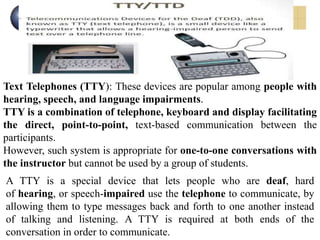
Text Telephones (TTY): These devices are popular among people with
hearing, speech, and language impairments.
TTY is a combination of telephone, keyboard and display facilitating
the direct, point-to-point, text-based communication between the
participants.
However, such system is appropriate for one-to-one conversations with
the instructor but cannot be used by a group of students.
A TTY is a special device that lets people who are deaf, hard
of hearing, or speech-impaired use the telephone to communicate, by
allowing them to type messages back and forth to one another instead
of talking and listening. A TTY is required at both ends of the
conversation in order to communicate.
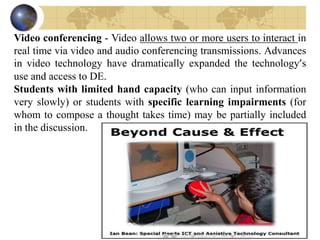
Video conferencing - Video allows two or more users to interact in
real time via video and audio conferencing transmissions. Advances
in video technology have dramatically expanded the technology’s
use and access to DE.
Students with limited hand capacity (who can input information
very slowly) or students with specific learning impairments (for
whom to compose a thought takes time) may be partially included
in the discussion.
Variety of video conferencing technologies: Integrated Services
Digital Network (ISDN), satellite and cable broadcast, and
Instructional Television Fixed Service (ITFS).
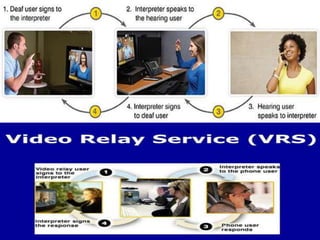
It is important to be aware of Telecommunication Relay Service
(TRS) and Video Relay Services (VRS) which support
telecommunication between non-hearing and hearing people.
TRS implements two-way translation between speech and text.
The hearing user communicates orally, the non-hearing user
communicates by typing on a TTY; a relay operator serves a liaison,
responding by voice to the hearing party and by text to the non-
hearing party.
VRS is a similar service, except for the non-hearing user converses
with the relay operator in the sign language.
Multi-user domain (MUD), object oriented (MOO) is a virtual
reality system in which several users are connected at one time. ...
Since then, MOO has been adapted for educational purposes such as
collaborative software development, distance education and
conferencing.
Multi-user domain Object Oriented Environments(MOOs) -
MOOs are virtual online environments designed for problem-

solving, live interaction, and collaboration.
A MOO is a synchronous text-based tool which gives the user a
control over ‘avatars’ (computer-generated actors) moving through
the virtual world, interacting and communicating via speech
generated by user-typed instructions.
In order to be accessible, a text description of the virtual world and a
real-time text transcript are required.
Asynchronous Communication and Collaboration Tools
When education is unfixed in time, the process is described as
‘asynchronous’.
The communication is less difficult than synchronous types, as
students are free to make up their own schedules. With asynchronous
delivery of instruction, a student can review the online content several
times and enjoy additional time to think over the learning material
and to respond to it.
is vital for students with disabilities, because input/output of
information, thinking, and conceptualization can take longer time
due to their impairments.
The advantages of this way of interaction are: a relatively low cost and
time flexibility.
Electronic mail(e-mail)- Electronic software is now so well-developed
and user-friendly that even new users need mail (e-mail) very little
training to get started.
Mailing list- A mailing list is an automatic mailing system, which
allows the group to communicate without having to send individual
e-mails to everyone in the group.
It addresses the entire class, so when someone sends mail to the
mailing list, a copy is transmitted to all subscribers.
Forum- Forums are another kind of asynchronous communication. They
are also known as bulletin boards and/or message boards.
while bulletin board users must visit a location on the web to read
and post messages.
Bulletin boards, messages about a particular topic are grouped together,
making discussions easy to follow.
Recurrent barriers to web access for people with SEN
Key problems experienced by users with disabilities are presented
according to the Formal Investigation conducted by the Disability
Rights Commission (Disability Rights Commission, 2004).
Instances are given in brackets.
Key problems experienced by blind users:
• Incompatibility between screen reading software and web pages,
e.g. the assistive technology not detecting some links or proving
impossible to highlight text using text-to-speech software (26);
• Incorrect or non-existent labelling of links, form elements, and
frames (24);
• Cluttered(Dis-orderly) and complex page structures (23);
• ALT tags on images non-existent or unhelpful (16);
• Confusing and disorienting navigation mechanisms (16).
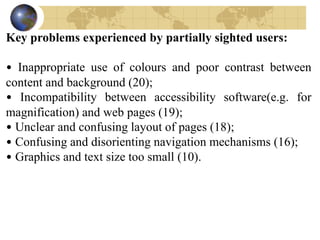
Key problems experienced by partially sighted users:
• Inappropriate use of colours and poor contrast between
content and background (20);
• Incompatibility between accessibility software(e.g. for
magnification) and web pages (19);
• Unclear and confusing layout of pages (18);
• Confusing and disorienting navigation mechanisms (16);
• Graphics and text size too small (10).
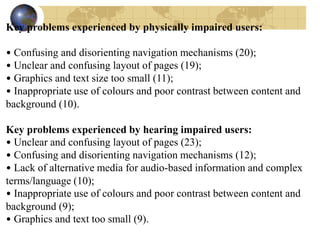
Key problems experienced by physically impaired users:
• Confusing and disorienting navigation mechanisms (20);
• Unclear and confusing layout of pages (19);
• Graphics and text size too small (11);
• Inappropriate use of colours and poor contrast between content and
background (10).
Key problems experienced by hearing impaired users:
• Unclear and confusing layout of pages (23);
• Confusing and disorienting navigation mechanisms (12);
• Lack of alternative media for audio-based information and complex
terms/language (10);
• Inappropriate use of colours and poor contrast between content and
background (9);
• Graphics and text too small (9).
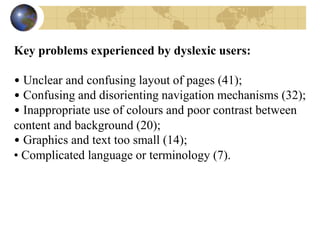
Key problems experienced by dyslexic users:
• Unclear and confusing layout of pages (41);
• Confusing and disorienting navigation mechanisms (32);
• Inappropriate use of colours and poor contrast between
content and background (20);
• Graphics and text too small (14);
• Complicated language or terminology (7).
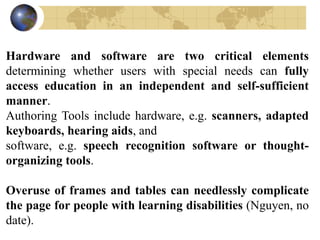
Hardware and software are two critical elements
determining whether users with special needs can fully
access education in an independent and self-sufficient
manner.
Authoring Tools include hardware, e.g. scanners, adapted
keyboards, hearing aids, and
software, e.g. speech recognition software or thought-
organizing tools.
Overuse of frames and tables can needlessly complicate
the page for people with learning disabilities (Nguyen, no
date).
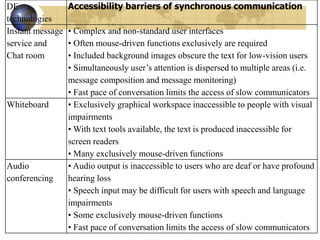
DE
technologies
Accessibility barriers of synchronous communication
Instant message
service and
Chat room
• Complex and non-standard user interfaces
• Often mouse-driven functions exclusively are required
• Included background images obscure the text for low-vision users
• Simultaneously user’s attention is dispersed to multiple areas (i.e.
message composition and message monitoring)
• Fast pace of conversation limits the access of slow communicators
Whiteboard • Exclusively graphical workspace inaccessible to people with visual
impairments
• With text tools available, the text is produced inaccessible for
screen readers
• Many exclusively mouse-driven functions
Audio
conferencing
• Audio output is inaccessible to users who are deaf or have profound
hearing loss
• Speech input may be difficult for users with speech and language
impairments
• Some exclusively mouse-driven functions
• Fast pace of conversation limits the access of slow communicators
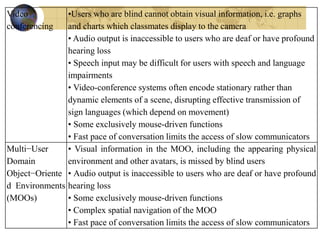
Video
conferencing
•Users who are blind cannot obtain visual information, i.e. graphs
and charts which classmates display to the camera
• Audio output is inaccessible to users who are deaf or have profound
hearing loss
• Speech input may be difficult for users with speech and language
impairments
• Video-conference systems often encode stationary rather than
dynamic elements of a scene, disrupting effective transmission of
sign languages (which depend on movement)
• Some exclusively mouse-driven functions
• Fast pace of conversation limits the access of slow communicators
Multi−User
Domain
Object−Oriente
d Environments
(MOOs)
• Visual information in the MOO, including the appearing physical
environment and other avatars, is missed by blind users
• Audio output is inaccessible to users who are deaf or have profound
hearing loss
• Some exclusively mouse-driven functions
• Complex spatial navigation of the MOO
• Fast pace of conversation limits the access of slow communicators
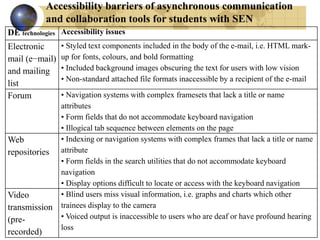
Accessibility barriers of asynchronous communication
and collaboration tools for students with SEN
DE technologies Accessibility issues
Electronic
mail (e−mail)
and mailing
list
• Styled text components included in the body of the e-mail, i.e. HTML mark-
up for fonts, colours, and bold formatting
• Included background images obscuring the text for users with low vision
• Non-standard attached file formats inaccessible by a recipient of the e-mail
Forum • Navigation systems with complex framesets that lack a title or name
attributes
• Form fields that do not accommodate keyboard navigation
• Illogical tab sequence between elements on the page
Web
repositories
• Indexing or navigation systems with complex frames that lack a title or name
attribute
• Form fields in the search utilities that do not accommodate keyboard
navigation
• Display options difficult to locate or access with the keyboard navigation
Video
transmission
(pre-
recorded)
• Blind users miss visual information, i.e. graphs and charts which other
trainees display to the camera
• Voiced output is inaccessible to users who are deaf or have profound hearing
loss
One of the most comprehensive sources for standards in the field of
electronic accessibility is World Wide Web Consortium (W3C). World
Wide Web Consortium is the voluntary organization which elaborates
official standards of web technology, including mark-up languages,
e.g. HTML and XML (eXtensible Markup Language).
According to the W3C, web accessibility includes:
Web sites and applications–
– Which people with disabilities can perceive, understand, navigate, and
interact with
Web browsers and media players -
– Which can be used effectively by people with disabilities
– which work well with assistive technologies that some people with
disabilities use to access the Web
Web authoring tools and evolving web technologies-
– Which support production of accessible web content and websites.
– Which can be used effectively by people with disabilities.
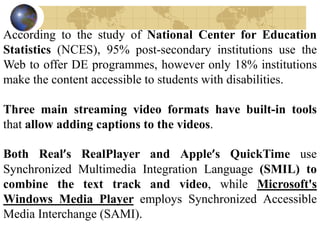
According to the study of National Center for Education
Statistics (NCES), 95% post-secondary institutions use the
Web to offer DE programmes, however only 18% institutions
make the content accessible to students with disabilities.
Three main streaming video formats have built-in tools
that allow adding captions to the videos.
Both Real’s RealPlayer and Apple’s QuickTime use
Synchronized Multimedia Integration Language (SMIL) to
combine the text track and video, while Microsoft's
Windows Media Player employs Synchronized Accessible
Media Interchange (SAMI).
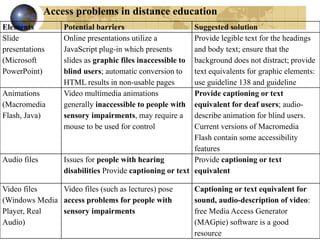
Access problems in distance education
Elements Potential barriers Suggested solution
Slide
presentations
(Microsoft
PowerPoint)
Online presentations utilize a
JavaScript plug-in which presents
slides as graphic files inaccessible to
blind users; automatic conversion to
HTML results in non-usable pages
Provide legible text for the headings
and body text; ensure that the
background does not distract; provide
text equivalents for graphic elements:
use guideline 138 and guideline
Animations
(Macromedia
Flash, Java)
Video multimedia animations
generally inaccessible to people with
sensory impairments, may require a
mouse to be used for control
Provide captioning or text
equivalent for deaf users; audio-
describe animation for blind users.
Current versions of Macromedia
Flash contain some accessibility
features
Audio files Issues for people with hearing
disabilities Provide captioning or text
Provide captioning or text
equivalent
Video files
(Windows Media
Player, Real
Audio)
Video files (such as lectures) pose
access problems for people with
sensory impairments
Captioning or text equivalent for
sound, audio-description of video:
free Media Access Generator
(MAGpie) software is a good
resource
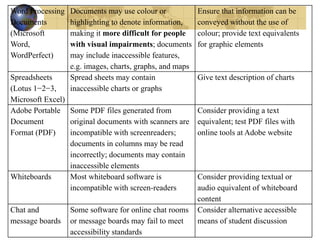
Word Processing
Documents
(Microsoft
Word,
WordPerfect)
Documents may use colour or
highlighting to denote information,
making it more difficult for people
with visual impairments; documents
may include inaccessible features,
e.g. images, charts, graphs, and maps
Ensure that information can be
conveyed without the use of
colour; provide text equivalents
for graphic elements
Spreadsheets
(Lotus 1−2−3,
Microsoft Excel)
Spread sheets may contain
inaccessible charts or graphs
Give text description of charts
Adobe Portable
Document
Format (PDF)
Some PDF files generated from
original documents with scanners are
incompatible with screenreaders;
documents in columns may be read
incorrectly; documents may contain
inaccessible elements
Consider providing a text
equivalent; test PDF files with
online tools at Adobe website
Whiteboards Most whiteboard software is
incompatible with screen-readers
Consider providing textual or
audio equivalent of whiteboard
content
Chat and
message boards
Some software for online chat rooms
or message boards may fail to meet
accessibility standards
Consider alternative accessible
means of student discussion
Diversity matters
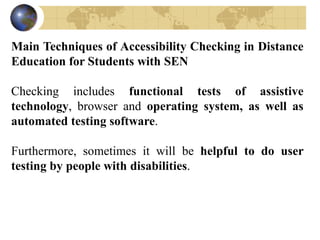
Main Techniques of Accessibility Checking in Distance
Education for Students with SEN
Checking includes functional tests of assistive
technology, browser and operating system, as well as
automated testing software.
Furthermore, sometimes it will be helpful to do user
testing by people with disabilities.
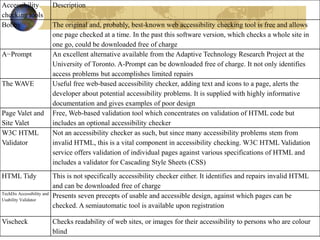
Accessibility
checking tools
Description
Bobby The original and, probably, best-known web accessibility checking tool is free and allows
one page checked at a time. In the past this software version, which checks a whole site in
one go, could be downloaded free of charge
A−Prompt An excellent alternative available from the Adaptive Technology Research Project at the
University of Toronto. A-Prompt can be downloaded free of charge. It not only identifies
access problems but accomplishes limited repairs
The WAVE Useful free web-based accessibility checker, adding text and icons to a page, alerts the
developer about potential accessibility problems. It is supplied with highly informative
documentation and gives examples of poor design
Page Valet and
Site Valet
Free, Web-based validation tool which concentrates on validation of HTML code but
includes an optional accessibility checker
W3C HTML
Validator
Not an accessibility checker as such, but since many accessibility problems stem from
invalid HTML, this is a vital component in accessibility checking. W3C HTML Validation
service offers validation of individual pages against various specifications of HTML and
includes a validator for Cascading Style Sheets (CSS)
HTML Tidy This is not specifically accessibility checker either. It identifies and repairs invalid HTML
and can be downloaded free of charge
TechDis Accessibility and
Usability Validator
Presents seven precepts of usable and accessible design, against which pages can be
checked. A semiautomatic tool is available upon registration
Vischeck Checks readability of web sites, or images for their accessibility to persons who are colour
blind
“Education without Equality is a waste”
“Education is a lifelong process, which we get through
learning either intentional or unintentional from
Experiences”
“Experience leads to Learning and learning in turn leads to
Education”
Jagannath K. Dange
Thank You
Dr. Jagannath K. Dange
Department of Education
Kuvempu University
Shankaraghatta
Dist: Shimoga,
Karnataka
jkdange@gmail.com
http://jkdange.blogspot.com

Distance Education Technologies for Students with Special Educational Needs

  • 1.
    DISTANCE TECHNOLOGIES FOR STUDENTSWITH SPECIAL EDUCATIONAL NEEDS Dr. Jagannath K. Dange Associate Professor Department of Education Kuvempu University Shankaraghatta Dist: Shimoga, Karnataka jkdange@gmail.com http://jkdange.blogspot.com
  • 2.
    For many yearsinstructors have taught students across great distances via correspondence courses based on written and printed materials. DE first stage was marked in late nineteenth century. Then known as correspondence courses generally provided students with study guides, textbooks, and sometimes supplemental reading lists. The early days of television witnessed the introduction of televised courses. Today, in a specially equipped facility, an instructor can teach several classrooms full of students brought together by interactive television. Early online courses via electronic mail were rapidly followed by web-based instruction.
  • 3.
    At present, therange and magnitude of DE courses available on the Internet have expanded tremendously. DE has gained credibility as a valid, educationally sound and viable alternative approach to teaching and learning, equal in standard to the traditional face-to-face interaction of a regular school. New information and communication technologies have the potential to offer immense opportunities to all societies and individuals of alternative and often cheaper ways of access to and dissemination of information. In this connection, DE has been a particularly successful model in the developing countries where affordability and geography are real barriers to access.
  • 4.
    The progress inthe DE field is exclusively relevant to education of students with SEN, as the technology-based DE provides them with the access to learning activities in any place throughout the world. The design of many distance learning courses rigid barriers to comprehensive participation of students and instructors with certain types of impairments. To assure that individuals with SEN can wholly participate in the process of ICT-based DE, we must carefully analyze the demands of the specific group of SEN students and make recommendations on how to select the most appropriate technology, which will be adequate to their needs. For this purpose, sufficient knowledge of assistive technologies is required
  • 5.
    Distance Education: NewOpportunities for Students with SEN In recent years the importance of providing delivering information mechanisms for the potential users of the emerging Digital Society has increased significantly Technological developments of the past three decades have led to fundamental changes in the production, storage, and dissemination of materials and information. DE has the capacity to reach many more people more cost-effectively than a traditional classroom instruction. Such programmes meet the demands of social justice and equal opportunity, especially, for groups who have difficulty in attending scheduled on-campus courses. DE is able to take advantage of Information Age and overcome the obstacles created by societal changes.
  • 6.
    Art Evolution of distanceeducation The medium for the first generation was written and printed material. The invention of radio in the 1920s allowed the beginning of radio-led courses consisting of a series of talks. From the 1950s TV-led courses have been extensively used, often with print and local groups, occasionally student assessment. The beginning of the second generation was marked by the Open University of the UK set up in 1969. This was the first time when a deliberately integrated multiple media approach was used for distance education, the print integrated with broadcasts (audio cassettes were added later). The third generation of distance education uses information and communication technologies as its basis, offering two-way communication in various forms (text, graphics, sound, moving pictures), either synchronous (‘at the same time’, such as videoconferencing and audio-graphics; both popular in North American institutions) or asynchronous (‘not at the same time’, such as electronic mail, the Internet and computer conferencing).
  • 7.
    Benefits of DistanceEducation for Students with SEN ICT-based DE has the potential to reduce isolation, link an individual with others, and increase access to learning for students with SEN. It is also likely to ensure that each student can access the appropriate learning course and assistance according to their needs. ICT-based technologies can effectively support the DE of students with SEN in three main areas: • Interactive communication between educators and learners. • Delivery of resources. • Access to learning resources.
  • 8.
    Benefits of ICT−baseddistance education for students with SEN • Removes barriers of place –students can join classes from a place of their choice. This may be seen as irrefutable advantage, particularly, for ‘homebound’ students with a disability; • Removes barriers of time –students pursue learning with a more flexible schedule; asynchronous discussion via a chat room enables them to join ‘the class’ at personally convenient times; • Obviates(Avoids) dependence on a prescribed information source (mostly textbook) - resources may be derived from multiple locations, in varying formats; • Decreases the assistance, for example, of library staff and others; • Increases opportunity of active engagement in the learning process. • Affords people with a range of disabilities an easier access to learning resources – e.g. students with vision, hearing, speech, or mobility impairments and learning disabilities have the opportunity to communicate with their peers using the appropriate assistive technology meeting their particular needs.
  • 9.
    Synchronous Communication andCollaboration Tools When the course instructor and students come together at the same time, the teaching/learning process is described as ‘synchronous’. Instant messaging services (e.g. MSN Messenger3, ICQ4, etc.,) offer the opportunity to identify people. Includes voice chat, file transfer, and other applications which can be essential for persons with SEN. Chat room - Chat rooms are synchronous communication tools which allow the users to have a discussion via typed text in real-time without a need to be in the same place. free on many web sites (such as Talk City5, Yahoo Chat6, etc.), where the instructors can create their own classroom area. Whiteboard - The whiteboard, as a graphical chat tool, allows users to draw, paint, and share existing graphical files in real time with a help of a mouse. Audio conferencing– Audiocan be done via phones or the Internet. This way of interaction includes two or conferencing more participants collaborating via oral speech in real-time.
  • 10.
    Text Telephones (TTY):These devices are popular among people with hearing, speech, and language impairments. TTY is a combination of telephone, keyboard and display facilitating the direct, point-to-point, text-based communication between the participants. However, such system is appropriate for one-to-one conversations with the instructor but cannot be used by a group of students. A TTY is a special device that lets people who are deaf, hard of hearing, or speech-impaired use the telephone to communicate, by allowing them to type messages back and forth to one another instead of talking and listening. A TTY is required at both ends of the conversation in order to communicate.
  • 11.
    Video conferencing -Video allows two or more users to interact in real time via video and audio conferencing transmissions. Advances in video technology have dramatically expanded the technology’s use and access to DE. Students with limited hand capacity (who can input information very slowly) or students with specific learning impairments (for whom to compose a thought takes time) may be partially included in the discussion.
  • 12.
    Variety of videoconferencing technologies: Integrated Services Digital Network (ISDN), satellite and cable broadcast, and Instructional Television Fixed Service (ITFS). It is important to be aware of Telecommunication Relay Service (TRS) and Video Relay Services (VRS) which support telecommunication between non-hearing and hearing people. TRS implements two-way translation between speech and text. The hearing user communicates orally, the non-hearing user communicates by typing on a TTY; a relay operator serves a liaison, responding by voice to the hearing party and by text to the non- hearing party. VRS is a similar service, except for the non-hearing user converses with the relay operator in the sign language.
  • 14.
    Multi-user domain (MUD),object oriented (MOO) is a virtual reality system in which several users are connected at one time. ... Since then, MOO has been adapted for educational purposes such as collaborative software development, distance education and conferencing. Multi-user domain Object Oriented Environments(MOOs) - MOOs are virtual online environments designed for problem- solving, live interaction, and collaboration. A MOO is a synchronous text-based tool which gives the user a control over ‘avatars’ (computer-generated actors) moving through the virtual world, interacting and communicating via speech generated by user-typed instructions. In order to be accessible, a text description of the virtual world and a real-time text transcript are required.
  • 15.
    Asynchronous Communication andCollaboration Tools When education is unfixed in time, the process is described as ‘asynchronous’. The communication is less difficult than synchronous types, as students are free to make up their own schedules. With asynchronous delivery of instruction, a student can review the online content several times and enjoy additional time to think over the learning material and to respond to it. is vital for students with disabilities, because input/output of information, thinking, and conceptualization can take longer time due to their impairments. The advantages of this way of interaction are: a relatively low cost and time flexibility. Electronic mail(e-mail)- Electronic software is now so well-developed and user-friendly that even new users need mail (e-mail) very little training to get started.
  • 16.
    Mailing list- Amailing list is an automatic mailing system, which allows the group to communicate without having to send individual e-mails to everyone in the group. It addresses the entire class, so when someone sends mail to the mailing list, a copy is transmitted to all subscribers. Forum- Forums are another kind of asynchronous communication. They are also known as bulletin boards and/or message boards. while bulletin board users must visit a location on the web to read and post messages. Bulletin boards, messages about a particular topic are grouped together, making discussions easy to follow.
  • 17.
    Recurrent barriers toweb access for people with SEN Key problems experienced by users with disabilities are presented according to the Formal Investigation conducted by the Disability Rights Commission (Disability Rights Commission, 2004). Instances are given in brackets. Key problems experienced by blind users: • Incompatibility between screen reading software and web pages, e.g. the assistive technology not detecting some links or proving impossible to highlight text using text-to-speech software (26); • Incorrect or non-existent labelling of links, form elements, and frames (24); • Cluttered(Dis-orderly) and complex page structures (23); • ALT tags on images non-existent or unhelpful (16); • Confusing and disorienting navigation mechanisms (16).
  • 18.
    Key problems experiencedby partially sighted users: • Inappropriate use of colours and poor contrast between content and background (20); • Incompatibility between accessibility software(e.g. for magnification) and web pages (19); • Unclear and confusing layout of pages (18); • Confusing and disorienting navigation mechanisms (16); • Graphics and text size too small (10).
  • 19.
    Key problems experiencedby physically impaired users: • Confusing and disorienting navigation mechanisms (20); • Unclear and confusing layout of pages (19); • Graphics and text size too small (11); • Inappropriate use of colours and poor contrast between content and background (10). Key problems experienced by hearing impaired users: • Unclear and confusing layout of pages (23); • Confusing and disorienting navigation mechanisms (12); • Lack of alternative media for audio-based information and complex terms/language (10); • Inappropriate use of colours and poor contrast between content and background (9); • Graphics and text too small (9).
  • 20.
    Key problems experiencedby dyslexic users: • Unclear and confusing layout of pages (41); • Confusing and disorienting navigation mechanisms (32); • Inappropriate use of colours and poor contrast between content and background (20); • Graphics and text too small (14); • Complicated language or terminology (7).
  • 21.
    Hardware and softwareare two critical elements determining whether users with special needs can fully access education in an independent and self-sufficient manner. Authoring Tools include hardware, e.g. scanners, adapted keyboards, hearing aids, and software, e.g. speech recognition software or thought- organizing tools. Overuse of frames and tables can needlessly complicate the page for people with learning disabilities (Nguyen, no date).
  • 22.
    DE technologies Accessibility barriers ofsynchronous communication Instant message service and Chat room • Complex and non-standard user interfaces • Often mouse-driven functions exclusively are required • Included background images obscure the text for low-vision users • Simultaneously user’s attention is dispersed to multiple areas (i.e. message composition and message monitoring) • Fast pace of conversation limits the access of slow communicators Whiteboard • Exclusively graphical workspace inaccessible to people with visual impairments • With text tools available, the text is produced inaccessible for screen readers • Many exclusively mouse-driven functions Audio conferencing • Audio output is inaccessible to users who are deaf or have profound hearing loss • Speech input may be difficult for users with speech and language impairments • Some exclusively mouse-driven functions • Fast pace of conversation limits the access of slow communicators
  • 23.
    Video conferencing •Users who areblind cannot obtain visual information, i.e. graphs and charts which classmates display to the camera • Audio output is inaccessible to users who are deaf or have profound hearing loss • Speech input may be difficult for users with speech and language impairments • Video-conference systems often encode stationary rather than dynamic elements of a scene, disrupting effective transmission of sign languages (which depend on movement) • Some exclusively mouse-driven functions • Fast pace of conversation limits the access of slow communicators Multi−User Domain Object−Oriente d Environments (MOOs) • Visual information in the MOO, including the appearing physical environment and other avatars, is missed by blind users • Audio output is inaccessible to users who are deaf or have profound hearing loss • Some exclusively mouse-driven functions • Complex spatial navigation of the MOO • Fast pace of conversation limits the access of slow communicators
  • 24.
    Accessibility barriers ofasynchronous communication and collaboration tools for students with SEN DE technologies Accessibility issues Electronic mail (e−mail) and mailing list • Styled text components included in the body of the e-mail, i.e. HTML mark- up for fonts, colours, and bold formatting • Included background images obscuring the text for users with low vision • Non-standard attached file formats inaccessible by a recipient of the e-mail Forum • Navigation systems with complex framesets that lack a title or name attributes • Form fields that do not accommodate keyboard navigation • Illogical tab sequence between elements on the page Web repositories • Indexing or navigation systems with complex frames that lack a title or name attribute • Form fields in the search utilities that do not accommodate keyboard navigation • Display options difficult to locate or access with the keyboard navigation Video transmission (pre- recorded) • Blind users miss visual information, i.e. graphs and charts which other trainees display to the camera • Voiced output is inaccessible to users who are deaf or have profound hearing loss
  • 25.
    One of themost comprehensive sources for standards in the field of electronic accessibility is World Wide Web Consortium (W3C). World Wide Web Consortium is the voluntary organization which elaborates official standards of web technology, including mark-up languages, e.g. HTML and XML (eXtensible Markup Language). According to the W3C, web accessibility includes: Web sites and applications– – Which people with disabilities can perceive, understand, navigate, and interact with Web browsers and media players - – Which can be used effectively by people with disabilities – which work well with assistive technologies that some people with disabilities use to access the Web Web authoring tools and evolving web technologies- – Which support production of accessible web content and websites. – Which can be used effectively by people with disabilities.
  • 26.
    According to thestudy of National Center for Education Statistics (NCES), 95% post-secondary institutions use the Web to offer DE programmes, however only 18% institutions make the content accessible to students with disabilities. Three main streaming video formats have built-in tools that allow adding captions to the videos. Both Real’s RealPlayer and Apple’s QuickTime use Synchronized Multimedia Integration Language (SMIL) to combine the text track and video, while Microsoft's Windows Media Player employs Synchronized Accessible Media Interchange (SAMI).
  • 27.
    Access problems indistance education Elements Potential barriers Suggested solution Slide presentations (Microsoft PowerPoint) Online presentations utilize a JavaScript plug-in which presents slides as graphic files inaccessible to blind users; automatic conversion to HTML results in non-usable pages Provide legible text for the headings and body text; ensure that the background does not distract; provide text equivalents for graphic elements: use guideline 138 and guideline Animations (Macromedia Flash, Java) Video multimedia animations generally inaccessible to people with sensory impairments, may require a mouse to be used for control Provide captioning or text equivalent for deaf users; audio- describe animation for blind users. Current versions of Macromedia Flash contain some accessibility features Audio files Issues for people with hearing disabilities Provide captioning or text Provide captioning or text equivalent Video files (Windows Media Player, Real Audio) Video files (such as lectures) pose access problems for people with sensory impairments Captioning or text equivalent for sound, audio-description of video: free Media Access Generator (MAGpie) software is a good resource
  • 28.
    Word Processing Documents (Microsoft Word, WordPerfect) Documents mayuse colour or highlighting to denote information, making it more difficult for people with visual impairments; documents may include inaccessible features, e.g. images, charts, graphs, and maps Ensure that information can be conveyed without the use of colour; provide text equivalents for graphic elements Spreadsheets (Lotus 1−2−3, Microsoft Excel) Spread sheets may contain inaccessible charts or graphs Give text description of charts Adobe Portable Document Format (PDF) Some PDF files generated from original documents with scanners are incompatible with screenreaders; documents in columns may be read incorrectly; documents may contain inaccessible elements Consider providing a text equivalent; test PDF files with online tools at Adobe website Whiteboards Most whiteboard software is incompatible with screen-readers Consider providing textual or audio equivalent of whiteboard content Chat and message boards Some software for online chat rooms or message boards may fail to meet accessibility standards Consider alternative accessible means of student discussion
  • 29.
    Diversity matters Main Techniquesof Accessibility Checking in Distance Education for Students with SEN Checking includes functional tests of assistive technology, browser and operating system, as well as automated testing software. Furthermore, sometimes it will be helpful to do user testing by people with disabilities.
  • 30.
    Accessibility checking tools Description Bobby Theoriginal and, probably, best-known web accessibility checking tool is free and allows one page checked at a time. In the past this software version, which checks a whole site in one go, could be downloaded free of charge A−Prompt An excellent alternative available from the Adaptive Technology Research Project at the University of Toronto. A-Prompt can be downloaded free of charge. It not only identifies access problems but accomplishes limited repairs The WAVE Useful free web-based accessibility checker, adding text and icons to a page, alerts the developer about potential accessibility problems. It is supplied with highly informative documentation and gives examples of poor design Page Valet and Site Valet Free, Web-based validation tool which concentrates on validation of HTML code but includes an optional accessibility checker W3C HTML Validator Not an accessibility checker as such, but since many accessibility problems stem from invalid HTML, this is a vital component in accessibility checking. W3C HTML Validation service offers validation of individual pages against various specifications of HTML and includes a validator for Cascading Style Sheets (CSS) HTML Tidy This is not specifically accessibility checker either. It identifies and repairs invalid HTML and can be downloaded free of charge TechDis Accessibility and Usability Validator Presents seven precepts of usable and accessible design, against which pages can be checked. A semiautomatic tool is available upon registration Vischeck Checks readability of web sites, or images for their accessibility to persons who are colour blind
  • 35.
    “Education without Equalityis a waste” “Education is a lifelong process, which we get through learning either intentional or unintentional from Experiences” “Experience leads to Learning and learning in turn leads to Education” Jagannath K. Dange
  • 36.
    Thank You Dr. JagannathK. Dange Department of Education Kuvempu University Shankaraghatta Dist: Shimoga, Karnataka jkdange@gmail.com http://jkdange.blogspot.com