Virtual Classroom Training Software Presentation By M. Skelly February 2010 Harrisburg University Learning Technologies LTMS 510-01
Purpose The purpose of this presentation is to provide a brief overview of Virtual Classrooms, and to familiarize persons on some of their key applications / features.
What is a Virtual Classroom?    - I think I know…    - I’m not sure.
What is it? A Virtual Classroom (aka as remote / distance education, E-learning), as the term suggests, means that the instructor(s) and learner(s) may not be physically situated in the same place / at the same time.  It may be either synchronous or asynchronous. 1-3  For a VC – a training session is occurring, but not through a traditional face-to-face meeting.
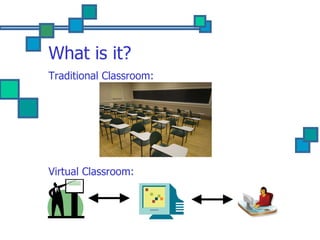
What is it? Traditional Classroom: Virtual Classroom:
Why is it important? Please type in your answer… 1 st  seven answers get a Hershey’s bar!
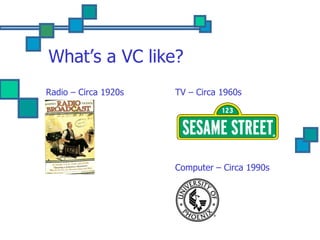
What’s a VC like? Radio – Circa 1920s TV – Circa 1960s Computer – Circa 1990s
What’s current VC like? Today, in addition to receiving telephone and video conferences, students are now able to take classes over the Internet, using quicker, more sophisticated forms of content delivery (e.g. multi-media), evaluation and feedback.  The dialogue & discussion is better – easier -  instantaneous!
Current VC Software
Current VC Software Offers ability to: narrate presentations (audio / video); engage or view material in real-time – synchronous learning; engage in interactive multimedia activities – especially for polling & testing; download / upload required readings & completed assignments; interact - share comments and material with fellow classmates; manage & monitor learner progress.
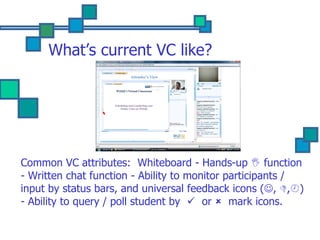
What’s current VC like? Common VC attributes:  Whiteboard - Hands-up    function - Written chat function - Ability to monitor participants / input by status bars, and universal feedback icons (  ,   ,  ) - Ability to query / poll student by     or     mark icons.
Current VC Components More memory for text, better images, and storage of videos; Gaming – simulation - training applications; Ability to hypertext to other supplemental Web sites / material (Multi-media) sources; Greater testing & evaluation feedback; Real-time oral & written chat discussion; Use of LMS also allow for automatic notices, testing reminders, review other students work, and storage of past lectures and work.
Technical needs common to VC software Obviously, a computer; how to deal with basic tech. issues – e.g. audio problems in case they occur; get access codes to participate prior to presentation; determine primary audio / computer delivery – muting of phone; know basic navigation of VC screen; VC etiquette – e.g. still need to raise VC hand, avoid excessive chat about non-related subject matters.
Conclusion The emergence of VC has seen a dwindling emphasis for the “brick & mortar” classroom.  The ongoing evolution of VC  may  bear witness to a decline of the traditional teacher in favor of a more technologically proficient VC – ID production manager.
Conclusion … cont . Current & future VC should: Balance technological sophistication with convenience; Offer greater student – instructor collaboration; Make learning more effective  – hopefully entertaining, and fun.
Q & A
Footnotes http://wiki.media-culture.org.au/index.php/E-Learning_-_The_Virtual_Classroom 2. http://www.slideshare.net/tech4101/virtual-classroom-presentation 3. http://en.wikipedia.org/wiki/Virtual_education

Virtual classroom

  • 1.
    Virtual Classroom TrainingSoftware Presentation By M. Skelly February 2010 Harrisburg University Learning Technologies LTMS 510-01
  • 2.
    Purpose The purposeof this presentation is to provide a brief overview of Virtual Classrooms, and to familiarize persons on some of their key applications / features.
  • 3.
    What is aVirtual Classroom?  - I think I know…  - I’m not sure.
  • 4.
    What is it?A Virtual Classroom (aka as remote / distance education, E-learning), as the term suggests, means that the instructor(s) and learner(s) may not be physically situated in the same place / at the same time. It may be either synchronous or asynchronous. 1-3 For a VC – a training session is occurring, but not through a traditional face-to-face meeting.
  • 5.
    What is it?Traditional Classroom: Virtual Classroom:
  • 6.
    Why is itimportant? Please type in your answer… 1 st seven answers get a Hershey’s bar!
  • 7.
    What’s a VClike? Radio – Circa 1920s TV – Circa 1960s Computer – Circa 1990s
  • 8.
    What’s current VClike? Today, in addition to receiving telephone and video conferences, students are now able to take classes over the Internet, using quicker, more sophisticated forms of content delivery (e.g. multi-media), evaluation and feedback. The dialogue & discussion is better – easier - instantaneous!
  • 9.
  • 10.
    Current VC SoftwareOffers ability to: narrate presentations (audio / video); engage or view material in real-time – synchronous learning; engage in interactive multimedia activities – especially for polling & testing; download / upload required readings & completed assignments; interact - share comments and material with fellow classmates; manage & monitor learner progress.
  • 11.
    What’s current VClike? Common VC attributes: Whiteboard - Hands-up  function - Written chat function - Ability to monitor participants / input by status bars, and universal feedback icons (  ,  ,  ) - Ability to query / poll student by  or  mark icons.
  • 12.
    Current VC ComponentsMore memory for text, better images, and storage of videos; Gaming – simulation - training applications; Ability to hypertext to other supplemental Web sites / material (Multi-media) sources; Greater testing & evaluation feedback; Real-time oral & written chat discussion; Use of LMS also allow for automatic notices, testing reminders, review other students work, and storage of past lectures and work.
  • 13.
    Technical needs commonto VC software Obviously, a computer; how to deal with basic tech. issues – e.g. audio problems in case they occur; get access codes to participate prior to presentation; determine primary audio / computer delivery – muting of phone; know basic navigation of VC screen; VC etiquette – e.g. still need to raise VC hand, avoid excessive chat about non-related subject matters.
  • 14.
    Conclusion The emergenceof VC has seen a dwindling emphasis for the “brick & mortar” classroom. The ongoing evolution of VC may bear witness to a decline of the traditional teacher in favor of a more technologically proficient VC – ID production manager.
  • 15.
    Conclusion … cont. Current & future VC should: Balance technological sophistication with convenience; Offer greater student – instructor collaboration; Make learning more effective – hopefully entertaining, and fun.
  • 16.
  • 17.
    Footnotes http://wiki.media-culture.org.au/index.php/E-Learning_-_The_Virtual_Classroom 2.http://www.slideshare.net/tech4101/virtual-classroom-presentation 3. http://en.wikipedia.org/wiki/Virtual_education

Editor's Notes

  • #2 Hello – my name is Mike Skelly – I’m a student at Harrisburg University, and I’ll be delivering this presentation about the use of Virtual Classroom training software.
  • #3 Read
  • #4 Read narration … note sure… well … have you have ever heard, listened, watched a video, a webinar, a podcast, or even participated in a tele-conference that was related to a training program? If you ever had any of these types of training experiences – chances are you actually have participated in a type of Virtual Classroom activity. Let’s review the answers…
  • #5 For those who are still unfamiliar / unsure of VC, … let’s begin with a definition, and then a conceptual or visual representation on the next slide. Some may even argue that VC technology has made instruction more collaborative ; however, I believe this is more an evolution of teaching styles and pedagogy .
  • #6 These images should help further explain what it is. Pay close attention to the lines of communication & their direction - - We’ll talk more about this later…
  • #7 Ok – so why is a VC important? What if a student lives in an isolated or remote community? What if you don’t have the time to attend / become physically involved in a training program? What if you have an accessibility handicap? The key answer is convenience!
  • #9 A key difference in today’s VC and those of its predecessors – is that today’s technology makes the communication – instruction element – more convenient & especially more collaborative – between the instructor & the student.
  • #10 Adobe Connect Pro
  • #12 As noted earlier, there are several companies that offer VC software. Here’s just one example… WizIQ offers: A main (ideally very prominent) white-screen for main presentation & viewing; A “hands-up”  / hand icon function; A written chat function; Ability to monitor participants / input by status bars, and universal feedback icons (  ,  ,  ) Ability to query / poll student by  or  mark icons;
  • #13 Current VC components include: [Read points]
  • #14 As noted earlier, a VC may lack a live instructor. It’s one thing to have a traditional classroom setting with a teacher who has laryngitis; however, it’s entirely different if the VC audio is not working whatsoever. If you have tech. problems, it may be difficult to get an immediate response from the IT person in Mumbai!
  • #15 READ…