VIRTUAL CLASSROOM Complete programs of e-learning. Integrated Learning environment over internet
OUTLINE   Definition. Features. Limitations. Concerns. Example. How does it support distance education??
PRIMARY CONTRIBUTOR TO ONLINE STUDENT SATISFACTION Contact and interaction with the instructor  was the primary contributor to student satisfaction
VIRTUAL CLASSROOM MODEL “IT’S ALL ABOUT COMMUNICATION” Technology serves to facilitate teacher/student and student/student interaction at a distance. Enriched interactive communication through integrated voice, video, and data. The Web plays a supporting role.
DEFINITION: Virtual classrooms are complete programs of learning .They consist of a mixture of synchronous and asynchronous events.  They are special application of  computer and network technologies to the task of education.
WHAT IS A VIRTUAL CLASSROOM?  Virtual =  something whose existence is    simulated with software. A teaching and learning environment located    within a computer-mediated communication    system. All activities and interactions take place    through the computer instead of face-to-face.
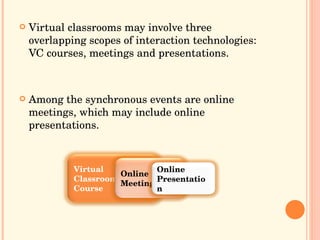
Virtual classrooms may involve three overlapping scopes of interaction technologies: VC courses, meetings and presentations. Among the synchronous events are online meetings, which may include online presentations. Virtual Classroom Course Online Meeting Online Presentation
EDUCATION AT A DISTANCE Usually refer to the fact that the students are    at a distance, but the greatest benefits is to    be able to use teachers at a distance.
: FEATURES Virtual classrooms provide the  community  and control some learners need. Classroom learning is  familiar and proven . Flexible  time: students may participate at    any time of the day..( Learning is flexible). Economical Efficient  learning Location : students are not limited to courses    offered in their geographic locality.( Overcome distances) More  active  learning: the computer forces    response and attention.
LIMITATIONS: Limited offerings : the choice of courses is limited at present. Equipment requirements:  students who do not have a computer will have to travel to use the necessary equipment. Delayed feedback : it may be hours until a question is answered by the teacher. COULD YOU THINK IN OTHER LIMITATIONS??
 
CONCERNS: Select a qualified instructor. Provide complete instruction. Simplify tasks for learners. Manage teams and deal with problem learners. Enable interpersonal communication. Pick tools to suit learners: Language fluency. Accents. Typing skills. Technical expertise.

When Creating a virtual classroom  :   Who will use it and how they will use it? Wholly online or a supplement?  Available for all the Internet users or only to    those enrolled in the course? What is necessary in use of a virtual classroom ? Well-designed web pages. Necessary equipment .
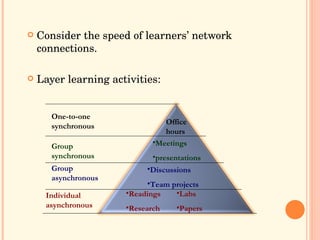
Consider the speed of learners’ network connections. Layer learning activities: Office hours One-to-one synchronous   Meetings presentations Group synchronous Discussions Team projects Group asynchronous Readings Research Labs Papers Individual asynchronous
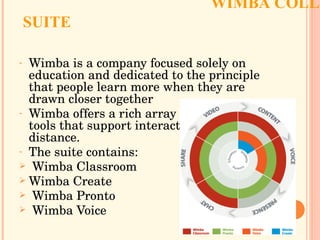
WIMBA COLLABORATION SUITE   Wimba is a company focused solely on education and dedicated to the principle that people learn more when they are drawn closer together  Wimba offers a rich array of collaborative tools that support interactivity at a distance.  The suite contains:  Wimba Classroom  Wimba Create Wimba Pronto Wimba Voice
WIMBA CLASSROOM BRING CLASS TO LIFE Reduce Senses of Isolation and Create Community   Offer Anytime Access   Ensure Comprehension   Appeal to Different Learning Styles   Integrate with other Educational Technologies
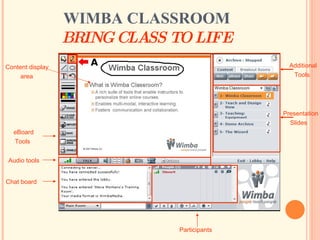
WIMBA CLASSROOM BRING CLASS TO LIFE   eBoard Tools   Chat board  Participants  Content display  area   Additional Tools   Presentation  Slides  Audio tools
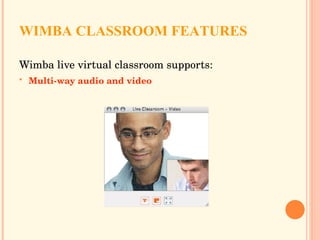
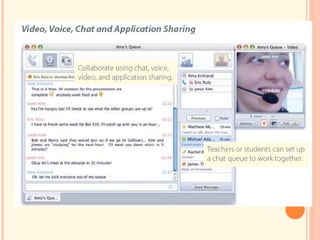
WIMBA CLASSROOM FEATURES Wimba live virtual classroom supports: Multi-way audio and video
 
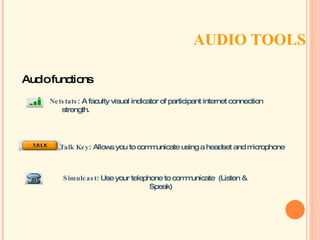
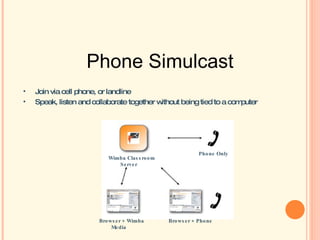
AUDIO TOOLS  Talk Key : Allows you to communicate using a headset and microphone  Simulcast : Use your telephone to communicate  (Listen & Speak) Netstats : A faculty visual indicator of participant internet connection strength. Audio functions
Join via cell phone, or landline Speak, listen and collaborate together without being tied to a computer Phone Simulcast Wimba Classroom Server Phone Only Browser + Wimba Media Browser + Phone
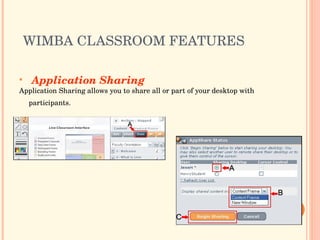
WIMBA CLASSROOM FEATURES  Application Sharing Application Sharing allows you to share all or part of your desktop with participants.
APPLICATION SHARING
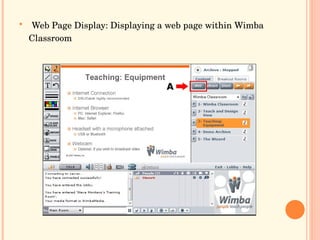
Web Page Display: Displaying a web page within Wimba Classroom
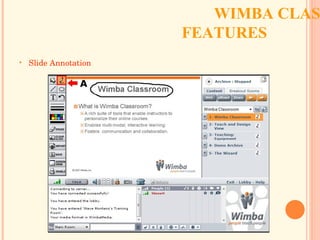
WIMBA CLASSROOM FEATURES  Slide Annotation
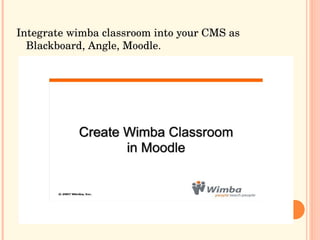
Integrate wimba classroom into your CMS as Blackboard, Angle, Moodle.
other collaborative features:  * Follow-The-Speaker Video * Public and Private Chat * Emoticons * Break-Out Rooms * Full-Featured Archives * Content Upload and Storage * Electronic Whiteboard * Polls, Quizzes & Surveys * Accessible to the Impaired
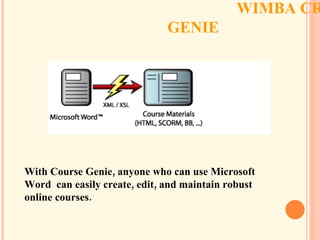
WIMBA CREATE COURSE GENIE  With Course Genie, anyone who can use Microsoft Word  can easily create, edit, and maintain robust online courses.
 
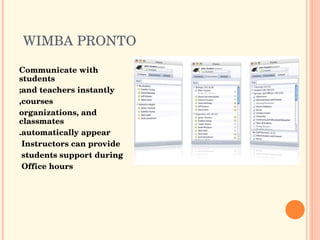
WIMBA PRONTO  Communicate with students and teachers instantly; courses, organizations, and classmates automatically appear. Instructors can provide  students support during  Office hours
 
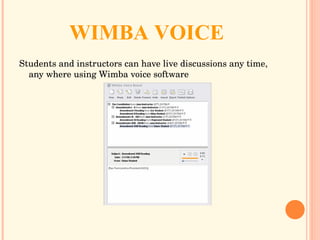
WIMBA VOICE Students and instructors can have live discussions any time, any where using Wimba voice software
 
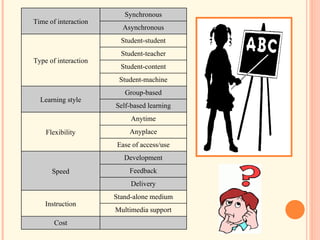
Time of interaction Synchronous Asynchronous Type of interaction Student-student Student-teacher Student-content Student-machine Learning style Group-based Self-based learning Flexibility Anytime Anyplace Ease of access/use Speed Development Feedback Delivery Instruction Stand-alone medium Multimedia support Cost
 

Virtual Classroom

  • 1.
    VIRTUAL CLASSROOM Completeprograms of e-learning. Integrated Learning environment over internet
  • 2.
    OUTLINE Definition. Features. Limitations. Concerns. Example. How does it support distance education??
  • 3.
    PRIMARY CONTRIBUTOR TOONLINE STUDENT SATISFACTION Contact and interaction with the instructor was the primary contributor to student satisfaction
  • 4.
    VIRTUAL CLASSROOM MODEL“IT’S ALL ABOUT COMMUNICATION” Technology serves to facilitate teacher/student and student/student interaction at a distance. Enriched interactive communication through integrated voice, video, and data. The Web plays a supporting role.
  • 5.
    DEFINITION: Virtual classroomsare complete programs of learning .They consist of a mixture of synchronous and asynchronous events. They are special application of computer and network technologies to the task of education.
  • 6.
    WHAT IS AVIRTUAL CLASSROOM? Virtual = something whose existence is simulated with software. A teaching and learning environment located within a computer-mediated communication system. All activities and interactions take place through the computer instead of face-to-face.
  • 7.
    Virtual classrooms mayinvolve three overlapping scopes of interaction technologies: VC courses, meetings and presentations. Among the synchronous events are online meetings, which may include online presentations. Virtual Classroom Course Online Meeting Online Presentation
  • 8.
    EDUCATION AT ADISTANCE Usually refer to the fact that the students are at a distance, but the greatest benefits is to be able to use teachers at a distance.
  • 9.
    : FEATURES Virtualclassrooms provide the community and control some learners need. Classroom learning is familiar and proven . Flexible time: students may participate at any time of the day..( Learning is flexible). Economical Efficient learning Location : students are not limited to courses offered in their geographic locality.( Overcome distances) More active learning: the computer forces response and attention.
  • 10.
    LIMITATIONS: Limited offerings: the choice of courses is limited at present. Equipment requirements: students who do not have a computer will have to travel to use the necessary equipment. Delayed feedback : it may be hours until a question is answered by the teacher. COULD YOU THINK IN OTHER LIMITATIONS??
  • 11.
  • 12.
    CONCERNS: Select aqualified instructor. Provide complete instruction. Simplify tasks for learners. Manage teams and deal with problem learners. Enable interpersonal communication. Pick tools to suit learners: Language fluency. Accents. Typing skills. Technical expertise.
  • 13.
    When Creating avirtual classroom : Who will use it and how they will use it? Wholly online or a supplement? Available for all the Internet users or only to those enrolled in the course? What is necessary in use of a virtual classroom ? Well-designed web pages. Necessary equipment .
  • 14.
    Consider the speedof learners’ network connections. Layer learning activities: Office hours One-to-one synchronous Meetings presentations Group synchronous Discussions Team projects Group asynchronous Readings Research Labs Papers Individual asynchronous
  • 15.
    WIMBA COLLABORATION SUITE Wimba is a company focused solely on education and dedicated to the principle that people learn more when they are drawn closer together Wimba offers a rich array of collaborative tools that support interactivity at a distance. The suite contains: Wimba Classroom Wimba Create Wimba Pronto Wimba Voice
  • 16.
    WIMBA CLASSROOM BRINGCLASS TO LIFE Reduce Senses of Isolation and Create Community Offer Anytime Access Ensure Comprehension Appeal to Different Learning Styles Integrate with other Educational Technologies
  • 17.
    WIMBA CLASSROOM BRINGCLASS TO LIFE eBoard Tools Chat board Participants Content display area Additional Tools Presentation Slides Audio tools
  • 18.
    WIMBA CLASSROOM FEATURESWimba live virtual classroom supports: Multi-way audio and video
  • 19.
  • 20.
    AUDIO TOOLS Talk Key : Allows you to communicate using a headset and microphone Simulcast : Use your telephone to communicate (Listen & Speak) Netstats : A faculty visual indicator of participant internet connection strength. Audio functions
  • 21.
    Join via cellphone, or landline Speak, listen and collaborate together without being tied to a computer Phone Simulcast Wimba Classroom Server Phone Only Browser + Wimba Media Browser + Phone
  • 22.
    WIMBA CLASSROOM FEATURES Application Sharing Application Sharing allows you to share all or part of your desktop with participants.
  • 23.
  • 24.
    Web Page Display:Displaying a web page within Wimba Classroom
  • 25.
    WIMBA CLASSROOM FEATURES Slide Annotation
  • 26.
    Integrate wimba classroominto your CMS as Blackboard, Angle, Moodle.
  • 27.
    other collaborative features: * Follow-The-Speaker Video * Public and Private Chat * Emoticons * Break-Out Rooms * Full-Featured Archives * Content Upload and Storage * Electronic Whiteboard * Polls, Quizzes & Surveys * Accessible to the Impaired
  • 28.
    WIMBA CREATE COURSEGENIE With Course Genie, anyone who can use Microsoft Word can easily create, edit, and maintain robust online courses.
  • 29.
  • 30.
    WIMBA PRONTO Communicate with students and teachers instantly; courses, organizations, and classmates automatically appear. Instructors can provide students support during Office hours
  • 31.
  • 32.
    WIMBA VOICE Studentsand instructors can have live discussions any time, any where using Wimba voice software
  • 33.
  • 34.
    Time of interactionSynchronous Asynchronous Type of interaction Student-student Student-teacher Student-content Student-machine Learning style Group-based Self-based learning Flexibility Anytime Anyplace Ease of access/use Speed Development Feedback Delivery Instruction Stand-alone medium Multimedia support Cost
  • 35.