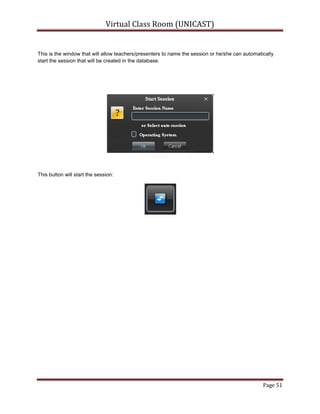
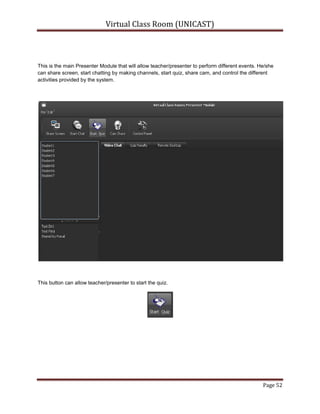
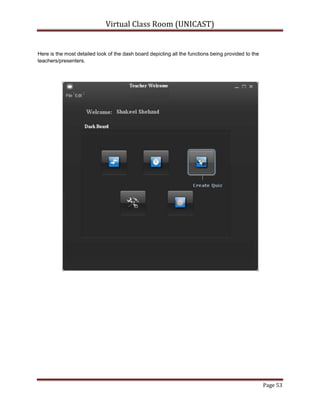
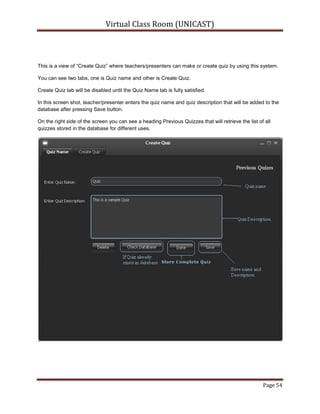
Virtual Class Room (Unicast)<br />By<br />Shakeel Shahzad Chaudhery<br />Department of Computer Sciences<br />Quaid-i-Azam University Islamabad<br />Feburary 2011<br />Concept of E-Learning:<br />With the ever-increasing popularity and accessibility of the Internet, it is only natural that the educational community should want to make use of this tremendous resource. Use of the Internet and Web are leading to significant changes in educational models. Effective exploitation of these changes requires adequate attention to understanding the technology, the educational processes and issues, student’s characteristics, etc. As this use of Internet is increasing, a traditional classroom has shifted to E-Learning. While advancements in communication tools were easily adapted to learning methods, it was the introduction of the personal computer and the development of the Internet that would create the most radical transformation in higher education. Learning by computer can be as easy as communicating with your professor and fellow classmates via email, student utilizing an interactive CD-ROM. Thus, E-Learning can be defined an approach to facilitate and enhance learning by means of personal computers, CD-ROMs, and the Internet. It may be as simple as that teacher may simply post their material on Internet; students can read it online or can download it for further access. Since student won’t be in a classroom with professor and classmates, he will need to be capable of independent learning. Instructor will provide him with a syllabus, course documents, and required readings. The interaction between the professor and the student will happen via e-mail, discussion board, forums etc. Since the class doesn’t meet in a physical space at a scheduled time, the student will have to learn independently. He will be responsible for keeping up with the assigned reading and completing assignments according to the timeline on the syllabus. The growing popularity of E-Learning has introduced new terms to education, as Virtual Classroom, where student will be present with his professor and fellow learners in a classroom. They will not be present physically in the classroom but connected to the classroom via Internet. Virtual classroom aims to simulate the experience of attending a class over the web. So everyone is able to see other participant virtually. [3]<br />Concept of Virtual Classroom: <br />Just as the term virtual means a simulation of the real thing, Virtual Classroom is a simulated classroom via departmental network, which provides a convenient communication environment for Quaid-i-Azam university (Computer Science department) students just like traditional face-to-face classroom.  A virtual classroom allows students to attend a class from the department and aims to provide a learning experience that is similar to a real classroom. When we go to college we have a schedule of lectures, which we must attend. Student must arrive on time, and when he enters the classroom, he finds a teacher, fellow learners, a blackboard or whiteboard, LCD projector, optionally a television screen with videos. Likewise, a Virtual Classroom is a scheduled, online, teacher-led training session where teachers and students interact together using computers linked to a departmental network. It can be used as a solution for live delivery and interaction that addresses the entire process of creating and managing our teaching-learning process. It facilitates instructor and student in teaching-learning events, such as a seminar, online discussion or a live training for employees in company. As in traditional classroom, there are professor and fellow learners present with the student; we have many participants present in virtual classroom. They can talk with each other as in the traditional classroom via chat. Similarly presenter uses whiteboard, gives notes/resources, and gives presentation as given in traditional one. Thus, virtual classroom can be visualized as a classroom where a lecture or session is conducted using departmental network. [3]<br />The Virtual Classroom (VCR) is actually developed to provide the simulation of classrooms in departmental network for the ease of teachers/presenters and students/participants.  It aims to complement the efforts of educators within the network to integrate technology into their classrooms and curricula and to link their schedule to the network in educationally productive ways. [1]<br />The VCR vision is to empower, enable and connect students/participants and teachers/presenter around the departmental network using Virtual Class Room.  It provides students with a stimulating, positive and enjoyable environment along with the opportunity to develop skills that are essential in the 21st century:  online quiz system, lectures/presentations recordings, chatting within the network to ask questions and to collaborate, file sharing, directory sharing, audio/video input/output device sharing etc. [1]<br />Virtual education refers to instruction in a learning environment where teachers/presenters and students/participants are separated by time or space, or both, and the teachers/presenters provide course content through course management applications, multimedia resources, the network, audio/videoconferencing, etc. Students/Participants receive the content and communicate with the teacher via the same technologies. [2]<br />A virtual classroom is a learning environment created in the virtual space. The objectives of a virtual classrooms are to improve access to advanced educational experiences by allowing students/participants and teachers/presenters to participate in remote learning communities using personal computers; and to improve the quality and effectiveness of education by using the computer to support a collaborative learning process. The explosion of the knowledge age has changed the context of what is learnt and how it is learnt – the concept of virtual classrooms is a manifestation of this knowledge revolution. [2]<br />The basic idea behind VCR is remote access, which sounds to control or operate some process or thing from distance. We normally use chat remote desktop software and web cam sharing tools, VCR combines both of these technologies and provides a better way to communicate and present.<br />There are many remote desktop access and similar tools that are working in the market, most of them are not free or provide limited features like no single software in my knowledge provides cam sharing, video recording, audio chatting and remote desktop sharing at the same with multicast feature there are some which provide this facility but in terms of unicasting like Skype etc. Basically these tools are of two different types:<br />1).Chat Messengers<br />2).Remote Desktop Access.<br />          Still one cannot use these software over LAN and this is where VCR fits in because VCR provides corresponding features in pretty handy manners.<br />Problem Definition:
Main modules of Virtual Class Room (VCR) are:
Presenter module:
Provides the multicasting of different application/presentations (in different formats) with audio/video chat and file share.
Participants module:
Provides the interface to watch and to listen the presentation/lecture with attend quiz session and chat.
Control module:
Remote monitoring interface for accessing attendees’ desktop with remote mouse and keyboard access.
Scope:System should allow teachers to present remotely, take quiz, remote communication via text or audio/video chat with file sharing facility.<br />This system is like a virtual/Virtual Class Room, in which teacher/presenter will be presenting from his/her office and the students/participants will be attending from the computer labs using LAN.<br />System should provide complete control to the presenter over client/student systems remotely, allow file share to multiple or single user, private or public chat.<br />System should recognize users with their LAN user names i.e. no need of creating new users and remembering their passwords etc.<br />Online quiz can be created, conducted and checked as well through digital classroom tool. <br />Scope Included (My side):<br />Session depends upon Teacher/Presenter (i.e. no online teacher means no session).<br />Sessions according to schedule.<br />Students/participants will join the session (i.e. only allowed).<br />Server connection with centralized database.<br />Audio, video, web cam recording.<br />File sharing for private and public.<br />Desktop sharing for Students (i.e. Unicast).<br />Remote desktop access for teacher (i.e. Unicast)<br />Remote Event Controls<br />Quiz Create, conduct, analyze and results view.<br />Schedule management, students/participants management.<br />System Configuration.<br />Terminologies frequently used:Hardware:<br />This tool should be installed on both client and server sides while database should be centralized in the network server.<br />Language and Platform:<br />This project involves different technologies but main are J2EE and JMF.<br />Server side:<br />Java/JMF:<br />We all are aware of Java technology. Java Media Framework is an API of java which helps to interact with media devices like audio/video devices.<br />Client Side:<br />Java/JMF:<br />J2EE and JMF are used over the client side to perform certain events that will be described in later chapters.<br />Database:<br />MySQL:<br />MySQL is used as DBMS and connectivity of MySQL with java is performed by MySQL J Connector.<br />System working exploration:The working principle of the system is:<br />Teacher/presenter will start session and students/participants will join.<br />System will automatically start the session according to the schedule only if concerned teacher/presenter is logged in.<br />Advantages of Virtual Classroom: Following are some of the advantages of Virtual classroom over traditional classroom model: <br />• Sessions can be recorded:<br />The session recording is the main advantage of the Virtual Class Room (VCR) as it will allow teachers/presenters and students/participants to record the whole session for later use. Students/Participants can record the session only if allowed by the teacher/presenter while teachers/presenters can record the session anytime they want to. Also, if teacher/presenter starts recording the session, it’ll ask him to store into the database or his/her system while students/participants can record session into their individual systems. Users can end the session recording anytime if they want to.<br /> • Quicker to organize: <br /> As all the schedule will already be stored into the system centralized database by the teacher/presenter so it will be easy for the teachers/presenters to organize the whole sessions with just turning on their systems and system will prompt them if his/her class timings has been scheduled. Also, if not scheduled, he/she can start the session manually as well.<br />• One to one communication: <br />In Virtual Class Room (VCR), there is one to one communication of all the users but with some constraints. Teacher/Presenter can communicate to the whole class or can select single or multiple students/participants for private chat. But students/participants can not communicate individually to other students but only to the whole channel or the teacher/presenter.<br />Limitations of Virtual Classroom: Following are some of the limitations of Virtual classroom:<br />• Familiarity with the Tools: <br />As in the real class rooms, students just raise their hands and can ask questions/queries to the teachers anytime they want to. Same concept tried to be introduced in the Virtual Class Room as students/participants can text their queries to the teachers/presenters over the chat channel. And teacher/presenter can answer the queries.<br />But the main problem is, all users should be trained enough to use this system as this concept will be introduced first time in the departmental labs or network. We tried our best to make the user friendly interfaces and provide them with the guides/manual as well so that everyone using Virtual Class Room, could easily use it.<br /> • Time dependency: <br />If schedule is not maintained, teacher/presenter will have to start session manually that will take him to inputs for course title and will ask him/her to select the number of students who should be in the session.<br />• Network should be fully functional: <br />All sessions can be only started if the network will be fully functional and will be configured properly.<br />• Technical Limitations: <br />Technical issues such as bandwidth speed of the connection or power failure may create problem while session will be going on.<br />Summary:
This chapter entails the introduction, scope, goals and objectives of the Virtual Class Room (VCR). Keeping in view the importance of remote access and problems faced by the PC users while using the existing devices, Virtual Class Room (VCR) is suggested.2.1Purpose:<br />The purpose of VCR is to provide an easy and remote interface to presenter or teacher to present his lecture effectively, on the other hand it’s a tool for students to attend their lectures, and communicate with their teachers. This whole process seems very expansive at hardware level and there is where VCR fits in to solve it using software resources. Main specs of VCR are:
An Interface to present.
An Interface to attend presentations.
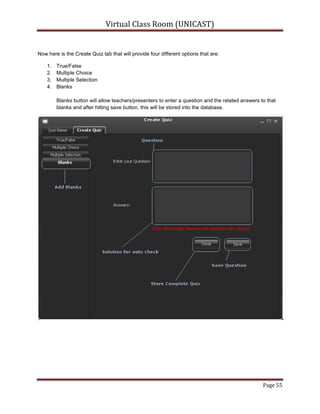
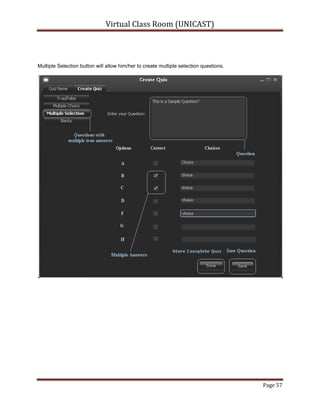
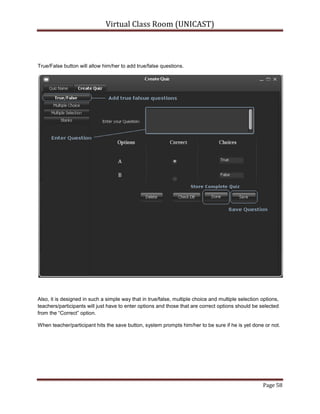
A digital and remote quiz management system.
A LAN based webcam sharing module with Audio/text chat.
Presentation/Lecture recording.
File or directory sharing and transfer .
Remote desktop access and control.2.2Scope:<br />Interface to present lectures remotely using LAN, that include online quiz management system, audio video and text based chat management system, with ability of private or public chat modules, presentation/lecture recording and on-demand availability, Remote desktop access uni-cast for attendee and multicast for presenter.2.3Overview:<br />This document has been prepared in accordance with the IEEE Standard 830-1998, IEEE Recommended Practice for Software Requirements Specifications [IEEE 830-1998 (1998)]. It provides the information of VCR perspective, VCR functions, User characteristics, Constraints, Assumptions and dependencies and specific requirement.2.4Product Perspective:<br />The VCR will allow teachers/presenters to present their lectures remotely over LAN from their offices within the department and will allow students/Attendees to participate/attend the lectures from the departmental labs. The system is developed to provide an easy interface to perform corresponding functionality, i.e. teacher can share his desktop with student, access desktops of student take online quizzes, share his webcam etc. Also, the system will allow teacher to have remote control over attendees computer..
All the teachers/presenters can share, transfer files or directories to any or all of the students/Attendees but vice versa is not true as students/Attendees can share file or directory only to the teachers/presenters.
The system has following dependencies:
Needs LAN.
MySQL DBMS.
Central database server.
JRE should be installed on both presenter or attendees modules.
Java Media Framework.2.4.1User Interfaces:<br />This system contains two main user’s presenter and attendee, and another user which is allowed to make changes to the data base; all of them have been provided very usable and interactive interfaces:
Teacher/Presenter:
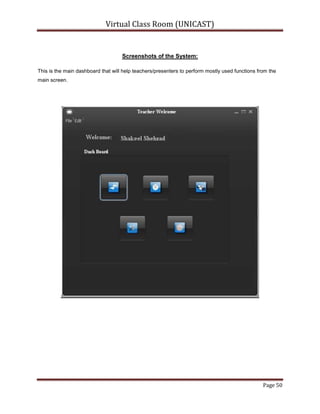
Teacher Welcome Screen where he can Start/initiate session or continue the already continued session.
Teacher main Screen where he can chat to everyone via audio and video devices.
Chat screen where he can Transfer files or share directories to anyone or everyone, chat via text messages.
Manage the schedule or arranged presentation support.
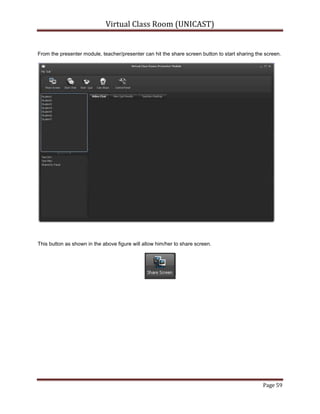
Share their screens or cams to the students/Attendees.
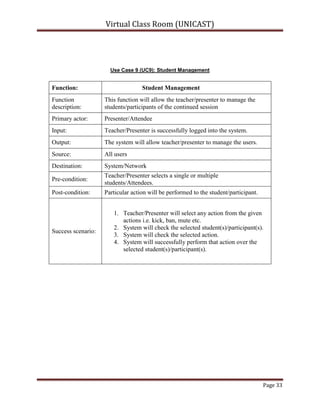
Access any of the students/Attendees desktop or may multiple.
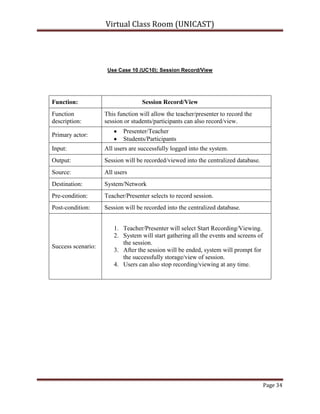
Allow students to record the video for later use.
Create; conduct the quizzes from main or welcome screen.
Automatic quiz checking screen which shows results too.
Configure his view and other view related setting like select one of multiple devices attached or may be network configurations
An interface to share his screen
Private chat interface or group chat interface
Students/Attendees:
Join the session.
Chat to everyone.
Share files or directory to Teachers/Presenters.
View shared files and directories
View to teacher screen/webcam if shared.
View recorded lectures.2.4.2Hardware Interfaces:<br />Audio/Video chat needs webcam and Microphone devices to be attached at presenter end.2.4.3Software Interfaces:<br />The following software interfaces are required to run virtual classroom within the network.
DBMS: MySQL as DBMS 5.0 or later.
JMF: Java Media Framework is should be installed at both ends.
JRE: Java Runtime Environment is required at both ends.
LAN: Network access is required.
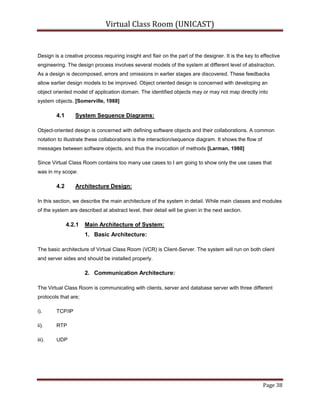
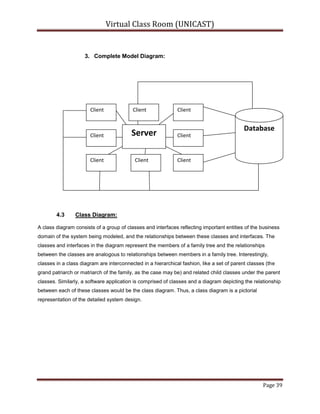
Operating System: VCR is platform independent.2.4.4Communication protocols/interfaces involved:<br />TCP/IP, UDP, and RTP protocols are used for communications, and will be explained in later chapters.2.5Product Functions:<br />The working of Virtual Classroom is based upon the following major functions:
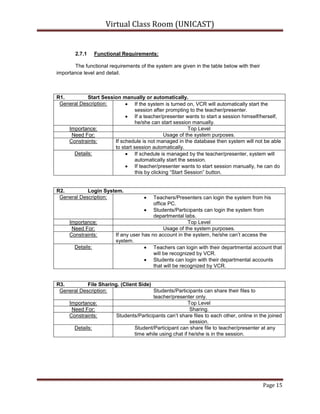
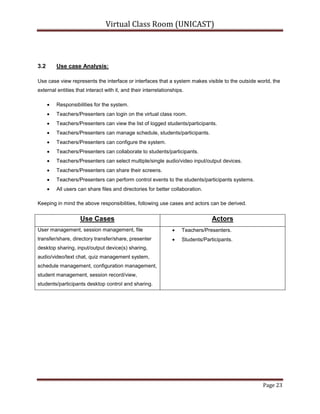
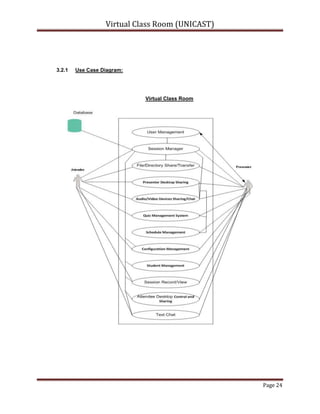
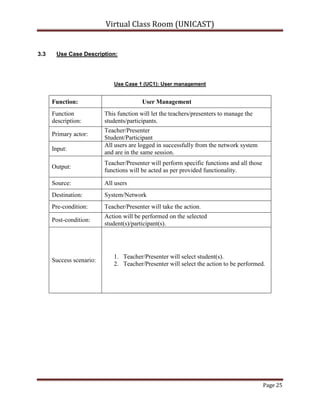
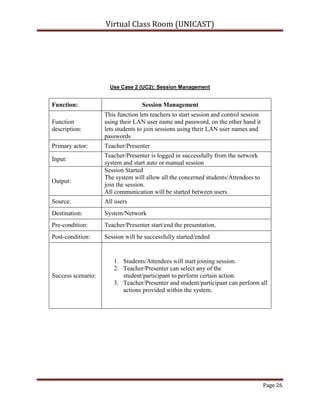
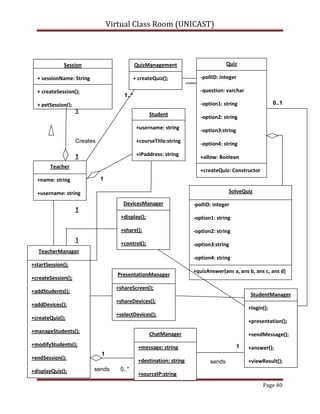
Session using LAN users:
Teacher/Presenter can start session using their LAN user names and attendees can join sessions using their LAN usernames
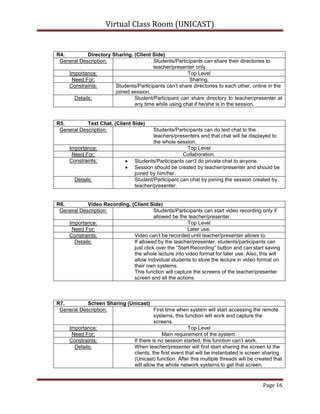
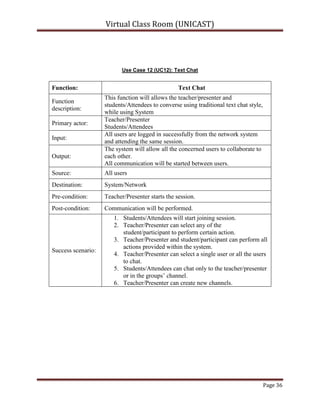
Text Chat:
Teacher/Presenter can chat with everyone in the session and can also make private conversations, where as students/attendees are bound to chat with teacher only as private and can chat in a group channel.
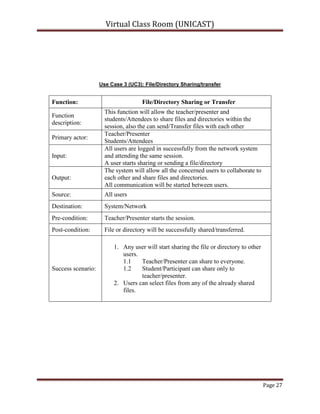
File/Directory Sharing or Transfer:
Every user can share two things using this system:
File (any format).
Directory.
And can transfer only files.
Teachers/Presenters can share to everyone while students/Attendees can     share only to the teachers/presenters but if allowed by the teacher than possible to share with anyone.
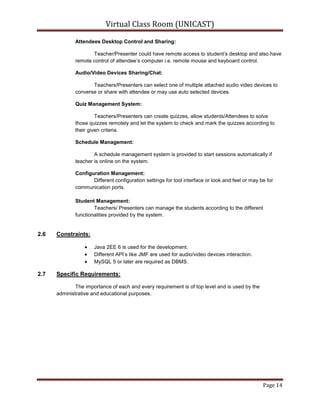
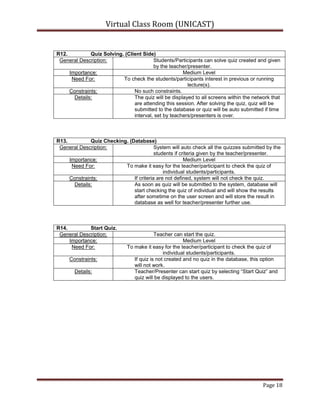
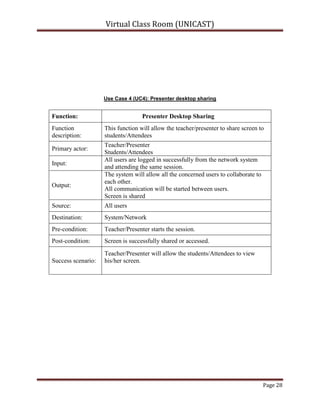
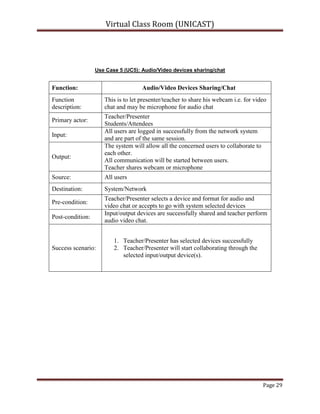
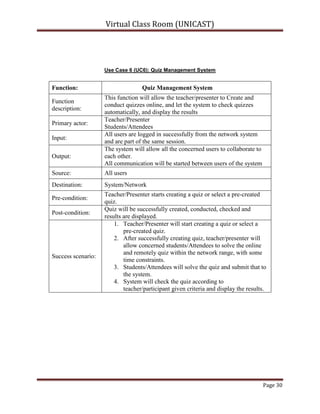
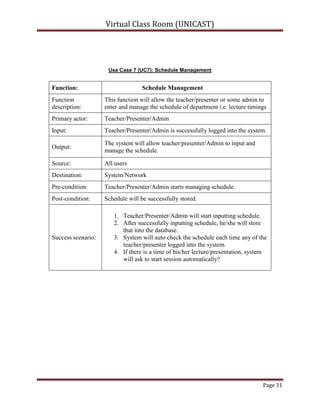
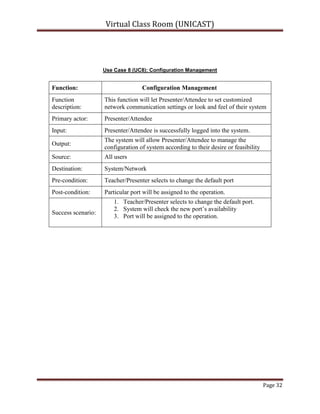
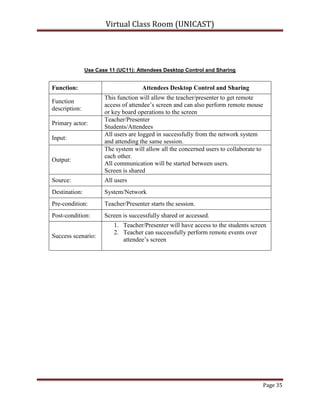
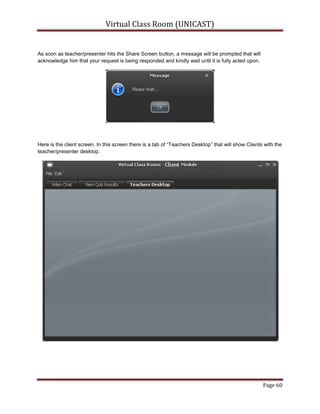
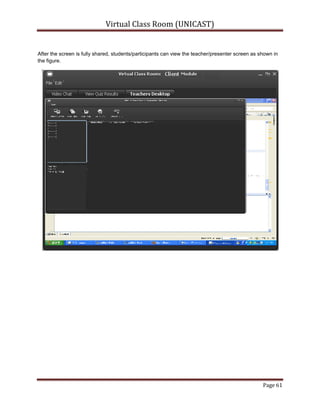
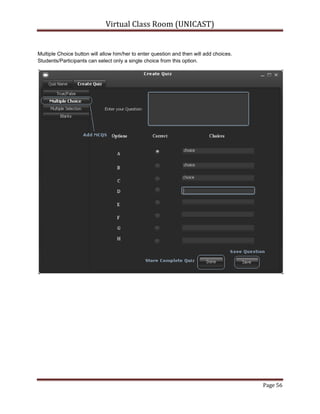
Presenter Desktop Sharing:Teachers/Presenters can share their screens to the students/Attendees and that will be a multicast session using UDP protocol so it should be faster and can be viewed by every user.<br />Attendees Desktop Control and Sharing:<br />Teacher/Presenter could have remote access to student’s desktop and also have remote control of attendee’s computer i.e. remote mouse and keyboard control.<br />Audio/Video Devices Sharing/Chat:Teachers/Presenters can select one of multiple attached audio video devices to converse or share with attendee or may use auto selected devices.<br />Quiz Management System:Teachers/Presenters can create quizzes, allow students/Attendees to solve those quizzes remotely and let the system to check and mark the quizzes according to their given criteria.<br />Schedule Management:A schedule management system is provided to start sessions automatically if teacher is online on the system.<br />Configuration Management:

Virtual Class Room

  • 1.
    Virtual Class Room(Unicast)<br />By<br />Shakeel Shahzad Chaudhery<br />Department of Computer Sciences<br />Quaid-i-Azam University Islamabad<br />Feburary 2011<br />Concept of E-Learning:<br />With the ever-increasing popularity and accessibility of the Internet, it is only natural that the educational community should want to make use of this tremendous resource. Use of the Internet and Web are leading to significant changes in educational models. Effective exploitation of these changes requires adequate attention to understanding the technology, the educational processes and issues, student’s characteristics, etc. As this use of Internet is increasing, a traditional classroom has shifted to E-Learning. While advancements in communication tools were easily adapted to learning methods, it was the introduction of the personal computer and the development of the Internet that would create the most radical transformation in higher education. Learning by computer can be as easy as communicating with your professor and fellow classmates via email, student utilizing an interactive CD-ROM. Thus, E-Learning can be defined an approach to facilitate and enhance learning by means of personal computers, CD-ROMs, and the Internet. It may be as simple as that teacher may simply post their material on Internet; students can read it online or can download it for further access. Since student won’t be in a classroom with professor and classmates, he will need to be capable of independent learning. Instructor will provide him with a syllabus, course documents, and required readings. The interaction between the professor and the student will happen via e-mail, discussion board, forums etc. Since the class doesn’t meet in a physical space at a scheduled time, the student will have to learn independently. He will be responsible for keeping up with the assigned reading and completing assignments according to the timeline on the syllabus. The growing popularity of E-Learning has introduced new terms to education, as Virtual Classroom, where student will be present with his professor and fellow learners in a classroom. They will not be present physically in the classroom but connected to the classroom via Internet. Virtual classroom aims to simulate the experience of attending a class over the web. So everyone is able to see other participant virtually. [3]<br />Concept of Virtual Classroom: <br />Just as the term virtual means a simulation of the real thing, Virtual Classroom is a simulated classroom via departmental network, which provides a convenient communication environment for Quaid-i-Azam university (Computer Science department) students just like traditional face-to-face classroom. A virtual classroom allows students to attend a class from the department and aims to provide a learning experience that is similar to a real classroom. When we go to college we have a schedule of lectures, which we must attend. Student must arrive on time, and when he enters the classroom, he finds a teacher, fellow learners, a blackboard or whiteboard, LCD projector, optionally a television screen with videos. Likewise, a Virtual Classroom is a scheduled, online, teacher-led training session where teachers and students interact together using computers linked to a departmental network. It can be used as a solution for live delivery and interaction that addresses the entire process of creating and managing our teaching-learning process. It facilitates instructor and student in teaching-learning events, such as a seminar, online discussion or a live training for employees in company. As in traditional classroom, there are professor and fellow learners present with the student; we have many participants present in virtual classroom. They can talk with each other as in the traditional classroom via chat. Similarly presenter uses whiteboard, gives notes/resources, and gives presentation as given in traditional one. Thus, virtual classroom can be visualized as a classroom where a lecture or session is conducted using departmental network. [3]<br />The Virtual Classroom (VCR) is actually developed to provide the simulation of classrooms in departmental network for the ease of teachers/presenters and students/participants.  It aims to complement the efforts of educators within the network to integrate technology into their classrooms and curricula and to link their schedule to the network in educationally productive ways. [1]<br />The VCR vision is to empower, enable and connect students/participants and teachers/presenter around the departmental network using Virtual Class Room.  It provides students with a stimulating, positive and enjoyable environment along with the opportunity to develop skills that are essential in the 21st century:  online quiz system, lectures/presentations recordings, chatting within the network to ask questions and to collaborate, file sharing, directory sharing, audio/video input/output device sharing etc. [1]<br />Virtual education refers to instruction in a learning environment where teachers/presenters and students/participants are separated by time or space, or both, and the teachers/presenters provide course content through course management applications, multimedia resources, the network, audio/videoconferencing, etc. Students/Participants receive the content and communicate with the teacher via the same technologies. [2]<br />A virtual classroom is a learning environment created in the virtual space. The objectives of a virtual classrooms are to improve access to advanced educational experiences by allowing students/participants and teachers/presenters to participate in remote learning communities using personal computers; and to improve the quality and effectiveness of education by using the computer to support a collaborative learning process. The explosion of the knowledge age has changed the context of what is learnt and how it is learnt – the concept of virtual classrooms is a manifestation of this knowledge revolution. [2]<br />The basic idea behind VCR is remote access, which sounds to control or operate some process or thing from distance. We normally use chat remote desktop software and web cam sharing tools, VCR combines both of these technologies and provides a better way to communicate and present.<br />There are many remote desktop access and similar tools that are working in the market, most of them are not free or provide limited features like no single software in my knowledge provides cam sharing, video recording, audio chatting and remote desktop sharing at the same with multicast feature there are some which provide this facility but in terms of unicasting like Skype etc. Basically these tools are of two different types:<br />1).Chat Messengers<br />2).Remote Desktop Access.<br /> Still one cannot use these software over LAN and this is where VCR fits in because VCR provides corresponding features in pretty handy manners.<br />Problem Definition:
  • 2.
    Main modules ofVirtual Class Room (VCR) are:
  • 3.
  • 4.
    Provides the multicastingof different application/presentations (in different formats) with audio/video chat and file share.
  • 5.
  • 6.
    Provides the interfaceto watch and to listen the presentation/lecture with attend quiz session and chat.
  • 7.
  • 8.
    Remote monitoring interfacefor accessing attendees’ desktop with remote mouse and keyboard access.
  • 9.
    Scope:System should allowteachers to present remotely, take quiz, remote communication via text or audio/video chat with file sharing facility.<br />This system is like a virtual/Virtual Class Room, in which teacher/presenter will be presenting from his/her office and the students/participants will be attending from the computer labs using LAN.<br />System should provide complete control to the presenter over client/student systems remotely, allow file share to multiple or single user, private or public chat.<br />System should recognize users with their LAN user names i.e. no need of creating new users and remembering their passwords etc.<br />Online quiz can be created, conducted and checked as well through digital classroom tool. <br />Scope Included (My side):<br />Session depends upon Teacher/Presenter (i.e. no online teacher means no session).<br />Sessions according to schedule.<br />Students/participants will join the session (i.e. only allowed).<br />Server connection with centralized database.<br />Audio, video, web cam recording.<br />File sharing for private and public.<br />Desktop sharing for Students (i.e. Unicast).<br />Remote desktop access for teacher (i.e. Unicast)<br />Remote Event Controls<br />Quiz Create, conduct, analyze and results view.<br />Schedule management, students/participants management.<br />System Configuration.<br />Terminologies frequently used:Hardware:<br />This tool should be installed on both client and server sides while database should be centralized in the network server.<br />Language and Platform:<br />This project involves different technologies but main are J2EE and JMF.<br />Server side:<br />Java/JMF:<br />We all are aware of Java technology. Java Media Framework is an API of java which helps to interact with media devices like audio/video devices.<br />Client Side:<br />Java/JMF:<br />J2EE and JMF are used over the client side to perform certain events that will be described in later chapters.<br />Database:<br />MySQL:<br />MySQL is used as DBMS and connectivity of MySQL with java is performed by MySQL J Connector.<br />System working exploration:The working principle of the system is:<br />Teacher/presenter will start session and students/participants will join.<br />System will automatically start the session according to the schedule only if concerned teacher/presenter is logged in.<br />Advantages of Virtual Classroom: Following are some of the advantages of Virtual classroom over traditional classroom model: <br />• Sessions can be recorded:<br />The session recording is the main advantage of the Virtual Class Room (VCR) as it will allow teachers/presenters and students/participants to record the whole session for later use. Students/Participants can record the session only if allowed by the teacher/presenter while teachers/presenters can record the session anytime they want to. Also, if teacher/presenter starts recording the session, it’ll ask him to store into the database or his/her system while students/participants can record session into their individual systems. Users can end the session recording anytime if they want to.<br /> • Quicker to organize: <br /> As all the schedule will already be stored into the system centralized database by the teacher/presenter so it will be easy for the teachers/presenters to organize the whole sessions with just turning on their systems and system will prompt them if his/her class timings has been scheduled. Also, if not scheduled, he/she can start the session manually as well.<br />• One to one communication: <br />In Virtual Class Room (VCR), there is one to one communication of all the users but with some constraints. Teacher/Presenter can communicate to the whole class or can select single or multiple students/participants for private chat. But students/participants can not communicate individually to other students but only to the whole channel or the teacher/presenter.<br />Limitations of Virtual Classroom: Following are some of the limitations of Virtual classroom:<br />• Familiarity with the Tools: <br />As in the real class rooms, students just raise their hands and can ask questions/queries to the teachers anytime they want to. Same concept tried to be introduced in the Virtual Class Room as students/participants can text their queries to the teachers/presenters over the chat channel. And teacher/presenter can answer the queries.<br />But the main problem is, all users should be trained enough to use this system as this concept will be introduced first time in the departmental labs or network. We tried our best to make the user friendly interfaces and provide them with the guides/manual as well so that everyone using Virtual Class Room, could easily use it.<br /> • Time dependency: <br />If schedule is not maintained, teacher/presenter will have to start session manually that will take him to inputs for course title and will ask him/her to select the number of students who should be in the session.<br />• Network should be fully functional: <br />All sessions can be only started if the network will be fully functional and will be configured properly.<br />• Technical Limitations: <br />Technical issues such as bandwidth speed of the connection or power failure may create problem while session will be going on.<br />Summary:
  • 10.
    This chapter entailsthe introduction, scope, goals and objectives of the Virtual Class Room (VCR). Keeping in view the importance of remote access and problems faced by the PC users while using the existing devices, Virtual Class Room (VCR) is suggested.2.1Purpose:<br />The purpose of VCR is to provide an easy and remote interface to presenter or teacher to present his lecture effectively, on the other hand it’s a tool for students to attend their lectures, and communicate with their teachers. This whole process seems very expansive at hardware level and there is where VCR fits in to solve it using software resources. Main specs of VCR are:
  • 11.
  • 12.
    An Interface toattend presentations.
  • 13.
    A digital andremote quiz management system.
  • 14.
    A LAN basedwebcam sharing module with Audio/text chat.
  • 15.
  • 16.
    File or directorysharing and transfer .
  • 17.
    Remote desktop accessand control.2.2Scope:<br />Interface to present lectures remotely using LAN, that include online quiz management system, audio video and text based chat management system, with ability of private or public chat modules, presentation/lecture recording and on-demand availability, Remote desktop access uni-cast for attendee and multicast for presenter.2.3Overview:<br />This document has been prepared in accordance with the IEEE Standard 830-1998, IEEE Recommended Practice for Software Requirements Specifications [IEEE 830-1998 (1998)]. It provides the information of VCR perspective, VCR functions, User characteristics, Constraints, Assumptions and dependencies and specific requirement.2.4Product Perspective:<br />The VCR will allow teachers/presenters to present their lectures remotely over LAN from their offices within the department and will allow students/Attendees to participate/attend the lectures from the departmental labs. The system is developed to provide an easy interface to perform corresponding functionality, i.e. teacher can share his desktop with student, access desktops of student take online quizzes, share his webcam etc. Also, the system will allow teacher to have remote control over attendees computer..
  • 18.
    All the teachers/presenterscan share, transfer files or directories to any or all of the students/Attendees but vice versa is not true as students/Attendees can share file or directory only to the teachers/presenters.
  • 19.
    The system hasfollowing dependencies:
  • 20.
  • 21.
  • 22.
  • 23.
    JRE should beinstalled on both presenter or attendees modules.
  • 24.
    Java Media Framework.2.4.1UserInterfaces:<br />This system contains two main user’s presenter and attendee, and another user which is allowed to make changes to the data base; all of them have been provided very usable and interactive interfaces:
  • 25.
  • 26.
    Teacher Welcome Screenwhere he can Start/initiate session or continue the already continued session.
  • 27.
    Teacher main Screenwhere he can chat to everyone via audio and video devices.
  • 28.
    Chat screen wherehe can Transfer files or share directories to anyone or everyone, chat via text messages.
  • 29.
    Manage the scheduleor arranged presentation support.
  • 30.
    Share their screensor cams to the students/Attendees.
  • 31.
    Access any ofthe students/Attendees desktop or may multiple.
  • 32.
    Allow students torecord the video for later use.
  • 33.
    Create; conduct thequizzes from main or welcome screen.
  • 34.
    Automatic quiz checkingscreen which shows results too.
  • 35.
    Configure his viewand other view related setting like select one of multiple devices attached or may be network configurations
  • 36.
    An interface toshare his screen
  • 37.
    Private chat interfaceor group chat interface
  • 38.
  • 39.
  • 40.
  • 41.
    Share files ordirectory to Teachers/Presenters.
  • 42.
    View shared filesand directories
  • 43.
    View to teacherscreen/webcam if shared.
  • 44.
    View recorded lectures.2.4.2HardwareInterfaces:<br />Audio/Video chat needs webcam and Microphone devices to be attached at presenter end.2.4.3Software Interfaces:<br />The following software interfaces are required to run virtual classroom within the network.
  • 45.
    DBMS: MySQL asDBMS 5.0 or later.
  • 46.
    JMF: Java MediaFramework is should be installed at both ends.
  • 47.
    JRE: Java RuntimeEnvironment is required at both ends.
  • 48.
  • 49.
    Operating System: VCRis platform independent.2.4.4Communication protocols/interfaces involved:<br />TCP/IP, UDP, and RTP protocols are used for communications, and will be explained in later chapters.2.5Product Functions:<br />The working of Virtual Classroom is based upon the following major functions:
  • 50.
  • 51.
    Teacher/Presenter can startsession using their LAN user names and attendees can join sessions using their LAN usernames
  • 52.
  • 53.
    Teacher/Presenter can chatwith everyone in the session and can also make private conversations, where as students/attendees are bound to chat with teacher only as private and can chat in a group channel.
  • 54.
  • 55.
    Every user canshare two things using this system:
  • 56.
  • 57.
  • 58.
    And can transferonly files.
  • 59.
  • 60.
    Teachers/Presenters can shareto everyone while students/Attendees can share only to the teachers/presenters but if allowed by the teacher than possible to share with anyone.
  • 61.
    Presenter Desktop Sharing:Teachers/Presenterscan share their screens to the students/Attendees and that will be a multicast session using UDP protocol so it should be faster and can be viewed by every user.<br />Attendees Desktop Control and Sharing:<br />Teacher/Presenter could have remote access to student’s desktop and also have remote control of attendee’s computer i.e. remote mouse and keyboard control.<br />Audio/Video Devices Sharing/Chat:Teachers/Presenters can select one of multiple attached audio video devices to converse or share with attendee or may use auto selected devices.<br />Quiz Management System:Teachers/Presenters can create quizzes, allow students/Attendees to solve those quizzes remotely and let the system to check and mark the quizzes according to their given criteria.<br />Schedule Management:A schedule management system is provided to start sessions automatically if teacher is online on the system.<br />Configuration Management: