Virtual Classroom	Team 4 EDU 656/Dr. WindomJanuary 10, 2010
OverviewWhat is a Virtual ClassroomBenefits of Synchronous LearningKey components  Whiteboard ChatPollingJust-in-time Training Why JIT in a Virtual ClassroomIncorporating JIT
What is a Virtual Classroom?Virtual Classrooms  include a realtime interactive learning environmentThe instructor facilitates the learning and provides directionThere are many tools that can be used within the lesson to carryout lesson objectivesThe course can be recorded by other programs such as Camtasia or Jing
What is a Virtual Classroom?Click the link to the right to watch the video about a free  virtual classroomThis provides an idea of what a virtual classroom is capable ofhttp://www.youtube.com/watch?v=EVln4C4_hXo
Synchronous LearningAdvantages of Synchronous learning is getting hands on real-time interactions between a facilitator and students. This creates a valuable environment for discussion and targeted learning objectives
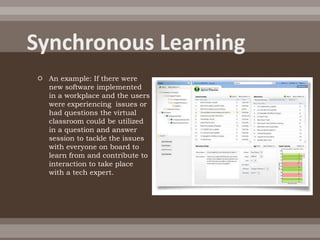
Synchronous LearningAn example: If there were new software implemented in a workplace and the users were experiencing  issues or had questions the virtual classroom could be utilized in a question and answer session to tackle the issues with everyone on board to learn from and contribute to interaction to take place with a tech expert.
Key ComponentsA virtual classroom needs to have: Students Shared learning environmentFunctioning components of the virtual classroomWhiteboard/or comparable siteChat Polling
WhiteboardThis is an example of the whiteboard and the areas of use availableThe main areas are the whiteboard, chat and participant summary area
Chat The chat area is labeled and this is an important part of the virtual classroomEven though there is usually audio in the virtual set up the chat window illivates everyone talking at once
PollingThe graphic above provides an example of the polling tools available and this can be used in a number of ways. Polling is useful to understand the majority of opinions or simply answering a multiple choice question.
Just In Time TrainingThe concept is built around the learner accessing information needed to fulfill a task without having to get bogged down with information the student may already know
Why Just In Time TrainingInstead of traditional means of training to schedule the time and place the ability to handle everything in one online location saves time money and manpower.
Incorporating JIT“As with all learning products, begin with a definition of your business goals and your instructional objectives linked to those goals. Consider your media mix by matching your instructional requirements to the features of the various media available to you. To make best use of the virtual classroom, select instructional goals that benefit from visualization and interactivity” (Bernard, 2004)
SummaryWhat is a Virtual ClassroomBenefits of Synchronous LearningKey components  Whiteboard ChatPollingJust-in-time Training Why JIT in a Virtual ClassroomIncorporating JIT
References(2007) Academic Technology Center - Worcester Polytechnic 	Institute 100 Institute Road, Worcester, MA. Retrieved 9 	January 2010 from http://www.wpi.edu/academics/ATC/Collaboratory/HowTo/MyWPI/usingclassroom.htmlBernard, M., Abrami, P., Lou, Y., Borokhovski, E., 	Wade, A., Wozney, L., Wallet, P., Fizet, M., & Huang, B. (2004). How 	does distance education compare with classroom 	instruction? A meta-analysis of the empirical literature. Review of Educational Research, 74(3), 379-439. Retrieved 9 	Jan 2010 from http://www.performancexpress.org/0506/mainframe0506.htmlClark, R. (2005). Four steps to effective virtual classroom 	training.Retrieved 9 January 2010 www.Clarktraining.com.

Virtual classroom

  • 1.
    Virtual Classroom Team 4EDU 656/Dr. WindomJanuary 10, 2010
  • 2.
    OverviewWhat is aVirtual ClassroomBenefits of Synchronous LearningKey components Whiteboard ChatPollingJust-in-time Training Why JIT in a Virtual ClassroomIncorporating JIT
  • 3.
    What is aVirtual Classroom?Virtual Classrooms include a realtime interactive learning environmentThe instructor facilitates the learning and provides directionThere are many tools that can be used within the lesson to carryout lesson objectivesThe course can be recorded by other programs such as Camtasia or Jing
  • 4.
    What is aVirtual Classroom?Click the link to the right to watch the video about a free virtual classroomThis provides an idea of what a virtual classroom is capable ofhttp://www.youtube.com/watch?v=EVln4C4_hXo
  • 5.
    Synchronous LearningAdvantages ofSynchronous learning is getting hands on real-time interactions between a facilitator and students. This creates a valuable environment for discussion and targeted learning objectives
  • 6.
    Synchronous LearningAn example:If there were new software implemented in a workplace and the users were experiencing issues or had questions the virtual classroom could be utilized in a question and answer session to tackle the issues with everyone on board to learn from and contribute to interaction to take place with a tech expert.
  • 7.
    Key ComponentsA virtualclassroom needs to have: Students Shared learning environmentFunctioning components of the virtual classroomWhiteboard/or comparable siteChat Polling
  • 8.
    WhiteboardThis is anexample of the whiteboard and the areas of use availableThe main areas are the whiteboard, chat and participant summary area
  • 9.
    Chat The chatarea is labeled and this is an important part of the virtual classroomEven though there is usually audio in the virtual set up the chat window illivates everyone talking at once
  • 10.
    PollingThe graphic aboveprovides an example of the polling tools available and this can be used in a number of ways. Polling is useful to understand the majority of opinions or simply answering a multiple choice question.
  • 11.
    Just In TimeTrainingThe concept is built around the learner accessing information needed to fulfill a task without having to get bogged down with information the student may already know
  • 12.
    Why Just InTime TrainingInstead of traditional means of training to schedule the time and place the ability to handle everything in one online location saves time money and manpower.
  • 13.
    Incorporating JIT“As withall learning products, begin with a definition of your business goals and your instructional objectives linked to those goals. Consider your media mix by matching your instructional requirements to the features of the various media available to you. To make best use of the virtual classroom, select instructional goals that benefit from visualization and interactivity” (Bernard, 2004)
  • 14.
    SummaryWhat is aVirtual ClassroomBenefits of Synchronous LearningKey components Whiteboard ChatPollingJust-in-time Training Why JIT in a Virtual ClassroomIncorporating JIT
  • 15.
    References(2007) Academic TechnologyCenter - Worcester Polytechnic Institute 100 Institute Road, Worcester, MA. Retrieved 9 January 2010 from http://www.wpi.edu/academics/ATC/Collaboratory/HowTo/MyWPI/usingclassroom.htmlBernard, M., Abrami, P., Lou, Y., Borokhovski, E., Wade, A., Wozney, L., Wallet, P., Fizet, M., & Huang, B. (2004). How does distance education compare with classroom instruction? A meta-analysis of the empirical literature. Review of Educational Research, 74(3), 379-439. Retrieved 9 Jan 2010 from http://www.performancexpress.org/0506/mainframe0506.htmlClark, R. (2005). Four steps to effective virtual classroom training.Retrieved 9 January 2010 www.Clarktraining.com.

Editor's Notes

  • #4 Assume you have been hired as the Director of Just-In-Time Learning for a school district or large corporation. You have decided that synchronous instruction within a virtual classroom is the best way to present just-in-time instruction. Your first task is to introduce the concept of a virtual classroom to your staff. Based on your reading, use PowerPoint to create a 15 to 20 slide presentation that introduces the virtual classroom, its components and their uses.
  • #5 Assume you have been hired as the Director of Just-In-Time Learning for a school district or large corporation. You have decided that synchronous instruction within a virtual classroom is the best way to present just-in-time instruction. Your first task is to introduce the concept of a virtual classroom to your staff. Based on your reading, use PowerPoint to create a 15 to 20 slide presentation that introduces the virtual classroom, its components and their uses.
  • #6 5 points possibleContent Criteria WeightDefines the virtual classroom .5Introduces key components of the virtual classroom such as the whiteboard, chat, polling 1Discusses benefits of the virtual classroom and synchronous learning 2Writing SkillsPresentation free of grammatical errors .5Research CriteriaSources are cited in APA according to APA guidelines .5Style CriteriaIncludes 15-20 slides
  • #9 Assume you have been hired as the Director of Just-In-Time Learning for a school district or large corporation. You have decided that synchronous instruction within a virtual classroom is the best way to present just-in-time instruction. Your first task is to introduce the concept of a virtual classroom to your staff. Based on your reading, use PowerPoint to create a 15 to 20 slide presentation that introduces the virtual classroom, its components and their uses.