Ting.Ou
2015.11.06
ting594@gmail.com
USB Type-C Spec. R1.1
Introduction
Topic
 Motivation
 Overview
 Mechanical
 Functional
 Functional Extensions
 Audio Adapter Accessory Mode
Motivation
 Existing USB host connector was too large:
 Met smaller, thinner and lighter form-factors trend.
 Enhance USB connector robustness & usability.
 Met the usability and robustness requirements for
newer platform.
 Exiting connector are difficult to use:
 Enhance ease of use for user confusion for plug and
cable orientation.
 The USB cable/connector ecosystem is moving
forward to address the emerging form-factor/ID
design trends with the new USB Type-C Connector
 Extending and advancing USB as the peripheral
connection of choice.
Overview
 This specification defines the USB Type-C™
receptacles, plug and cables.
 Mechanical definition.
 Power Consumption Spec.
 Electrical Characteristics.
 Compatible with existing USB interface electrical
and functional specifications.
 Functional behavior. (CC, Connection States)
 Extend Functional behavior. (Alternate modes)
Overview
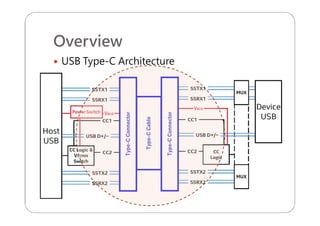
 USB Type-C Architecture
Overview
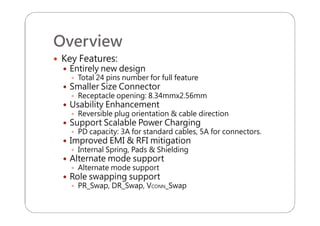
 Key Features:
 Entirely new design
 Total 24 pins number for full feature
 Smaller Size Connector
 Receptacle opening: 8.34mmx2.56mm
 Usability Enhancement
 Reversible plug orientation & cable direction
 Support Scalable Power Charging
 PD capacity: 3A for standard cables, 5A for connectors.
 Improved EMI & RFI mitigation
 Internal Spring, Pads & Shielding
 Alternate mode support
 Role swapping support
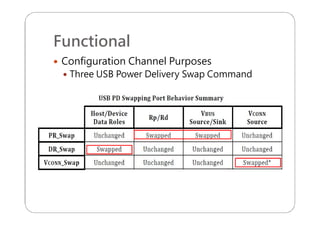
 PR_Swap, DR_Swap, VCONN_Swap
Mechanical
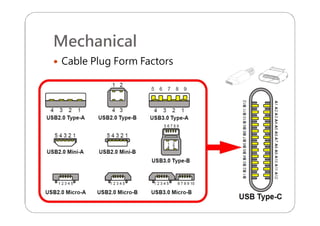
 Cable Plug Form Factors
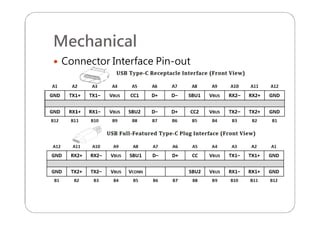
Mechanical
 Connector Interface Pin-out
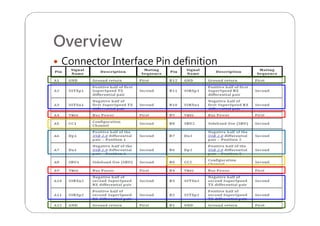
Overview
 Connector Interface Pin definition
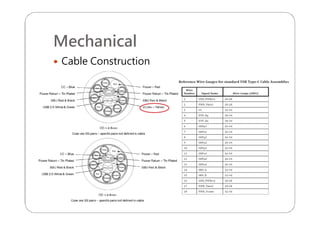
Mechanical
 Cable Construction
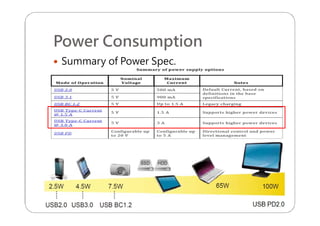
Power Consumption
 Summary of Power Spec.
Power Consumption
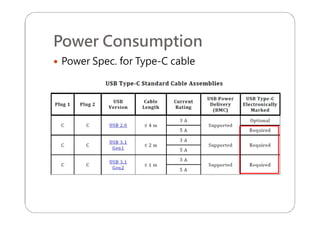
 Power Spec. for Type-C cable
Power Consumption
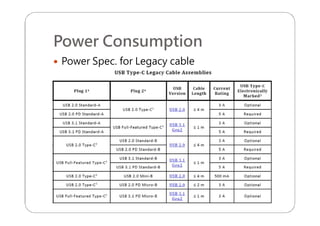
 Power Spec. for Legacy cable
Power Consumption
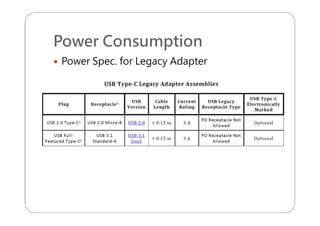
 Power Spec. for Legacy Adapter
Mechanical
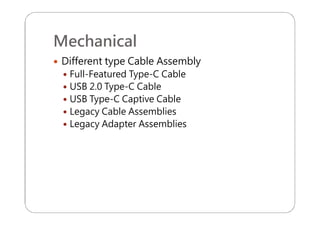
 Different type Cable Assembly
 Full-Featured Type-C Cable
 USB 2.0 Type-C Cable
 USB Type-C Captive Cable
 Legacy Cable Assemblies
 Legacy Adapter Assemblies
Mechanical
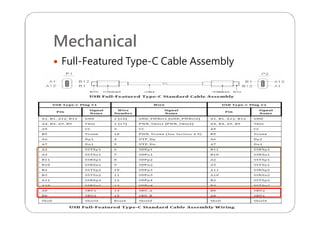
 Full-Featured Type-C Cable Assembly
Mechanical
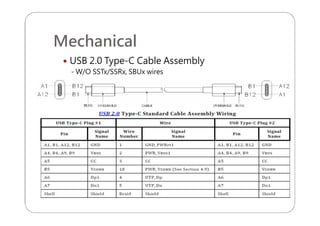
 USB 2.0 Type-C Cable Assembly
- W/O SSTx/SSRx, SBUx wires
Mechanical
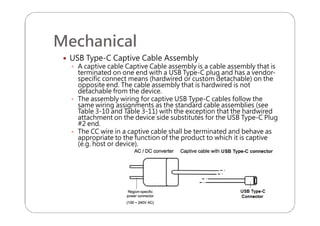
 USB Type-C Captive Cable Assembly
 A captive cable Captive Cable assembly is a cable assembly that is
terminated on one end with a USB Type-C plug and has a vendor-
specific connect means (hardwired or custom detachable) on the
opposite end. The cable assembly that is hardwired is not
detachable from the device.
 The assembly wiring for captive USB Type-C cables follow the
same wiring assignments as the standard cable assemblies (see
Table 3-10 and Table 3-11) with the exception that the hardwired
attachment on the device side substitutes for the USB Type-C Plug
#2 end.
 The CC wire in a captive cable shall be terminated and behave as
appropriate to the function of the product to which it is captive
(e.g. host or device).
Mechanical
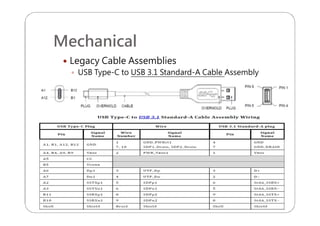
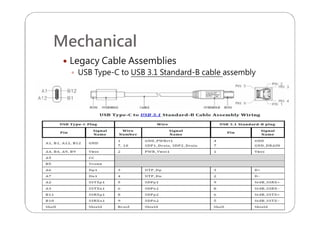
 Legacy Cable Assemblies
 USB Type-C to USB 3.1 Standard-A Cable Assembly
Mechanical
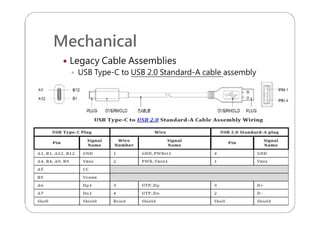
 Legacy Cable Assemblies
 USB Type-C to USB 2.0 Standard-A cable assembly
Mechanical
 Legacy Cable Assemblies
 USB Type-C to USB 3.1 Standard-B cable assembly
Mechanical
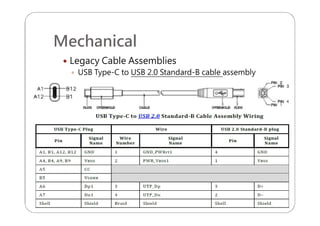
 Legacy Cable Assemblies
 USB Type-C to USB 2.0 Standard-B cable assembly
Mechanical
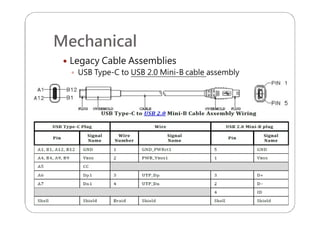
 Legacy Cable Assemblies
 USB Type-C to USB 2.0 Mini-B cable assembly
Mechanical
 Legacy Cable Assemblies
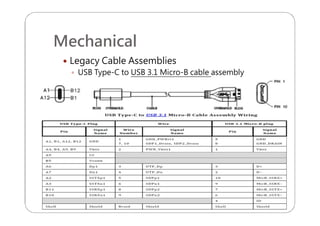
 USB Type-C to USB 3.1 Micro-B cable assembly
Mechanical
 Legacy Cable Assemblies
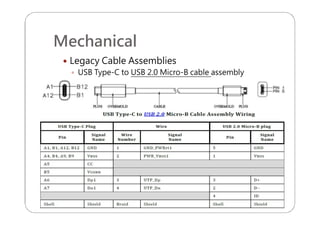
 USB Type-C to USB 2.0 Micro-B cable assembly
Mechanical
 Legacy Adapter Assemblies
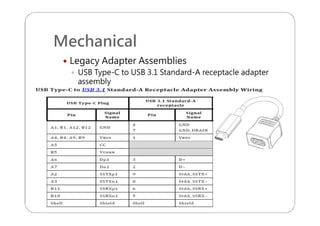
 USB Type-C to USB 3.1 Standard-A receptacle adapter
assembly
Mechanical
 Legacy Adapter Assemblies
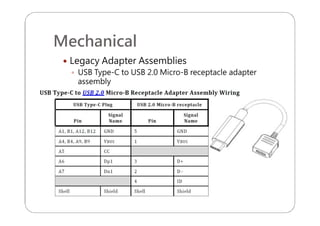
 USB Type-C to USB 2.0 Micro-B receptacle adapter
assembly
Mechanical
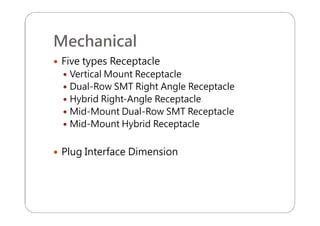
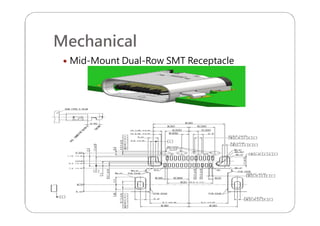
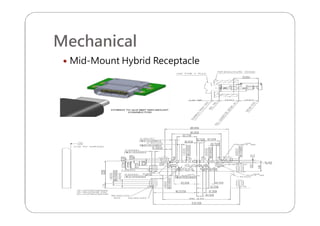
 Five types Receptacle
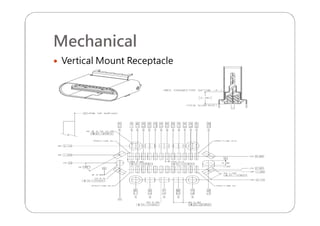
 Vertical Mount Receptacle
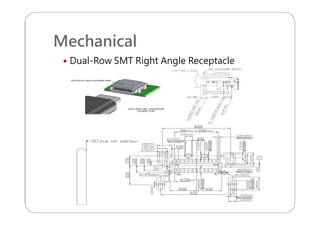
 Dual-Row SMT Right Angle Receptacle
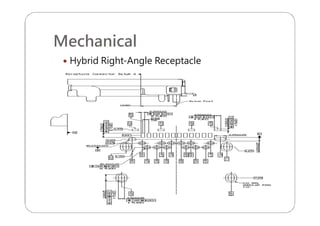
 Hybrid Right-Angle Receptacle
 Mid-Mount Dual-Row SMT Receptacle
 Mid-Mount Hybrid Receptacle
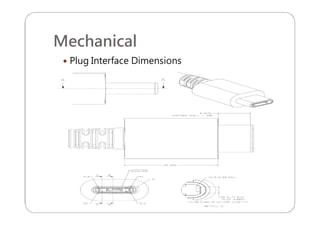
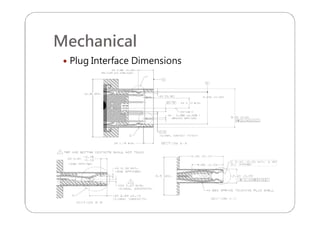
 Plug Interface Dimension
Mechanical
 Vertical Mount Receptacle
Mechanical
 Dual-Row SMT Right Angle Receptacle
Mechanical
 Hybrid Right-Angle Receptacle
Mechanical
 Mid-Mount Dual-Row SMT Receptacle
Mechanical
 Mid-Mount Hybrid Receptacle
Mechanical
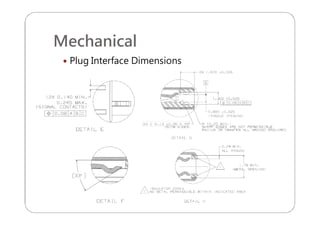
 Plug Interface Dimensions
Mechanical
 Plug Interface Dimensions
Mechanical
 Plug Interface Dimensions
Mechanical
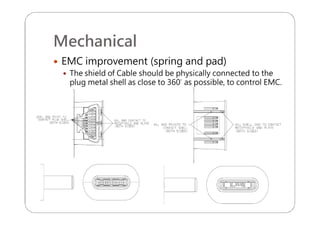
 EMC improvement (spring and pad)
 The shield of Cable should be physically connected to the
plug metal shell as close to 360° as possible, to control EMC.
Mechanical
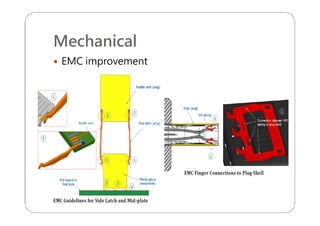
 EMC improvement
Mechanical
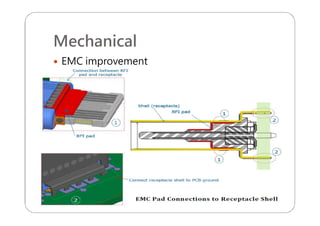
 EMC improvement
Electrical Characteristics
 Electrical Characteristics
 Raw Cable
 Connector
 Cable Assemble
Electrical Characteristics
 Raw Cable
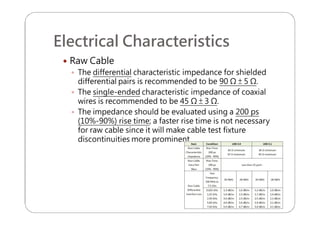
 The differential characteristic impedance for shielded
differential pairs is recommended to be 90 Ω ± 5 Ω.
 The single-ended characteristic impedance of coaxial
wires is recommended to be 45 Ω ± 3 Ω.
 The impedance should be evaluated using a 200 ps
(10%-90%) rise time; a faster rise time is not necessary
for raw cable since it will make cable test fixture
discontinuities more prominent.
Electrical Characteristics
 Raw Cable
 Intra-Pair Skew
 Differential Insertion Loss
Electrical Characteristics
 Mated Connector
 Differential Impedance
 Differential Insertion Loss
 Differential Return Loss
 Differential Near-End and Far-End Crosstalk between
SuperSpeed Pairs
 Differential Crosstalk between D+/D− and SuperSpeed
Pairs
 Differential-to-Common-Mode Conversion
Electrical Characteristics
 Cable Assemble
 USB Type-C to Type-C Passive Cable Assemblies
 USB Type-C to Legacy Cable Assemblies
 USB Type-C to USB Legacy Adapter Assemblies
 Shielding Effectiveness Requirements
 DC Electrical Requirements
Functional
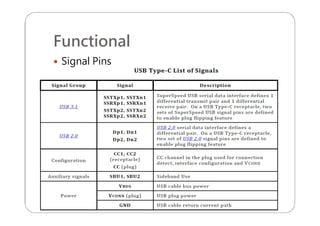
 Signal Pins Definition
 Sideband Use
 Power and Ground
 Configuration Channel
 Power
 USB Hubs
 Chargers
 Electronically Marked Cables
 VCONN-Power Accessories
Functional
 Signal Pins
Functional
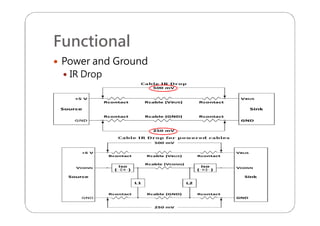
 Power and Ground
 IR Drop
Functional
 Power and Ground
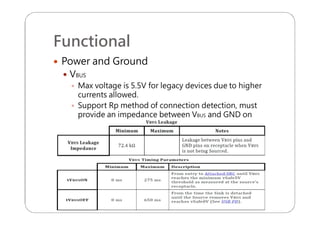
 VBUS
 Max voltage is 5.5V for legacy devices due to higher
currents allowed.
 Support Rp method of connection detection, must
provide an impedance between VBUS and GND on
receptacle pin.
Functional
 Power and Ground
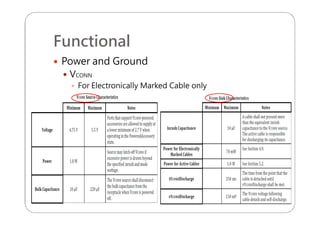
 VCONN
 For Electronically Marked Cable only
Functional
 Power and Ground
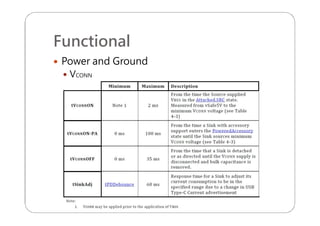
 VCONN
Functional
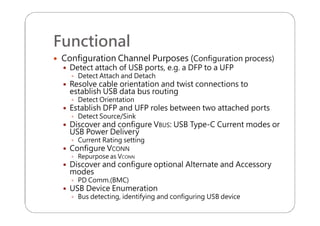
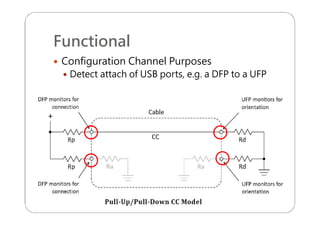
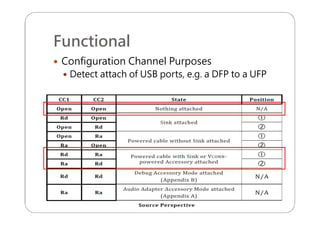
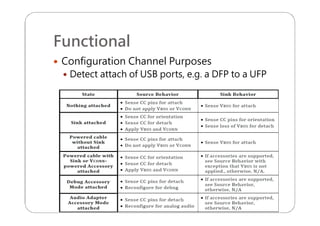
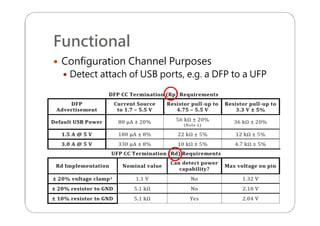
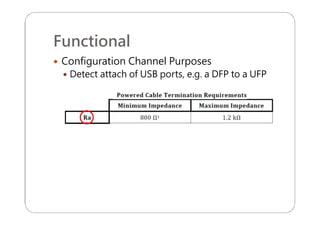
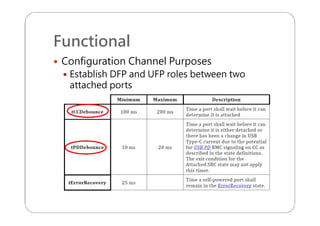
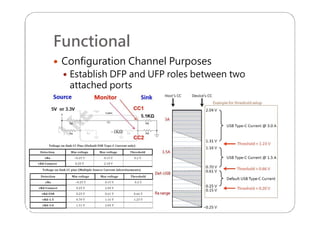
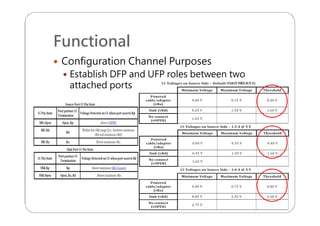
 Configuration Channel Purposes (Configuration process)
 Detect attach of USB ports, e.g. a DFP to a UFP
 Detect Attach and Detach
 Resolve cable orientation and twist connections to
establish USB data bus routing
 Detect Orientation
 Establish DFP and UFP roles between two attached ports
 Detect Source/Sink
 Discover and configure VBUS: USB Type-C Current modes or
USB Power Delivery
 Current Rating setting
 Configure VCONN
 Repurpose as VCONN
 Discover and configure optional Alternate and Accessory
modes
 PD Comm.(BMC)
 USB Device Enumeration
 Bus detecting, identifying and configuring USB device
Functional
 Configuration Channel Purposes
 Detect attach of USB ports, e.g. a DFP to a UFP
Functional
 Configuration Channel Purposes
 Detect attach of USB ports, e.g. a DFP to a UFP
Functional
 Configuration Channel Purposes
 Detect attach of USB ports, e.g. a DFP to a UFP
Functional
 Configuration Channel Purposes
 Detect attach of USB ports, e.g. a DFP to a UFP
Functional
 Configuration Channel Purposes
 Detect attach of USB ports, e.g. a DFP to a UFP
Functional
 Configuration Channel Purposes
 Establish DFP and UFP roles between two
attached ports
Functional
 Configuration Channel Purposes
 Establish DFP and UFP roles between two
attached ports
Functional
 Configuration Channel Purposes
 Establish DFP and UFP roles between two
attached ports
Functional
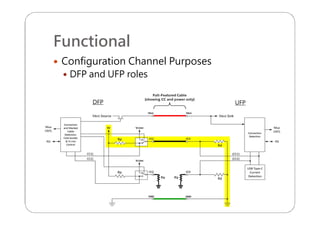
 Configuration Channel Purposes
 DFP and UFP roles
Functional
 Configuration Channel Purposes
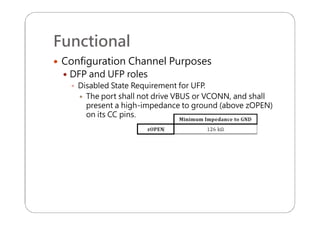
 DFP and UFP roles
 Disabled State Requirement for UFP.
 The port shall not drive VBUS or VCONN, and shall
present a high-impedance to ground (above zOPEN)
on its CC pins.
Functional
 Configuration Channel Purposes
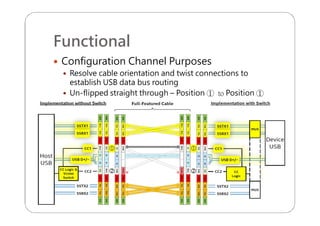
 Resolve cable orientation and twist connections to
establish USB data bus routing
 Un-flipped straight through – Position ① to Position ①
Functional
 Configuration Channel Purposes
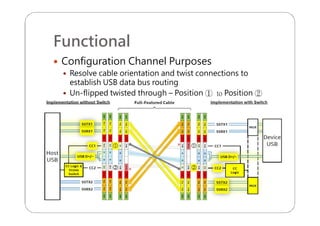
 Resolve cable orientation and twist connections to
establish USB data bus routing
 Un-flipped twisted through – Position ① to Position ②
Functional
 Configuration Channel Purposes
 Resolve cable orientation and twist connections to
establish USB data bus routing
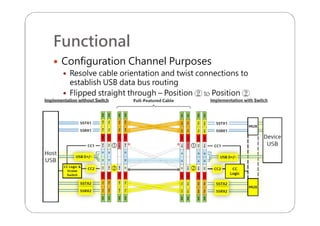
 Flipped straight through – Position ② to Position ②
Functional
 Configuration Channel Purposes
 Resolve cable orientation and twist connections to
establish USB data bus routing
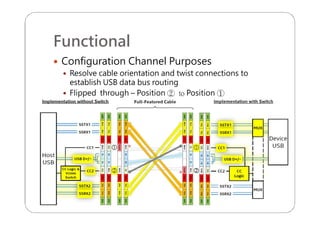
 Flipped through – Position ② to Position ①
Functional
 Configuration Channel Purposes
 Direct Connect Device
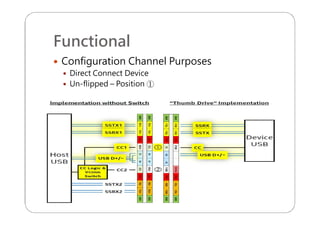
 Un-flipped – Position ①
Functional
 Configuration Channel Purposes
 Direct Connect Device
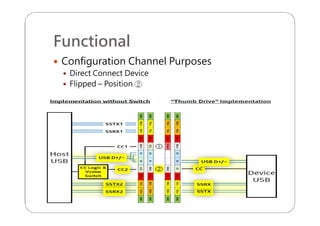
 Flipped – Position ②
Functional
 Configuration Channel Purposes
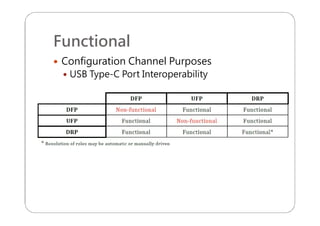
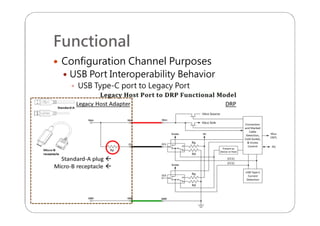
 USB Type-C Port Interoperability
Functional
 Configuration Channel Purposes
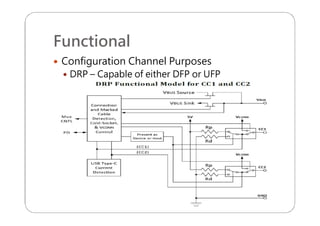
 DRP – Capable of either DFP or UFP
Functional
 Configuration Channel Purposes
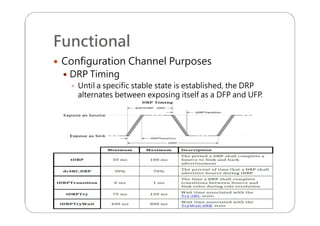
 DRP Timing
 Until a specific stable state is established, the DRP
alternates between exposing itself as a DFP and UFP.
Functional
 Configuration Channel Purposes
 Three USB Power Delivery Swap Command
Functional
 Configuration Channel Purposes
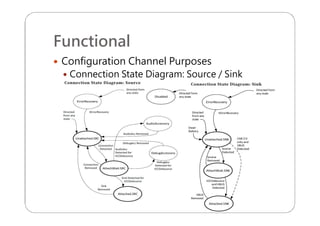
 Connection State Diagram: Source / Sink
Functional
 Configuration Channel Purposes
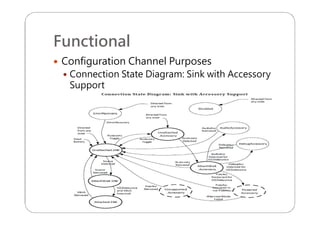
 Connection State Diagram: Sink with Accessory
Support
Functional
 Configuration Channel Purposes
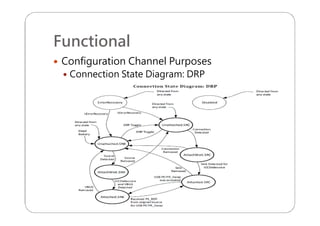
 Connection State Diagram: DRP
Functional
 Configuration Channel Purposes
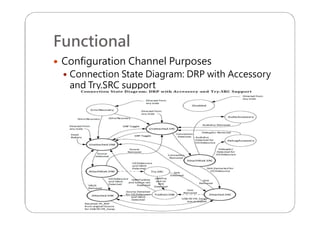
 Connection State Diagram: DRP with Accessory
and Try.SRC support
Functional
 Configuration Channel Purposes
 Each Connection States behavior
Functional
 Configuration Channel Purposes
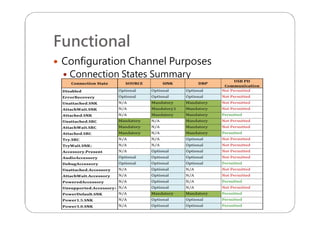
 Connection States Summary
Functional
 Configuration Channel Purposes
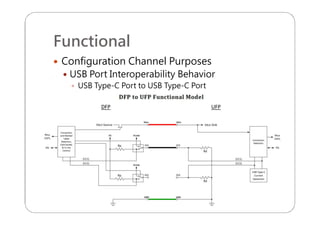
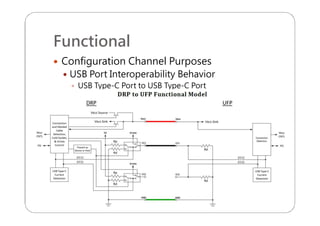
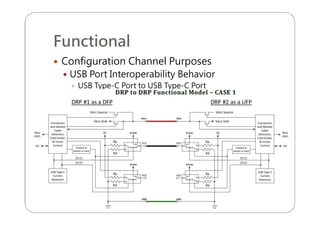
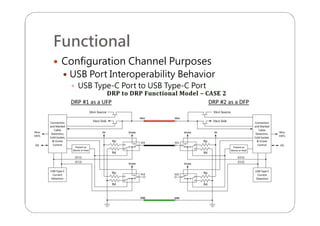
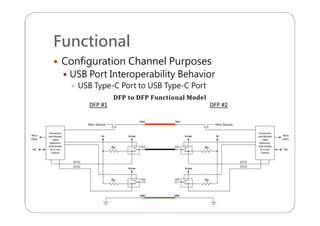
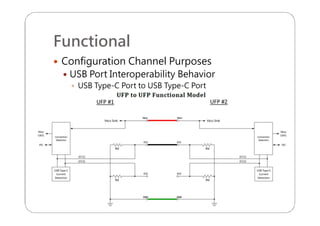
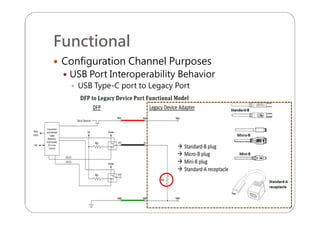
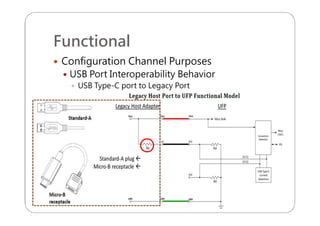
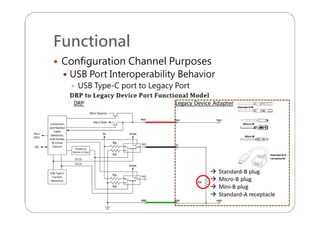
 USB Port Interoperability Behavior
 USB Type-C Port to USB Type-C Port
Functional
 Configuration Channel Purposes
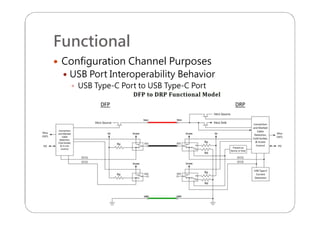
 USB Port Interoperability Behavior
 USB Type-C Port to USB Type-C Port
Functional
 Configuration Channel Purposes
 USB Port Interoperability Behavior
 USB Type-C Port to USB Type-C Port
Functional
 Configuration Channel Purposes
 USB Port Interoperability Behavior
 USB Type-C Port to USB Type-C Port
Functional
 Configuration Channel Purposes
 USB Port Interoperability Behavior
 USB Type-C Port to USB Type-C Port
Functional
 Configuration Channel Purposes
 USB Port Interoperability Behavior
 USB Type-C Port to USB Type-C Port
Functional
 Configuration Channel Purposes
 USB Port Interoperability Behavior
 USB Type-C Port to USB Type-C Port
Functional
 Configuration Channel Purposes
 USB Port Interoperability Behavior
 USB Type-C port to Legacy Port
Functional
 Configuration Channel Purposes
 USB Port Interoperability Behavior
 USB Type-C port to Legacy Port
Functional
 Configuration Channel Purposes
 USB Port Interoperability Behavior
 USB Type-C port to Legacy Port
Functional
 Configuration Channel Purposes
 USB Port Interoperability Behavior
 USB Type-C port to Legacy Port
Functional
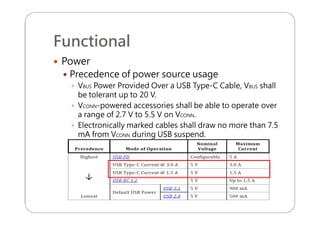
 Power
 Precedence of power source usage
 VBUS Power Provided Over a USB Type-C Cable, VBUS shall
be tolerant up to 20 V.
 VCONN-powered accessories shall be able to operate over
a range of 2.7 V to 5.5 V on VCONN.
 Electronically marked cables shall draw no more than 7.5
mA from VCONN during USB suspend.
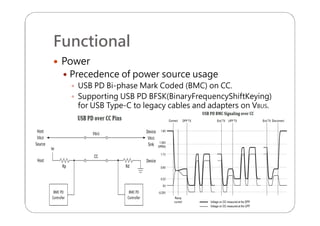
Functional
 Power
 Precedence of power source usage
 USB PD Bi-phase Mark Coded (BMC) on CC.
 Supporting USB PD BFSK(BinaryFrequencyShiftKeying)
for USB Type-C to legacy cables and adapters on VBUS.
Functional
 Chargers
 DFP as a Power Source
 Chargers with USB Type-C Receptacles
 Chargers with USB Type-C Captive Cables
 Non-USB Charging Methods
 Sinking DFP
 Charging UFP
 Charging a System with a Dead Battery
Functional
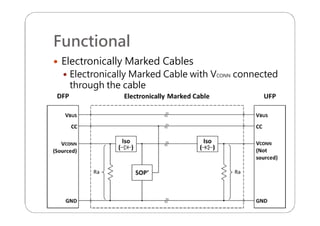
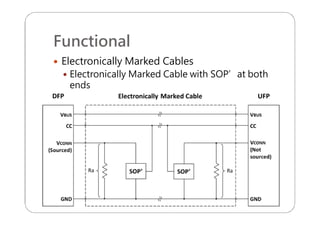
 Electronically Marked Cables
 Electronically Marked Cable with VCONN connected
through the cable
Functional
 Electronically Marked Cables
 Electronically Marked Cable with SOP’at both
ends
Functional
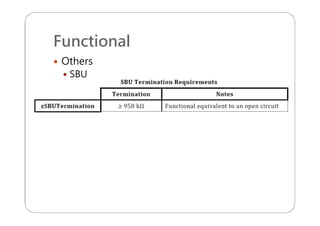
 Others
 SBU
Functional
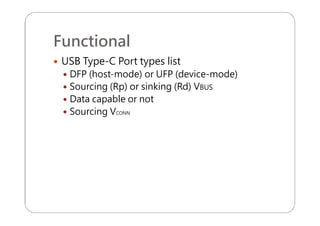
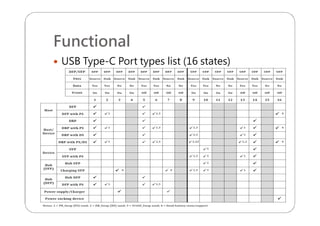
 USB Type-C Port types list
 DFP (host-mode) or UFP (device-mode)
 Sourcing (Rp) or sinking (Rd) VBUS
 Data capable or not
 Sourcing VCONN
Functional
 USB Type-C Port types list (16 states)
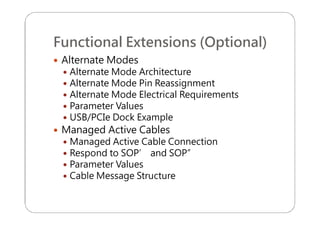
Functional Extensions (Optional)
 Alternate Modes
 Alternate Mode Architecture
 Alternate Mode Pin Reassignment
 Alternate Mode Electrical Requirements
 Parameter Values
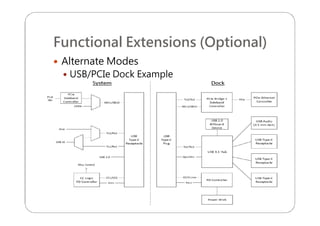
 USB/PCIe Dock Example
 Managed Active Cables
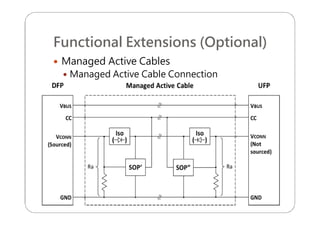
 Managed Active Cable Connection
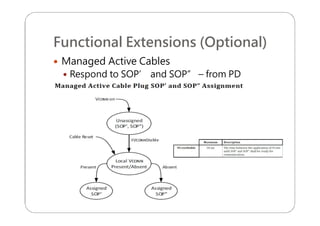
 Respond to SOP’ and SOP”
 Parameter Values
 Cable Message Structure
Functional Extensions (Optional)
 Alternate Modes
 Alternate Mode Architecture
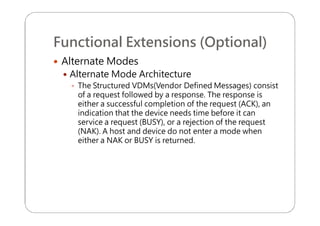
 The Structured VDMs(Vendor Defined Messages) consist
of a request followed by a response. The response is
either a successful completion of the request (ACK), an
indication that the device needs time before it can
service a request (BUSY), or a rejection of the request
(NAK). A host and device do not enter a mode when
either a NAK or BUSY is returned.
Functional Extensions (Optional)
 Alternate Modes
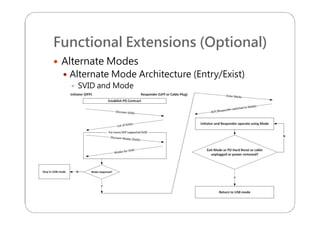
 Alternate Mode Architecture (Entry/Exist)
 SVID and Mode
Functional Extensions (Optional)
 Alternate Modes
 Alternate Mode Architecture
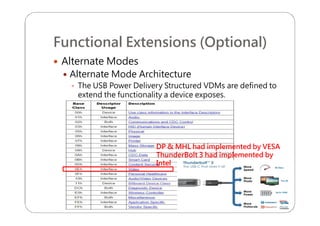
 The USB Power Delivery Structured VDMs are defined to
extend the functionality a device exposes.
DP &DP & MHL had implemented by VESAMHL had implemented by VESA
ThunderBoltThunderBolt 3 had implemented by3 had implemented by
IntelIntel
Functional Extensions (Optional)
 Alternate Modes
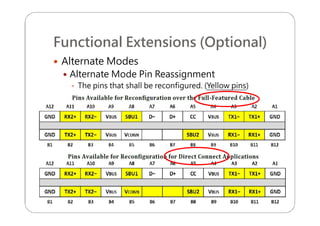
 Alternate Mode Pin Reassignment
 The pins that shall be reconfigured. (Yellow pins)
Functional Extensions (Optional)
 Alternate Modes
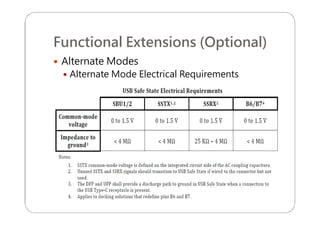
 Alternate Mode Electrical Requirements
Functional Extensions (Optional)
 Alternate Modes
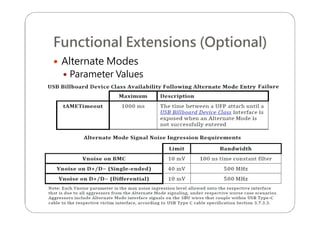
 Parameter Values
Functional Extensions (Optional)
 Alternate Modes
 USB/PCIe Dock Example
Functional Extensions (Optional)
 Managed Active Cables
 Managed Active Cable Connection
Functional Extensions (Optional)
 Managed Active Cables
 Respond to SOP’ and SOP” – from PD
Functional Extensions (Optional)
 Managed Active Cables
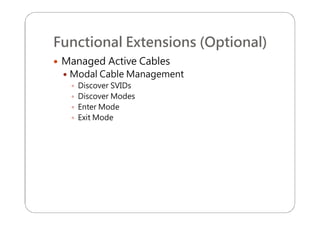
 Modal Cable Management
 Discover SVIDs
 Discover Modes
 Enter Mode
 Exit Mode
Functional Extensions (Optional)
 Managed Active Cables
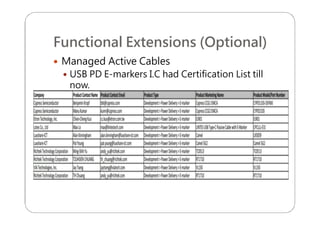
 USB PD E-markers I.C had Certification List till
now.
Audio Adapter Accessory Mode
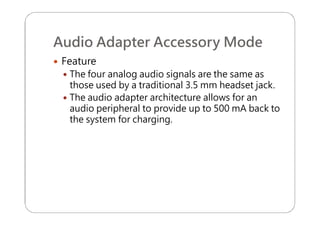
 Feature
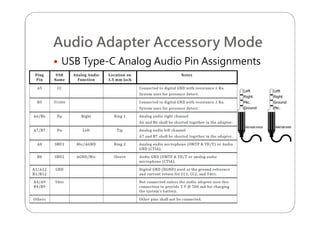
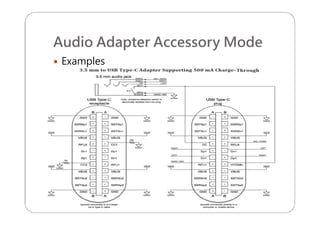
 The four analog audio signals are the same as
those used by a traditional 3.5 mm headset jack.
 The audio adapter architecture allows for an
audio peripheral to provide up to 500 mA back to
the system for charging.
Audio Adapter Accessory Mode
 USB Type-C Analog Audio Pin Assignments
Audio Adapter Accessory Mode
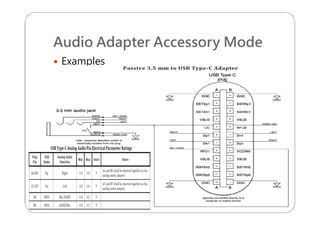
 Examples
Audio Adapter Accessory Mode
 Examples
Reference
 USB Type-C Spec. R1.1
 USB PD Spec. R2.0 V1.1
 Intel IDF15 HSTS003 file
Q & A

USB Type-C R1.1 Introduction