October 4, 2016
Santa Clara Convention Center
Mission City Ballroom
October 4, 2016
Santa Clara Convention Center
Mission City Ballroom
Wearables:
Setting up a
Body Area Network (BAN)
with sensor synchronization
Francesco Doddo
Agenda 2
10:00 Body Area Network Francesco Doddo
Quick Guide to BLE
connectivity
BAN Synchronization
The SensorTile Solution
10:45 Conclusion
Time
Speaker
Presentation
Body Area Network
Body Area Network applications
2 sensors on arm 1 sensor on stomach 2 sensors on leg
• Fitness application:
• track you training exercise.
• Medical application:
• track your rehabilitation exercise
SYNCHRONICITY
of the sampling and streaming
activities is essential
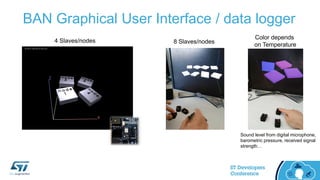
BAN Graphical User Interface / data logger
Color depends
on Temperature
8 Slaves/nodes4 Slaves/nodes
Sound level from digital microphone,
barometric pressure, received signal
strength…
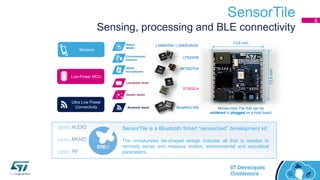
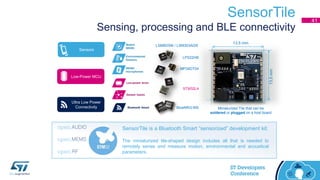
SensorTile
Sensing, processing and BLE connectivity
6
Sensors
Ultra Low Power
Connectivity
Low-Power MCU
MP34DT04
LPS22HB
LSM6DSM / LSM303AGR
STM32L4
BlueNRG-MS
SensorTile is a Bluetooth Smart “sensorized” development kit.
The miniaturized tile-shaped design includes all that is needed to
remotely sense and measure motion, environmental and acoustical
parameters.
13.5 mm
13.5mm
Miniaturized Tile that can be
soldered or plugged on a host board
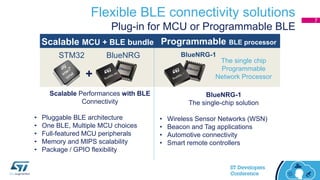
Flexible BLE connectivity solutions
Plug-in for MCU or Programmable BLE
+
STM32 BlueNRG BlueNRG-1
The single chip
Programmable
Network Processor
Programmable BLE processorScalable MCU + BLE bundle
BlueNRG-1
The single-chip solution
• Wireless Sensor Networks (WSN)
• Beacon and Tag applications
• Automotive connectivity
• Smart remote controllers
Scalable Performances with BLE
Connectivity
• Pluggable BLE architecture
• One BLE, Multiple MCU choices
• Full-featured MCU peripherals
• Memory and MIPS scalability
• Package / GPIO flexibility
7
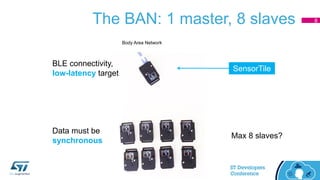
The BAN: 1 master, 8 slaves
BLE connectivity,
low-latency target
Data must be
synchronous
Max 8 slaves?
Body Area Network
SensorTile
8
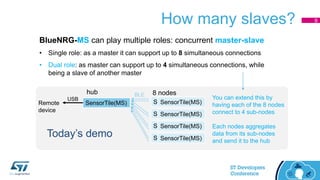
How many slaves?
BlueNRG-MS can play multiple roles: concurrent master-slave
• Single role: as a master it can support up to 8 simultaneous connections
• Dual role: as master can support up to 4 simultaneous connections, while
being a slave of another master
SensorTile(MS)Remote
device
SensorTile(MS)
SensorTile(MS)
SensorTile(MS)
SensorTile(MS)
SensorTile(MS)
SensorTile(MS)
SensorTile(MS)
SensorTile(MS)
USB
Today’s demo
You can extend this by
having each of the 8 nodes
connect to 4 sub-nodes
Each nodes aggregates
data from its sub-nodes
and send it to the hub
hub 8 nodesBLE
9
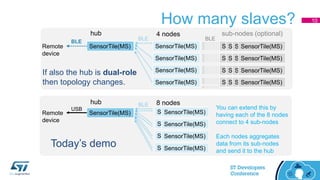
How many slaves?
SensorTile(MS)Remote
device
SensorTile(MS)
SensorTile(MS)
SensorTile(MS)
SensorTile(MS)
hub 4 nodes sub-nodes (optional)
SensorTile(MS)SensorTile(MS)SensorTile(MS)SensorTile(MS)
BLE
BLE BLE
If also the hub is dual-role
then topology changes.
SensorTile(MS)Remote
device
SensorTile(MS)
SensorTile(MS)
SensorTile(MS)
SensorTile(MS)
SensorTile(MS)
SensorTile(MS)
SensorTile(MS)
SensorTile(MS)
USB
Today’s demo
You can extend this by
having each of the 8 nodes
connect to 4 sub-nodes
Each nodes aggregates
data from its sub-nodes
and send it to the hub
hub 8 nodesBLE
10
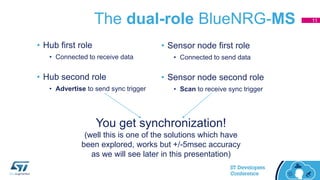
The dual-role BlueNRG-MS
• Hub first role
• Connected to receive data
• Hub second role
• Advertise to send sync trigger
• Sensor node first role
• Connected to send data
• Sensor node second role
• Scan to receive sync trigger
You get synchronization!
(well this is one of the solutions which have
been explored, works but +/-5msec accuracy
as we will see later in this presentation)
11
Quick Guide to BLE connectivity
Quick Guide to BLE Connectivity
• Master/Slave vs. Client/Server
• Services/Characteristics/Values vs. Attributes
• Anchor period, connection interval, connection length
• Events (and timestamps)
13
Quick Guide to BLE Connectivity
• Master/Slave vs. Client/Server
• Services/Characteristics/Values vs. Attributes
• Anchor period, connection interval, connection length
• Events (and timestamps)
14
Quick Guide to BLE connectivity
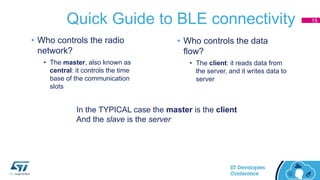
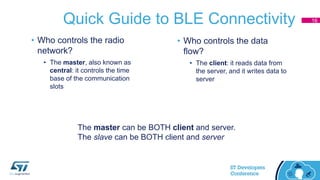
• Who controls the radio
network?
• The master, also known as
central: it controls the time
base of the communication
slots
• Who controls the data
flow?
• The client: it reads data from
the server, and it writes data to
server
In the TYPICAL case the master is the client
And the slave is the server
15
Quick Guide to BLE Connectivity
The master can be BOTH client and server.
The slave can be BOTH client and server
16
• Who controls the radio
network?
• The master, also known as
central: it controls the time
base of the communication
slots
• Who controls the data
flow?
• The client: it reads data from
the server, and it writes data to
server
Quick Guide to BLE connectivity
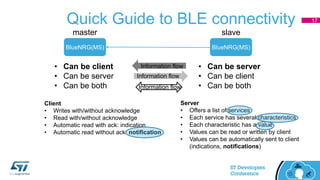
BlueNRG(MS)BlueNRG(MS)
master slave
• Can be server
• Can be client
• Can be both
• Can be client
• Can be server
• Can be both
Information flow
Server
• Offers a list of services
• Each service has several characteristics
• Each characteristic has a value
• Values can be read or written by client
• Values can be automatically sent to client
(indications, notifications)
Client
• Writes with/without acknowledge
• Read with/without acknowledge
• Automatic read with ack: indication
• Automatic read without ack: notification
Information flow
Information flow
17
Quick Guide to BLE connectivity
• Master/Slave vs. Client/Server
• Services/Characteristics/Values vs. Attributes
• Anchor period, connection interval, connection length
• Events (and timestamps)
18
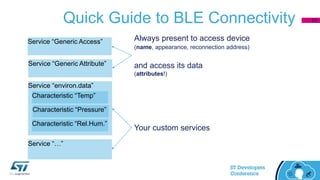
Quick Guide to BLE Connectivity
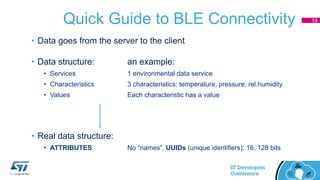
• Data goes from the server to the client
• Data structure: an example:
• Services 1 environmental data service
• Characteristics 3 characteristics: temperature, pressure, rel.humidity
• Values Each characteristic has a value
• Real data structure:
• ATTRIBUTES No “names”, UUIDs (unique identifiers): 16, 128 bits
19
Quick Guide to BLE Connectivity
Service “environ.data”
Characteristic “Temp”
Characteristic “Pressure”
Characteristic “Rel.Hum.”
Service “Generic Access”
Service “Generic Attribute”
Always present to access device
(name, appearance, reconnection address)
and access its data
(attributes!)
Service “…”
Your custom services
20
Quick Guide to BLE Connectivity
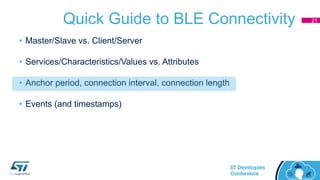
• Master/Slave vs. Client/Server
• Services/Characteristics/Values vs. Attributes
• Anchor period, connection interval, connection length
• Events (and timestamps)
21
Quick Guide to BLE Connectivity
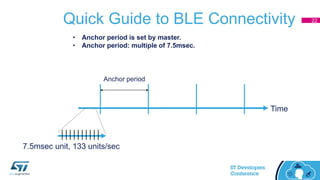
Time
Anchor period
• Anchor period is set by master.
• Anchor period: multiple of 7.5msec.
7.5msec unit, 133 units/sec
22
Quick Guide to BLE Connectivity
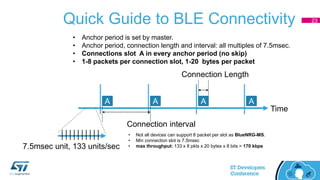
Time
A A A A
Connection interval
Connection Length
• Anchor period is set by master.
• Anchor period, connection length and interval: all multiples of 7.5msec.
• Connections slot A in every anchor period (no skip)
• 1-8 packets per connection slot, 1-20 bytes per packet
7.5msec unit, 133 units/sec
• Not all devices can support 8 packet per slot as BlueNRG-MS.
• Min connection slot is 7.5msec
• max throughput: 133 x 8 pkts x 20 bytes x 8 bits = 170 kbps
23
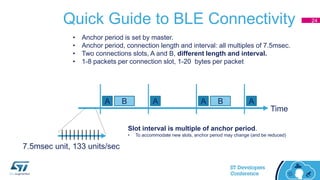
Quick Guide to BLE Connectivity
Time
A A A AB B
• Anchor period is set by master.
• Anchor period, connection length and interval: all multiples of 7.5msec.
• Two connections slots, A and B, different length and interval.
• 1-8 packets per connection slot, 1-20 bytes per packet
7.5msec unit, 133 units/sec
Slot interval is multiple of anchor period.
• To accommodate new slots, anchor period may change (and be reduced)
24
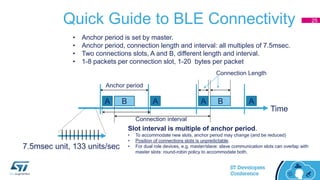
Quick Guide to BLE Connectivity
Time
Anchor period
A A A AB B
Connection interval
Connection Length
• Anchor period is set by master.
• Anchor period, connection length and interval: all multiples of 7.5msec.
• Two connections slots, A and B, different length and interval.
• 1-8 packets per connection slot, 1-20 bytes per packet
7.5msec unit, 133 units/sec
Slot interval is multiple of anchor period.
• To accommodate new slots, anchor period may change (and be reduced)
• Position of connections slots is unpredictable.
• For dual role devices, e.g. master/slave: slave communication slots can overlap with
master slots: round-robin policy to accommodate both.
25
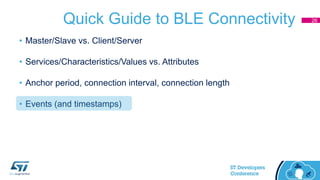
Quick Guide to BLE Connectivity
• Master/Slave vs. Client/Server
• Services/Characteristics/Values vs. Attributes
• Anchor period, connection interval, connection length
• Events (and timestamps)
26
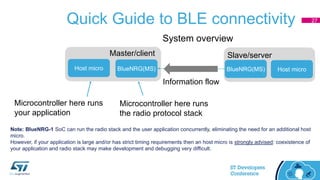
Quick Guide to BLE connectivity
BlueNRG(MS) BlueNRG(MS)
Master/client Slave/server
Information flow
Host micro
Microcontroller here runs
the radio protocol stack
Microcontroller here runs
your application
Host micro
System overview
Note: BlueNRG-1 SoC can run the radio stack and the user application concurrently, eliminating the need for an additional host
micro.
However, if your application is large and/or has strict timing requirements then an host micro is strongly advised: coexistence of
your application and radio stack may make development and debugging very difficult.
27
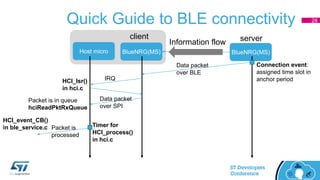
Quick Guide to BLE connectivity
BlueNRG(MS) BlueNRG(MS)
client serverInformation flow
Host micro
Data packet
over BLE
IRQ
Data packet
over SPI
Packet is in queue
hciReadPktRxQueue
Packet is
processed
Connection event:
assigned time slot in
anchor period
Timer for
HCI_process()
in hci.c
HCI_Isr()
in hci.c
HCI_event_CB()
in ble_service.c
28
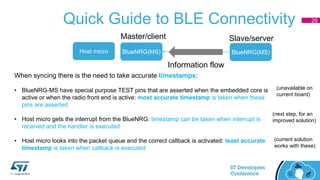
Quick Guide to BLE Connectivity
BlueNRG(MS) BlueNRG(MS)
Master/client Slave/server
Information flow
Host micro
When syncing there is the need to take accurate timestamps:
• BlueNRG-MS have special purpose TEST pins that are asserted when the embedded core is
active or when the radio front end is active: most accurate timestamp is taken when these
pins are asserted
• Host micro gets the interrupt from the BlueNRG: timestamp can be taken when interrupt is
received and the handler is executed
• Host micro looks into the packet queue and the correct callback is activated: least accurate
timestamp is taken when callback is executed
(unavailable on
current board)
(next step, for an
improved solution)
(current solution
works with these)
29
BAN Synchronization
The need for synchronization
• Clock of remote sensor units
• May not be an accurate crystal oscillator: because of power, cost and start-up time, it is
probably an RC oscillator which can be +/-5% off with respect to nominal frequency
• Even if an expensive crystal is used, over time the accumulated drift would compromise
the synchronization of the sensors
• Need for synchronization!
31
How-to achieve synchronization
What we have tested:
• Broadcasting a trigger signal: master advertises and slaves scan (while connected! Needs
dual-role devices)
• Exploiting the low-level radio network synchronization: dependence on availability high
quality timestamps.
• Slave activity is synchronized to communication slot, master resamples all the data
based on accurate timestamps
32
How-to achieve synchronization
• Broadcasting a trigger signal: ADVERTISE data packet
• Multiple role needed: master/hub must advertise and receive data, remote sensor must scan
and send data.
• Advertise is done on multiple channels (1-3) and remote sensors listen to the channel of their
choice synchronizing on different ADV event
• Even if we restrict advertise on a single channel, it is very unlikely that all sensor will listen to the
same channel and receive the same ADV event
• Advertise may be done with a +/-5msec tolerance with respect to nominal time slot; this is a
lower limit for the synchronization (offset)
• Due to +/-5msec variability, it is not possible to synchronize the clock speed (rate) by measuring
interval over multiple repetitions
33
How-to achieve synchronization
Exploit the radio network synchronization
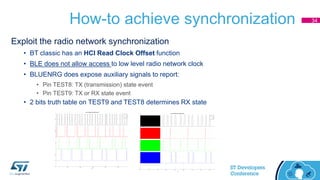
• BT classic has an HCI Read Clock Offset function
• BLE does not allow access to low level radio network clock
• BLUENRG does expose auxiliary signals to report:
• Pin TEST8: TX (transmission) state event
• Pin TEST9: TX or RX state event
• 2 bits truth table on TEST9 and TEST8 determines RX state
34
How-to achieve synchronization
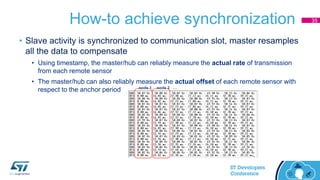
• Slave activity is synchronized to communication slot, master resamples
all the data to compensate
• Using timestamp, the master/hub can reliably measure the actual rate of transmission
from each remote sensor
• The master/hub can also reliably measure the actual offset of each remote sensor with
respect to the anchor period
35
node 1 node 2 …
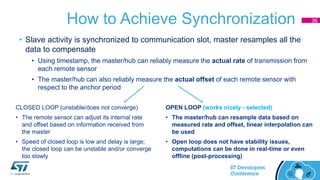
How to Achieve Synchronization
OPEN LOOP (works nicely - selected)
• The master/hub can resample data based on
measured rate and offset, linear interpolation can
be used
• Open loop does not have stability issues,
computations can be done in real-time or even
offline (post-processing)
CLOSED LOOP (unstable/does not converge)
• The remote sensor can adjust its internal rate
and offset based on information received from
the master
• Speed of closed loop is low and delay is large;
the closed loop can be unstable and/or converge
too slowly
• Slave activity is synchronized to communication slot, master resamples all the
data to compensate
• Using timestamp, the master/hub can reliably measure the actual rate of transmission from
each remote sensor
• The master/hub can also reliably measure the actual offset of each remote sensor with
respect to the anchor period
36
How-to achieve synchronization
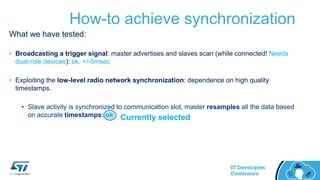
What we have tested:
• Broadcasting a trigger signal: master advertises and slaves scan (while connected! Needs
dual-role devices): ok, +/-5msec
• Exploiting the low-level radio network synchronization: dependence on high quality
timestamps.
• Slave activity is synchronized to communication slot, master resamples all the data based
on accurate timestamps: ok Currently selected
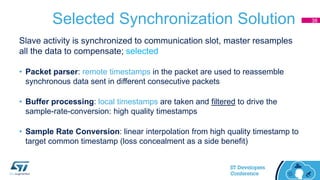
Selected Synchronization Solution
Slave activity is synchronized to communication slot, master resamples
all the data to compensate; selected
• Packet parser: remote timestamps in the packet are used to reassemble
synchronous data sent in different consecutive packets
• Buffer processing: local timestamps are taken and filtered to drive the
sample-rate-conversion: high quality timestamps
• Sample Rate Conversion: linear interpolation from high quality timestamp to
target common timestamp (loss concealment as a side benefit)
38
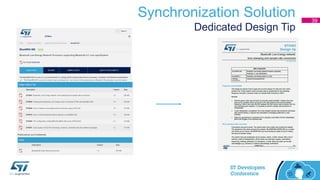
Synchronization Solution
Dedicated Design Tip
39
SensorTile
SensorTile
Sensing, processing and BLE connectivity
41
Sensors
Ultra Low Power
Connectivity
Low-Power MCU
MP34DT04
LPS22HB
LSM6DSM / LSM303AGR
STM32L4
BlueNRG-MS
SensorTile is a Bluetooth Smart “sensorized” development kit.
The miniaturized tile-shaped design includes all that is needed to
remotely sense and measure motion, environmental and acoustical
parameters.
13.5 mm
13.5mm
Miniaturized Tile that can be
soldered or plugged on a host board
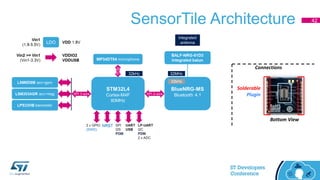
SensorTile Architecture
Connections
Bottom View
Solderable
Plugin
42
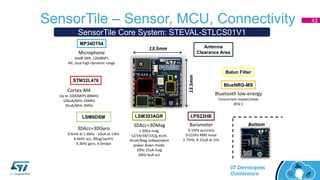
SensorTile – Sensor, MCU, Connectivity 43
Barometer
0.1hPa accuracy
0.01hPa RMS noise
1-75Hz, 4-15uA at 1Hz
3DAcc+3DMag
± 50Ga mag,
±2/±4/±8/±16/g accel,
Accel/Mag independent
power down mode,
10Hz 25uA mag
50Hz 6uA acc
3DAcc+3DGyro
0.6mA at 1.6kHz - 10uA at 13Hz
6.6kHz acc, 90ug/sqrtHz
3.3kHz gyro, 4.5mdps
Microphone
64dB SNR, 120dBSPL
Alt: dual high-dynamic-range
Bluetooth low-energy
Concurrent master/slave
BT4.1
Cortex-M4
Up to 100DMIPS 80MHz
100uA/MHz 24MHz
35uA/MHz 2MHz
13.5mm
13.5mm
LPS22HBLSM303AGRLSM6DSM
STM32L476
MP34DT04
BlueNRG-MS
Balun Filter
Antenna
Clearance Area
SensorTile Core System: STEVAL-STLCS01V1
Bottom
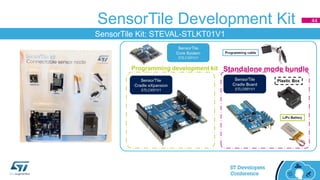
SensorTile Development Kit 44
SensorTile Kit: STEVAL-STLKT01V1
Thank You

Track 4 session 1 - st dev con 2016 - body area network and sensor synchronization

  • 1.
    October 4, 2016 SantaClara Convention Center Mission City Ballroom October 4, 2016 Santa Clara Convention Center Mission City Ballroom Wearables: Setting up a Body Area Network (BAN) with sensor synchronization Francesco Doddo
  • 2.
    Agenda 2 10:00 BodyArea Network Francesco Doddo Quick Guide to BLE connectivity BAN Synchronization The SensorTile Solution 10:45 Conclusion Time Speaker Presentation
  • 3.
  • 4.
    Body Area Networkapplications 2 sensors on arm 1 sensor on stomach 2 sensors on leg • Fitness application: • track you training exercise. • Medical application: • track your rehabilitation exercise SYNCHRONICITY of the sampling and streaming activities is essential
  • 5.
    BAN Graphical UserInterface / data logger Color depends on Temperature 8 Slaves/nodes4 Slaves/nodes Sound level from digital microphone, barometric pressure, received signal strength…
  • 6.
    SensorTile Sensing, processing andBLE connectivity 6 Sensors Ultra Low Power Connectivity Low-Power MCU MP34DT04 LPS22HB LSM6DSM / LSM303AGR STM32L4 BlueNRG-MS SensorTile is a Bluetooth Smart “sensorized” development kit. The miniaturized tile-shaped design includes all that is needed to remotely sense and measure motion, environmental and acoustical parameters. 13.5 mm 13.5mm Miniaturized Tile that can be soldered or plugged on a host board
  • 7.
    Flexible BLE connectivitysolutions Plug-in for MCU or Programmable BLE + STM32 BlueNRG BlueNRG-1 The single chip Programmable Network Processor Programmable BLE processorScalable MCU + BLE bundle BlueNRG-1 The single-chip solution • Wireless Sensor Networks (WSN) • Beacon and Tag applications • Automotive connectivity • Smart remote controllers Scalable Performances with BLE Connectivity • Pluggable BLE architecture • One BLE, Multiple MCU choices • Full-featured MCU peripherals • Memory and MIPS scalability • Package / GPIO flexibility 7
  • 8.
    The BAN: 1master, 8 slaves BLE connectivity, low-latency target Data must be synchronous Max 8 slaves? Body Area Network SensorTile 8
  • 9.
    How many slaves? BlueNRG-MScan play multiple roles: concurrent master-slave • Single role: as a master it can support up to 8 simultaneous connections • Dual role: as master can support up to 4 simultaneous connections, while being a slave of another master SensorTile(MS)Remote device SensorTile(MS) SensorTile(MS) SensorTile(MS) SensorTile(MS) SensorTile(MS) SensorTile(MS) SensorTile(MS) SensorTile(MS) USB Today’s demo You can extend this by having each of the 8 nodes connect to 4 sub-nodes Each nodes aggregates data from its sub-nodes and send it to the hub hub 8 nodesBLE 9
  • 10.
    How many slaves? SensorTile(MS)Remote device SensorTile(MS) SensorTile(MS) SensorTile(MS) SensorTile(MS) hub4 nodes sub-nodes (optional) SensorTile(MS)SensorTile(MS)SensorTile(MS)SensorTile(MS) SensorTile(MS)SensorTile(MS)SensorTile(MS)SensorTile(MS) SensorTile(MS)SensorTile(MS)SensorTile(MS)SensorTile(MS) SensorTile(MS)SensorTile(MS)SensorTile(MS)SensorTile(MS) BLE BLE BLE If also the hub is dual-role then topology changes. SensorTile(MS)Remote device SensorTile(MS) SensorTile(MS) SensorTile(MS) SensorTile(MS) SensorTile(MS) SensorTile(MS) SensorTile(MS) SensorTile(MS) USB Today’s demo You can extend this by having each of the 8 nodes connect to 4 sub-nodes Each nodes aggregates data from its sub-nodes and send it to the hub hub 8 nodesBLE 10
  • 11.
    The dual-role BlueNRG-MS •Hub first role • Connected to receive data • Hub second role • Advertise to send sync trigger • Sensor node first role • Connected to send data • Sensor node second role • Scan to receive sync trigger You get synchronization! (well this is one of the solutions which have been explored, works but +/-5msec accuracy as we will see later in this presentation) 11
  • 12.
    Quick Guide toBLE connectivity
  • 13.
    Quick Guide toBLE Connectivity • Master/Slave vs. Client/Server • Services/Characteristics/Values vs. Attributes • Anchor period, connection interval, connection length • Events (and timestamps) 13
  • 14.
    Quick Guide toBLE Connectivity • Master/Slave vs. Client/Server • Services/Characteristics/Values vs. Attributes • Anchor period, connection interval, connection length • Events (and timestamps) 14
  • 15.
    Quick Guide toBLE connectivity • Who controls the radio network? • The master, also known as central: it controls the time base of the communication slots • Who controls the data flow? • The client: it reads data from the server, and it writes data to server In the TYPICAL case the master is the client And the slave is the server 15
  • 16.
    Quick Guide toBLE Connectivity The master can be BOTH client and server. The slave can be BOTH client and server 16 • Who controls the radio network? • The master, also known as central: it controls the time base of the communication slots • Who controls the data flow? • The client: it reads data from the server, and it writes data to server
  • 17.
    Quick Guide toBLE connectivity BlueNRG(MS)BlueNRG(MS) master slave • Can be server • Can be client • Can be both • Can be client • Can be server • Can be both Information flow Server • Offers a list of services • Each service has several characteristics • Each characteristic has a value • Values can be read or written by client • Values can be automatically sent to client (indications, notifications) Client • Writes with/without acknowledge • Read with/without acknowledge • Automatic read with ack: indication • Automatic read without ack: notification Information flow Information flow 17
  • 18.
    Quick Guide toBLE connectivity • Master/Slave vs. Client/Server • Services/Characteristics/Values vs. Attributes • Anchor period, connection interval, connection length • Events (and timestamps) 18
  • 19.
    Quick Guide toBLE Connectivity • Data goes from the server to the client • Data structure: an example: • Services 1 environmental data service • Characteristics 3 characteristics: temperature, pressure, rel.humidity • Values Each characteristic has a value • Real data structure: • ATTRIBUTES No “names”, UUIDs (unique identifiers): 16, 128 bits 19
  • 20.
    Quick Guide toBLE Connectivity Service “environ.data” Characteristic “Temp” Characteristic “Pressure” Characteristic “Rel.Hum.” Service “Generic Access” Service “Generic Attribute” Always present to access device (name, appearance, reconnection address) and access its data (attributes!) Service “…” Your custom services 20
  • 21.
    Quick Guide toBLE Connectivity • Master/Slave vs. Client/Server • Services/Characteristics/Values vs. Attributes • Anchor period, connection interval, connection length • Events (and timestamps) 21
  • 22.
    Quick Guide toBLE Connectivity Time Anchor period • Anchor period is set by master. • Anchor period: multiple of 7.5msec. 7.5msec unit, 133 units/sec 22
  • 23.
    Quick Guide toBLE Connectivity Time A A A A Connection interval Connection Length • Anchor period is set by master. • Anchor period, connection length and interval: all multiples of 7.5msec. • Connections slot A in every anchor period (no skip) • 1-8 packets per connection slot, 1-20 bytes per packet 7.5msec unit, 133 units/sec • Not all devices can support 8 packet per slot as BlueNRG-MS. • Min connection slot is 7.5msec • max throughput: 133 x 8 pkts x 20 bytes x 8 bits = 170 kbps 23
  • 24.
    Quick Guide toBLE Connectivity Time A A A AB B • Anchor period is set by master. • Anchor period, connection length and interval: all multiples of 7.5msec. • Two connections slots, A and B, different length and interval. • 1-8 packets per connection slot, 1-20 bytes per packet 7.5msec unit, 133 units/sec Slot interval is multiple of anchor period. • To accommodate new slots, anchor period may change (and be reduced) 24
  • 25.
    Quick Guide toBLE Connectivity Time Anchor period A A A AB B Connection interval Connection Length • Anchor period is set by master. • Anchor period, connection length and interval: all multiples of 7.5msec. • Two connections slots, A and B, different length and interval. • 1-8 packets per connection slot, 1-20 bytes per packet 7.5msec unit, 133 units/sec Slot interval is multiple of anchor period. • To accommodate new slots, anchor period may change (and be reduced) • Position of connections slots is unpredictable. • For dual role devices, e.g. master/slave: slave communication slots can overlap with master slots: round-robin policy to accommodate both. 25
  • 26.
    Quick Guide toBLE Connectivity • Master/Slave vs. Client/Server • Services/Characteristics/Values vs. Attributes • Anchor period, connection interval, connection length • Events (and timestamps) 26
  • 27.
    Quick Guide toBLE connectivity BlueNRG(MS) BlueNRG(MS) Master/client Slave/server Information flow Host micro Microcontroller here runs the radio protocol stack Microcontroller here runs your application Host micro System overview Note: BlueNRG-1 SoC can run the radio stack and the user application concurrently, eliminating the need for an additional host micro. However, if your application is large and/or has strict timing requirements then an host micro is strongly advised: coexistence of your application and radio stack may make development and debugging very difficult. 27
  • 28.
    Quick Guide toBLE connectivity BlueNRG(MS) BlueNRG(MS) client serverInformation flow Host micro Data packet over BLE IRQ Data packet over SPI Packet is in queue hciReadPktRxQueue Packet is processed Connection event: assigned time slot in anchor period Timer for HCI_process() in hci.c HCI_Isr() in hci.c HCI_event_CB() in ble_service.c 28
  • 29.
    Quick Guide toBLE Connectivity BlueNRG(MS) BlueNRG(MS) Master/client Slave/server Information flow Host micro When syncing there is the need to take accurate timestamps: • BlueNRG-MS have special purpose TEST pins that are asserted when the embedded core is active or when the radio front end is active: most accurate timestamp is taken when these pins are asserted • Host micro gets the interrupt from the BlueNRG: timestamp can be taken when interrupt is received and the handler is executed • Host micro looks into the packet queue and the correct callback is activated: least accurate timestamp is taken when callback is executed (unavailable on current board) (next step, for an improved solution) (current solution works with these) 29
  • 30.
  • 31.
    The need forsynchronization • Clock of remote sensor units • May not be an accurate crystal oscillator: because of power, cost and start-up time, it is probably an RC oscillator which can be +/-5% off with respect to nominal frequency • Even if an expensive crystal is used, over time the accumulated drift would compromise the synchronization of the sensors • Need for synchronization! 31
  • 32.
    How-to achieve synchronization Whatwe have tested: • Broadcasting a trigger signal: master advertises and slaves scan (while connected! Needs dual-role devices) • Exploiting the low-level radio network synchronization: dependence on availability high quality timestamps. • Slave activity is synchronized to communication slot, master resamples all the data based on accurate timestamps 32
  • 33.
    How-to achieve synchronization •Broadcasting a trigger signal: ADVERTISE data packet • Multiple role needed: master/hub must advertise and receive data, remote sensor must scan and send data. • Advertise is done on multiple channels (1-3) and remote sensors listen to the channel of their choice synchronizing on different ADV event • Even if we restrict advertise on a single channel, it is very unlikely that all sensor will listen to the same channel and receive the same ADV event • Advertise may be done with a +/-5msec tolerance with respect to nominal time slot; this is a lower limit for the synchronization (offset) • Due to +/-5msec variability, it is not possible to synchronize the clock speed (rate) by measuring interval over multiple repetitions 33
  • 34.
    How-to achieve synchronization Exploitthe radio network synchronization • BT classic has an HCI Read Clock Offset function • BLE does not allow access to low level radio network clock • BLUENRG does expose auxiliary signals to report: • Pin TEST8: TX (transmission) state event • Pin TEST9: TX or RX state event • 2 bits truth table on TEST9 and TEST8 determines RX state 34
  • 35.
    How-to achieve synchronization •Slave activity is synchronized to communication slot, master resamples all the data to compensate • Using timestamp, the master/hub can reliably measure the actual rate of transmission from each remote sensor • The master/hub can also reliably measure the actual offset of each remote sensor with respect to the anchor period 35 node 1 node 2 …
  • 36.
    How to AchieveSynchronization OPEN LOOP (works nicely - selected) • The master/hub can resample data based on measured rate and offset, linear interpolation can be used • Open loop does not have stability issues, computations can be done in real-time or even offline (post-processing) CLOSED LOOP (unstable/does not converge) • The remote sensor can adjust its internal rate and offset based on information received from the master • Speed of closed loop is low and delay is large; the closed loop can be unstable and/or converge too slowly • Slave activity is synchronized to communication slot, master resamples all the data to compensate • Using timestamp, the master/hub can reliably measure the actual rate of transmission from each remote sensor • The master/hub can also reliably measure the actual offset of each remote sensor with respect to the anchor period 36
  • 37.
    How-to achieve synchronization Whatwe have tested: • Broadcasting a trigger signal: master advertises and slaves scan (while connected! Needs dual-role devices): ok, +/-5msec • Exploiting the low-level radio network synchronization: dependence on high quality timestamps. • Slave activity is synchronized to communication slot, master resamples all the data based on accurate timestamps: ok Currently selected
  • 38.
    Selected Synchronization Solution Slaveactivity is synchronized to communication slot, master resamples all the data to compensate; selected • Packet parser: remote timestamps in the packet are used to reassemble synchronous data sent in different consecutive packets • Buffer processing: local timestamps are taken and filtered to drive the sample-rate-conversion: high quality timestamps • Sample Rate Conversion: linear interpolation from high quality timestamp to target common timestamp (loss concealment as a side benefit) 38
  • 39.
  • 40.
  • 41.
    SensorTile Sensing, processing andBLE connectivity 41 Sensors Ultra Low Power Connectivity Low-Power MCU MP34DT04 LPS22HB LSM6DSM / LSM303AGR STM32L4 BlueNRG-MS SensorTile is a Bluetooth Smart “sensorized” development kit. The miniaturized tile-shaped design includes all that is needed to remotely sense and measure motion, environmental and acoustical parameters. 13.5 mm 13.5mm Miniaturized Tile that can be soldered or plugged on a host board
  • 42.
  • 43.
    SensorTile – Sensor,MCU, Connectivity 43 Barometer 0.1hPa accuracy 0.01hPa RMS noise 1-75Hz, 4-15uA at 1Hz 3DAcc+3DMag ± 50Ga mag, ±2/±4/±8/±16/g accel, Accel/Mag independent power down mode, 10Hz 25uA mag 50Hz 6uA acc 3DAcc+3DGyro 0.6mA at 1.6kHz - 10uA at 13Hz 6.6kHz acc, 90ug/sqrtHz 3.3kHz gyro, 4.5mdps Microphone 64dB SNR, 120dBSPL Alt: dual high-dynamic-range Bluetooth low-energy Concurrent master/slave BT4.1 Cortex-M4 Up to 100DMIPS 80MHz 100uA/MHz 24MHz 35uA/MHz 2MHz 13.5mm 13.5mm LPS22HBLSM303AGRLSM6DSM STM32L476 MP34DT04 BlueNRG-MS Balun Filter Antenna Clearance Area SensorTile Core System: STEVAL-STLCS01V1 Bottom
  • 44.
    SensorTile Development Kit44 SensorTile Kit: STEVAL-STLKT01V1
  • 45.