Agenda
 What is USB?
 Pre-Releases Of USB
 History Of USB
 USB 3.0 Now
 Key Features
 Connector Properties
 Connector Types
 Application
 Conclusion
What is USB?
 USB stands for Universal Serial Bus
 Provides an expandable, fast, bi-directional, low cost, hot
pluggable Plug and Play serial hardware interface
 Allows users to connect a wide variety of peripherals to a
computer and have them automatically configured and
ready to use
 Implemented to provide a replacement for legacy ports to
make the addition of peripheral devices quick and easy for
the end user
Pre-Releases of USB
 USB 0.7: Released in November 1994.
 USB 0.8: Released in December 1994.
 USB 0.9: Released in April 1995.
 USB 0.99: Released in August 1995.
 USB 1.0: Released in November 1995
History of USB
 There have been three versions released prior
to 3.0
 USB 1.0 in January 1996 – data rates of 1.5 Mbps up to 12
Mbps
 USB 1.1 in September 1998 – first widely used version of USB
 USB 2.0 in April 2000
Major feature revision was the addition of a high speed transfer rate of
480 Mbps
USB 3.0 Now
 On Nov 17,2008 It was Developed
 It is called as “SUPER SPEED” Technology
 Transfer Mode of Up to 4.8 Gbps
Key Features
 Single connector type
 Replaces all different legacy connectors with one well-
defined standardized USB connector for all USB peripheral
devices
 Hot swappable
 Devices can be safely plugged and unplugged as needed
while the computer is running (no need to reboot)
 Plug and Play
 OS software automatically identifies, configures, and loads
the appropriate driver when connection is made
Key Features
 High performance
 USB offers data transfer speeds at up to 4.8 Gbps
 Expandability
 Up to 127 different peripheral devices may theoretically be
connected to a single bus at one time
 Bus-supplied power
 USB distributes the power to all connected devices,
eliminating the need for an external power source for low
power devices (flash drives, memory cards, Bluetooth)
Connector properties
 Availability
 Consumer Products are expected to become available in
2010
 Usability
 Most connectors cannot be plugged in upside down
 Durability
 The standard connectors were designed to be robust
 Compatibility
 Two-way communication is also possible. In USB
3.0, full-duplex communications are done when using
SuperSpeed (USB 3.0) transfer
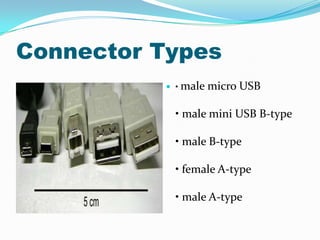
Connector Types
 • male micro USB
• male mini USB B-type
• male B-type
• female A-type
• male A-type
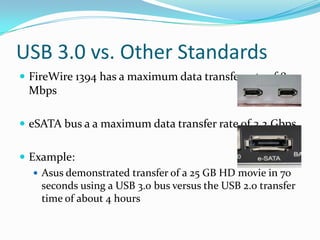
USB 3.0 vs. Other Standards
 FireWire 1394 has a maximum data transfer rate of 800
Mbps
 eSATA bus a a maximum data transfer rate of 3.2 Gbps
 Example:
 Asus demonstrated transfer of a 25 GB HD movie in 70
seconds using a USB 3.0 bus versus the USB 2.0 transfer
time of about 4 hours
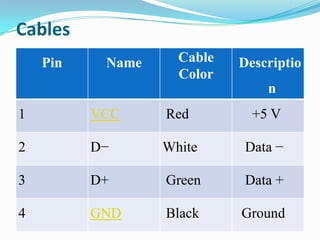
Cables
Pin Name Cable
Color
Descriptio
n
1 VCC Red +5 V
2 D− White Data −
3 D+ Green Data +
4 GND Black Ground
Maximum Useful Distance
 USB 1.1 maximum cable length is 3 metres (9.8 ft)
 USB 2.0 maximum cable length is 5 metres (16 ft)
 USB 3.0 cable assembly may be of any length
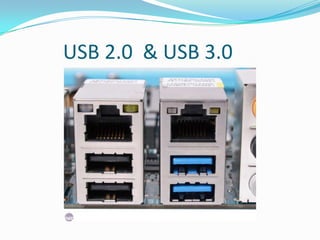
USB 2.0 & USB 3.0
APPLICATIONS
USB implements connections to storage devices using a set
of standards called the USB mass storage device class.
USB 3.0 can also support portable hard disk drives. The
earlier versions of USBs were not supporting the 3.5 inch
hard disk drives.
These external drives usually contain a translating device
that interfaces a drive of conventional technology (IDE,
PATA, SATA, ATAPI, or even SCSI) to a USB port.
Why the upgrade?
 Mainly the need for faster transfer rates in devices such
as hard drives, flash card readers, and DVD, Blu-ray,
and HD DVD optical drives
 User applications demanding a higher performance
connection between the PC and peripherals
 Need for greater energy efficiency in today’s “greener
world”
Conclusion
The Universal serial bus 3.0 is supporting a speed of
about 5 Gb/sec i.e. ten times faster than the 2.0
version.
So hopefully by the help of this SuperSpeed data
transfer rate the USB 3.0 will be replacing many of
the connecters in the future
Usb   universal serial bus

Usb universal serial bus

  • 2.
    Agenda  What isUSB?  Pre-Releases Of USB  History Of USB  USB 3.0 Now  Key Features  Connector Properties  Connector Types  Application  Conclusion
  • 3.
    What is USB? USB stands for Universal Serial Bus  Provides an expandable, fast, bi-directional, low cost, hot pluggable Plug and Play serial hardware interface  Allows users to connect a wide variety of peripherals to a computer and have them automatically configured and ready to use  Implemented to provide a replacement for legacy ports to make the addition of peripheral devices quick and easy for the end user
  • 4.
    Pre-Releases of USB USB 0.7: Released in November 1994.  USB 0.8: Released in December 1994.  USB 0.9: Released in April 1995.  USB 0.99: Released in August 1995.  USB 1.0: Released in November 1995
  • 5.
    History of USB There have been three versions released prior to 3.0  USB 1.0 in January 1996 – data rates of 1.5 Mbps up to 12 Mbps  USB 1.1 in September 1998 – first widely used version of USB  USB 2.0 in April 2000 Major feature revision was the addition of a high speed transfer rate of 480 Mbps
  • 6.
    USB 3.0 Now On Nov 17,2008 It was Developed  It is called as “SUPER SPEED” Technology  Transfer Mode of Up to 4.8 Gbps
  • 7.
    Key Features  Singleconnector type  Replaces all different legacy connectors with one well- defined standardized USB connector for all USB peripheral devices  Hot swappable  Devices can be safely plugged and unplugged as needed while the computer is running (no need to reboot)  Plug and Play  OS software automatically identifies, configures, and loads the appropriate driver when connection is made
  • 8.
    Key Features  Highperformance  USB offers data transfer speeds at up to 4.8 Gbps  Expandability  Up to 127 different peripheral devices may theoretically be connected to a single bus at one time  Bus-supplied power  USB distributes the power to all connected devices, eliminating the need for an external power source for low power devices (flash drives, memory cards, Bluetooth)
  • 9.
    Connector properties  Availability Consumer Products are expected to become available in 2010  Usability  Most connectors cannot be plugged in upside down  Durability  The standard connectors were designed to be robust  Compatibility  Two-way communication is also possible. In USB 3.0, full-duplex communications are done when using SuperSpeed (USB 3.0) transfer
  • 10.
    Connector Types  •male micro USB • male mini USB B-type • male B-type • female A-type • male A-type
  • 11.
    USB 3.0 vs.Other Standards  FireWire 1394 has a maximum data transfer rate of 800 Mbps  eSATA bus a a maximum data transfer rate of 3.2 Gbps  Example:  Asus demonstrated transfer of a 25 GB HD movie in 70 seconds using a USB 3.0 bus versus the USB 2.0 transfer time of about 4 hours
  • 12.
    Cables Pin Name Cable Color Descriptio n 1VCC Red +5 V 2 D− White Data − 3 D+ Green Data + 4 GND Black Ground
  • 13.
    Maximum Useful Distance USB 1.1 maximum cable length is 3 metres (9.8 ft)  USB 2.0 maximum cable length is 5 metres (16 ft)  USB 3.0 cable assembly may be of any length
  • 14.
    USB 2.0 &USB 3.0
  • 15.
    APPLICATIONS USB implements connectionsto storage devices using a set of standards called the USB mass storage device class. USB 3.0 can also support portable hard disk drives. The earlier versions of USBs were not supporting the 3.5 inch hard disk drives. These external drives usually contain a translating device that interfaces a drive of conventional technology (IDE, PATA, SATA, ATAPI, or even SCSI) to a USB port.
  • 16.
    Why the upgrade? Mainly the need for faster transfer rates in devices such as hard drives, flash card readers, and DVD, Blu-ray, and HD DVD optical drives  User applications demanding a higher performance connection between the PC and peripherals  Need for greater energy efficiency in today’s “greener world”
  • 17.
    Conclusion The Universal serialbus 3.0 is supporting a speed of about 5 Gb/sec i.e. ten times faster than the 2.0 version. So hopefully by the help of this SuperSpeed data transfer rate the USB 3.0 will be replacing many of the connecters in the future