An E-Tutor Presentation
Sosuhira Liverpool-Morris
Objectives
At the end of this presentation, learners will:
 Define a file
 Explain the purpose for a filing system
 Describe how an operating system stores
files
 Identify the two different parts of a file
 Differentiate between file and file extension
 Identify file types
 Describe a database and database
management system
FILES
 Files are a collection of data,
information, or programmes
 An operating system organizes and
stores files for effective operation of the
system.
 An effective filing system allows for
faster operation and easy retrieval.
File Naming
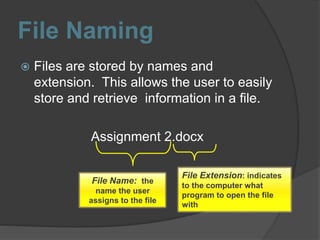
 Files are stored by names and
extension. This allows the user to easily
store and retrieve information in a file.
Assignment 2.docx
File Name: the
name the user
assigns to the file
File Extension: indicates
to the computer what
program to open the file
with
File Types
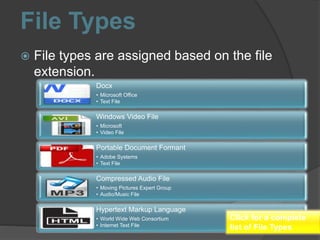
 File types are assigned based on the file
extension.
Docx
• Microsoft Office
• Text File
Windows Video File
• Microsoft
• Video File
Portable Document Formant
• Adobe Systems
• Text File
Compressed Audio File
• Moving Pictures Expert Group
• Audio/Music File
Hypertext Markup Language
• World Wide Web Consortium
• Internet Text File
Click for a complete
list of File Types
File Management
Files should be stored in folders for easy
management and retrieval
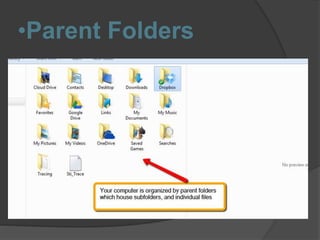
 Parent Folders: Main Folders for storage
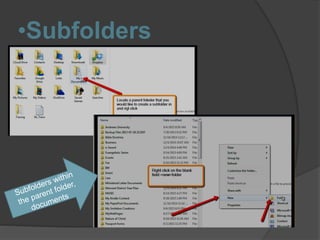
 Subfolders: Folders within a parent folder
•Parent Folders
•Subfolders
Databases
A collection of data or list of information
that is organized in a computer program
for easy retrieval; it is an electronic filing
system and is usually organized in table
formation
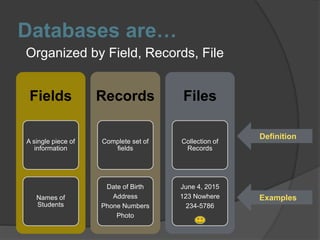
Databases are…
Organized by Field, Records, File
Fields
A single piece of
information
Names of
Students
Records
Complete set of
fields
Date of Birth
Address
Phone Numbers
Photo
Files
Collection of
Records
June 4, 2015
123 Nowhere
234-5786
Definition
Examples
Data Basse Management
Systems
 A data base management system
(DBMS) is a system used to manage
and protect data
Wikibooks(2015)
Advantages /Functions of
Data Base Management
Systems
 It controls redundancy
 It maintains the reliability of the stored
information
 It restricts access
 It can share data
 It backups or recover data
Wikibooks(2015)
References
Wikibooks: Open Books for an Open World (2015). Introduction to computer
information system: Database. Retrieved from
https://en.wikibooks.org/wiki/Introduction_to_Computer_Information_System
s/Database

Unit 4 File and Data Management

  • 1.
  • 2.
    Objectives At the endof this presentation, learners will:  Define a file  Explain the purpose for a filing system  Describe how an operating system stores files  Identify the two different parts of a file  Differentiate between file and file extension  Identify file types  Describe a database and database management system
  • 3.
    FILES  Files area collection of data, information, or programmes  An operating system organizes and stores files for effective operation of the system.  An effective filing system allows for faster operation and easy retrieval.
  • 4.
    File Naming  Filesare stored by names and extension. This allows the user to easily store and retrieve information in a file. Assignment 2.docx File Name: the name the user assigns to the file File Extension: indicates to the computer what program to open the file with
  • 5.
    File Types  Filetypes are assigned based on the file extension. Docx • Microsoft Office • Text File Windows Video File • Microsoft • Video File Portable Document Formant • Adobe Systems • Text File Compressed Audio File • Moving Pictures Expert Group • Audio/Music File Hypertext Markup Language • World Wide Web Consortium • Internet Text File Click for a complete list of File Types
  • 6.
    File Management Files shouldbe stored in folders for easy management and retrieval  Parent Folders: Main Folders for storage  Subfolders: Folders within a parent folder
  • 7.
  • 8.
  • 9.
    Databases A collection ofdata or list of information that is organized in a computer program for easy retrieval; it is an electronic filing system and is usually organized in table formation
  • 10.
    Databases are… Organized byField, Records, File Fields A single piece of information Names of Students Records Complete set of fields Date of Birth Address Phone Numbers Photo Files Collection of Records June 4, 2015 123 Nowhere 234-5786 Definition Examples
  • 11.
    Data Basse Management Systems A data base management system (DBMS) is a system used to manage and protect data Wikibooks(2015)
  • 12.
    Advantages /Functions of DataBase Management Systems  It controls redundancy  It maintains the reliability of the stored information  It restricts access  It can share data  It backups or recover data Wikibooks(2015)
  • 13.
    References Wikibooks: Open Booksfor an Open World (2015). Introduction to computer information system: Database. Retrieved from https://en.wikibooks.org/wiki/Introduction_to_Computer_Information_System s/Database