Presented by,
V.Santhi,
Assistant Professor,
Department of Computer Applications,
Bon Secours College for Women,
Thanjavur
I n t r o d u c t i o n t o
O R A C L E A N D
S Q L
files
 In general, A large amount of information or
data that lives a very long time
 File is a container in a computer system for
storing information.
 Files used in computers are similar in features to
that of paper documents used in library and
office files.
 A file is a sequence of bits, bytes, lines or records
whose meaning is defined by the files creator and
user.
What are files?
What are files?
 There are different types of files such as text files, data
files, directory files, binary and graphic files, and
these different types of files store different types of
information.
 In a computer operating system, files can be stored on
optical drives, hard drives or other types of storage
devices.
 The file can be indexed, structured, etc. The file is an
entry in a directory.
 The file may have attributes (name, creator, date, type,
permissions).
File attributes
 Name – only information kept in human-readable form
 Identifier – unique tag (number) identifies file within file
system
 Type – needed for systems that support different types
 Location – pointer to file location on device
 Size – current file size
 Protection – controls who can do reading, writing,
executing
 Time, date, and user identification– data for
protection, security, and usage monitoring
 Information about files are kept in the directory structure,
which is maintained on the disk
File Systems and Disks
User view
File is a named, persistent collection of data
OS & file system view
File is collection of disk blocks — i.e., a container
File System maps file names and offsets to disk blocks
File structure
 File structure is a structure, which is according to
a required format that operating system can
understand.
 A file has a certain defined structure according to
its type.
 A text file is a sequence of characters organized
into lines.
 source file is a sequence of procedures and
functions.
 An object file is a sequence of bytes organized into
blocks that are understandable by the machine.
File operations
 Create
 Write (Store)
 Read
 Reposition within file
 Delete
 Truncate
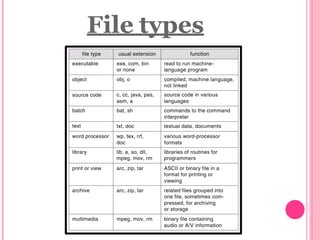
File types
Functions of file system
 File system in OS provide the way to create
and access the files.
 How the memory is allocated to files and how
the addresses are saved regarding to each file.
File access methods
 File access refers to the
manner in which the records of a file
may be accessed.
There are several ways to access files
 Sequential access
 Direct/Random access
 Indexed sequential access
Sequential access
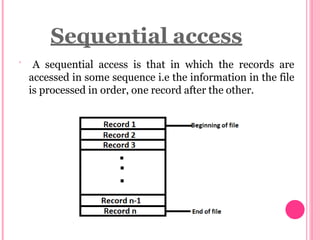
 A sequential access is that in which the records are
accessed in some sequence i.e the information in the file
is processed in order, one record after the other.
 This access method is the most common one.
 Example: Compilers usually access files in this fashion.
 Retrieving from sequential file:
 To access records, it is necessary to read the file from beginning to
examine each record in sequence until the desired record is located.
 Appending a sequential file:
The append operation refers to adding more records to an
existing file.
The following operations are done for the purpose of appending a
file.
 Open the file.
Read the file till EOF is encountered.
Read the data to be added.
Write the data on the file.
Close the file.




Direct / random access
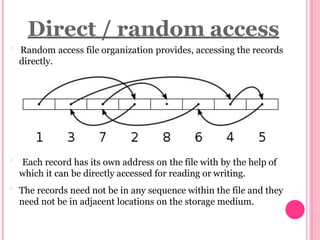
 Random access file organization provides, accessing the records
directly.
 Each record has its own address on the file with by the help of
which it can be directly accessed for reading or writing.
 The records need not be in any sequence within the file and they
need not be in adjacent locations on the storage medium.
 Method useful for disks.
 There are no restrictions on which blocks are read/written
in any order.
 User now says "read n" rather than "read next".
Indexed sequential access
 This approach combines the advantages of both
sequential and direct file access.
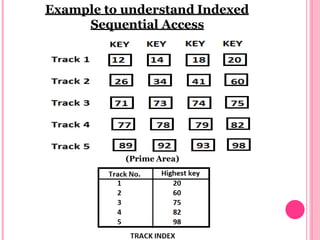
 Anindex is created for each file which contains
pointers to various blocks.
 Indexis searched sequentially and its pointer is
used to access the file directly.
Example to understand Indexed
Sequential Access
(Prime Area)
FLAT FILE
 A flat file database is a database that stores data in a
plain text file.
 Each line of the text file holds one record, with fields
separated by delimiters, such as commas or tabs.
 While it uses a simple structure, a flat file database
cannot contain multiple tables like a relational database can
 Flat file is also a type of computer file system that stores
all data in a single directory There are no folders or paths
used organize the data.
 While this is a simple way to store files, a flat file system
becomes increasingly inefficient as more data is added.
Advantages OF Flat file System
Easy to understand.
Easy to implement.
Less hardware and software requirements.
Less Skills set are required to handle flat database
systems.
Best for small databases.
Disadvantages OF Flat file System
Less security easy to extract information.
Data Inconsistency
Redundancy
Sharing of information is cumbersome task
Slow for huge database
Searching process is time consuming
Thank you

Introduction to File System

  • 1.
    Presented by, V.Santhi, Assistant Professor, Departmentof Computer Applications, Bon Secours College for Women, Thanjavur I n t r o d u c t i o n t o O R A C L E A N D S Q L
  • 2.
  • 3.
     In general,A large amount of information or data that lives a very long time  File is a container in a computer system for storing information.  Files used in computers are similar in features to that of paper documents used in library and office files.  A file is a sequence of bits, bytes, lines or records whose meaning is defined by the files creator and user. What are files?
  • 4.
    What are files? There are different types of files such as text files, data files, directory files, binary and graphic files, and these different types of files store different types of information.  In a computer operating system, files can be stored on optical drives, hard drives or other types of storage devices.  The file can be indexed, structured, etc. The file is an entry in a directory.  The file may have attributes (name, creator, date, type, permissions).
  • 5.
    File attributes  Name– only information kept in human-readable form  Identifier – unique tag (number) identifies file within file system  Type – needed for systems that support different types  Location – pointer to file location on device  Size – current file size  Protection – controls who can do reading, writing, executing  Time, date, and user identification– data for protection, security, and usage monitoring  Information about files are kept in the directory structure, which is maintained on the disk
  • 6.
    File Systems andDisks User view File is a named, persistent collection of data OS & file system view File is collection of disk blocks — i.e., a container File System maps file names and offsets to disk blocks
  • 7.
    File structure  Filestructure is a structure, which is according to a required format that operating system can understand.  A file has a certain defined structure according to its type.  A text file is a sequence of characters organized into lines.  source file is a sequence of procedures and functions.  An object file is a sequence of bytes organized into blocks that are understandable by the machine.
  • 8.
    File operations  Create Write (Store)  Read  Reposition within file  Delete  Truncate
  • 9.
  • 10.
    Functions of filesystem  File system in OS provide the way to create and access the files.  How the memory is allocated to files and how the addresses are saved regarding to each file.
  • 11.
    File access methods File access refers to the manner in which the records of a file may be accessed. There are several ways to access files  Sequential access  Direct/Random access  Indexed sequential access
  • 12.
    Sequential access  Asequential access is that in which the records are accessed in some sequence i.e the information in the file is processed in order, one record after the other.
  • 13.
     This accessmethod is the most common one.  Example: Compilers usually access files in this fashion.  Retrieving from sequential file:  To access records, it is necessary to read the file from beginning to examine each record in sequence until the desired record is located.  Appending a sequential file: The append operation refers to adding more records to an existing file. The following operations are done for the purpose of appending a file.  Open the file. Read the file till EOF is encountered. Read the data to be added. Write the data on the file. Close the file.    
  • 14.
    Direct / randomaccess  Random access file organization provides, accessing the records directly.  Each record has its own address on the file with by the help of which it can be directly accessed for reading or writing.  The records need not be in any sequence within the file and they need not be in adjacent locations on the storage medium.
  • 15.
     Method usefulfor disks.  There are no restrictions on which blocks are read/written in any order.  User now says "read n" rather than "read next".
  • 17.
    Indexed sequential access This approach combines the advantages of both sequential and direct file access.  Anindex is created for each file which contains pointers to various blocks.  Indexis searched sequentially and its pointer is used to access the file directly.
  • 18.
    Example to understandIndexed Sequential Access (Prime Area)
  • 19.
    FLAT FILE  Aflat file database is a database that stores data in a plain text file.  Each line of the text file holds one record, with fields separated by delimiters, such as commas or tabs.  While it uses a simple structure, a flat file database cannot contain multiple tables like a relational database can  Flat file is also a type of computer file system that stores all data in a single directory There are no folders or paths used organize the data.  While this is a simple way to store files, a flat file system becomes increasingly inefficient as more data is added.
  • 20.
    Advantages OF Flatfile System Easy to understand. Easy to implement. Less hardware and software requirements. Less Skills set are required to handle flat database systems. Best for small databases.
  • 21.
    Disadvantages OF Flatfile System Less security easy to extract information. Data Inconsistency Redundancy Sharing of information is cumbersome task Slow for huge database Searching process is time consuming
  • 22.