Unit 2: Data
Processing Concepts
Outlines
•Introduction
•Data Processing Concepts
•Data Processing Activities
•Data Processing Cycle
•Data Hierarchy
•Data File structures
•Data File Structures
•Application Portfolio Management
•Introduction to Micro Database
Manager
3.1 Data Processing Concepts
Data
The word "data" is the plural of datum, which
means facts, observations, occurrence and
observations. Data are representations of facts
pertaining to people, things, ideas and events.
Data are represented by symbols such as
alphabets, numerals or special symbols.
Data Processing
Data processing is the act of manipulating or
handling data in some manner. Thus, the idea of
processing is to transform data into
information Thus, data processing can be defined
as a series of actions or steps, which converts
data into useful information.
Information
Information can be defined as 'data transformed
into useful and meaningful form for specific
purpose'. Thus, data is not useful until it is
organised and manipulated because after that
only data becomes information.
3.2 Data Processing Activities
Data processing consists of all those activities,
which are required to convert data into
information. There are some tools, which help
in processing of data; these tools can be
manual, mechanical, electromechanical or
electronic such as manual tools as paper and
pencil, mechanical tools as filing cabinets,
electromechanical tools such as typewriters and
adding machines and electronic tools such as
calculators and computers.
3.3 Data Processing Cycle
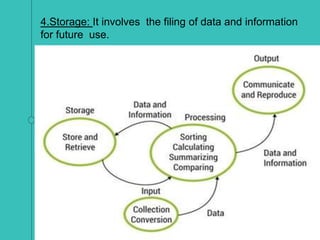
1.Input: The term input refers to the activities required
to record data and to make it available for processing.
The input can also include the steps necessary to
check, verify and validate data contents.
2.Processing: The term processing denotes the
actual data manipulation techniques such as
classifying, sorting, calculating,summarising,
comparing, etc. that convert data into information.
3.Output: It is a communication function, which
transmits the information generated after processing
of data, to persons who need the information.
•Sometimes output also includes decoding activity,
which converts the electronically generated
information into human-readable form.
4.Storage: It involves the filing of data and information
for future use.
2.7 Data Hierarchy
It shows arrangement of data in hierarchical form
having following fields,records, files and so on.
A data field will keep date as September 8, 1971.
A record is shows details about an employee with
name fields, address fields, date of birth field etc.
A file carries related records. It helps in keeping track of
employee details.
Files are arranged in database using DBMS.
In case of data storage, data fields have bytes which
consist of bits.
3.8 Data File Structures
This is a particular way that information is encoded
for storage in a computer file. Since a disk drive or indeed
any computer storage, can store only bits, the computer
must have some way of converting information to 0s and
1s and vice-versa. There are different kinds of formats
for different kinds of information.
Within any format type, e.g. word processor
documents, there will typically be several different
formats. File formats are divided into proprietary and
open formats.
1. Generality
It is seen that there are certain file formats which are
used to store only particular type of data. The
formats such as JPEG are used to store static
photographic images while GIF format is used to
store images and animations. Apart from this,
QuickTime format stores certain types of multimedia.
2. Specifications
Many file formats, including some of the most well-
known file formats, often have a published
specification document (often with a reference
implementation) that describes exactly how the data is to
be encoded and which can be used to determine whether
or not a particular program treats a particular file format
correctly.
3. Identifying the Type of a File
A method is required to determine the format of a
particular file within the file system- an example of
metadata.
4. Filename extension
An important feature in operating systems is to
determine the format of file based on section of its name
following final period which is known as the filename
extension.
We see that an HTML documents will have extension
of .html or .htm, which an image file is having an
extension of .gif, .PNG etc.
For example, a company logo may be needed in
both .tif format (for publishing) and .gif format (for web
sites). With the extensions visible, these would appear
at the unique filenames "CompanyLogo.tif" and
"CompanyLogo.gif". With the extensions hidden, these
would both appear to have the identical filename
"Company Logo", making it more difficult to determine,
which one to select for a particular application.
5. Internal metadata
A second way to identify a file format is to store information
regarding the format inside the file itself. Usually, such
information is written in one (or more) binary string(s),
tagged or raw texts placed in fixed, specific locations
within the file. Since the easiest place to locate them is at
the beginning of it, this area is usually called a file header
when it is greater than a few bytes or a magic number if it
is just a few bytes long.
6. File header
First, the meta-data contained in a file header are not
necessarily stored only at the beginning of it but might be
present in other areas too, often including the end of the
file that depends on the file format or the type of data it
contains. Character-based (text) files have character-
based human-readable headers,whereas binary
formats usually feature binary headers, the need to read
all the bytes/records before it.
7. External metadata
A good way to store a file format is to store the information
about format in file system instead of keeping within the file
itself. Such idea not only keeps the metadata away from
main data and name but also not very safe as compared to
either file extensions.
8. Mac OS type-codes
Mac OS File System will able to store codes for creator
and types that serves as part of directory entry for each
file. They are called as OS Types or HyperCard stack
file. Type of code will show the format of file, while
creator code specifies default program to run.
9. OS/2 Extended Attributes
It found that HPFS, FAT12 and FAT16 file systems
allows storage of extended attributes with files which
contains an arbitrary set of triplets with name, coded type
for value and a value having different names.
10. POSIX extended attributes
On UNIX and Unix-like systems, ext2, ext3, ReiserFS
version 3, XFS, JFS, FFS and HFS+ file systems allow
storage of extended attributes with files.
11. PRONOM Unique Identifiers (PUIDs)
PRONOM Persistent Unique Identifier is an extension of
constant, special and definite identifiers which is for
file formats that was created by National Archives of
UK which serve as part of its PRONOM technical registry
service.
12. MIME types
MIME types are useful in Internet-related applications
that carries standardised system of identifiers having type
and sub-type which is separated by slash.
13. File content based format identification
It is another way of finding file format by way of file
contents that shows distinguishable patterns.
14. File format identifiers (FFIDs)
File format identifiers is also a way to find file formats
as per their origin and file category. It has several digits
which are of form NNNNNNNNN-XX-YYYYYYY, where
NNNNNNNN as per company/standards organisation
database and XX and YYYYYYY shows file type in
hexadecimal.
3.9 Application Portfolio Management.
Application Portfolio Management is a system
which is applied in medium to large size
Information Technology organisations. Such
system uses lessons of financial portfolio
management in order to verify financial benefits of
application to be compared with costs of the
application maintenance and operations.
Portfolio
Definition of an application
Application in case of application portfolio
management is an important aspect.
Application software: There are certain
executable software components which are used to
create, update, manage, calculate or display
information for particular business.
Software component: This is an executable
computer instructions having single deployment
container which cannot be broken further
Inclusions
The purpose of inclusion is:
To provide three web services: Invoice Create,
Invoice Search and Invoice Detail Get.
To have a service-oriented business application
where a user interface to get invoice which calls
Invoice Create service.
To have a legacy system having rich client,
server-based middle tier and database.
To pull data from database using website publishing
system and publishes it to HTML format as sub-site
on public URL.
Exclusions
The following are not applications:
HTML website
Having database which is not part of series of steps
for business values.
Web service which is incapable of being set of
steps.
Having a stand-alone batch script which compares
contents of databases by
making calls
3.10 Introduction to Micro Data Base Manager
Micro DB Manager is a database abstraction
class written in PHP using object-oriented
technologies.
The class realises the following functionalities:
Connecting to the database
Executing queries
Converting results to associative array
Getting selected rows
Getting affected rows
Getting last insert id
Getting the number of executed queries
Getting the execution time of the queries
Getting error messages and codes.
3.11 Glossary
1. Data - It is related to facts, observations,
occurrence of information.
2. Data processing - It is a processing of carrying
out data in particular
manner.
3. Processing - It is a procedure of giving some
meaning to data.
4. Application Portfolio Management - It is a system
applied in medium to large size Information
Technology organisations.

Bba203 unit 2data processing concepts

  • 1.
  • 2.
    Outlines •Introduction •Data Processing Concepts •DataProcessing Activities •Data Processing Cycle •Data Hierarchy •Data File structures •Data File Structures •Application Portfolio Management •Introduction to Micro Database Manager
  • 3.
    3.1 Data ProcessingConcepts Data The word "data" is the plural of datum, which means facts, observations, occurrence and observations. Data are representations of facts pertaining to people, things, ideas and events. Data are represented by symbols such as alphabets, numerals or special symbols. Data Processing Data processing is the act of manipulating or handling data in some manner. Thus, the idea of processing is to transform data into information Thus, data processing can be defined as a series of actions or steps, which converts data into useful information.
  • 4.
    Information Information can bedefined as 'data transformed into useful and meaningful form for specific purpose'. Thus, data is not useful until it is organised and manipulated because after that only data becomes information.
  • 5.
    3.2 Data ProcessingActivities Data processing consists of all those activities, which are required to convert data into information. There are some tools, which help in processing of data; these tools can be manual, mechanical, electromechanical or electronic such as manual tools as paper and pencil, mechanical tools as filing cabinets, electromechanical tools such as typewriters and adding machines and electronic tools such as calculators and computers.
  • 6.
    3.3 Data ProcessingCycle 1.Input: The term input refers to the activities required to record data and to make it available for processing. The input can also include the steps necessary to check, verify and validate data contents. 2.Processing: The term processing denotes the actual data manipulation techniques such as classifying, sorting, calculating,summarising, comparing, etc. that convert data into information. 3.Output: It is a communication function, which transmits the information generated after processing of data, to persons who need the information. •Sometimes output also includes decoding activity, which converts the electronically generated information into human-readable form.
  • 7.
    4.Storage: It involvesthe filing of data and information for future use.
  • 8.
    2.7 Data Hierarchy Itshows arrangement of data in hierarchical form having following fields,records, files and so on. A data field will keep date as September 8, 1971. A record is shows details about an employee with name fields, address fields, date of birth field etc. A file carries related records. It helps in keeping track of employee details. Files are arranged in database using DBMS. In case of data storage, data fields have bytes which consist of bits.
  • 9.
    3.8 Data FileStructures This is a particular way that information is encoded for storage in a computer file. Since a disk drive or indeed any computer storage, can store only bits, the computer must have some way of converting information to 0s and 1s and vice-versa. There are different kinds of formats for different kinds of information. Within any format type, e.g. word processor documents, there will typically be several different formats. File formats are divided into proprietary and open formats.
  • 10.
    1. Generality It isseen that there are certain file formats which are used to store only particular type of data. The formats such as JPEG are used to store static photographic images while GIF format is used to store images and animations. Apart from this, QuickTime format stores certain types of multimedia. 2. Specifications Many file formats, including some of the most well- known file formats, often have a published specification document (often with a reference implementation) that describes exactly how the data is to be encoded and which can be used to determine whether or not a particular program treats a particular file format correctly.
  • 11.
    3. Identifying theType of a File A method is required to determine the format of a particular file within the file system- an example of metadata. 4. Filename extension An important feature in operating systems is to determine the format of file based on section of its name following final period which is known as the filename extension. We see that an HTML documents will have extension of .html or .htm, which an image file is having an extension of .gif, .PNG etc.
  • 12.
    For example, acompany logo may be needed in both .tif format (for publishing) and .gif format (for web sites). With the extensions visible, these would appear at the unique filenames "CompanyLogo.tif" and "CompanyLogo.gif". With the extensions hidden, these would both appear to have the identical filename "Company Logo", making it more difficult to determine, which one to select for a particular application. 5. Internal metadata A second way to identify a file format is to store information regarding the format inside the file itself. Usually, such information is written in one (or more) binary string(s), tagged or raw texts placed in fixed, specific locations within the file. Since the easiest place to locate them is at the beginning of it, this area is usually called a file header when it is greater than a few bytes or a magic number if it is just a few bytes long.
  • 13.
    6. File header First,the meta-data contained in a file header are not necessarily stored only at the beginning of it but might be present in other areas too, often including the end of the file that depends on the file format or the type of data it contains. Character-based (text) files have character- based human-readable headers,whereas binary formats usually feature binary headers, the need to read all the bytes/records before it. 7. External metadata A good way to store a file format is to store the information about format in file system instead of keeping within the file itself. Such idea not only keeps the metadata away from main data and name but also not very safe as compared to either file extensions.
  • 14.
    8. Mac OStype-codes Mac OS File System will able to store codes for creator and types that serves as part of directory entry for each file. They are called as OS Types or HyperCard stack file. Type of code will show the format of file, while creator code specifies default program to run. 9. OS/2 Extended Attributes It found that HPFS, FAT12 and FAT16 file systems allows storage of extended attributes with files which contains an arbitrary set of triplets with name, coded type for value and a value having different names. 10. POSIX extended attributes On UNIX and Unix-like systems, ext2, ext3, ReiserFS version 3, XFS, JFS, FFS and HFS+ file systems allow storage of extended attributes with files.
  • 15.
    11. PRONOM UniqueIdentifiers (PUIDs) PRONOM Persistent Unique Identifier is an extension of constant, special and definite identifiers which is for file formats that was created by National Archives of UK which serve as part of its PRONOM technical registry service. 12. MIME types MIME types are useful in Internet-related applications that carries standardised system of identifiers having type and sub-type which is separated by slash. 13. File content based format identification It is another way of finding file format by way of file contents that shows distinguishable patterns.
  • 16.
    14. File formatidentifiers (FFIDs) File format identifiers is also a way to find file formats as per their origin and file category. It has several digits which are of form NNNNNNNNN-XX-YYYYYYY, where NNNNNNNN as per company/standards organisation database and XX and YYYYYYY shows file type in hexadecimal.
  • 17.
    3.9 Application PortfolioManagement. Application Portfolio Management is a system which is applied in medium to large size Information Technology organisations. Such system uses lessons of financial portfolio management in order to verify financial benefits of application to be compared with costs of the application maintenance and operations. Portfolio
  • 18.
    Definition of anapplication Application in case of application portfolio management is an important aspect. Application software: There are certain executable software components which are used to create, update, manage, calculate or display information for particular business. Software component: This is an executable computer instructions having single deployment container which cannot be broken further
  • 19.
    Inclusions The purpose ofinclusion is: To provide three web services: Invoice Create, Invoice Search and Invoice Detail Get. To have a service-oriented business application where a user interface to get invoice which calls Invoice Create service. To have a legacy system having rich client, server-based middle tier and database. To pull data from database using website publishing system and publishes it to HTML format as sub-site on public URL.
  • 20.
    Exclusions The following arenot applications: HTML website Having database which is not part of series of steps for business values. Web service which is incapable of being set of steps. Having a stand-alone batch script which compares contents of databases by making calls
  • 21.
    3.10 Introduction toMicro Data Base Manager Micro DB Manager is a database abstraction class written in PHP using object-oriented technologies. The class realises the following functionalities: Connecting to the database Executing queries Converting results to associative array Getting selected rows Getting affected rows Getting last insert id Getting the number of executed queries Getting the execution time of the queries Getting error messages and codes.
  • 22.
    3.11 Glossary 1. Data- It is related to facts, observations, occurrence of information. 2. Data processing - It is a processing of carrying out data in particular manner. 3. Processing - It is a procedure of giving some meaning to data. 4. Application Portfolio Management - It is a system applied in medium to large size Information Technology organisations.