Understanding EDP Environment
Objectives 
• Describe organizational structure of an EDP Environment 
• Define computer files 
• Explain the purpose of computer files. 
• Describe the elements of a file 
• List and explain types of files 
• Explain file organization methods. 
• Explain file Access Methods 
• Explain storage media devices. 
• Describe processing activities. 
• Explain vulnerability of files: 
(i) Improper/fraudulent input 
(ii) Software/programme abuse 
• Master the use of keyboard
Data 
Data is defined as any collection of facts. Thus, 
sales reports, inventory figures, test scores, 
customers’ names and addresses, and weather 
reports are all examples of data. Note that data 
may be numerical (e.g, inventory figures and 
test scores) or they may be numerical (e.g. , 
names of students and addresses, drawings).
Data Processing 
Data processing is the manipulation of data into a more 
useful form. 
Data processing includes not only numerical calculations 
but also operations such as the classification of data and 
the transmission of data from one place to another. In 
general, we assume that these operations are performed 
by some type of machine or computer, although some of 
them could also be carried out manually. Data processing 
system refers to the equipment or devices and 
procedures by which the result is achieved.
Types of Data Processing 
Modern data processing employing machines 
and other devices falls into two basic categories: 
• Mechanical Data Processing 
• Electronic Data Processing. 
Mechanical processing system use a combination of manual procedures and 
mechanical equipment. The system uses various devices such as typewriters, 
sorters, calculators, collators, tabulators, duplicators, and verifiers. 
In electronic data processing different types of input, output, and storage 
devices may be interconnected to an electronic computer to process data.
Electronic Data Processing 
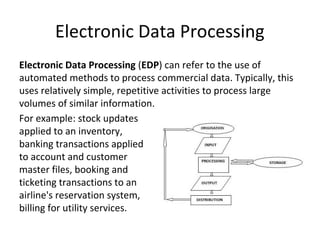
Electronic Data Processing (EDP) can refer to the use of 
automated methods to process commercial data. Typically, this 
uses relatively simple, repetitive activities to process large 
volumes of similar information. 
For example: stock updates 
applied to an inventory, 
banking transactions applied 
to account and customer 
master files, booking and 
ticketing transactions to an 
airline's reservation system, 
billing for utility services.
Organizational Structure of an EDP 
Environment 
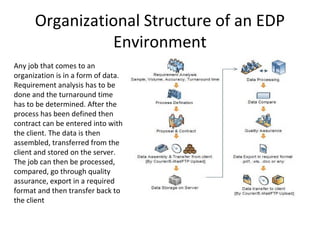
Any job that comes to an 
organization is in a form of data. 
Requirement analysis has to be 
done and the turnaround time 
has to be determined. After the 
process has been defined then 
contract can be entered into with 
the client. The data is then 
assembled, transferred from the 
client and stored on the server. 
The job can then be processed, 
compared, go through quality 
assurance, export in a required 
format and then transfer back to 
the client
Computer Files 
• Computer files are files maintained in computer-readable 
form. 
• A computer file is a resource for storing information, 
which is available to a computer program and is usually 
based on some kind of durable storage. A file is 
"durable" in the sense that it remains available for other 
programs to use after the program that created it has 
finished executing. 
Computer files can be considered as 
the modern counterpart of paper 
documents which traditionally are 
kept in office and library files, and 
this is the source of the term.
Types of Computer Files 
Computers can store information on several 
different storage magnetic disks, magnetic tapes 
etc. A computer can store millions of bytes of 
data or information. so that we can store and 
access data easily from the storage device the 
operating systems provides us data file system. 
.doc, .xls, .png, .jpeg, etc are various extensions 
for various files.
Some File Types 
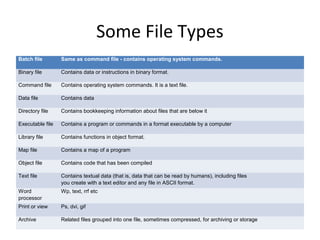
Batch file Same as command file - contains operating system commands. 
Binary file Contains data or instructions in binary format. 
Command file Contains operating system commands. It is a text file. 
Data file Contains data 
Directory file Contains bookkeeping information about files that are below it 
Executable file Contains a program or commands in a format executable by a computer 
Library file Contains functions in object format. 
Map file Contains a map of a program 
Object file Contains code that has been compiled 
Text file Contains textual data (that is, data that can be read by humans), including files 
you create with a text editor and any file in ASCII format. 
Word 
processor 
Wp, text, rrf etc 
Print or view Ps, dvi, gif 
Archive Related files grouped into one file, sometimes compressed, for archiving or storage
File Types & Extension 
Extensions are three letters or numbers that appear at the end of a file 
name and indicate what type of file it is. What the file is used for. And if it 
will work on your computer. 
CAD exchange files .dxf 
Drawing Web Format .dwf 
Animations, audio & video 
GIF animations .gif 
Sound files .wav, .au, .aif, .mid 
Video files .mov, .mpeg
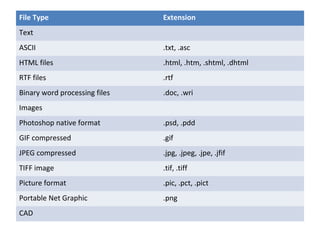
File Type Extension 
Text 
ASCII .txt, .asc 
HTML files .html, .htm, .shtml, .dhtml 
RTF files .rtf 
Binary word processing files .doc, .wri 
Images 
Photoshop native format .psd, .pdd 
GIF compressed .gif 
JPEG compressed .jpg, .jpeg, .jpe, .jfif 
TIFF image .tif, .tiff 
Picture format .pic, .pct, .pict 
Portable Net Graphic .png 
CAD
File Organization Method 
File organization is a way of organizing the data 
or records in a file. It does not refer to how files 
are organized in folders, but how the contents 
of a file are added and accessed. There are 
several types of file organization, the most 
common of them are: 
•Sequential 
•Relative 
•Indexed.
Method of File Organization 
• Sequential, 
• Line-sequential, 
• Indexed-sequential, 
• Inverted list 
• Direct or Hashed Access
Sequential Organization 
A sequential file contains records organized in 
the order they were entered. The order of the 
records is fixed. The records are stored and 
sorted in physical, contiguous blocks within each 
block the records are in sequence. 
Records in these files can only be read or 
written sequentially.
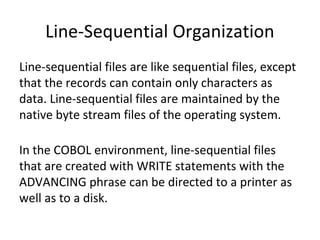
Line-Sequential Organization 
Line-sequential files are like sequential files, except 
that the records can contain only characters as 
data. Line-sequential files are maintained by the 
native byte stream files of the operating system. 
In the COBOL environment, line-sequential files 
that are created with WRITE statements with the 
ADVANCING phrase can be directed to a printer as 
well as to a disk.
Indexed-sequential Organization 
Key searches are improved by this system too. 
The single-level indexing structure is the 
simplest one where a file, whose records are 
pairs, contains a key pointer. This pointer is the 
position in the data file of the record with the 
given key. A subset of the records, which are 
evenly spaced along the data file, is indexed, in 
order to mark intervals of data records.
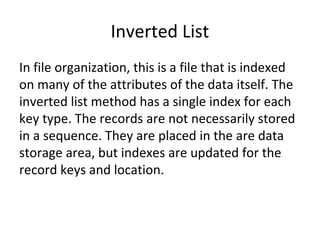
Inverted List 
In file organization, this is a file that is indexed 
on many of the attributes of the data itself. The 
inverted list method has a single index for each 
key type. The records are not necessarily stored 
in a sequence. They are placed in the are data 
storage area, but indexes are updated for the 
record keys and location.
Direct or Hashed Access 
With direct or hashed access a portion of disk 
space is reserved and a "hashing" algorithm 
computes the record address. So there is additional 
space required for this kind of file in the store. 
Records are placed randomly through out the file. 
Records are accessed by addresses that specify 
their disc location. Also, this type of file 
organization requires a disk storage rather than 
tape. It has an excellent search retrieval 
performance, but care must be taken to maintain 
the indexes.
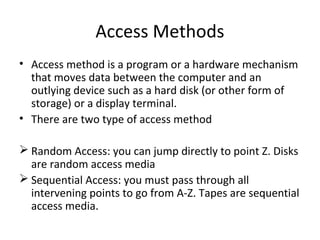
Access Methods 
• Access method is a program or a hardware mechanism 
that moves data between the computer and an 
outlying device such as a hard disk (or other form of 
storage) or a display terminal. 
• There are two type of access method 
 Random Access: you can jump directly to point Z. Disks 
are random access media 
 Sequential Access: you must pass through all 
intervening points to go from A-Z. Tapes are sequential 
access media.
Storage Media Devices 
Storage Media Device is any hardware device capable of holding information. 
Types of computer storage 
• Floppy diskette 
• CD-ROM disc 
• CD-R and CD-RW disc 
• Cloud storage 
• DVD-R, DVD+R, DVD-RW, and DVD+RW disc 
• Jump drive and USB flash drive 
• Hard drive 
• Memory card 
• Memory stick 
• Tape cassette 
• Zip diskette
Processing Activities 
• Assignment 
• Class Discussion
Vulnerability of Files 
Vulnerability of files is a weakness which allows an 
attacker to reduce computer files assurance. 
(i)Improper/fraudulent input: is a type of 
vulnerability in computer software that may be 
used for security exploits. 
(ii)Software/program abuse: this is a situation 
whereby the vulnerability of a software/program is 
taken advantage of in order to make it behave in 
an unintended or unanticipated way. The piece of 
software hackers use to abuse software is called 
exploit.

Understanding EDP (Electronic Data Processing) Environment

  • 1.
  • 2.
    Objectives • Describeorganizational structure of an EDP Environment • Define computer files • Explain the purpose of computer files. • Describe the elements of a file • List and explain types of files • Explain file organization methods. • Explain file Access Methods • Explain storage media devices. • Describe processing activities. • Explain vulnerability of files: (i) Improper/fraudulent input (ii) Software/programme abuse • Master the use of keyboard
  • 3.
    Data Data isdefined as any collection of facts. Thus, sales reports, inventory figures, test scores, customers’ names and addresses, and weather reports are all examples of data. Note that data may be numerical (e.g, inventory figures and test scores) or they may be numerical (e.g. , names of students and addresses, drawings).
  • 4.
    Data Processing Dataprocessing is the manipulation of data into a more useful form. Data processing includes not only numerical calculations but also operations such as the classification of data and the transmission of data from one place to another. In general, we assume that these operations are performed by some type of machine or computer, although some of them could also be carried out manually. Data processing system refers to the equipment or devices and procedures by which the result is achieved.
  • 5.
    Types of DataProcessing Modern data processing employing machines and other devices falls into two basic categories: • Mechanical Data Processing • Electronic Data Processing. Mechanical processing system use a combination of manual procedures and mechanical equipment. The system uses various devices such as typewriters, sorters, calculators, collators, tabulators, duplicators, and verifiers. In electronic data processing different types of input, output, and storage devices may be interconnected to an electronic computer to process data.
  • 6.
    Electronic Data Processing Electronic Data Processing (EDP) can refer to the use of automated methods to process commercial data. Typically, this uses relatively simple, repetitive activities to process large volumes of similar information. For example: stock updates applied to an inventory, banking transactions applied to account and customer master files, booking and ticketing transactions to an airline's reservation system, billing for utility services.
  • 7.
    Organizational Structure ofan EDP Environment Any job that comes to an organization is in a form of data. Requirement analysis has to be done and the turnaround time has to be determined. After the process has been defined then contract can be entered into with the client. The data is then assembled, transferred from the client and stored on the server. The job can then be processed, compared, go through quality assurance, export in a required format and then transfer back to the client
  • 8.
    Computer Files •Computer files are files maintained in computer-readable form. • A computer file is a resource for storing information, which is available to a computer program and is usually based on some kind of durable storage. A file is "durable" in the sense that it remains available for other programs to use after the program that created it has finished executing. Computer files can be considered as the modern counterpart of paper documents which traditionally are kept in office and library files, and this is the source of the term.
  • 9.
    Types of ComputerFiles Computers can store information on several different storage magnetic disks, magnetic tapes etc. A computer can store millions of bytes of data or information. so that we can store and access data easily from the storage device the operating systems provides us data file system. .doc, .xls, .png, .jpeg, etc are various extensions for various files.
  • 10.
    Some File Types Batch file Same as command file - contains operating system commands. Binary file Contains data or instructions in binary format. Command file Contains operating system commands. It is a text file. Data file Contains data Directory file Contains bookkeeping information about files that are below it Executable file Contains a program or commands in a format executable by a computer Library file Contains functions in object format. Map file Contains a map of a program Object file Contains code that has been compiled Text file Contains textual data (that is, data that can be read by humans), including files you create with a text editor and any file in ASCII format. Word processor Wp, text, rrf etc Print or view Ps, dvi, gif Archive Related files grouped into one file, sometimes compressed, for archiving or storage
  • 11.
    File Types &Extension Extensions are three letters or numbers that appear at the end of a file name and indicate what type of file it is. What the file is used for. And if it will work on your computer. CAD exchange files .dxf Drawing Web Format .dwf Animations, audio & video GIF animations .gif Sound files .wav, .au, .aif, .mid Video files .mov, .mpeg
  • 12.
    File Type Extension Text ASCII .txt, .asc HTML files .html, .htm, .shtml, .dhtml RTF files .rtf Binary word processing files .doc, .wri Images Photoshop native format .psd, .pdd GIF compressed .gif JPEG compressed .jpg, .jpeg, .jpe, .jfif TIFF image .tif, .tiff Picture format .pic, .pct, .pict Portable Net Graphic .png CAD
  • 13.
    File Organization Method File organization is a way of organizing the data or records in a file. It does not refer to how files are organized in folders, but how the contents of a file are added and accessed. There are several types of file organization, the most common of them are: •Sequential •Relative •Indexed.
  • 14.
    Method of FileOrganization • Sequential, • Line-sequential, • Indexed-sequential, • Inverted list • Direct or Hashed Access
  • 15.
    Sequential Organization Asequential file contains records organized in the order they were entered. The order of the records is fixed. The records are stored and sorted in physical, contiguous blocks within each block the records are in sequence. Records in these files can only be read or written sequentially.
  • 16.
    Line-Sequential Organization Line-sequentialfiles are like sequential files, except that the records can contain only characters as data. Line-sequential files are maintained by the native byte stream files of the operating system. In the COBOL environment, line-sequential files that are created with WRITE statements with the ADVANCING phrase can be directed to a printer as well as to a disk.
  • 17.
    Indexed-sequential Organization Keysearches are improved by this system too. The single-level indexing structure is the simplest one where a file, whose records are pairs, contains a key pointer. This pointer is the position in the data file of the record with the given key. A subset of the records, which are evenly spaced along the data file, is indexed, in order to mark intervals of data records.
  • 18.
    Inverted List Infile organization, this is a file that is indexed on many of the attributes of the data itself. The inverted list method has a single index for each key type. The records are not necessarily stored in a sequence. They are placed in the are data storage area, but indexes are updated for the record keys and location.
  • 19.
    Direct or HashedAccess With direct or hashed access a portion of disk space is reserved and a "hashing" algorithm computes the record address. So there is additional space required for this kind of file in the store. Records are placed randomly through out the file. Records are accessed by addresses that specify their disc location. Also, this type of file organization requires a disk storage rather than tape. It has an excellent search retrieval performance, but care must be taken to maintain the indexes.
  • 20.
    Access Methods •Access method is a program or a hardware mechanism that moves data between the computer and an outlying device such as a hard disk (or other form of storage) or a display terminal. • There are two type of access method  Random Access: you can jump directly to point Z. Disks are random access media  Sequential Access: you must pass through all intervening points to go from A-Z. Tapes are sequential access media.
  • 21.
    Storage Media Devices Storage Media Device is any hardware device capable of holding information. Types of computer storage • Floppy diskette • CD-ROM disc • CD-R and CD-RW disc • Cloud storage • DVD-R, DVD+R, DVD-RW, and DVD+RW disc • Jump drive and USB flash drive • Hard drive • Memory card • Memory stick • Tape cassette • Zip diskette
  • 22.
    Processing Activities •Assignment • Class Discussion
  • 23.
    Vulnerability of Files Vulnerability of files is a weakness which allows an attacker to reduce computer files assurance. (i)Improper/fraudulent input: is a type of vulnerability in computer software that may be used for security exploits. (ii)Software/program abuse: this is a situation whereby the vulnerability of a software/program is taken advantage of in order to make it behave in an unintended or unanticipated way. The piece of software hackers use to abuse software is called exploit.