BS (Computer Sciences) 5th Semester
File System
Interface
Presented By:
Ayaz Zafar(1293-2015)
Dayan Ahmed(1309-2016)
Paras Kumar(1011-2016)
Ayaz Zafar
BS(CS) 5th Semester
(1293-2015)
Dayan Ahmed
BS(CS) 5th Semester
(1309-2016)
Paras Kumar
BS(CS) 5th Semester
(1011-2016)
Our
Group
Members
File System Interface
Our Point of Contents Are
File Concept
Directory Structure
Access Method
Protection
File System Interface
It provides the mechanism for on-
line storage of and access to bot
h data and programs of the opera
ting system and all the users of t
he computer system.
File
Concept
• Storage devices are nonvolatile.
• A file is a named collection of related informat
ion that is recorded on secondary storage.
• Contiguous logical address space
• Types:
Data
✔ numeric
✔ character
✔ binary
Program
✔Source, object and executable file formats
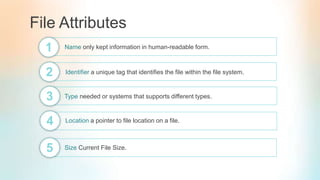
File Attributes
Name only kept information in human-readable form.1
2 Identifier a unique tag that identifies the file within the file system.
3 Type needed or systems that supports different types.
4 Location a pointer to file location on a file.
5 Size Current File Size.
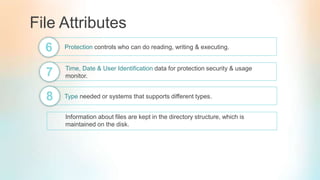
File Attributes
Protection controls who can do reading, writing & executing.6
7 Time, Date & User Identification data for protection security & usage
monitor.
8 Type needed or systems that supports different types.
Information about files are kept in the directory structure, which is
maintained on the disk.
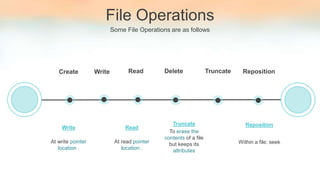
File Operations
Some File Operations are as follows
Create
Within a file: seek
Reposition
Write Read Delete Truncate Reposition
To erase the
contents of a file
but keeps its
attributes
Truncate
At write pointer
location .
Write
At read pointer
location .
Read
Claypool Example
Unix open()
Path
Is the name of file
On success
Return index
flags
Is bitmap to set switch
int open (char * path,int flags[,int model])
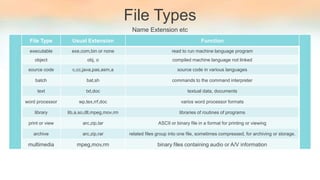
File Types
Name Extension etc
File Type Usual Extension Function
executable exe,com,bin or none read to run machine language program
object obj, o compiled machine language not linked
source code c,cc,java,pas,asm,a source code in various languages
batch bat,sh commands to the command interpreter
text txt,doc textual data, documents
word processor wp,tex,rrf,doc varios word processor formats
library lib,a,so,dll,mpeg,mov,rm libraries of routines of programs
print or view arc,zip,tar ASCII or binary file in a format for printing or viewing
archive arc,zip,rar related files group into one file, sometimes compressed, for archiving or storage.
multimedia mpeg,mov,rm binary files containing audio or A/V information
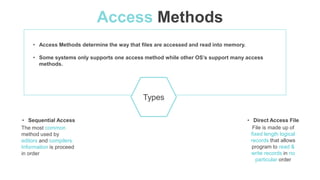
Access Methods
The most common
method used by
editors and compilers.
Information is proceed
in order
• Sequential Access
File is made up of
fixed length logical
records that allows
program to read &
write records in no
particular order
• Direct Access File
• Access Methods determine the way that files are accessed and read into memory.
• Some systems only supports one access method while other OS’s support many access
methods.
Types
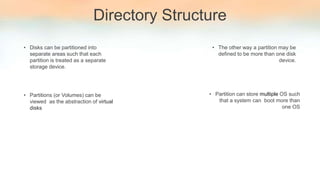
Directory Structure
• Disks can be partitioned into
separate areas such that each
partition is treated as a separate
storage device.
• Partitions (or Volumes) can be
viewed as the abstraction of virtual
disks
• The other way a partition may be
defined to be more than one disk
device.
• Partition can store multiple OS such
that a system can boot more than
one OS
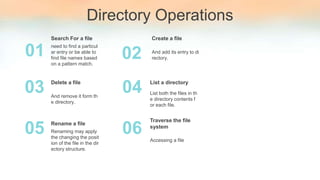
Directory Operations
need to find a particul
ar entry or be able to
find file names based
on a pattern match.
Search For a file
01
0403
And add its entry to di
rectory.
Create a file
And remove it form th
e directory.
Delete a file
02
List both the files in th
e directory contents f
or each file.
List a directory
0605 Renaming may apply
the changing the posit
ion of the file in the dir
ectory structure.
Rename a file
Accessing a file
Traverse the file
system
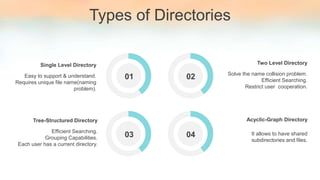
Types of Directories
01 02
0403
01Easy to support & understand.
Requires unique file name(naming
problem).
Single Level Directory
Efficient Searching.
Grouping Capabilities.
Each user has a current directory.
Tree-Structured Directory
Solve the name collision problem.
Efficient Searching.
Restrict user cooperation.
Two Level Directory
It allows to have shared
subdirectories and files.
Acyclic-Graph Directory
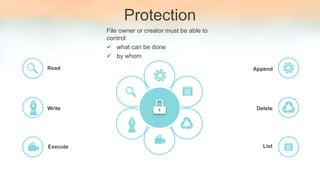
Protection
File owner or creator must be able to
control:
 what can be done
 by whom
Execute
Write
Read
List
Delete
Append
Any Questions?
Thank you
Insert the title of your subtitle Here

File system interface

  • 1.
    BS (Computer Sciences)5th Semester File System Interface Presented By: Ayaz Zafar(1293-2015) Dayan Ahmed(1309-2016) Paras Kumar(1011-2016)
  • 2.
    Ayaz Zafar BS(CS) 5thSemester (1293-2015) Dayan Ahmed BS(CS) 5th Semester (1309-2016) Paras Kumar BS(CS) 5th Semester (1011-2016) Our Group Members
  • 3.
    File System Interface OurPoint of Contents Are File Concept Directory Structure Access Method Protection
  • 4.
    File System Interface Itprovides the mechanism for on- line storage of and access to bot h data and programs of the opera ting system and all the users of t he computer system.
  • 5.
    File Concept • Storage devicesare nonvolatile. • A file is a named collection of related informat ion that is recorded on secondary storage. • Contiguous logical address space • Types: Data ✔ numeric ✔ character ✔ binary Program ✔Source, object and executable file formats
  • 6.
    File Attributes Name onlykept information in human-readable form.1 2 Identifier a unique tag that identifies the file within the file system. 3 Type needed or systems that supports different types. 4 Location a pointer to file location on a file. 5 Size Current File Size.
  • 7.
    File Attributes Protection controlswho can do reading, writing & executing.6 7 Time, Date & User Identification data for protection security & usage monitor. 8 Type needed or systems that supports different types. Information about files are kept in the directory structure, which is maintained on the disk.
  • 8.
    File Operations Some FileOperations are as follows Create Within a file: seek Reposition Write Read Delete Truncate Reposition To erase the contents of a file but keeps its attributes Truncate At write pointer location . Write At read pointer location . Read
  • 9.
    Claypool Example Unix open() Path Isthe name of file On success Return index flags Is bitmap to set switch int open (char * path,int flags[,int model])
  • 10.
    File Types Name Extensionetc File Type Usual Extension Function executable exe,com,bin or none read to run machine language program object obj, o compiled machine language not linked source code c,cc,java,pas,asm,a source code in various languages batch bat,sh commands to the command interpreter text txt,doc textual data, documents word processor wp,tex,rrf,doc varios word processor formats library lib,a,so,dll,mpeg,mov,rm libraries of routines of programs print or view arc,zip,tar ASCII or binary file in a format for printing or viewing archive arc,zip,rar related files group into one file, sometimes compressed, for archiving or storage. multimedia mpeg,mov,rm binary files containing audio or A/V information
  • 11.
    Access Methods The mostcommon method used by editors and compilers. Information is proceed in order • Sequential Access File is made up of fixed length logical records that allows program to read & write records in no particular order • Direct Access File • Access Methods determine the way that files are accessed and read into memory. • Some systems only supports one access method while other OS’s support many access methods. Types
  • 12.
    Directory Structure • Diskscan be partitioned into separate areas such that each partition is treated as a separate storage device. • Partitions (or Volumes) can be viewed as the abstraction of virtual disks • The other way a partition may be defined to be more than one disk device. • Partition can store multiple OS such that a system can boot more than one OS
  • 13.
    Directory Operations need tofind a particul ar entry or be able to find file names based on a pattern match. Search For a file 01 0403 And add its entry to di rectory. Create a file And remove it form th e directory. Delete a file 02 List both the files in th e directory contents f or each file. List a directory 0605 Renaming may apply the changing the posit ion of the file in the dir ectory structure. Rename a file Accessing a file Traverse the file system
  • 14.
    Types of Directories 0102 0403 01Easy to support & understand. Requires unique file name(naming problem). Single Level Directory Efficient Searching. Grouping Capabilities. Each user has a current directory. Tree-Structured Directory Solve the name collision problem. Efficient Searching. Restrict user cooperation. Two Level Directory It allows to have shared subdirectories and files. Acyclic-Graph Directory
  • 15.
    Protection File owner orcreator must be able to control:  what can be done  by whom Execute Write Read List Delete Append
  • 16.
  • 17.
    Thank you Insert thetitle of your subtitle Here