A basic course on Research data management
part 2: protecting and organizing
your data
PROOF course Information Literacy and
Research Data Management
TU/e, 24-01-2017
l.osinski@tue.nl, TU/e IEC/Library
Available under CC BY-SA license, which permits copying
and redistributing the material in any medium or format &
adapting the material for any purpose, provided the original
author and source are credited & you distribute the
adapted material under the same license as the original
Research data management
 Sharing your data, or making your data findable and accessible
with good data practices
→ protecting your data: back up, access control; file naming, organizing
data, versioning
+ sharing your data via collaboration platforms and archives
 Caring for your data, or making your data re-usable and
interoperable with good data practices
+ metadata, tidy data, licenses
Research data management
what was it again
Be safe
+ storage, backup  data safety, protecting against loss: use local
ICT infrastructure (including SURFdrive) as much as possible
+ access control  data security, protecting against unauthorized
use: with DataverseNL for example
Be organized, or: you should be able to tell what’s in a file
without opening it
+ file-naming, organizing data in folders, versioning,
+ data classification and retention; different treatment of different
data (raw versus processed data)
Protecting your data
good data practices during your research
“…we can copy everything and do not manage it well.” (Indra Sihar)
File-naming #1
be consistent and aim for concise but informative names
Good file names are consistent (use file-naming
conventions), unique (distinguishes a file from files with
similar subjects as well as different versions of the file)
and meaningful (use descriptive names).
File-naming conventions help you find your data, help
others to find your data and help track which version of
a file is most current
 Avoid using special characters in a file name:  / : * ? < >
| [ ] & $
 Use underscores instead of periods or spaces to
separate logical elements in a file name
 Avoid very long names: usually 25 characters is sufficient
length
 Names should include all necessary descriptive
information independent of where it is stored
 Include dates and a version number on files
 Add a readme.txt to each folder in which the file naming
and its meaning is explained
Source: File naming conventions
File naming #2
think about the ordering of elements within a filename
 Order by date:
2013-04-12_interview-recording_THD.mp3
2013-04-12_interview-transcript_THD.docx
2012-12-15_interview-recording_MBD.mp3
2012-12-15_interview-transcript_MBD.docx
 Order by subject:
MBD_interview-recording_2012-12-15.mp3
MBD_interview-transcript_2012-12-15.docx
THD_interview-recording_2013-04-12.mp3
THD_interview-transcript_2013-04-12.docx
 Order by type:
Interview-recording_MBD_2012-12-15.mp3
Interview-recording_THD_2013-04-12.mp3
Interview-transcript_MBD_2012-12-15.docx
Interview-transcript_THD_2013-04-12.docx
 Forced order with numbering:
01_THD_interview-recording_2013-04-12.mp3
02_THD_interview-transcript_2013-04-12.docx
03_MBD_interview-recording_2012-12-15.mp3
04_MBD_interview-transcript_2012-12-15.docx
<
File organization
PAGE 631-1-2017
<
Source: Beatriz Ramirez, Data management plan for the PhD project:
development and application of a monitoring system to assess the
impacts of climate and land cover changes on eco-hydrological
processes in an eastern Andes catchment area
Source: Haselager, dr. G.J.T.
(Radboud University Nijmegen);
Aken, prof. dr. M.A.G. van (Utrecht
University) (2000): Personality and
Family Relationships. DANS.
http://dx.doi.org/10.17026/dans-
xk5-y7vc .
Organizing your data in folders #1
based on the TIER documentation protocol (http://www.projecttier.org/)
1. Main project folder (name of your research project/working title of your
paper)
1.1. Original data and metadata
1.1.1. Original data
1.1.2. Metadata
1.1.2.1. Supplements
1.2. Processing and analysis files
1.2.1. Importable data files
1.2.2. Command files
1.2.3. Analysis files
1.3. Documents
1. Main project folder (name of your research project/working title of your
paper)
1.1. Original data and metadata
1.1.1. Original data (keep these read only)
Any data that were necessary for any part of the processing
and/or analysis you reported in you paper.
Copies of all your original data files, saved in exactly the
format it was when you first obtained it. The name of the
original data file may be changed
1.1.2. Metadata
1.1.2.1. Supplements
Organizing your data in folders #2
based on the TIER documentation protocol
1. Main project folder (name of your research project/working title of your paper)
1.1. Original data and metadata
1.1.1. Original data
1.1.2. Metadata
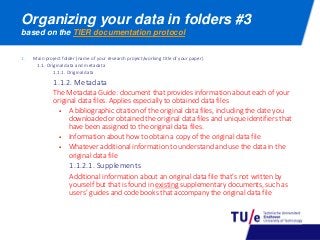
The Metadata Guide: document that provides information about each of your
original data files. Applies especially to obtained data files
 A bibliographic citation of the original data files, including the date you
downloaded or obtained the original data files and unique identifiers that
have been assigned to the original data files.
 Information about how to obtain a copy of the original data file
 Whatever additional information to understand and use the data in the
original data file
1.1.2.1. Supplements
Additional information about an original data file that’s not written by
yourself but that is found in existing supplementary documents, such as
users’ guides and code books that accompany the original data file
Organizing your data in folders #3
based on the TIER documentation protocol
Organizing your data in folders #4
based on the TIER documentation protocol
1. Main project folder (name of your research project/working title of your paper)
1.1. Original data and metadata
1.1.1. Original data
1.1.2. Metadata
1.1.2.1. Supplements
1.2. Processing and analysis files
1.2.1. Importable data files (the data you work with)
A corresponding version for each of the original data files. This version can be
identical to the original version, or in some cases it will be a modified version.
For example modifications required to allow your software to read the file
(converting the file to another format, removing explanatory notes from a
table…).
 The original and importable versions of a data file should be given different
names
 The importable data file should be as nearly as identical as possible to the
original
 The changes you make to your original data files to create the corresponding
importable data files should be described in a Readme file
1.2.2. Command files
1.2.3. Analysis files
Organizing your data in folders #5
based on the TIER documentation protocol
1. Main project folder (name of your research project/working title of your paper)
1.1. Original data and metadata
1.1.1. Original data
1.1.2. Metadata
1.1.2.1. Supplements
1.2. Processing and analysis files
1.2.1. Importable data files
1.2.2. Command files
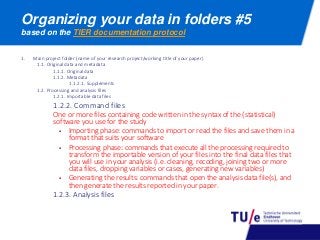
One or more files containing code written in the syntax of the (statistical)
software you use for the study
 Importing phase: commands to import or read the files and save them in a
format that suits your software
 Processing phase: commands that execute all the processing required to
transform the importable version of your files into the final data files that
you will use in your analysis (i.e. cleaning, recoding, joining two or more
data files, dropping variables or cases, generating new variables)
 Generating the results: commands that open the analysis data file(s), and
then generate the results reported in your paper.
1.2.3. Analysis files
Organizing your data in folders #6
based on the TIER documentation protocol
1. Main project folder (name of your research project/working title of your paper)
1.1. Original data and metadata
1.1.1. Original data
1.1.2. Metadata
1.1.2.1. Supplements
1.2. Processing and analysis files
1.2.1. Importable data files
1.2.2. Command files
1.2.3. Analysis files
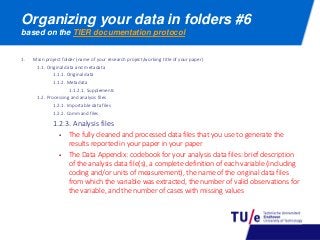
 The fully cleaned and processed data files that you use to generate the
results reported in your paper in your paper
 The Data Appendix: codebook for your analysis data files: brief description
of the analysis data file(s), a complete definition of each variable (including
coding and/or units of measurement), the name of the original data files
from which the variable was extracted, the number of valid observations for
the variable, and the number of cases with missing values
Organizing your data in folders #7
based on the TIER documentation protocol
1. Main project folder (name of your research project/working title of your paper)
1.1. Original data and metadata
1.1.1. Original data
1.1.2. Metadata
1.1.2.1. Supplements
1.2. Processing and analysis files
1.2.1. Importable data files
1.2.2. Command files
1.2.3. Analysis files
1.3. Documents
 An electronic copy of your complete final paper
 The Readme-file for your replication documentation
 What statistical software or other computer programs are needed to run the
command files
 Explain the structure of the hierarchy of folders in which the documentation is
stored
 Describe precisely any changes you made to your original data files to create
the corresponding importable data files
 Step-by-step instructions for using your documentation to replicate the
statistical results reported in your paper
1. File naming conventions: https://lib.stanford.edu/data-management-services/file-naming
2. File organization: http://www.wageningenur.nl/web/file?uuid=3f974938-79a0-421f-b1ad-
95eef49d777c&owner=c057b578-4a6a-4449-881b-17fff17e2f1a (paragraph 6, example 1)
3. File organization: Haselager, dr. G.J.T. , Aken, prof. dr. M.A.G. van (2000): Personality and Family
Relationships. DANS. http://dx.doi.org/10.17026/dans-xk5-y7vc (Data guide, p. 24-26)
4. Version control: http://www.data-archive.ac.uk/create-manage/format/versions
5. Storage, back up of data: http://www.data-archive.ac.uk/create-manage/storage
6. Local ICT infrastructure: https://intranet.tue.nl/en/university/services/ict-services/ict-service-
catalog/management-services/data-management-storage/ (TU/e intranet)
7. DataverseNL: https://dataverse.nl/dvn/
8. TIER documentation protocol: http://www.projecttier.org/
URL’s of mentioned webpages
in order of appearance

A basic course on Reseach data management, part 2: protecting and organizing your data

  • 1.
    A basic courseon Research data management part 2: protecting and organizing your data PROOF course Information Literacy and Research Data Management TU/e, 24-01-2017 l.osinski@tue.nl, TU/e IEC/Library Available under CC BY-SA license, which permits copying and redistributing the material in any medium or format & adapting the material for any purpose, provided the original author and source are credited & you distribute the adapted material under the same license as the original
  • 2.
    Research data management Sharing your data, or making your data findable and accessible with good data practices → protecting your data: back up, access control; file naming, organizing data, versioning + sharing your data via collaboration platforms and archives  Caring for your data, or making your data re-usable and interoperable with good data practices + metadata, tidy data, licenses Research data management what was it again
  • 3.
    Be safe + storage,backup  data safety, protecting against loss: use local ICT infrastructure (including SURFdrive) as much as possible + access control  data security, protecting against unauthorized use: with DataverseNL for example Be organized, or: you should be able to tell what’s in a file without opening it + file-naming, organizing data in folders, versioning, + data classification and retention; different treatment of different data (raw versus processed data) Protecting your data good data practices during your research “…we can copy everything and do not manage it well.” (Indra Sihar)
  • 4.
    File-naming #1 be consistentand aim for concise but informative names Good file names are consistent (use file-naming conventions), unique (distinguishes a file from files with similar subjects as well as different versions of the file) and meaningful (use descriptive names). File-naming conventions help you find your data, help others to find your data and help track which version of a file is most current  Avoid using special characters in a file name: / : * ? < > | [ ] & $  Use underscores instead of periods or spaces to separate logical elements in a file name  Avoid very long names: usually 25 characters is sufficient length  Names should include all necessary descriptive information independent of where it is stored  Include dates and a version number on files  Add a readme.txt to each folder in which the file naming and its meaning is explained Source: File naming conventions
  • 5.
    File naming #2 thinkabout the ordering of elements within a filename  Order by date: 2013-04-12_interview-recording_THD.mp3 2013-04-12_interview-transcript_THD.docx 2012-12-15_interview-recording_MBD.mp3 2012-12-15_interview-transcript_MBD.docx  Order by subject: MBD_interview-recording_2012-12-15.mp3 MBD_interview-transcript_2012-12-15.docx THD_interview-recording_2013-04-12.mp3 THD_interview-transcript_2013-04-12.docx  Order by type: Interview-recording_MBD_2012-12-15.mp3 Interview-recording_THD_2013-04-12.mp3 Interview-transcript_MBD_2012-12-15.docx Interview-transcript_THD_2013-04-12.docx  Forced order with numbering: 01_THD_interview-recording_2013-04-12.mp3 02_THD_interview-transcript_2013-04-12.docx 03_MBD_interview-recording_2012-12-15.mp3 04_MBD_interview-transcript_2012-12-15.docx <
  • 6.
    File organization PAGE 631-1-2017 < Source:Beatriz Ramirez, Data management plan for the PhD project: development and application of a monitoring system to assess the impacts of climate and land cover changes on eco-hydrological processes in an eastern Andes catchment area Source: Haselager, dr. G.J.T. (Radboud University Nijmegen); Aken, prof. dr. M.A.G. van (Utrecht University) (2000): Personality and Family Relationships. DANS. http://dx.doi.org/10.17026/dans- xk5-y7vc .
  • 7.
    Organizing your datain folders #1 based on the TIER documentation protocol (http://www.projecttier.org/) 1. Main project folder (name of your research project/working title of your paper) 1.1. Original data and metadata 1.1.1. Original data 1.1.2. Metadata 1.1.2.1. Supplements 1.2. Processing and analysis files 1.2.1. Importable data files 1.2.2. Command files 1.2.3. Analysis files 1.3. Documents
  • 8.
    1. Main projectfolder (name of your research project/working title of your paper) 1.1. Original data and metadata 1.1.1. Original data (keep these read only) Any data that were necessary for any part of the processing and/or analysis you reported in you paper. Copies of all your original data files, saved in exactly the format it was when you first obtained it. The name of the original data file may be changed 1.1.2. Metadata 1.1.2.1. Supplements Organizing your data in folders #2 based on the TIER documentation protocol
  • 9.
    1. Main projectfolder (name of your research project/working title of your paper) 1.1. Original data and metadata 1.1.1. Original data 1.1.2. Metadata The Metadata Guide: document that provides information about each of your original data files. Applies especially to obtained data files  A bibliographic citation of the original data files, including the date you downloaded or obtained the original data files and unique identifiers that have been assigned to the original data files.  Information about how to obtain a copy of the original data file  Whatever additional information to understand and use the data in the original data file 1.1.2.1. Supplements Additional information about an original data file that’s not written by yourself but that is found in existing supplementary documents, such as users’ guides and code books that accompany the original data file Organizing your data in folders #3 based on the TIER documentation protocol
  • 10.
    Organizing your datain folders #4 based on the TIER documentation protocol 1. Main project folder (name of your research project/working title of your paper) 1.1. Original data and metadata 1.1.1. Original data 1.1.2. Metadata 1.1.2.1. Supplements 1.2. Processing and analysis files 1.2.1. Importable data files (the data you work with) A corresponding version for each of the original data files. This version can be identical to the original version, or in some cases it will be a modified version. For example modifications required to allow your software to read the file (converting the file to another format, removing explanatory notes from a table…).  The original and importable versions of a data file should be given different names  The importable data file should be as nearly as identical as possible to the original  The changes you make to your original data files to create the corresponding importable data files should be described in a Readme file 1.2.2. Command files 1.2.3. Analysis files
  • 11.
    Organizing your datain folders #5 based on the TIER documentation protocol 1. Main project folder (name of your research project/working title of your paper) 1.1. Original data and metadata 1.1.1. Original data 1.1.2. Metadata 1.1.2.1. Supplements 1.2. Processing and analysis files 1.2.1. Importable data files 1.2.2. Command files One or more files containing code written in the syntax of the (statistical) software you use for the study  Importing phase: commands to import or read the files and save them in a format that suits your software  Processing phase: commands that execute all the processing required to transform the importable version of your files into the final data files that you will use in your analysis (i.e. cleaning, recoding, joining two or more data files, dropping variables or cases, generating new variables)  Generating the results: commands that open the analysis data file(s), and then generate the results reported in your paper. 1.2.3. Analysis files
  • 12.
    Organizing your datain folders #6 based on the TIER documentation protocol 1. Main project folder (name of your research project/working title of your paper) 1.1. Original data and metadata 1.1.1. Original data 1.1.2. Metadata 1.1.2.1. Supplements 1.2. Processing and analysis files 1.2.1. Importable data files 1.2.2. Command files 1.2.3. Analysis files  The fully cleaned and processed data files that you use to generate the results reported in your paper in your paper  The Data Appendix: codebook for your analysis data files: brief description of the analysis data file(s), a complete definition of each variable (including coding and/or units of measurement), the name of the original data files from which the variable was extracted, the number of valid observations for the variable, and the number of cases with missing values
  • 13.
    Organizing your datain folders #7 based on the TIER documentation protocol 1. Main project folder (name of your research project/working title of your paper) 1.1. Original data and metadata 1.1.1. Original data 1.1.2. Metadata 1.1.2.1. Supplements 1.2. Processing and analysis files 1.2.1. Importable data files 1.2.2. Command files 1.2.3. Analysis files 1.3. Documents  An electronic copy of your complete final paper  The Readme-file for your replication documentation  What statistical software or other computer programs are needed to run the command files  Explain the structure of the hierarchy of folders in which the documentation is stored  Describe precisely any changes you made to your original data files to create the corresponding importable data files  Step-by-step instructions for using your documentation to replicate the statistical results reported in your paper
  • 14.
    1. File namingconventions: https://lib.stanford.edu/data-management-services/file-naming 2. File organization: http://www.wageningenur.nl/web/file?uuid=3f974938-79a0-421f-b1ad- 95eef49d777c&owner=c057b578-4a6a-4449-881b-17fff17e2f1a (paragraph 6, example 1) 3. File organization: Haselager, dr. G.J.T. , Aken, prof. dr. M.A.G. van (2000): Personality and Family Relationships. DANS. http://dx.doi.org/10.17026/dans-xk5-y7vc (Data guide, p. 24-26) 4. Version control: http://www.data-archive.ac.uk/create-manage/format/versions 5. Storage, back up of data: http://www.data-archive.ac.uk/create-manage/storage 6. Local ICT infrastructure: https://intranet.tue.nl/en/university/services/ict-services/ict-service- catalog/management-services/data-management-storage/ (TU/e intranet) 7. DataverseNL: https://dataverse.nl/dvn/ 8. TIER documentation protocol: http://www.projecttier.org/ URL’s of mentioned webpages in order of appearance