Components of
computer
System
 Hardware and software
 Main components of
computer system
 Operating system
 Control devices
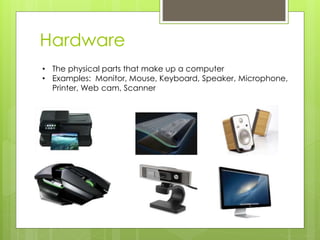
Hardware
• The physical parts that make up a computer
• Examples: Monitor, Mouse, Keyboard, Speaker, Microphone,
Printer, Web cam, Scanner
Software
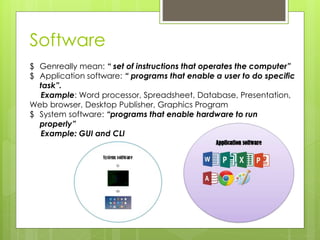
$ Genreally mean: “ set of instructions that operates the computer”
$ Application software: “ programs that enable a user to do specific
task”.
Example: Word processor, Spreadsheet, Database, Presentation,
Web browser, Desktop Publisher, Graphics Program
$ System software: “programs that enable hardware to run
properly”
Example: GUI and CLI
Main components of
computer system
£ A typical computer is made up of hardware and software
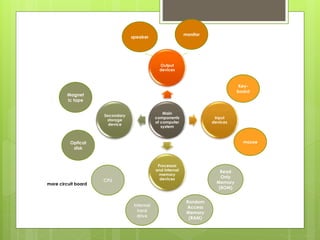
1. Input devices: keyboard, mouse
2. Output devices: speaker, monitor
3. Secondary storage device: magnetic tapes, optical disk
4. Processor and internal memory devices:
∞ CPU is a one or more circuit board which is made up of discrete
components which interprets and execute commands from
hardware to software.
∞ Internal hard drive is the main memory which stores the
software and data files. Fast data transfer and large memory
capacity.
∞ Random Access Memory(RAM) is an internal chip where data
of running application is stored temporarily. This memory can
be written and read from.
∞ Read Only Memory(ROM) is used to store permanent
memory(NON-VOLATILE). Can only be read but not written.
Contains some coding known as boot file [ Basic input/ output
system(BIOS)]
Main
components
of computer
system
Output
devices
Input
devices
Processor
and internal
memory
devices
Secondary
storage
device
Key-
board
mouse
monitor
speaker
Magnet
ic tape
Optical
disk
CPU
Internal
hard
drive
Random
Access
Memory
(RAM)
Read
Only
Memory
(ROM)
more circuit board
Operating system
€ To enable users to communicate with computer systems.
♫ Controlling the operation of input, output and backing storage
device
♫ Supervising the loading, running & storage.
♫ Dealing with errors
♫ Maintaining security of program
♫ Maintaining a computer log
♫ User interface (allowing communication between user and
computer)
€ Command Line Interface(CLI)
λ Require to type in instructions in order to choose options
λ Must learn commands and slow to have to key in commands
λ Direct communication with computer and not restricted to a number
of pre-determined option.
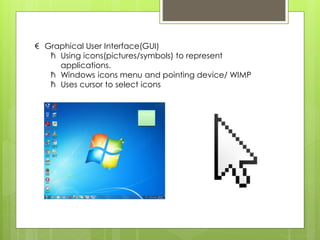
€ Graphical User Interface(GUI)
ћ Using icons(pictures/symbols) to represent
applications.
ћ Windows icons menu and pointing device/ WIMP
ћ Uses cursor to select icons

Types and components of computer system

  • 1.
    Components of computer System  Hardwareand software  Main components of computer system  Operating system  Control devices
  • 2.
    Hardware • The physicalparts that make up a computer • Examples: Monitor, Mouse, Keyboard, Speaker, Microphone, Printer, Web cam, Scanner
  • 3.
    Software $ Genreally mean:“ set of instructions that operates the computer” $ Application software: “ programs that enable a user to do specific task”. Example: Word processor, Spreadsheet, Database, Presentation, Web browser, Desktop Publisher, Graphics Program $ System software: “programs that enable hardware to run properly” Example: GUI and CLI
  • 4.
    Main components of computersystem £ A typical computer is made up of hardware and software 1. Input devices: keyboard, mouse 2. Output devices: speaker, monitor 3. Secondary storage device: magnetic tapes, optical disk 4. Processor and internal memory devices: ∞ CPU is a one or more circuit board which is made up of discrete components which interprets and execute commands from hardware to software. ∞ Internal hard drive is the main memory which stores the software and data files. Fast data transfer and large memory capacity. ∞ Random Access Memory(RAM) is an internal chip where data of running application is stored temporarily. This memory can be written and read from. ∞ Read Only Memory(ROM) is used to store permanent memory(NON-VOLATILE). Can only be read but not written. Contains some coding known as boot file [ Basic input/ output system(BIOS)]
  • 5.
  • 6.
    Operating system € Toenable users to communicate with computer systems. ♫ Controlling the operation of input, output and backing storage device ♫ Supervising the loading, running & storage. ♫ Dealing with errors ♫ Maintaining security of program ♫ Maintaining a computer log ♫ User interface (allowing communication between user and computer) € Command Line Interface(CLI) λ Require to type in instructions in order to choose options λ Must learn commands and slow to have to key in commands λ Direct communication with computer and not restricted to a number of pre-determined option.
  • 7.
    € Graphical UserInterface(GUI) ћ Using icons(pictures/symbols) to represent applications. ћ Windows icons menu and pointing device/ WIMP ћ Uses cursor to select icons