Keyboarding Concepts Dale Gunter Forestview High School
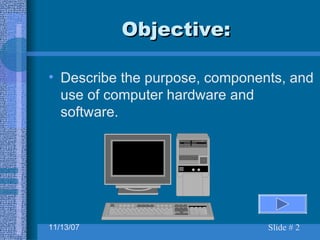
Objective: Describe the purpose, components, and use of computer hardware and software.
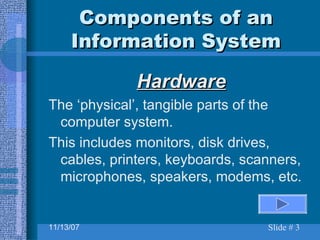
Components of an Information System Hardware The ‘physical’, tangible parts of the computer system. This includes monitors, disk drives, cables, printers, keyboards, scanners, microphones, speakers, modems, etc.
Components of an Information System Applications  Software Computer programs designed to perform specific functions…. Word-processing, database, and spreadsheet software are examples of applications software.
Components of an Information System Systems Software   Computer programs designed to run the actual computer when it is turned on. Examples are MS-Dos, Windows 95, Windows 98.
Applications Software Word Processing Used to create documents such as letters, reports, memos, and flyers. Word processors perform work that was originally done on the typewriter.
Applications Software Spreadsheet Used to process numerical information.  Spreadsheets are used to process financial and statistical calculations. Spreadsheets consist of rows and columns and are widely used in accounting.
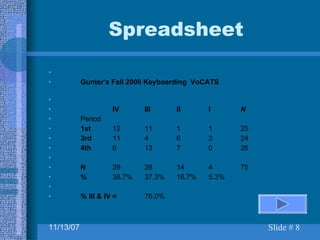
Spreadsheet Gunter's Fall 2000 Keyboarding  VoCATS IV III II I N Period 1st 12 11 1 1 25 3rd 11 4 6 3 24 4th 6 13 7 0 26 N 29 28 14 4 75 % 38.7% 37.3% 18.7% 5.3% % III & IV = 76.0%
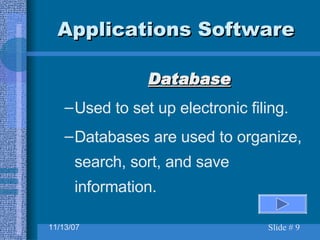
Applications Software Database Used to set up electronic filing. Databases are used to organize, search, sort, and save information.
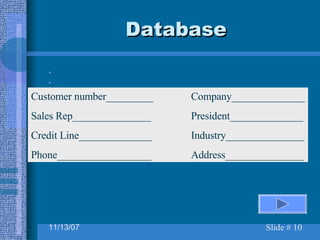
Database Customer number_________ Company______________ Sales Rep_______________ President______________ Credit Line______________ Industry_______________ Phone__________________ Address_______________
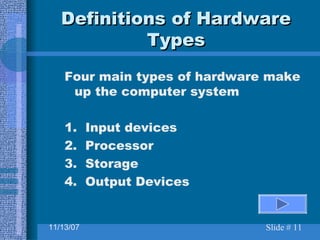
Definitions of Hardware Types Four main types of hardware make up the computer system 1.  Input devices 2.  Processor 3.  Storage 4.  Output Devices
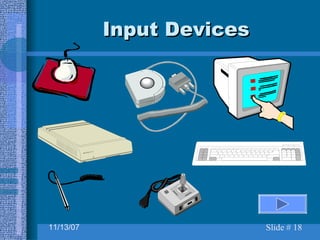
Definitions of Hardware Types Input Devices Used to  enter  information  into  the computer. Examples are keyboard, joystick, mouse, scanner, voice recognition device, touch screen, microphone and light pen.
Definitions of Hardware Types Processor The device or microcircuits that manipulates data and receives and carries out instructions. The processor is the ‘brains’ of the computer
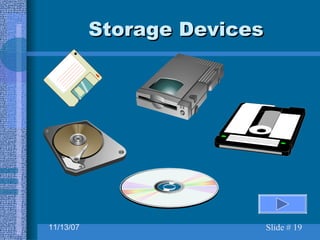
Definitions of Hardware Types Storage Devices that save data so that it can be used again. Disk drives are used to store data on disks Storage capacity is measured in megabytes and gigabytes.
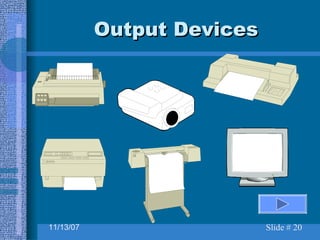
Definitions of Hardware Types Output Device Displays or prints information produced by the computer. Printers and monitors are examples are examples of output devices.
Definitions of Hardware Types Output Devices A  Printer  produces  ‘hard’  copy output A  Monitor  produces  ‘soft’  copy output
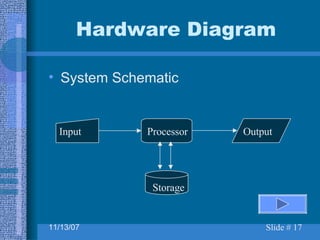
System Schematic Hardware Diagram Input Processor Output Storage
Input Devices
Storage Devices
Output Devices
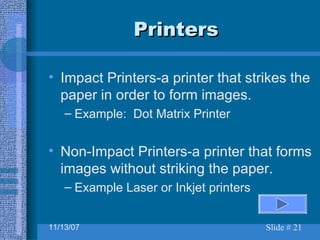
Printers Impact Printers-a printer that strikes the paper in order to form images. Example:  Dot Matrix Printer Non-Impact Printers-a printer that forms images without striking the paper. Example Laser or Inkjet printers
Computer Care Keep food and drinks away from the computer and keyboard. Avoid dusty locations. Avoid bright sunny locations. Do not move the computer while it is in use. Always exit programs per user manual instructions.
Diskette Care Avoid contact with magnets and electromagnetic fields. Keep disks stored in a clean, cool, and dry place with a protective cover. Keep protective metal slider in place. Use a virus check program regularly. Make a back-up copy!
Computer Terminology What do you call the information that  leaves  the computer? (Click for answer) Output
Computer Terminology What do you call a printed page of output? (Click for answer) Hard Copy
Computer Terminology What do you call output viewed on the monitor? (Click for answer) Soft Copy
Computer Terminology The touchable physical equipment of a computer system is called: (Click for answer) Hardware
Computer Terminology The video screen of the computer is called the: (Click for answer) Monitor
Computer Terminology The “Brains” of the computer where the work is done is called the: (Click for answer) CPU Central Processing Unit
Computer Terminology An input device that enters data with letters, numbers, symbols, and function keys is called: (Click for answer) Keyboard
Computer Terminology Computer hardware that allows information to be passed through the telephone lines: (Click for answer) Modem
Computer Terminology Used like a copy machine to allow information to be input into the computer: (Click for answer) Scanner
Computer Terminology Name the two most commonly used INPUT devices: (Click for answer) Keyboard and mouse
Computer Terminology Name the two most commonly used OUTPUT devices: (Click for answer) Monitor and printer
Computer Terminology Which of the three types of application software should be used for keeping records, such as mailing lists? (Click for answer) Database
Computer Terminology Which of the three types of application software should be used for writing letters, memos, and reports? (Click for answer) Word Processing
Computer Terminology Which of the three types of application software should be used for performing calculations such as in accounting? (Click for answer) Spreadsheet
Computer Terminology Which hardware device is used to store data on disk?? (Click for answer) Disk drive
Computer Terminology Joysticks, mice, trackballs, graphics tablets and light pens are what kind of hardware? (Click for answer) Input devices
Computer Terminology Computer programs that are designed to perform specific functions are called: (Click for answer) Applications software
Computer Terminology A small hand-held device used to control the position of the cursor on the screen  is called a:  (Click for answer) Mouse
Computer Terminology A program that allows users to enter, retrieve, and update data in an organized and efficient manner is called:  (Click for answer) Database Software
Computer Terminology A program frequently used by people who work with numbers, formulas, and data to perform calculations is called:  (Click for answer) Spreadsheet Software
Computer Terminology Information that is entered into the computer is called:  (Click for answer) Data
Computer Terminology Cables connecting computer components are examples of: (Click for answer) Hardware

1 01 Computer Components

  • 1.
    Keyboarding Concepts DaleGunter Forestview High School
  • 2.
    Objective: Describe thepurpose, components, and use of computer hardware and software.
  • 3.
    Components of anInformation System Hardware The ‘physical’, tangible parts of the computer system. This includes monitors, disk drives, cables, printers, keyboards, scanners, microphones, speakers, modems, etc.
  • 4.
    Components of anInformation System Applications Software Computer programs designed to perform specific functions…. Word-processing, database, and spreadsheet software are examples of applications software.
  • 5.
    Components of anInformation System Systems Software Computer programs designed to run the actual computer when it is turned on. Examples are MS-Dos, Windows 95, Windows 98.
  • 6.
    Applications Software WordProcessing Used to create documents such as letters, reports, memos, and flyers. Word processors perform work that was originally done on the typewriter.
  • 7.
    Applications Software SpreadsheetUsed to process numerical information. Spreadsheets are used to process financial and statistical calculations. Spreadsheets consist of rows and columns and are widely used in accounting.
  • 8.
    Spreadsheet Gunter's Fall2000 Keyboarding VoCATS IV III II I N Period 1st 12 11 1 1 25 3rd 11 4 6 3 24 4th 6 13 7 0 26 N 29 28 14 4 75 % 38.7% 37.3% 18.7% 5.3% % III & IV = 76.0%
  • 9.
    Applications Software DatabaseUsed to set up electronic filing. Databases are used to organize, search, sort, and save information.
  • 10.
    Database Customer number_________Company______________ Sales Rep_______________ President______________ Credit Line______________ Industry_______________ Phone__________________ Address_______________
  • 11.
    Definitions of HardwareTypes Four main types of hardware make up the computer system 1. Input devices 2. Processor 3. Storage 4. Output Devices
  • 12.
    Definitions of HardwareTypes Input Devices Used to enter information into the computer. Examples are keyboard, joystick, mouse, scanner, voice recognition device, touch screen, microphone and light pen.
  • 13.
    Definitions of HardwareTypes Processor The device or microcircuits that manipulates data and receives and carries out instructions. The processor is the ‘brains’ of the computer
  • 14.
    Definitions of HardwareTypes Storage Devices that save data so that it can be used again. Disk drives are used to store data on disks Storage capacity is measured in megabytes and gigabytes.
  • 15.
    Definitions of HardwareTypes Output Device Displays or prints information produced by the computer. Printers and monitors are examples are examples of output devices.
  • 16.
    Definitions of HardwareTypes Output Devices A Printer produces ‘hard’ copy output A Monitor produces ‘soft’ copy output
  • 17.
    System Schematic HardwareDiagram Input Processor Output Storage
  • 18.
  • 19.
  • 20.
  • 21.
    Printers Impact Printers-aprinter that strikes the paper in order to form images. Example: Dot Matrix Printer Non-Impact Printers-a printer that forms images without striking the paper. Example Laser or Inkjet printers
  • 22.
    Computer Care Keepfood and drinks away from the computer and keyboard. Avoid dusty locations. Avoid bright sunny locations. Do not move the computer while it is in use. Always exit programs per user manual instructions.
  • 23.
    Diskette Care Avoidcontact with magnets and electromagnetic fields. Keep disks stored in a clean, cool, and dry place with a protective cover. Keep protective metal slider in place. Use a virus check program regularly. Make a back-up copy!
  • 24.
    Computer Terminology Whatdo you call the information that leaves the computer? (Click for answer) Output
  • 25.
    Computer Terminology Whatdo you call a printed page of output? (Click for answer) Hard Copy
  • 26.
    Computer Terminology Whatdo you call output viewed on the monitor? (Click for answer) Soft Copy
  • 27.
    Computer Terminology Thetouchable physical equipment of a computer system is called: (Click for answer) Hardware
  • 28.
    Computer Terminology Thevideo screen of the computer is called the: (Click for answer) Monitor
  • 29.
    Computer Terminology The“Brains” of the computer where the work is done is called the: (Click for answer) CPU Central Processing Unit
  • 30.
    Computer Terminology Aninput device that enters data with letters, numbers, symbols, and function keys is called: (Click for answer) Keyboard
  • 31.
    Computer Terminology Computerhardware that allows information to be passed through the telephone lines: (Click for answer) Modem
  • 32.
    Computer Terminology Usedlike a copy machine to allow information to be input into the computer: (Click for answer) Scanner
  • 33.
    Computer Terminology Namethe two most commonly used INPUT devices: (Click for answer) Keyboard and mouse
  • 34.
    Computer Terminology Namethe two most commonly used OUTPUT devices: (Click for answer) Monitor and printer
  • 35.
    Computer Terminology Whichof the three types of application software should be used for keeping records, such as mailing lists? (Click for answer) Database
  • 36.
    Computer Terminology Whichof the three types of application software should be used for writing letters, memos, and reports? (Click for answer) Word Processing
  • 37.
    Computer Terminology Whichof the three types of application software should be used for performing calculations such as in accounting? (Click for answer) Spreadsheet
  • 38.
    Computer Terminology Whichhardware device is used to store data on disk?? (Click for answer) Disk drive
  • 39.
    Computer Terminology Joysticks,mice, trackballs, graphics tablets and light pens are what kind of hardware? (Click for answer) Input devices
  • 40.
    Computer Terminology Computerprograms that are designed to perform specific functions are called: (Click for answer) Applications software
  • 41.
    Computer Terminology Asmall hand-held device used to control the position of the cursor on the screen is called a: (Click for answer) Mouse
  • 42.
    Computer Terminology Aprogram that allows users to enter, retrieve, and update data in an organized and efficient manner is called: (Click for answer) Database Software
  • 43.
    Computer Terminology Aprogram frequently used by people who work with numbers, formulas, and data to perform calculations is called: (Click for answer) Spreadsheet Software
  • 44.
    Computer Terminology Informationthat is entered into the computer is called: (Click for answer) Data
  • 45.
    Computer Terminology Cablesconnecting computer components are examples of: (Click for answer) Hardware