2.
Computer part & component

2.1 Overview of the computer system
Learning Outcome
•   Identify main components in the computer system :
     – Monitor
     – Keyboard
     – Speaker
     – Mouse
     – System unit
     – Printer
•   State the functions of the main components in the computer system
MONITOR
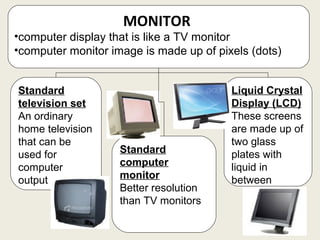
•computer display that is like a TV monitor
•computer monitor image is made up of pixels (dots)


Standard                                 Liquid Crystal
television set                           Display (LCD)
An ordinary                              These screens
home television                          are made up of
that can be                              two glass
used for            Standard             plates with
computer            computer             liquid in
output              monitor              between
                    Better resolution
                    than TV monitors
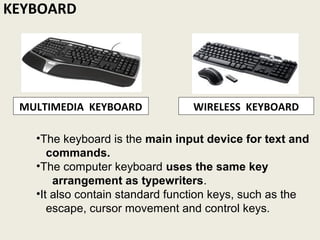
KEYBOARD


 MULTIMEDIA KEYBOARD            WIRELESS KEYBOARD

   •The keyboard is the main input device for text and
      commands.
   •The computer keyboard uses the same key
       arrangement as typewriters.
   •It also contain standard function keys, such as the
      escape, cursor movement and control keys.
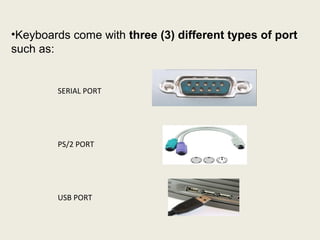
•Keyboards come with three (3) different types of port
such as:


        SERIAL PORT


        PS/2 PORT


        USB PORT
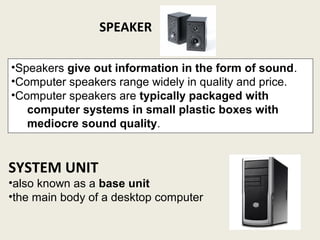
SPEAKER

•Speakers give out information in the form of sound.
•Computer speakers range widely in quality and price.
•Computer speakers are typically packaged with
   computer systems in small plastic boxes with
   mediocre sound quality.


SYSTEM UNIT
•also known as a base unit
•the main body of a desktop computer
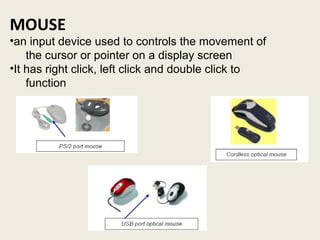
MOUSE
•an input device used to controls the movement of
    the cursor or pointer on a display screen
•It has right click, left click and double click to
    function
PRINTER
•device that produces a hard copy (permanent human
readable text or graphics) of documents stored in electronic
form that prints texts or illustrations on paper

     Dot-Matrix printer       Ink-Jet printer            Laser printer
    low-cost printer that     low-cost printer that     uses a laser beam
    produces low quality      produces a mid-       to produce the
    output                    quality output        best quality output
    works like an automatic   most economical for       speed of a laser
    typewriter                color output          printer is typically about
    can also be used when                               8 ppm (page per
    carbon copies of a                                  minute).
    document are required

Computer system

  • 1.
    2. Computer part &component 2.1 Overview of the computer system
  • 2.
    Learning Outcome • Identify main components in the computer system : – Monitor – Keyboard – Speaker – Mouse – System unit – Printer • State the functions of the main components in the computer system
  • 3.
    MONITOR •computer display thatis like a TV monitor •computer monitor image is made up of pixels (dots) Standard Liquid Crystal television set Display (LCD) An ordinary These screens home television are made up of that can be two glass used for Standard plates with computer computer liquid in output monitor between Better resolution than TV monitors
  • 4.
    KEYBOARD MULTIMEDIA KEYBOARD WIRELESS KEYBOARD •The keyboard is the main input device for text and commands. •The computer keyboard uses the same key arrangement as typewriters. •It also contain standard function keys, such as the escape, cursor movement and control keys.
  • 5.
    •Keyboards come withthree (3) different types of port such as: SERIAL PORT PS/2 PORT USB PORT
  • 6.
    SPEAKER •Speakers give outinformation in the form of sound. •Computer speakers range widely in quality and price. •Computer speakers are typically packaged with computer systems in small plastic boxes with mediocre sound quality. SYSTEM UNIT •also known as a base unit •the main body of a desktop computer
  • 7.
    MOUSE •an input deviceused to controls the movement of the cursor or pointer on a display screen •It has right click, left click and double click to function
  • 8.
    PRINTER •device that producesa hard copy (permanent human readable text or graphics) of documents stored in electronic form that prints texts or illustrations on paper Dot-Matrix printer Ink-Jet printer Laser printer low-cost printer that low-cost printer that uses a laser beam produces low quality produces a mid- to produce the output quality output best quality output works like an automatic most economical for speed of a laser typewriter color output printer is typically about can also be used when 8 ppm (page per carbon copies of a minute). document are required