Training Basic Latex
                                   Edited by: Nguyen Duc Minh Khoi
                             Email: nguyenducminhkhoi@gmail.com
                  Website: http://nguyenducminhkhoi.blogspot.com
                      @HCMC University of Technology, Spring 2013
Main reference: THE NOT SO SHORT INTRODUCTION TO LATEX2Ε
     by Tobias Oetiker Hubert Partl, Irene Hyna and Elisabeth Schlegl
Contents:

                Things you need to know

                       Typesetting Text

                       Specialities

                       Typeset Mathematical formulae

                Producing Mathematical graphics
Training Basic Latex                               1/12/2013   2
Things you need to know


Training Basic Latex   1/12/2013   3
Things you need to know
         Tex, Latex
     TEX
             is a computer program created by Donald E. Knuth
             is aimed at typesetting text and mathematical formulae
     LATEX
             enables authors to typeset and print their work at the highest typo-graphical quality,
              using a predefined, professional layout
             was originally written by Leslie Lamport
             uses the TEX formatter as its typesetting engine
             These days LATEX is maintained by Frank Mittelbach


Training Basic Latex                                                               1/12/2013           4
Things you need to know
         Author, Book Designer, Typesetter

     To publish something:
             authors give their typed manuscript to a publishing company.
             One of their book designers then decides the layout of the document and writes his
              instructions into the manuscript and then gives it to a typesetter
             typesetter who typesets the book according to these instructions.
     In a LATEX environment,
             LATEX takes the role of the book designer and uses TEX as its typesetter.
             But LATEX is “only” a program and therefore needs more guidance. The author has to
              provide additional information to describe the logical structure of his work.
             This information is written into the text as “LATEX commands.”


Training Basic Latex                                                              1/12/2013        5
Things you need to know
         Latex’s advantages
     LATEX prevents formatting errors by forcing the author to declare the logical
      structure of his document. LATEX then chooses the most suitable layout.
     Professionally crafted layouts are available, which make a document really look as
      if “printed.”
     The typesetting of mathematical formulae is supported in a convenient way.
     Users only need to learn a few easy-to-understand commands that specify the
      logical structure of a document.
     Even complex structures such as footnotes, references, table of contents, and
      bibliographies can be generated easily.
     TEX, the formatting engine of LATEX2ε, is highly portable and free. Therefore the
      system runs on almost any hardware platform available.
Training Basic Latex                                                   1/12/2013           6
Things you need to know
         Latex’s installation
     On Linux OS systems: use Texlive as compiler and gedit as text editor
     On Mac OS: use MacTex as compiler and text wrangler as text editor
     On Windows: use MikTex as compiler and notepad++ as text editor
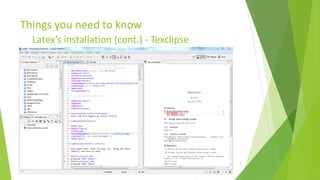
     Or you can use texclipse as text editor (full support for latex) on multiple platform
     On website:
             verbosus
             MonkeyTeX
             LaTeX Lab
             ShareLaTeX
             WriteLaTeX


Training Basic Latex                                                     1/12/2013            7
Things you need to know
         Latex’s installation (cont.) - Texclipse


Training Basic Latex                                1/12/2013   8
Things you need to know
         Files encounter


Training Basic Latex       1/12/2013   9
Typesetting Text


Training Basic Latex   1/12/2013   10
Typesetting Text
         Input files
     Spaces:
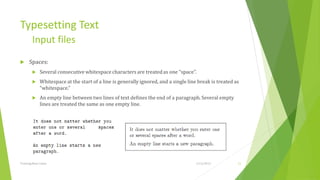
             Several consecutive whitespace characters are treated as one “space”.
             Whitespace at the start of a line is generally ignored, and a single line break is treated as
              “whitespace.”
             An empty line between two lines of text defines the end of a paragraph. Several empty
              lines are treated the same as one empty line.


Training Basic Latex                                                                  1/12/2013           11
Typesetting Text
         Input files (cont.)
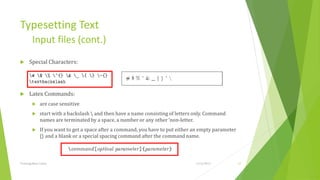
     Special Characters:


     Latex Commands:
             are case sensitive
             start with a backslash  and then have a name consisting of letters only. Command
              names are terminated by a space, a number or any other ‘non-letter.
             If you want to get a space after a command, you have to put either an empty parameter
              {} and a blank or a special spacing command after the command name.


Training Basic Latex                                                              1/12/2013           12
Typesetting Text
         Input files (cont.)
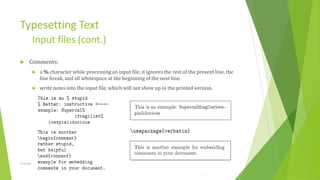
     Comments:
             a % character while processing an input file, it ignores the rest of the present line, the
              line break, and all whitespace at the beginning of the next line.
             write notes into the input file, which will not show up in the printed version.


Training Basic Latex                                                                 1/12/2013            13
Typesetting Text
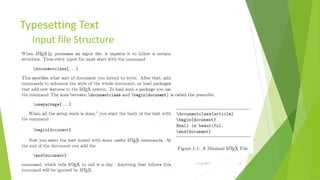
         Input file Structure


Training Basic Latex            1/12/2013   14
Typesetting Text
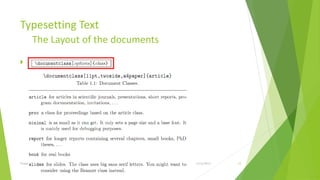
         The Layout of the documents
     M


Training Basic Latex                   1/12/2013   15
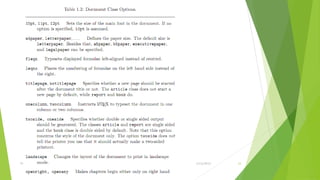
Training Basic Latex   1/12/2013   16
Typesetting Text
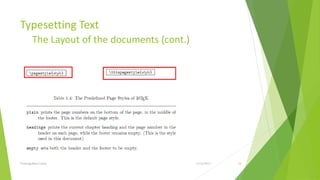
        The Layout of the documents (cont.)


Training Basic Latex                          1/12/2013   17
Typesetting Text
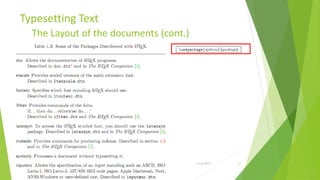
         The Layout of the documents (cont.)


Training Basic Latex                           1/12/2013   18
Typesetting Text
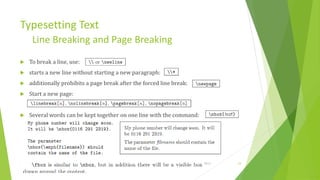
         Line Breaking and Page Breaking
     To break a line, use:
     starts a new line without starting a new paragraph:
     additionally prohibits a page break after the forced line break:
     Start a new page:


     Several words can be kept together on one line with the command:


Training Basic Latex                                                     1/12/2013   19
Typesetting Text
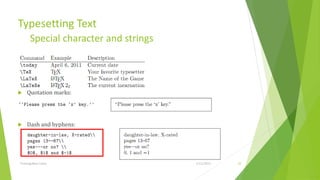
       Special character and strings


    Quotation marks:


    Dash and hyphens:


Training Basic Latex                   1/12/2013   20
Typesetting Text
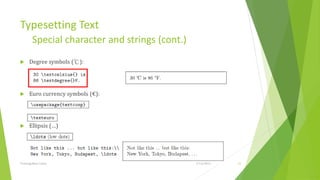
         Special character and strings (cont.)
     Degree symbols (℃):


     Euro currency symbols (€):


     Ellipsis (…)


Training Basic Latex                             1/12/2013   21
Typesetting Text
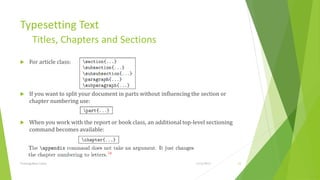
         Titles, Chapters and Sections
     For article class:


     If you want to split your document in parts without influencing the section or
      chapter numbering use:


     When you work with the report or book class, an additional top-level sectioning
      command becomes available:


Training Basic Latex                                                   1/12/2013        22
Typesetting Text
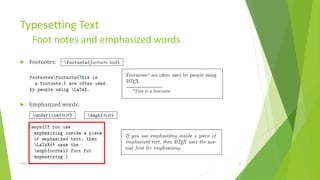
         Foot notes and emphasized words
     Footnotes:


     Emphasized words:


Training Basic Latex                       1/12/2013   23
Typesetting Text
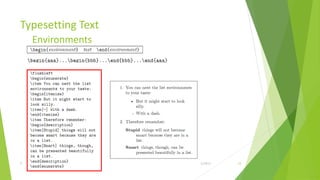
         Environments


Training Basic Latex    1/12/2013   24
Typesetting Text
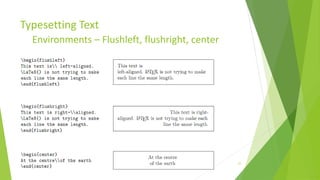
         Environments – Flushleft, flushright, center


Training Basic Latex                           1/12/2013   25
Typesetting Text
         Quote, Quotation, Abstract


Training Basic Latex                  1/12/2013   26
Typesetting Text
         Verbatim, tabular
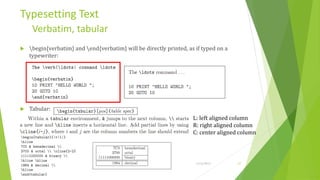
     begin{verbatim} and end{verbatim} will be directly printed, as if typed on a
      typewriter:


     Tabular:
                                                                      L: left aligned column
                                                                      R: right aligned column
                                                                      C: center aligned column


Training Basic Latex                                                   1/12/2013       27
Specialties

Training Basic Latex   1/12/2013   28
Specialties
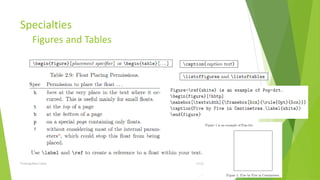
         Figures and Tables


Training Basic Latex          1/12/2013   29
Specialties
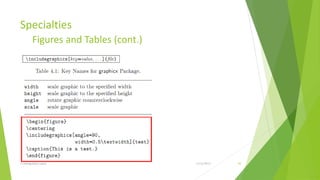
         Figures and Tables (cont.)


Training Basic Latex                  1/12/2013   30
Specialties
         Bibliography
     Produce a bibliography with the thebibliography environment. Each entry starts
      with:
     The marker is then used to cite the book, article or paper within the document.


Training Basic Latex                                                   1/12/2013        31
Specialties
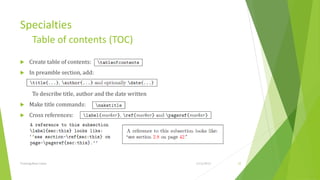
         Table of contents (TOC)
     Create table of contents:
     In preamble section, add:


         To describe title, author and the date written
     Make title commands:
     Cross references:


Training Basic Latex                                      1/12/2013   32
Specialties
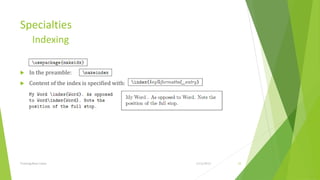
         Indexing

     In the preamble:
     Content of the index is specified with:


Training Basic Latex                            1/12/2013   33
Specialties
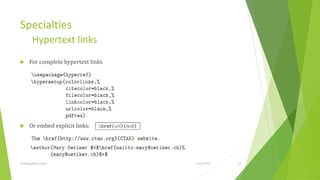
         Hypertext links
     For complete hypertext links


     Or embed explicit links:


Training Basic Latex                 1/12/2013   34
Specialties
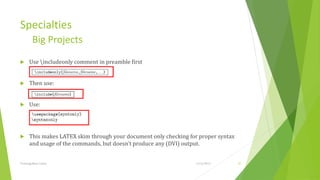
         Big Projects
     Use includeonly comment in preamble first


     Then use:


     Use:


     This makes LATEX skim through your document only checking for proper syntax
      and usage of the commands, but doesn’t produce any (DVI) output.


Training Basic Latex                                              1/12/2013         35
Specialties
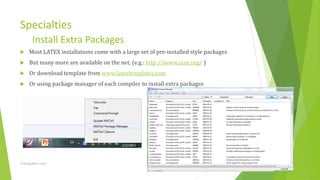
         Install Extra Packages
     Most LATEX installations come with a large set of pre-installed style packages
     But many more are available on the net. (e.g.: http://www.ctan.org/ )
     Or download template from www.latextemplates.com
     Or using package manager of each compiler to install extra packages


Training Basic Latex                                                   1/12/2013       36
Typesetting Mathematical
Formulae

Training Basic Latex   1/12/2013   37
Typesetting Mathematical Formulae
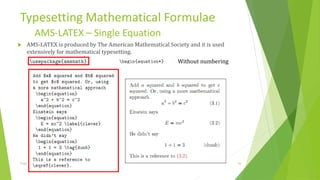
          AMS-LATEX – Single Equation
   AMS-LATEX is produced by The American Mathematical Society and it is used
    extensively for mathematical typesetting.
                                                           Without numbering


Training Basic Latex                                              1/12/2013     38
Typesetting Mathematical Formulae
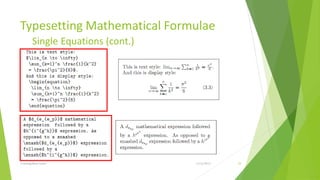
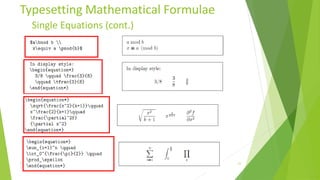
         Single Equations (cont.)


Training Basic Latex                1/12/2013   39
Typesetting Mathematical Formulae
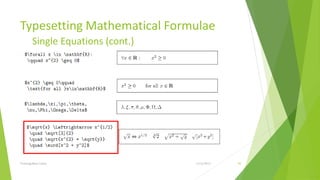
         Single Equations (cont.)


Training Basic Latex                1/12/2013   40
Typesetting Mathematical Formulae
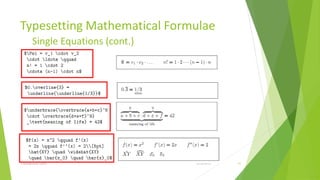
         Single Equations (cont.)


Training Basic Latex                1/12/2013   41
Typesetting Mathematical Formulae
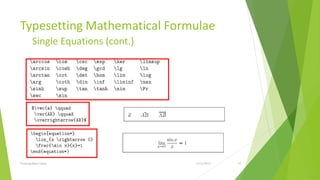
         Single Equations (cont.)


Training Basic Latex                1/12/2013   42
Typesetting Mathematical Formulae
        Single Equations (cont.)


Training Basic Latex               1/12/2013   43
Typesetting Mathematical Formulae
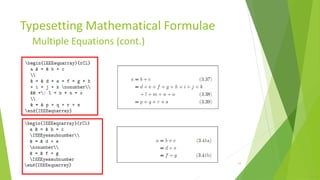
         Multiple Equations (cont.)


Training Basic Latex                  1/12/2013   44
Typesetting Mathematical Formulae
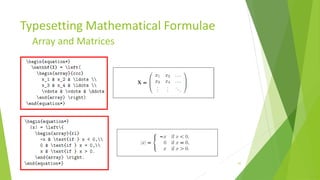
         Array and Matrices


Training Basic Latex          1/12/2013   45
Typesetting Mathematical Formulae
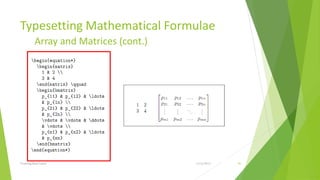
          Array and Matrices (cont.)


Training Basic Latex                   1/12/2013   46
Typesetting Mathematical Formulae
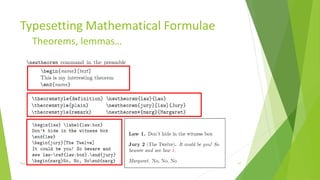
         Theorems, lemmas…


Training Basic Latex         1/12/2013   47
Typesetting Mathematical Formulae
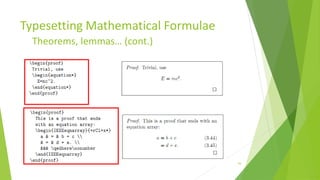
         Theorems, lemmas… (cont.)


Training Basic Latex                 1/12/2013   48
Producing Mathematical
graphics

Training Basic Latex   1/12/2013   49
Producing Mathematical graphics
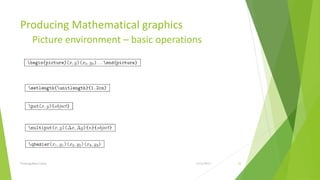
         Picture environment – basic operations


Training Basic Latex                         1/12/2013   50
Producing Mathematical graphics
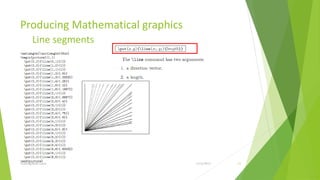
         Line segments


Training Basic Latex              1/12/2013   51
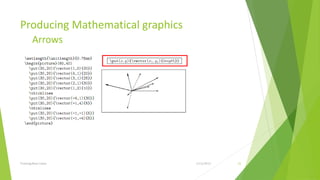
Producing Mathematical graphics
         Arrows


Training Basic Latex              1/12/2013   52
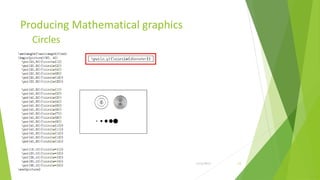
Producing Mathematical graphics
         Circles


Training Basic Latex              1/12/2013   53
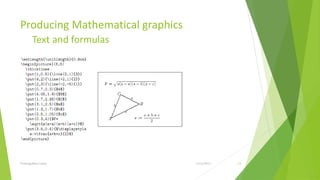
Producing Mathematical graphics
         Text and formulas


Training Basic Latex              1/12/2013   54
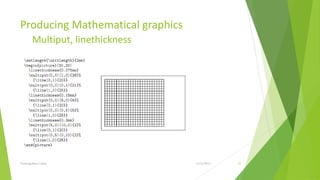
Producing Mathematical graphics
         Multiput, linethickness


Training Basic Latex               1/12/2013   55
Producing Mathematical graphics
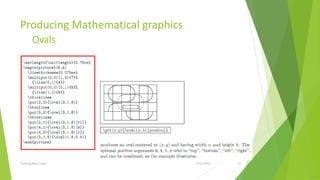
         Ovals


Training Basic Latex              1/12/2013   56
Producing Mathematical graphics
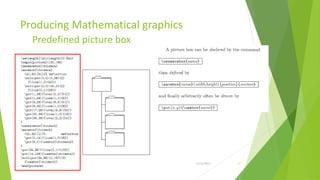
         Predefined picture box


Training Basic Latex              1/12/2013   57
Producing Mathematical graphics
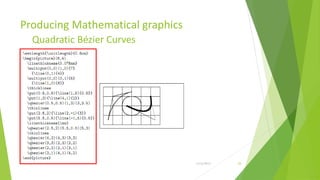
         Quadratic Bézier Curves


Training Basic Latex               1/12/2013   58
Producing Mathematical graphics
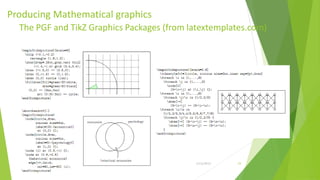
  The PGF and TikZ Graphics Packages (from latextemplates.com)


  Training Basic Latex                      1/12/2013   59
Thank for your listening!

Training basic latex

  • 1.
    Training Basic Latex Edited by: Nguyen Duc Minh Khoi Email: nguyenducminhkhoi@gmail.com Website: http://nguyenducminhkhoi.blogspot.com @HCMC University of Technology, Spring 2013 Main reference: THE NOT SO SHORT INTRODUCTION TO LATEX2Ε by Tobias Oetiker Hubert Partl, Irene Hyna and Elisabeth Schlegl
  • 2.
    Contents: Things you need to know Typesetting Text Specialities Typeset Mathematical formulae Producing Mathematical graphics Training Basic Latex 1/12/2013 2
  • 3.
    Things you needto know Training Basic Latex 1/12/2013 3
  • 4.
    Things you needto know Tex, Latex  TEX  is a computer program created by Donald E. Knuth  is aimed at typesetting text and mathematical formulae  LATEX  enables authors to typeset and print their work at the highest typo-graphical quality, using a predefined, professional layout  was originally written by Leslie Lamport  uses the TEX formatter as its typesetting engine  These days LATEX is maintained by Frank Mittelbach Training Basic Latex 1/12/2013 4
  • 5.
    Things you needto know Author, Book Designer, Typesetter  To publish something:  authors give their typed manuscript to a publishing company.  One of their book designers then decides the layout of the document and writes his instructions into the manuscript and then gives it to a typesetter  typesetter who typesets the book according to these instructions.  In a LATEX environment,  LATEX takes the role of the book designer and uses TEX as its typesetter.  But LATEX is “only” a program and therefore needs more guidance. The author has to provide additional information to describe the logical structure of his work.  This information is written into the text as “LATEX commands.” Training Basic Latex 1/12/2013 5
  • 6.
    Things you needto know Latex’s advantages  LATEX prevents formatting errors by forcing the author to declare the logical structure of his document. LATEX then chooses the most suitable layout.  Professionally crafted layouts are available, which make a document really look as if “printed.”  The typesetting of mathematical formulae is supported in a convenient way.  Users only need to learn a few easy-to-understand commands that specify the logical structure of a document.  Even complex structures such as footnotes, references, table of contents, and bibliographies can be generated easily.  TEX, the formatting engine of LATEX2ε, is highly portable and free. Therefore the system runs on almost any hardware platform available. Training Basic Latex 1/12/2013 6
  • 7.
    Things you needto know Latex’s installation  On Linux OS systems: use Texlive as compiler and gedit as text editor  On Mac OS: use MacTex as compiler and text wrangler as text editor  On Windows: use MikTex as compiler and notepad++ as text editor  Or you can use texclipse as text editor (full support for latex) on multiple platform  On website:  verbosus  MonkeyTeX  LaTeX Lab  ShareLaTeX  WriteLaTeX Training Basic Latex 1/12/2013 7
  • 8.
    Things you needto know Latex’s installation (cont.) - Texclipse Training Basic Latex 1/12/2013 8
  • 9.
    Things you needto know Files encounter Training Basic Latex 1/12/2013 9
  • 10.
  • 11.
    Typesetting Text Input files  Spaces:  Several consecutive whitespace characters are treated as one “space”.  Whitespace at the start of a line is generally ignored, and a single line break is treated as “whitespace.”  An empty line between two lines of text defines the end of a paragraph. Several empty lines are treated the same as one empty line. Training Basic Latex 1/12/2013 11
  • 12.
    Typesetting Text Input files (cont.)  Special Characters:  Latex Commands:  are case sensitive  start with a backslash and then have a name consisting of letters only. Command names are terminated by a space, a number or any other ‘non-letter.  If you want to get a space after a command, you have to put either an empty parameter {} and a blank or a special spacing command after the command name. Training Basic Latex 1/12/2013 12
  • 13.
    Typesetting Text Input files (cont.)  Comments:  a % character while processing an input file, it ignores the rest of the present line, the line break, and all whitespace at the beginning of the next line.  write notes into the input file, which will not show up in the printed version. Training Basic Latex 1/12/2013 13
  • 14.
    Typesetting Text Input file Structure Training Basic Latex 1/12/2013 14
  • 15.
    Typesetting Text The Layout of the documents  M Training Basic Latex 1/12/2013 15
  • 16.
    Training Basic Latex 1/12/2013 16
  • 17.
    Typesetting Text The Layout of the documents (cont.) Training Basic Latex 1/12/2013 17
  • 18.
    Typesetting Text The Layout of the documents (cont.) Training Basic Latex 1/12/2013 18
  • 19.
    Typesetting Text Line Breaking and Page Breaking  To break a line, use:  starts a new line without starting a new paragraph:  additionally prohibits a page break after the forced line break:  Start a new page:  Several words can be kept together on one line with the command: Training Basic Latex 1/12/2013 19
  • 20.
    Typesetting Text Special character and strings  Quotation marks:  Dash and hyphens: Training Basic Latex 1/12/2013 20
  • 21.
    Typesetting Text Special character and strings (cont.)  Degree symbols (℃):  Euro currency symbols (€):  Ellipsis (…) Training Basic Latex 1/12/2013 21
  • 22.
    Typesetting Text Titles, Chapters and Sections  For article class:  If you want to split your document in parts without influencing the section or chapter numbering use:  When you work with the report or book class, an additional top-level sectioning command becomes available: Training Basic Latex 1/12/2013 22
  • 23.
    Typesetting Text Foot notes and emphasized words  Footnotes:  Emphasized words: Training Basic Latex 1/12/2013 23
  • 24.
    Typesetting Text Environments Training Basic Latex 1/12/2013 24
  • 25.
    Typesetting Text Environments – Flushleft, flushright, center Training Basic Latex 1/12/2013 25
  • 26.
    Typesetting Text Quote, Quotation, Abstract Training Basic Latex 1/12/2013 26
  • 27.
    Typesetting Text Verbatim, tabular  begin{verbatim} and end{verbatim} will be directly printed, as if typed on a typewriter:  Tabular: L: left aligned column R: right aligned column C: center aligned column Training Basic Latex 1/12/2013 27
  • 28.
  • 29.
    Specialties Figures and Tables Training Basic Latex 1/12/2013 29
  • 30.
    Specialties Figures and Tables (cont.) Training Basic Latex 1/12/2013 30
  • 31.
    Specialties Bibliography  Produce a bibliography with the thebibliography environment. Each entry starts with:  The marker is then used to cite the book, article or paper within the document. Training Basic Latex 1/12/2013 31
  • 32.
    Specialties Table of contents (TOC)  Create table of contents:  In preamble section, add: To describe title, author and the date written  Make title commands:  Cross references: Training Basic Latex 1/12/2013 32
  • 33.
    Specialties Indexing  In the preamble:  Content of the index is specified with: Training Basic Latex 1/12/2013 33
  • 34.
    Specialties Hypertext links  For complete hypertext links  Or embed explicit links: Training Basic Latex 1/12/2013 34
  • 35.
    Specialties Big Projects  Use includeonly comment in preamble first  Then use:  Use:  This makes LATEX skim through your document only checking for proper syntax and usage of the commands, but doesn’t produce any (DVI) output. Training Basic Latex 1/12/2013 35
  • 36.
    Specialties Install Extra Packages  Most LATEX installations come with a large set of pre-installed style packages  But many more are available on the net. (e.g.: http://www.ctan.org/ )  Or download template from www.latextemplates.com  Or using package manager of each compiler to install extra packages Training Basic Latex 1/12/2013 36
  • 37.
  • 38.
    Typesetting Mathematical Formulae AMS-LATEX – Single Equation  AMS-LATEX is produced by The American Mathematical Society and it is used extensively for mathematical typesetting. Without numbering Training Basic Latex 1/12/2013 38
  • 39.
    Typesetting Mathematical Formulae Single Equations (cont.) Training Basic Latex 1/12/2013 39
  • 40.
    Typesetting Mathematical Formulae Single Equations (cont.) Training Basic Latex 1/12/2013 40
  • 41.
    Typesetting Mathematical Formulae Single Equations (cont.) Training Basic Latex 1/12/2013 41
  • 42.
    Typesetting Mathematical Formulae Single Equations (cont.) Training Basic Latex 1/12/2013 42
  • 43.
    Typesetting Mathematical Formulae Single Equations (cont.) Training Basic Latex 1/12/2013 43
  • 44.
    Typesetting Mathematical Formulae Multiple Equations (cont.) Training Basic Latex 1/12/2013 44
  • 45.
    Typesetting Mathematical Formulae Array and Matrices Training Basic Latex 1/12/2013 45
  • 46.
    Typesetting Mathematical Formulae Array and Matrices (cont.) Training Basic Latex 1/12/2013 46
  • 47.
    Typesetting Mathematical Formulae Theorems, lemmas… Training Basic Latex 1/12/2013 47
  • 48.
    Typesetting Mathematical Formulae Theorems, lemmas… (cont.) Training Basic Latex 1/12/2013 48
  • 49.
  • 50.
    Producing Mathematical graphics Picture environment – basic operations Training Basic Latex 1/12/2013 50
  • 51.
    Producing Mathematical graphics Line segments Training Basic Latex 1/12/2013 51
  • 52.
    Producing Mathematical graphics Arrows Training Basic Latex 1/12/2013 52
  • 53.
    Producing Mathematical graphics Circles Training Basic Latex 1/12/2013 53
  • 54.
    Producing Mathematical graphics Text and formulas Training Basic Latex 1/12/2013 54
  • 55.
    Producing Mathematical graphics Multiput, linethickness Training Basic Latex 1/12/2013 55
  • 56.
    Producing Mathematical graphics Ovals Training Basic Latex 1/12/2013 56
  • 57.
    Producing Mathematical graphics Predefined picture box Training Basic Latex 1/12/2013 57
  • 58.
    Producing Mathematical graphics Quadratic Bézier Curves Training Basic Latex 1/12/2013 58
  • 59.
    Producing Mathematical graphics The PGF and TikZ Graphics Packages (from latextemplates.com) Training Basic Latex 1/12/2013 59
  • 60.
    Thank for yourlistening!