Motivation Basics Controlling Appearance Adding Structure BIBTEX References 
The LATEX 
Document Preparation System 
Vijay Ukani, 
Computer Science and Engineering Department 
Nirma University, Ahmedabad 
September 20, 2014 
Vijay Ukani Nirma University, Ahmedabad 
Introduction to LATEX
Motivation Basics Controlling Appearance Adding Structure BIBTEX References 
1 Motivation 
2 Basics 
Commands 
Document Structure 
Running LATEX 
3 Controlling Appearance 
Making Lists 
Fonts, Symbols, quotations and footnotes 
4 Adding Structure 
Sections 
Tables, Figures and Equations 
5 BIBTEX 
Vijay Ukani Nirma University, Ahmedabad 
Introduction to LATEX
Motivation Basics Controlling Appearance Adding Structure BIBTEX References 
What is TEXand LATEX? 
TEX typesetting system developed by DONALD E. 
KNUTH (Stanford University) to create beautiful 
documents, especially those containing maths. TEX 
is free software focusing more upon formatting. 
LATEX LATEX is a set of macros built on top of TEX. 
TEX-macroprocessor is written by LESLIE 
LAMPORT, which implements a markup-language. 
Allows users to concentrate on the content of the 
document rather than on formatting. 
Vijay Ukani Nirma University, Ahmedabad 
Introduction to LATEX
Motivation Basics Controlling Appearance Adding Structure BIBTEX References 
What is LATEX? 
pronounced as Lah-tek, or Lay-tek 
a typesetting program, not a word-processor 
macros of TeX (Donald E. Knuth) 
current version LATEX2" 
designed for producing beautiful Books, Thesis, Papers, 
Articles... 
de facto standard for writing academic papers 
Vijay Ukani Nirma University, Ahmedabad 
Introduction to LATEX
Motivation Basics Controlling Appearance Adding Structure BIBTEX References 
Why LATEX? 
platform, version independent (Unix, Windows), freely 
available 
High quality math typesetting 
Only a few commands to de
ne the structure of text, no 
knowledge of typography or book design required 
Complex scienti
c documents can be created automatically 
including: 
bibliography 
index, glossaries 
crossreferences 
table of contents, lists of
gures, tables etc. 
. . . 
used widely in scienti
c world and required for most 
conference or journal submissions 
allows you to think about content than format 
Vijay Ukani Nirma University, Ahmedabad 
Introduction to LATEX
Motivation Basics Controlling Appearance Adding Structure BIBTEX References 
Limitations of LATEX 
learning curve 
LATEX is not WYSIWYG you have to compile your
les 
before you can see the changes. Rather it is WYMIWYG 
(What You Mean is What You Get) 
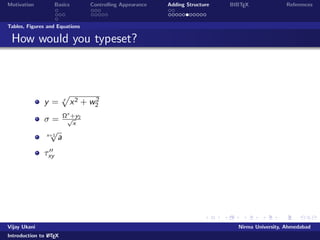
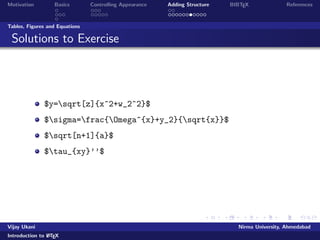
If you are trying to produce a document for which there is no 
pre-de
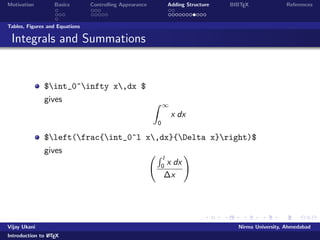
ned layout, it requires a fair bit of knowledge to design 
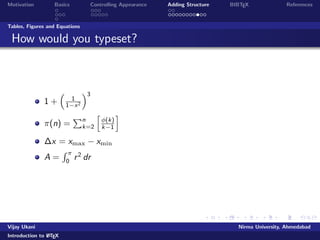
a new layout 
You cannot easily exchange LATEX
les with colleagues who 
are unfamiliar with it 
Un
exible formatting (dicult to change position of
gures) 
Requires compilation 
Vijay Ukani Nirma University, Ahmedabad 
Introduction to LATEX
Motivation Basics Controlling Appearance Adding Structure BIBTEX References 
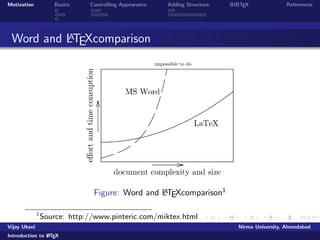
Word and LATEXcomparison 
Figure: Word and LATEXcomparison1 
1Source: http://www.pinteric.com/miktex.html 
Vijay Ukani Nirma University, Ahmedabad 
Introduction to LATEX
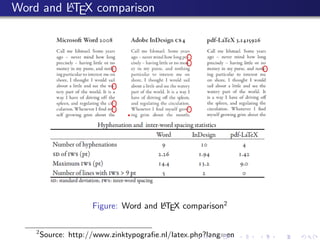
Word and LATEX comparison 
Figure: Word and LATEX comparison2 
2Source: http://www.zinktypogra
e.nl/latex.php?lang=en
Motivation Basics Controlling Appearance Adding Structure BIBTEX References 
Word and LATEX comparison 
Plus points of LATEX 
Speed 
Security 
Separation of contents from formatting 
Control 
Flexibility 
Interoperable 
. . . 
Vijay Ukani Nirma University, Ahmedabad 
Introduction to LATEX
Motivation Basics Controlling Appearance Adding Structure BIBTEX References 
Word and LATEX comparison 
Plus points of Word 
Grammar Checker 
Lesser time for smaller documents 
WYSIWYG 
Vijay Ukani Nirma University, Ahmedabad 
Introduction to LATEX
Motivation Basics Controlling Appearance Adding Structure BIBTEX References 
Where to get LATEX? 
Windows 
MikTeX, The LATEXCompiler http://www.miktex.de/ 
LATEXEditors 
WinEdt (Share ware) 
LATEXEditor, LEd, a free LaTeX editor 
TexNIC center, a free LaTeX editor 
WinShell, SciTE (Open Source) 
Notepad, wordpad or any other text editor can be used 
Linux 
TeXLive/teTex, available with most Linux distros 
Kile, a free LaTeX editor 
gedit with LATEXplugin 
Online LATEX 
https://www.writelatex.com/edu 
https://www.sharelatex.com/ 
Vijay Ukani Nirma University, Ahmedabad 
Introduction to LATEX
Motivation Basics Controlling Appearance Adding Structure BIBTEX References 
Outline 
1 Motivation 
2 Basics 
Commands 
Document Structure 
Running LATEX 
3 Controlling Appearance 
Making Lists 
Fonts, Symbols, quotations and footnotes 
4 Adding Structure 
Sections 
Tables, Figures and Equations 
5 BIBTEX 
Vijay Ukani Nirma University, Ahmedabad 
Introduction to LATEX
Motivation Basics Controlling Appearance Adding Structure BIBTEX References 
Commands 
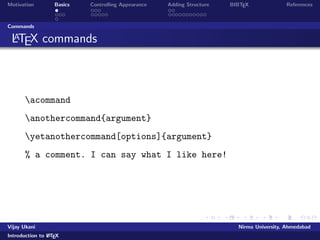
LATEX commands 
acommand 
anothercommand{argument} 
yetanothercommand[options]{argument} 
% a comment. I can say what I like here! 
Vijay Ukani Nirma University, Ahmedabad 
Introduction to LATEX
Motivation Basics Controlling Appearance Adding Structure BIBTEX References 
Document Structure 
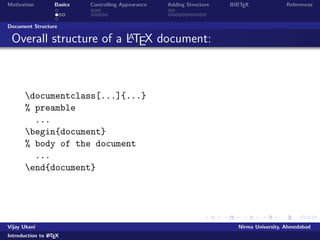
Overall structure of a LATEX document: 
documentclass[...]{...} 
% preamble 
... 
begin{document} 
% body of the document 
... 
end{document} 
Vijay Ukani Nirma University, Ahmedabad 
Introduction to LATEX
Motivation Basics Controlling Appearance Adding Structure BIBTEX References 
Document Structure 
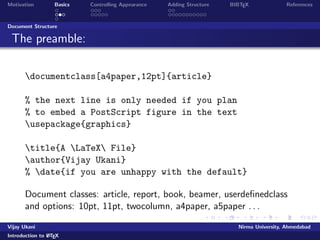
The preamble: 
documentclass[a4paper,12pt]{article} 
% the next line is only needed if you plan 
% to embed a PostScript figure in the text 
usepackage{graphics} 
title{A LaTeX File} 
author{Vijay Ukani} 
% date{if you are unhappy with the default} 
Document classes: article, report, book, beamer, userde
nedclass 
and options: 10pt, 11pt, twocolumn, a4paper, a5paper . . . 
Vijay Ukani Nirma University, Ahmedabad 
Introduction to LATEX
Motivation Basics Controlling Appearance Adding Structure BIBTEX References 
Document Structure 
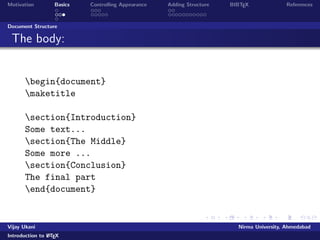
The body: 
begin{document} 
maketitle 
section{Introduction} 
Some text... 
section{The Middle} 
Some more ... 
section{Conclusion} 
The final part 
end{document} 
Vijay Ukani Nirma University, Ahmedabad 
Introduction to LATEX
Motivation Basics Controlling Appearance Adding Structure BIBTEX References 
Running LATEX 
Running and Viewing LATEX 
Start WinEdt or any of your favorite TEX editor 
Create a new .tex
le 
Vijay Ukani Nirma University, Ahmedabad 
Introduction to LATEX
Motivation Basics Controlling Appearance Adding Structure BIBTEX References 
Running LATEX 
Running and Viewing LATEX 
Start WinEdt or any of your favorite TEX editor 
Create a new .tex
le 
Prepare your latex
le as per previous slide 
Vijay Ukani Nirma University, Ahmedabad 
Introduction to LATEX
Motivation Basics Controlling Appearance Adding Structure BIBTEX References 
Running LATEX 
Running and Viewing LATEX 
Start WinEdt or any of your favorite TEX editor 
Create a new .tex
le 
Prepare your latex
le as per previous slide 
Prepare Bibliography, if any 
Use BibTex to process Bibliography 
Vijay Ukani Nirma University, Ahmedabad 
Introduction to LATEX
Motivation Basics Controlling Appearance Adding Structure BIBTEX References 
Running LATEX 
Running and Viewing LATEX 
Start WinEdt or any of your favorite TEX editor 
Create a new .tex
le 
Prepare your latex
le as per previous slide 
Prepare Bibliography, if any 
Use BibTex to process Bibliography 
Compile your document with LaTeX
lename.tex command 
on DOS prompt or click TEX button in the menubar 
Vijay Ukani Nirma University, Ahmedabad 
Introduction to LATEX
Motivation Basics Controlling Appearance Adding Structure BIBTEX References 
Running LATEX 
Running and Viewing LATEX 
Start WinEdt or any of your favorite TEX editor 
Create a new .tex
le 
Prepare your latex
le as per previous slide 
Prepare Bibliography, if any 
Use BibTex to process Bibliography 
Compile your document with LaTeX
lename.tex command 
on DOS prompt or click TEX button in the menubar 
View the dvi output 
Vijay Ukani Nirma University, Ahmedabad 
Introduction to LATEX
Motivation Basics Controlling Appearance Adding Structure BIBTEX References 
Running LATEX 
Running and Viewing LATEX 
Start WinEdt or any of your favorite TEX editor 
Create a new .tex
le 
Prepare your latex
le as per previous slide 
Prepare Bibliography, if any 
Use BibTex to process Bibliography 
Compile your document with LaTeX
lename.tex command 
on DOS prompt or click TEX button in the menubar 
View the dvi output 
To get pdf output, the command is pd
atex
lename.tex 
View the pdf output 
Vijay Ukani Nirma University, Ahmedabad 
Introduction to LATEX
Motivation Basics Controlling Appearance Adding Structure BIBTEX References 
Running LATEX 
Running and Viewing LATEX 
Start WinEdt or any of your favorite TEX editor 
Create a new .tex
le 
Prepare your latex
le as per previous slide 
Prepare Bibliography, if any 
Use BibTex to process Bibliography 
Compile your document with LaTeX
lename.tex command 
on DOS prompt or click TEX button in the menubar 
View the dvi output 
To get pdf output, the command is pd
atex
lename.tex 
View the pdf output 
Vijay Ukani Nirma University, Ahmedabad 
Introduction to LATEX
Motivation Basics Controlling Appearance Adding Structure BIBTEX References 
Running LATEX 
Running and Viewing LATEX 
Start WinEdt or any of your favorite TEX editor 
Create a new .tex
le 
Prepare your latex
le as per previous slide 
Prepare Bibliography, if any 
Use BibTex to process Bibliography 
Compile your document with LaTeX
lename.tex command 
on DOS prompt or click TEX button in the menubar 
View the dvi output 
To get pdf output, the command is pd
atex
lename.tex 
View the pdf output 
Vijay Ukani Nirma University, Ahmedabad 
Introduction to LATEX
Motivation Basics Controlling Appearance Adding Structure BIBTEX References 
Outline 
1 Motivation 
2 Basics 
Commands 
Document Structure 
Running LATEX 
3 Controlling Appearance 
Making Lists 
Fonts, Symbols, quotations and footnotes 
4 Adding Structure 
Sections 
Tables, Figures and Equations 
5 BIBTEX 
Vijay Ukani Nirma University, Ahmedabad 
Introduction to LATEX
Motivation Basics Controlling Appearance Adding Structure BIBTEX References 
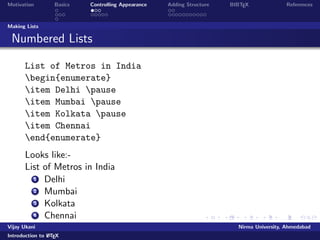
Making Lists 
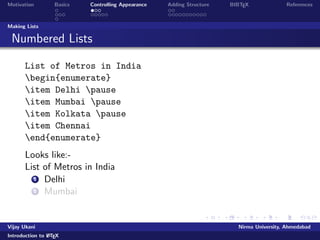
Numbered Lists 
List of Metros in India 
begin{enumerate} 
item Delhi pause 
item Mumbai pause 
item Kolkata pause 
item Chennai 
end{enumerate} 
Looks like:- 
List of Metros in India 
1 Delhi 
2 Mumbai 
Vijay Ukani Nirma University, Ahmedabad 
Introduction to LATEX
Motivation Basics Controlling Appearance Adding Structure BIBTEX References 
Making Lists 
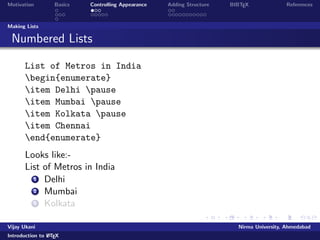
Numbered Lists 
List of Metros in India 
begin{enumerate} 
item Delhi pause 
item Mumbai pause 
item Kolkata pause 
item Chennai 
end{enumerate} 
Looks like:- 
List of Metros in India 
1 Delhi 
2 Mumbai 
3 Kolkata 
Vijay Ukani Nirma University, Ahmedabad 
Introduction to LATEX
Motivation Basics Controlling Appearance Adding Structure BIBTEX References 
Making Lists 
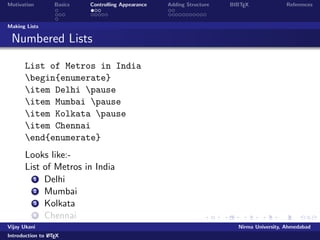
Numbered Lists 
List of Metros in India 
begin{enumerate} 
item Delhi pause 
item Mumbai pause 
item Kolkata pause 
item Chennai 
end{enumerate} 
Looks like:- 
List of Metros in India 
1 Delhi 
2 Mumbai 
3 Kolkata 
4 Chennai 
Vijay Ukani Nirma University, Ahmedabad 
Introduction to LATEX

Latex slides

  • 1.
    Motivation Basics ControllingAppearance Adding Structure BIBTEX References The LATEX Document Preparation System Vijay Ukani, Computer Science and Engineering Department Nirma University, Ahmedabad September 20, 2014 Vijay Ukani Nirma University, Ahmedabad Introduction to LATEX
  • 2.
    Motivation Basics ControllingAppearance Adding Structure BIBTEX References 1 Motivation 2 Basics Commands Document Structure Running LATEX 3 Controlling Appearance Making Lists Fonts, Symbols, quotations and footnotes 4 Adding Structure Sections Tables, Figures and Equations 5 BIBTEX Vijay Ukani Nirma University, Ahmedabad Introduction to LATEX
  • 3.
    Motivation Basics ControllingAppearance Adding Structure BIBTEX References What is TEXand LATEX? TEX typesetting system developed by DONALD E. KNUTH (Stanford University) to create beautiful documents, especially those containing maths. TEX is free software focusing more upon formatting. LATEX LATEX is a set of macros built on top of TEX. TEX-macroprocessor is written by LESLIE LAMPORT, which implements a markup-language. Allows users to concentrate on the content of the document rather than on formatting. Vijay Ukani Nirma University, Ahmedabad Introduction to LATEX
  • 4.
    Motivation Basics ControllingAppearance Adding Structure BIBTEX References What is LATEX? pronounced as Lah-tek, or Lay-tek a typesetting program, not a word-processor macros of TeX (Donald E. Knuth) current version LATEX2" designed for producing beautiful Books, Thesis, Papers, Articles... de facto standard for writing academic papers Vijay Ukani Nirma University, Ahmedabad Introduction to LATEX
  • 5.
    Motivation Basics ControllingAppearance Adding Structure BIBTEX References Why LATEX? platform, version independent (Unix, Windows), freely available High quality math typesetting Only a few commands to de
  • 6.
    ne the structureof text, no knowledge of typography or book design required Complex scienti
  • 7.
    c documents canbe created automatically including: bibliography index, glossaries crossreferences table of contents, lists of
  • 8.
    gures, tables etc. . . . used widely in scienti
  • 9.
    c world andrequired for most conference or journal submissions allows you to think about content than format Vijay Ukani Nirma University, Ahmedabad Introduction to LATEX
  • 10.
    Motivation Basics ControllingAppearance Adding Structure BIBTEX References Limitations of LATEX learning curve LATEX is not WYSIWYG you have to compile your
  • 11.
    les before youcan see the changes. Rather it is WYMIWYG (What You Mean is What You Get) If you are trying to produce a document for which there is no pre-de
  • 12.
    ned layout, itrequires a fair bit of knowledge to design a new layout You cannot easily exchange LATEX
  • 13.
    les with colleagueswho are unfamiliar with it Un exible formatting (dicult to change position of
  • 14.
    gures) Requires compilation Vijay Ukani Nirma University, Ahmedabad Introduction to LATEX
  • 15.
    Motivation Basics ControllingAppearance Adding Structure BIBTEX References Word and LATEXcomparison Figure: Word and LATEXcomparison1 1Source: http://www.pinteric.com/miktex.html Vijay Ukani Nirma University, Ahmedabad Introduction to LATEX
  • 16.
    Word and LATEXcomparison Figure: Word and LATEX comparison2 2Source: http://www.zinktypogra
  • 17.
  • 18.
    Motivation Basics ControllingAppearance Adding Structure BIBTEX References Word and LATEX comparison Plus points of LATEX Speed Security Separation of contents from formatting Control Flexibility Interoperable . . . Vijay Ukani Nirma University, Ahmedabad Introduction to LATEX
  • 19.
    Motivation Basics ControllingAppearance Adding Structure BIBTEX References Word and LATEX comparison Plus points of Word Grammar Checker Lesser time for smaller documents WYSIWYG Vijay Ukani Nirma University, Ahmedabad Introduction to LATEX
  • 20.
    Motivation Basics ControllingAppearance Adding Structure BIBTEX References Where to get LATEX? Windows MikTeX, The LATEXCompiler http://www.miktex.de/ LATEXEditors WinEdt (Share ware) LATEXEditor, LEd, a free LaTeX editor TexNIC center, a free LaTeX editor WinShell, SciTE (Open Source) Notepad, wordpad or any other text editor can be used Linux TeXLive/teTex, available with most Linux distros Kile, a free LaTeX editor gedit with LATEXplugin Online LATEX https://www.writelatex.com/edu https://www.sharelatex.com/ Vijay Ukani Nirma University, Ahmedabad Introduction to LATEX
  • 21.
    Motivation Basics ControllingAppearance Adding Structure BIBTEX References Outline 1 Motivation 2 Basics Commands Document Structure Running LATEX 3 Controlling Appearance Making Lists Fonts, Symbols, quotations and footnotes 4 Adding Structure Sections Tables, Figures and Equations 5 BIBTEX Vijay Ukani Nirma University, Ahmedabad Introduction to LATEX
  • 22.
    Motivation Basics ControllingAppearance Adding Structure BIBTEX References Commands LATEX commands acommand anothercommand{argument} yetanothercommand[options]{argument} % a comment. I can say what I like here! Vijay Ukani Nirma University, Ahmedabad Introduction to LATEX
  • 23.
    Motivation Basics ControllingAppearance Adding Structure BIBTEX References Document Structure Overall structure of a LATEX document: documentclass[...]{...} % preamble ... begin{document} % body of the document ... end{document} Vijay Ukani Nirma University, Ahmedabad Introduction to LATEX
  • 24.
    Motivation Basics ControllingAppearance Adding Structure BIBTEX References Document Structure The preamble: documentclass[a4paper,12pt]{article} % the next line is only needed if you plan % to embed a PostScript figure in the text usepackage{graphics} title{A LaTeX File} author{Vijay Ukani} % date{if you are unhappy with the default} Document classes: article, report, book, beamer, userde
  • 25.
    nedclass and options:10pt, 11pt, twocolumn, a4paper, a5paper . . . Vijay Ukani Nirma University, Ahmedabad Introduction to LATEX
  • 26.
    Motivation Basics ControllingAppearance Adding Structure BIBTEX References Document Structure The body: begin{document} maketitle section{Introduction} Some text... section{The Middle} Some more ... section{Conclusion} The final part end{document} Vijay Ukani Nirma University, Ahmedabad Introduction to LATEX
  • 27.
    Motivation Basics ControllingAppearance Adding Structure BIBTEX References Running LATEX Running and Viewing LATEX Start WinEdt or any of your favorite TEX editor Create a new .tex
  • 28.
    le Vijay UkaniNirma University, Ahmedabad Introduction to LATEX
  • 29.
    Motivation Basics ControllingAppearance Adding Structure BIBTEX References Running LATEX Running and Viewing LATEX Start WinEdt or any of your favorite TEX editor Create a new .tex
  • 30.
  • 31.
    le as perprevious slide Vijay Ukani Nirma University, Ahmedabad Introduction to LATEX
  • 32.
    Motivation Basics ControllingAppearance Adding Structure BIBTEX References Running LATEX Running and Viewing LATEX Start WinEdt or any of your favorite TEX editor Create a new .tex
  • 33.
  • 34.
    le as perprevious slide Prepare Bibliography, if any Use BibTex to process Bibliography Vijay Ukani Nirma University, Ahmedabad Introduction to LATEX
  • 35.
    Motivation Basics ControllingAppearance Adding Structure BIBTEX References Running LATEX Running and Viewing LATEX Start WinEdt or any of your favorite TEX editor Create a new .tex
  • 36.
  • 37.
    le as perprevious slide Prepare Bibliography, if any Use BibTex to process Bibliography Compile your document with LaTeX
  • 38.
    lename.tex command onDOS prompt or click TEX button in the menubar Vijay Ukani Nirma University, Ahmedabad Introduction to LATEX
  • 39.
    Motivation Basics ControllingAppearance Adding Structure BIBTEX References Running LATEX Running and Viewing LATEX Start WinEdt or any of your favorite TEX editor Create a new .tex
  • 40.
  • 41.
    le as perprevious slide Prepare Bibliography, if any Use BibTex to process Bibliography Compile your document with LaTeX
  • 42.
    lename.tex command onDOS prompt or click TEX button in the menubar View the dvi output Vijay Ukani Nirma University, Ahmedabad Introduction to LATEX
  • 43.
    Motivation Basics ControllingAppearance Adding Structure BIBTEX References Running LATEX Running and Viewing LATEX Start WinEdt or any of your favorite TEX editor Create a new .tex
  • 44.
  • 45.
    le as perprevious slide Prepare Bibliography, if any Use BibTex to process Bibliography Compile your document with LaTeX
  • 46.
    lename.tex command onDOS prompt or click TEX button in the menubar View the dvi output To get pdf output, the command is pd atex
  • 47.
    lename.tex View thepdf output Vijay Ukani Nirma University, Ahmedabad Introduction to LATEX
  • 48.
    Motivation Basics ControllingAppearance Adding Structure BIBTEX References Running LATEX Running and Viewing LATEX Start WinEdt or any of your favorite TEX editor Create a new .tex
  • 49.
  • 50.
    le as perprevious slide Prepare Bibliography, if any Use BibTex to process Bibliography Compile your document with LaTeX
  • 51.
    lename.tex command onDOS prompt or click TEX button in the menubar View the dvi output To get pdf output, the command is pd atex
  • 52.
    lename.tex View thepdf output Vijay Ukani Nirma University, Ahmedabad Introduction to LATEX
  • 53.
    Motivation Basics ControllingAppearance Adding Structure BIBTEX References Running LATEX Running and Viewing LATEX Start WinEdt or any of your favorite TEX editor Create a new .tex
  • 54.
  • 55.
    le as perprevious slide Prepare Bibliography, if any Use BibTex to process Bibliography Compile your document with LaTeX
  • 56.
    lename.tex command onDOS prompt or click TEX button in the menubar View the dvi output To get pdf output, the command is pd atex
  • 57.
    lename.tex View thepdf output Vijay Ukani Nirma University, Ahmedabad Introduction to LATEX
  • 58.
    Motivation Basics ControllingAppearance Adding Structure BIBTEX References Outline 1 Motivation 2 Basics Commands Document Structure Running LATEX 3 Controlling Appearance Making Lists Fonts, Symbols, quotations and footnotes 4 Adding Structure Sections Tables, Figures and Equations 5 BIBTEX Vijay Ukani Nirma University, Ahmedabad Introduction to LATEX
  • 59.
    Motivation Basics ControllingAppearance Adding Structure BIBTEX References Making Lists Numbered Lists List of Metros in India begin{enumerate} item Delhi pause item Mumbai pause item Kolkata pause item Chennai end{enumerate} Looks like:- List of Metros in India 1 Delhi 2 Mumbai Vijay Ukani Nirma University, Ahmedabad Introduction to LATEX
  • 60.
    Motivation Basics ControllingAppearance Adding Structure BIBTEX References Making Lists Numbered Lists List of Metros in India begin{enumerate} item Delhi pause item Mumbai pause item Kolkata pause item Chennai end{enumerate} Looks like:- List of Metros in India 1 Delhi 2 Mumbai 3 Kolkata Vijay Ukani Nirma University, Ahmedabad Introduction to LATEX
  • 61.
    Motivation Basics ControllingAppearance Adding Structure BIBTEX References Making Lists Numbered Lists List of Metros in India begin{enumerate} item Delhi pause item Mumbai pause item Kolkata pause item Chennai end{enumerate} Looks like:- List of Metros in India 1 Delhi 2 Mumbai 3 Kolkata 4 Chennai Vijay Ukani Nirma University, Ahmedabad Introduction to LATEX
  • 62.
    Motivation Basics ControllingAppearance Adding Structure BIBTEX References Making Lists Numbered Lists List of Metros in India begin{enumerate} item Delhi pause item Mumbai pause item Kolkata pause item Chennai end{enumerate} Looks like:- List of Metros in India 1 Delhi 2 Mumbai 3 Kolkata 4 Chennai Vijay Ukani Nirma University, Ahmedabad Introduction to LATEX
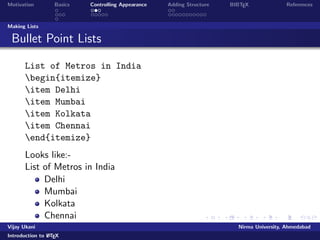
  • 63.
    Motivation Basics ControllingAppearance Adding Structure BIBTEX References Making Lists Bullet Point Lists List of Metros in India begin{itemize} item Delhi item Mumbai item Kolkata item Chennai end{itemize} Looks like:- List of Metros in India Delhi Mumbai Kolkata Chennai Vijay Ukani Nirma University, Ahmedabad Introduction to LATEX
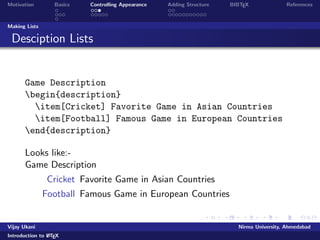
  • 64.
    Motivation Basics ControllingAppearance Adding Structure BIBTEX References Making Lists Desciption Lists Game Description begin{description} item[Cricket] Favorite Game in Asian Countries item[Football] Famous Game in European Countries end{description} Looks like:- Game Description Cricket Favorite Game in Asian Countries Football Famous Game in European Countries Vijay Ukani Nirma University, Ahmedabad Introduction to LATEX
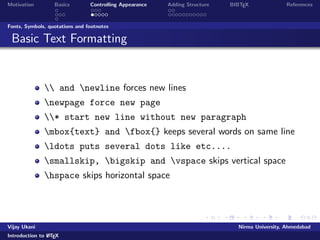
  • 65.
    Motivation Basics ControllingAppearance Adding Structure BIBTEX References Fonts, Symbols, quotations and footnotes Basic Text Formatting and newline forces new lines newpage force new page * start new line without new paragraph mbox{text} and fbox{} keeps several words on same line ldots puts several dots like etc.... smallskip, bigskip and vspace skips vertical space hspace skips horizontal space Vijay Ukani Nirma University, Ahmedabad Introduction to LATEX
  • 66.
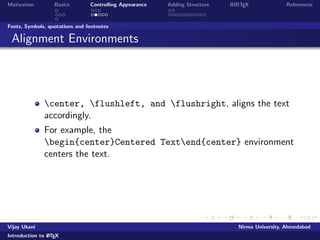
    Motivation Basics ControllingAppearance Adding Structure BIBTEX References Fonts, Symbols, quotations and footnotes Alignment Environments center, flushleft, and flushright, aligns the text accordingly. For example, the begin{center}Centered Textend{center} environment centers the text. Vijay Ukani Nirma University, Ahmedabad Introduction to LATEX
  • 67.
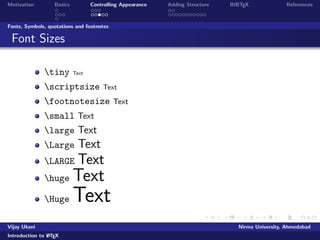
    Motivation Basics ControllingAppearance Adding Structure BIBTEX References Fonts, Symbols, quotations and footnotes Font Sizes tiny Text scriptsize Text footnotesize Text small Text large Text Large Text LARGE Text huge Text HugeText Vijay Ukani Nirma University, Ahmedabad Introduction to LATEX
  • 68.
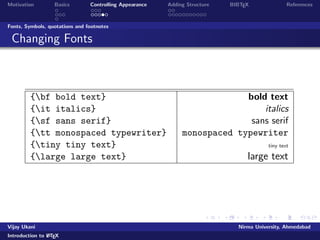
    Motivation Basics ControllingAppearance Adding Structure BIBTEX References Fonts, Symbols, quotations and footnotes Changing Fonts {bf bold text} bold text {it italics} italics {sf sans serif} sans serif {tt monospaced typewriter} monospaced typewriter {tiny tiny text} tiny text {large large text} large text Vijay Ukani Nirma University, Ahmedabad Introduction to LATEX
  • 69.
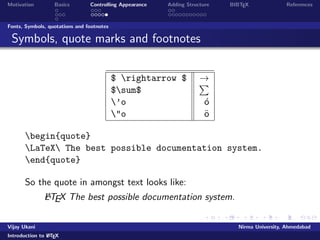
    Motivation Basics ControllingAppearance Adding Structure BIBTEX References Fonts, Symbols, quotations and footnotes Symbols, quote marks and footnotes $ rightarrow $ ! $sum$ P 'o o o o begin{quote} LaTeX The best possible documentation system. end{quote} So the quote in amongst text looks like: LATEX The best possible documentation system. Vijay Ukani Nirma University, Ahmedabad Introduction to LATEX
  • 70.
    Motivation Basics ControllingAppearance Adding Structure BIBTEX References Outline 1 Motivation 2 Basics Commands Document Structure Running LATEX 3 Controlling Appearance Making Lists Fonts, Symbols, quotations and footnotes 4 Adding Structure Sections Tables, Figures and Equations 5 BIBTEX Vijay Ukani Nirma University, Ahmedabad Introduction to LATEX
  • 71.
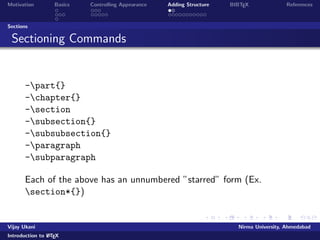
    Motivation Basics ControllingAppearance Adding Structure BIBTEX References Sections Sectioning Commands -part{} -chapter{} -section -subsection{} -subsubsection{} -paragraph -subparagraph Each of the above has an unnumbered starred form (Ex. section*{}) Vijay Ukani Nirma University, Ahmedabad Introduction to LATEX
  • 72.
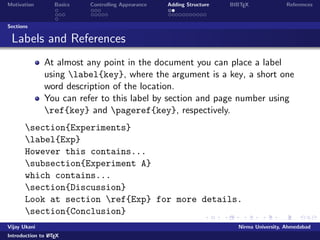
    Motivation Basics ControllingAppearance Adding Structure BIBTEX References Sections Labels and References At almost any point in the document you can place a label using label{key}, where the argument is a key, a short one word description of the location. You can refer to this label by section and page number using ref{key} and pageref{key}, respectively. section{Experiments} label{Exp} However this contains... subsection{Experiment A} which contains... section{Discussion} Look at section ref{Exp} for more details. section{Conclusion} Vijay Ukani Nirma University, Ahmedabad Introduction to LATEX
  • 73.
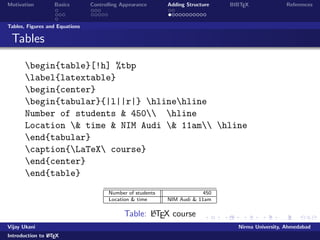
    Motivation Basics ControllingAppearance Adding Structure BIBTEX References Tables, Figures and Equations Tables begin{table}[!h] %tbp label{latextable} begin{center} begin{tabular}{|l||r|} hlinehline Number of students 450 hline Location time NIM Audi 11am hline end{tabular} caption{LaTeX course} end{center} end{table} Number of students 450 Location time NIM Audi 11am Table: LATEX course Vijay Ukani Nirma University, Ahmedabad Introduction to LATEX
  • 74.
    Motivation Basics ControllingAppearance Adding Structure BIBTEX References Tables, Figures and Equations Including Pictures begin{figure}[!h] begin{center} %rotatebox{270} {{includegraphics{poweredby.png}}} caption{Powered by Red Hat} end{center} end{figure} Figure: Powered by Red Hat Vijay Ukani Nirma University, Ahmedabad Introduction to LATEX
  • 75.
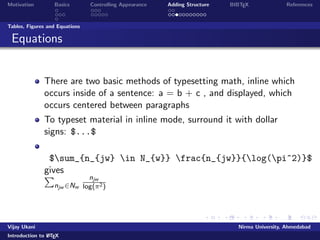
    Motivation Basics ControllingAppearance Adding Structure BIBTEX References Tables, Figures and Equations Equations There are two basic methods of typesetting math, inline which occurs inside of a sentence: a = b + c , and displayed, which occurs centered between paragraphs To typeset material in inline mode, surround it with dollar signs: $...$ $sum_{n_{jw} in N_{w}} frac{n_{jw}}{log(pi^2)}$ gPives njw2Nw njw log(2) Vijay Ukani Nirma University, Ahmedabad Introduction to LATEX
  • 76.
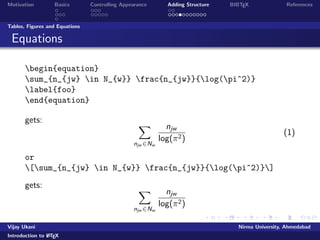
    Motivation Basics ControllingAppearance Adding Structure BIBTEX References Tables, Figures and Equations Equations begin{equation} sum_{n_{jw} in N_{w}} frac{n_{jw}}{log(pi^2)} label{foo} end{equation} gets: X njw2Nw njw log(2) (1) or [sum_{n_{jw} in N_{w}} frac{n_{jw}}{log(pi^2)}] gets: X njw2Nw njw log(2) Vijay Ukani Nirma University, Ahmedabad Introduction to LATEX
  • 77.
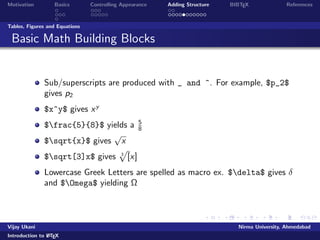
    Motivation Basics ControllingAppearance Adding Structure BIBTEX References Tables, Figures and Equations Basic Math Building Blocks Sub/superscripts are produced with _ and ^. For example, $p_2$ gives p2 $x^y$ gives xy $frac{5}{8}$ yields a 5 8 $sqrt{x}$ gives p x $sqrt[3]x$ gives 3 p [x] Lowercase Greek Letters are spelled as macro ex. $delta$ gives and $Omega$ yielding Vijay Ukani Nirma University, Ahmedabad Introduction to LATEX
  • 78.
    Motivation Basics ControllingAppearance Adding Structure BIBTEX References Tables, Figures and Equations How would you typeset? y = z p x2 + w2 2 = xp+y2 x p n+1 a 00 xy Vijay Ukani Nirma University, Ahmedabad Introduction to LATEX
  • 79.
    Motivation Basics ControllingAppearance Adding Structure BIBTEX References Tables, Figures and Equations Solutions to Exercise $y=sqrt[z]{x^2+w_2^2}$ $sigma=frac{Omega^{x}+y_2}{sqrt{x}}$ $sqrt[n+1]{a}$ $tau_{xy}''$ Vijay Ukani Nirma University, Ahmedabad Introduction to LATEX
  • 80.
    Motivation Basics ControllingAppearance Adding Structure BIBTEX References Tables, Figures and Equations Integrals and Summations $int_0^infty x,dx $ gives Z 1 0 x dx $left(frac{int_0^l x,dx}{Delta x}right)$ gives R l 0 x dx x ! Vijay Ukani Nirma University, Ahmedabad Introduction to LATEX
  • 81.
    Motivation Basics ControllingAppearance Adding Structure BIBTEX References Tables, Figures and Equations How would you typeset? 1 + 1 1x2 3 (n) = Pn k=2 h (k) k1 i x = xmax xmin A = R 0 r 2 dr Vijay Ukani Nirma University, Ahmedabad Introduction to LATEX
  • 82.
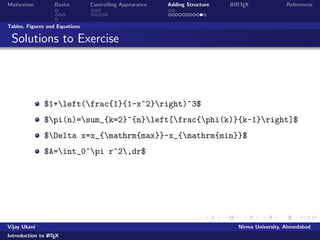
    Motivation Basics ControllingAppearance Adding Structure BIBTEX References Tables, Figures and Equations Solutions to Exercise $1+left(frac{1}{1-x^2}right)^3$ $pi(n)=sum_{k=2}^{n}left[frac{phi(k)}{k-1}right]$ $Delta x=x_{mathrm{max}}-x_{mathrm{min}}$ $A=int_0^pi r^2,dr$ Vijay Ukani Nirma University, Ahmedabad Introduction to LATEX
  • 83.
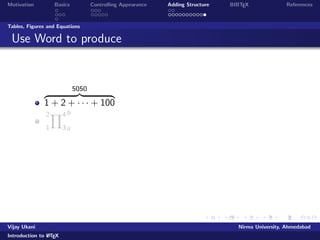
    Motivation Basics ControllingAppearance Adding Structure BIBTEX References Tables, Figures and Equations Use Word to produce z 5050 }| { 1 + 2 + + 100 Y2 4 b 1 3 a Vijay Ukani Nirma University, Ahmedabad Introduction to LATEX
  • 84.
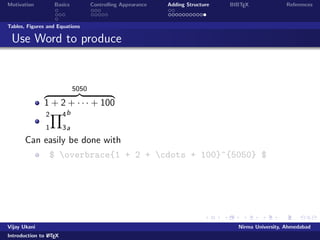
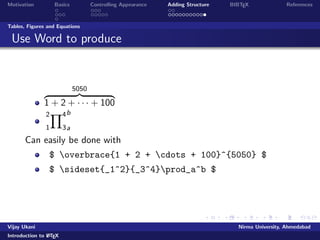
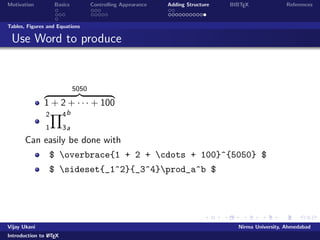
    Motivation Basics ControllingAppearance Adding Structure BIBTEX References Tables, Figures and Equations Use Word to produce z 5050 }| { 1 + 2 + + 100 Y2 4 b 1 3 a Can easily be done with $ overbrace{1 + 2 + cdots + 100}^{5050} $ Vijay Ukani Nirma University, Ahmedabad Introduction to LATEX
  • 85.
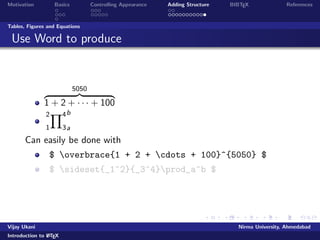
    Motivation Basics ControllingAppearance Adding Structure BIBTEX References Tables, Figures and Equations Use Word to produce z 5050 }| { 1 + 2 + + 100 Y2 4 b 1 3 a Can easily be done with $ overbrace{1 + 2 + cdots + 100}^{5050} $ $ sideset{_1^2}{_3^4}prod_a^b $ Vijay Ukani Nirma University, Ahmedabad Introduction to LATEX
  • 86.
    Motivation Basics ControllingAppearance Adding Structure BIBTEX References Tables, Figures and Equations Use Word to produce z 5050 }| { 1 + 2 + + 100 Y2 4 b 1 3 a Can easily be done with $ overbrace{1 + 2 + cdots + 100}^{5050} $ $ sideset{_1^2}{_3^4}prod_a^b $ Vijay Ukani Nirma University, Ahmedabad Introduction to LATEX
  • 87.
    Motivation Basics ControllingAppearance Adding Structure BIBTEX References Tables, Figures and Equations Use Word to produce z 5050 }| { 1 + 2 + + 100 Y2 4 b 1 3 a Can easily be done with $ overbrace{1 + 2 + cdots + 100}^{5050} $ $ sideset{_1^2}{_3^4}prod_a^b $ Vijay Ukani Nirma University, Ahmedabad Introduction to LATEX
  • 88.
    Motivation Basics ControllingAppearance Adding Structure BIBTEX References Citations and Bibliography Using BIBTEX store your references in a .bib
  • 89.
    le in thespeci
  • 90.
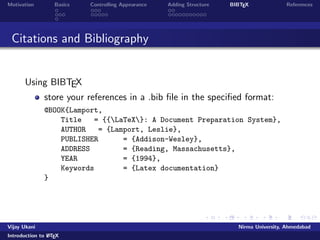
    ed format: @BOOK{Lamport, Title = {{LaTeX}: A Document Preparation System}, AUTHOR = {Lamport, Leslie}, PUBLISHER = {Addison-Wesley}, ADDRESS = {Reading, Massachusetts}, YEAR = {1994}, Keywords = {Latex documentation} } Vijay Ukani Nirma University, Ahmedabad Introduction to LATEX
  • 91.
    Motivation Basics ControllingAppearance Adding Structure BIBTEX References Using your bib
  • 92.
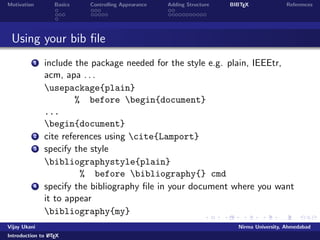
    le 1 includethe package needed for the style e.g. plain, IEEEtr, acm, apa . . . usepackage{plain} % before begin{document} ... begin{document} 2 cite references using cite{Lamport} 3 specify the style bibliographystyle{plain} % before bibliography{} cmd 4 specify the bibliography
  • 93.
    le in yourdocument where you want it to appear bibliography{my} Vijay Ukani Nirma University, Ahmedabad Introduction to LATEX
  • 94.
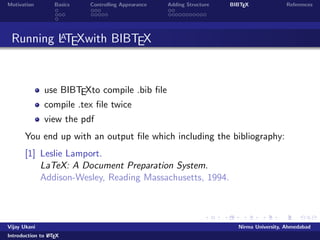
    Motivation Basics ControllingAppearance Adding Structure BIBTEX References Running LATEXwith BIBTEX use BIBTEXto compile .bib
  • 95.
  • 96.
    le twice viewthe pdf You end up with an output
  • 97.
    le which includingthe bibliography: [1] Leslie Lamport. LaTeX: A Document Preparation System. Addison-Wesley, Reading Massachusetts, 1994. Vijay Ukani Nirma University, Ahmedabad Introduction to LATEX
  • 98.
    Motivation Basics ControllingAppearance Adding Structure BIBTEX References Common Mistakes Misspelled command or environment names Missing or improperly nested end statements Improperly matched { and }. They should always come in pairs Missing command arguments A missing $ Using one of the special LATEX characters such as # Vijay Ukani Nirma University, Ahmedabad Introduction to LATEX
  • 99.
    Motivation Basics ControllingAppearance Adding Structure BIBTEX References [1] Leslie Lamport. LaTeX: A Document Preparation System. Addison-Wesley, Reading Massachusetts, second edition, 1994. Vijay Ukani Nirma University, Ahmedabad Introduction to LATEX
  • 100.
    Motivation Basics ControllingAppearance Adding Structure BIBTEX References In case of any queries/help, mail@ vijay.ukani@nirmauni.ac.in Vijay Ukani Nirma University, Ahmedabad Introduction to LATEX
  • 101.
    Motivation Basics ControllingAppearance Adding Structure BIBTEX References Vijay Ukani Nirma University, Ahmedabad Introduction to LATEX