A Comprehensive Document Engineering using TeX2e/LateX


   Anjan K and Harish G
   Assistant Professor,
   Dept. of CSE,
   RVCE
   {anjank,harishg}@rvce.edu.in


                              Latex: Document Engineering   December 2, 2011   1
   Need for LateX
   LateX Vs. Word Processors
   Various TeX Distributions
   Installation – TeXlive, TeXMaker, ipe
    ◦ Installation Hands On.
   Layout of TeX Document
    ◦ Document Class
    ◦ Packages
    ◦ Document Body
   Latex Document illustrations
    ◦ Hands on
   Report Format for Projects
   Overview of ipe
   Overview of Beamer for presentations
   Summary
   Key Web References

                               Latex: Document Engineering   December 2, 2011   2
   Pronounced as (Lah-tek, or Lay-tek)
   TeX is essentially a Markup Language (like HTML,
    XML and RTF)
   A typesetting program, not a word-processor
   TeX written by Donald Knuth in 70´s
    ◦ A revolution in typesetting
   Latex is an extension of TeX
    ◦ Macro packages to make TeX easier to use
   Designed for producing professional books,
    thesis's, technical papers ,articles.
   De facto standard for writing academic papers
    and project reports
   Current version LaTeX2

                                    Latex: Document Engineering   December 2, 2011   3
   De facto standard for scientific publishing
   Good for large documents- Can compile very big books
    (unless your document is more than 70,000 pages!)
   Can run even on lower version of computer
    configuration.
   Platform, version independent (Unix, Windows…)
   Pre-set standard formats (for paper, thesis…)
   Bibliography management
   Fast, professional math equations typesetting
   Open source
   Never crash, never lose your file

           Outcome: Professional documentation.


                              Latex: Document Engineering   December 2, 2011   4
Latex: Document Engineering   December 2, 2011   5
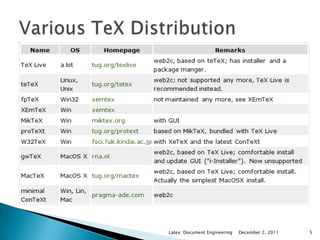
   lEDBeta             pdfTeX
   LateX Editor        LuaTeX – latest of
   Kile                 PDFLatex
   TeXnic Center       XeTeX – Unicode and
   TeXMaker             BMP, OTF
   TeXshop on Mac      NTS –OO Based
   Winshell            ExTeX - Hybrid
   LateXila            Aleph –Omega eTeX
   TeXStudios          BibTeX – Bib
   TeXWorks             management

IDE for LateX        LateX Engines

                     Latex: Document Engineering   December 2, 2011   6
Latex: Document Engineering   December 2, 2011   7
Duration: 30 minutes


            Latex: Document Engineering   December 2, 2011   8
   Document Class
    ◦ Predefined Formats (article, report, book,..).
    ◦ Syntax:
      documentclass[options]{class}
         Options = a4paper, 11pt, 12pt, 10pt, twocolumn,
          landscape,...
         class = article, report, book,…
   Packages -
    ◦ Added Functionality (graphics, reference style,...).
    ◦ Syntax:
      usepackage{package name}
    ◦ Package name examples
      epsfig - insert PS pictures into the document
      fancyhdr - easy definition of footer and header


                                    Latex: Document Engineering   December 2, 2011   9
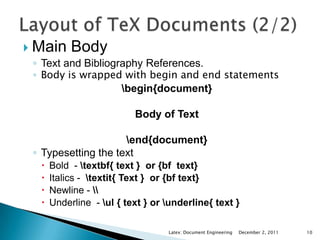
 Main Body
  ◦ Text and Bibliography References.
  ◦ Body is wrapped with begin and end statements
                   begin{document}

                           Body of Text

                      end{document}
  ◦ Typesetting the text
      Bold - textbf{ text } or {bf text}
      Italics - textit{ Text } or {bf text}
      Newline - 
      Underline - ul { text } or underline{ text }

                                   Latex: Document Engineering   December 2, 2011   10
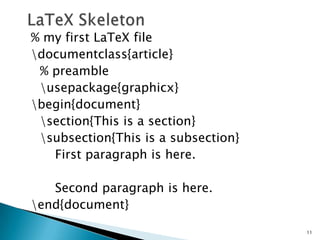
% my first LaTeX file
documentclass{article}
 % preamble
 usepackage{graphicx}
begin{document}
 section{This is a section}
 subsection{This is a subsection}
   First paragraph is here.

   Second paragraph is here.
end{document}

                                     11
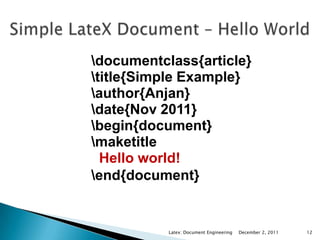
documentclass{article}
title{Simple Example}
author{Anjan}
date{Nov 2011}
begin{document}
maketitle
  Hello world!
end{document}


           Latex: Document Engineering   December 2, 2011   12
Duration: 30 minutes


            Latex: Document Engineering   December 2, 2011   13
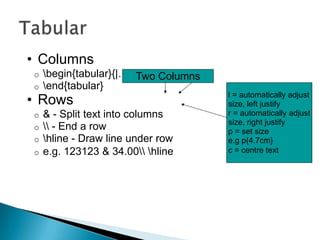
• Columns
o   begin{tabular}{|…|…|} Columns
                       Two
o   end{tabular}
• Rows                               l = automatically adjust
                                     size, left justify
o   & - Split text into columns      r = automatically adjust
                                     size, right justify
o    - End a row                   p = set size
o   hline - Draw line under row     e.g p{4.7cm}
o   e.g. 123123 & 34.00 hline     c = centre text
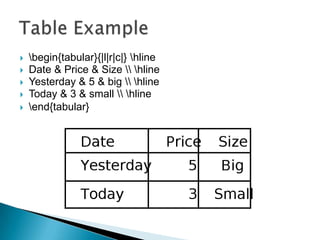
   begin{tabular}{|l|r|c|} hline
   Date & Price & Size  hline
   Yesterday & 5 & big  hline
   Today & 3 & small  hline
   end{tabular}
SubFigure and Longtable


Duration: 30 minutes


              Latex: Document Engineering   December 2, 2011   16
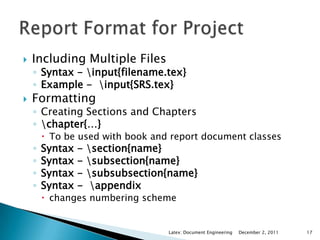
   Including Multiple Files
    ◦ Syntax - input{filename.tex}
    ◦ Example - input{SRS.tex}
   Formatting
    ◦ Creating Sections and Chapters
    ◦ chapter{…}
         To be used with book and report document classes
    ◦   Syntax -   section{name}
    ◦   Syntax -   subsection{name}
    ◦   Syntax -   subsubsection{name}
    ◦   Syntax -    appendix
         changes numbering scheme


                                  Latex: Document Engineering   December 2, 2011   17
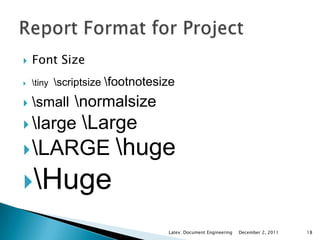
   Font Size
   tiny scriptsize   footnotesize
   small normalsize
 large        Large
 LARGE                  huge
Huge

                                   Latex: Document Engineering   December 2, 2011   18
   TexLive Distribution
    ◦ www.tug.org/texlive/
   MikTex Distribution
    ◦ www.miktex.org/
   LateX Wiki
    ◦ en.wikibooks.org/wiki/LaTeX
    ◦ www.latexwiki.org/
   Math LateX Wiki
    ◦ en.wikibooks.org/wiki/LaTeX/Mathematics


                             Latex: Document Engineering   December 2, 2011   19

Document typesetting using LateX

  • 1.
    A Comprehensive DocumentEngineering using TeX2e/LateX Anjan K and Harish G Assistant Professor, Dept. of CSE, RVCE {anjank,harishg}@rvce.edu.in Latex: Document Engineering December 2, 2011 1
  • 2.
    Need for LateX  LateX Vs. Word Processors  Various TeX Distributions  Installation – TeXlive, TeXMaker, ipe ◦ Installation Hands On.  Layout of TeX Document ◦ Document Class ◦ Packages ◦ Document Body  Latex Document illustrations ◦ Hands on  Report Format for Projects  Overview of ipe  Overview of Beamer for presentations  Summary  Key Web References Latex: Document Engineering December 2, 2011 2
  • 3.
    Pronounced as (Lah-tek, or Lay-tek)  TeX is essentially a Markup Language (like HTML, XML and RTF)  A typesetting program, not a word-processor  TeX written by Donald Knuth in 70´s ◦ A revolution in typesetting  Latex is an extension of TeX ◦ Macro packages to make TeX easier to use  Designed for producing professional books, thesis's, technical papers ,articles.  De facto standard for writing academic papers and project reports  Current version LaTeX2 Latex: Document Engineering December 2, 2011 3
  • 4.
    De facto standard for scientific publishing  Good for large documents- Can compile very big books (unless your document is more than 70,000 pages!)  Can run even on lower version of computer configuration.  Platform, version independent (Unix, Windows…)  Pre-set standard formats (for paper, thesis…)  Bibliography management  Fast, professional math equations typesetting  Open source  Never crash, never lose your file Outcome: Professional documentation. Latex: Document Engineering December 2, 2011 4
  • 5.
    Latex: Document Engineering December 2, 2011 5
  • 6.
    lEDBeta  pdfTeX  LateX Editor  LuaTeX – latest of  Kile PDFLatex  TeXnic Center  XeTeX – Unicode and  TeXMaker BMP, OTF  TeXshop on Mac  NTS –OO Based  Winshell  ExTeX - Hybrid  LateXila  Aleph –Omega eTeX  TeXStudios  BibTeX – Bib  TeXWorks management IDE for LateX LateX Engines Latex: Document Engineering December 2, 2011 6
  • 7.
    Latex: Document Engineering December 2, 2011 7
  • 8.
    Duration: 30 minutes Latex: Document Engineering December 2, 2011 8
  • 9.
    Document Class ◦ Predefined Formats (article, report, book,..). ◦ Syntax:  documentclass[options]{class}  Options = a4paper, 11pt, 12pt, 10pt, twocolumn, landscape,...  class = article, report, book,…  Packages - ◦ Added Functionality (graphics, reference style,...). ◦ Syntax:  usepackage{package name} ◦ Package name examples  epsfig - insert PS pictures into the document  fancyhdr - easy definition of footer and header Latex: Document Engineering December 2, 2011 9
  • 10.
     Main Body ◦ Text and Bibliography References. ◦ Body is wrapped with begin and end statements begin{document} Body of Text end{document} ◦ Typesetting the text  Bold - textbf{ text } or {bf text}  Italics - textit{ Text } or {bf text}  Newline -  Underline - ul { text } or underline{ text } Latex: Document Engineering December 2, 2011 10
  • 11.
    % my firstLaTeX file documentclass{article} % preamble usepackage{graphicx} begin{document} section{This is a section} subsection{This is a subsection} First paragraph is here. Second paragraph is here. end{document} 11
  • 12.
    documentclass{article} title{Simple Example} author{Anjan} date{Nov 2011} begin{document} maketitle Hello world! end{document} Latex: Document Engineering December 2, 2011 12
  • 13.
    Duration: 30 minutes Latex: Document Engineering December 2, 2011 13
  • 14.
    • Columns o begin{tabular}{|…|…|} Columns Two o end{tabular} • Rows l = automatically adjust size, left justify o & - Split text into columns r = automatically adjust size, right justify o - End a row p = set size o hline - Draw line under row e.g p{4.7cm} o e.g. 123123 & 34.00 hline c = centre text
  • 15.
    begin{tabular}{|l|r|c|} hline  Date & Price & Size hline  Yesterday & 5 & big hline  Today & 3 & small hline  end{tabular}
  • 16.
    SubFigure and Longtable Duration:30 minutes Latex: Document Engineering December 2, 2011 16
  • 17.
    Including Multiple Files ◦ Syntax - input{filename.tex} ◦ Example - input{SRS.tex}  Formatting ◦ Creating Sections and Chapters ◦ chapter{…}  To be used with book and report document classes ◦ Syntax - section{name} ◦ Syntax - subsection{name} ◦ Syntax - subsubsection{name} ◦ Syntax - appendix  changes numbering scheme Latex: Document Engineering December 2, 2011 17
  • 18.
    Font Size  tiny scriptsize footnotesize  small normalsize  large Large  LARGE huge Huge Latex: Document Engineering December 2, 2011 18
  • 19.
    TexLive Distribution ◦ www.tug.org/texlive/  MikTex Distribution ◦ www.miktex.org/  LateX Wiki ◦ en.wikibooks.org/wiki/LaTeX ◦ www.latexwiki.org/  Math LateX Wiki ◦ en.wikibooks.org/wiki/LaTeX/Mathematics Latex: Document Engineering December 2, 2011 19