Text Editing Using
LaTeX
Dr. Aisha Abdulahi
12/20/2016 1
Outlines
■ Introduction
■ Writing the First Document
■ Text Formatting
■ Figures
■ Tables
■ Bibliography
■ Arabic Text
■ References
12/20/2016 2
What is LaTeX?
■ TeX is a computer program created by Donald E. Knuth, 1979.
■ Last update was released on 12/01/2014, version number =
3.14159265 ≈ 𝜋
■ ‘Technology’ stems from a Greek root Tex; and this same
Greek word means art as well as technology.
12/20/2016 3
What is LaTeX?
■ LaTeX is a macro package that enables authors to typeset
and print their work at the highest typographical quality,
using a predefined, professional layout using TeX engine.
■ Originally written by Leslie Lamport.
■ LaTeX is pronounced in English as “Lay-tek” or “Lah-
tek”.
12/20/2016 4
Installing LaTeX
■ LaTeX-Core, in windows MiKTeX is one of the most commonly used.
http://ctan.mirror.garr.it/mirrors/CTAN/systems/win32/miktex/setup/basic-
miktex-2.9.6161-x64.exe
■ Basic installation, you need to install packages as you go (e.g. the above link).
■ Complete installations, installs everything, all at once.
■ The editor, where you write your document
we will use, TeXstudio
https://sourceforge.net/projects/texstudio/files/texstudio/TeXstudio%202.11.2/texs
tudio-2.11.2-osx-qt5.6.zip/download
■ There are similar software for Mac, and Linux based OS.
12/20/2016 5
Why LaTeX? Advantages
■ Separation of formatting and content
■ Free, and Open Source
■ Made for scientists
■ Built-in referencing capability
■ Speed
■ Portable
■ Reliability
12/20/2016 6
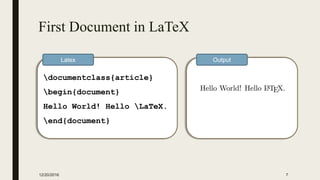
First Document in LaTeX
12/20/2016 7
documentclass{article}
begin{document}
Hello World! Hello LaTeX.
end{document}
Latex Output
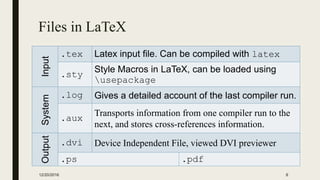
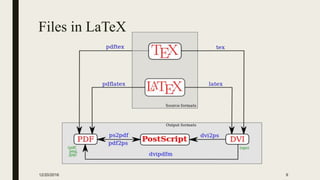
Files in LaTeX
Input
.tex Latex input file. Can be compiled with latex
.sty
Style Macros in LaTeX, can be loaded using
usepackage
System
.log Gives a detailed account of the last compiler run.
.aux
Transports information from one compiler run to the
next, and stores cross-references information.
Output
.dvi Device Independent File, viewed DVI previewer
.ps .pdf
12/20/2016 8
Files in LaTeX
12/20/2016 9
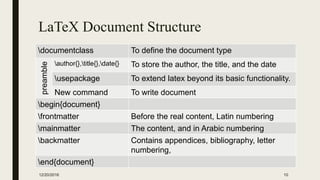
LaTeX Document Structure
documentclass To define the document type
preamble
author{},title{},date{} To store the author, the title, and the date
usepackage To extend latex beyond its basic functionality.
New command To write document
begin{document}
frontmatter Before the real content, Latin numbering
mainmatter The content, and in Arabic numbering
backmatter Contains appendices, bibliography, letter
numbering,
end{document}
12/20/2016 10
article
For articles in scientific journals, presentations, short reports, program
documentation, invitations, ...
IEEEtran For articles with the IEEE Transactions format.
proc A class for proceedings based on the article class.
report For longer reports containing several chapters, small books, thesis, ...
book For real books.
slides For slides. The class uses big sans serif letters.
memoir
For changing sensibly the output of the document. It is based on the book
class, but you can create any kind of document with it.
letter For writing letters.
beamer For writing presentations.
12/20/2016 11
documentclass[options]{class}
12/20/2016 12
documentclass[options]{class}
10pt, 11pt, 12pt size of the main font, default is 10pt.
a4paper,.. Defines the paper size.
twocolumn two columns instead of one.
twoside, oneside
Specifies whether double or single sided output should be
generated.
landscape Changes the layout of the document to print in landscape mode.
Example
documentclass[12pt,a4paper,oneside, lanscape]{report}
Document Title
12/20/2016 13
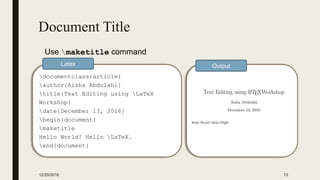
documentclass{article}
author{Aisha Abdulahi}
title{Text Editing using LaTeX
Workshop}
date{December 13, 2016}
begin{document}
maketitle
Hello World! Hello LaTeX.
end{document}
Latex Output
Use maketitle command
Packages
■ usepackage[options]{package}
■ Options are additional information to the package
12/20/2016 14
Package Usage
graphicx Allows you to insert graphic files within a document.
xcolor Adds support for colored text.
listings To insert programming code within the document.
arabtex,
babel
For Arabic language support.
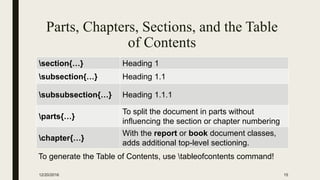
Parts, Chapters, Sections, and the Table
of Contents
section{…} Heading 1
subsection{…} Heading 1.1
subsubsection{…} Heading 1.1.1
parts{…}
To split the document in parts without
influencing the section or chapter numbering
chapter{…}
With the report or book document classes,
adds additional top-level sectioning.
12/20/2016 15
To generate the Table of Contents, use tableofcontents command!
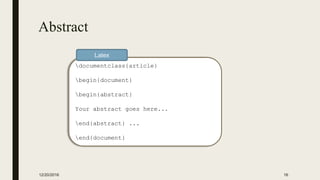
Abstract
12/20/2016 16
documentclass{article}
begin{document}
begin{abstract}
Your abstract goes here...
end{abstract} ...
end{document}
Latex
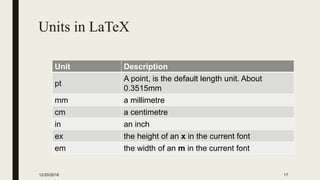
Units in LaTeX
Unit Description
pt
A point, is the default length unit. About
0.3515mm
mm a millimetre
cm a centimetre
in an inch
ex the height of an x in the current font
em the width of an m in the current font
12/20/2016 17
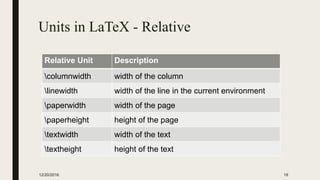
Units in LaTeX - Relative
Relative Unit Description
columnwidth width of the column
linewidth width of the line in the current environment
paperwidth width of the page
paperheight height of the page
textwidth width of the text
textheight height of the text
12/20/2016 18
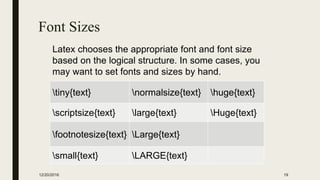
Font Sizes
tiny{text} normalsize{text} huge{text}
scriptsize{text} large{text} Huge{text}
footnotesize{text} Large{text}
small{text} LARGE{text}
12/20/2016 19
Latex chooses the appropriate font and font size
based on the logical structure. In some cases, you
may want to set fonts and sizes by hand.
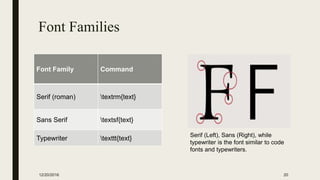
Font Families
12/20/2016 20
Font Family Command
Serif (roman) textrm{text}
Sans Serif textsf{text}
Typewriter texttt{text}
Serif (Left), Sans (Right), while
typewriter is the font similar to code
fonts and typewriters.
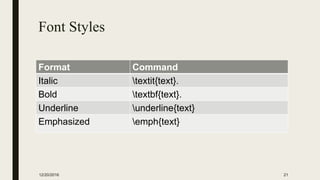
Font Styles
Format Command
Italic textit{text}.
Bold textbf{text}.
Underline underline{text}
Emphasized emph{text}
12/20/2016 21
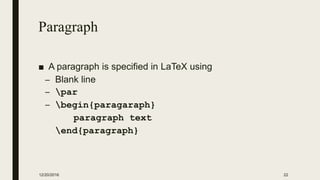
Paragraph
■ A paragraph is specified in LaTeX using
– Blank line
– par
– begin{paragaraph}
paragraph text
end{paragraph}
12/20/2016 22
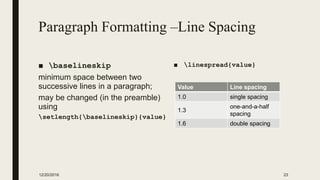
Paragraph Formatting –Line Spacing
■ baselineskip
minimum space between two
successive lines in a paragraph;
may be changed (in the preamble)
using
setlength{baselineskip}{value}
■ linespread{value}
12/20/2016 23
Value Line spacing
1.0 single spacing
1.3
one-and-a-half
spacing
1.6 double spacing
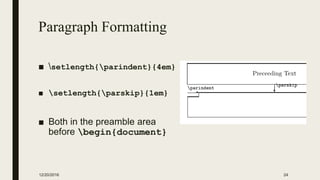
Paragraph Formatting
■ setlength{parindent}{4em}
■ setlength{parskip}{1em}
■ Both in the preamble area
before begin{document}
12/20/2016 24
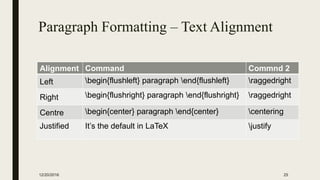
Paragraph Formatting – Text Alignment
Alignment Command Commnd 2
Left begin{flushleft} paragraph end{flushleft} raggedright
Right begin{flushright} paragraph end{flushright} raggedright
Centre begin{center} paragraph end{center} centering
Justified It’s the default in LaTeX justify
12/20/2016 25
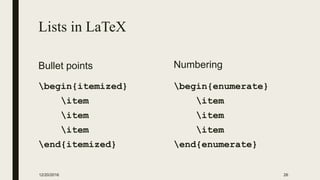
Lists in LaTeX
Bullet points
begin{itemized}
item
item
item
end{itemized}
Numbering
begin{enumerate}
item
item
item
end{enumerate}
12/20/2016 26
Footnotes
■ footnote{text in the footnote}
■ To change the default number
– footnote[10]{text in the footnote}
■ To separate the footnote mark, and the text
– footnotemark
– footnotetext{text}
■ Multiple references for the same footnote
– footnotemark[value{footnote}]
12/20/2016 27
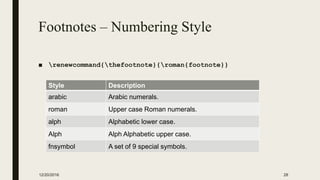
Footnotes – Numbering Style
■ renewcommand{thefootnote}{roman{footnote}}
12/20/2016 28
Style Description
arabic Arabic numerals.
roman Upper case Roman numerals.
alph Alphabetic lower case.
Alph Alph Alphabetic upper case.
fnsymbol A set of 9 special symbols.
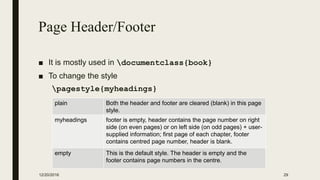
Page Header/Footer
■ It is mostly used in documentclass{book}
■ To change the style
pagestyle{myheadings}
12/20/2016 29
plain Both the header and footer are cleared (blank) in this page
style.
myheadings footer is empty, header contains the page number on right
side (on even pages) or on left side (on odd pages) + user-
supplied information; first page of each chapter, footer
contains centred page number, header is blank.
empty This is the default style. The header is empty and the
footer contains page numbers in the centre.
Page Header/Footer
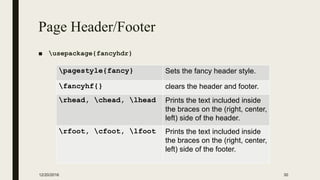
■ usepackage{fancyhdr}
12/20/2016 30
pagestyle{fancy} Sets the fancy header style.
fancyhf{} clears the header and footer.
rhead, chead, lhead Prints the text included inside
the braces on the (right, center,
left) side of the header.
rfoot, cfoot, lfoot Prints the text included inside
the braces on the (right, center,
left) side of the footer.
Figures in LaTeX
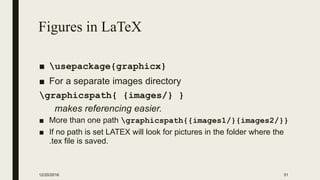
■ usepackage{graphicx}
■ For a separate images directory
graphicspath{ {images/} }
makes referencing easier.
■ More than one path graphicspath{{images1/}{images2/}}
■ If no path is set LATEX will look for pictures in the folder where the
.tex file is saved.
12/20/2016 31
Figures in LaTeX
■ includegraphics[options]{imagefile}
12/20/2016 32
width=xx width of the imported image to xx.
height=xx height of the imported image to xx.
keepaspectratio
scale the image according to both height and width
[true/false]
scale=xx Scales the image by the desired factor.
angle=xx rotates the image by xx degrees
trim=l b r t crops the image [left, bottom, right, top]
resolution=x Specify image resolution in dpi
Figure Caption & Position
■ To add a caption to the figure or to change the alignment
begin{figure}[h]
includegraphics[options]{image filename}
caption{text}
end{figure}
■ To specify the alignment of the image use centering,
raggedright, raggedleft
12/20/2016 33
Wrapping a Figure
■ To insert your figure within the text, usepackage{wrapfig}
begin{wrapfigure}{x}{y}
includegraphics[options]{logo}
caption{text}
end{wrapfigure}
■ x: defines the alignment of the figure, (l: left, r: right, etc.)
■ y: the width of the figure box. It's not the width of the image itself!
12/20/2016 34
Referencing Figures, List of Figures
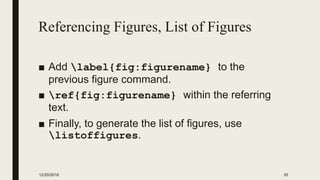
■ Add label{fig:figurename} to the
previous figure command.
■ ref{fig:figurename} within the referring
text.
■ Finally, to generate the list of figures, use
listoffigures.
12/20/2016 35
Tables in LaTeX
begin{tabular}{||c c c c||}
hline
Col1 & Col2 & Col2 & Col3  [0.5ex]
hlinehline
1 & 6 & 87837 & 787 
2 & 7 & 78 & 5415 
5 & 88 & 788 & 6344  [1ex]
hline
end{tabular}
12/20/2016 36
No of columns, and
Vertical borders
Horizontal Borders
Cell height
Table Caption, Referencing, and List of
Tables
begin{table}[h]
<Table Design>
caption{text}
end{table}
■ Add label{table:1} to the previous command.
■ ref{table:1}, within the referring text.
■ listoftables command to generate the list of table for the
document.
12/20/2016 37
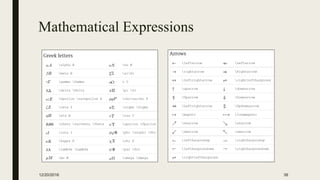
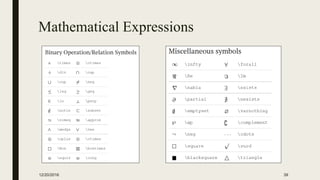
Mathematical Expressions
12/20/2016 38
Mathematical Expressions
12/20/2016 39
Mathematical Expressions
Mathematical
Environments Inline
( ),
$ $
begin{math}
end{math}
Display Numbered
begin{equation}
end{equation}
Unnumbered
[ ],
$$ $$,
begin{displaymath}
end{displaymath}
12/20/2016 40
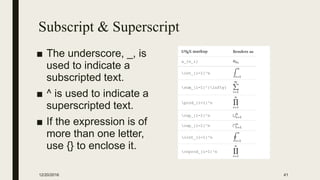
Subscript & Superscript
■ The underscore, _, is
used to indicate a
subscripted text.
■ ^ is used to indicate a
superscripted text.
■ If the expression is of
more than one letter,
use {} to enclose it.
12/20/2016 41
Brackets and Parentheses
Dynamic Resizing
■ [
left{
begin{tabular}{ccc}
1 & 5 & 8 
0 & 2 & 4 
3 & 3 & -8
end{tabular}
right }
]
Manual Resizing
12/20/2016 42
Fractions and Bionomials
■ frac{numerator}{denominator}
for fractions
■ bionom{n}{k}, for bionomials
■ You need to
usepackages{amsmath}
■ Example
[
binom{n}{k} = frac{n!}{k!(n-k)!}
]
12/20/2016 43
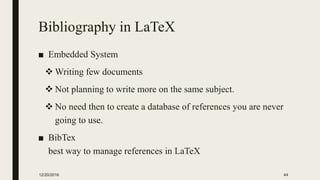
Bibliography in LaTeX
■ Embedded System
 Writing few documents
 Not planning to write more on the same subject.
 No need then to create a database of references you are never
going to use.
■ BibTex
best way to manage references in LaTeX
12/20/2016 44
Embedded System
■ The bibliography environment
bibliographystyle{plain}
begin{thebibliography}[n]
bibitem{citekey}
the list of information
end{thebibliography}
N: pattern for no. of references, [9] means 9 references or less.
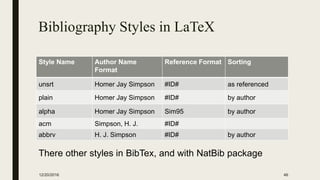
■ There are many other styles in latex, see the next Table.
12/20/2016 45
Bibliography Styles in LaTeX
Style Name Author Name
Format
Reference Format Sorting
unsrt Homer Jay Simpson #ID# as referenced
plain Homer Jay Simpson #ID# by author
alpha Homer Jay Simpson Sim95 by author
acm Simpson, H. J. #ID#
abbrv H. J. Simpson #ID# by author
12/20/2016 46
There other styles in BibTex, and with NatBib package
Bibliography Styles in LaTeX
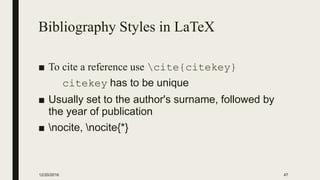
■ To cite a reference use cite{citekey}
citekey has to be unique
■ Usually set to the author's surname, followed by
the year of publication
■ nocite, nocite{*}
12/20/2016 47
Embedded System
12/20/2016 48
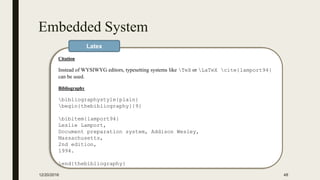
Citation
Instead of WYSIWYG editors, typesetting systems like TeX or LaTeX cite{lamport94}
can be used.
Bibliography
bibliographystyle{plain}
begin{thebibliography}{9}
bibitem{lamport94}
Leslie Lamport,
Document preparation system, Addison Wesley,
Massachusetts,
2nd edition,
1994.
end{thebibliography}
Latex
Embedded System
12/20/2016 49
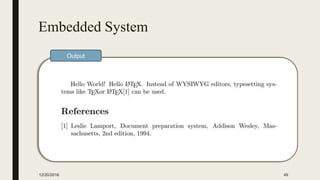
Output
BibTeX
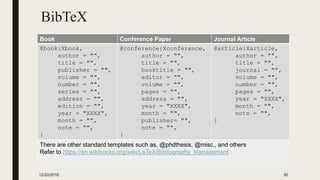
Book Conference Paper Journal Article
@book{Xbook,
author = "",
title = "",
publisher = "",
volume = "",
number = "",
series = "",
address = "",
edition = "",
year = "XXXX",
month = "",
note = "",
}
@conference{Xconference,
author = "",
title = "",
booktitle = "",
editor = "",
volume = "",
pages = "",
address = "",
year = "XXXX",
month = "",
publisher= "",
note = "",
}
@article{Xarticle,
author = "",
title = "",
journal = "",
volume = "",
number = "",
pages = "",
year = "XXXX",
month = "",
note = "",
}
There are other standard templates such as, @phdthesis, @misc., and others
Refer to https://en.wikibooks.org/wiki/LaTeX/Bibliography_Management
12/20/2016 50
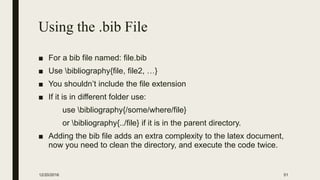
Using the .bib File
■ For a bib file named: file.bib
■ Use bibliography{file, file2, …}
■ You shouldn’t include the file extension
■ If it is in different folder use:
use bibliography{/some/where/file}
or bibliography{../file} if it is in the parent directory.
■ Adding the bib file adds an extra complexity to the latex document,
now you need to clean the directory, and execute the code twice.
12/20/2016 51
BibTeX Referencing Software
■ There are many applications that simplify the work of
BibTeX, such as JabRef.
■ You can download it from here
https://www.fosshub.com/JabRef.html
■ Tutorial for using JabRef
http://www.cs.rpi.edu/~tayloj/JABREF.TUTORIAL/
12/20/2016 52
Arabic Text in LaTeX
usepackage[utf8]{inputenc} Input encoding, allows for many
different languages.
usepackage[LFE,LAE]{fontenc} Supports specific characters for
Arabic language.
usepackage{arabtex} Supports right-to-left writing.
usepackage[arabic]{babel} Proper hyphenation and translating
the names of the document
elements.
12/20/2016 53
‫الاليتاك‬ ‫باستخدام‬ ‫بالعربية‬ ‫عنوان‬ ‫صفحة‬
12/20/2016 54
documentclass[11pt,a4paper]{report}
usepackage{arabtex}
usepackage[utf8]{inputenc}
usepackage[LFE,LAE]{fontenc}
usepackage[arabic]{babel}
title{ ‫النصوص‬ ‫تحرير‬ ‫في‬ ‫تدريبية‬ ‫دورة‬
‫الاليتاك‬ ‫باستخدام‬}
author{ ‫د‬.‫هللا‬ ‫عبد‬ ‫عائشة‬}
begin{document}
maketitle
end{document}
Latex
Output
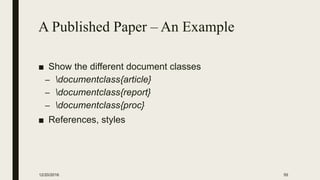
A Published Paper – An Example
■ Show the different document classes
– documentclass{article}
– documentclass{report}
– documentclass{proc}
■ References, styles
12/20/2016 55
References
■ https://en.wikibooks.org/wiki/LaTeX
An ebook that is featured on Wikibooks because it
contains substantial content, it is well-formatted, and it
is regularly updated.
■ https://www.sharelatex.com/learn
A great LaTeX knowledge base, the website is home
for a great online editor.
12/20/2016 56
CONVERTING?
I hope you so!
12/20/2016 57

Latex workshop

  • 1.
    Text Editing Using LaTeX Dr.Aisha Abdulahi 12/20/2016 1
  • 2.
    Outlines ■ Introduction ■ Writingthe First Document ■ Text Formatting ■ Figures ■ Tables ■ Bibliography ■ Arabic Text ■ References 12/20/2016 2
  • 3.
    What is LaTeX? ■TeX is a computer program created by Donald E. Knuth, 1979. ■ Last update was released on 12/01/2014, version number = 3.14159265 ≈ 𝜋 ■ ‘Technology’ stems from a Greek root Tex; and this same Greek word means art as well as technology. 12/20/2016 3
  • 4.
    What is LaTeX? ■LaTeX is a macro package that enables authors to typeset and print their work at the highest typographical quality, using a predefined, professional layout using TeX engine. ■ Originally written by Leslie Lamport. ■ LaTeX is pronounced in English as “Lay-tek” or “Lah- tek”. 12/20/2016 4
  • 5.
    Installing LaTeX ■ LaTeX-Core,in windows MiKTeX is one of the most commonly used. http://ctan.mirror.garr.it/mirrors/CTAN/systems/win32/miktex/setup/basic- miktex-2.9.6161-x64.exe ■ Basic installation, you need to install packages as you go (e.g. the above link). ■ Complete installations, installs everything, all at once. ■ The editor, where you write your document we will use, TeXstudio https://sourceforge.net/projects/texstudio/files/texstudio/TeXstudio%202.11.2/texs tudio-2.11.2-osx-qt5.6.zip/download ■ There are similar software for Mac, and Linux based OS. 12/20/2016 5
  • 6.
    Why LaTeX? Advantages ■Separation of formatting and content ■ Free, and Open Source ■ Made for scientists ■ Built-in referencing capability ■ Speed ■ Portable ■ Reliability 12/20/2016 6
  • 7.
    First Document inLaTeX 12/20/2016 7 documentclass{article} begin{document} Hello World! Hello LaTeX. end{document} Latex Output
  • 8.
    Files in LaTeX Input .texLatex input file. Can be compiled with latex .sty Style Macros in LaTeX, can be loaded using usepackage System .log Gives a detailed account of the last compiler run. .aux Transports information from one compiler run to the next, and stores cross-references information. Output .dvi Device Independent File, viewed DVI previewer .ps .pdf 12/20/2016 8
  • 9.
  • 10.
    LaTeX Document Structure documentclassTo define the document type preamble author{},title{},date{} To store the author, the title, and the date usepackage To extend latex beyond its basic functionality. New command To write document begin{document} frontmatter Before the real content, Latin numbering mainmatter The content, and in Arabic numbering backmatter Contains appendices, bibliography, letter numbering, end{document} 12/20/2016 10
  • 11.
    article For articles inscientific journals, presentations, short reports, program documentation, invitations, ... IEEEtran For articles with the IEEE Transactions format. proc A class for proceedings based on the article class. report For longer reports containing several chapters, small books, thesis, ... book For real books. slides For slides. The class uses big sans serif letters. memoir For changing sensibly the output of the document. It is based on the book class, but you can create any kind of document with it. letter For writing letters. beamer For writing presentations. 12/20/2016 11 documentclass[options]{class}
  • 12.
    12/20/2016 12 documentclass[options]{class} 10pt, 11pt,12pt size of the main font, default is 10pt. a4paper,.. Defines the paper size. twocolumn two columns instead of one. twoside, oneside Specifies whether double or single sided output should be generated. landscape Changes the layout of the document to print in landscape mode. Example documentclass[12pt,a4paper,oneside, lanscape]{report}
  • 13.
    Document Title 12/20/2016 13 documentclass{article} author{AishaAbdulahi} title{Text Editing using LaTeX Workshop} date{December 13, 2016} begin{document} maketitle Hello World! Hello LaTeX. end{document} Latex Output Use maketitle command
  • 14.
    Packages ■ usepackage[options]{package} ■ Optionsare additional information to the package 12/20/2016 14 Package Usage graphicx Allows you to insert graphic files within a document. xcolor Adds support for colored text. listings To insert programming code within the document. arabtex, babel For Arabic language support.
  • 15.
    Parts, Chapters, Sections,and the Table of Contents section{…} Heading 1 subsection{…} Heading 1.1 subsubsection{…} Heading 1.1.1 parts{…} To split the document in parts without influencing the section or chapter numbering chapter{…} With the report or book document classes, adds additional top-level sectioning. 12/20/2016 15 To generate the Table of Contents, use tableofcontents command!
  • 16.
  • 17.
    Units in LaTeX UnitDescription pt A point, is the default length unit. About 0.3515mm mm a millimetre cm a centimetre in an inch ex the height of an x in the current font em the width of an m in the current font 12/20/2016 17
  • 18.
    Units in LaTeX- Relative Relative Unit Description columnwidth width of the column linewidth width of the line in the current environment paperwidth width of the page paperheight height of the page textwidth width of the text textheight height of the text 12/20/2016 18
  • 19.
    Font Sizes tiny{text} normalsize{text}huge{text} scriptsize{text} large{text} Huge{text} footnotesize{text} Large{text} small{text} LARGE{text} 12/20/2016 19 Latex chooses the appropriate font and font size based on the logical structure. In some cases, you may want to set fonts and sizes by hand.
  • 20.
    Font Families 12/20/2016 20 FontFamily Command Serif (roman) textrm{text} Sans Serif textsf{text} Typewriter texttt{text} Serif (Left), Sans (Right), while typewriter is the font similar to code fonts and typewriters.
  • 21.
    Font Styles Format Command Italictextit{text}. Bold textbf{text}. Underline underline{text} Emphasized emph{text} 12/20/2016 21
  • 22.
    Paragraph ■ A paragraphis specified in LaTeX using – Blank line – par – begin{paragaraph} paragraph text end{paragraph} 12/20/2016 22
  • 23.
    Paragraph Formatting –LineSpacing ■ baselineskip minimum space between two successive lines in a paragraph; may be changed (in the preamble) using setlength{baselineskip}{value} ■ linespread{value} 12/20/2016 23 Value Line spacing 1.0 single spacing 1.3 one-and-a-half spacing 1.6 double spacing
  • 24.
    Paragraph Formatting ■ setlength{parindent}{4em} ■setlength{parskip}{1em} ■ Both in the preamble area before begin{document} 12/20/2016 24
  • 25.
    Paragraph Formatting –Text Alignment Alignment Command Commnd 2 Left begin{flushleft} paragraph end{flushleft} raggedright Right begin{flushright} paragraph end{flushright} raggedright Centre begin{center} paragraph end{center} centering Justified It’s the default in LaTeX justify 12/20/2016 25
  • 26.
    Lists in LaTeX Bulletpoints begin{itemized} item item item end{itemized} Numbering begin{enumerate} item item item end{enumerate} 12/20/2016 26
  • 27.
    Footnotes ■ footnote{text inthe footnote} ■ To change the default number – footnote[10]{text in the footnote} ■ To separate the footnote mark, and the text – footnotemark – footnotetext{text} ■ Multiple references for the same footnote – footnotemark[value{footnote}] 12/20/2016 27
  • 28.
    Footnotes – NumberingStyle ■ renewcommand{thefootnote}{roman{footnote}} 12/20/2016 28 Style Description arabic Arabic numerals. roman Upper case Roman numerals. alph Alphabetic lower case. Alph Alph Alphabetic upper case. fnsymbol A set of 9 special symbols.
  • 29.
    Page Header/Footer ■ Itis mostly used in documentclass{book} ■ To change the style pagestyle{myheadings} 12/20/2016 29 plain Both the header and footer are cleared (blank) in this page style. myheadings footer is empty, header contains the page number on right side (on even pages) or on left side (on odd pages) + user- supplied information; first page of each chapter, footer contains centred page number, header is blank. empty This is the default style. The header is empty and the footer contains page numbers in the centre.
  • 30.
    Page Header/Footer ■ usepackage{fancyhdr} 12/20/201630 pagestyle{fancy} Sets the fancy header style. fancyhf{} clears the header and footer. rhead, chead, lhead Prints the text included inside the braces on the (right, center, left) side of the header. rfoot, cfoot, lfoot Prints the text included inside the braces on the (right, center, left) side of the footer.
  • 31.
    Figures in LaTeX ■usepackage{graphicx} ■ For a separate images directory graphicspath{ {images/} } makes referencing easier. ■ More than one path graphicspath{{images1/}{images2/}} ■ If no path is set LATEX will look for pictures in the folder where the .tex file is saved. 12/20/2016 31
  • 32.
    Figures in LaTeX ■includegraphics[options]{imagefile} 12/20/2016 32 width=xx width of the imported image to xx. height=xx height of the imported image to xx. keepaspectratio scale the image according to both height and width [true/false] scale=xx Scales the image by the desired factor. angle=xx rotates the image by xx degrees trim=l b r t crops the image [left, bottom, right, top] resolution=x Specify image resolution in dpi
  • 33.
    Figure Caption &Position ■ To add a caption to the figure or to change the alignment begin{figure}[h] includegraphics[options]{image filename} caption{text} end{figure} ■ To specify the alignment of the image use centering, raggedright, raggedleft 12/20/2016 33
  • 34.
    Wrapping a Figure ■To insert your figure within the text, usepackage{wrapfig} begin{wrapfigure}{x}{y} includegraphics[options]{logo} caption{text} end{wrapfigure} ■ x: defines the alignment of the figure, (l: left, r: right, etc.) ■ y: the width of the figure box. It's not the width of the image itself! 12/20/2016 34
  • 35.
    Referencing Figures, Listof Figures ■ Add label{fig:figurename} to the previous figure command. ■ ref{fig:figurename} within the referring text. ■ Finally, to generate the list of figures, use listoffigures. 12/20/2016 35
  • 36.
    Tables in LaTeX begin{tabular}{||cc c c||} hline Col1 & Col2 & Col2 & Col3 [0.5ex] hlinehline 1 & 6 & 87837 & 787 2 & 7 & 78 & 5415 5 & 88 & 788 & 6344 [1ex] hline end{tabular} 12/20/2016 36 No of columns, and Vertical borders Horizontal Borders Cell height
  • 37.
    Table Caption, Referencing,and List of Tables begin{table}[h] <Table Design> caption{text} end{table} ■ Add label{table:1} to the previous command. ■ ref{table:1}, within the referring text. ■ listoftables command to generate the list of table for the document. 12/20/2016 37
  • 38.
  • 39.
  • 40.
    Mathematical Expressions Mathematical Environments Inline (), $ $ begin{math} end{math} Display Numbered begin{equation} end{equation} Unnumbered [ ], $$ $$, begin{displaymath} end{displaymath} 12/20/2016 40
  • 41.
    Subscript & Superscript ■The underscore, _, is used to indicate a subscripted text. ■ ^ is used to indicate a superscripted text. ■ If the expression is of more than one letter, use {} to enclose it. 12/20/2016 41
  • 42.
    Brackets and Parentheses DynamicResizing ■ [ left{ begin{tabular}{ccc} 1 & 5 & 8 0 & 2 & 4 3 & 3 & -8 end{tabular} right } ] Manual Resizing 12/20/2016 42
  • 43.
    Fractions and Bionomials ■frac{numerator}{denominator} for fractions ■ bionom{n}{k}, for bionomials ■ You need to usepackages{amsmath} ■ Example [ binom{n}{k} = frac{n!}{k!(n-k)!} ] 12/20/2016 43
  • 44.
    Bibliography in LaTeX ■Embedded System  Writing few documents  Not planning to write more on the same subject.  No need then to create a database of references you are never going to use. ■ BibTex best way to manage references in LaTeX 12/20/2016 44
  • 45.
    Embedded System ■ Thebibliography environment bibliographystyle{plain} begin{thebibliography}[n] bibitem{citekey} the list of information end{thebibliography} N: pattern for no. of references, [9] means 9 references or less. ■ There are many other styles in latex, see the next Table. 12/20/2016 45
  • 46.
    Bibliography Styles inLaTeX Style Name Author Name Format Reference Format Sorting unsrt Homer Jay Simpson #ID# as referenced plain Homer Jay Simpson #ID# by author alpha Homer Jay Simpson Sim95 by author acm Simpson, H. J. #ID# abbrv H. J. Simpson #ID# by author 12/20/2016 46 There other styles in BibTex, and with NatBib package
  • 47.
    Bibliography Styles inLaTeX ■ To cite a reference use cite{citekey} citekey has to be unique ■ Usually set to the author's surname, followed by the year of publication ■ nocite, nocite{*} 12/20/2016 47
  • 48.
    Embedded System 12/20/2016 48 Citation Insteadof WYSIWYG editors, typesetting systems like TeX or LaTeX cite{lamport94} can be used. Bibliography bibliographystyle{plain} begin{thebibliography}{9} bibitem{lamport94} Leslie Lamport, Document preparation system, Addison Wesley, Massachusetts, 2nd edition, 1994. end{thebibliography} Latex
  • 49.
  • 50.
    BibTeX Book Conference PaperJournal Article @book{Xbook, author = "", title = "", publisher = "", volume = "", number = "", series = "", address = "", edition = "", year = "XXXX", month = "", note = "", } @conference{Xconference, author = "", title = "", booktitle = "", editor = "", volume = "", pages = "", address = "", year = "XXXX", month = "", publisher= "", note = "", } @article{Xarticle, author = "", title = "", journal = "", volume = "", number = "", pages = "", year = "XXXX", month = "", note = "", } There are other standard templates such as, @phdthesis, @misc., and others Refer to https://en.wikibooks.org/wiki/LaTeX/Bibliography_Management 12/20/2016 50
  • 51.
    Using the .bibFile ■ For a bib file named: file.bib ■ Use bibliography{file, file2, …} ■ You shouldn’t include the file extension ■ If it is in different folder use: use bibliography{/some/where/file} or bibliography{../file} if it is in the parent directory. ■ Adding the bib file adds an extra complexity to the latex document, now you need to clean the directory, and execute the code twice. 12/20/2016 51
  • 52.
    BibTeX Referencing Software ■There are many applications that simplify the work of BibTeX, such as JabRef. ■ You can download it from here https://www.fosshub.com/JabRef.html ■ Tutorial for using JabRef http://www.cs.rpi.edu/~tayloj/JABREF.TUTORIAL/ 12/20/2016 52
  • 53.
    Arabic Text inLaTeX usepackage[utf8]{inputenc} Input encoding, allows for many different languages. usepackage[LFE,LAE]{fontenc} Supports specific characters for Arabic language. usepackage{arabtex} Supports right-to-left writing. usepackage[arabic]{babel} Proper hyphenation and translating the names of the document elements. 12/20/2016 53
  • 54.
    ‫الاليتاك‬ ‫باستخدام‬ ‫بالعربية‬‫عنوان‬ ‫صفحة‬ 12/20/2016 54 documentclass[11pt,a4paper]{report} usepackage{arabtex} usepackage[utf8]{inputenc} usepackage[LFE,LAE]{fontenc} usepackage[arabic]{babel} title{ ‫النصوص‬ ‫تحرير‬ ‫في‬ ‫تدريبية‬ ‫دورة‬ ‫الاليتاك‬ ‫باستخدام‬} author{ ‫د‬.‫هللا‬ ‫عبد‬ ‫عائشة‬} begin{document} maketitle end{document} Latex Output
  • 55.
    A Published Paper– An Example ■ Show the different document classes – documentclass{article} – documentclass{report} – documentclass{proc} ■ References, styles 12/20/2016 55
  • 56.
    References ■ https://en.wikibooks.org/wiki/LaTeX An ebookthat is featured on Wikibooks because it contains substantial content, it is well-formatted, and it is regularly updated. ■ https://www.sharelatex.com/learn A great LaTeX knowledge base, the website is home for a great online editor. 12/20/2016 56
  • 57.
    CONVERTING? I hope youso! 12/20/2016 57