Date: 17 - 18 May 2017
Time: 10.00 am - 5.00 pm
Venue: Centre of Quranic Research, University of Malaya, Jalan Pantai Baharu, Kuala
Lumpur, Malaysia.
Requirements: *Laptop for practice *notebook and pen for taking notes.
By:
Dr. Mohamed A. Alrshah,
Ph.D. in Computer Science,
Dept. of Communication Technology and Networks.
Lecturer at Al-Asmarya University – Libya.
More than 15 years of academic experience.
Mohamed.asnd@gmail.com
LATEX Workshop: Essentials and Practices
Topics:
 Essentials of LaTex
 Practical Applications
 Producing High Quality Articles and Documents
Outlines
 In this workshop:
 We will learn the concept of LaTex.
 We will learn the necessary commands of LaTex.
 We will learn how to solve our LaTex problems using online search.
 We will learn how to use some available online tools.
 We will learn how to find a LaTex journal template, and how to start working with it.
 We will practice real journal scenarios from the well-known publishers, such as Elsevier, Springer, and
IEEE.
 We will learn how to deal with thesis scenario.
What is TEX?
 TEX is a typesetting system uses the macro processing.
 A TEX source document specifies a number of macro definitions that instruct the
TEX engine how to typeset the document.
 Its implementations are governed by the principle that the same input should
produce the same output regardless what version of TEX is used.
 It is totally FREE.
What are LATEX, PDFLATEX, XeLATEX,
LuaLATEX, and LATEXmk?
 Each of them is a TEX Compiler.
 PDFLATEX is the fastest one among them.
 Every compiler is a set of macro packages.
 It enables authors to produce high quality articles.
 It provides a lot of predefined and professional layouts.
 It uses the TEX formatter as its typesetting engine.
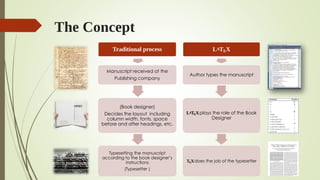
The Concept
Traditional process
Manuscript received at the
Publishing company
(Book designer)
Decides the layout including
column width, fonts, space
before and after headings, etc.
Typesetting the manuscript
according to the book designer’s
instructions
(Typesetter )
LATEX
Author types the manuscript
LATEXplays the role of the Book
Designer
TEXdoes the job of the typesetter
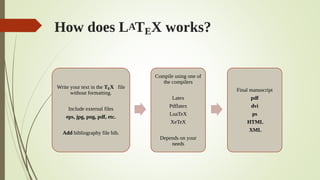
How does LATEX works?
Write your text in the TEX file
without formatting.
Include external files
eps, jpg, png, pdf, etc.
Add bibliography file bib.
Compile using one of
the compilers
Latex
Pdflatex
LuaTeX
XeTeX
Depends on your
needs
Final manuscript
pdf
dvi
ps
HTML
XML
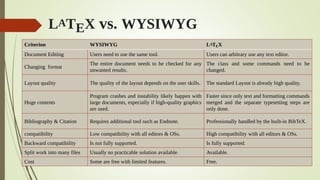
LATEX vs. WYSIWYG
Criterion WYSIWYG LATEX
Document Editing Users need to use the same tool. Users can arbitrary use any text editor.
Changing format
The entire document needs to be checked for any
unwanted results.
The class and some commands need to be
changed.
Layout quality The quality of the layout depends on the user skills. The standard Layout is already high quality.
Huge contents
Program crashes and instability likely happen with
large documents, especially if high-quality graphics
are used.
Faster since only text and formatting commands
merged and the separate typesetting steps are
only done.
Bibliography & Citation Requires additional tool such as Endnote. Professionally handled by the built-in BibTeX.
compatibility Low compatibility with all editors & OSs. High compatibility with all editors & OSs.
Backward compatibility Is not fully supported. Is fully supported.
Split work into many files Usually no practicable solution available. Available.
Cost Some are free with limited features. Free.
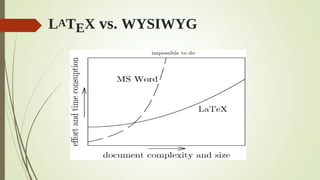
LATEX vs. WYSIWYG
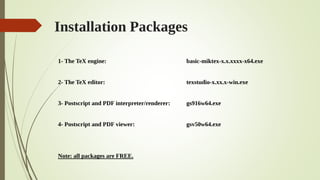
Installation Packages
1- The TeX engine: basic-miktex-x.x.xxxx-x64.exe
2- The TeX editor: texstudio-x.xx.x-win.exe
3- Postscript and PDF interpreter/renderer: gs916w64.exe
4- Postscript and PDF viewer: gsv50w64.exe
Note: all packages are FREE.
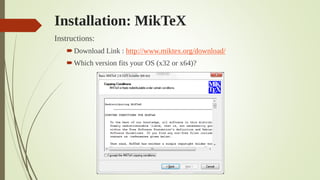
Installation: MikTeX
Instructions:
Download Link : http://www.miktex.org/download/
Which version fits your OS (x32 or x64)?
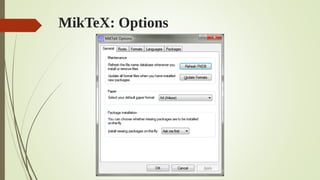
MikTeX: Options
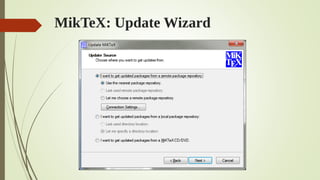
MikTeX: Update Wizard
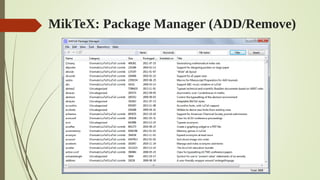
MikTeX: Package Manager (ADD/Remove)
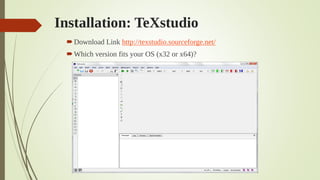
Installation: TeXstudio
Download Link http://texstudio.sourceforge.net/
Which version fits your OS (x32 or x64)?
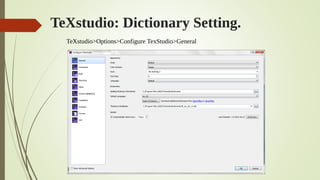
TeXstudio: Dictionary Setting.
 TeXstudio>Options>General> Dictionaries
TeXstudio>Options>Configure TexStudio>General
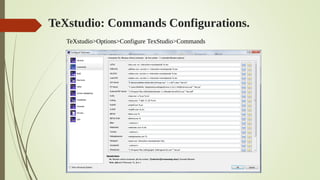
TeXstudio>Options>Configure TexStudio>Commands
TeXstudio: Commands Configurations.
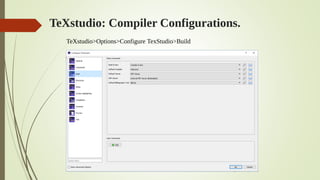
TeXstudio: Compiler Configurations.
TeXstudio>Options>Configure TexStudio>Build
Installation: Ghostscript and GSView
 Ghostscript:
Download Link https://www.ghostscript.com/download/gsdnld.html
Which version fits your OS (x32 or x64)?
 GSView:
Download Link https://artifex.com/developers-ghostscript-gsview/
documentclass[option1, option2, …]{class}
…
usepackage{package1}
usepackage[options]{package2}
usepackage{package3, package4}
usepackage[options]{package5, package6}
…
…
begin{document}
…
…
...
end{document}
LATEX: Basic Document Structure
The preamble
The content
LATEX: Basic Document Structure
documentclass[10pt,a4paper]{article}
title{You must put the title Here}
author{The name of first author
and The name of second author}
date{15/11/2015}
begin{document}
maketitle
You can write anything here. You can write
anything here. You can write anything here.
You can write anything here. You can write
anything here. You can write anything here.
You can write anything here.
end{document}
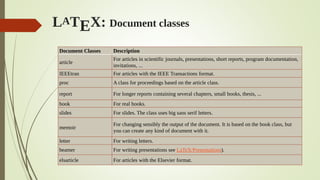
LATEX: Document classes
Document Classes Description
article
For articles in scientific journals, presentations, short reports, program documentation,
invitations, ...
IEEEtran For articles with the IEEE Transactions format.
proc A class for proceedings based on the article class.
report For longer reports containing several chapters, small books, thesis, ...
book For real books.
slides For slides. The class uses big sans serif letters.
memoir
For changing sensibly the output of the document. It is based on the book class, but
you can create any kind of document with it.
letter For writing letters.
beamer For writing presentations see LaTeX/Presentations).
elsarticle For articles with the Elsevier format.
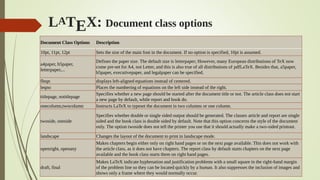
Document Class Options Description
10pt, 11pt, 12pt Sets the size of the main font in the document. If no option is specified, 10pt is assumed.
a4paper, b5paper,
letterpaper,...
Defines the paper size. The default size is letterpaper; However, many European distributions of TeX now
come pre-set for A4, not Letter, and this is also true of all distributions of pdfLaTeX. Besides that, a5paper,
b5paper, executivepaper, and legalpaper can be specified.
fleqn displays left-aligned equations instead of centered.
leqno Places the numbering of equations on the left side instead of the right.
titlepage, notitlepage
Specifies whether a new page should be started after the document title or not. The article class does not start
a new page by default, while report and book do.
onecolumn,twocolumn Instructs LaTeX to typeset the document in two columns or one column.
twoside, oneside
Specifies whether double or single sided output should be generated. The classes article and report are single
sided and the book class is double sided by default. Note that this option concerns the style of the document
only. The option twoside does not tell the printer you use that it should actually make a two-sided printout.
landscape Changes the layout of the document to print in landscape mode.
openright, openany
Makes chapters begin either only on right hand pages or on the next page available. This does not work with
the article class, as it does not have chapters. The report class by default starts chapters on the next page
available and the book class starts them on right hand pages.
draft, final
Makes LaTeX indicate hyphenation and justification problems with a small square in the right-hand margin
of the problem line so they can be located quickly by a human. It also suppresses the inclusion of images and
shows only a frame where they would normally occur.
LATEX: Document class options
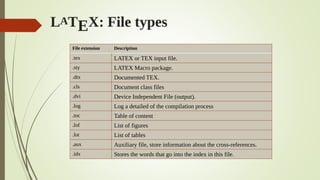
File extension Description
.tex LATEX or TEX input file.
.sty LATEX Macro package.
.dtx Documented TEX.
.cls Document class files
.dvi Device Independent File (output).
.log Log a detailed of the compilation process
.toc Table of content
.lof List of figures
.lot List of tables
.aux Auxiliary file, store information about the cross-references.
.idx Stores the words that go into the index in this file.
LATEX: File types
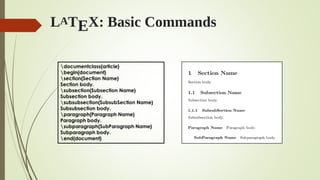
LATEX: Basic Commands
documentclass{article}
begin{document}
section{Section Name}
Section body.
subsection{Subsection Name}
Subsection body.
subsubsection{SubsubSection Name}
Subsubsection body.
paragraph{Paragraph Name}
Paragraph body.
subparagraph{SubParagraph Name}
Subparagraph body.
end{document}
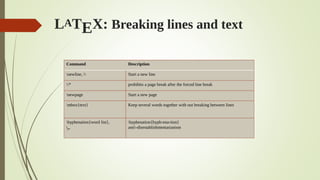
LATEX: Breaking lines and text
Command Description
newline,  Start a new line
* prohibits a page break after the forced line break
newpage Start a new page
mbox{text} Keep several words together with out breaking between lines
hyphenation{word list},
-
hyphenation{hyph-ena-tion}
anti-disestablishmentarianism
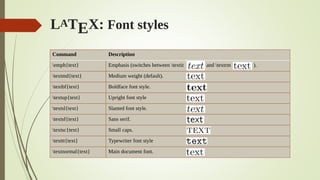
LATEX: Font styles
Command Description
emph{text} Emphasis (switches between textit and textrm ).
textmd{text} Medium weight (default).
textbf{text} Boldface font style.
textup{text} Upright font style
textsl{text} Slanted font style.
textsf{text} Sans serif.
textsc{text} Small caps.
texttt{text} Typewriter font style
textnormal{text} Main document font.
LATEX: Font styles
Command 10pt 11pt 12pt
tiny 5 6 6
scriptsize 7 8 8
footnotesize 8 9 10
small 9 10 10.95
normalsize 10 10.95 12
large 12 12 14.4
Large 14.4 14.4 17.28
LARGE 17.28 17.28 20.74
huge 20.74 20.74 24.88
Huge 24.88 24.88 24.88
documentclass[11pt]{article}
tiny sample text
large sample text
Huge sample text
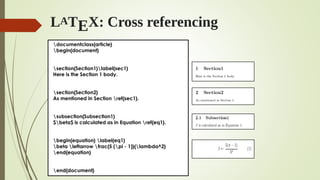
LATEX: Cross referencing
documentclass{article}
begin{document}
section{Section1}label{sec1}
Here is the Section 1 body.
section{Section2}
As mentioned in Section ref{sec1}.
subsection{Subsection1}
$beta$ is calculated as in Equation ref{eq1}.
begin{equation} label{eq1}
beta leftarrow frac{5 (pi - 1)}{lambda^2}
end{equation}
end{document}
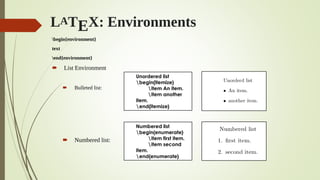
LATEX: Environments
begin{environment}
text
end{environment}
 List Environment
 Bulleted list:
 Numbered list:
Unordered list
begin{itemize}
item An item.
item another
item.
end{itemize}
Numbered list
begin{enumerate}
item first item.
item second
item.
end{enumerate}
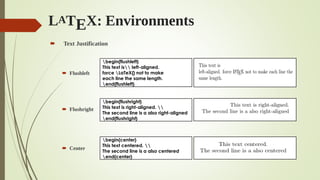
LATEX: Environments
 Text Justification
 Flushleft
 Flushright
 Center
begin{flushleft}
This text is left-aligned.
force LaTeX{} not to make
each line the same length.
end{flushleft}
begin{flushright}
This text is right-aligned. 
The second line is a also right-aligned
end{flushright}
begin{center}
This text centered. 
The second line is a also centered
end{center}
LATEX: Environments
 Tables
 Table
 Tabular
begin{table}[placement]
body of the table
caption{table title}
end{table}
begin{tabular}[pos]{cols}
entry 1 & entry 2... & entry n 
...
end{tabular}
Placement Description
h here
t at the top of the page
b at the bottom of the page
p on a dedicated page of floats
! override the default float restrictions
pos Description
t align on top row
b align on bottom row
c align to the centre
cols Description
l a column of left-aligned items
r a column of right-aligned items
c a column of centered items
p{wd} a column with specific width
| A vertical line
Tables: Three-line Table
begin{table}[h]
centering
caption {Simulation Parameters}
begin{tabular}[width=linewidth]{p{5cm}p{2.2cm}}
hline
Parameter & Value  hline
Simulation time & 500 sec 
MAC layer & IEEE 802.11e 
Preamble length & 144 bits 
PLCP header length & 48 bits  hline
end{tabular}
label{tab:SimPars}
end{table}
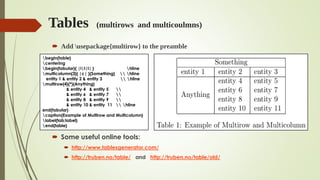
Tables (multirows and multicoulmns)
 Add usepackage{multirow} to the preamble
 Some useful online tools:
 http://www.tablesgenerator.com/
 http://truben.no/table/ and http://truben.no/table/old/
begin{table}
centering
begin{tabular}{ |l|l|l| } hline
multicolumn{3}{ |c| }{Something}  hline
entity 1 & entity 2 & entity 3  hline
multirow{4}{*}{Anything}
& entity 4 & entity 5 
& entity 6 & entity 7 
& entity 8 & entity 9 
& entity 10 & entity 11  hline
end{tabular}
caption{Example of Multirow and Multicolumn}
label{tab:label}
end{table}
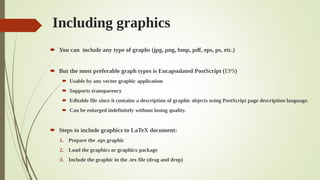
Including graphics
 You can include any type of graphs (jpg, png, bmp, pdf, eps, ps, etc.)
 But the most preferable graph types is Encapsulated PostScript (EPS)
 Usable by any vector graphic application
 Supports transparency
 Editable file since it contains a description of graphic objects using PostScript page description language.
 Can be enlarged indefinitely without losing quality.
 Steps to include graphics to LaTeX document:
1. Prepare the .eps graphic
2. Load the graphics or graphicx package
3. Include the graphic in the .tex file (drag and drop)
Including graphics
 Load the graphicx package by putting the following command in the preamble
usepackage{graphicx}
 Include the graph
 The options of Includegraphics
begin{figure}[h]
centering
includegraphics[width=0.7linewidth]{plot}
caption{Figure Caption Here}
label{fig:plot}
end{figure}
option Description
width change the graphic width
height change the graphic hight
angle rotate graphic counterclockwise with a specific degree
scale scale graphic (% from the original size)
option Description
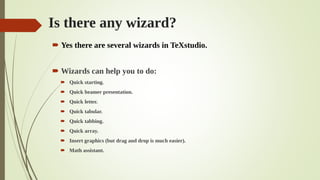
Is there any wizard?
 Yes there are several wizards in TeXstudio.
 Wizards can help you to do:
 Quick starting.
 Quick beamer presentation.
 Quick letter.
 Quick tabular.
 Quick tabbing.
 Quick array.
 Insert graphics (but drag and drop is much easier).
 Math assistant.
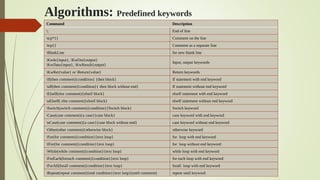
Algorithms: Predefined keywords
Command Description
; End of line
tcp*{} Comment on the line
tcp{} Comment as a separate line
BlankLine for new blank line
KwIn{input}, KwOut{output}
KwData{input}, KwResult{output}
Input, output keywords
KwRet{value} or Return{value} Return keywords
If(then comment){condition} {then block} If statement with end keyword
uIf(then comment){condition}{ then block without end} If statement without end keyword
ElseIf(else comment){elseif block} elseIf statement with end keyword
uElseIf( else comment){elseif block} elseIf statement without end keyword
Switch(switch comment){condition}{Switch block} Switch keyword
Case(case comment){a case}{case block} case keyword with end keyword
uCase(case comment){a case}{case block without end} case keyword without end keyword
Other(other comment){otherwise block} otherwise keyword
For(for comment){condition}{text loop} for loop with end keyword
lFor(for comment){condition}{text loop} for loop without end keyword
While(while comment){condition}{text loop} while loop with end keyword
ForEach(foreach comment){condition}{text loop} for each loop with end keyword
ForAll(forall comment){condition}{text loop} forall loop with end keyword
Repeat(repeat comment){end condition}{text loop}(until comment) repeat until keyword
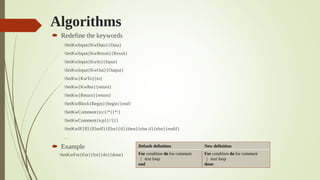
Algorithms
 Redefine the keywords
SetKwInput{KwData}{Data}
SetKwInput{KwResult}{Result}
SetKwInput{KwIn}{Input}
SetKwInput{KwOut}{Output}
SetKw{KwTo}{to}
SetKw{KwRet}{return}
SetKw{Return}{return}
SetKwBlock{Begin}{begin}{end}
SetKwComment{tcc{/*}{*/}
SetKwComment{tcp}{//}{}
SetKwIF{If}{ElseIf}{Else}{if}{then}{else if}{else}{endif}
…
 Example
SetKwFor{For}{for}{do}{done}
Default definition New definition
For condition do for comment
| text loop
end
For condition do for comment
| text loop
done
Algorithms  usepackage[linesnumbered, ruled]{algorithm2e}
For more information about algorithm2e refer to: http://ctan.mirrorcatalogs.com/macros/latex/contrib/algorithm2e/doc/algorithm2e.pdf
SetKwProg{Initialize}{Initialize}{ }{end}
SetKwProg{Function}{Function}{ }{end}
SetKwProg{Event}{Event}{ do}{event-end}
SetKwInOut{Input}{input}
begin{algorithm}
caption{Agile-SD Congestion Avoidance.}label{algo01}
Input{$tcp_status$}
Initialize{Variables}
{
$lambda_{min} leftarrow 1, lambda_{max} leftarrow 3,$
$beta_1 leftarrow 0.90, beta_2 leftarrow 0.95,$
$cwnd leftarrow 2$
}
Function{On ACK Receiption}
{
calculate $gap_{current}$
calculate $gap_{total}$
calculate $lambda$
$alpha = frac{lambda}{cwnd}$
$cwnd leftarrow cwnd + alpha$
}
Event{On Loss Detection}
{
$cwnd_{loss} leftarrow cwnd$
uIf {$tcp_status = SlowStart$} {
$cwnd leftarrow cwnd times beta_1$ }
Else {
$cwnd leftarrow cwnd times beta_2$ }
$ssthresh leftarrow cwnd - 1$
$cwnd_{degraded} leftarrow cwnd$
}
end{algorithm}
Theorems
(theorems, definitions, propositions, remarks, corollaries, lemmas, etc.)
 usepackage{amsthm}
 Define the environment in the preamble
newtheorem{name}{displayword}
 Examples
newtheorem{theorem}{Theorem}
newtheorem{corollary}{Corollary}
newtheorem{lemma} {Lemma}
newtheorem{prop}{Proposition}
 Numbering rules
newtheorem{theorem}{Theorem}[section]
newtheorem{corollary}{Corollary}[theorem]
newtheorem{lemma}[theorem]{Lemma}
newtheorem{prop}{Proposition}
Theorems
newtheorem{theorem}{Theorem}[section]
newtheorem{corollary}{Corollary}[theorem]
newtheorem{lemma}[theorem]{Lemma}
newtheorem{prop}{Proposition}
section{Introduction}
Introduction to use $setminus newtheorem$ command.
begin{theorem}[anyoption] label{theo1}
Place the theorem definition here.
end{theorem}
begin{proof}
Place the proof of Theorem ref{theo1} here.
end{proof}
begin{corollary} label{cor1}
Place the corollary definition here.
end{corollary}
Refer to your theorem ref{theo1} or corollary ref{cor1}
begin{prop} label{prop1}
Place the proposition definition here.
end{prop}
begin{proof}
Place the proof of Proposition ref{prop1} here.
end{proof}
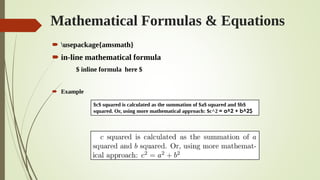
Mathematical Formulas & Equations
 usepackage{amsmath}
 in-line mathematical formula
$ inline formula here $
 Example
$c$ squared is calculated as the summation of $a$ squared and $b$
squared. Or, using more mathematical approach: $c^2 = a^2 + b^2$
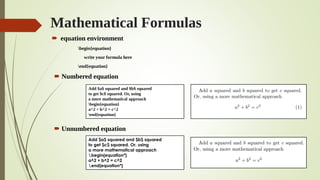
Mathematical Formulas
 equation environment
begin{equation}
write your formula here
end{equation}
 Numbered equation
 Unnumbered equation
Add $a$ squared and $b$ squared
to get $c$ squared. Or, using
a more mathematical approach
begin{equation}
a^2 + b^2 = c^2
end{equation}
Add $a$ squared and $b$ squared
to get $c$ squared. Or, using
a more mathematical approach
begin{equation*}
a^2 + b^2 = c^2
end{equation*}
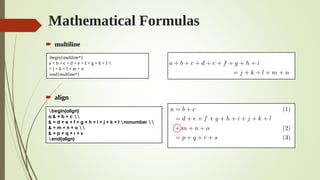
Mathematical Formulas
 multiline
 align
begin{multline*}
a + b + c + d + e + f + g + h + I 
= j + k + l + m + n
end{multline*}
begin{align}
a & = b + c 
& = d + e + f + g + h + i + j + k + l nonumber 
& + m + n + o 
& = p + q + r + s
end{align}
Mathematical Formulas
 IEEEeqnarray
 Requires IEEEtrantools.sty which can be obtained from
https://www.ctan.org/tex-archive/macros/latex/contrib/IEEEtran/tools
 usepackage[retainorgcmds]{IEEEtrantools}
 Example:
 Fine whitespaces can be added by using “:” to fix the unaligned entities
begin{IEEEeqnarray}{rCl}
a & = & b + c 
& = & d + e + f + g + h nonumber
& + & l + m + n + o 
& = & p + q + r + s
end{IEEEeqnarray}
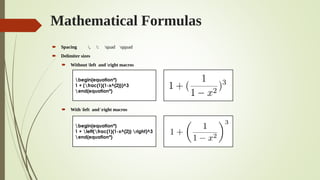
Mathematical Formulas
 Spacing , : quad qquad
 Delimiter sizes
 Without left and right macros
 With left and right macros
begin{equation*}
1 + (frac{1}{1-x^{2}})^3
end{equation*}
begin{equation*}
1 + left(frac{1}{1-x^{2}} right)^3
end{equation*}
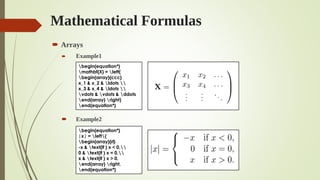
Mathematical Formulas
 Arrays
 Example1
 Example2
begin{equation*}
mathbf{X} = left(
begin{array}{ccc}
x_1 & x_2 & ldots 
x_3 & x_4 & ldots 
vdots & vdots & ddots
end{array} right)
end{equation*}
begin{equation*}
|x| = left{
begin{array}{rl}
-x & text{if } x < 0,
0 & text{if } x = 0,
x & text{if } x > 0.
end{array} right.
end{equation*}
Mathematical Formulas
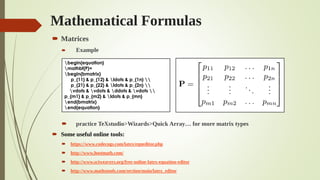
 Matrices
 Example
 practice TeXstudio>Wizards>Quick Array… for more matrix types
 Some useful online tools:
 https://www.codecogs.com/latex/eqneditor.php
 http://www.hostmath.com/
 http://www.sciweavers.org/free-online-latex-equation-editor
 http://www.mathstools.com/section/main/latex_editor
begin{equation}
mathbf{P}=
begin{bmatrix}
p_{11} & p_{12} & ldots & p_{1n} 
p_{21} & p_{22} & ldots & p_{2n} 
vdots & vdots & ddots & vdots 
p_{m1} & p_{m2} & ldots & p_{mn}
end{bmatrix}
end{equation}
Bibliography
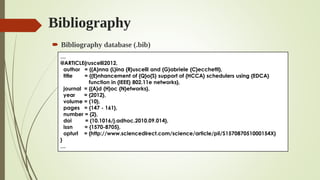
 Bibliography database (.bib)
…
@ARTICLE{ruscelli2012,
author = {{A}nna {L}ina {R}uscelli and {G}abriele {C}ecchetti},
title = {{E}nhancement of {Q}o{S} support of {HCCA} schedulers using {EDCA}
function in {IEEE} 802.11e networks},
journal = {{A}d {H}oc {N}etworks},
year = {2012},
volume = {10},
pages = {147 - 161},
number = {2},
doi = {10.1016/j.adhoc.2010.09.014},
issn = {1570-8705},
opturl = {http://www.sciencedirect.com/science/article/pii/S157087051000154X}
}
…
Bibliography
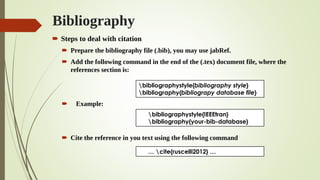
 Steps to deal with citation
 Prepare the bibliography file (.bib), you may use jabRef.
 Add the following command in the end of the (.tex) document file, where the
references section is:
 Example:
 Cite the reference in you text using the following command
bibliographystyle{bibliography style}
bibliography{bibliograpy database file}
bibliographystyle{IEEEtran}
bibliography{your-bib-database}
… cite{ruscelli2012} …
Bibliography
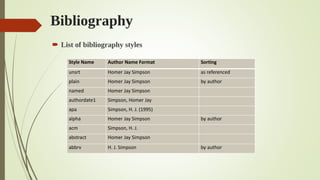
 List of bibliography styles
Style Name Author Name Format Sorting
unsrt Homer Jay Simpson as referenced
plain Homer Jay Simpson by author
named Homer Jay Simpson
authordate1 Simpson, Homer Jay
apa Simpson, H. J. (1995)
alpha Homer Jay Simpson by author
acm Simpson, H. J.
abstract Homer Jay Simpson
abbrv H. J. Simpson by author
Bibliography
 Multiple citation
 Some useful online tools:
 http://truben.no/latex/bibtex/
 http://www.bibme.org/bibtex
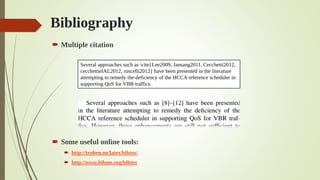
Several approaches such as cite{Lee2009, Jansang2011, Cecchetti2012,
cecchettielAL2012, ruscelli2012} have been presented in the literature
attempting to remedy the deficiency of the HCCA reference scheduler in
supporting QoS for VBR traffics.
Some useful websites:
 For free templates:
 https://www.overleaf.com/latex/templates/
 https://www.latextemplates.com/
 https://www.sharelatex.com/templates/thesis
 For technical resources and support:
 https://www.ctan.org/
 https://tex.stackexchange.com/
 http://stackoverflow.com/
Getting things together
 applying LaTex template
1. Get the IEEEtrans template from https://www.ctan.org/ or
https://www.ieee.org/conferences_events/conferences/publishing/tem
plates.html
2. Extract the template file (which includes IEEEtran.cls)into a folder
3. Copy images files
4. Copy reference.bib
5. add your material in the given template’s places
6. Compile
7. Done!
References
 https://en.wikibooks.org/wiki/LaTeX
 LaTeX Tutorial, Je Clark, Revised February 26, 2002
 Learning LATEX by Doing, Andr’e Heck, March 2005, AMSTEL Institute
 The Not So Short Introduction to LATEX2E, Tobias Oetiker,Hubert Partl, Irene
Hyna and Elisabeth Schlegl, Version 5.05, July 18, 2015
 Latex Workshop, Mohammed A. Al-maqri, April 2015, UPM.

Latex workshop: Essentials and Practices

  • 1.
    Date: 17 -18 May 2017 Time: 10.00 am - 5.00 pm Venue: Centre of Quranic Research, University of Malaya, Jalan Pantai Baharu, Kuala Lumpur, Malaysia. Requirements: *Laptop for practice *notebook and pen for taking notes. By: Dr. Mohamed A. Alrshah, Ph.D. in Computer Science, Dept. of Communication Technology and Networks. Lecturer at Al-Asmarya University – Libya. More than 15 years of academic experience. Mohamed.asnd@gmail.com LATEX Workshop: Essentials and Practices Topics:  Essentials of LaTex  Practical Applications  Producing High Quality Articles and Documents
  • 2.
    Outlines  In thisworkshop:  We will learn the concept of LaTex.  We will learn the necessary commands of LaTex.  We will learn how to solve our LaTex problems using online search.  We will learn how to use some available online tools.  We will learn how to find a LaTex journal template, and how to start working with it.  We will practice real journal scenarios from the well-known publishers, such as Elsevier, Springer, and IEEE.  We will learn how to deal with thesis scenario.
  • 3.
    What is TEX? TEX is a typesetting system uses the macro processing.  A TEX source document specifies a number of macro definitions that instruct the TEX engine how to typeset the document.  Its implementations are governed by the principle that the same input should produce the same output regardless what version of TEX is used.  It is totally FREE.
  • 4.
    What are LATEX,PDFLATEX, XeLATEX, LuaLATEX, and LATEXmk?  Each of them is a TEX Compiler.  PDFLATEX is the fastest one among them.  Every compiler is a set of macro packages.  It enables authors to produce high quality articles.  It provides a lot of predefined and professional layouts.  It uses the TEX formatter as its typesetting engine.
  • 5.
    The Concept Traditional process Manuscriptreceived at the Publishing company (Book designer) Decides the layout including column width, fonts, space before and after headings, etc. Typesetting the manuscript according to the book designer’s instructions (Typesetter ) LATEX Author types the manuscript LATEXplays the role of the Book Designer TEXdoes the job of the typesetter
  • 6.
    How does LATEXworks? Write your text in the TEX file without formatting. Include external files eps, jpg, png, pdf, etc. Add bibliography file bib. Compile using one of the compilers Latex Pdflatex LuaTeX XeTeX Depends on your needs Final manuscript pdf dvi ps HTML XML
  • 7.
    LATEX vs. WYSIWYG CriterionWYSIWYG LATEX Document Editing Users need to use the same tool. Users can arbitrary use any text editor. Changing format The entire document needs to be checked for any unwanted results. The class and some commands need to be changed. Layout quality The quality of the layout depends on the user skills. The standard Layout is already high quality. Huge contents Program crashes and instability likely happen with large documents, especially if high-quality graphics are used. Faster since only text and formatting commands merged and the separate typesetting steps are only done. Bibliography & Citation Requires additional tool such as Endnote. Professionally handled by the built-in BibTeX. compatibility Low compatibility with all editors & OSs. High compatibility with all editors & OSs. Backward compatibility Is not fully supported. Is fully supported. Split work into many files Usually no practicable solution available. Available. Cost Some are free with limited features. Free.
  • 8.
  • 9.
    Installation Packages 1- TheTeX engine: basic-miktex-x.x.xxxx-x64.exe 2- The TeX editor: texstudio-x.xx.x-win.exe 3- Postscript and PDF interpreter/renderer: gs916w64.exe 4- Postscript and PDF viewer: gsv50w64.exe Note: all packages are FREE.
  • 10.
    Installation: MikTeX Instructions: Download Link: http://www.miktex.org/download/ Which version fits your OS (x32 or x64)?
  • 11.
  • 12.
  • 13.
  • 14.
    Installation: TeXstudio Download Linkhttp://texstudio.sourceforge.net/ Which version fits your OS (x32 or x64)?
  • 15.
    TeXstudio: Dictionary Setting. TeXstudio>Options>General> Dictionaries TeXstudio>Options>Configure TexStudio>General
  • 16.
  • 17.
  • 18.
    Installation: Ghostscript andGSView  Ghostscript: Download Link https://www.ghostscript.com/download/gsdnld.html Which version fits your OS (x32 or x64)?  GSView: Download Link https://artifex.com/developers-ghostscript-gsview/
  • 19.
    documentclass[option1, option2, …]{class} … usepackage{package1} usepackage[options]{package2} usepackage{package3,package4} usepackage[options]{package5, package6} … … begin{document} … … ... end{document} LATEX: Basic Document Structure The preamble The content
  • 20.
    LATEX: Basic DocumentStructure documentclass[10pt,a4paper]{article} title{You must put the title Here} author{The name of first author and The name of second author} date{15/11/2015} begin{document} maketitle You can write anything here. You can write anything here. You can write anything here. You can write anything here. You can write anything here. You can write anything here. You can write anything here. end{document}
  • 21.
    LATEX: Document classes DocumentClasses Description article For articles in scientific journals, presentations, short reports, program documentation, invitations, ... IEEEtran For articles with the IEEE Transactions format. proc A class for proceedings based on the article class. report For longer reports containing several chapters, small books, thesis, ... book For real books. slides For slides. The class uses big sans serif letters. memoir For changing sensibly the output of the document. It is based on the book class, but you can create any kind of document with it. letter For writing letters. beamer For writing presentations see LaTeX/Presentations). elsarticle For articles with the Elsevier format.
  • 22.
    Document Class OptionsDescription 10pt, 11pt, 12pt Sets the size of the main font in the document. If no option is specified, 10pt is assumed. a4paper, b5paper, letterpaper,... Defines the paper size. The default size is letterpaper; However, many European distributions of TeX now come pre-set for A4, not Letter, and this is also true of all distributions of pdfLaTeX. Besides that, a5paper, b5paper, executivepaper, and legalpaper can be specified. fleqn displays left-aligned equations instead of centered. leqno Places the numbering of equations on the left side instead of the right. titlepage, notitlepage Specifies whether a new page should be started after the document title or not. The article class does not start a new page by default, while report and book do. onecolumn,twocolumn Instructs LaTeX to typeset the document in two columns or one column. twoside, oneside Specifies whether double or single sided output should be generated. The classes article and report are single sided and the book class is double sided by default. Note that this option concerns the style of the document only. The option twoside does not tell the printer you use that it should actually make a two-sided printout. landscape Changes the layout of the document to print in landscape mode. openright, openany Makes chapters begin either only on right hand pages or on the next page available. This does not work with the article class, as it does not have chapters. The report class by default starts chapters on the next page available and the book class starts them on right hand pages. draft, final Makes LaTeX indicate hyphenation and justification problems with a small square in the right-hand margin of the problem line so they can be located quickly by a human. It also suppresses the inclusion of images and shows only a frame where they would normally occur. LATEX: Document class options
  • 23.
    File extension Description .texLATEX or TEX input file. .sty LATEX Macro package. .dtx Documented TEX. .cls Document class files .dvi Device Independent File (output). .log Log a detailed of the compilation process .toc Table of content .lof List of figures .lot List of tables .aux Auxiliary file, store information about the cross-references. .idx Stores the words that go into the index in this file. LATEX: File types
  • 24.
    LATEX: Basic Commands documentclass{article} begin{document} section{SectionName} Section body. subsection{Subsection Name} Subsection body. subsubsection{SubsubSection Name} Subsubsection body. paragraph{Paragraph Name} Paragraph body. subparagraph{SubParagraph Name} Subparagraph body. end{document}
  • 25.
    LATEX: Breaking linesand text Command Description newline, Start a new line * prohibits a page break after the forced line break newpage Start a new page mbox{text} Keep several words together with out breaking between lines hyphenation{word list}, - hyphenation{hyph-ena-tion} anti-disestablishmentarianism
  • 26.
    LATEX: Font styles CommandDescription emph{text} Emphasis (switches between textit and textrm ). textmd{text} Medium weight (default). textbf{text} Boldface font style. textup{text} Upright font style textsl{text} Slanted font style. textsf{text} Sans serif. textsc{text} Small caps. texttt{text} Typewriter font style textnormal{text} Main document font.
  • 27.
    LATEX: Font styles Command10pt 11pt 12pt tiny 5 6 6 scriptsize 7 8 8 footnotesize 8 9 10 small 9 10 10.95 normalsize 10 10.95 12 large 12 12 14.4 Large 14.4 14.4 17.28 LARGE 17.28 17.28 20.74 huge 20.74 20.74 24.88 Huge 24.88 24.88 24.88 documentclass[11pt]{article} tiny sample text large sample text Huge sample text
  • 28.
    LATEX: Cross referencing documentclass{article} begin{document} section{Section1}label{sec1} Hereis the Section 1 body. section{Section2} As mentioned in Section ref{sec1}. subsection{Subsection1} $beta$ is calculated as in Equation ref{eq1}. begin{equation} label{eq1} beta leftarrow frac{5 (pi - 1)}{lambda^2} end{equation} end{document}
  • 29.
    LATEX: Environments begin{environment} text end{environment}  ListEnvironment  Bulleted list:  Numbered list: Unordered list begin{itemize} item An item. item another item. end{itemize} Numbered list begin{enumerate} item first item. item second item. end{enumerate}
  • 30.
    LATEX: Environments  TextJustification  Flushleft  Flushright  Center begin{flushleft} This text is left-aligned. force LaTeX{} not to make each line the same length. end{flushleft} begin{flushright} This text is right-aligned. The second line is a also right-aligned end{flushright} begin{center} This text centered. The second line is a also centered end{center}
  • 31.
    LATEX: Environments  Tables Table  Tabular begin{table}[placement] body of the table caption{table title} end{table} begin{tabular}[pos]{cols} entry 1 & entry 2... & entry n ... end{tabular} Placement Description h here t at the top of the page b at the bottom of the page p on a dedicated page of floats ! override the default float restrictions pos Description t align on top row b align on bottom row c align to the centre cols Description l a column of left-aligned items r a column of right-aligned items c a column of centered items p{wd} a column with specific width | A vertical line
  • 32.
    Tables: Three-line Table begin{table}[h] centering caption{Simulation Parameters} begin{tabular}[width=linewidth]{p{5cm}p{2.2cm}} hline Parameter & Value hline Simulation time & 500 sec MAC layer & IEEE 802.11e Preamble length & 144 bits PLCP header length & 48 bits hline end{tabular} label{tab:SimPars} end{table}
  • 33.
    Tables (multirows andmulticoulmns)  Add usepackage{multirow} to the preamble  Some useful online tools:  http://www.tablesgenerator.com/  http://truben.no/table/ and http://truben.no/table/old/ begin{table} centering begin{tabular}{ |l|l|l| } hline multicolumn{3}{ |c| }{Something} hline entity 1 & entity 2 & entity 3 hline multirow{4}{*}{Anything} & entity 4 & entity 5 & entity 6 & entity 7 & entity 8 & entity 9 & entity 10 & entity 11 hline end{tabular} caption{Example of Multirow and Multicolumn} label{tab:label} end{table}
  • 34.
    Including graphics  Youcan include any type of graphs (jpg, png, bmp, pdf, eps, ps, etc.)  But the most preferable graph types is Encapsulated PostScript (EPS)  Usable by any vector graphic application  Supports transparency  Editable file since it contains a description of graphic objects using PostScript page description language.  Can be enlarged indefinitely without losing quality.  Steps to include graphics to LaTeX document: 1. Prepare the .eps graphic 2. Load the graphics or graphicx package 3. Include the graphic in the .tex file (drag and drop)
  • 35.
    Including graphics  Loadthe graphicx package by putting the following command in the preamble usepackage{graphicx}  Include the graph  The options of Includegraphics begin{figure}[h] centering includegraphics[width=0.7linewidth]{plot} caption{Figure Caption Here} label{fig:plot} end{figure} option Description width change the graphic width height change the graphic hight angle rotate graphic counterclockwise with a specific degree scale scale graphic (% from the original size) option Description
  • 36.
    Is there anywizard?  Yes there are several wizards in TeXstudio.  Wizards can help you to do:  Quick starting.  Quick beamer presentation.  Quick letter.  Quick tabular.  Quick tabbing.  Quick array.  Insert graphics (but drag and drop is much easier).  Math assistant.
  • 37.
    Algorithms: Predefined keywords CommandDescription ; End of line tcp*{} Comment on the line tcp{} Comment as a separate line BlankLine for new blank line KwIn{input}, KwOut{output} KwData{input}, KwResult{output} Input, output keywords KwRet{value} or Return{value} Return keywords If(then comment){condition} {then block} If statement with end keyword uIf(then comment){condition}{ then block without end} If statement without end keyword ElseIf(else comment){elseif block} elseIf statement with end keyword uElseIf( else comment){elseif block} elseIf statement without end keyword Switch(switch comment){condition}{Switch block} Switch keyword Case(case comment){a case}{case block} case keyword with end keyword uCase(case comment){a case}{case block without end} case keyword without end keyword Other(other comment){otherwise block} otherwise keyword For(for comment){condition}{text loop} for loop with end keyword lFor(for comment){condition}{text loop} for loop without end keyword While(while comment){condition}{text loop} while loop with end keyword ForEach(foreach comment){condition}{text loop} for each loop with end keyword ForAll(forall comment){condition}{text loop} forall loop with end keyword Repeat(repeat comment){end condition}{text loop}(until comment) repeat until keyword
  • 38.
    Algorithms  Redefine thekeywords SetKwInput{KwData}{Data} SetKwInput{KwResult}{Result} SetKwInput{KwIn}{Input} SetKwInput{KwOut}{Output} SetKw{KwTo}{to} SetKw{KwRet}{return} SetKw{Return}{return} SetKwBlock{Begin}{begin}{end} SetKwComment{tcc{/*}{*/} SetKwComment{tcp}{//}{} SetKwIF{If}{ElseIf}{Else}{if}{then}{else if}{else}{endif} …  Example SetKwFor{For}{for}{do}{done} Default definition New definition For condition do for comment | text loop end For condition do for comment | text loop done
  • 39.
    Algorithms  usepackage[linesnumbered,ruled]{algorithm2e} For more information about algorithm2e refer to: http://ctan.mirrorcatalogs.com/macros/latex/contrib/algorithm2e/doc/algorithm2e.pdf SetKwProg{Initialize}{Initialize}{ }{end} SetKwProg{Function}{Function}{ }{end} SetKwProg{Event}{Event}{ do}{event-end} SetKwInOut{Input}{input} begin{algorithm} caption{Agile-SD Congestion Avoidance.}label{algo01} Input{$tcp_status$} Initialize{Variables} { $lambda_{min} leftarrow 1, lambda_{max} leftarrow 3,$ $beta_1 leftarrow 0.90, beta_2 leftarrow 0.95,$ $cwnd leftarrow 2$ } Function{On ACK Receiption} { calculate $gap_{current}$ calculate $gap_{total}$ calculate $lambda$ $alpha = frac{lambda}{cwnd}$ $cwnd leftarrow cwnd + alpha$ } Event{On Loss Detection} { $cwnd_{loss} leftarrow cwnd$ uIf {$tcp_status = SlowStart$} { $cwnd leftarrow cwnd times beta_1$ } Else { $cwnd leftarrow cwnd times beta_2$ } $ssthresh leftarrow cwnd - 1$ $cwnd_{degraded} leftarrow cwnd$ } end{algorithm}
  • 40.
    Theorems (theorems, definitions, propositions,remarks, corollaries, lemmas, etc.)  usepackage{amsthm}  Define the environment in the preamble newtheorem{name}{displayword}  Examples newtheorem{theorem}{Theorem} newtheorem{corollary}{Corollary} newtheorem{lemma} {Lemma} newtheorem{prop}{Proposition}  Numbering rules newtheorem{theorem}{Theorem}[section] newtheorem{corollary}{Corollary}[theorem] newtheorem{lemma}[theorem]{Lemma} newtheorem{prop}{Proposition}
  • 41.
    Theorems newtheorem{theorem}{Theorem}[section] newtheorem{corollary}{Corollary}[theorem] newtheorem{lemma}[theorem]{Lemma} newtheorem{prop}{Proposition} section{Introduction} Introduction to use$setminus newtheorem$ command. begin{theorem}[anyoption] label{theo1} Place the theorem definition here. end{theorem} begin{proof} Place the proof of Theorem ref{theo1} here. end{proof} begin{corollary} label{cor1} Place the corollary definition here. end{corollary} Refer to your theorem ref{theo1} or corollary ref{cor1} begin{prop} label{prop1} Place the proposition definition here. end{prop} begin{proof} Place the proof of Proposition ref{prop1} here. end{proof}
  • 42.
    Mathematical Formulas &Equations  usepackage{amsmath}  in-line mathematical formula $ inline formula here $  Example $c$ squared is calculated as the summation of $a$ squared and $b$ squared. Or, using more mathematical approach: $c^2 = a^2 + b^2$
  • 43.
    Mathematical Formulas  equationenvironment begin{equation} write your formula here end{equation}  Numbered equation  Unnumbered equation Add $a$ squared and $b$ squared to get $c$ squared. Or, using a more mathematical approach begin{equation} a^2 + b^2 = c^2 end{equation} Add $a$ squared and $b$ squared to get $c$ squared. Or, using a more mathematical approach begin{equation*} a^2 + b^2 = c^2 end{equation*}
  • 44.
    Mathematical Formulas  multiline align begin{multline*} a + b + c + d + e + f + g + h + I = j + k + l + m + n end{multline*} begin{align} a & = b + c & = d + e + f + g + h + i + j + k + l nonumber & + m + n + o & = p + q + r + s end{align}
  • 45.
    Mathematical Formulas  IEEEeqnarray Requires IEEEtrantools.sty which can be obtained from https://www.ctan.org/tex-archive/macros/latex/contrib/IEEEtran/tools  usepackage[retainorgcmds]{IEEEtrantools}  Example:  Fine whitespaces can be added by using “:” to fix the unaligned entities begin{IEEEeqnarray}{rCl} a & = & b + c & = & d + e + f + g + h nonumber & + & l + m + n + o & = & p + q + r + s end{IEEEeqnarray}
  • 46.
    Mathematical Formulas  Spacing, : quad qquad  Delimiter sizes  Without left and right macros  With left and right macros begin{equation*} 1 + (frac{1}{1-x^{2}})^3 end{equation*} begin{equation*} 1 + left(frac{1}{1-x^{2}} right)^3 end{equation*}
  • 47.
    Mathematical Formulas  Arrays Example1  Example2 begin{equation*} mathbf{X} = left( begin{array}{ccc} x_1 & x_2 & ldots x_3 & x_4 & ldots vdots & vdots & ddots end{array} right) end{equation*} begin{equation*} |x| = left{ begin{array}{rl} -x & text{if } x < 0, 0 & text{if } x = 0, x & text{if } x > 0. end{array} right. end{equation*}
  • 48.
    Mathematical Formulas  Matrices Example  practice TeXstudio>Wizards>Quick Array… for more matrix types  Some useful online tools:  https://www.codecogs.com/latex/eqneditor.php  http://www.hostmath.com/  http://www.sciweavers.org/free-online-latex-equation-editor  http://www.mathstools.com/section/main/latex_editor begin{equation} mathbf{P}= begin{bmatrix} p_{11} & p_{12} & ldots & p_{1n} p_{21} & p_{22} & ldots & p_{2n} vdots & vdots & ddots & vdots p_{m1} & p_{m2} & ldots & p_{mn} end{bmatrix} end{equation}
  • 49.
    Bibliography  Bibliography database(.bib) … @ARTICLE{ruscelli2012, author = {{A}nna {L}ina {R}uscelli and {G}abriele {C}ecchetti}, title = {{E}nhancement of {Q}o{S} support of {HCCA} schedulers using {EDCA} function in {IEEE} 802.11e networks}, journal = {{A}d {H}oc {N}etworks}, year = {2012}, volume = {10}, pages = {147 - 161}, number = {2}, doi = {10.1016/j.adhoc.2010.09.014}, issn = {1570-8705}, opturl = {http://www.sciencedirect.com/science/article/pii/S157087051000154X} } …
  • 50.
    Bibliography  Steps todeal with citation  Prepare the bibliography file (.bib), you may use jabRef.  Add the following command in the end of the (.tex) document file, where the references section is:  Example:  Cite the reference in you text using the following command bibliographystyle{bibliography style} bibliography{bibliograpy database file} bibliographystyle{IEEEtran} bibliography{your-bib-database} … cite{ruscelli2012} …
  • 51.
    Bibliography  List ofbibliography styles Style Name Author Name Format Sorting unsrt Homer Jay Simpson as referenced plain Homer Jay Simpson by author named Homer Jay Simpson authordate1 Simpson, Homer Jay apa Simpson, H. J. (1995) alpha Homer Jay Simpson by author acm Simpson, H. J. abstract Homer Jay Simpson abbrv H. J. Simpson by author
  • 52.
    Bibliography  Multiple citation Some useful online tools:  http://truben.no/latex/bibtex/  http://www.bibme.org/bibtex Several approaches such as cite{Lee2009, Jansang2011, Cecchetti2012, cecchettielAL2012, ruscelli2012} have been presented in the literature attempting to remedy the deficiency of the HCCA reference scheduler in supporting QoS for VBR traffics.
  • 53.
    Some useful websites: For free templates:  https://www.overleaf.com/latex/templates/  https://www.latextemplates.com/  https://www.sharelatex.com/templates/thesis  For technical resources and support:  https://www.ctan.org/  https://tex.stackexchange.com/  http://stackoverflow.com/
  • 54.
    Getting things together applying LaTex template 1. Get the IEEEtrans template from https://www.ctan.org/ or https://www.ieee.org/conferences_events/conferences/publishing/tem plates.html 2. Extract the template file (which includes IEEEtran.cls)into a folder 3. Copy images files 4. Copy reference.bib 5. add your material in the given template’s places 6. Compile 7. Done!
  • 55.
    References  https://en.wikibooks.org/wiki/LaTeX  LaTeXTutorial, Je Clark, Revised February 26, 2002  Learning LATEX by Doing, Andr’e Heck, March 2005, AMSTEL Institute  The Not So Short Introduction to LATEX2E, Tobias Oetiker,Hubert Partl, Irene Hyna and Elisabeth Schlegl, Version 5.05, July 18, 2015  Latex Workshop, Mohammed A. Al-maqri, April 2015, UPM.