Improving Your Writing Project
Workflow with a Collaborative
Online Platform: Overleaf and
ShareLaTeX
Olga Scrivner, Workshop in Methods, October 26
Objectives
- Become familiar with Overleaf platform
- Collaborate and share
- Be able to write an article for journals that provide an
Overleaf template
- Understand the Latex structure (writing format)
1
Introduction to Overleaf Platform
Overleaf
- Templates for papers, presentations, newsletters, syllabi,
books. . .
- Online collaboration platform
- Output: nice PDF files
3
Overleaf
Overleaf is a website for writing and publishing documents.
ShareLaTex joined Overleaf last year.
4
Overview I
Collaborating, commenting, and tracking changes
5
Overview II
Sharing documents with URL - streamline collaboration
6
Overview III
Searching your bibliography and inserting citation
7
Overleaf Version 2 - Coming
- Zotero and Mendeley integration
- API integration (for publisher manuscript management
platforms)
- Direct GitHub synchronization
Source:https://www.sharelatex.com/blog/2018/05/01/try-out-overleaf-v2.html
8
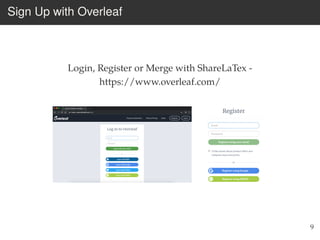
Sign Up with Overleaf
Login, Register or Merge with ShareLaTex -
https://www.overleaf.com/
9
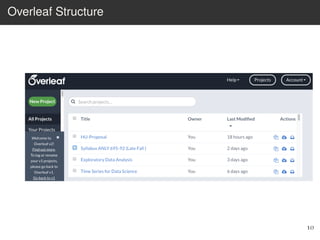
Overleaf Structure
10
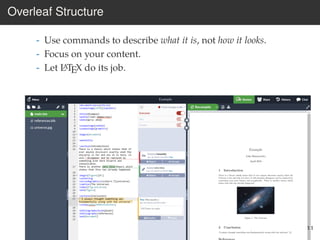
Overleaf Structure
- Use commands to describe what it is, not how it looks.
- Focus on your content.
- Let LATEX do its job.
11
How Does It Work?
Credits: John D Lees-Miller (University of Bristol), Charles Batts (University of North Carolina)
12
More Examples
Credits: John D Lees-Miller (University of Bristol), Charles Batts (University of North Carolina)
13
Basics
Create a New Project
Select New Project > Blank Project > Give it a name > Create
15
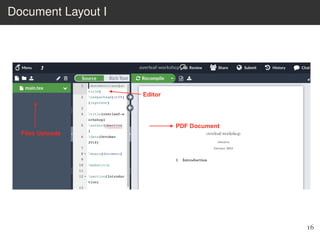
Document Layout I
16
Document Layout II
Rename, Delete, Upload
17
Document Layout III
Adjust setting for your current project, back to main projects
18
Document Layout IV
19
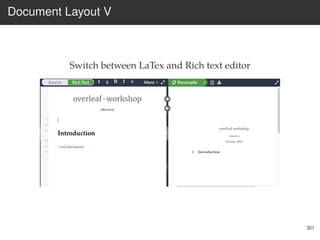
Document Layout V
Switch between LaTex and Rich text editor
20
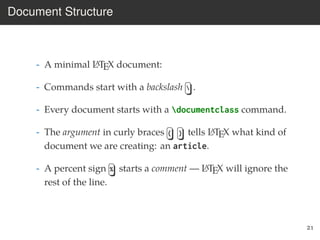
Document Structure
- A minimal LATEX document:
- Commands start with a backslash  .
- Every document starts with a documentclass command.
- The argument in curly braces { } tells LATEX what kind of
document we are creating: an article.
- A percent sign % starts a comment — LATEX will ignore the
rest of the line.
21
Typesetting Text
Credits: John D Lees-Miller (University of Bristol), Charles Batts (University of North Carolina)
22
Practice - Title and Author
Change Title and Author, then Recompile
23
Abstract
24
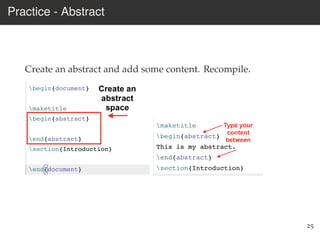
Practice - Abstract
Create an abstract and add some content. Recompile.
25
Editing - Undo/Redo
26
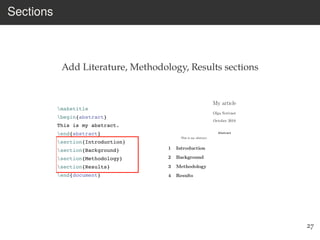
Sections
Add Literature, Methodology, Results sections
27
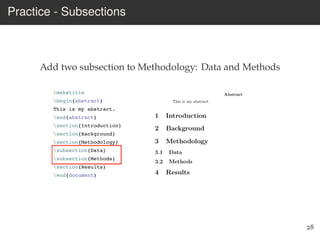
Practice - Subsections
Add two subsection to Methodology: Data and Methods
28
Adding Content to Introduction
Type a sentence in the Introduction section. Recompile.
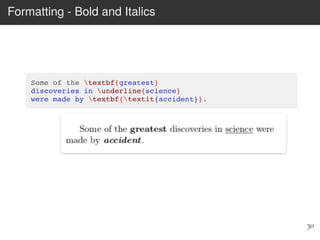
Some of the greatest discoveries in science were made by
accident.
29
Formatting - Bold and Italics
30
Caveats
- Quotation marks are a bit tricky: use a backtick ` on the left and
an apostrophe ´ on the right. Single quotes: ‘text’.
Double quotes: “text”.
- Some common characters have special meanings in LATEX:
% percent sign
# hash (pound / sharp) sign
& ampersand
$ dollar sign
- If you just type these, you’ll get an error. If you want one to
appear in the output, you have to escape it by preceding it with a
backslash. Backslash $%&#
31
Quotes
Skip one line and type (quotes = left single quote twice and
right single quote twice)
Inertia is “the first law of the motion”
32
Add Citation with &
Inertia is “the first law of the motion” (Newton
& Newton, n.d.).
33
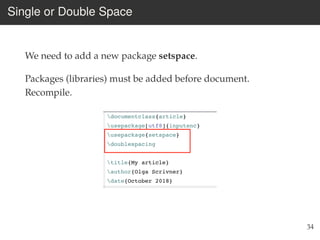
Single or Double Space
We need to add a new package setspace.
Packages (libraries) must be added before document.
Recompile.
34
Indentation
We want to remove indentation in the second paragraph.
35
Handling Errors
LATEX can get confused when it is trying to compile your
document. If it does, it stops with an error, which you
must fix before it will produce any output.
For example, if you misspell emph as meph, LATEX will stop
with an “undefined control sequence” error, because
“meph” is not one of the commands it knows.
Advice on Errors
1. Don’t panic! Errors happen.
2. Fix them as soon as they arise — if what you just typed
caused an error, you can start your debugging there.
3. If there are multiple errors, start with the first one — the
cause may even be above it.
36
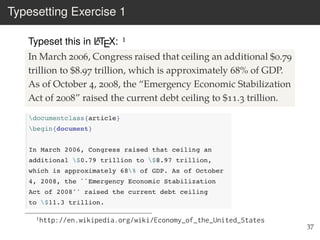
Typesetting Exercise 1
Typeset this in LATEX: 1
In March 2006, Congress raised that ceiling an additional $0.79
trillion to $8.97 trillion, which is approximately 68% of GDP.
As of October 4, 2008, the “Emergency Economic Stabilization
Act of 2008” raised the current debt ceiling to $11.3 trillion.
1http://en.wikipedia.org/wiki/Economy_of_the_United_States
37
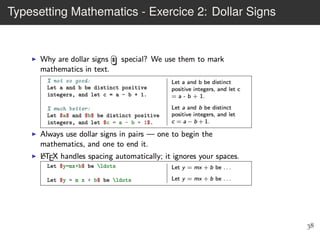
Typesetting Mathematics - Exercice 2: Dollar Signs
38
Environments - Exercice 3
39
Environments - Exercice 4
Type three hobbies you like - one per line
40
Share
- Select Share Menu
41
PDF and Journals
- Select Download PDF to generate a pdf File
- Select Journal and Services to submit directly to journals
42
Figures and Tables
Graphics
Requires the graphicx package, which provides the
includegraphics command.
Supported graphics formats include JPEG, PNG and PDF
(usually).
44
Practice
Download any image from internet Upload it to Overleaf Add
package named graphicx
Add this line:
45
Practice - Explore template
Return to Project
Select New Project
Select Template
Explore
46
Interlude: Optional Arguments
We use square brackets [ ] for optional arguments,
instead of braces { } .
includegraphics accepts optional arguments that allow
you to transform the image when it is included. For
example, width=0.3textwidth makes the image take up
30% of the width of the surrounding text (textwidth).
documentclass accepts optional arguments, too. Example:
makes the text bigger (12pt) and puts it into two columns.
Where do you find out about these? See the slides at the
end of this presentation for links to more information.
47
Graphics
Tables in LATEX take some getting used to.
Use the tabular environment from the tabularx package.
The argument specifies column alignment — left, right,
right.
Item Qty Unit $
Widget 1 199.99
Gadget 2 399.99
Cable 3 19.99
It also specifies vertical lines; use hline for horizontal
lines.
Item Qty Unit $
Widget 1 199.99
Gadget 2 399.99
Cable 3 19.99
Use an ampersand & to separate columns and a double
backslash   to start a new row (like in the align*
environment that we saw in part 1).
48
Bib file
Put your references in a .bib file in ‘bibtex’ database
format:
Most reference managers can export to bibtex format.
49
Bib file
Each entry in the .bib file has a key that you can use to
reference it in the document. For example,
Jacobson1999Towards is the key for this article:
It’s a good idea to use a key based on the name, year and
title.
LATEX can automatically format your in-text citations and
generate a list of references; it knows most standard styles,
and you can design your own.
50
Natbib
Use the natbib package2 with citet and citep.
Reference bibliography at the end, and specify a
bibliographystyle.
bib-example.pdf
51

Introduction to Overleaf Workshop

  • 1.
    Improving Your WritingProject Workflow with a Collaborative Online Platform: Overleaf and ShareLaTeX Olga Scrivner, Workshop in Methods, October 26
  • 2.
    Objectives - Become familiarwith Overleaf platform - Collaborate and share - Be able to write an article for journals that provide an Overleaf template - Understand the Latex structure (writing format) 1
  • 3.
  • 4.
    Overleaf - Templates forpapers, presentations, newsletters, syllabi, books. . . - Online collaboration platform - Output: nice PDF files 3
  • 5.
    Overleaf Overleaf is awebsite for writing and publishing documents. ShareLaTex joined Overleaf last year. 4
  • 6.
  • 7.
    Overview II Sharing documentswith URL - streamline collaboration 6
  • 8.
    Overview III Searching yourbibliography and inserting citation 7
  • 9.
    Overleaf Version 2- Coming - Zotero and Mendeley integration - API integration (for publisher manuscript management platforms) - Direct GitHub synchronization Source:https://www.sharelatex.com/blog/2018/05/01/try-out-overleaf-v2.html 8
  • 10.
    Sign Up withOverleaf Login, Register or Merge with ShareLaTex - https://www.overleaf.com/ 9
  • 11.
  • 12.
    Overleaf Structure - Usecommands to describe what it is, not how it looks. - Focus on your content. - Let LATEX do its job. 11
  • 13.
    How Does ItWork? Credits: John D Lees-Miller (University of Bristol), Charles Batts (University of North Carolina) 12
  • 14.
    More Examples Credits: JohnD Lees-Miller (University of Bristol), Charles Batts (University of North Carolina) 13
  • 15.
  • 16.
    Create a NewProject Select New Project > Blank Project > Give it a name > Create 15
  • 17.
  • 18.
    Document Layout II Rename,Delete, Upload 17
  • 19.
    Document Layout III Adjustsetting for your current project, back to main projects 18
  • 20.
  • 21.
    Document Layout V Switchbetween LaTex and Rich text editor 20
  • 22.
    Document Structure - Aminimal LATEX document: - Commands start with a backslash . - Every document starts with a documentclass command. - The argument in curly braces { } tells LATEX what kind of document we are creating: an article. - A percent sign % starts a comment — LATEX will ignore the rest of the line. 21
  • 23.
    Typesetting Text Credits: JohnD Lees-Miller (University of Bristol), Charles Batts (University of North Carolina) 22
  • 24.
    Practice - Titleand Author Change Title and Author, then Recompile 23
  • 25.
  • 26.
    Practice - Abstract Createan abstract and add some content. Recompile. 25
  • 27.
  • 28.
  • 29.
    Practice - Subsections Addtwo subsection to Methodology: Data and Methods 28
  • 30.
    Adding Content toIntroduction Type a sentence in the Introduction section. Recompile. Some of the greatest discoveries in science were made by accident. 29
  • 31.
    Formatting - Boldand Italics 30
  • 32.
    Caveats - Quotation marksare a bit tricky: use a backtick ` on the left and an apostrophe ´ on the right. Single quotes: ‘text’. Double quotes: “text”. - Some common characters have special meanings in LATEX: % percent sign # hash (pound / sharp) sign & ampersand $ dollar sign - If you just type these, you’ll get an error. If you want one to appear in the output, you have to escape it by preceding it with a backslash. Backslash $%&# 31
  • 33.
    Quotes Skip one lineand type (quotes = left single quote twice and right single quote twice) Inertia is “the first law of the motion” 32
  • 34.
    Add Citation with& Inertia is “the first law of the motion” (Newton & Newton, n.d.). 33
  • 35.
    Single or DoubleSpace We need to add a new package setspace. Packages (libraries) must be added before document. Recompile. 34
  • 36.
    Indentation We want toremove indentation in the second paragraph. 35
  • 37.
    Handling Errors LATEX canget confused when it is trying to compile your document. If it does, it stops with an error, which you must fix before it will produce any output. For example, if you misspell emph as meph, LATEX will stop with an “undefined control sequence” error, because “meph” is not one of the commands it knows. Advice on Errors 1. Don’t panic! Errors happen. 2. Fix them as soon as they arise — if what you just typed caused an error, you can start your debugging there. 3. If there are multiple errors, start with the first one — the cause may even be above it. 36
  • 38.
    Typesetting Exercise 1 Typesetthis in LATEX: 1 In March 2006, Congress raised that ceiling an additional $0.79 trillion to $8.97 trillion, which is approximately 68% of GDP. As of October 4, 2008, the “Emergency Economic Stabilization Act of 2008” raised the current debt ceiling to $11.3 trillion. 1http://en.wikipedia.org/wiki/Economy_of_the_United_States 37
  • 39.
    Typesetting Mathematics -Exercice 2: Dollar Signs 38
  • 40.
  • 41.
    Environments - Exercice4 Type three hobbies you like - one per line 40
  • 42.
  • 43.
    PDF and Journals -Select Download PDF to generate a pdf File - Select Journal and Services to submit directly to journals 42
  • 44.
  • 45.
    Graphics Requires the graphicxpackage, which provides the includegraphics command. Supported graphics formats include JPEG, PNG and PDF (usually). 44
  • 46.
    Practice Download any imagefrom internet Upload it to Overleaf Add package named graphicx Add this line: 45
  • 47.
    Practice - Exploretemplate Return to Project Select New Project Select Template Explore 46
  • 48.
    Interlude: Optional Arguments Weuse square brackets [ ] for optional arguments, instead of braces { } . includegraphics accepts optional arguments that allow you to transform the image when it is included. For example, width=0.3textwidth makes the image take up 30% of the width of the surrounding text (textwidth). documentclass accepts optional arguments, too. Example: makes the text bigger (12pt) and puts it into two columns. Where do you find out about these? See the slides at the end of this presentation for links to more information. 47
  • 49.
    Graphics Tables in LATEXtake some getting used to. Use the tabular environment from the tabularx package. The argument specifies column alignment — left, right, right. Item Qty Unit $ Widget 1 199.99 Gadget 2 399.99 Cable 3 19.99 It also specifies vertical lines; use hline for horizontal lines. Item Qty Unit $ Widget 1 199.99 Gadget 2 399.99 Cable 3 19.99 Use an ampersand & to separate columns and a double backslash to start a new row (like in the align* environment that we saw in part 1). 48
  • 50.
    Bib file Put yourreferences in a .bib file in ‘bibtex’ database format: Most reference managers can export to bibtex format. 49
  • 51.
    Bib file Each entryin the .bib file has a key that you can use to reference it in the document. For example, Jacobson1999Towards is the key for this article: It’s a good idea to use a key based on the name, year and title. LATEX can automatically format your in-text citations and generate a list of references; it knows most standard styles, and you can design your own. 50
  • 52.
    Natbib Use the natbibpackage2 with citet and citep. Reference bibliography at the end, and specify a bibliographystyle. bib-example.pdf 51