“LATEX- EFFECTIVE
DOCUMENT WRITING”
Prof.R.N.Mahind
Prof.R.S.Shinde
Assistant Professor, Computer Science & Engg.
DACOE,Karad.
Email : mahindrupali@gmail.com
rajanishinde13@gmail.com
Contents
 Getting Started with Latex
 Installation ofLatex
 Basic Programming
 Typesetting Mathematical Equations
 Report Writing
GETTING STARTED WITH LATEX
WHY LATEX ?
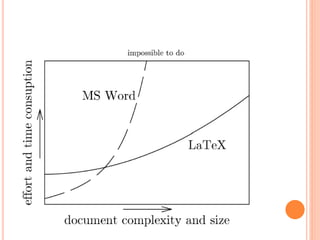
• Modification in big docs is easy
• Separation of content and style
• Portability
• Open Source
• Page Numbers auto
• Generates list
• Scientific features
Advantages
History
• Donald Knuth – January 10, 1938
• “father "of analysis of algorithms
• Asymptotic Notations
• TeX – (1978)
• Typesetting Mathematics & Scientific
Articles.
• Knowledge of symbols & characters
• LATEX input files - *.tex
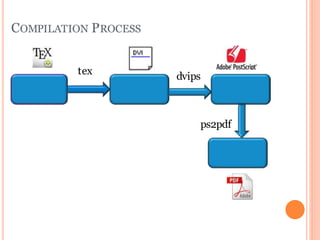
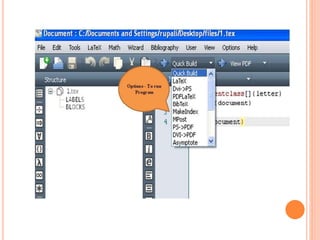
COMPILATION PROCESS
ps2pdf
dvips
tex
WHAT IS LATEX ?
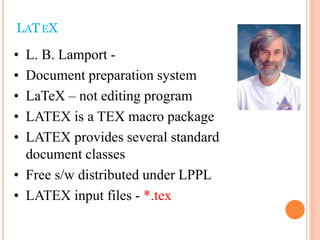
• L. B. Lamport -
• Document preparation system
• LaTeX – not editing program
• LATEX is a TEX macro package
• LATEX provides several standard
document classes
• Free s/w distributed under LPPL
• LATEX input files - *.tex
LATEX
COMPILATION PROCESS
*.tex File
tex
*.dvi File *.ps file
*.pdf File *.pdf file
dvips
pdflatex
dvi2pdf
ps2pdf
simple.DVI
simple.ps
simple.pdf
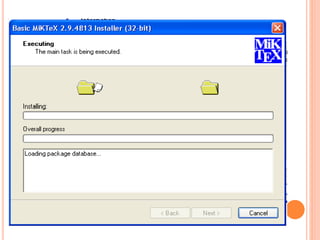
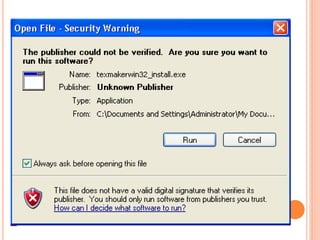
• Install MikTex (Base System)
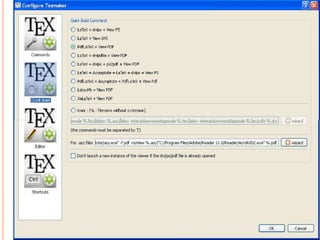
• Install Editor – TexMaker
• Install GhostScript & GS View
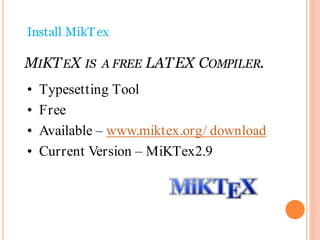
Install MikTex
MIKTEX IS A FREE LATEX COMPILER.
• Typesetting Tool
• Free
• Available – www.miktex.org/ download
• Current Version – MiKTex2.9
• LEd
• Emac
• Vim
• Texmaker
• Kile
• TexStudio
• TexShop
• TeXnicCenter
INSTALLING EDITOR
• TexMaker -
http://www.xm1math.net/texmaker/down
load.html
INSTALLING GHOST SCRIPT & GS VIEW
• Ghost Script – gs813win32
• GS View - gsv46win32
BASIC PROGRAMMING
39
documentclass[. . . ]{ . . . }
begin{document}
.
.
.
.
.
end{document}
40
Environment
documentclass[<option-list>]{<classname>}
41
Article
Report
Book
Letter
Slides
• 10pt| 11pt| 12pt
• letterpaper| legalpaper|
executivepaper| a4paper|
a5paper| b5paper
• oneside| twoside
• onecolumn| twocolumn
FIRST SIMPLE PROGRAM
documentclass[]{letter}
begin{document}
Computer Science and Engineering
end{document}
42
43
Save program with
“Program_name.tex”
Eg. 1.tex
OUTPUT
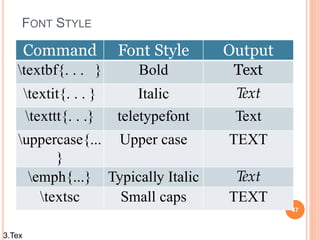
FONT STYLE
47
Command Font Style Output
textbf{. . . } Bold Text
textit{. . . } Italic Text
texttt{. . .} teletypefont Text
uppercase{...
}
Upper case TEXT
emph{...} Typically Italic Text
textsc Small caps TEXT
3.Tex
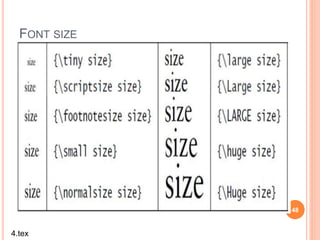
FONT SIZE
48
4.tex
49
Font Type
fontfamily{Code}selectfont{TEXT}
5.tex
FONT COLOR
Package -  usepackage{color}
File - color.sty
51
TEXT COLORING
 textcolor{color_name}{text}
6.tex
COLOR BOX FOR TEXT
52
 colorbox{color_name}{Text}
7.tex
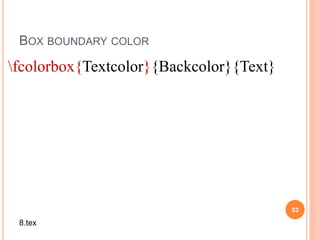
BOX BOUNDARY COLOR
53
fcolorbox{Textcolor}{Backcolor}{Text}
8.tex
COLORING PAGE
54
pagecolor{color_name} – page color
9.tex
SOME COLORS
55
UNDERLINE & QUOTES
Underline (text)
u nderline{ Text }
Single Quote (‘text’)-
 lq text  rq
Double Quotes (“text”)
lqlq text rqrq
56
10.tex
SPECIAL SYMBOLS
textbackslash

textless
<
textgreater
>
textquoteright
’
ldots
…
$
$
57
11.tex
58
• New Line

newline
• New Page
newpage
12.tex
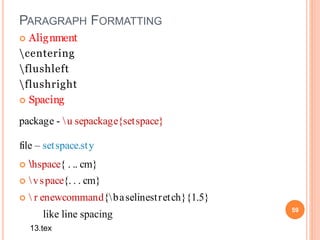
PARAGRAPH FORMATTING
 Alignment
centering
flushleft
flushright
 Spacing
package - u sepackage{setspace}
file – setspace.sty
 hspace{ . .. cm}
 vspace{. . . cm}
  r enewcommand{baselinestretch}{1.5}
like line spacing 59
13.tex
LIST
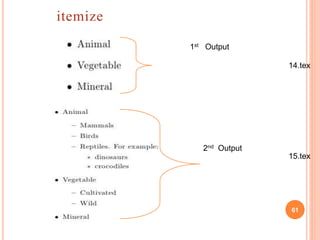
 itemize - unordered lists ( )
 enumerate - for ordered lists (1,2,3,….)
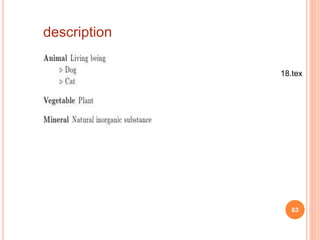
 description - lists where you want to specify your own
label (∆,*)
60
61
itemize
1st Output
2nd Output
14.tex
15.tex
62
enumerate
1st Output
2nd Output
16.tex
17.tex
63
description
18.tex
64
• Package - usepackage{graphicx}
includegraphics[scale= • ]{imageFile_name }
Eg. begin{figure}[h]
includegraphics[width=4cm,height=4cm]{1.p
ng}
end{figure}
Inserting Image
19.tex
[h] - here
[b] - bottom
[t] - top
[p] – separate page
65
Eg. rotatebox{48}{have a nice day}
65
rotatebox{angle}{Text}
Rotating Text
includegraphics[angle=45,width=1in,heig
ht=2in]{1.png}
Rotating image
includegraphics[angle,width,height]
{imageFile_name}
20.tex
REFLECTING TEXT
reflectbox{Text}
Eg. reflectbox{Pune} newline
Eg. reflectbox{231} 231 --- Horizontal
Eg. raisebox{depth}{scalebox{1}[-1]{WOW}}
---Vertical
66
21.tex
67
scalebox{<h scale>}[<v scale>]{<text>}
scalebox{2}[5]{Satara}
resizebox{hlength}{vlength}{some text}
resizebox{20mm}{1.7cm}{some text}
22.tex
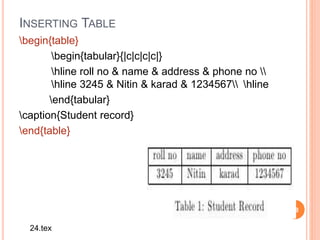
INSERTING TABLE
begin{table}
begin{tabular}{|c|c|c|c|}
hline roll no & name & address & phone no 
hline 3245 & Nitin & karad & 1234567 hline
end{tabular}
caption{Student record}
end{table}
68
24.tex
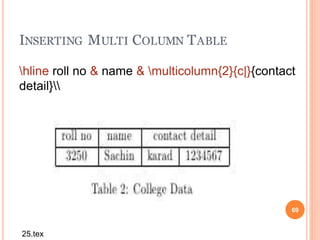
INSERTING MULTI COLUMN TABLE
69
hline roll no & name & multicolumn{2}{c|}{contact
detail}
25.tex
TABLE ALIGNMENT
centering
flushleft
flushright
70
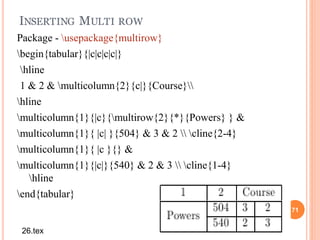
INSERTING MULTI ROW
71
Package - usepackage{multirow}
begin{tabular}{|c|c|c|c|}
hline
1 & 2 & multicolumn{2}{c|}{Course}
hline
multicolumn{1}{|c}{multirow{2}{*}{Powers} } &
multicolumn{1}{ |c| }{504} & 3 & 2  cline{2-4}
multicolumn{1}{ |c }{} &
multicolumn{1}{|c|}{540} & 2 & 3  cline{1-4}
hline
end{tabular}
26.tex
CHANGING SIZE OF TABLE
72
% horizontal size(height) i.e. size of row
renewcommand{arraystretch}{2}
%vertical size(width)i.e. size of column
begin{tabular}{|p{3cm}|p{4cm}|}
hline name & roll 
hline abc & 324 
hline end{tabular}
27.tex
ASSIGNMENT
73
Department Information
Dept. No. of
Student
Result Year
CSE
IT
60
60
80
80
2015
2015
28.tex
74
Package - usepackage{fancyheadings}
File – fancyheading.sty
pagestyle{fancy}
lhead{}
chead{}
rhead{}
lfoot{}
cfoot{}
rfoot{}
Header & Footer
29.tex
75
 pagenumbering{ . . . }
Roman
Arabic
roman
Alph
alph
Page Numbering
MARGIN
 evensidemargin . .pt
 oddsidemargin . . pt
 topmargin . . pt
 headheight . . pt
 paperwidth . . pt
 paperheight . . pt
76
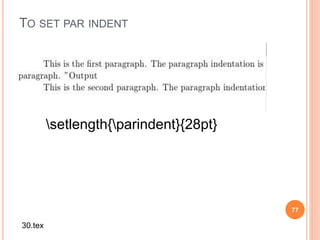
TO SET PAR INDENT
77
setlength{parindent}{28pt}
30.tex
PAGE BORDER
78
Package - u sepackage{fancybox}
 t hisfancyput(-0.6in,-9.8in)
{
 setlength{ unitlength}{1in}
framebox(7.5,10)
}
31.tex
MATHEMATICAL FORMULA
79
Donald Knuth says that his aim in
creating TEX is to beautifullytypeset
technical documents especiallythose containing a
lot of Mathematics. It is verydifficult to
produce complex mathematical formulas
using a word processor.
80
Package -
usepackage{amsmath,amsthm}
Symbols
➢Relation - >, < , =, Π, ∑ ,∩ ……
➢Arrow - ↑, ↔ , ← …..
➢Miscellaneous - √ , ∆, ̸ …..
➢Delimiters - [ , ] ,{ ,} ,|
➢Greek Letters – Ø, ø, α. Β, γ, η …..
Eg. y = mx + c
begin{displaymath}
y = mx + c
end{displaymath}
Eg. y = mx +c --------- (1)
begin{equation}
y = mx + c
end{equation}
81
SIMPLE EQUATION
32.tex
82
a = int_{i}^{j}+frac{x}{ysqrt{z}}
Sigma_{i}^{j}=(a+b)*c
33.tex
83
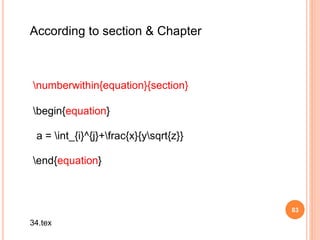
numberwithin{equation}{section}
begin{equation}
a = int_{i}^{j}+frac{x}{ysqrt{z}}
end{equation}
According to section & Chapter
34.tex
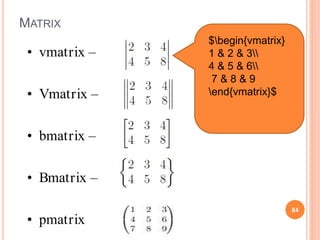
MATRIX
84
• vmatrix –
• Vmatrix –
• bmatrix –
• Bmatrix –
• pmatrix
$begin{vmatrix}
1 & 2 & 3
4 & 5 & 6
7 & 8 & 9
end{vmatrix}$
85
Report Writing
CONTENTS IN REPORT
 Title page
 Declaration
 Abstract
 Index – Content, Table, Figure
 Nomenclature
 Abbreviations
 Chapter
 Section
 Bibliography
CLASSES
Class Chapter Section
Book Yes Yes
Report Yes Yes
Article No Yes
Paper No Yes
88
title{. . . . .}
author{. . . .}
date{ . . . }
maketitle
begin{titlepage}
end{titlepage}
Title page
36.tex
Package - usepackage{titlesec}
File - titlesec.sty
titleformat{chapter}[display]
{normalfonthugebfseriescentering}
{chaptertitlename
thechapter}{20pt}{Huge}
Chapter Alignment
37.tex
Section Alignment
titleformat{section}
{normalfontLargebfseriesflushright}
{thesection}{1em}{}
Section Alignment
38.tex
INDEX
tableofcontents
listoftables
listoffigures
RPackage -
usepackage[english]{babel}
begin{thebibliography}{31}
bibitem{…} author list,paper name
end{thebibliography}
Bibliography
HYPERLINKS
 Table reference
 Figure reference
 Equation reference
Hyperlinks
Package - usepackage{hyperref}[]
It’s not the design of your template, it’s what you do with it that counts
Beyond Bullet Points
PowerPoint Slides
PowerPoint Training
m62 visualcommunications is the global leader in presentation effectiveness, from offices in the UK, USA, and Singapore

Latex for beginner