BMS INSTITUTE OF TECHNOLOGY AND MANAGEMENT 
AVALAHALLI, DODDABALLAPUR ROAD 
YELAHANKA – BANGALORE - 64 
INTRODUCTION 
TO 
DOCUMENT PREPARATION SYSTEM: LATEX 
Dr. M. C. HANUMANTHARAJU 
(mchanumantharaju@gmail.com / mchanumantharaju@bmsit.in) 
Associate Professor 
Department of Electronics & Communication Engineering 
BMS Institute of Technology 
1. INTRODUCTION TO LATEX 
 Pronounced as LAY-Tek/Laitek/Leytek/LAH-tek 
 Document Preparation System and document markup language 
 Used in publication of scientific documents in many fields of engineering 
 Plays a prominent role in publication of books and articles 
 LaTeX uses typesetting program for formatting its output and is written in TeX 
macro language. 
 Widely used in Academia. 
 LaTeX can be used as a standalone document preparation system or as an 
intermediate format. 
 Earlier, LaTeX was started as a writing tool by mathematicians and computer 
scientists. 
 LaTeX was originally written in the early 1980s by Leslie Lamport. 
 The current version of LaTeX is LaTeX2e. 
 Latex is a free software and is distributed under the LaTeX Project Public License 
(LPPL) 
 LaTeX source generates a number of outputs: pdf, dvi, html, rtf, ps and so on.
 The output is concerned with placing boxes around the page and boxes are in turn 
are combined to form other boxes. 
Typesetting System 
 LaTeX is based on Donald E Knuth’s Tex typesetting 
 LaTex follows the design philosophy of separating presentation from content. 
 The authors can focus on the content of what they are writing without attending 
simultaneously to its visual appearance. 
 In preparing a LaTeX document, the author specifies the logical structure using 
simple concepts such as chapter, section, table, figure, etc., 
 Authors leave the formatting and layout of these structures to LaTeX system. 
 LaTeX can be arbitrarily extended by using underlying macro language to develop 
custom formats. 
 The macros are often collected into packages and are available to address special 
formatting issues such as complex mathematics or graphics. 
 Indeed, in the example, below, the align environment is provided by the amsmath 
package 
“LaTeX is not a word processor! Instead, LaTeX encourages authors not to worry 
too much about the appearance of their documents but to concentrate on getting the 
right content” 
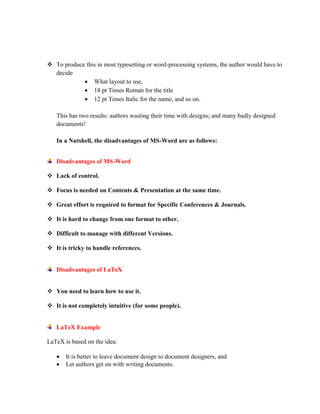
Consider this document
 To produce this in most typesetting or word-processing systems, the author would have to 
decide 
 What layout to use, 
 18 pt Times Roman for the title 
 12 pt Times Italic for the name, and so on. 
This has two results: authors wasting their time with designs; and many badly designed 
documents! 
In a Nutshell, the disadvantages of MS-Word are as follows: 
Disadvantages of MS-Word 
 Lack of control. 
 Focus is needed on Contents & Presentation at the same time. 
 Great effort is required to format for Specific Conferences & Journals. 
 It is hard to change from one format to other. 
 Difficult to manage with different Versions. 
 It is tricky to handle references. 
Disadvantages of LaTeX 
 You need to learn how to use it. 
 It is not completely intuitive (for some people). 
LaTeX Example 
LaTeX is based on the idea: 
 It is better to leave document design to document designers, and 
 Let authors get on with writing documents.
So, in LaTeX you would input this document as: 
o This document is an article. 
o Its title is Cartesian closed categories and the price of eggs. 
o Its author is Jane Doe. 
o It was written in September 1994. 
o The document consists of a title followed by the text Hello world! 
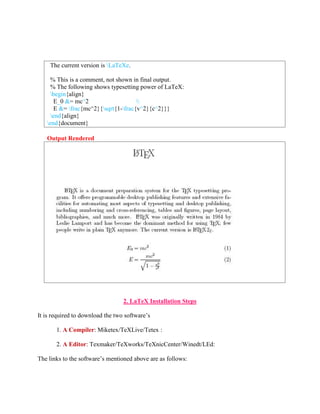
The example below shows the LaTeX input and corresponding output 
Simple Latex 
documentclass{article} 
LaTeX Input 
documentclass[12pt]{article} 
usepackage{amsmath} 
title{LaTeX} 
date{} 
begin{document} 
maketitle 
LaTeX{} is a document preparation system for the TeX{} 
typesetting program. It offers programmable desktop 
publishing features and extensive facilities for 
automating most aspects of typesetting and desktop 
publishing, including numbering and cross-referencing, 
tables and figures, page layout, bibliographies, and 
much more. LaTeX{} was originally written in 1984 by 
Leslie Lamport and has become the dominant method for 
using TeX; few people write in plain TeX{} anymore.
The current version is LaTeXe. 
% This is a comment, not shown in final output. 
% The following shows typesetting power of LaTeX: 
begin{align} 
E_0 &= mc^2  
E &= frac{mc^2}{sqrt{1-frac{v^2}{c^2}}} 
end{align} 
end{document} 
Output Rendered 
2. LaTeX Installation Steps 
It is required to download the two software’s 
1. A Compiler: Miketex/TeXLive/Tetex : 
2. A Editor: Texmaker/TeXworks/TeXnicCenter/Winedt/LEd: 
The links to the software’s mentioned above are as follows:
An Compiler 
http://miktex.org/download 
An Editor 
http://www.xm1math.net/texmaker/ 
http://www.tug.org/texworks/ 
http://www.texniccenter.org/download/ 
http://www.latexeditor.org/ 
Using LaTex without Software 
If you do not Latex Software: Don’t Worry* 
However if you internet connectivity then use the following link to run LaTeX code and render 
its output 
https://www.writelatex.com 
 Install the Software 
 Create your first document in LaTeX 
3. Syntax & Semantics of LaTeX 
LaTeX Mathematics Demonstration 
INSTALLATION 
DEMO 
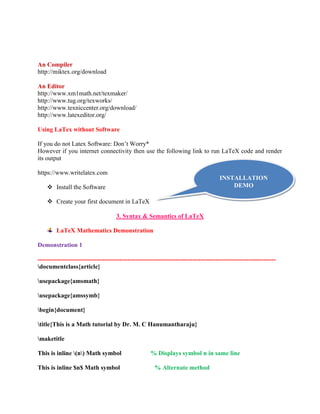
Demonstration 1 
------------------------------------------------------------------------------------------------------------------ 
documentclass{article} 
usepackage{amsmath} 
usepackage{amssymb} 
begin{document} 
title{This is a Math tutorial by Dr. M. C Hanumantharaju} 
maketitle 
This is inline (n) Math symbol % Displays symbol n in same line 
This is inline $n$ Math symbol % Alternate method
This is a newline displayed $$n$$ Math symbol % Displays symbol n in new line 
This is a newline displayed [n] Math symbol % Alternate Method 
$frac{x}{y}$ % Fraction x/y 
$n^n$ % Superscript : nn 
end{document} 
------------------------------------------------------------------------------------------------------------------ 
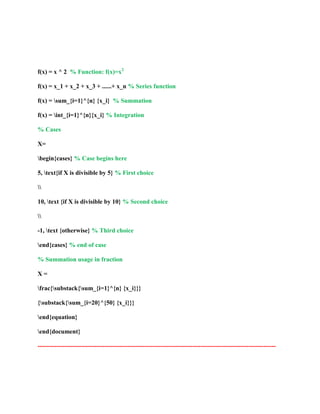
Demonstration 2 
------------------------------------------------------------------------------------------------------------------ 
% In this tutorial we will go over following features: 
% Latex amsmath package 
% Latex equation environment 
% Using Simple equations like x = y + z 
% Using Summation in equations 
% Using Integration in equations 
% Using Cases in equation (if condition based values of a variable) 
% Using fractions to write multiple-row equations 
documentclass{article} 
usepackage{amsmath} 
usepackage{amssymb} 
begin{document} 
title{Writing Equations} % Displays title as “Writing Equations” 
maketitle 
begin{equation} 
% Begin equation(s) with numbering, No line spacing is allowed in equations 
x = y + z % Simple equation: x = y + z
f(x) = x ^ 2 % Function: f(x)=x2 
f(x) = x_1 + x_2 + x_3 + ......+ x_n % Series function 
f(x) = sum_{i=1}^{n} {x_i} % Summation 
f(x) = int_{i=1}^{n}{x_i} % Integration 
% Cases 
X= 
begin{cases} % Case begins here 
5, text{if X is divisible by 5} % First choice 
 
10, text {if X is divisible by 10} % Second choice 
 
-1, text {otherwise} % Third choice 
end{cases} % end of case 
% Summation usage in fraction 
X = 
frac{substack{sum_{i=1}^{n} {x_i}}} 
{substack{sum_{i=20}^{50} {x_i}}} 
end{equation} 
end{document} 
------------------------------------------------------------------------------------------------------------------
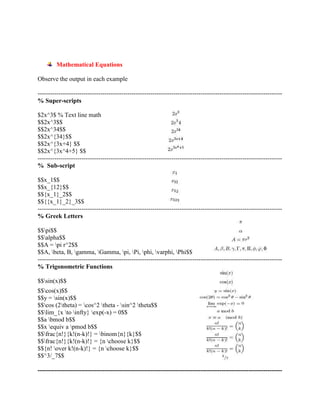
Mathematical Equations 
Observe the output in each example 
--------------------------------------------------------------------------------------------------------------------- 
% Super-scripts 
$2x^3$ % Text line math 
$$2x^3$$ 
$$2x^34$$ 
$$2x^{34}$$ 
$$2x^{3x+4} $$ 
$$2x^{3x^4+5} $$ 
--------------------------------------------------------------------------------------------------------------------- 
% Sub-script 
$$x_1$$ 
$$x_{12}$$ 
$${x_1}_2$$ 
$${{x_1}_2}_3$$ 
--------------------------------------------------------------------------------------------------------------------- 
% Greek Letters 
$$pi$$ 
$$alpha$$ 
$$A = pi r^2$$ 
$$A, beta, B, gamma, Gamma, pi, Pi, phi, varphi, Phi$$ 
--------------------------------------------------------------------------------------------------------------------- 
% Trigonometric Functions 
$$sin(x)$$ 
$$cos(x)$$ 
$$y = sin(x)$$ 
$$cos (2theta) = cos^2 theta - sin^2 theta$$ 
$$lim_{x to infty} exp(-x) = 0$$ 
$$a bmod b$$ 
$$x equiv a pmod b$$ 
$$frac{n!}{k!(n-k)!} = binom{n}{k}$$ 
$$frac{n!}{k!(n-k)!} = {n choose k}$$ 
$${n! over k!(n-k)!} = {n choose k}$$ 
$$^3/_7$$ 
---------------------------------------------------------------------------------------------------------------------
% Log Functions 
$$log(x)$$ 
$$ln(x)$$ 
$$log_5(x)$$ 
--------------------------------------------------------------------------------------------------------------------- 
% Square Root 
$$sqrt{2}$$ 
$$sqrt[3]{2}$$ 
$$sqrt{x^2+y^2}$$ 
$$sqrt{1 + sqrt{x}}$$ 
$$sqrt[n]{1+x+x^2+x^3+ldots}$$ 
--------------------------------------------------------------------------------------------------------------------- 
% Multiplications 
begin{equation} 
frac{ 
begin{array}[b]{r} 
left( x_1 x_2 right) 
times left( x'_1 x'_2 right) 
end{array} 
}{ 
left( y_1y_2y_3y_4 right) 
} end{equation} 
--------------------------------------------------------------------------------------------------------------------- 
% Summations & Integrals 
$$sum_{i=1}^{10} t_i$$ 
$$int_0^infty mathrm{e}^{-x},mathrm{d}x$$ 
$$bigoplus$$ 
$int y mathrm{d}x$ 
---------------------------------------------------------------------------------------------------------------------
--------------------------------------------------------------------------------------------------------------------- 
% Fractions 
% In line mathematics mode 
% Latex format for fractions is : frac{}{} 
% within first curly bracket type Numerator 
% type Denominator within the second curly 
bracket 
About 2/3 of the class is full 
About $2/3$ of the class is full 
About $frac{2}{3}$ of the class is full 
$(frac{n}{2})$ 
$$frac{x}{x^2+x+1}$$ 
$$frac{sqrt{x+1}}{sqrt{x-1}}$$ 
$$frac{1}{1+frac{1}{x}} $$ 
$$sqrt{frac{x}{x^2+x+1}}$$ 
$$frac{frac{1}{x}+frac{1}{y}}{y-z}$$ 
--------------------------------------------------------------------------------------------------------------------- 
% Parenthesis 
$$(x+1)$$ 
$$3[2+(x+2)]$$ 
$${a,b,c}$$ % No curly brackets 
$${a,b,c}$$ 
$$$12.5$$ % Prints the dollar sign 
$$3(frac{2}{5})$$ % Bracket appears very small
$$3left(frac{2}{5}right)$$ % Bracket enlarges for the fraction 
$$3left[frac{2}{5}right]$$ % Square bracket for the fraction 
$$3left{frac{2}{5}right}$$ % Curly brackets for the fraction 
$$|x|$$ % Absolute value 
$$|frac{x}{x+1}|$$ % Small absolute for fraction 
$$left|frac{x}{x+1}right| $$ % Large square bracket for fraction 
$$left{x^2right.$$ % One sided bracket 
$$left|frac{dx}{dy}right|_{x=1}$$ % Absolute bracket with subscript 
$$( a ), [ b ], { c }, | d |, | e |,$$ 
$$langle f rangle, lfloor g rfloor,$$ 
$$lceil h rceil, ulcorner i urcorner$$ 
--------------------------------------------------------------------------------------------------------------------- 
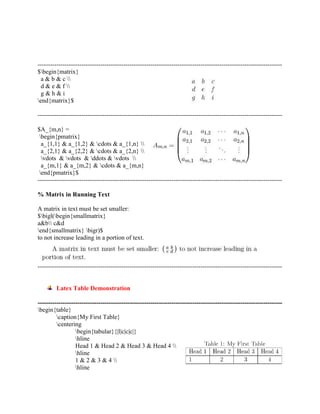
% Matrices 
$ left( 
begin{array} {c c c} 
1 & 2 & 3 
4 & 5 & 6 
7 & 8 & 9 
end{array} 
right) 
$
--------------------------------------------------------------------------------------------------------------------- 
$begin{matrix} 
a & b & c  
d & e & f  
g & h & i 
end{matrix}$ 
--------------------------------------------------------------------------------------------------------------------- 
$A_{m,n} = 
begin{pmatrix} 
a_{1,1} & a_{1,2} & cdots & a_{1,n}  
a_{2,1} & a_{2,2} & cdots & a_{2,n}  
vdots & vdots & ddots & vdots  
a_{m,1} & a_{m,2} & cdots & a_{m,n} 
end{pmatrix}$ 
--------------------------------------------------------------------------------------------------------------------- 
% Matrix in Running Text 
A matrix in text must be set smaller: 
$bigl(begin{smallmatrix} 
a&b c&d 
end{smallmatrix} bigr)$ 
to not increase leading in a portion of text. 
--------------------------------------------------------------------------------------------------------------------- 
Latex Table Demonstration 
--------------------------------------------------------------------------------------------------------------------- 
begin{table} 
caption{My First Table} 
centering 
begin{tabular}{|l|c|c|c|} 
hline 
Head 1 & Head 2 & Head 3 & Head 4  
hline 
1 & 2 & 3 & 4  
hline
end{tabular} 
label{tab:MyFirstTable} 
end{table} 
--------------------------------------------------------------------------------------------------------------------- 
Table row=4, column =3 without border 
begin{table} 
begin{tabular}{lll} 
22 & 22 & 21  
43 & 11 & 13  
65 & 12 & 11  
21 & 34 & 98  
end{tabular} 
end{table} 
--------------------------------------------------------------------------------------------------------------------- 
Table row=4, column =3 with border 
begin{table}[ht] 
begin{tabular}{|l|l|l|} 
hline 
22 & 22 & 21  hline 
43 & 11 & 13  hline 
65 & 12 & 11  hline 
21 & 34 & 98  hline 
end{tabular} 
end{table} 
--------------------------------------------------------------------------------------------------------------------- 
Table with border and caption 
begin{table} 
begin{tabular}{|l|l|l|} 
hline 
22 & 22 & 21  hline 
43 & 11 & 13  hline 
65 & 12 & 11  hline 
21 & 34 & 98  hline 
end{tabular} 
caption {Table with Border} 
end{table} 
--------------------------------------------------------------------------------------------------------------------- 
Table with adding borders around 
begin{table}
begin{tabular}{|lll|} 
hline 
22 & 22 & 21  
43 & 11 & 13  
65 & 12 & 11  
21 & 34 & 98  hline 
end{tabular} 
caption {Table with adding borders around} 
end{table} 
--------------------------------------------------------------------------------------------------------------------- 
Latex Figures Demonstration 
--------------------------------------------------------------------------------------------------------------------- 
begin{figure} 
centering 
{ includegraphics[height=2in,width=3in]{test.jpg} 
label{fig:subfig3} 
} 
caption{This is an Example of Test Image} 
end{figure} 
--------------------------------------------------------------------------------------------------------------------- 
begin{wrapfigure}{r}{0.5textwidth} 
vspace{-20pt} 
begin{center} 
includegraphics[width=0.48textwidth]{gull} 
end{center} 
vspace{-20pt} 
caption{A gull} 
vspace{-10pt} 
end{wrapfigure} 
--------------------------------------------------------------------------------------------------------------------- 
begin{figure*} 
caption{textbf{First Row} : RGB to Y, RGB to Cb, RGB to Cr, textbf{Second Row} : YCbCr 
to R, YCbCr to G, YCbCr to B} 
centering 
begin{tabular}{ccc} 
includegraphics[height=4.5cm,width=4.3cm]{figures/rgb2y.jpg} & 
includegraphics[height=4.5cm,width=4.3cm]{figures/rgb2cb.jpg} &
includegraphics[height=4.5cm,width=4.3cm]{figures/rgb2cr.jpg}  
includegraphics[height=4.5cm,width=4.3cm]{figures/ycbcr2r.jpg} & 
includegraphics[height=4.5cm,width=4.3cm]{figures/ycbcr2g.jpg} & 
includegraphics[height=4.5cm,width=4.3cm]{figures/ycbcr2b.jpg} 
end{tabular} 
end{figure*} 
% Six Pictures of 2x3 format 
--------------------------------------------------------------------------------------------------------------------- 
5. IEEE/Springer/Elsevier Format Paper Writing using Latex 
1. Download IEEE template from the following link: 
o http://www.ieee.org/conferences_events/conferences/publishing/templates.html 
o Download windows latex and bibliography files 
o Extract into new folder 
o Run using Latex 
software 
2. Download Springer template (LNCS) from the following link 
IEEE Paper 
Writing 
DEMO 
o The Springer Template may be obtained from the link provided below: 
o http://www.springer.com/computer/lncs?SGWID=0-164-6-793341-0 
o Download both typeinst.zip and llncs2e.zip 
o Follow the steps illustrated in IEEE paper writing 
3. Download Elsevier template from the following link 
Springer 
Paper 
Writing 
DEMO 
o http://www.elsevier.com/author-schemas/preparing-crc-journal-articles-with-latex 
o Follow the steps similar to that of IEEE paper demo
6. Book Editing 
The template for editing Book using latex may be found from the link: 
https://www.sharelatex.com/templates/books 
7. Thesis Formulation 
 VTU Ph.D thesis may be downloaded from the link provided below: 
 http://research.vtu.ac.in/research/materials.html 
 Unzip and start editing each chapters 
8. Conclusions 
 Latex is a free 
 Latex is available for many machines 
 Latex files are ASCII and are portable 
 One can use editor of your choice. 
 Typesetting is better, especially the mathematics 
 Style changes are better in LaTeX. Style files for many periodicals exist. 
 LaTeX is extensible. If you want a new feature, you can look around for a free add-on or 
write one yourself. 
 In Latex font selection is difficult compared to word. 
 Latex is not good for flowing text around pictures. 
 LaTeX encourages (almost insists on) structured writing and the separation of style from 
content. This is not the way that many people (especially non-programmers) are used to 
working. 
 Without a WYSIWYG front end, it's not always easy to find out how to do things.
“However, 
World’s available best thesis/Books/Articles/Research papers are usually written in 
Latex”. 
References 
Text books & Other Information for Learning Usage of Latex 
1. LaTeX: A document preparation system, User's guide and reference manual by Leslie 
Lamport, 2nd edition, ISBN 0-201-52983-1. 
2. The LaTeX Companion, 2nd edition (TTCT series) by Frank Mittelbach, Michel Goossens, 
Johannes Braams, David Carlisle, Chris Rowley ISBN 0-201-36299-6. 
3. LaTeX Beginner's Guide by Stefan Kottwitz, ISBN 978-1847199867. 
4. Guide to LaTeX, by Helmut Kopka, 4th Edition: This book is an excellent reference to 
LaTeX 
5. http://en.wikibooks.org/wiki/LaTeX : Latex Examples 
6. http://www.math.uiuc.edu/~hildebr/tex/tips-topten.html : Latex Tips 
7. http://www.tablesgenerator.com/ : Latex Table Editor 
8. http://www.codecogs.com/latex/eqneditor.php : Latex Equation Editor 
Thank you for your patience 
& 
For any queries on Latex mail/call me at 
mchanumantharaju@gmail.com / mchanumantharaju@bmsit.in 
9742290764

Latex Tutorial by Dr. M. C. Hanumantharaju

  • 1.
    BMS INSTITUTE OFTECHNOLOGY AND MANAGEMENT AVALAHALLI, DODDABALLAPUR ROAD YELAHANKA – BANGALORE - 64 INTRODUCTION TO DOCUMENT PREPARATION SYSTEM: LATEX Dr. M. C. HANUMANTHARAJU (mchanumantharaju@gmail.com / mchanumantharaju@bmsit.in) Associate Professor Department of Electronics & Communication Engineering BMS Institute of Technology 1. INTRODUCTION TO LATEX  Pronounced as LAY-Tek/Laitek/Leytek/LAH-tek  Document Preparation System and document markup language  Used in publication of scientific documents in many fields of engineering  Plays a prominent role in publication of books and articles  LaTeX uses typesetting program for formatting its output and is written in TeX macro language.  Widely used in Academia.  LaTeX can be used as a standalone document preparation system or as an intermediate format.  Earlier, LaTeX was started as a writing tool by mathematicians and computer scientists.  LaTeX was originally written in the early 1980s by Leslie Lamport.  The current version of LaTeX is LaTeX2e.  Latex is a free software and is distributed under the LaTeX Project Public License (LPPL)  LaTeX source generates a number of outputs: pdf, dvi, html, rtf, ps and so on.
  • 2.
     The outputis concerned with placing boxes around the page and boxes are in turn are combined to form other boxes. Typesetting System  LaTeX is based on Donald E Knuth’s Tex typesetting  LaTex follows the design philosophy of separating presentation from content.  The authors can focus on the content of what they are writing without attending simultaneously to its visual appearance.  In preparing a LaTeX document, the author specifies the logical structure using simple concepts such as chapter, section, table, figure, etc.,  Authors leave the formatting and layout of these structures to LaTeX system.  LaTeX can be arbitrarily extended by using underlying macro language to develop custom formats.  The macros are often collected into packages and are available to address special formatting issues such as complex mathematics or graphics.  Indeed, in the example, below, the align environment is provided by the amsmath package “LaTeX is not a word processor! Instead, LaTeX encourages authors not to worry too much about the appearance of their documents but to concentrate on getting the right content” Consider this document
  • 3.
     To producethis in most typesetting or word-processing systems, the author would have to decide  What layout to use,  18 pt Times Roman for the title  12 pt Times Italic for the name, and so on. This has two results: authors wasting their time with designs; and many badly designed documents! In a Nutshell, the disadvantages of MS-Word are as follows: Disadvantages of MS-Word  Lack of control.  Focus is needed on Contents & Presentation at the same time.  Great effort is required to format for Specific Conferences & Journals.  It is hard to change from one format to other.  Difficult to manage with different Versions.  It is tricky to handle references. Disadvantages of LaTeX  You need to learn how to use it.  It is not completely intuitive (for some people). LaTeX Example LaTeX is based on the idea:  It is better to leave document design to document designers, and  Let authors get on with writing documents.
  • 4.
    So, in LaTeXyou would input this document as: o This document is an article. o Its title is Cartesian closed categories and the price of eggs. o Its author is Jane Doe. o It was written in September 1994. o The document consists of a title followed by the text Hello world! The example below shows the LaTeX input and corresponding output Simple Latex documentclass{article} LaTeX Input documentclass[12pt]{article} usepackage{amsmath} title{LaTeX} date{} begin{document} maketitle LaTeX{} is a document preparation system for the TeX{} typesetting program. It offers programmable desktop publishing features and extensive facilities for automating most aspects of typesetting and desktop publishing, including numbering and cross-referencing, tables and figures, page layout, bibliographies, and much more. LaTeX{} was originally written in 1984 by Leslie Lamport and has become the dominant method for using TeX; few people write in plain TeX{} anymore.
  • 5.
    The current versionis LaTeXe. % This is a comment, not shown in final output. % The following shows typesetting power of LaTeX: begin{align} E_0 &= mc^2 E &= frac{mc^2}{sqrt{1-frac{v^2}{c^2}}} end{align} end{document} Output Rendered 2. LaTeX Installation Steps It is required to download the two software’s 1. A Compiler: Miketex/TeXLive/Tetex : 2. A Editor: Texmaker/TeXworks/TeXnicCenter/Winedt/LEd: The links to the software’s mentioned above are as follows:
  • 6.
    An Compiler http://miktex.org/download An Editor http://www.xm1math.net/texmaker/ http://www.tug.org/texworks/ http://www.texniccenter.org/download/ http://www.latexeditor.org/ Using LaTex without Software If you do not Latex Software: Don’t Worry* However if you internet connectivity then use the following link to run LaTeX code and render its output https://www.writelatex.com  Install the Software  Create your first document in LaTeX 3. Syntax & Semantics of LaTeX LaTeX Mathematics Demonstration INSTALLATION DEMO Demonstration 1 ------------------------------------------------------------------------------------------------------------------ documentclass{article} usepackage{amsmath} usepackage{amssymb} begin{document} title{This is a Math tutorial by Dr. M. C Hanumantharaju} maketitle This is inline (n) Math symbol % Displays symbol n in same line This is inline $n$ Math symbol % Alternate method
  • 7.
    This is anewline displayed $$n$$ Math symbol % Displays symbol n in new line This is a newline displayed [n] Math symbol % Alternate Method $frac{x}{y}$ % Fraction x/y $n^n$ % Superscript : nn end{document} ------------------------------------------------------------------------------------------------------------------ Demonstration 2 ------------------------------------------------------------------------------------------------------------------ % In this tutorial we will go over following features: % Latex amsmath package % Latex equation environment % Using Simple equations like x = y + z % Using Summation in equations % Using Integration in equations % Using Cases in equation (if condition based values of a variable) % Using fractions to write multiple-row equations documentclass{article} usepackage{amsmath} usepackage{amssymb} begin{document} title{Writing Equations} % Displays title as “Writing Equations” maketitle begin{equation} % Begin equation(s) with numbering, No line spacing is allowed in equations x = y + z % Simple equation: x = y + z
  • 8.
    f(x) = x^ 2 % Function: f(x)=x2 f(x) = x_1 + x_2 + x_3 + ......+ x_n % Series function f(x) = sum_{i=1}^{n} {x_i} % Summation f(x) = int_{i=1}^{n}{x_i} % Integration % Cases X= begin{cases} % Case begins here 5, text{if X is divisible by 5} % First choice 10, text {if X is divisible by 10} % Second choice -1, text {otherwise} % Third choice end{cases} % end of case % Summation usage in fraction X = frac{substack{sum_{i=1}^{n} {x_i}}} {substack{sum_{i=20}^{50} {x_i}}} end{equation} end{document} ------------------------------------------------------------------------------------------------------------------
  • 9.
    Mathematical Equations Observethe output in each example --------------------------------------------------------------------------------------------------------------------- % Super-scripts $2x^3$ % Text line math $$2x^3$$ $$2x^34$$ $$2x^{34}$$ $$2x^{3x+4} $$ $$2x^{3x^4+5} $$ --------------------------------------------------------------------------------------------------------------------- % Sub-script $$x_1$$ $$x_{12}$$ $${x_1}_2$$ $${{x_1}_2}_3$$ --------------------------------------------------------------------------------------------------------------------- % Greek Letters $$pi$$ $$alpha$$ $$A = pi r^2$$ $$A, beta, B, gamma, Gamma, pi, Pi, phi, varphi, Phi$$ --------------------------------------------------------------------------------------------------------------------- % Trigonometric Functions $$sin(x)$$ $$cos(x)$$ $$y = sin(x)$$ $$cos (2theta) = cos^2 theta - sin^2 theta$$ $$lim_{x to infty} exp(-x) = 0$$ $$a bmod b$$ $$x equiv a pmod b$$ $$frac{n!}{k!(n-k)!} = binom{n}{k}$$ $$frac{n!}{k!(n-k)!} = {n choose k}$$ $${n! over k!(n-k)!} = {n choose k}$$ $$^3/_7$$ ---------------------------------------------------------------------------------------------------------------------
  • 10.
    % Log Functions $$log(x)$$ $$ln(x)$$ $$log_5(x)$$ --------------------------------------------------------------------------------------------------------------------- % Square Root $$sqrt{2}$$ $$sqrt[3]{2}$$ $$sqrt{x^2+y^2}$$ $$sqrt{1 + sqrt{x}}$$ $$sqrt[n]{1+x+x^2+x^3+ldots}$$ --------------------------------------------------------------------------------------------------------------------- % Multiplications begin{equation} frac{ begin{array}[b]{r} left( x_1 x_2 right) times left( x'_1 x'_2 right) end{array} }{ left( y_1y_2y_3y_4 right) } end{equation} --------------------------------------------------------------------------------------------------------------------- % Summations & Integrals $$sum_{i=1}^{10} t_i$$ $$int_0^infty mathrm{e}^{-x},mathrm{d}x$$ $$bigoplus$$ $int y mathrm{d}x$ ---------------------------------------------------------------------------------------------------------------------
  • 11.
    --------------------------------------------------------------------------------------------------------------------- % Fractions % In line mathematics mode % Latex format for fractions is : frac{}{} % within first curly bracket type Numerator % type Denominator within the second curly bracket About 2/3 of the class is full About $2/3$ of the class is full About $frac{2}{3}$ of the class is full $(frac{n}{2})$ $$frac{x}{x^2+x+1}$$ $$frac{sqrt{x+1}}{sqrt{x-1}}$$ $$frac{1}{1+frac{1}{x}} $$ $$sqrt{frac{x}{x^2+x+1}}$$ $$frac{frac{1}{x}+frac{1}{y}}{y-z}$$ --------------------------------------------------------------------------------------------------------------------- % Parenthesis $$(x+1)$$ $$3[2+(x+2)]$$ $${a,b,c}$$ % No curly brackets $${a,b,c}$$ $$$12.5$$ % Prints the dollar sign $$3(frac{2}{5})$$ % Bracket appears very small
  • 12.
    $$3left(frac{2}{5}right)$$ % Bracketenlarges for the fraction $$3left[frac{2}{5}right]$$ % Square bracket for the fraction $$3left{frac{2}{5}right}$$ % Curly brackets for the fraction $$|x|$$ % Absolute value $$|frac{x}{x+1}|$$ % Small absolute for fraction $$left|frac{x}{x+1}right| $$ % Large square bracket for fraction $$left{x^2right.$$ % One sided bracket $$left|frac{dx}{dy}right|_{x=1}$$ % Absolute bracket with subscript $$( a ), [ b ], { c }, | d |, | e |,$$ $$langle f rangle, lfloor g rfloor,$$ $$lceil h rceil, ulcorner i urcorner$$ --------------------------------------------------------------------------------------------------------------------- % Matrices $ left( begin{array} {c c c} 1 & 2 & 3 4 & 5 & 6 7 & 8 & 9 end{array} right) $
  • 13.
    --------------------------------------------------------------------------------------------------------------------- $begin{matrix} a& b & c d & e & f g & h & i end{matrix}$ --------------------------------------------------------------------------------------------------------------------- $A_{m,n} = begin{pmatrix} a_{1,1} & a_{1,2} & cdots & a_{1,n} a_{2,1} & a_{2,2} & cdots & a_{2,n} vdots & vdots & ddots & vdots a_{m,1} & a_{m,2} & cdots & a_{m,n} end{pmatrix}$ --------------------------------------------------------------------------------------------------------------------- % Matrix in Running Text A matrix in text must be set smaller: $bigl(begin{smallmatrix} a&b c&d end{smallmatrix} bigr)$ to not increase leading in a portion of text. --------------------------------------------------------------------------------------------------------------------- Latex Table Demonstration --------------------------------------------------------------------------------------------------------------------- begin{table} caption{My First Table} centering begin{tabular}{|l|c|c|c|} hline Head 1 & Head 2 & Head 3 & Head 4 hline 1 & 2 & 3 & 4 hline
  • 14.
    end{tabular} label{tab:MyFirstTable} end{table} --------------------------------------------------------------------------------------------------------------------- Table row=4, column =3 without border begin{table} begin{tabular}{lll} 22 & 22 & 21 43 & 11 & 13 65 & 12 & 11 21 & 34 & 98 end{tabular} end{table} --------------------------------------------------------------------------------------------------------------------- Table row=4, column =3 with border begin{table}[ht] begin{tabular}{|l|l|l|} hline 22 & 22 & 21 hline 43 & 11 & 13 hline 65 & 12 & 11 hline 21 & 34 & 98 hline end{tabular} end{table} --------------------------------------------------------------------------------------------------------------------- Table with border and caption begin{table} begin{tabular}{|l|l|l|} hline 22 & 22 & 21 hline 43 & 11 & 13 hline 65 & 12 & 11 hline 21 & 34 & 98 hline end{tabular} caption {Table with Border} end{table} --------------------------------------------------------------------------------------------------------------------- Table with adding borders around begin{table}
  • 15.
    begin{tabular}{|lll|} hline 22& 22 & 21 43 & 11 & 13 65 & 12 & 11 21 & 34 & 98 hline end{tabular} caption {Table with adding borders around} end{table} --------------------------------------------------------------------------------------------------------------------- Latex Figures Demonstration --------------------------------------------------------------------------------------------------------------------- begin{figure} centering { includegraphics[height=2in,width=3in]{test.jpg} label{fig:subfig3} } caption{This is an Example of Test Image} end{figure} --------------------------------------------------------------------------------------------------------------------- begin{wrapfigure}{r}{0.5textwidth} vspace{-20pt} begin{center} includegraphics[width=0.48textwidth]{gull} end{center} vspace{-20pt} caption{A gull} vspace{-10pt} end{wrapfigure} --------------------------------------------------------------------------------------------------------------------- begin{figure*} caption{textbf{First Row} : RGB to Y, RGB to Cb, RGB to Cr, textbf{Second Row} : YCbCr to R, YCbCr to G, YCbCr to B} centering begin{tabular}{ccc} includegraphics[height=4.5cm,width=4.3cm]{figures/rgb2y.jpg} & includegraphics[height=4.5cm,width=4.3cm]{figures/rgb2cb.jpg} &
  • 16.
    includegraphics[height=4.5cm,width=4.3cm]{figures/rgb2cr.jpg} includegraphics[height=4.5cm,width=4.3cm]{figures/ycbcr2r.jpg}& includegraphics[height=4.5cm,width=4.3cm]{figures/ycbcr2g.jpg} & includegraphics[height=4.5cm,width=4.3cm]{figures/ycbcr2b.jpg} end{tabular} end{figure*} % Six Pictures of 2x3 format --------------------------------------------------------------------------------------------------------------------- 5. IEEE/Springer/Elsevier Format Paper Writing using Latex 1. Download IEEE template from the following link: o http://www.ieee.org/conferences_events/conferences/publishing/templates.html o Download windows latex and bibliography files o Extract into new folder o Run using Latex software 2. Download Springer template (LNCS) from the following link IEEE Paper Writing DEMO o The Springer Template may be obtained from the link provided below: o http://www.springer.com/computer/lncs?SGWID=0-164-6-793341-0 o Download both typeinst.zip and llncs2e.zip o Follow the steps illustrated in IEEE paper writing 3. Download Elsevier template from the following link Springer Paper Writing DEMO o http://www.elsevier.com/author-schemas/preparing-crc-journal-articles-with-latex o Follow the steps similar to that of IEEE paper demo
  • 17.
    6. Book Editing The template for editing Book using latex may be found from the link: https://www.sharelatex.com/templates/books 7. Thesis Formulation  VTU Ph.D thesis may be downloaded from the link provided below:  http://research.vtu.ac.in/research/materials.html  Unzip and start editing each chapters 8. Conclusions  Latex is a free  Latex is available for many machines  Latex files are ASCII and are portable  One can use editor of your choice.  Typesetting is better, especially the mathematics  Style changes are better in LaTeX. Style files for many periodicals exist.  LaTeX is extensible. If you want a new feature, you can look around for a free add-on or write one yourself.  In Latex font selection is difficult compared to word.  Latex is not good for flowing text around pictures.  LaTeX encourages (almost insists on) structured writing and the separation of style from content. This is not the way that many people (especially non-programmers) are used to working.  Without a WYSIWYG front end, it's not always easy to find out how to do things.
  • 18.
    “However, World’s availablebest thesis/Books/Articles/Research papers are usually written in Latex”. References Text books & Other Information for Learning Usage of Latex 1. LaTeX: A document preparation system, User's guide and reference manual by Leslie Lamport, 2nd edition, ISBN 0-201-52983-1. 2. The LaTeX Companion, 2nd edition (TTCT series) by Frank Mittelbach, Michel Goossens, Johannes Braams, David Carlisle, Chris Rowley ISBN 0-201-36299-6. 3. LaTeX Beginner's Guide by Stefan Kottwitz, ISBN 978-1847199867. 4. Guide to LaTeX, by Helmut Kopka, 4th Edition: This book is an excellent reference to LaTeX 5. http://en.wikibooks.org/wiki/LaTeX : Latex Examples 6. http://www.math.uiuc.edu/~hildebr/tex/tips-topten.html : Latex Tips 7. http://www.tablesgenerator.com/ : Latex Table Editor 8. http://www.codecogs.com/latex/eqneditor.php : Latex Equation Editor Thank you for your patience & For any queries on Latex mail/call me at mchanumantharaju@gmail.com / mchanumantharaju@bmsit.in 9742290764