7 TOOLS OF QUALITY
&
PROBLEM SOLVING
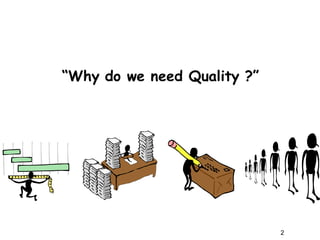
“Why do we need Quality ?”
2
Why do we need ‘Quality’ ?
A Quote from Bill Smith ...
In 1985, Bill Smith, an engineer at Motorola
(Father of Six Sigma) presented a paper which
concluded that …
“If a product was found defective & corrected
during the production process, other defects
were bound to be missed and found later by the
customer during early use of the product….
However, when the product is manufactured
error free, it rarely fails during early use by
the consumer …”
3
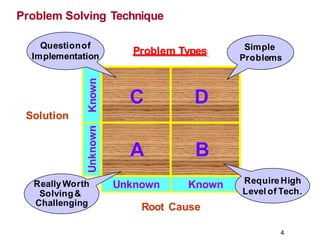
Problem Solving Technique
Problem Types
Known
Unknown Known
Root Cause
Solution
D
C
B
A
Simple
Problems
ReallyWorth
Solving&
Challenging
Questionof
Implementation
RequireHigh
Level of Tech.
4
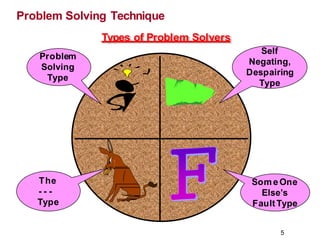
Problem Solving Technique
Types of Problem Solvers
Problem
Solving
Type
The
- - -
Type
SomeOne
Else’s
FaultType
Self
Negating,
Despairing
Type
5
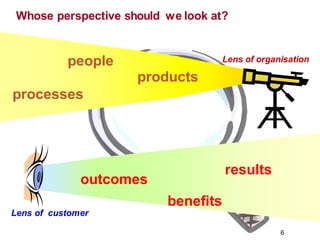
people
6
products
processes
outcomes
results
benefits
Lens of organisation
Lens of customer
Whose perspective should we look at?
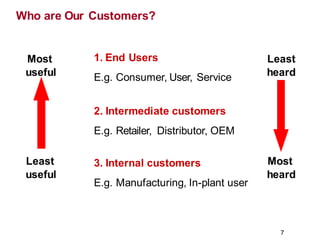
1. End Users
E.g. Consumer, User, Service
2. Intermediate customers
E.g. Retailer, Distributor, OEM
3. Internal customers
E.g. Manufacturing, In-plant user
Most
useful
Least
useful
Least
heard
7
Most
heard
Who are Our Customers?
Why Do we need Quality Tools?
“95% of the problem is solved when clearly defined”
We need Quality Tools for:
1. Problem solving - making judgments & decisions.
2. For continual improvement.
3. For Process measurement.
8
Problem solving - Methods & Tools
9
What methods & Tools do we have for Problem Solving?
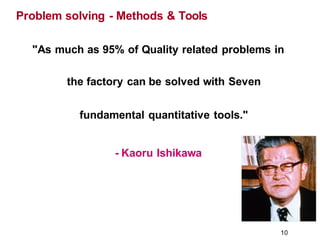
"As much as 95% of Quality related problems in
the factory can be solved with Seven
fundamental quantitative tools."
- Kaoru Ishikawa
Problem solving - Methods & Tools
10
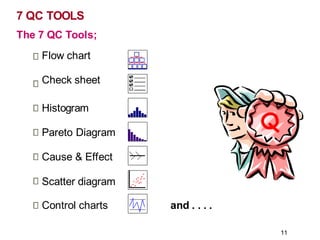
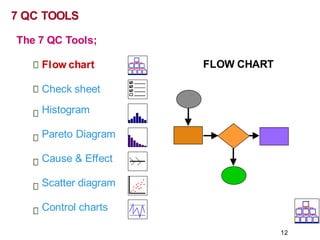
7 QC TOOLS
Q
The 7 QC Tools;
Flow chart
Check sheet
Histogram
Pareto Diagram
Cause & Effect
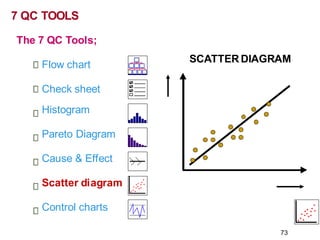
Scatter diagram
Control charts and . . . .
11
FLOW CHART
7 QC TOOLS
The 7 QC Tools;
Flow chart
Check sheet
Histogram
Pareto Diagram
Cause & Effect
Scatter diagram
Control charts
12
FLOW CHARTS
13
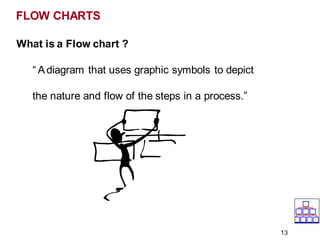
What is a Flow chart ?
“ Adiagram that uses graphic symbols to depict
the nature and flow of the steps in a process.”
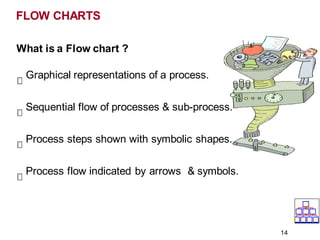
What is a Flow chart ?
Graphical representations of a process.
Sequential flow of processes & sub-process.
Process steps shown with symbolic shapes.
Process flow indicated by arrows & symbols.
FLOW CHARTS
14
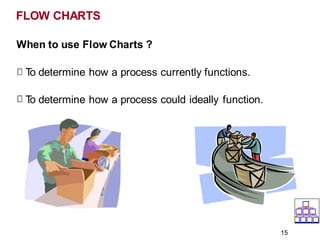
When to use Flow Charts ?
T
o determine how a process currently functions.
T
o determine how a process could ideally function.
FLOW CHARTS
15
FLOW CHARTS
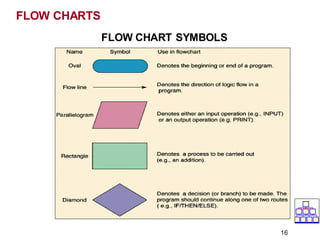
FLOW CHART SYMBOLS
16
FLOW CHARTS
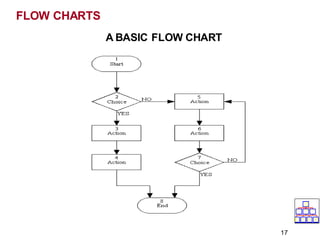
A BASIC FLOW CHART
17
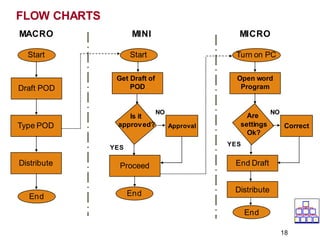
FLOW CHARTS
Start
Draft POD
Type POD
Distribute
End
MACRO MINI MICRO
Start
Get Draft of
POD
Is it
approved?
Proceed
YES
NO
End
Turn on PC
Open word
Program
Approval
NO
Are
settings
Ok?
YES
End Draft
Correct
Distribute
End
18
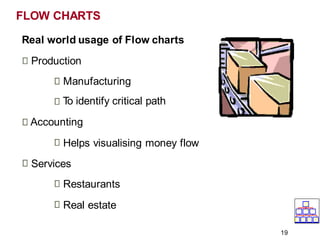
Real world usage of Flow charts
Production
Manufacturing
T
o identify critical path
Accounting
Helps visualising money flow
Services
Restaurants
Real estate
FLOW CHARTS
19
Benefits of Flow Charts
Create Visual map of process.
To identify time lags & NVAsteps.
Identify process that need improvement.
Determine major & minor inputs in the process.
Promotes process understanding.
Depicts customer - supplier relationship.
FLOW CHARTS
20
FLOW CHART
1. Examples of Flow chart:
• In-house Process Flow chart
• Supplier Process Flow chart
21
CHECK SHEET
7 QC TOOLS
The 7 QC Tools;
Flow chart
Check sheet
Histogram
Pareto Diagram
Cause & Effect
Scatter diagram
Control charts
22
CHECK SHEET
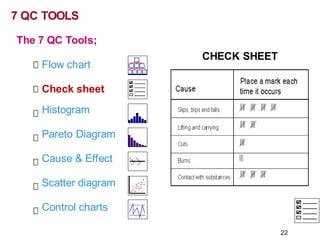
What is a Check sheet ?
Agraphical presentation of information.
Data gathering & interpretation tool.
Simplest way to assess common problems.
23
CHECK SHEET
When to use a Check sheet ?
T
o distinguish between fact & opinion.
T
o gather data about how often a problem occurs.
T
o gather data about the type of problem.
24
CHECK SHEET
How to create a Check sheet ?
What is the Problem?
Why should data be collected?
Whowill use the information being collected?
Whowill collect the data?
25
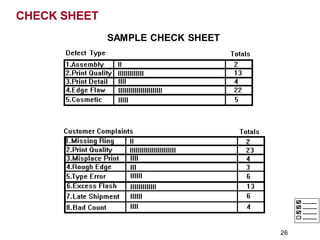
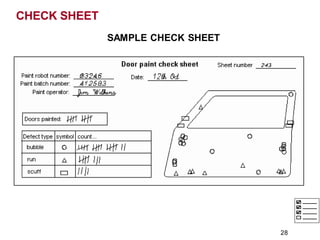
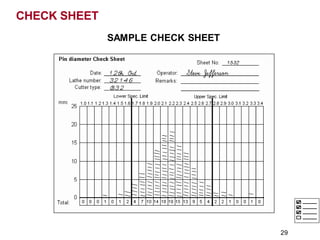
SAMPLE CHECK SHEET
CHECK SHEET
26
CHECK SHEET
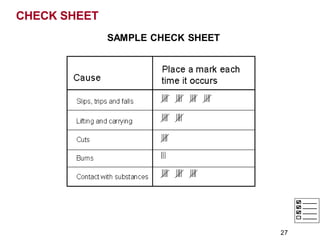
SAMPLE CHECK SHEET
27
CHECK SHEET
SAMPLE CHECK SHEET
28
CHECK SHEET
SAMPLE CHECK SHEET
29
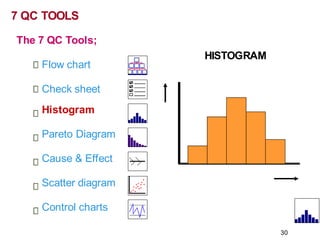
HISTOGRAM
7 QC TOOLS
The 7 QC Tools;
Flow chart
Check sheet
Histogram
Pareto Diagram
Cause & Effect
Scatter diagram
Control charts
30
What is a Histogram ?
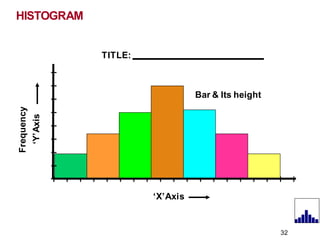
Avertical bar chart that depicts distribution of data.
It is a one time snap shot of a process performance.
Atool to determine the frequency of occurrence of data.
Agraphical information communicating tool.
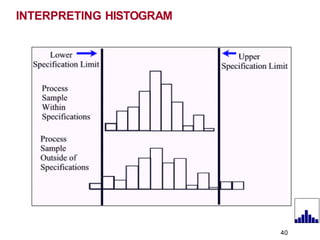
Compares process results with specification limits.
31
HISTOGRAM
HISTOGRAM
TITLE:
32
‘X’Axis
Frequency
‘Y’Axis
Bar & Its height
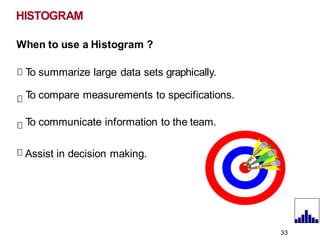
When to use a Histogram ?
T
o summarize large data sets graphically.
T
o compare measurements to specifications.
T
o communicate information to the team.
Assist in decision making.
HISTOGRAM
33
HISTOGRAM
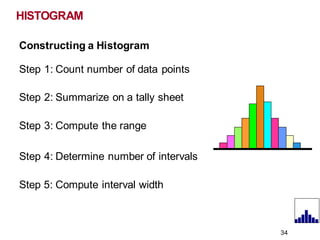
Constructing a Histogram
Step 1: Count number of data points
Step 2: Summarize on a tally sheet
Step 3: Compute the range
Step 4: Determine number of intervals
Step 5: Compute interval width
34
HISTOGRAM
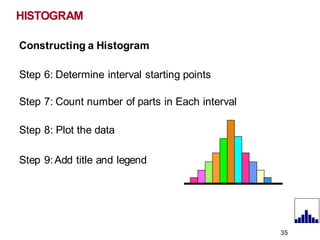
Constructing a Histogram
Step 6: Determine interval starting points
Step 7: Count number of parts in Each interval
Step 8: Plot the data
Step 9:Add title and legend
35
BAR WIDTH & BOUNDARY
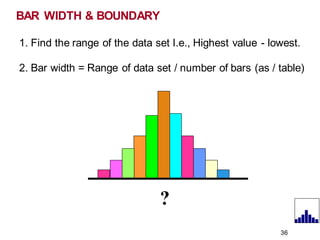
1. Find the range of the data set I.e., Highest value - lowest.
2. Bar width = Range of data set / number of bars (as / table)
?
36
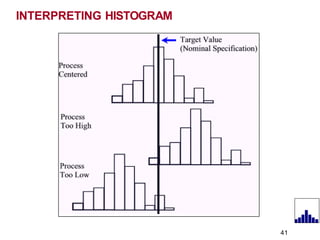
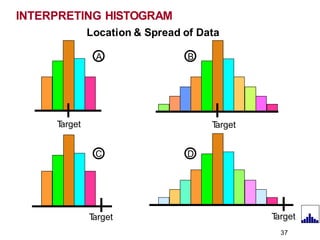
INTERPRETING HISTOGRAM
T
arget
Location & Spread of Data
A B
T
arget
D
T
arget
C
T
arget
37
INTERPRETING HISTOGRAM
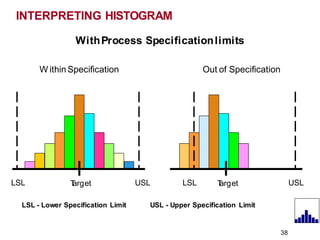
WithProcess Specificationlimits
W ithinSpecification Out of Specification
T
arget
LSL USL T
arget
38
LSL USL
LSL - Lower Specification Limit USL - Upper Specification Limit
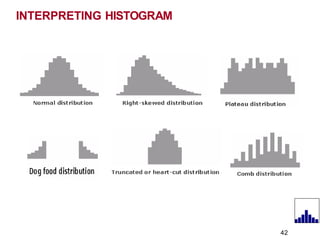
INTERPRETING HISTOGRAM
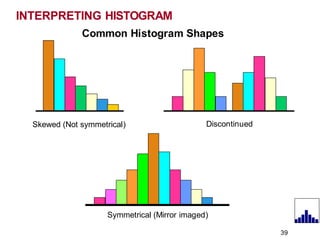
Common Histogram Shapes
Skewed (Not symmetrical) Discontinued
39
Symmetrical (Mirror imaged)
INTERPRETING HISTOGRAM
40
INTERPRETING HISTOGRAM
41
INTERPRETING HISTOGRAM
42
Benefits of Histogram
T
o know whether process produces within specification.
T
o know whether process is stable & predictable.
Process monitoring & centering.
HISTOGRAM
43
HISTOGRAM
1. Learn to construct a Histogram using:
• MS Excel
• Minitabsoftware
2. Exercise on Histogram
44
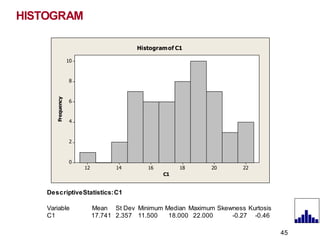
C1
Frequency
22
20
18
16
14
12
10
8
6
4
2
0
Histogramof C1
DescriptiveStatistics:C1
Variable Mean St Dev Minimum Median Maximum Skewness Kurtosis
C1 17.741 2.357 11.500 18.000 22.000 -0.27 -0.46
HISTOGRAM
45
HISTOGRAM
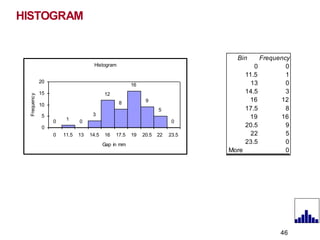
Histogram
1
3
12
8
16
9
5
0 0 0
0
15
10
5
20
0 11.5 13 14.5 16 17.5 19 20.5 22 23.5
Gap in mm
Frequenc
y
Bin Frequency
0 0
11.5 1
13 0
14.5 3
16 12
17.5 8
19 16
20.5 9
22 5
23.5 0
More 0
46
VISUALS
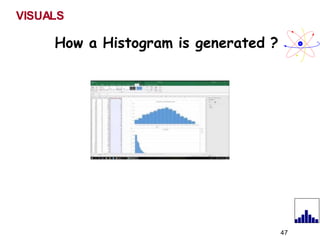
How a Histogram is generated ?
47
PARETO DIAGRAM
1
2
3
4
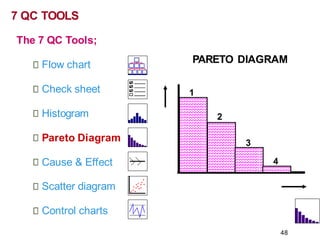
7 QC TOOLS
The 7 QC Tools;
Flow chart
Check sheet
Histogram
Pareto Diagram
Cause & Effect
Scatter diagram
Control charts
48
What is a Pareto Diagram ?
Shows focus area to get most gains.
Bar chart arranged in descending order of height.
Bars on left; relatively important than those in right.
Separates “Vital few” from “Trivial many”.
80 % of trouble comes from 20 % of the problems
Named after Italian Economist Wilfredo Pareto.
PARETO DIAGRAM
49
When to use a Pareto Diagram ?
Starter to Problem solving - What to solve?
T
o break big problems into smaller problems.
T
o prioritize high impact issues - Where to focus?
Systematic analysis of causes based on magnitude.
Allows better use of limited resources.
PARETO DIAGRAM
50
PARETO DIAGRAM
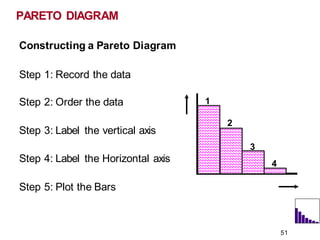
Constructing a Pareto Diagram
Step 1: Record the data
Step 2: Order the data
Step 3: Label the vertical axis
Step 4: Label the Horizontal axis
Step 5: Plot the Bars
1
51
2
3
4
PARETO DIAGRAM
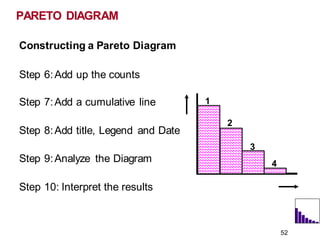
Constructing a Pareto Diagram
Step 6:Add up the counts
Step 7:Add a cumulative line
Step 8:Add title, Legend and Date
Step 9:Analyze the Diagram
Step 10: Interpret the results
1
52
2
3
4
Benefits of Pareto Diagram
Identifies ‘Major Few’ problems.
Improves team performance & effectiveness.
Before & After tracking of a problem in single chart.
53
PARETO DIAGRAM
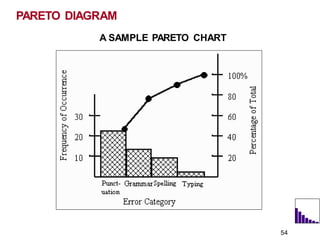
A SAMPLE PARETO CHART
PARETO DIAGRAM
54
1. Learn to construct a Pareto Diagram using:
• Pareto Excel - Example
• Minitabsoftware
2. Exercise on Pareto Diagram.
PARETO DIAGRAM
55
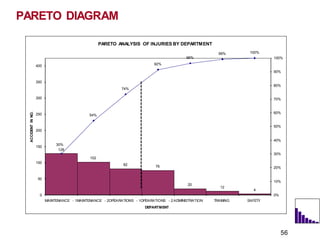
PARETO ANALYSIS OF INJURIES BY DEPARTMENT
102
82 76
20
12
4
54%
74%
92%
96%
99% 100%
30%
128
0
50
100
150
200
250
300
350
400
TRAINING SAFETY
MAINTENANCE - 1MAINTENANCE - 2OPEARATIONS - 1OPEARATIONS - 2 ADMINISTRATION
DEPARTMENT
ACCIDENT
IN
NO.
0%
10%
20%
30%
40%
50%
60%
70%
80%
90%
100%
PARETO DIAGRAM
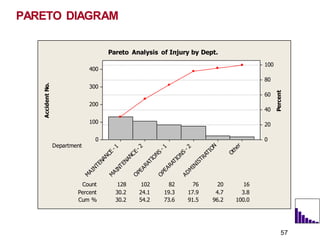
56
Accident
No.
Percent
Department
Count 128 102 82 76 20 16
Percent 30.2 24.1 19.3 17.9 4.7 3.8
Cum % 30.2 54.2 73.6 91.5 96.2 100.0
400
300
200
100
0
100
80
60
40
20
0
Pareto Analysis of Injury by Dept.
PARETO DIAGRAM
57
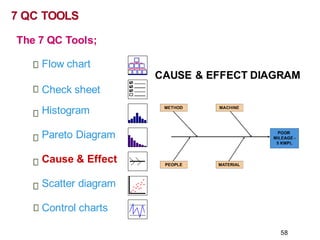
The 7 QC Tools;
Flow chart
CAUSE & EFFECT DIAGRAM
Check sheet
Histogram
Pareto Diagram
Cause & Effect
Scatter diagram
Control charts
7 QC TOOLS
58
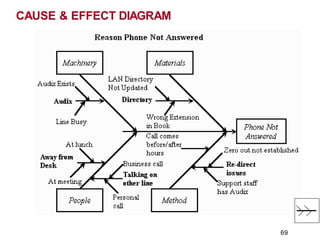
What is a Cause & Effect Diagram ?
Agraphical tool that helps identify, sort and
display possible causes of a problem or
Quality characteristic.
CAUSE & EFFECT DIAGRAM
59
About Cause & Effect Diagram ?
Developed by Kaoru Ishikawa of Japan.
Also called, Ishikawa or Fish bone diagram.
Used to explore potential & real causes.
Compares relative importance of each cause.
Helps to identify root cause.
CAUSE & EFFECT DIAGRAM
60
When to use a Cause & Effect Diagram ?
During Problem solving to focus on problem.
T
o sort out interactions among factors for a cause.
T
o analyze existing problems.
CAUSE & EFFECT DIAGRAM
61
CAUSE & EFFECT DIAGRAM
Why to use Cause & Effect Diagram ?
Helps to determine root cause of a Problem.
Group participation & knowledge sharing.
Indicates possible cause for variation in a process.
Increases knowledge of a process, its factors etc.,
Identifies areas of further data collection.
62
CAUSE & EFFECT DIAGRAM
STEP 1 - Identify & define the effect
Decide on the effect to examine.
Use operational definitions.
Phrase effect and quantify
Positive (an objective) or
Negative (a problem)
63
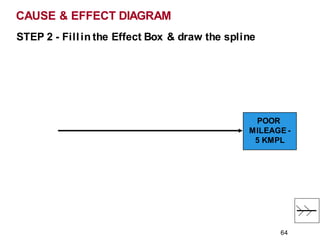
STEP 2 - Fillin the Effect Box & draw the spline
CAUSE & EFFECT DIAGRAM
POOR
MILEAGE -
5 KMPL
64
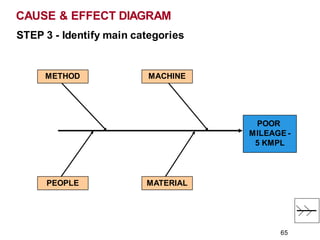
STEP 3 - Identify main categories
CAUSE & EFFECT DIAGRAM
POOR
MILEAGE -
5 KMPL
MACHINE
METHOD
PEOPLE MATERIAL
65
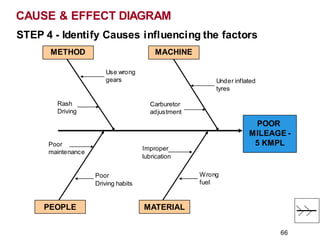
STEP 4 - Identify Causes influencing the factors
CAUSE & EFFECT DIAGRAM
POOR
MILEAGE -
5 KMPL
MACHINE
METHOD
PEOPLE MATERIAL
Under inflated
tyres
Use wrong
gears
Carburetor
adjustment
Rash
Driving
Poor
maintenance
Poor
Driving habits
Improper
lubrication
Wrong
fuel
66
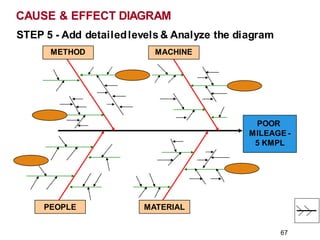
STEP 5 - Add detailedlevels & Analyze the diagram
CAUSE & EFFECT DIAGRAM
POOR
MILEAGE -
5 KMPL
MACHINE
METHOD
PEOPLE MATERIAL
67
CAUSE & EFFECT DIAGRAM
68
CAUSE & EFFECT DIAGRAM
69
CAUSE & EFFECT DIAGRAM
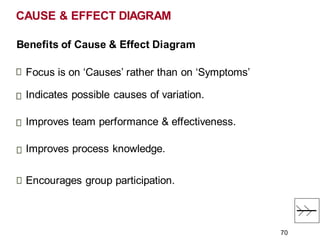
Benefits of Cause & Effect Diagram
Focus is on ‘Causes’ rather than on ‘Symptoms’
Indicates possible causes of variation.
Improves team performance & effectiveness.
Improves process knowledge.
Encourages group participation.
70
1. Learn to construct a Cause & Effect Diagram using:
• Cause & Effect Diagram Generator
• Minitabsoftware
2. Exercise on Cause & Effect Diagram
CAUSE & EFFECT DIAGRAM
71
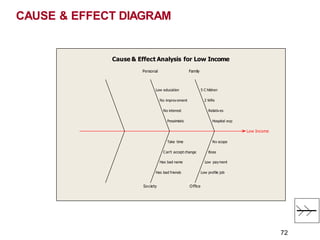
Low Income
Society Office
Hospital exp
Relatives
2 Wife
5 C hildren
No scope
Boss
Low payment
Low profile job
Pessimistic
No interest
No improvement
Low education
Take time
Can't accept change
Has bad name
Has bad friends
Cause & Effect Analysis for Low Income
Personal Family
CAUSE & EFFECT DIAGRAM
72
SCATTER DIAGRAM
7 QC TOOLS
The 7 QC Tools;
Flow chart
Check sheet
Histogram
Pareto Diagram
Cause & Effect
Scatter diagram
Control charts
73
SCATTER DIAGRAM
What is a Scatter Diagram ?
Avisual & statistical testing tool.
Analyzes strength & relationship between 2 variables.
Involve correlation to establish significant relationship.
Arrive at Quantitative conclusion on relationship.
74
SCATTER DIAGRAM
When to use a Scatter Diagram ?
In problem solving to establish a root cause.
Examine root cause theories in C & E.
T
o confirm a Hypothesis.
75
SCATTER DIAGRAM
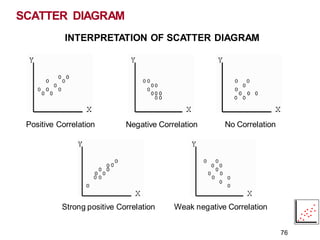
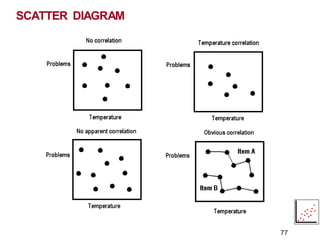
Positive Correlation
76
Negative Correlation No Correlation
Strong positive Correlation Weak negative Correlation
INTERPRETATION OF SCATTER DIAGRAM
SCATTER DIAGRAM
77
SCATTER DIAGRAM
78
SCATTERPLOT STA
TISTICS:
For scatter plots, the following statisticsare calculated:
Mean X and Y Average of all the data points.
Maximum X and Y Maximum value in the series.
MinimumXand Y Minimum value in the series.
SampleSize Number of values in the series.
X Range and Y Range Maximum value - minimum value.
SCATTER DIAGRAM
79
SCATTERPLOT STATISTICS:
X RangeandY Range Maximum value - minimum value.
Stdev of X and Y values Indicates spread of data around the mean. Line
of Best Fit- Slope Slope of the line
Lineof BestFit-Y Intercept Point at which line of best fit crosses Yaxis
INTERPRETATION OF SCATTER DIAGRAM
Strong correlation
r-value range of between 0.85 to 1, or -0.85 to -1.
Moderatecorrelation
r-value ranges from 0.75 to 0.85 or, -0.75 to -0.85.
W eak correlation
r ranges from 0.60 to 0.74 or -0.60 to 0.74.
Though an entirely random relationship equals, 0.00,
r-value that is 0.59 and below is not considered to be a reliable predictor.
(Tan 45 degree = 1)
SCATTER DIAGRAM
80
SCATTER DIAGRAM
Benefits of Scatter Diagram
Trends & patterns of different measures are tracked.
Better process management in variable analysis.
Relationship establishment tool.
81
1. Learn to construct a Scatter Diagram using:
• Scatter diagram using MS Excel
• Minitabsoftware
2. Exercise on Scatter Diagram
SCATTER DIAGRAM
82
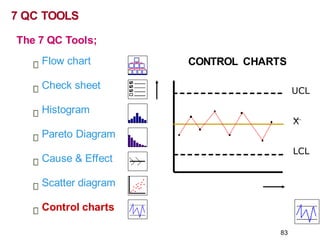
CONTROL CHARTS
UCL
X
LCL
7 QC TOOLS
The 7 QC Tools;
Flow chart
Check sheet
Histogram
Pareto Diagram
Cause & Effect
Scatter diagram
Control charts
83
CONTROL CHARTS
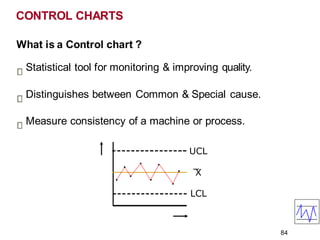
What is a Control chart ?
Statistical tool for monitoring & improving quality.
Distinguishes between Common & Special cause.
Measure consistency of a machine or process.
UCL
X
LCL
84
CONTROL CHARTS
When to use a Control chart ?
Visual display for Process output.
T
o monitor, control & improve process performance.
T
o identify variation at its source.
85
CONTROL CHARTS
Benefits of Control charts
Common visual language to predict process.
Provides cues for taking action.
Easy & simple to maintain.
86
1. Learn to construct a Control Chart using:
• MS Excel
• Minitabsoftware
2. Exercise on Control charts
CONTROL CHARTS
87
VISUALS
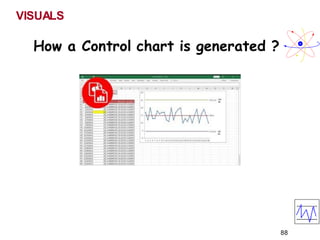
How a Control chart is generated ?
88
OTHER QC TOOLS
89
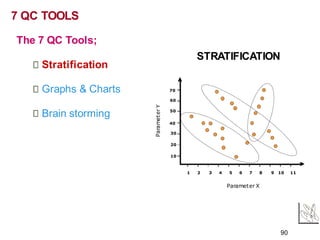
STRATIFICATION
1 2 3 4 5 6 7 8 9 10 11
10
20
30
40
50
60
70
Parameter X
Paramet
er
Y
7 QC TOOLS
The 7 QC Tools;
Stratification
Graphs & Charts
Brain storming
90
STRATIFICATION
What is Stratification?
Atechnique used to analyze and divide a universe of
data into homogeneous groups (Strata)
Involves observing data, splitting them into distinct layers
& doing analysis to see a different process.
Often these events, represent multiple sources that need
to be treated separately.
91
STRATIFICATION
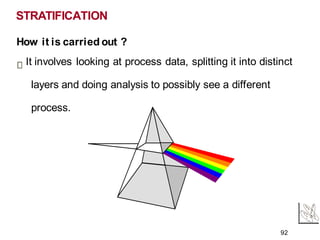
How it is carried out ?
It involves looking at process data, splitting it into distinct
layers and doing analysis to possibly see a different
process.
92
Example:
For instance, analysing ‘Quality’ cost.
Prevention cost
Internal Failure cost
External Failure cost
Appraisal cost
World class companies have a Quality cost of around 2
to 5 %
93
STRATIFICATION
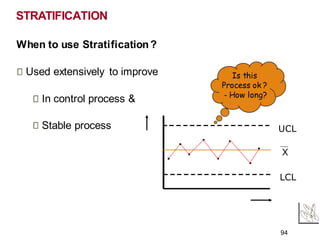
When to use Stratification?
Used extensively to improve
In control process &
Stable process
STRATIFICATION
UCL
X
LCL
Is this
Process ok ?
- How long?
94
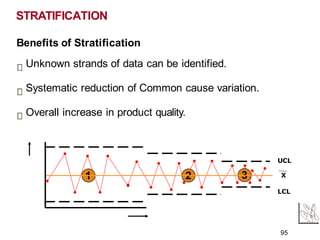
Benefits of Stratification
Unknown strands of data can be identified.
Systematic reduction of Common cause variation.
Overall increase in product quality.
STRATIFICATION
1 2
LCL
UCL
X
3
95
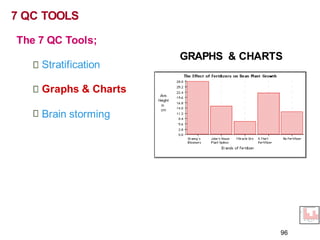
GRAPHS & CHARTS
7 QC TOOLS
The 7 QC Tools;
Stratification
Graphs & Charts
Brain storming
96
What are Graphs & Charts?
Atechnique used to communicate information visually.
Complicated information is made easy to understand
individually and comparatively using Graphs & Charts.
Basic types include;
1. Bar graph
2. Line graph
3. Pie or Circle graph
97
GRAPHS & CHARTS
1. Learn to construct Graphs & Charts using:
• MS Excel worksheet
2. Exercise on Graphs & Charts
GRAPHS & CHARTS
98
VISUALS
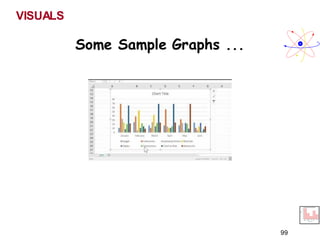
Some Sample Graphs ...
99
BRAINSTORMING
7 QC TOOLS
The 7 QC Tools;
Stratification
Graphs & Charts
Brain storming
100
What is Brainstorming?
Atool used by teams for creative exploration of options in
an environment of free criticism.
Provides creative and unrestricted exploration of options
or solutions.
BRAINSTORMING
101
BRAINSTORMING
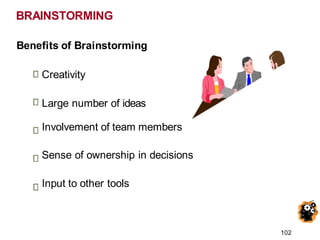
Benefits of Brainstorming
Creativity
Large number of ideas
Involvement of team members
Sense of ownership in decisions
Input to other tools
102
BRAINSTORMING
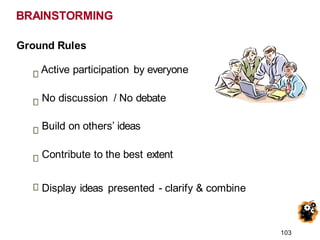
Ground Rules
Active participation by everyone
No discussion / No debate
Build on others’ ideas
Contribute to the best extent
Display ideas presented - clarify & combine
103
BRAINSTORMING
Brainstorming sequence
Review the rules
Set a time limit
State / pose the question
Collect ideas - Structured & Unstructured
Collate & analyze
104
1. A Demo on Brainstorming:
• Go to Brainstorming video.
2. Exercise on Brainstorming
• As an input to Cause & Effect diagram.
105
BRAINSTORMING
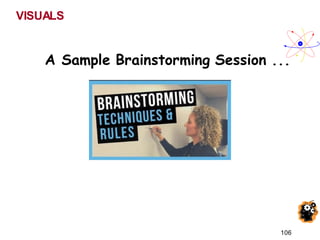
VISUALS
A Sample Brainstorming Session ...
106
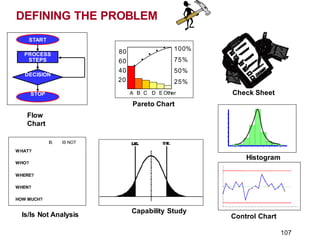
Check Sheet
Pareto Chart
•
•
•
•
•
A B C D EOther
60
40
20
80 100%
75%
50%
25%
Histogram
Control Chart
Flow
Chart
PROCESS
STEPS
START
DECISION
STOP
IS IS NOT
WHAT?
WHO?
WHERE?
WHEN?
HOW MUCH?
Is/Is Not Analysis
Capability Study
DEFINING THE PROBLEM
107
T o t a l
A 1 3 1 1 6
B 3 4 4 2 1 3
C 2 1 3 3 9
D 4 2 2 4 1 2
N G T
Brainstorming
EFFEC
T
Cause Cause
Cause Cause
Cause
P r o ble m
S ta te m e nt
O perational
D efinitions
Define the Team
Team Members
Name Role
John Team Leader
Mary Coach
Bob Teacher
Susan Custodian
Bill Secretary
Jane Driver
Wayne Student
P u r p o se & Vi si o n
_ _ _ _ _ _ _ _ _ _ _ _ __ _ _ __ _ _ __ _ __
Lower Control Limit [LCL]
CONTROL CHART
_ _ _ _ _ _ _ _ _ _
U
_
p_
p
_
er_
C
_
on_
t_
ro
_
l L
_
i
m
__
i
t_
[U
_
C
_
L
]_
Average
Time
Measurement
Average
RUN CHART
Time
Measuremen
t
Rest ra in
Fo
D riving
Fo r ces
FO RC E FI E LD ANALY SI S
INTERRELATIONSHIP
Cause
Cause Cause
Cause
Cause
Cause
C HECKLIST
Date Total
Category 1 Data Data
Category 2 Data Data
Category 3 Data Data
Category 4 Data Data
D ec is ion
Proc es s
St ep
St op
St art
FLOWCH
ART
The Plan-Do-Study-Act [PDSA] Cycle
Plan
Do
Act
Study
Delighted
Customers
Systems Progress Pilot Project Five Whys?
Why?
Why? Why?
Why?
Why?
BAR CHART
Category
Survey Results In Percent
COLUMN CHA RT
Number
SURVEY
1.xxxxxxxxxx
2.xxxxxxxxxx
3.xxxxxxxxxx
Project Bulletin Board
RED ITEMS REQUIRE ACTION WITHIN 30 DAYS.
1.
2.
3.
1.
2.
3.
YELLOW ITEMS ARE SCHEDULED TO MOVE INTO RED.
1.
2.
3.
GREEN ITEMS CAPTURE ALL IMPROVEM
ENT S
UGGESTIONS.
Completed Items move to the
Succes s ful Projects Board.
Items mus t be organized into s egments
capable of being addres s ed within 30 days .
Items move into yellow as space permits.
0
1
2
3
CORRELATION CHART
Factor
1
No Correlation
100 %
90 %
80 %
70 %
ETC.
Consensogram
Pie Chart
Frequency
HIST OGRAM
Time
M
easurement
A Alone
B Alone
Stratification
A and B Combined
Imagineer ing
Flow T ree
Knowledge
Understanding
Application
Analysis
Capacity Matrix
Aim or Capacity Breakdown
Res ult
Parking
Lot
+
What is go
ingw
ell
?
.
What needs im
p
rov
em
e
n
t
? I/O
What ques t
iondoy
ouha
ve
? W
ha
t aretheissues o
r ob
s e
rv
atio
ns.
A ffinity Diagram
PR
OJECT
STEPS
1.
2.
3.
4.
5.
Time
GannttChart
Present Org
an
izatio
n
1.
2.
3.
4.
Future Org
an
izati
o
n
1.
2.
3.
4.
Positiv eFo
rces T
hatCreat
e G
rowth
1.
2.
3.
4.
5.
6.
+
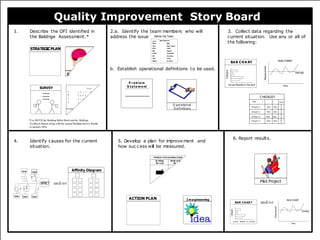
Quality Improvemen t Story Board
b. Establ i shoperat
i on
al defi
ni
ti
onsto b
e used.
1. D escr
i b
e the O
FIi
denti
fi
edi nthe 2.
a. Ident
i f
y t
he t
eamm
em
bersw
ho w
i
l l 3.Col l
ectdat
a r
egardi
Bal dri ge Assess
ment
. address the i ss
ue. current si t
uati
on.
5. D
eve
how
4. Identi fycausesf
orthecurr
ent
si tuati on.
ACTION PLAN
STRATEGICPLAN
A Quality Tool Belt
Quality Improvement Story Board
.
b. Establish operational definitions to be used.
1.
*Use BOTH the Building Bullet Book and the Baldrige
Feedback Report along with the annual Baldrige Survey Results
to identify OFIs.
Describe the OFI identified in 2.a. Identify the team members who will 3. Collect data regarding the
the Baldrige Assessment.* address the issue current situation. Use any or all of
the following:
5. Develop a plan for im
prove m
ent and
how suc c ess will be m
easured.
6. Report results.
and/or
4. Identify causes for the current
situation.
and/or
I m a gineering
Define the Team
Team Members
Name Role
John Team Leader
Mary Coach
Bob Teacher
Susan Custodian
Bill Secretary
Jane Driver
Wayne Student
O perational
D efinitions
SURVEY
1. xxxxxxxxxx
2. xxxxxxxxxx
3. xxxxxxxxxx
Affinity Diagram
EFFECT
Cause Cause
Cause Cause
Cause
Pilot Project
P r o ble m
S ta te m e nt
A
B
C
D
T o t a l
1 3 1 1 6
3 4 4 2
2 1 3
4
Average
RUN CHART
Time
Measurement
BAR CHA RT
Category
Survey Results In Percent
C HECKLIST
Date Total
Category 1 Data Data
Category 2 Data Data
Category 3 Data Data
Category 4 Data Data
Average
RUN CHART
Time
Measurement
BAR CHAR T
Category
Survey Results In Percent
ACTION PLAN
STRATEGICPLAN
Rest ra in
Fo
D riving
Fo r ces
FO RC E FI E LD ANALY SI S
B
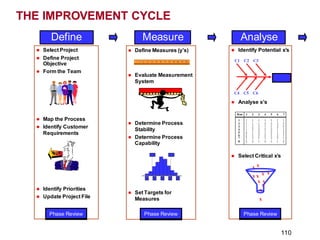
Define Measure Analyse
Run 1 2 3 4 5 6 7
1 1 1 1 1 1 1 1
2 1 1 1 2 2 2 2
3 1 2 2 1 1 2 2
4 1 2 2 2 2 1 1
5 2 1 2 1 2 1 2
6 2 1 2 2 1 2 1
7 2 2 1 1 2 2 1
8 2 2 1 2 1 1 2
⚫ Identify Potential x’s
C1 C2 C3
Effect
C4 C5 C6
⚫ Analyse x’s
⚫ Select Critical x’s
x x
x x x x
x x
x
x
x
Phase Review
⚫ Select Project
⚫ Define Project
Objective
⚫ Form the Team
⚫ Map the Process
⚫ Identify Customer
Requirements
⚫ Identify Priorities
⚫ Update Project File
Phase Review
⚫ Define Measures (y’s)
⚫ Evaluate Measurement
System
⚫ Determine Process
Stability
⚫ Determine Process
Capability
LSL USL
15 20 25 30 35
⚫ Set Targets for
Measures
Phase Review
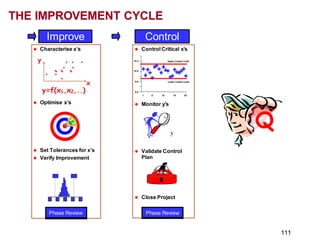
THE IMPROVEMENT CYCLE
110
Improve Control
⚫ Control Critical x’s
10.2 Upper Control Limit
10.0
9.8 Lower Control Limit
9.6
1 5 10 15 20
⚫ Monitor y’s
y
⚫ Validate Control
Plan
⚫ Close Project
Phase Review
⚫ Characterise x’s
y . . .
. .
.
. ... ...
. x
y=f(x1,x2,..)
⚫ Optimise x’s
⚫ Set Tolerances for x’s
⚫ Verify Improvement
LSL USL
15 20 25 30 35
Phase Review
THE IMPROVEMENT CYCLE
Q
111
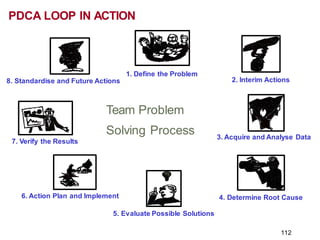
1. Define the Problem
2. Interim Actions
3. Acquire and Analyse Data
4. Determine Root Cause
5. Evaluate Possible Solutions
6. Action Plan and Implement
7. Verify the Results
8. Standardise and Future Actions
Team Problem
Solving Process
112
PDCA LOOP IN ACTION
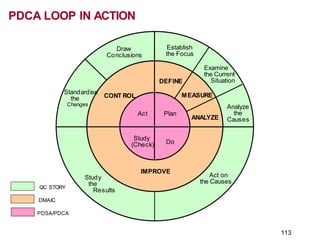
QC STORY
DMAIC
PDSA/PDCA
Draw
Conclusions
Establish
the Focus
Examine
the Current
Situation
Analyze
the
Causes
Act on
the Causes
IMPROVE
DEFINE
MEASURE
ANALYZE
CONT ROL
Standardise
the
Changes
Study
the
Results
Plan
Do
Study
(Check)
Act
PDCA LOOP IN ACTION
113
SUMMARY
The tools listed above are ideally utilized in reducing the process
variability or identifying specific problems in the process. In any
case, the tools should be utilized to ensure that all attempts at
process improvement include:
• Analysis
• Improvement
• Monitoring
• Implementation
114

7 QC Tools For Problem Solving Presentation.pdf

  • 1.
    7 TOOLS OFQUALITY & PROBLEM SOLVING
  • 2.
    “Why do weneed Quality ?” 2
  • 3.
    Why do weneed ‘Quality’ ? A Quote from Bill Smith ... In 1985, Bill Smith, an engineer at Motorola (Father of Six Sigma) presented a paper which concluded that … “If a product was found defective & corrected during the production process, other defects were bound to be missed and found later by the customer during early use of the product…. However, when the product is manufactured error free, it rarely fails during early use by the consumer …” 3
  • 4.
    Problem Solving Technique ProblemTypes Known Unknown Known Root Cause Solution D C B A Simple Problems ReallyWorth Solving& Challenging Questionof Implementation RequireHigh Level of Tech. 4
  • 5.
    Problem Solving Technique Typesof Problem Solvers Problem Solving Type The - - - Type SomeOne Else’s FaultType Self Negating, Despairing Type 5
  • 6.
  • 7.
    1. End Users E.g.Consumer, User, Service 2. Intermediate customers E.g. Retailer, Distributor, OEM 3. Internal customers E.g. Manufacturing, In-plant user Most useful Least useful Least heard 7 Most heard Who are Our Customers?
  • 8.
    Why Do weneed Quality Tools? “95% of the problem is solved when clearly defined” We need Quality Tools for: 1. Problem solving - making judgments & decisions. 2. For continual improvement. 3. For Process measurement. 8
  • 9.
    Problem solving -Methods & Tools 9 What methods & Tools do we have for Problem Solving?
  • 10.
    "As much as95% of Quality related problems in the factory can be solved with Seven fundamental quantitative tools." - Kaoru Ishikawa Problem solving - Methods & Tools 10
  • 11.
    7 QC TOOLS Q The7 QC Tools; Flow chart Check sheet Histogram Pareto Diagram Cause & Effect Scatter diagram Control charts and . . . . 11
  • 12.
    FLOW CHART 7 QCTOOLS The 7 QC Tools; Flow chart Check sheet Histogram Pareto Diagram Cause & Effect Scatter diagram Control charts 12
  • 13.
    FLOW CHARTS 13 What isa Flow chart ? “ Adiagram that uses graphic symbols to depict the nature and flow of the steps in a process.”
  • 14.
    What is aFlow chart ? Graphical representations of a process. Sequential flow of processes & sub-process. Process steps shown with symbolic shapes. Process flow indicated by arrows & symbols. FLOW CHARTS 14
  • 15.
    When to useFlow Charts ? T o determine how a process currently functions. T o determine how a process could ideally function. FLOW CHARTS 15
  • 16.
  • 17.
    FLOW CHARTS A BASICFLOW CHART 17
  • 18.
    FLOW CHARTS Start Draft POD TypePOD Distribute End MACRO MINI MICRO Start Get Draft of POD Is it approved? Proceed YES NO End Turn on PC Open word Program Approval NO Are settings Ok? YES End Draft Correct Distribute End 18
  • 19.
    Real world usageof Flow charts Production Manufacturing T o identify critical path Accounting Helps visualising money flow Services Restaurants Real estate FLOW CHARTS 19
  • 20.
    Benefits of FlowCharts Create Visual map of process. To identify time lags & NVAsteps. Identify process that need improvement. Determine major & minor inputs in the process. Promotes process understanding. Depicts customer - supplier relationship. FLOW CHARTS 20
  • 21.
    FLOW CHART 1. Examplesof Flow chart: • In-house Process Flow chart • Supplier Process Flow chart 21
  • 22.
    CHECK SHEET 7 QCTOOLS The 7 QC Tools; Flow chart Check sheet Histogram Pareto Diagram Cause & Effect Scatter diagram Control charts 22
  • 23.
    CHECK SHEET What isa Check sheet ? Agraphical presentation of information. Data gathering & interpretation tool. Simplest way to assess common problems. 23
  • 24.
    CHECK SHEET When touse a Check sheet ? T o distinguish between fact & opinion. T o gather data about how often a problem occurs. T o gather data about the type of problem. 24
  • 25.
    CHECK SHEET How tocreate a Check sheet ? What is the Problem? Why should data be collected? Whowill use the information being collected? Whowill collect the data? 25
  • 26.
  • 27.
  • 28.
  • 29.
  • 30.
    HISTOGRAM 7 QC TOOLS The7 QC Tools; Flow chart Check sheet Histogram Pareto Diagram Cause & Effect Scatter diagram Control charts 30
  • 31.
    What is aHistogram ? Avertical bar chart that depicts distribution of data. It is a one time snap shot of a process performance. Atool to determine the frequency of occurrence of data. Agraphical information communicating tool. Compares process results with specification limits. 31 HISTOGRAM
  • 32.
  • 33.
    When to usea Histogram ? T o summarize large data sets graphically. T o compare measurements to specifications. T o communicate information to the team. Assist in decision making. HISTOGRAM 33
  • 34.
    HISTOGRAM Constructing a Histogram Step1: Count number of data points Step 2: Summarize on a tally sheet Step 3: Compute the range Step 4: Determine number of intervals Step 5: Compute interval width 34
  • 35.
    HISTOGRAM Constructing a Histogram Step6: Determine interval starting points Step 7: Count number of parts in Each interval Step 8: Plot the data Step 9:Add title and legend 35
  • 36.
    BAR WIDTH &BOUNDARY 1. Find the range of the data set I.e., Highest value - lowest. 2. Bar width = Range of data set / number of bars (as / table) ? 36
  • 37.
    INTERPRETING HISTOGRAM T arget Location &Spread of Data A B T arget D T arget C T arget 37
  • 38.
    INTERPRETING HISTOGRAM WithProcess Specificationlimits WithinSpecification Out of Specification T arget LSL USL T arget 38 LSL USL LSL - Lower Specification Limit USL - Upper Specification Limit
  • 39.
    INTERPRETING HISTOGRAM Common HistogramShapes Skewed (Not symmetrical) Discontinued 39 Symmetrical (Mirror imaged)
  • 40.
  • 41.
  • 42.
  • 43.
    Benefits of Histogram T oknow whether process produces within specification. T o know whether process is stable & predictable. Process monitoring & centering. HISTOGRAM 43
  • 44.
    HISTOGRAM 1. Learn toconstruct a Histogram using: • MS Excel • Minitabsoftware 2. Exercise on Histogram 44
  • 45.
    C1 Frequency 22 20 18 16 14 12 10 8 6 4 2 0 Histogramof C1 DescriptiveStatistics:C1 Variable MeanSt Dev Minimum Median Maximum Skewness Kurtosis C1 17.741 2.357 11.500 18.000 22.000 -0.27 -0.46 HISTOGRAM 45
  • 46.
    HISTOGRAM Histogram 1 3 12 8 16 9 5 0 0 0 0 15 10 5 20 011.5 13 14.5 16 17.5 19 20.5 22 23.5 Gap in mm Frequenc y Bin Frequency 0 0 11.5 1 13 0 14.5 3 16 12 17.5 8 19 16 20.5 9 22 5 23.5 0 More 0 46
  • 47.
    VISUALS How a Histogramis generated ? 47
  • 48.
    PARETO DIAGRAM 1 2 3 4 7 QCTOOLS The 7 QC Tools; Flow chart Check sheet Histogram Pareto Diagram Cause & Effect Scatter diagram Control charts 48
  • 49.
    What is aPareto Diagram ? Shows focus area to get most gains. Bar chart arranged in descending order of height. Bars on left; relatively important than those in right. Separates “Vital few” from “Trivial many”. 80 % of trouble comes from 20 % of the problems Named after Italian Economist Wilfredo Pareto. PARETO DIAGRAM 49
  • 50.
    When to usea Pareto Diagram ? Starter to Problem solving - What to solve? T o break big problems into smaller problems. T o prioritize high impact issues - Where to focus? Systematic analysis of causes based on magnitude. Allows better use of limited resources. PARETO DIAGRAM 50
  • 51.
    PARETO DIAGRAM Constructing aPareto Diagram Step 1: Record the data Step 2: Order the data Step 3: Label the vertical axis Step 4: Label the Horizontal axis Step 5: Plot the Bars 1 51 2 3 4
  • 52.
    PARETO DIAGRAM Constructing aPareto Diagram Step 6:Add up the counts Step 7:Add a cumulative line Step 8:Add title, Legend and Date Step 9:Analyze the Diagram Step 10: Interpret the results 1 52 2 3 4
  • 53.
    Benefits of ParetoDiagram Identifies ‘Major Few’ problems. Improves team performance & effectiveness. Before & After tracking of a problem in single chart. 53 PARETO DIAGRAM
  • 54.
    A SAMPLE PARETOCHART PARETO DIAGRAM 54
  • 55.
    1. Learn toconstruct a Pareto Diagram using: • Pareto Excel - Example • Minitabsoftware 2. Exercise on Pareto Diagram. PARETO DIAGRAM 55
  • 56.
    PARETO ANALYSIS OFINJURIES BY DEPARTMENT 102 82 76 20 12 4 54% 74% 92% 96% 99% 100% 30% 128 0 50 100 150 200 250 300 350 400 TRAINING SAFETY MAINTENANCE - 1MAINTENANCE - 2OPEARATIONS - 1OPEARATIONS - 2 ADMINISTRATION DEPARTMENT ACCIDENT IN NO. 0% 10% 20% 30% 40% 50% 60% 70% 80% 90% 100% PARETO DIAGRAM 56
  • 57.
    Accident No. Percent Department Count 128 10282 76 20 16 Percent 30.2 24.1 19.3 17.9 4.7 3.8 Cum % 30.2 54.2 73.6 91.5 96.2 100.0 400 300 200 100 0 100 80 60 40 20 0 Pareto Analysis of Injury by Dept. PARETO DIAGRAM 57
  • 58.
    The 7 QCTools; Flow chart CAUSE & EFFECT DIAGRAM Check sheet Histogram Pareto Diagram Cause & Effect Scatter diagram Control charts 7 QC TOOLS 58
  • 59.
    What is aCause & Effect Diagram ? Agraphical tool that helps identify, sort and display possible causes of a problem or Quality characteristic. CAUSE & EFFECT DIAGRAM 59
  • 60.
    About Cause &Effect Diagram ? Developed by Kaoru Ishikawa of Japan. Also called, Ishikawa or Fish bone diagram. Used to explore potential & real causes. Compares relative importance of each cause. Helps to identify root cause. CAUSE & EFFECT DIAGRAM 60
  • 61.
    When to usea Cause & Effect Diagram ? During Problem solving to focus on problem. T o sort out interactions among factors for a cause. T o analyze existing problems. CAUSE & EFFECT DIAGRAM 61
  • 62.
    CAUSE & EFFECTDIAGRAM Why to use Cause & Effect Diagram ? Helps to determine root cause of a Problem. Group participation & knowledge sharing. Indicates possible cause for variation in a process. Increases knowledge of a process, its factors etc., Identifies areas of further data collection. 62
  • 63.
    CAUSE & EFFECTDIAGRAM STEP 1 - Identify & define the effect Decide on the effect to examine. Use operational definitions. Phrase effect and quantify Positive (an objective) or Negative (a problem) 63
  • 64.
    STEP 2 -Fillin the Effect Box & draw the spline CAUSE & EFFECT DIAGRAM POOR MILEAGE - 5 KMPL 64
  • 65.
    STEP 3 -Identify main categories CAUSE & EFFECT DIAGRAM POOR MILEAGE - 5 KMPL MACHINE METHOD PEOPLE MATERIAL 65
  • 66.
    STEP 4 -Identify Causes influencing the factors CAUSE & EFFECT DIAGRAM POOR MILEAGE - 5 KMPL MACHINE METHOD PEOPLE MATERIAL Under inflated tyres Use wrong gears Carburetor adjustment Rash Driving Poor maintenance Poor Driving habits Improper lubrication Wrong fuel 66
  • 67.
    STEP 5 -Add detailedlevels & Analyze the diagram CAUSE & EFFECT DIAGRAM POOR MILEAGE - 5 KMPL MACHINE METHOD PEOPLE MATERIAL 67
  • 68.
    CAUSE & EFFECTDIAGRAM 68
  • 69.
    CAUSE & EFFECTDIAGRAM 69
  • 70.
    CAUSE & EFFECTDIAGRAM Benefits of Cause & Effect Diagram Focus is on ‘Causes’ rather than on ‘Symptoms’ Indicates possible causes of variation. Improves team performance & effectiveness. Improves process knowledge. Encourages group participation. 70
  • 71.
    1. Learn toconstruct a Cause & Effect Diagram using: • Cause & Effect Diagram Generator • Minitabsoftware 2. Exercise on Cause & Effect Diagram CAUSE & EFFECT DIAGRAM 71
  • 72.
    Low Income Society Office Hospitalexp Relatives 2 Wife 5 C hildren No scope Boss Low payment Low profile job Pessimistic No interest No improvement Low education Take time Can't accept change Has bad name Has bad friends Cause & Effect Analysis for Low Income Personal Family CAUSE & EFFECT DIAGRAM 72
  • 73.
    SCATTER DIAGRAM 7 QCTOOLS The 7 QC Tools; Flow chart Check sheet Histogram Pareto Diagram Cause & Effect Scatter diagram Control charts 73
  • 74.
    SCATTER DIAGRAM What isa Scatter Diagram ? Avisual & statistical testing tool. Analyzes strength & relationship between 2 variables. Involve correlation to establish significant relationship. Arrive at Quantitative conclusion on relationship. 74
  • 75.
    SCATTER DIAGRAM When touse a Scatter Diagram ? In problem solving to establish a root cause. Examine root cause theories in C & E. T o confirm a Hypothesis. 75
  • 76.
    SCATTER DIAGRAM Positive Correlation 76 NegativeCorrelation No Correlation Strong positive Correlation Weak negative Correlation INTERPRETATION OF SCATTER DIAGRAM
  • 77.
  • 78.
    SCATTER DIAGRAM 78 SCATTERPLOT STA TISTICS: Forscatter plots, the following statisticsare calculated: Mean X and Y Average of all the data points. Maximum X and Y Maximum value in the series. MinimumXand Y Minimum value in the series. SampleSize Number of values in the series. X Range and Y Range Maximum value - minimum value.
  • 79.
    SCATTER DIAGRAM 79 SCATTERPLOT STATISTICS: XRangeandY Range Maximum value - minimum value. Stdev of X and Y values Indicates spread of data around the mean. Line of Best Fit- Slope Slope of the line Lineof BestFit-Y Intercept Point at which line of best fit crosses Yaxis
  • 80.
    INTERPRETATION OF SCATTERDIAGRAM Strong correlation r-value range of between 0.85 to 1, or -0.85 to -1. Moderatecorrelation r-value ranges from 0.75 to 0.85 or, -0.75 to -0.85. W eak correlation r ranges from 0.60 to 0.74 or -0.60 to 0.74. Though an entirely random relationship equals, 0.00, r-value that is 0.59 and below is not considered to be a reliable predictor. (Tan 45 degree = 1) SCATTER DIAGRAM 80
  • 81.
    SCATTER DIAGRAM Benefits ofScatter Diagram Trends & patterns of different measures are tracked. Better process management in variable analysis. Relationship establishment tool. 81
  • 82.
    1. Learn toconstruct a Scatter Diagram using: • Scatter diagram using MS Excel • Minitabsoftware 2. Exercise on Scatter Diagram SCATTER DIAGRAM 82
  • 83.
    CONTROL CHARTS UCL X LCL 7 QCTOOLS The 7 QC Tools; Flow chart Check sheet Histogram Pareto Diagram Cause & Effect Scatter diagram Control charts 83
  • 84.
    CONTROL CHARTS What isa Control chart ? Statistical tool for monitoring & improving quality. Distinguishes between Common & Special cause. Measure consistency of a machine or process. UCL X LCL 84
  • 85.
    CONTROL CHARTS When touse a Control chart ? Visual display for Process output. T o monitor, control & improve process performance. T o identify variation at its source. 85
  • 86.
    CONTROL CHARTS Benefits ofControl charts Common visual language to predict process. Provides cues for taking action. Easy & simple to maintain. 86
  • 87.
    1. Learn toconstruct a Control Chart using: • MS Excel • Minitabsoftware 2. Exercise on Control charts CONTROL CHARTS 87
  • 88.
    VISUALS How a Controlchart is generated ? 88
  • 89.
  • 90.
    STRATIFICATION 1 2 34 5 6 7 8 9 10 11 10 20 30 40 50 60 70 Parameter X Paramet er Y 7 QC TOOLS The 7 QC Tools; Stratification Graphs & Charts Brain storming 90
  • 91.
    STRATIFICATION What is Stratification? Atechniqueused to analyze and divide a universe of data into homogeneous groups (Strata) Involves observing data, splitting them into distinct layers & doing analysis to see a different process. Often these events, represent multiple sources that need to be treated separately. 91
  • 92.
    STRATIFICATION How it iscarried out ? It involves looking at process data, splitting it into distinct layers and doing analysis to possibly see a different process. 92
  • 93.
    Example: For instance, analysing‘Quality’ cost. Prevention cost Internal Failure cost External Failure cost Appraisal cost World class companies have a Quality cost of around 2 to 5 % 93 STRATIFICATION
  • 94.
    When to useStratification? Used extensively to improve In control process & Stable process STRATIFICATION UCL X LCL Is this Process ok ? - How long? 94
  • 95.
    Benefits of Stratification Unknownstrands of data can be identified. Systematic reduction of Common cause variation. Overall increase in product quality. STRATIFICATION 1 2 LCL UCL X 3 95
  • 96.
    GRAPHS & CHARTS 7QC TOOLS The 7 QC Tools; Stratification Graphs & Charts Brain storming 96
  • 97.
    What are Graphs& Charts? Atechnique used to communicate information visually. Complicated information is made easy to understand individually and comparatively using Graphs & Charts. Basic types include; 1. Bar graph 2. Line graph 3. Pie or Circle graph 97 GRAPHS & CHARTS
  • 98.
    1. Learn toconstruct Graphs & Charts using: • MS Excel worksheet 2. Exercise on Graphs & Charts GRAPHS & CHARTS 98
  • 99.
  • 100.
    BRAINSTORMING 7 QC TOOLS The7 QC Tools; Stratification Graphs & Charts Brain storming 100
  • 101.
    What is Brainstorming? Atoolused by teams for creative exploration of options in an environment of free criticism. Provides creative and unrestricted exploration of options or solutions. BRAINSTORMING 101
  • 102.
    BRAINSTORMING Benefits of Brainstorming Creativity Largenumber of ideas Involvement of team members Sense of ownership in decisions Input to other tools 102
  • 103.
    BRAINSTORMING Ground Rules Active participationby everyone No discussion / No debate Build on others’ ideas Contribute to the best extent Display ideas presented - clarify & combine 103
  • 104.
    BRAINSTORMING Brainstorming sequence Review therules Set a time limit State / pose the question Collect ideas - Structured & Unstructured Collate & analyze 104
  • 105.
    1. A Demoon Brainstorming: • Go to Brainstorming video. 2. Exercise on Brainstorming • As an input to Cause & Effect diagram. 105 BRAINSTORMING
  • 106.
  • 107.
    Check Sheet Pareto Chart • • • • • AB C D EOther 60 40 20 80 100% 75% 50% 25% Histogram Control Chart Flow Chart PROCESS STEPS START DECISION STOP IS IS NOT WHAT? WHO? WHERE? WHEN? HOW MUCH? Is/Is Not Analysis Capability Study DEFINING THE PROBLEM 107
  • 108.
    T o ta l A 1 3 1 1 6 B 3 4 4 2 1 3 C 2 1 3 3 9 D 4 2 2 4 1 2 N G T Brainstorming EFFEC T Cause Cause Cause Cause Cause P r o ble m S ta te m e nt O perational D efinitions Define the Team Team Members Name Role John Team Leader Mary Coach Bob Teacher Susan Custodian Bill Secretary Jane Driver Wayne Student P u r p o se & Vi si o n _ _ _ _ _ _ _ _ _ _ _ _ __ _ _ __ _ _ __ _ __ Lower Control Limit [LCL] CONTROL CHART _ _ _ _ _ _ _ _ _ _ U _ p_ p _ er_ C _ on_ t_ ro _ l L _ i m __ i t_ [U _ C _ L ]_ Average Time Measurement Average RUN CHART Time Measuremen t Rest ra in Fo D riving Fo r ces FO RC E FI E LD ANALY SI S INTERRELATIONSHIP Cause Cause Cause Cause Cause Cause C HECKLIST Date Total Category 1 Data Data Category 2 Data Data Category 3 Data Data Category 4 Data Data D ec is ion Proc es s St ep St op St art FLOWCH ART The Plan-Do-Study-Act [PDSA] Cycle Plan Do Act Study Delighted Customers Systems Progress Pilot Project Five Whys? Why? Why? Why? Why? Why? BAR CHART Category Survey Results In Percent COLUMN CHA RT Number SURVEY 1.xxxxxxxxxx 2.xxxxxxxxxx 3.xxxxxxxxxx Project Bulletin Board RED ITEMS REQUIRE ACTION WITHIN 30 DAYS. 1. 2. 3. 1. 2. 3. YELLOW ITEMS ARE SCHEDULED TO MOVE INTO RED. 1. 2. 3. GREEN ITEMS CAPTURE ALL IMPROVEM ENT S UGGESTIONS. Completed Items move to the Succes s ful Projects Board. Items mus t be organized into s egments capable of being addres s ed within 30 days . Items move into yellow as space permits. 0 1 2 3 CORRELATION CHART Factor 1 No Correlation 100 % 90 % 80 % 70 % ETC. Consensogram Pie Chart Frequency HIST OGRAM Time M easurement A Alone B Alone Stratification A and B Combined Imagineer ing Flow T ree Knowledge Understanding Application Analysis Capacity Matrix Aim or Capacity Breakdown Res ult Parking Lot + What is go ingw ell ? . What needs im p rov em e n t ? I/O What ques t iondoy ouha ve ? W ha t aretheissues o r ob s e rv atio ns. A ffinity Diagram PR OJECT STEPS 1. 2. 3. 4. 5. Time GannttChart Present Org an izatio n 1. 2. 3. 4. Future Org an izati o n 1. 2. 3. 4. Positiv eFo rces T hatCreat e G rowth 1. 2. 3. 4. 5. 6. + Quality Improvemen t Story Board b. Establ i shoperat i on al defi ni ti onsto b e used. 1. D escr i b e the O FIi denti fi edi nthe 2. a. Ident i f y t he t eamm em bersw ho w i l l 3.Col l ectdat a r egardi Bal dri ge Assess ment . address the i ss ue. current si t uati on. 5. D eve how 4. Identi fycausesf orthecurr ent si tuati on. ACTION PLAN STRATEGICPLAN A Quality Tool Belt
  • 109.
    Quality Improvement StoryBoard . b. Establish operational definitions to be used. 1. *Use BOTH the Building Bullet Book and the Baldrige Feedback Report along with the annual Baldrige Survey Results to identify OFIs. Describe the OFI identified in 2.a. Identify the team members who will 3. Collect data regarding the the Baldrige Assessment.* address the issue current situation. Use any or all of the following: 5. Develop a plan for im prove m ent and how suc c ess will be m easured. 6. Report results. and/or 4. Identify causes for the current situation. and/or I m a gineering Define the Team Team Members Name Role John Team Leader Mary Coach Bob Teacher Susan Custodian Bill Secretary Jane Driver Wayne Student O perational D efinitions SURVEY 1. xxxxxxxxxx 2. xxxxxxxxxx 3. xxxxxxxxxx Affinity Diagram EFFECT Cause Cause Cause Cause Cause Pilot Project P r o ble m S ta te m e nt A B C D T o t a l 1 3 1 1 6 3 4 4 2 2 1 3 4 Average RUN CHART Time Measurement BAR CHA RT Category Survey Results In Percent C HECKLIST Date Total Category 1 Data Data Category 2 Data Data Category 3 Data Data Category 4 Data Data Average RUN CHART Time Measurement BAR CHAR T Category Survey Results In Percent ACTION PLAN STRATEGICPLAN Rest ra in Fo D riving Fo r ces FO RC E FI E LD ANALY SI S B
  • 110.
    Define Measure Analyse Run1 2 3 4 5 6 7 1 1 1 1 1 1 1 1 2 1 1 1 2 2 2 2 3 1 2 2 1 1 2 2 4 1 2 2 2 2 1 1 5 2 1 2 1 2 1 2 6 2 1 2 2 1 2 1 7 2 2 1 1 2 2 1 8 2 2 1 2 1 1 2 ⚫ Identify Potential x’s C1 C2 C3 Effect C4 C5 C6 ⚫ Analyse x’s ⚫ Select Critical x’s x x x x x x x x x x x Phase Review ⚫ Select Project ⚫ Define Project Objective ⚫ Form the Team ⚫ Map the Process ⚫ Identify Customer Requirements ⚫ Identify Priorities ⚫ Update Project File Phase Review ⚫ Define Measures (y’s) ⚫ Evaluate Measurement System ⚫ Determine Process Stability ⚫ Determine Process Capability LSL USL 15 20 25 30 35 ⚫ Set Targets for Measures Phase Review THE IMPROVEMENT CYCLE 110
  • 111.
    Improve Control ⚫ ControlCritical x’s 10.2 Upper Control Limit 10.0 9.8 Lower Control Limit 9.6 1 5 10 15 20 ⚫ Monitor y’s y ⚫ Validate Control Plan ⚫ Close Project Phase Review ⚫ Characterise x’s y . . . . . . . ... ... . x y=f(x1,x2,..) ⚫ Optimise x’s ⚫ Set Tolerances for x’s ⚫ Verify Improvement LSL USL 15 20 25 30 35 Phase Review THE IMPROVEMENT CYCLE Q 111
  • 112.
    1. Define theProblem 2. Interim Actions 3. Acquire and Analyse Data 4. Determine Root Cause 5. Evaluate Possible Solutions 6. Action Plan and Implement 7. Verify the Results 8. Standardise and Future Actions Team Problem Solving Process 112 PDCA LOOP IN ACTION
  • 113.
    QC STORY DMAIC PDSA/PDCA Draw Conclusions Establish the Focus Examine theCurrent Situation Analyze the Causes Act on the Causes IMPROVE DEFINE MEASURE ANALYZE CONT ROL Standardise the Changes Study the Results Plan Do Study (Check) Act PDCA LOOP IN ACTION 113
  • 114.
    SUMMARY The tools listedabove are ideally utilized in reducing the process variability or identifying specific problems in the process. In any case, the tools should be utilized to ensure that all attempts at process improvement include: • Analysis • Improvement • Monitoring • Implementation 114