STORAGE DEVICES
Storage device – is used to hold data even when the computer is turned off.
Processes:
1. Writing or recording, the data so it can be found later of use.
2. Reading the stored data, transferring it into the computer’s memory.
Storage media – physical materials on which data are stored. Ex. Diskette
Storage devices – the hardware components that write data to, and read data from storage
media. Access time for storage devices is measured in milliseconds (ms) or one-thousandths of
a second. Ex. Diskette drive
Two main categories of storage technology: magnetic storage and optical storage
Magnetic Storage Devices
Magnetic storage – a storage technology in which data is recorded when iron particles are
polarized on a magnetic storage medium. Diskette drives, hard disk drives, high-capacity floppy
disk drives, and tape drives use similar techniques for writing and reading data. The surfaces of
these media are coated with a magnetically sensitive material, such as iron oxide, that reacts to
a magnetic field.
High-Capacity Floppy Disk – contains a single disk, but the formatting enables it to store much
more data than a normal floppy disk.
• Data storage and retrieval
– Media is covered with iron oxide
– Read/write head is a magnet
– Magnet writes charges on the media
• Positive charge is a 1
• Negative charge is a 0
– Magnet reads charges
– Drive converts charges into binary
Data Retrieval
• Data
organization
– Disks must be formatted before use
– Formatting or initializing is the process of mapping a disk
– Format draws concentric rings called tracks on the disk
– Tracks is divided into sectors
– Sectors are where data is physically stored on the disk
• Amount of data a drive can read
• Numbered sequentially
• Smallest unit that a magnetic disk drive can work
• Computer accesses area on disk using unique number
Tracks and Sectors
Magnetic storage devices are categorized as random access storage devices because a
magnetic disk drive’s heads can go directly to any point on the disk’s surface to read or write
data.
How the Operating System Finds Data on a Disk
– Computer’s operating system can locate data on disk since each track and sector are
labeled
– logical formatting – labeling of tracks and sectors
– each formatting method configures the disk’s surface in different manner resulting if
different files system
– Data is organized in clusters
– Cluster is a group sectors that are treated as a single data-storage unit
• size of data the OS handles
– Cluster usage is tracked in the file allocation table
FAT file system – commonly used logical format performed by Windows since this relies on a
standardized file allocation table (FAT) to keep track of file locations on the disk.
File system – logical method for managing the storage of data on a disk’s surface
When a diskette is formatted with the FAT file system, four areas are created on the disk:
o Boot sector – contains a program that runs when starting the computer. This program
determines whether the disk has the basic components that are necessary to run the
operating system successfully. The boot sector also contains number of bytes per
sector and the number of sectors per track—information that the operating system needs
to access data on the disk.
o File allocation table (FAT) – is a log that records the location of each file and the status
of each sector. In writing file to a disk, the OS checks the FAT to find an open area,
stores the file, and then logs the file’s identity and its location in the FAT. When a
program needs to locate data on the disk, the OS checks the FAT to see where that data
is stored.
o Root folder – the master folder on any disk. A folder is a tool form organizing files on a
disk. The topmost folder is the root folder that holds all the information about all other
folders on the disk.
o Data area – part of the disk that remains free after boot sector, the FAT, and the root
folder have been created. This is where data and program files are actually stored on
the disk.
Different operating systems use different file systems:
o File Allocation Table (FAT) – also known as FAT 16, used in MS-DOS and the basis
for early Windows operating systems. All versions of Windows support FAT, but it is no
longer the preferred file system; newer file systems offer better security and greater
flexibility.
2
o FAT32 – introduced in Windows 95 and an extended edition of the original FAT file
system, providing better performance than FAT. It continues to be supported Windows
2000 and Windows XP.
o New Technology File System (NTFS) – introduced with Windows NT and the basis for
later operating systems, offers better security and overall performance. NTFS allowed
Windows computers to use long file names.
o NTFS 5 – updated version of NTFS is used in Windows 2000 and XP.
o High-Performance Files System (HPFS) – designed for use with IBM’s OS/2.
UNIX and Novell NetWare operating systems – use their own file systems.
Diskette – contain a single thin disk, usually made of plastic and stores data on both sides of its
disk, and its side has its own read/write head. A disk’s density is a measured of its capacity—
the amount of data it can store
– Also known as floppy disks
– Read with a disk drive
– Mylar disk
– Spin at 300 RPM
– Takes .2 second to find data
– 3 ½ floppy disk holds 1.44 MB
– Density is a measure
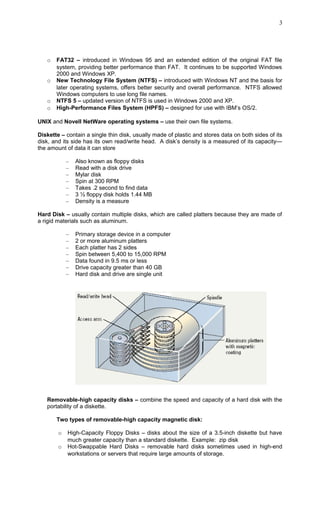
Hard Disk – usually contain multiple disks, which are called platters because they are made of
a rigid materials such as aluminum.
– Primary storage device in a computer
– 2 or more aluminum platters
– Each platter has 2 sides
– Spin between 5,400 to 15,000 RPM
– Data found in 9.5 ms or less
– Drive capacity greater than 40 GB
– Hard disk and drive are single unit
Removable-high capacity disks – combine the speed and capacity of a hard disk with the
portability of a diskette.
Two types of removable-high capacity magnetic disk:
o High-Capacity Floppy Disks – disks about the size of a 3.5-inch diskette but have
much greater capacity than a standard diskette. Example: zip disk
o Hot-Swappable Hard Disks – removable hard disks sometimes used in high-end
workstations or servers that require large amounts of storage.
3
Tape drives
– Best used for
• Infrequently accessed data
• Back-up solutions
– Slow sequential access
– Capacity exceeds 200 GB
Optical Storage Devices
Optical Storage – storage systems that use light beams to read data from the surface of an
optical disc. Data is stored as a series of lands and pits on the disc’s reflective surface. Optical
storage systems provide higher storage capacities than typical magnetic storage systems, but
they operate at slower speeds.
• CD-ROM
– Use same technology
– Read using a laser
• Lands, binary 1, reflect data
• Pits scatter data
– Written from the inside out
– CD speed is based on the original
• Original CD read 150 Kbps
• A 10 X will read 1,500 Kbps
– Standard CD holds 650 MB
• DVD-ROM
– Digital Video Disk
– Use both sides of the disk
– Capacities can reach 18 GB
– DVD players can read CDs
Recordable Optical Technologies
• CD Recordable (CD-R)
– Create a data or audio CD
– Data cannot be changed
– Can continue adding until full
• CD Rewritable (CD-RW)
– Create a reusable CD
– Cannot be read in all CD players
– Can reuse about 100 times
• Photo CD
– Developed by Kodak
– Provides for photo storage
– Photos added to CD until full
– Original pictures cannot be changed
• DVD Recordable
– Several different formats exist
– None are standardized
– Allows home users to create DVDs
– Cannot be read in all players
• DVD-RAM
– Allow reusing of DVD media
– Not standardized
– Cannot be read in all players
Solid State Devices
Solid-state storage – third category of storage and increasingly used in computer systems, but
most commonly used in devices such as digital cameras and media players. Solid-state storage
is neither magnetic nor optical. This relies on integrated circuits to hold data.
4
• Flash memory
• Found in cameras and USB drives
• Combination of RAM and ROM
• Long term updateable storage
• Smart cards (intelligent smart cards)
• Credit cards with a chip
• Chip stores data
• Eventually may be used for cash
• Hotels use for electronic keys
• Solid-state disks
• Large amount of SDRAM (synchronous dynamic RAM)
• Extremely fast
• Volatile storage
• Require battery backups
• Most have hard disks copying data
Measuring and Improving Drive Performance
• Average access time
– Also known as seek time
– Time to find desired data
– Measured in milliseconds
– Depends on two factors
• RPM
• Time to access a track
– Hard drive between 6 and 12 ms
– CD between 80 and 800 ms
• Data transfer rate (throughput)
– How fast data can be read
– Measured in Bps or bps
– Hard drive ranges from 15 to 160
MBps
– CD ROMS depend on X factor
• 24x CD transfers 24 x 150
KBps
– Floppy disks transfer at 45 KBps
Optimizing Disk Performance
Disk optimization - handled by operating system tool
– routine disk maintenance
– optimization should be run monthly
• Clean up unnecessary files
– Delete temp files
– Uninstall unused programs
– Delete obsolete data files
– Files should be cleaned weekly
• Scan a disk for errors
– Bad spots on the media
– Find and fix the error
• Move data to a good spot
• Mark the spot as bad
– Disks should be scanned monthly
– Time-consuming process
5
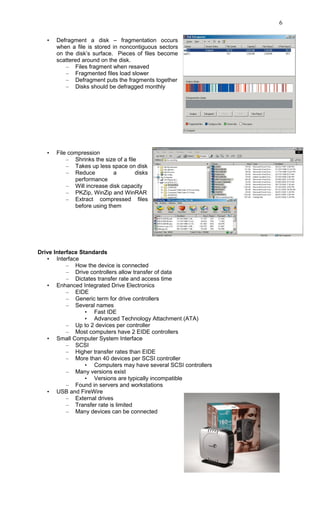
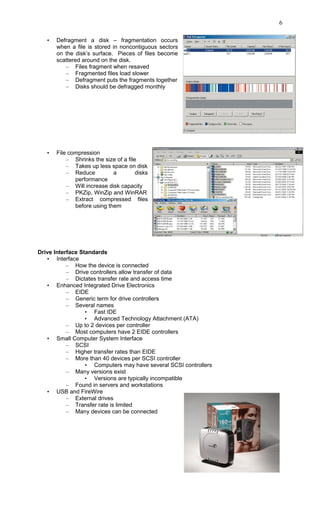
• Defragment a disk – fragmentation occurs
when a file is stored in noncontiguous sectors
on the disk’s surface. Pieces of files become
scattered around on the disk.
– Files fragment when resaved
– Fragmented files load slower
– Defragment puts the fragments together
– Disks should be defragged monthly
• File compression
– Shrinks the size of a file
– Takes up less space on disk
– Reduce a disks
performance
– Will increase disk capacity
– PKZip, WinZip and WinRAR
– Extract compressed files
before using them
Drive Interface Standards
• Interface
– How the device is connected
– Drive controllers allow transfer of data
– Dictates transfer rate and access time
• Enhanced Integrated Drive Electronics
– EIDE
– Generic term for drive controllers
– Several names
• Fast IDE
• Advanced Technology Attachment (ATA)
– Up to 2 devices per controller
– Most computers have 2 EIDE controllers
• Small Computer System Interface
– SCSI
– Higher transfer rates than EIDE
– More than 40 devices per SCSI controller
• Computers may have several SCSI controllers
– Many versions exist
• Versions are typically incompatible
– Found in servers and workstations
• USB and FireWire
– External drives
– Transfer rate is limited
– Many devices can be connected
6
• Defragment a disk – fragmentation occurs
when a file is stored in noncontiguous sectors
on the disk’s surface. Pieces of files become
scattered around on the disk.
– Files fragment when resaved
– Fragmented files load slower
– Defragment puts the fragments together
– Disks should be defragged monthly
• File compression
– Shrinks the size of a file
– Takes up less space on disk
– Reduce a disks
performance
– Will increase disk capacity
– PKZip, WinZip and WinRAR
– Extract compressed files
before using them
Drive Interface Standards
• Interface
– How the device is connected
– Drive controllers allow transfer of data
– Dictates transfer rate and access time
• Enhanced Integrated Drive Electronics
– EIDE
– Generic term for drive controllers
– Several names
• Fast IDE
• Advanced Technology Attachment (ATA)
– Up to 2 devices per controller
– Most computers have 2 EIDE controllers
• Small Computer System Interface
– SCSI
– Higher transfer rates than EIDE
– More than 40 devices per SCSI controller
• Computers may have several SCSI controllers
– Many versions exist
• Versions are typically incompatible
– Found in servers and workstations
• USB and FireWire
– External drives
– Transfer rate is limited
– Many devices can be connected
6

Storage Devices

  • 1.
    STORAGE DEVICES Storage device– is used to hold data even when the computer is turned off. Processes: 1. Writing or recording, the data so it can be found later of use. 2. Reading the stored data, transferring it into the computer’s memory. Storage media – physical materials on which data are stored. Ex. Diskette Storage devices – the hardware components that write data to, and read data from storage media. Access time for storage devices is measured in milliseconds (ms) or one-thousandths of a second. Ex. Diskette drive Two main categories of storage technology: magnetic storage and optical storage Magnetic Storage Devices Magnetic storage – a storage technology in which data is recorded when iron particles are polarized on a magnetic storage medium. Diskette drives, hard disk drives, high-capacity floppy disk drives, and tape drives use similar techniques for writing and reading data. The surfaces of these media are coated with a magnetically sensitive material, such as iron oxide, that reacts to a magnetic field. High-Capacity Floppy Disk – contains a single disk, but the formatting enables it to store much more data than a normal floppy disk. • Data storage and retrieval – Media is covered with iron oxide – Read/write head is a magnet – Magnet writes charges on the media • Positive charge is a 1 • Negative charge is a 0 – Magnet reads charges – Drive converts charges into binary Data Retrieval • Data organization – Disks must be formatted before use – Formatting or initializing is the process of mapping a disk – Format draws concentric rings called tracks on the disk
  • 2.
    – Tracks isdivided into sectors – Sectors are where data is physically stored on the disk • Amount of data a drive can read • Numbered sequentially • Smallest unit that a magnetic disk drive can work • Computer accesses area on disk using unique number Tracks and Sectors Magnetic storage devices are categorized as random access storage devices because a magnetic disk drive’s heads can go directly to any point on the disk’s surface to read or write data. How the Operating System Finds Data on a Disk – Computer’s operating system can locate data on disk since each track and sector are labeled – logical formatting – labeling of tracks and sectors – each formatting method configures the disk’s surface in different manner resulting if different files system – Data is organized in clusters – Cluster is a group sectors that are treated as a single data-storage unit • size of data the OS handles – Cluster usage is tracked in the file allocation table FAT file system – commonly used logical format performed by Windows since this relies on a standardized file allocation table (FAT) to keep track of file locations on the disk. File system – logical method for managing the storage of data on a disk’s surface When a diskette is formatted with the FAT file system, four areas are created on the disk: o Boot sector – contains a program that runs when starting the computer. This program determines whether the disk has the basic components that are necessary to run the operating system successfully. The boot sector also contains number of bytes per sector and the number of sectors per track—information that the operating system needs to access data on the disk. o File allocation table (FAT) – is a log that records the location of each file and the status of each sector. In writing file to a disk, the OS checks the FAT to find an open area, stores the file, and then logs the file’s identity and its location in the FAT. When a program needs to locate data on the disk, the OS checks the FAT to see where that data is stored. o Root folder – the master folder on any disk. A folder is a tool form organizing files on a disk. The topmost folder is the root folder that holds all the information about all other folders on the disk. o Data area – part of the disk that remains free after boot sector, the FAT, and the root folder have been created. This is where data and program files are actually stored on the disk. Different operating systems use different file systems: o File Allocation Table (FAT) – also known as FAT 16, used in MS-DOS and the basis for early Windows operating systems. All versions of Windows support FAT, but it is no longer the preferred file system; newer file systems offer better security and greater flexibility. 2
  • 3.
    o FAT32 –introduced in Windows 95 and an extended edition of the original FAT file system, providing better performance than FAT. It continues to be supported Windows 2000 and Windows XP. o New Technology File System (NTFS) – introduced with Windows NT and the basis for later operating systems, offers better security and overall performance. NTFS allowed Windows computers to use long file names. o NTFS 5 – updated version of NTFS is used in Windows 2000 and XP. o High-Performance Files System (HPFS) – designed for use with IBM’s OS/2. UNIX and Novell NetWare operating systems – use their own file systems. Diskette – contain a single thin disk, usually made of plastic and stores data on both sides of its disk, and its side has its own read/write head. A disk’s density is a measured of its capacity— the amount of data it can store – Also known as floppy disks – Read with a disk drive – Mylar disk – Spin at 300 RPM – Takes .2 second to find data – 3 ½ floppy disk holds 1.44 MB – Density is a measure Hard Disk – usually contain multiple disks, which are called platters because they are made of a rigid materials such as aluminum. – Primary storage device in a computer – 2 or more aluminum platters – Each platter has 2 sides – Spin between 5,400 to 15,000 RPM – Data found in 9.5 ms or less – Drive capacity greater than 40 GB – Hard disk and drive are single unit Removable-high capacity disks – combine the speed and capacity of a hard disk with the portability of a diskette. Two types of removable-high capacity magnetic disk: o High-Capacity Floppy Disks – disks about the size of a 3.5-inch diskette but have much greater capacity than a standard diskette. Example: zip disk o Hot-Swappable Hard Disks – removable hard disks sometimes used in high-end workstations or servers that require large amounts of storage. 3
  • 4.
    Tape drives – Bestused for • Infrequently accessed data • Back-up solutions – Slow sequential access – Capacity exceeds 200 GB Optical Storage Devices Optical Storage – storage systems that use light beams to read data from the surface of an optical disc. Data is stored as a series of lands and pits on the disc’s reflective surface. Optical storage systems provide higher storage capacities than typical magnetic storage systems, but they operate at slower speeds. • CD-ROM – Use same technology – Read using a laser • Lands, binary 1, reflect data • Pits scatter data – Written from the inside out – CD speed is based on the original • Original CD read 150 Kbps • A 10 X will read 1,500 Kbps – Standard CD holds 650 MB • DVD-ROM – Digital Video Disk – Use both sides of the disk – Capacities can reach 18 GB – DVD players can read CDs Recordable Optical Technologies • CD Recordable (CD-R) – Create a data or audio CD – Data cannot be changed – Can continue adding until full • CD Rewritable (CD-RW) – Create a reusable CD – Cannot be read in all CD players – Can reuse about 100 times • Photo CD – Developed by Kodak – Provides for photo storage – Photos added to CD until full – Original pictures cannot be changed • DVD Recordable – Several different formats exist – None are standardized – Allows home users to create DVDs – Cannot be read in all players • DVD-RAM – Allow reusing of DVD media – Not standardized – Cannot be read in all players Solid State Devices Solid-state storage – third category of storage and increasingly used in computer systems, but most commonly used in devices such as digital cameras and media players. Solid-state storage is neither magnetic nor optical. This relies on integrated circuits to hold data. 4
  • 5.
    • Flash memory •Found in cameras and USB drives • Combination of RAM and ROM • Long term updateable storage • Smart cards (intelligent smart cards) • Credit cards with a chip • Chip stores data • Eventually may be used for cash • Hotels use for electronic keys • Solid-state disks • Large amount of SDRAM (synchronous dynamic RAM) • Extremely fast • Volatile storage • Require battery backups • Most have hard disks copying data Measuring and Improving Drive Performance Measuring and Improving Drive Performance • Average access time – Also known as seek time – Time to find desired data – Measured in milliseconds – Depends on two factors • RPM • Time to access a track – Hard drive between 6 and 12 ms – CD between 80 and 800 ms • Data transfer rate (throughput) – How fast data can be read – Measured in Bps or bps – Hard drive ranges from 15 to 160 MBps – CD ROMS depend on X factor • 24x CD transfers 24 x 150 KBps – Floppy disks transfer at 45 KBps Optimizing Disk Performance Disk optimization - handled by operating system tool – routine disk maintenance – optimization should be run monthly • Clean up unnecessary files – Delete temp files – Uninstall unused programs – Delete obsolete data files – Files should be cleaned weekly • Scan a disk for errors – Bad spots on the media – Find and fix the error • Move data to a good spot • Mark the spot as bad – Disks should be scanned monthly – Time-consuming process 5
  • 6.
    • Defragment adisk – fragmentation occurs when a file is stored in noncontiguous sectors on the disk’s surface. Pieces of files become scattered around on the disk. – Files fragment when resaved – Fragmented files load slower – Defragment puts the fragments together – Disks should be defragged monthly • File compression – Shrinks the size of a file – Takes up less space on disk – Reduce a disks performance – Will increase disk capacity – PKZip, WinZip and WinRAR – Extract compressed files before using them Drive Interface Standards • Interface – How the device is connected – Drive controllers allow transfer of data – Dictates transfer rate and access time • Enhanced Integrated Drive Electronics – EIDE – Generic term for drive controllers – Several names • Fast IDE • Advanced Technology Attachment (ATA) – Up to 2 devices per controller – Most computers have 2 EIDE controllers • Small Computer System Interface – SCSI – Higher transfer rates than EIDE – More than 40 devices per SCSI controller • Computers may have several SCSI controllers – Many versions exist • Versions are typically incompatible – Found in servers and workstations • USB and FireWire – External drives – Transfer rate is limited – Many devices can be connected 6
  • 7.
    • Defragment adisk – fragmentation occurs when a file is stored in noncontiguous sectors on the disk’s surface. Pieces of files become scattered around on the disk. – Files fragment when resaved – Fragmented files load slower – Defragment puts the fragments together – Disks should be defragged monthly • File compression – Shrinks the size of a file – Takes up less space on disk – Reduce a disks performance – Will increase disk capacity – PKZip, WinZip and WinRAR – Extract compressed files before using them Drive Interface Standards • Interface – How the device is connected – Drive controllers allow transfer of data – Dictates transfer rate and access time • Enhanced Integrated Drive Electronics – EIDE – Generic term for drive controllers – Several names • Fast IDE • Advanced Technology Attachment (ATA) – Up to 2 devices per controller – Most computers have 2 EIDE controllers • Small Computer System Interface – SCSI – Higher transfer rates than EIDE – More than 40 devices per SCSI controller • Computers may have several SCSI controllers – Many versions exist • Versions are typically incompatible – Found in servers and workstations • USB and FireWire – External drives – Transfer rate is limited – Many devices can be connected 6