Storage and File Structure
Several types of data storage exist in most computer systems. These storage media are classified by the
speed with which data can be accessed, by the cost per unit of data to buy the medium, and by the medium’s
reliability. Among the media typically available are these:
Classification by capacity, speed and cost
Cache: The cache is the fastest and most costly form of storage. Cache memory is small; its use is
managed by the computer system hardware.
Main Memory: The storage medium used for data that are available to be operated on is the main memory.
 Fast access: 10 to 100 nanoseconds
 General-purpose machine instructions operate on main memory.
 Although main memory may contain many megabytes (or even gigabytes of data in large systems)
of data, it is generally too small (or too expensive) to store the entire database.
 Contents of main memory are usually lost if a power failure or system crash occurs.
Flash memory:
 Data survive from power failure
 Data can be written at a location only once, but location can be erased and written again
 Can support only a limited number (10K – 1M) of write/erase cycles.
 Erasing of memory has to be done to an entire bank of memory
 Reads are roughly as fast as main memory (less than 100 nanoseconds) but writes are slow (4-10
microseconds), erase is slower.
 Cost per unit of storage roughly similar to main memory
 Widely used in embedded devices such as digital cameras
 Is a type of EEPROM (Electrically Erasable Programmable Read-Only Memory)
Magnetic-disk storage:
 Data is stored on spinning disk, and read/written magnetically.
 Primary medium for long-term on-line storage of data; usually stores the entire database.
 Data must be moved from disk to main memory in order for the data to be operated on.
 After operations are performed, data must be copied back to disk if any changes were made.
 Direct access storage – it is possible to read data from any location on disk.
 Disk storage usually survives power failures and system crashes.
 The size of magnetic disks currently ranges from few GB to 400 GB. Growing constantly and rapidly
with technology improvements (factor of 2 to 3 every 2 years).
Optical storage:
 Non-volatile, data is read optically from a spinning disk using a laser
 Compact disk, CD-ROM (640 MB) and digital video disk, DVD (4.7 to 17 GB) most popular
forms; cannot be written, but are supplied with data preloaded.
 Write-one, read-many (WORM) (“record once” version of CD)optical disks used for archival storage
(CD-R, DVD-R, DVD+R).
 There are also “multiple-write” versions of compact disk (called CD-RW) and digital video disk
(DVD-RW, DVD+RW and DVD-RAM), which can be written multiple times.
 Reads and writes are slower than with magnetic disk.
 Jukebox systems contain a few drives and numerous disks that can be loaded into one of the drives
automatically (by a robot arm) on demand.
Tape Storage: used primarily for backup and archival data.
 Non-volatile, cheaper, but much slower access, since tape must be read sequentially from the
beginning.
 Sequential access storage.
 High capacity 40 to 300 GB.
 Tape Jukeboxes [100s of terabyte (1TB = 1012
bytes) or even pentabyte (1015
bytes)].
The various storage media can be organized in a hierarchy (Figure 1) according to their speed and their
cost. The higher levels are expensive, but are fast. As we move down the hierarchy, the cost per bit
decreases, whereas the access time increases.
Figure 1: Storage-device hierarchy
Classification by type of storage
 Primary storage: the fastest storage media, such as cache and main memory but volatile.
 Secondary (or on-line) storage: the next level of the hierarchy, e.g., flash memory, magnetic disks.
Non-volatile and moderately fast access time.
 Tertiary (or offline) storage: magnetic tapes and optical disk juke boxes. Non-volatile and slow access
time.
Classification by storage volatility
 Volatile storage: Volatile storage loses its contents when the power is removed. The storage systems
from main memory up (cache, main memory) are volatile.
 Nonvolatile storage: The storage systems below main memory (flash memory, magnetic disk, optical
disk, magnetic tape) are nonvolatile. Without power backup, data must be written to nonvolatile storage
for safekeeping.
Magnetic Disks:
Magnetic disks provide the bulk of secondary storage for modern computer systems. Disk capacities have
been growing at over 50 percent per year, but the storage requirements of large applications have also
been growing very fast, in some cases even faster than the growth rate of disk capacities. A large database
may require hundreds of disks.
Physical Characteristics of a Magnetic Disk
 Each disk platter has a flat circular shape. Platters are made from rigid metal or glass and their two
surfaces are covered with a magnetic material and information is recorded on the surfaces. There is a
read-write head positioned just above the surface of the platter.
 A disk surface is logically divided into tracks, which are subdivided into sectors.
 When the disk is in use, a drive motor spins it at a constant high speed (usually 60, 90 or 120 revolutions
per second, more like 250 revolutions per second is also available)
Disk → Platter → Tracks → Blocks → Sectors
1. A disk has 1-5 platters.
2. Each platter has 50000 to 100000 tracks (inner tracks have around 500 sectors and outer tracks have
10000 sectors)
3. A block is a contiguous sequence of sectors from a single track of one platter – 512 bytes to several KB)
4. Sector sizes are typically 512 Bytes – the smallest unit of storage.
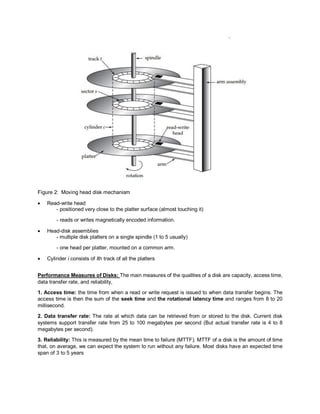
Figure 2: Moving head disk mechanism
 Read-write head
- positioned very close to the platter surface (almost touching it)
- reads or writes magnetically encoded information.
 Head-disk assemblies
- multiple disk platters on a single spindle (1 to 5 usually)
- one head per platter, mounted on a common arm.
 Cylinder i consists of ith track of all the platters
Performance Measures of Disks: The main measures of the qualities of a disk are capacity, access time,
data transfer rate, and reliability,
1. Access time: the time from when a read or write request is issued to when data transfer begins. The
access time is then the sum of the seek time and the rotational latency time and ranges from 8 to 20
millisecond.
2. Data transfer rate: The rate at which data can be retrieved from or stored to the disk. Current disk
systems support transfer rate from 25 to 100 megabytes per second (But actual transfer rate is 4 to 8
megabytes per second).
3. Reliability: This is measured by the mean time to failure (MTTF). MTTF of a disk is the amount of time
that, on average, we can expect the system to run without any failure. Most disks have an expected time
span of 3 to 5 years

Storage and File Structure in DBMS

  • 1.
    Storage and FileStructure Several types of data storage exist in most computer systems. These storage media are classified by the speed with which data can be accessed, by the cost per unit of data to buy the medium, and by the medium’s reliability. Among the media typically available are these: Classification by capacity, speed and cost Cache: The cache is the fastest and most costly form of storage. Cache memory is small; its use is managed by the computer system hardware. Main Memory: The storage medium used for data that are available to be operated on is the main memory.  Fast access: 10 to 100 nanoseconds  General-purpose machine instructions operate on main memory.  Although main memory may contain many megabytes (or even gigabytes of data in large systems) of data, it is generally too small (or too expensive) to store the entire database.  Contents of main memory are usually lost if a power failure or system crash occurs. Flash memory:  Data survive from power failure  Data can be written at a location only once, but location can be erased and written again  Can support only a limited number (10K – 1M) of write/erase cycles.  Erasing of memory has to be done to an entire bank of memory  Reads are roughly as fast as main memory (less than 100 nanoseconds) but writes are slow (4-10 microseconds), erase is slower.  Cost per unit of storage roughly similar to main memory  Widely used in embedded devices such as digital cameras  Is a type of EEPROM (Electrically Erasable Programmable Read-Only Memory) Magnetic-disk storage:  Data is stored on spinning disk, and read/written magnetically.  Primary medium for long-term on-line storage of data; usually stores the entire database.  Data must be moved from disk to main memory in order for the data to be operated on.  After operations are performed, data must be copied back to disk if any changes were made.  Direct access storage – it is possible to read data from any location on disk.  Disk storage usually survives power failures and system crashes.  The size of magnetic disks currently ranges from few GB to 400 GB. Growing constantly and rapidly with technology improvements (factor of 2 to 3 every 2 years). Optical storage:  Non-volatile, data is read optically from a spinning disk using a laser  Compact disk, CD-ROM (640 MB) and digital video disk, DVD (4.7 to 17 GB) most popular forms; cannot be written, but are supplied with data preloaded.
  • 2.
     Write-one, read-many(WORM) (“record once” version of CD)optical disks used for archival storage (CD-R, DVD-R, DVD+R).  There are also “multiple-write” versions of compact disk (called CD-RW) and digital video disk (DVD-RW, DVD+RW and DVD-RAM), which can be written multiple times.  Reads and writes are slower than with magnetic disk.  Jukebox systems contain a few drives and numerous disks that can be loaded into one of the drives automatically (by a robot arm) on demand. Tape Storage: used primarily for backup and archival data.  Non-volatile, cheaper, but much slower access, since tape must be read sequentially from the beginning.  Sequential access storage.  High capacity 40 to 300 GB.  Tape Jukeboxes [100s of terabyte (1TB = 1012 bytes) or even pentabyte (1015 bytes)]. The various storage media can be organized in a hierarchy (Figure 1) according to their speed and their cost. The higher levels are expensive, but are fast. As we move down the hierarchy, the cost per bit decreases, whereas the access time increases. Figure 1: Storage-device hierarchy
  • 3.
    Classification by typeof storage  Primary storage: the fastest storage media, such as cache and main memory but volatile.  Secondary (or on-line) storage: the next level of the hierarchy, e.g., flash memory, magnetic disks. Non-volatile and moderately fast access time.  Tertiary (or offline) storage: magnetic tapes and optical disk juke boxes. Non-volatile and slow access time. Classification by storage volatility  Volatile storage: Volatile storage loses its contents when the power is removed. The storage systems from main memory up (cache, main memory) are volatile.  Nonvolatile storage: The storage systems below main memory (flash memory, magnetic disk, optical disk, magnetic tape) are nonvolatile. Without power backup, data must be written to nonvolatile storage for safekeeping. Magnetic Disks: Magnetic disks provide the bulk of secondary storage for modern computer systems. Disk capacities have been growing at over 50 percent per year, but the storage requirements of large applications have also been growing very fast, in some cases even faster than the growth rate of disk capacities. A large database may require hundreds of disks. Physical Characteristics of a Magnetic Disk  Each disk platter has a flat circular shape. Platters are made from rigid metal or glass and their two surfaces are covered with a magnetic material and information is recorded on the surfaces. There is a read-write head positioned just above the surface of the platter.  A disk surface is logically divided into tracks, which are subdivided into sectors.  When the disk is in use, a drive motor spins it at a constant high speed (usually 60, 90 or 120 revolutions per second, more like 250 revolutions per second is also available) Disk → Platter → Tracks → Blocks → Sectors 1. A disk has 1-5 platters. 2. Each platter has 50000 to 100000 tracks (inner tracks have around 500 sectors and outer tracks have 10000 sectors) 3. A block is a contiguous sequence of sectors from a single track of one platter – 512 bytes to several KB) 4. Sector sizes are typically 512 Bytes – the smallest unit of storage.
  • 4.
    Figure 2: Movinghead disk mechanism  Read-write head - positioned very close to the platter surface (almost touching it) - reads or writes magnetically encoded information.  Head-disk assemblies - multiple disk platters on a single spindle (1 to 5 usually) - one head per platter, mounted on a common arm.  Cylinder i consists of ith track of all the platters Performance Measures of Disks: The main measures of the qualities of a disk are capacity, access time, data transfer rate, and reliability, 1. Access time: the time from when a read or write request is issued to when data transfer begins. The access time is then the sum of the seek time and the rotational latency time and ranges from 8 to 20 millisecond. 2. Data transfer rate: The rate at which data can be retrieved from or stored to the disk. Current disk systems support transfer rate from 25 to 100 megabytes per second (But actual transfer rate is 4 to 8 megabytes per second). 3. Reliability: This is measured by the mean time to failure (MTTF). MTTF of a disk is the amount of time that, on average, we can expect the system to run without any failure. Most disks have an expected time span of 3 to 5 years